How to Write VCF Files in Python
By Dr. Zubair Khalid, DVM, MS, PhD ·

By the end of this guide you will be able to write a valid VCF (Variant Call Format) file from Python, compress and index it so downstream tools can query it, validate it with bcftools, and avoid the coordinate and header errors that quietly corrupt variant datasets. The walkthrough covers both a production path built on pysam and a dependency-free pure Python path, plus a step by step checklist for testing your output.
You will need on hand:
- Python 3.9 or newer
- The
pysampackage (installed below), which binds the htslib C library - The htslib command line tools
bcftools,tabix, andbgzip, which ship together through conda - Optionally,
cyvcf2, a second Python binding to the same C library
VCF is the standard text format for describing sequence variants such as SNPs, insertions, and deletions, together with per-sample genotypes and annotations. The format and its binary sibling BCF are maintained as international standards under the Global Alliance for Genomics and Health, and htslib is the reference software library that implements them for samtools and bcftools [1]. Python sits at the center of genomics glue code, anchored by mature libraries such as Biopython and Biotite [2][3], and writing clean, well-annotated variant output is a core skill in python for bioinformatics. Standardized, machine-readable output is also what makes results reusable and FAIR compliant, a goal that recent tooling work across the sciences keeps emphasizing. Fragmented, tool-specific formats are a recurring source of pain in genomics, which is exactly why communities keep investing in shared formats with shared libraries [4].
What a VCF File Must Contain
A VCF file has two parts: a header block of meta lines that declare the file version, reference contigs, and every annotation field you plan to use, followed by one line per variant. A contig is a named reference sequence such as chr1. Here is a complete, valid two-sample VCF with two records (fields are separated by single tab characters):
##fileformat=VCFv4.2
##FILTER=<ID=PASS,Description="All filters passed">
##FILTER=<ID=LowQual,Description="Quality below 30">
##contig=<ID=chr1,length=249250621>
##INFO=<ID=DP,Number=1,Type=Integer,Description="Combined depth across samples">
##FORMAT=<ID=GT,Number=1,Type=String,Description="Genotype">
##FORMAT=<ID=DP,Number=1,Type=Integer,Description="Read depth for this sample">
#CHROM	POS	ID	REF	ALT	QUAL	FILTER	INFO	FORMAT	tumor	normal
chr1	101	rs123	A	G,T	99	PASS	DP=87	GT:DP	1/2:55	0/0:32
chr1	251	.	C	T	12	LowQual	DP=8	GT:DP	0/1:5	0/0:3
The header block
Every line starting with ## is a meta line. Three rules matter most when you write one from Python:
- The first line must be
##fileformat=VCFv4.x. Readers reject or misparse files that omit it. - Every INFO key, FORMAT key, and FILTER value that appears in a data line must be declared in a matching
##INFO=,##FORMAT=, or##FILTER=line. htslib-based tools warn when they encounter an undeclared field, for example[W::vcf_parse] INFO 'DP' is not defined in the header, assuming type=..., and stricter tools simply fail. Undeclared fields are a leading cause of silent data loss when files move between programs. - Every contig you write records on should have a
##contig=<ID=...,length=...>line. The length should match the reference you called variants against, because downstream reference checks use it.
The data line
The eight fixed columns are the same in every VCF:
| Column | Meaning | Example | Notes for writers |
|---|---|---|---|
| CHROM | Contig name | chr1 | Must match a declared contig, and later the index |
| POS | 1-based position of the first base in REF | 101 | pysam calls this rec.pos, its rec.start is 0-based |
| ID | Variant identifier | rs123 | Use . when there is none |
| REF | Reference allele | A | For indels it includes the anchor base |
| ALT | Alternate allele(s) | G,T | Comma separated, . for a reference-only record |
| QUAL | Phred-scaled quality, higher means more confidence | 99 | Use . for missing |
| FILTER | Filter status | PASS | PASS means the record passed all checks |
| INFO | Semicolon-separated key=value annotations | DP=87 | Values cannot contain spaces, semicolons, or equals signs |
Two coordinate conventions cause most of the pain when writing VCFs in Python:
- POS is 1-based. The first base of a chromosome is position 1.
- For insertions and deletions, REF carries an anchor base. An insertion of
TCGafter position 101 is written as POS 101, REFA, ALTATCG. A deletion ofTGafter position 101 is written as POS 101, REFATG, ALTA.
Genotypes live in the sample columns after FORMAT. 0/1 means one reference allele and one first-ALT allele, unphased. A pipe such as 0|1 means the alleles are phased. ./. is a no-call, meaning genotype unknown.
Number= and Type= declarations
Each INFO and FORMAT declaration carries a Number= code that tells readers how many values to expect. Getting this wrong does not always raise an error on write, which is what makes it dangerous: readers may truncate or misinterpret your values later.
| Number code | Meaning | Typical fields |
|---|---|---|
| 1 | Exactly one value | DP, MQ |
| 0 | Flag, no value stored | DB |
| A | One value per ALT allele | AC |
| R | One value per allele including REF | AD |
| G | One value per possible genotype | PL |
| . | Variable or unknown count | custom annotations |
Type= is one of Integer, Float, Flag, String, or Character.
How to Write a VCF File in Python: Choosing Your Approach
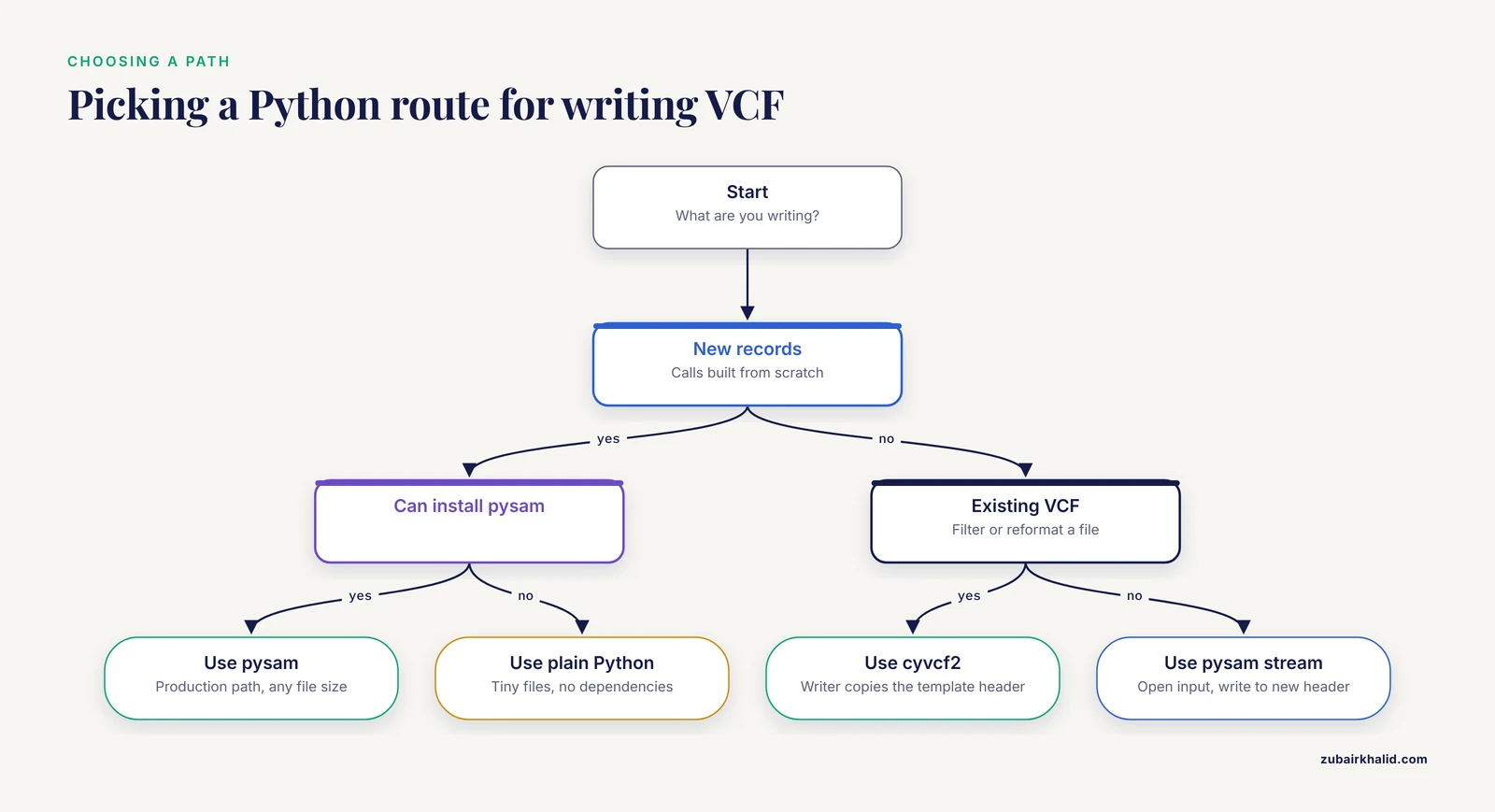
There are three practical ways to write VCF in Python, and the right choice depends on file size, dependencies, and whether you are producing new calls or rewriting existing ones.
| Approach | Best for | Dependencies | Watch out for |
|---|---|---|---|
| Plain Python file writing | Learning the format, tiny files, teaching demos | None | Escaping, no compression, no indexing, no validation |
| pysam | Production pipelines of any size, new calls | pysam, which wraps htslib | 0-based start, header must be complete before writing |
| cyvcf2 | Fast filtering and rewriting of existing VCFs | cyvcf2, which wraps htslib | Records usually come from an existing template file |
pysam and cyvcf2 both bind htslib, the C library behind samtools and bcftools. htslib has been incorporated directly into Python among other languages, which is why these bindings inherit years of format edge-case handling for free [1]. If you came from a Biopython tutorial, note the scope difference: Biopython is the standard library for sequences, alignments, BLAST integration, and online database access [2], and Biotite similarly covers sequence and structural bioinformatics with performance comparable to specialized single-task tools [3], but maintained VCF writing lives in the htslib bindings, not in those packages.
Step-by-Step: Writing a VCF with pysam
This is the production path. The full script appears in Step 5, and each step explains one part of it.
Step 1: Install pysam and bcftools
With conda, which pulls precompiled binaries from the Bioconda channel:
conda create -n vcfenv -c conda-forge -c bioconda python=3.12 pysam bcftools
conda activate vcfenv
Or with pip inside a virtual environment:
python -m venv .venv
source .venv/bin/activate
pip install pysam
Confirm the installs:
pip show pysam | head -n 2
bcftools --version | head -n 1
Each command prints its version string. If bcftools is missing, install it through conda as above, since the validation steps later rely on it.
Step 2: Build the header first
In pysam, a VariantHeader object describes everything above the data lines. Order matters: declare contigs, then INFO and FORMAT fields, then samples, before you create any records.
import pysam

header = pysam.VariantHeader()

# Contigs must be declared before records reference them
header.contigs.add("chr1", length=249250621)

# Every INFO and FORMAT key used in records must be declared here
header.add_meta("INFO", items=[
    ("ID", "DP"), ("Number", "1"), ("Type", "Integer"),
    ("Description", "Combined depth across samples"),
])
header.add_meta("FORMAT", items=[
    ("ID", "GT"), ("Number", "1"), ("Type", "String"),
    ("Description", "Genotype"),
])
header.add_meta("FORMAT", items=[
    ("ID", "DP"), ("Number", "1"), ("Type", "Integer"),
    ("Description", "Read depth for this sample"),
])
header.add_meta("FILTER", items=[
    ("ID", "LowQual"), ("Description", "Quality below 30"),
])

# Samples must be added before records are created
header.add_sample("tumor")
header.add_sample("normal")
Notes on each call:
contigs.add(name, length=...)declares a reference sequence. The length here is the GRCh37 length of chr1, which is the kind of value you should copy from your reference, not guess.add_meta("INFO", items=...)andadd_meta("FORMAT", items=...)build the structured##INFO=and##FORMAT=lines. Theitemslist maps directly onto the key=value pairs in the final text.add_meta("FILTER", ...)defines any filter besides the implicit PASS.add_sample(name)appends a sample column. Adding samples after records have been created is a classic bug, because records are sized to the sample count at creation time.
Step 3: Create records with the right coordinates
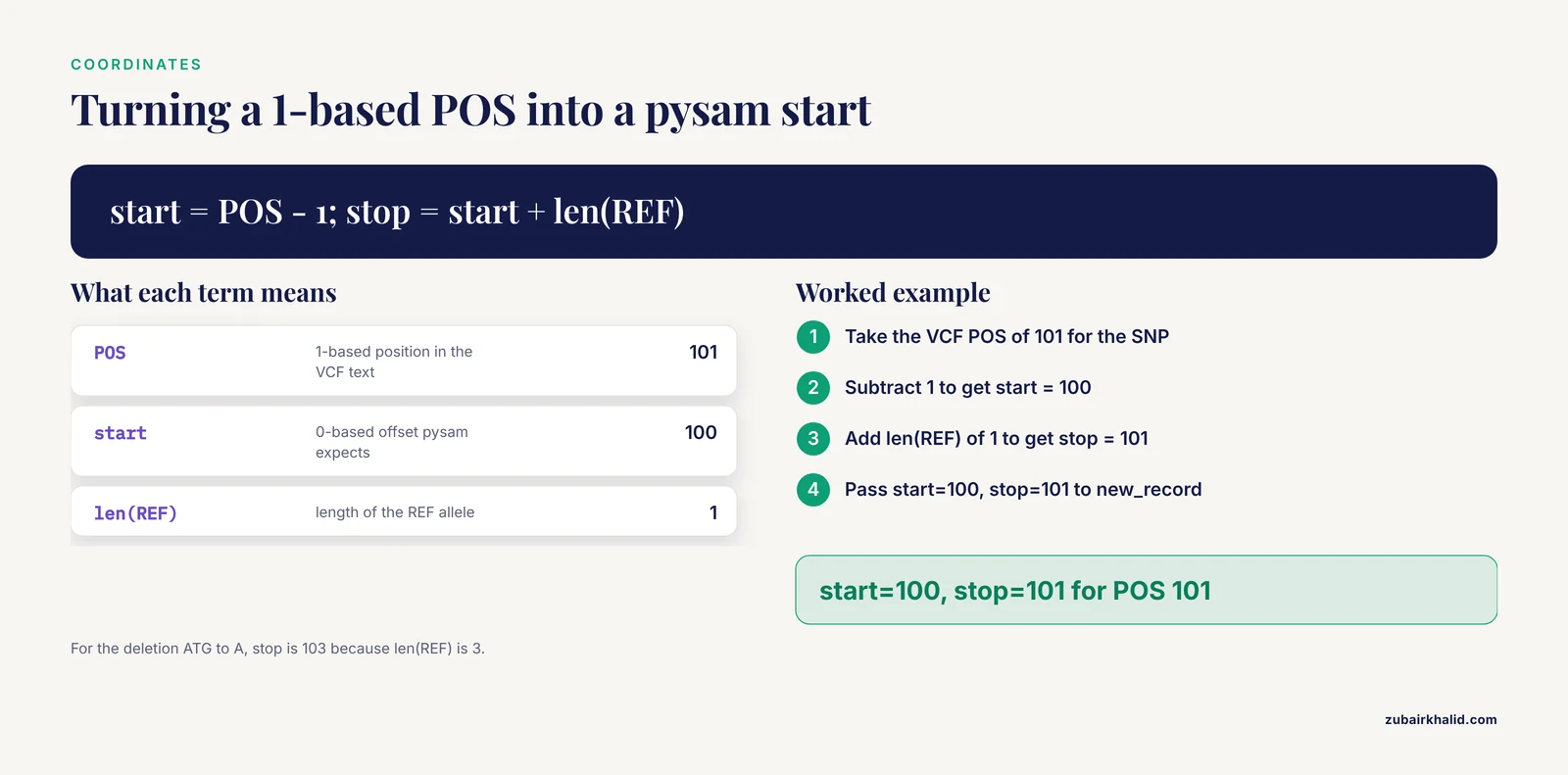
pysam creates records through the open output file, and it uses 0-based, half-open coordinates internally. The rule is start is the 0-based offset of the first REF base and stop = start + len(REF).
with pysam.VariantFile("calls.vcf", "w", header=header) as out:
    # SNP at POS 101: 0-based start is 100, stop is 101
    rec = out.new_record(contig="chr1", start=100, stop=101,
                         alleles=("A", "G", "T"))
alleles is a tuple whose first element is REF and whose remaining elements are the ALT alleles in order, so ("A", "G", "T") produces REF A and ALT G,T. For an insertion of TCG after position 101 you would use start=100, stop=101, alleles=("A", "ATCG"). For a deletion of TG after position 101, start=100, stop=103, alleles=("ATG", "A").
Step 4: Fill INFO, FORMAT, and genotypes
    rec.id = "rs123"
    rec.qual = 99.0
    rec.info["DP"] = 87

    tumor = rec.samples["tumor"]
    tumor["GT"] = (1, 2)
    tumor["DP"] = 55

    normal = rec.samples["normal"]
    normal["GT"] = (0, 0)
    normal["DP"] = 32
    out.write(rec)
Key details:
- Genotypes are tuples of allele indices, where 0 is REF, 1 is the first ALT, and so on.
(1, 2)writes as1/2. UseNoneinside the tuple for a missing allele, which writes as.within the genotype. - To phase a genotype, set
tumor.phased = True, which changes the separator from/to|. - A record is not saved until you call
out.write(rec). Creating a record and forgetting to write it is a common way to lose variants silently. - Leaving
rec.qualasNonewrites.. Setting no filter writes PASS.
Step 5: Write the file and check the output
Here is the complete script, write_calls.py, with a second record that uses the LowQual filter:
# write_calls.py
import pysam

header = pysam.VariantHeader()
header.contigs.add("chr1", length=249250621)
header.add_meta("INFO", items=[
    ("ID", "DP"), ("Number", "1"), ("Type", "Integer"),
    ("Description", "Combined depth across samples"),
])
header.add_meta("FORMAT", items=[
    ("ID", "GT"), ("Number", "1"), ("Type", "String"),
    ("Description", "Genotype"),
])
header.add_meta("FORMAT", items=[
    ("ID", "DP"), ("Number", "1"), ("Type", "Integer"),
    ("Description", "Read depth for this sample"),
])
header.add_meta("FILTER", items=[
    ("ID", "LowQual"), ("Description", "Quality below 30"),
])
header.add_sample("tumor")
header.add_sample("normal")

with pysam.VariantFile("calls.vcf", "w", header=header) as out:
    rec = out.new_record(contig="chr1", start=100, stop=101,
                         alleles=("A", "G", "T"))
    rec.id = "rs123"
    rec.qual = 99.0
    rec.info["DP"] = 87
    rec.samples["tumor"]["GT"] = (1, 2)
    rec.samples["tumor"]["DP"] = 55
    rec.samples["normal"]["GT"] = (0, 0)
    rec.samples["normal"]["DP"] = 32
    out.write(rec)

    rec2 = out.new_record(contig="chr1", start=250, stop=251,
                          alleles=("C", "T"))
    rec2.qual = 12.0
    rec2.filter.add("LowQual")
    rec2.info["DP"] = 8
    rec2.samples["tumor"]["GT"] = (0, 1)
    rec2.samples["tumor"]["DP"] = 5
    rec2.samples["normal"]["GT"] = (0, 0)
    rec2.samples["normal"]["DP"] = 3
    out.write(rec2)
Run it and inspect the result:
python write_calls.py
cat calls.vcf
Expected output (your header line order can vary slightly between htslib versions, the data lines must match exactly):
##fileformat=VCFv4.2
##FILTER=<ID=PASS,Description="All filters passed">
##FILTER=<ID=LowQual,Description="Quality below 30">
##contig=<ID=chr1,length=249250621>
##INFO=<ID=DP,Number=1,Type=Integer,Description="Combined depth across samples">
##FORMAT=<ID=GT,Number=1,Type=String,Description="Genotype">
##FORMAT=<ID=DP,Number=1,Type=Integer,Description="Read depth for this sample">
#CHROM	POS	ID	REF	ALT	QUAL	FILTER	INFO	FORMAT	tumor	normal
chr1	101	rs123	A	G,T	99	PASS	DP=87	GT:DP	1/2:55	0/0:32
chr1	251	.	C	T	12	LowQual	DP=8	GT:DP	0/1:5	0/0:3
Check the details against what you wrote: POS 101 for a record created at start=100, ALT G,T for a three-allele tuple, 1/2 for the (1, 2) genotype, and PASS on the record where no filter was set.
Step 6: Write a bgzipped, indexed VCF
Most pipelines want a compressed, indexable file. The compression must be BGZF, the blocked gzip format used by htslib tools, because tabix and bcftools indexes only work on BGZF files. Plain gzip module output is not BGZF and cannot be indexed.
Change one line in the script:
with pysam.VariantFile("calls.vcf.gz", "wz", header=header) as out:The wz mode writes BGZF-compressed VCF directly. Then index it, either from Python or the shell:
pysam.tabix_index("calls.vcf.gz", preset="vcf", force=True)tabix -p vcf calls.vcf.gz
ls calls.vcf.gz*Expected output:
calls.vcf.gz
calls.vcf.gz.tbi
Records must be sorted by contig and position before indexing. If your records come out in arbitrary order, sort first with bcftools sort -Oz -o sorted.vcf.gz unsorted.vcf.gz.
Step 7: Validate with bcftools
The cheapest correctness check is to make the reference parser read the whole file:
bcftools view calls.vcf.gz > /dev/null && echo OKExpected output:
OKThen look at summary statistics:
bcftools stats calls.vcf.gz | head -n 30You should see a SN line reporting the number of records, which should equal the number you wrote, here 2. A useful spot check for specific fields:
bcftools query -f '%CHROM\t%POS\t%REF\t%ALT\t%INFO/DP\n' calls.vcf.gzExpected output:
chr1	101	A	G,T	87
chr1	251	C	T	8
If you have the reference FASTA available, verify that REF alleles actually match it:
bcftools norm -f reference.fa -c e calls.vcf.gz > /dev/null && echo REF_OKThe -c e option makes bcftools exit with an error on any REF mismatch instead of silently fixing or warning.
Step 8: Round-trip the file and pick next steps
Reading your own file back with the same library catches some errors, so also read it with a fresh process or a second tool:
with pysam.VariantFile("calls.vcf.gz") as vcf:
    for rec in vcf:
        print(rec.chrom, rec.pos, rec.ref, rec.alts, rec.info["DP"])
Expected output:
chr1 101 A ('G', 'T') 87
chr1 251 C ('T',) 8
Note that rec.pos is 1-based (101) while rec.start would be 0-based (100). Sensible next steps from here:
- Write BCF for intermediate files in pipelines, with
bcftools view -Ob -o calls.bcf calls.vcf.gz, since the binary format is the same data in a more efficient container within the htslib stack [1]. - Add a golden-file test and a property-based test, covered under Testing Your VCF Writer below.
- Learn region queries against the index, covered under Performance and Scale.
Step-by-Step: Writing a VCF in Pure Python
Plain Python writing is worth learning even if you will use pysam in production, because it teaches exactly what the format requires, and it works when you cannot install compiled dependencies. Scripting health and biological data in Python has a long tradition [5], but hand-rolled writers miss the edge-case handling that htslib bindings inherit [1], so keep this path for small, controlled outputs.
The following minimal writer enforces the rules that matter: fileformat first, tab separation, one value per sample, and 1-based POS.
# mini_vcf.py
FIXED = ["CHROM", "POS", "ID", "REF", "ALT", "QUAL", "FILTER", "INFO"]

def write_vcf(path, meta_lines, records, samples=()):
    if not meta_lines or not meta_lines.startswith("##fileformat="):
        raise ValueError("the first line must be ##fileformat=VCFv4.x")
    with open(path, "w", newline="\n") as out:
        for line in meta_lines:
            if not line.startswith("##"):
                raise ValueError(f"meta lines must start with '##': {line}")
            out.write(line + "\n")
        columns = FIXED + list(samples)
        out.write("#" + "\t".join(columns) + "\n")
        for rec in records:
            pos = int(rec["POS"])
            if pos < 1:
                raise ValueError("POS is 1-based and must be at least 1")
            fields = [str(rec.get(col, ".")) for col in FIXED]
            if samples:
                fields.append(rec.get("FORMAT", "GT"))
                values = rec.get("sample_values")
                if values is None:
                    values = ["./."] * len(samples)
                if len(values) != len(samples):
                    raise ValueError("one value per sample is required")
                fields.extend(str(v) for v in values)
            for field in fields:
                if "\t" in field or "\n" in field or "\r" in field:
                    raise ValueError("tabs and line breaks are not allowed inside fields")
            out.write("\t".join(fields) + "\n")
Using it:
meta = [
    "##fileformat=VCFv4.2",
    "##contig=<ID=chr1,length=249250621>",
    '##INFO=<ID=DP,Number=1,Type=Integer,Description="Combined depth">',
    '##FORMAT=<ID=GT,Number=1,Type=String,Description="Genotype">',
]
records = [
    {"CHROM": "chr1", "POS": 101, "ID": "rs123", "REF": "A", "ALT": "G",
     "QUAL": 99, "FILTER": "PASS", "INFO": "DP=42",
     "FORMAT": "GT", "sample_values": ["0/1", "0/0"]},
    {"CHROM": "chr1", "POS": 251, "ID": ".", "REF": "C", "ALT": "T",
     "QUAL": ".", "FILTER": "PASS", "INFO": ".",
     "FORMAT": "GT", "sample_values": ["0/1", "./."]},
]
write_vcf("mini.vcf", meta, records, samples=("tumor", "normal"))
Expected output in mini.vcf:
##fileformat=VCFv4.2
##contig=<ID=chr1,length=249250621>
##INFO=<ID=DP,Number=1,Type=Integer,Description="Combined depth">
##FORMAT=<ID=GT,Number=1,Type=String,Description="Genotype">
#CHROM	POS	ID	REF	ALT	QUAL	FILTER	INFO	FORMAT	tumor	normal
chr1	101	rs123	A	G	99	PASS	DP=42	GT	0/1	0/0
chr1	251	.	C	T	.	PASS	.	GT	0/1	./.
What this path does not give you: BGZF compression, indexing, genotype encoding checks, and tolerance for format oddities in real-world data. Validate anything written this way with bcftools view file.vcf > /dev/null before it leaves your hands.
Reading, Filtering, and Rewriting Existing VCFs
A large share of real work is not creating calls from scratch but subsetting, annotating, or reformatting an existing file. With pysam, open the input, open an output with the same header, and stream records through:
import pysam

with pysam.VariantFile("calls.vcf.gz") as src, \
     pysam.VariantFile("high_dp.vcf.gz", "wz", header=src.header) as dst:
    for rec in src:
        if rec.info.get("DP", 0) >= 30:
            dst.write(rec)
The output inherits the input header, so all INFO and FORMAT declarations carry over. Streaming record by record keeps memory flat regardless of file size. This is the same architectural principle behind event-based format libraries in other domains, which read and write through a stream of events so that large datasets never need to fit in memory [6].
cyvcf2 is a good alternative for this kind of rewriting, and it binds the same htslib library [1]:
from cyvcf2 import VCF, Writer

vcf = VCF("calls.vcf.gz")
writer = Writer("filtered.vcf", vcf)
for variant in vcf:
    if variant.INFO.get("DP", 0) >= 30:
        writer.write_record(variant)
writer.close()
vcf.close()
Here the Writer takes the open reader as a template, which copies its header into the output.
Performance and Scale
Four habits keep VCF writing fast and reliable as files grow from megabytes to hundreds of gigabytes:
- Stream, never accumulate. Build the header once, then write records in a loop. Holding millions of records in a Python list before writing multiplies memory use by a large factor. Event-based and streaming architectures exist precisely because they stay memory efficient on large datasets [6].
- Use BCF for intermediates.
bcftools view -Ob -o calls.bcf calls.vcf.gzproduces the binary counterpart of VCF within the same htslib ecosystem [1]. Convert back to VCF with-Ozor-Ovwhen you need text. - Let bcftools do what bcftools does. Sorting, normalization, left-alignment of indels, merging, and set operations are solved problems in bcftools. Reimplementing them in Python is slower and riskier. A typical hybrid pipeline writes records with pysam, then shells out to
bcftools sortandbcftools norm. - Rely on the compiled core. pysam moves the parsing and formatting hot loop into C, which is the same pattern that lets high-performance scientific Python frameworks reach native speed through compiled backends. Resist the urge to format VCF lines with Python string operations in performance-critical paths.
Once a file is BGZF-compressed and indexed, region queries become cheap:
with pysam.VariantFile("calls.vcf.gz") as vcf:
    for rec in vcf.fetch("chr1", 100, 200):
        print(rec.pos)
fetch requires the .tbi or .csi index produced in Step 6, and the coordinates here are 0-based, half-open, covering POS 101 through 200.
Practical Tips That Save Hours
- Build the header from one source of truth. Keep your INFO and FORMAT definitions in a single Python data structure and generate
add_metacalls from it, so a field can never appear in a record without a declaration. - Use context managers for every output file. The
withblock guarantees the BGZF footer and index metadata are flushed on exit, and an exception cannot leave a truncated file behind unnoticed. - End files with a newline and use Unix line endings. A missing final newline breaks some strict parsers, and CRLF endings from Windows editors can break others. The pure Python writer above forces
newline="\n"for this reason. - Pick one chromosome naming convention and enforce it. Mixing
chr1and1breaks joins against reference resources and can break indexing order. Declare contigs in the header in the order you will write them. - Log counts. Print or log the number of records written and compare it to the number expected. A mismatch found at write time costs minutes, the same mismatch found during review costs days.
- Use an LLM assistant as a reviewer, not an authority. Research on programming education finds that strategies such as Socratic dialogue, mentorship, and asking students to explain or teach material help learners, and these translate directly to asking a model to explain an unfamiliar htslib error or critique your header design. Always verify the answer against the pysam documentation and the format specification, because generated code can look plausible and still mishandle coordinates or Number declarations.
Testing Your VCF Writer
Treat a VCF writer like any other serialization code and give it three layers of tests.
Golden file test. Keep one small known-good VCF in your repository and assert byte equality:
def test_matches_golden(tmp_path):
    out = tmp_path / "calls.vcf"
    write_my_vcf(str(out))
    expected = open("tests/golden_calls.vcf").read()
    assert out.read_text() == expected
Round-trip test. Write, then read back, and assert the values survived:
import os, tempfile
import pysam

def test_snp_roundtrip():
    header = pysam.VariantHeader()
    header.contigs.add("chrT", length=2000)
    header.add_sample("s1")
    with tempfile.TemporaryDirectory() as tmp:
        path = os.path.join(tmp, "t.vcf")
        with pysam.VariantFile(path, "w", header=header) as out:
            rec = out.new_record(contig="chrT", start=41, stop=42,
                                 alleles=("A", "G"))
            rec.samples["s1"]["GT"] = (0, 1)
            out.write(rec)
        with pysam.VariantFile(path) as check:
            got = next(check)
            assert (got.pos, got.ref, got.alts) == (42, "A", "G")
Property-based test. Generate hundreds of random variants and assert the round trip holds for all of them. Property-based testing is an established technique that is still underused in practice, and recent work on synthesizing such tests automatically for Python APIs reports that a valid, sound test can be produced in a median of a few samples with strong models. A compact version with Hypothesis:
from hypothesis import given, strategies as st

BASES = ["A", "C", "G", "T"]

@given(pos=st.integers(min_value=1, max_value=1000),
       ref=st.sampled_from(BASES),
       alt=st.sampled_from(BASES))
def test_snp_roundtrip_properties(pos, ref, alt, tmp_path):
    if ref == alt:
        return
    header = pysam.VariantHeader()
    header.contigs.add("chrT", length=2000)
    header.add_sample("s1")
    path = str(tmp_path / "t.vcf")
    with pysam.VariantFile(path, "w", header=header) as out:
        rec = out.new_record(contig="chrT", start=pos - 1, stop=pos,
                             alleles=(ref, alt))
        rec.samples["s1"]["GT"] = (0, 1)
        out.write(rec)
    with pysam.VariantFile(path) as check:
        got = next(check)
        assert got.pos == pos
        assert got.ref == ref
        assert got.alts == alt
Finally, cross-check with an independent parser. bcftools view file.vcf > /dev/null is the fastest independent read, and bcftools norm -f reference.fa -c e catches REF alleles that do not match your reference genome.
Common Mistakes and Limitations
These are the errors that account for most broken VCF output in practice, with fixes.
- Off-by-one coordinates. VCF POS is 1-based, pysam
startis 0-based, andstopmust equalstart + len(REF). Writingstart=posinstead ofstart=pos-1shifts every variant by one base and corrupts any downstream annotation overlap. Always test one SNP, one insertion, and one deletion against known positions. - Using the gzip module instead of BGZF. Files written with Python's
gzipmodule are valid gzip but not BGZF, sotabix -p vcfandbcftools indexfail on them. Write with pysam modewz, or pipe throughbgzip. Related symptom: opening a.vcf.gzwith plainopen()raisesUnicodeDecodeError: 'utf-8' codec can't decode byte 0x8b in position 1: invalid start byte. Open compressed files with pysam orgzip.open, never withopen(). - Undeclared INFO, FORMAT, or FILTER fields. htslib-based readers emit warnings such as
[W::vcf_parse] INFO 'DP' is not defined in the header, assuming type=...and guess the type, while stricter tools reject the file. Declare every field before writing records that use it. - Unsorted records. Indexing fails with messages like
[E::hts_idx_push] Chromosome blocks not continuouswhen records are out of order. Sort withbcftools sortbefore indexing, and declare contigs in the order records will appear. - Wrong Number= declarations. Declaring
Number=1for a field that carries one value per ALT allele makes readers truncate or misalign your values, often without any error at write time. Match the table above, and when in doubt check how the consuming tool reads the field. - Illegal characters in INFO values. INFO values cannot contain spaces, semicolons, or equals signs, and commas separate values within a field. Replace spaces with underscores and encode complex values as separate subfields.
- Sample columns misaligned with the header. Adding samples to the header after creating records, duplicating a sample name, or writing fewer sample values than declared columns all produce files that parse but carry the wrong data. Add samples first, and assert
len(rec.samples) == len(header.samples)in tests. - Records created but never written. In pysam,
new_recorddoes not append anything until you callout.write(rec). If a run produces an empty file, look for a missingwritecall before anything else. - Misusing ALT for reference-only or symbolic records. A record with no alternate allele uses ALT
.. Symbolic alleles such as<DEL>require a matching##ALT=<ID=DEL,...>header line, and structural variants generally need END or similar declared INFO fields to be interpretable. - Chromosome naming mismatches. Writing
chr1when your reference, index, and collaborator files use1breaks joins and reference checks. Choose one convention, declare it via##contiglines, and convert at boundaries with a documented mapping. - Assuming text quirks are harmless. Leading zeros in POS, float QUAL written in scientific notation, and CRLF line endings all pass casual inspection and fail strict parsers downstream. Keep output plain: integer positions, simple decimals, Unix newlines, final newline present.
Limitations to keep in mind: the VCF specification evolves between versions, so confirm which version your collaborators and tools expect and write the matching ##fileformat line. This guide covers writing well-formed files, not whether the variant calls inside them are correct, and datasets intended for clinical or regulatory use need review by qualified specialists under the applicable standards.
Frequently Asked Questions
Can I write a VCF file in Python without installing pysam?
Yes. Plain Python can write valid VCF by producing the header block and tab-separated data lines yourself, as shown in the pure Python walkthrough above. You give up BGZF compression, indexing, and built-in validation, so run the result through bcftools view before sharing it.
Why does pysam use a 0-based start when my VCF shows a 1-based POS?
htslib stores coordinates internally as 0-based half-open intervals, while the VCF text format uses 1-based POS. In pysam, rec.start is the 0-based offset, rec.pos equals rec.start + 1, and stop equals start + len(REF). Convert once, at the boundary, and test with a known SNP.
How do I write a bgzipped, indexed VCF from Python?
Open the output with pysam mode wz, which writes BGZF-compressed VCF, then call pysam.tabix_index("file.vcf.gz", preset="vcf", force=True) or run tabix -p vcf file.vcf.gz. Records must be sorted first, and plain gzip module output cannot be indexed.
Does Biopython write VCF files?
No maintained VCF writer ships with Biopython. Biopython is the go-to library for sequences, alignments, BLAST, and database access, and for VCF input and output you should use pysam or cyvcf2, which bind the same htslib stack that powers bcftools.
What does Number=A, R, or G mean in a VCF header line?
Number=A means one value per ALT allele, Number=R means one value per allele including REF, and Number=G means one value per possible genotype. These codes tell readers how many values to expect, so a wrong declaration causes silent truncation or misalignment rather than a loud error.
How do I represent missing values and no-calls in a VCF?
Use . for a missing QUAL, a missing entire INFO column, or a missing ID, and ./. for an unknown diploid genotype. In pysam, set rec.qual = None for missing quality and use None inside a genotype tuple for a missing allele.
Why does tabix report that my VCF is unsorted?
Indexing requires records ordered by contig and then by position, and contigs must appear in blocks without interleaving. Sort with bcftools sort -Oz -o sorted.vcf.gz unsorted.vcf.gz, then index the sorted file.
Should I use pysam or cyvcf2 to write VCF files?
Use pysam when you create records from scratch, because its header and record APIs build files from nothing. Use cyvcf2 when you are filtering or rewriting an existing VCF, since its Writer copies a template header and streams records with minimal ceremony. Both wrap htslib, so output validity is equivalent.
Sources
- HTSlib: C library for reading/writing high-throughput sequencing data.
- Biopython: freely available Python tools for computational molecular biology and bioinformatics.
- Biotite: new tools for a versatile Python bioinformatics library
- VDJML: a file format with tools for capturing the results of inferring immune receptor rearrangements.
- Methods in Medical Informatics: Fundamentals of Healthcare Programming in Perl, Python, and Ruby
- JPhyloIO: a Java library for event-based reading and writing of different phylogenetic file formats through a common interface.