Writing FASTA Files in Python: Best Practices
By Dr. Zubair Khalid, DVM, MS, PhD ·

By the end of this guide you will be able to write FASTA files in Python correctly and reproducibly. You will know how to use Biopython's SeqIO interface, how to write FASTA with nothing but the standard library, how to stream a large genome to disk without exhausting memory, how to control line wrapping, and how to verify that the file you produced will not break the next tool in your pipeline. Python is the most widely used scripting language for bioinformatics work, and Biopython is its mature, open source library for sequence input and output [1].
To follow along you need Python 3.8 or newer, a terminal, and about 10 MB of free disk space for the examples. Install Biopython once with pip and you are set:
python -m pip install biopythonEvery code block in this article runs as shown. Where output is produced, the expected result appears immediately after the code.
FASTA Format Fundamentals
FASTA (also written fasta) is a plain text format for nucleotide or protein sequences. Each record has two parts:
- A header line that starts with a greater than sign (
>), followed by an identifier and an optional free-text description. - One or more sequence lines containing the residues themselves.
A minimal two-record file looks like this:
>contig_1 example contig from assembly demo
ATGCGTACGTAGCTAGGCTTATCGATCGATCGGTAC
>prot_1 example protein
MKTAYIAKQRQISFVKSHFSRQ
The format dates back to the original FASTA sequence comparison program of the late 1980s and has become one of the common file formats that nearly every bioinformatics tool accepts [2]. Its popularity comes from simplicity. Any text editor can open it, any language can write it, and grep, awk, and wc all work on it.
That simplicity carries a cost. FASTA has no formal standard for metadata beyond the free-text description on the header line, which is why libraries built for richer formats exist alongside it. The JPhyloIO library, for example, was created precisely because classical formats have a limited data model while newer formats such as NeXML and phyloXML can carry structured annotations [3]. When you write FASTA, you accept that anything you want to record about a sequence beyond its name must live in the description string or in a separate companion file.
Three conventions matter in practice even though the format itself does not enforce them:
- Line width. Sequences are traditionally wrapped at 60 or 70 characters per line, a relic of fixed-width terminals and 80 column printouts. Most modern parsers accept any width, but consistency within a file matters for some indexing tools.
- Character case. Uppercase is the convention for both DNA and protein sequences. Some tools treat lowercase as soft-masked (repeat-masked) sequence, so case is meaningful, not cosmetic.
- Identifiers. The identifier is everything on the header line up to the first whitespace. Downstream tools such as BLAST database builders, samtools, and alignment software key on this token, so it must be unique and predictable.
Keeping these conventions when you write output is what separates a FASTA file that "opens" from one that pipelines cleanly through a dozen tools.
Step-by-Step: Writing FASTA Files in Python with Biopython
This section is the core biopython tutorial portion of the guide. Biopython provides modules for reading and writing many sequence file formats and multiple sequence alignments, distributed freely under the Biopython license [1]. The Bio.SeqIO interface is the entry point, and it uses the same object model for every format, which means what you learn here transfers directly to GenBank, EMBL, and FASTQ.
Step 1: Create a SeqRecord
A SeqRecord (sequence record) bundles a sequence with its identifier, name, description, and optional annotations. Build one in a Python session:
from Bio.Seq import Seq
from Bio.SeqRecord import SeqRecord

record = SeqRecord(
    Seq("ATGCGTACGTAGCTAGGCTTATCGATCGATCGGTACGATCGATCGATCGATCGATCGATCGATC"),
    id="contig_1",
    name="contig_1",
    description="example contig from assembly demo",
)
The Seq object holds the sequence string. The id is the token downstream tools will match on. The description is free text that appears after the identifier in the output header.
Step 2: Write a Single Record
from Bio import SeqIO

with open("example.fasta", "w") as handle:
    count = SeqIO.write(record, handle, "fasta")

print(count)
Expected output:
1SeqIO.write returns the number of records written, which gives you a cheap sanity check at no cost. The file now contains:
>contig_1 example contig from assembly demo
ATGCGTACGTAGCTAGGCTTATCGATCGATCGGTACGATCGATCGATCGATCGATCGATCGATC
The FASTA writer in Biopython combines the record's identifier and description into the header line and wraps the sequence at 60 characters per line by default. Our 64 base sequence wraps, so the actual file looks like this:
>contig_1 example contig from assembly demo
ATGCGTACGTAGCTAGGCTTATCGATCGATCGGTACGATCGATCGATCGATCGATCGATCGAT
C
If you see the whole sequence on one line in your own output, check your Biopython version, because wrapping behavior is controlled by the writer class described next.
Step 3: Control Line Wrapping Explicitly
The default 60 character wrap is a safe choice. When you need a different width, or when you need every sequence on a single line (a common requirement for feeders into some indexing and database tools), use the writer classes directly from Bio.SeqIO.FastaIO:
from Bio.SeqIO.FastaIO import FastaWriter, Fasta2Line

with open("wrapped70.fasta", "w") as handle:
    writer = FastaWriter(handle, wrap=70)
    writer.write_file([record])

with open("oneline.fasta", "w") as handle:
    writer = Fasta2Line(handle)
    writer.write_file([record])
FastaWriter(handle, wrap=N) wraps at N characters. Fasta2Line writes the header and the full sequence on one line with no wrapping at all. A file written with wrap=70 on our example contains two sequence lines, one of 64 characters and one continuation. The single-line file contains exactly two lines total.
The rule that matters more than the number you choose is consistency within a file. Indexing tools such as samtools faidx expect every sequence in a file to keep a consistent line length, so mixing wrapped and unwrapped records in one file is a reliable way to break indexing later.
Step 4: Write Many Records
In practice you almost always write collections. Build a list of SeqRecord objects and pass it in:
from Bio.Seq import Seq
from Bio.SeqRecord import SeqRecord
from Bio import SeqIO

records = [
    SeqRecord(Seq("ATGCGTACGTAGCTAGGCTT"), id="contig_1",
              description="example contig 1"),
    SeqRecord(Seq("TTGACCAATGGCCATTAGGCA"), id="contig_2",
              description="example contig 2"),
    SeqRecord(Seq("MKTAYIAKQRQISFVKSHFSRQ"), id="prot_1",
              description="example protein"),
]

with open("collection.fasta", "w") as handle:
    count = SeqIO.write(records, handle, "fasta")

print(count)
Expected output:
3The resulting file:
>contig_1 example contig 1
ATGCGTACGTAGCTAGGCTT
>contig_2 example contig 2
TTGACCAATGGCCATTAGGCA
>prot_1 example protein
MKTAYIAKQRQISFVKSHFSRQ
Notice that the third record holds a protein sequence while the first two hold DNA. FASTA does not distinguish the two. Convention says protein identifiers carry no type marker, so downstream users infer type from context. If your workflow depends on sequence type, record it in the description or in a companion table rather than relying on the file itself.
Step 5: Convert Another Format to FASTA
The most common real-world task is conversion. SeqIO.convert parses the input format and writes the target format in one call:
from Bio import SeqIO

count = SeqIO.convert("record.gb", "genbank", "record.fasta", "fasta")
print(count)

count = SeqIO.convert("reads.fastq", "fastq", "reads.fasta", "fasta")
print(count)
Expected output for a single-record GenBank file:
1The same call converts FASTQ (the quality-scored format produced by most sequencers) to FASTA. Quality scores are dropped because FASTA has nowhere to put them, which is exactly what you want when the downstream tool needs only the sequence. Because SeqIO uses one object model across formats, this kind of format interconversion is a core strength of the library [1], and the same pattern of a shared interface over many formats is a proven design in bioinformatics IO libraries generally [4].
Step 6: Stream Large Files with a Generator
A list of records holds every sequence in memory at once. A human genome in FASTA is roughly 3 gigabases, which is several gigabytes of text and far more in Python objects. For files that size, filter and write record by record. SeqIO.parse returns an iterator that reads lazily, and SeqIO.write accepts any iterator:
from Bio import SeqIO

def long_records(input_path, min_length):
    for record in SeqIO.parse(input_path, "fasta"):
        if len(record.seq) >= min_length:
            yield record

with open("filtered.fasta", "w") as handle:
    count = SeqIO.write(
        long_records("raw_assembly.fasta", 200),
        handle,
        "fasta",
    )

print(count)
This keeps only one record in memory at a time regardless of input size. The event-based design used by large-dataset IO libraries exists for exactly this reason, because streaming one event or record at a time is memory efficient for large datasets [3]. Adopt the same shape in your own code: never materialize a whole FASTA file as a list unless you genuinely need random access.
Step 7: Write Gzip-Compressed FASTA
FASTA compresses extremely well (roughly four-fold for genomic DNA with gzip). Pass a gzip handle instead of a file handle:
import gzip
from Bio import SeqIO

with gzip.open("collection.fasta.gz", "wt") as handle:
    count = SeqIO.write(records, handle, "fasta")

print(count)
Expected output:
3The "wt" argument is the detail people get wrong. It opens the handle in text mode for writing. A binary handle ("wb") produces the error shown in the troubleshooting section below.
Writing FASTA with Plain Python
You do not need Biopython to write FASTA. When you are gluing together data from spreadsheets or databases and the sequences are already plain strings, the standard library is enough, and this is a legitimate answer to how to write fasta with python in a minimal environment:
def write_fasta(records, path, wrap=60):
    """records is an iterable of (header, sequence) string pairs"""
    with open(path, "w") as handle:
        for header, sequence in records:
            handle.write(f">{header}\n")
            for i in range(0, len(sequence), wrap):
                handle.write(sequence[i : i + wrap])
                handle.write("\n")

records = [
    ("contig_1 example contig 1", "ATGCGTACGTAGCTAGGCTTATCG"),
    ("contig_2 example contig 2", "TTGACCAATGGCCATTAGGCAGGT"),
]

write_fasta(records, "example.fasta")
The file produced:
>contig_1 example contig 1
ATGCGTACGTAGCTAGGCTTATCG
>contig_2 example contig 2
TTGACCAATGGCCATTAGGCAGGT
Use this approach when the data is simple, the volume is small, and you control every character that enters the header. Use Biopython when records come from real format parsing, when you might need to convert formats later, or when other people will maintain the script, because the library already handles the edge cases.
Choosing an Approach: Key Options at a Glance
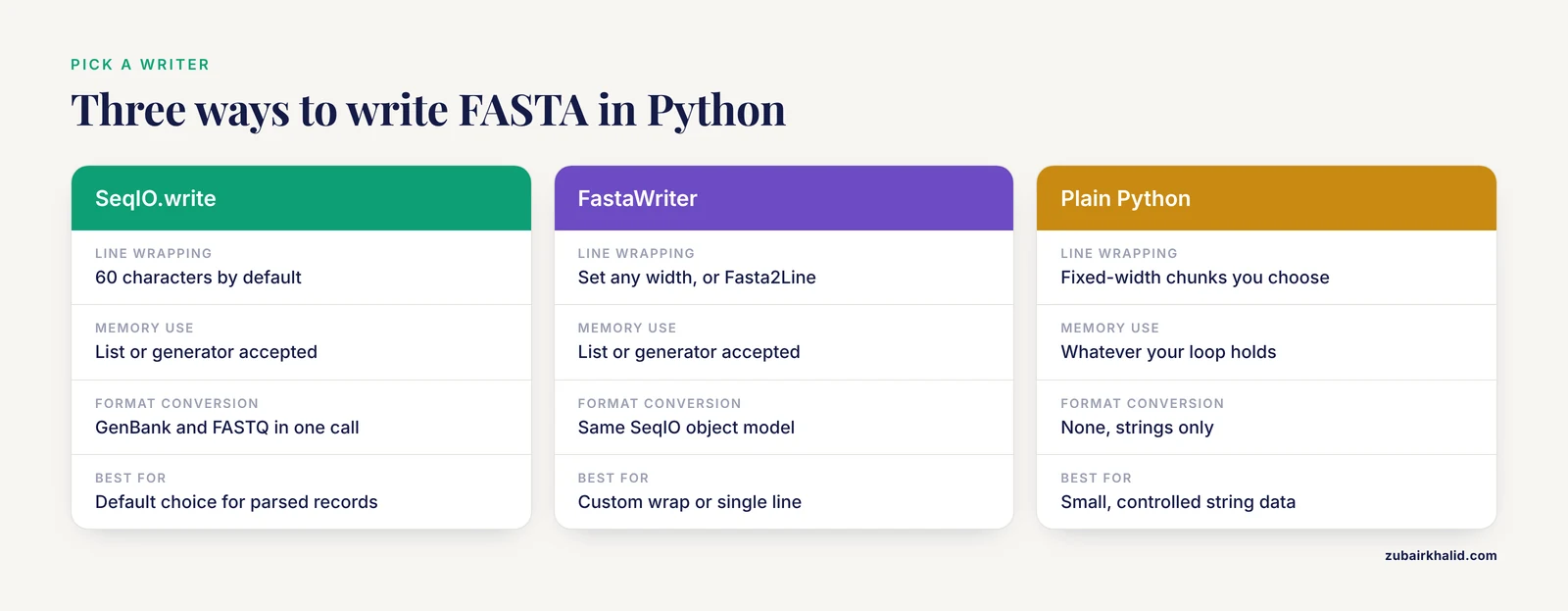
| Decision | Options | Recommendation |
|---|---|---|
| , - | , - | , - |
| Writer | SeqIO.write, FastaWriter, plain Python | SeqIO.write by default, FastaWriter for custom wrap |
| Line wrap | 60, 70, 80, or single line | 60 unless a downstream tool demands otherwise, keep it consistent |
| Header content | identifier only, identifier plus description | unique machine-friendly identifier first, human text after one space |
| Record container | list, generator | generator for anything above a few thousand records |
| Handle | plain file, gzip text handle, stdout | gzip for archives and long-term storage |
| Case | uppercase, lowercase | uppercase unless you intend soft-masking |
| Source data | strings in code, parsed records, BAM or FASTQ input | SeqRecord for anything parsed, plain strings only for trivial cases |
Writing FASTA in High-Throughput Pipelines
Production genomics pipelines often live outside pure Python. HTSlib is the C library underlying samtools and bcftools for high-throughput sequencing data, and it has been incorporated into Python, Perl, R, and Rust bindings, which is how most Python code touches BAM, CRAM, and VCF data efficiently [5]. When your FASTA output is a byproduct of alignment data, extract sequences through pysam (the Python wrapper for HTSlib) rather than shelling out to intermediate text files:
import pysam

bam = pysam.AlignmentFile("sorted.bam", "rb")
with open("extracted_reads.fasta", "w") as out:
    for read in bam.fetch(until_eof=True):
        if read.query_sequence:
            out.write(f">{read.query_name}\n{read.query_sequence}\n")
This writes each aligned read as a FASTA record. For reference genomes that already exist as indexed FASTA, samtools faidx and pysam's FastaFile reader pull subsequences by coordinates without loading whole chromosomes.
The same architectural principle shows up across bioinformatics libraries: keep data representation separate from input and output. The Neo project, which handles electrophysiology data in Python through IO modules for many formats, makes this separation explicit so that analysis code stays focused on analysis while IO code handles formats [6]. Structure your own scripts the same way, with one function or module responsible for producing records and a separate one responsible for serializing them to disk.
If your output format needs to be something FASTA cannot express, do not invent a parser from scratch each time. TextFormats is a library built to let researchers define text format specifications declaratively and then parse and write data in those formats from Python and other languages, with automatic testing of the specification [7]. Related work on auto-generating file readers from structured format descriptions demonstrates that the same idea extends to writers.
How to Verify Your FASTA Output
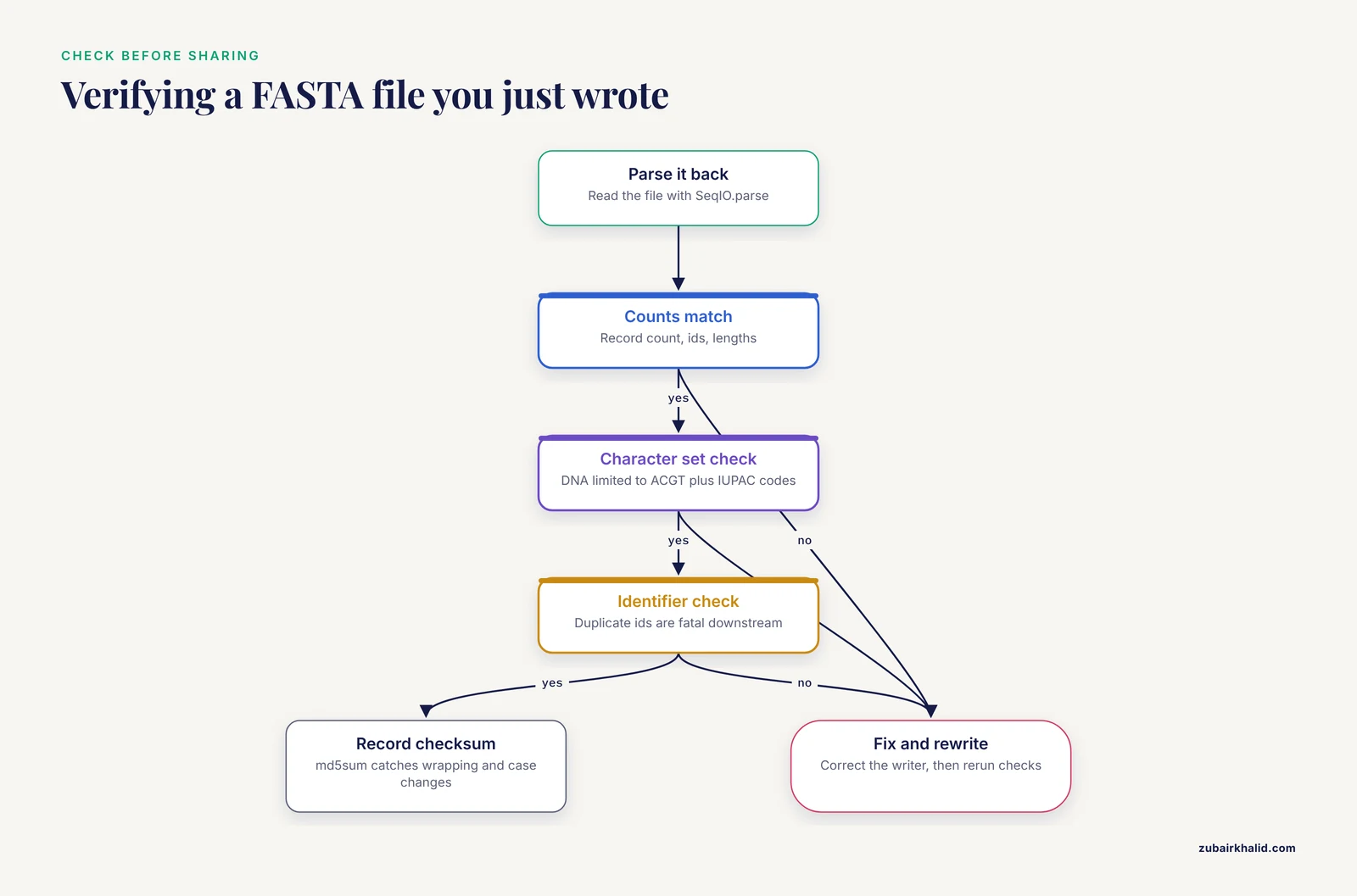
Never trust a file you have not parsed back. Three checks take under a minute and catch nearly every writing error.
Check 1: round-trip parse.
from Bio import SeqIO

records = list(SeqIO.parse("collection.fasta", "fasta"))
print(len(records))
print([r.id for r in records])
print([len(r.seq) for r in records])
Expected output:
3
['contig_1', 'contig_2', 'prot_1']
[20, 21, 22]
If the count, identifier list, and sequence lengths match your input data, the write succeeded structurally.
Check 2: character set inspection. Confirm the sequences contain only the characters your data type allows. DNA should be limited to ACGT plus the IUPAC ambiguity codes (R, Y, S, W, K, M, B, D, H, V, N). A quick set check on a large file:
from Bio import SeqIO

alphabet = set("ACGTRYSWKMBDHVN")
bad = set()
for record in SeqIO.parse("collection.fasta", "fasta"):
    bad.update(set(str(record.seq).upper()) - alphabet)
print(bad or "clean")
Check 3: identifier uniqueness. Duplicate identifiers are invisible to most parsers and fatal to many downstream tools.
from Bio import SeqIO
from collections import Counter

ids = [r.id for r in SeqIO.parse("collection.fasta", "fasta")]
duplicates = [i for i, n in Counter(ids).items() if n > 1]
print(duplicates or "unique")
For the companion tabular files that often accompany sequence data (metadata sheets, mapping files, sample sheets), validation deserves the same rigor. Keemei is a tool built for validating tabular bioinformatics file formats in Google Sheets, created because misformatted input files are a well-known bottleneck before analysis begins, especially when many collaborators edit the same file [8]. The broader lesson applies to FASTA too: validate at the boundary where data enters your workflow, not after an analysis has failed mysteriously.
Finally, record a checksum when reproducibility matters:
md5sum collection.fastaAny change to wrapping, header text, or case changes the checksum, which makes checksums a sensitive regression test for your writer code.
Tips for Writing FASTA Files in Python
These tips cover the decisions that separate throwaway scripts from code you can rerun a year later.
- Treat the identifier as a foreign key. Everything downstream joins on it. Use a pattern like
sample_001_contig_004, never spaces or characters your shell will interpret. - Decide once how you handle descriptions. If you parse a header like
>sp|P12345 Human protein, isoform 2, Biopython splits it sorecord.idissp|P12345andrecord.descriptionis the full text. On write, both are recombined. If you mutaterecord.idand forgetrecord.description, the stale description reappears in your output header. Clear it deliberately withrecord.description = ""when you want the output header to contain only the new identifier. - Stream by default. Write your filtering logic as a generator (Step 6 above). The memory efficiency of event-based IO for large datasets is well established in bioinformatics IO libraries [3], and Python generators give you it for free.
- Set the alphabet when you plan to manipulate sequences. A
SeqRecordcreated without alphabet knowledge cannot be reverse complemented or translated safely. Constructing records with the correctSeqobject type keeps those operations available. - Compress archives, keep working files plain. Gzip on write costs seconds and saves multiples in disk space. Keep the uncompressed copy only while the current stage of the pipeline needs raw access.
- Separate serialization from analysis. The pattern used by established libraries, where data objects and format IO are distinct layers, keeps each part testable [6]. A
write_fastafunction that accepts an iterable of records can be unit tested with three tiny records, independent of where they came from. - Test your writer with a fixture file. Modern scientific Python libraries ship with comprehensive documentation, extensive testing, and continuous integration precisely because format IO code is where silent data corruption hides [9]. A five-line test that parses your golden fixture back and compares record counts and a hash catches most regressions.
- Record provenance outside the FASTA file. FASTA has no place for structured provenance, capture it in a README, a TSV, or a richer format. If a richer format is warranted, libraries exist that let you define the format once and write it from Python [7].
Common Mistakes and Limitations
These are the mistakes that show up repeatedly when people write FASTA files in Python, with the exact symptoms and fixes.
Mistake 1: Passing an empty list or exhausted iterator.
count = SeqIO.write([], open("out.fasta", "w"), "fasta")This raises:
ValueError: No records found in handleThe subtler version happens with generators. If you pass a generator to SeqIO.write and the generator has already been consumed (for example you iterated it once for a count first), the writer sees zero records and raises the same error. Generators are single use. Materialize a list if you need to inspect records before writing.
Mistake 2: Using the wrong case in the format name. Format strings are lowercase:
ValueError: Unknown format 'FASTA'The fix is "fasta", not "FASTA" or "fa".
Mistake 3: Writing text to a binary handle. With gzip.open("file.fasta.gz", "wb"), the writer's string writes fail with:
TypeError: a bytes-like object is required, not 'str'Use "wt" for gzip text mode or encode explicitly.
Mistake 4: Assuming the header survives a round trip untouched. Parsers split the header at the first whitespace and at some punctuation. A header containing gi|568336018|gb|AGTK01117712.1| parses into an identifier with pipe characters intact, but a header containing spaces splits into identifier plus description. If you rewrite records, output headers can change shape. Check the round-trip parse before you promise anyone byte-identical output.
Mistake 5: Duplicate or ambiguous identifiers. Tools that build indexes over FASTA (BLAST database builders, alignment indexes, coordinate fetchers) require unique identifiers. Duplicates usually come from joining two source files without renaming. Enforce uniqueness before writing, as shown in the verification section.
Mistake 6: Illegal or accidental characters in sequences. Trailing whitespace, numbers from spreadsheet exports, translation artifacts like * in nucleotide data, or full lowercase where uppercase was intended all pass silently through FASTA writers and fail downstream. Run the character set check above as part of every write.
Mistake 7: Windows line endings. A file written on Windows with default settings can carry carriage return plus line feed endings (\r\n). Most Unix tools cope, but some strict parsers treat the carriage return as part of the sequence. Write with open(path, "w", newline="\n") when cross-platform portability matters.
Mistake 8: Blank lines inside records. Copy-pasted data or naive string concatenation can inject blank lines between sequence lines. Many parsers tolerate them, some do not. The round-trip check (comparing sequence lengths before and after) detects this immediately.
Mistake 9: Inconsistent wrapping within one file. Mixing wrapped and unwrapped records breaks tools that index by line position. Pick one wrap setting per file and apply it to every record.
Limitations to keep in mind. FASTA stores no quality scores, no per-sequence annotations, no alignment state, and no structured metadata. If your data needs any of those, write a richer format (GenBank, FASTQ for qualities, or an annotated format) and convert to FASTA only at the boundary with tools that need it. Also remember that FASTA says nothing about sequence type, so a consumer cannot tell DNA from protein without context. Finally, no writing practice fixes upstream data problems, so validate sequences and identifiers at the point they enter your script rather than trusting the writer to catch garbage.
Frequently Asked Questions
How do I write a FASTA file in Python without Biopython?
Use the standard library with a small function that writes > plus the header, then the sequence in fixed-width chunks, as shown in the plain Python section above. This works well for simple, controlled data, and Biopython becomes worth installing the moment you need to parse real files or convert between formats.
Why does my output FASTA header contain text I did not put in the identifier?
Biopython writes the record's identifier and description together on the header line. If you parsed an input file, the original description is still attached to the record, so it reappears in your output. Set record.description = "" before writing if you want a clean header with the identifier alone.
What line width should I use when writing FASTA?
Sixty characters per line is the safe, widely compatible default and is what Biopython uses. Single-line sequences are acceptable to most modern tools, but keep wrapping consistent across all records in one file because position-based indexing tools expect it.
How do I write a gzip-compressed FASTA file in Python?
Open the output with gzip.open("file.fasta.gz", "wt") and pass that handle to SeqIO.write or your own writer function. The t in "wt" is required, because a binary handle causes a TypeError when the writer tries to write text.
Can I convert FASTQ to FASTA in Python?
Yes. One call does it: SeqIO.convert("reads.fastq", "fastq", "reads.fasta", "fasta"). The per-base quality scores are dropped because FASTA cannot store them, so only do this when downstream tools need sequence only.
How do I write FASTA for very large genomes without running out of memory?
Parse the input with SeqIO.parse, which returns an iterator, and pass a generator that yields the records you want directly into SeqIO.write. Only one record sits in memory at a time, no matter how large the input file is.
Why do some tools reject the FASTA file I just wrote?
The most frequent causes are duplicate identifiers, whitespace or special characters in identifiers, blank lines inside records, characters in sequences outside the expected alphabet, and inconsistent line wrapping. Run the three verification checks in this guide (round-trip parse, character set, identifier uniqueness) and the cause usually surfaces in seconds.
How can I validate a FASTA file before sharing it?
Parse it back with SeqIO.parse and confirm record count, identifiers, and sequence lengths match expectations, then check the character set and identifier uniqueness with the short snippets above. For the tabular metadata files that often accompany sequence data, a dedicated validator such as Keemei catches formatting problems in Google Sheets before analysis begins.
Sources
- Biopython: freely available Python tools for computational molecular biology and bioinformatics
- Common File Formats.
- JPhyloIO: a Java library for event-based reading and writing of different phylogenetic file formats through a common interface
- JPhyloIO - A Java library for event-based reading and writing of different alignment and tree formats through one common interface
- HTSlib: C library for reading/writing high-throughput sequencing data
- Neo: an object model for handling electrophysiology data in multiple formats
- TextFormats: Simplifying the definition and parsing of text formats in bioinformatics
- Keemei: cloud-based validation of tabular bioinformatics file formats in Google Sheets
- IOData: A python library for reading, writing, and converting computational chemistry file formats and generating input files