How to View and Inspect FASTQ Files in the Linux Terminal
By Dr. Zubair Khalid, DVM, MS, PhD ·

By the end of this guide you will be able to open any FASTQ file in a Linux terminal, count its reads without decompressing it, inspect the sequence and quality lines, check that paired-end files are in sync, and pull out a safe subset for testing a pipeline. Everything runs with tools that ship with every Linux distribution, plus one optional utility you can install in a minute.
You will need a terminal on Linux, macOS, or Windows Subsystem for Linux (WSL), the GNU coreutils package (installed by default on most distributions), and at least one FASTQ file to work on. If your file ends in .gz, your system already has gzip or a compatible zcat. Nothing else is required. For the examples below, assume a paired-end Illumina amplicon dataset with two files, sample_R1.fastq.gz and sample_R2.fastq.gz.
FASTQ files matter because they are the raw entry point of nearly every sequencing workflow. Amplicon pipelines built on QIIME 2 and Snakemake, such as Tourmaline, start from a manifest or archive of FASTQ sequences and pass them straight into denoising with DADA2 or Deblur [1]. If the FASTQ files are truncated, mislabeled, or encoded in an unexpected way, every downstream step inherits that problem. A few minutes in the terminal catches most of these issues before you burn hours of compute.
What a FASTQ File Actually Contains
FASTQ is a plain-text format that stores a sequencing read and its per-base quality scores. Each read occupies exactly four lines:
- A header line starting with
@, containing the read identifier and usually instrument metadata such as flowcell, lane, tile, and coordinates. - The raw nucleotide sequence, using
A,C,G,T, and oftenNfor uncertain bases. - A separator line that starts with
+. On older files it repeats the header. On modern files it is usually just a bare+. - A quality string of the same length as the sequence, where each character encodes a Phred quality score for the base at the same position.
Here is a realistic two-read example:
@A00552:123:HTKWLDSX7:1:1101:24169:1000 1:N:0:ATCGACTG+GTACATAG
GATGAACGCTGGCGGCGTGCTTACACATGCAAGTCGAACGAGAACCTT
+
F,FFFFFF:F,FFF,F,F:FF,FF,F:,F,:,FF,F,,F,,F,F,:F
@A00552:123:HTKWLDSX7:1:1101:10081:1000 1:N:0:ATCGACTG+GTACATAG
TACGGAGGGTGCAAGCGTTAATCGGAATTACTGGGCGTAAAGCGCACG
+
FFFFFFFF:FFFFFFFFFFFFFFFFFFFFFFFFFFFFFFFFFFFFFFFF
The quality characters map to numbers through an ASCII offset. In the modern Phred+33 encoding, used by Illumina software since version 1.8 and by Sanger sequencing long before that, the character ! represents a Phred score of 0 and each step up the ASCII table adds one. A # is a Phred 2, a 5 is Phred 20, an H is Phred 39. Older Solexa and early Illumina pipelines used a Phred+64 offset, which shifts every character up by 31 positions and still shows up in archived data. Recognizing the difference matters because tools that recalculate quality summaries will produce garbage numbers if you assume the wrong offset.
Two structural rules drive every command in this guide. First, the file is a strict alternation of four line types, so any line whose position modulo 4 equals 1 is a header, 2 is a sequence, and 4 is a quality string. Second, FASTQ files from sequencing facilities are almost always gzip compressed, which means every text tool must read them through a decompression stream rather than opening them directly.
View FASTQ Files in Linux Step by Step
This walkthrough shows how to view a fastq file in Linux from a cold start. Run the commands in order on your own files, or download a small public test FASTQ if you do not have one yet.
Step 1: Confirm the file exists and is intact
Start by listing the file with human-readable sizes and checking its type.
ls -lh sample_R1.fastq.gz sample_R2.fastq.gz
file sample_R1.fastq.gz
Expected output looks like this:
-rw-r--r-- 1 you yourgroup 1.4G Jan 14 09:22 sample_R1.fastq.gz
-rw-r--r-- 1 you yourgroup 1.3G Jan 14 09:22 sample_R2.fastq.gz
sample_R1.fastq.gz: gzip compressed data, original size modulo 2^32 4213977110
If file reports gzip compressed data, the archive header is valid. If it reports HTML document or ASCII text, you downloaded an error page instead of data, which happens surprisingly often with links that require a login session. If ls -lh shows a size of exactly 0 bytes, the transfer failed partway.
Before spending compute time on a large file, record its checksum so you can prove later that the file did not change:
sha256sum sample_R1.fastq.gz > sample_R1.fastq.gz.sha256Rerun sha256sum -c sample_R1.fastq.gz.sha256 whenever you want to confirm the file is still bit-for-bit identical. Many sequencing providers publish an MD5 or SHA-256 checksum alongside the download, and comparing against it is the fastest way to detect a corrupted transfer.
Step 2: Count the reads
Every read is four lines, so the read count is the total line count divided by 4. Stream the file through zcat and count with wc:
zcat sample_R1.fastq.gz | wc -lExpected output for a file with 12,345,678 reads:
49382712Then do the arithmetic:
echo $(( 49382712 / 4 ))
12345678
A faster, single-step version uses awk to count records directly:
zcat sample_R1.fastq.gz | awk 'END { print NR / 4 }'For a paired-end run, repeat the count on the R2 file. The two counts must match exactly. If they do not, the pair is out of sync or one file is truncated, and no mainstream aligner or denoiser will accept them. Amplicon workflows such as Tourmaline pair these files explicitly through a manifest before denoising, so a mismatch fails early in a well-built pipeline but silently corrupts results in a hand-rolled one [1].
One warning about wc -l: it counts newline characters, not lines. If a file was written without a trailing newline on the final line, the count comes up one short. With FASTQ this is rare but not impossible in files produced by custom scripts. If your line count is not divisible by 4, that missing newline is one possible cause.
Step 3: Look at the first reads
The quickest way to view a fastq file is head fed by zcat:
zcat sample_R1.fastq.gz | head -n 8This prints two complete reads (8 lines) and exits immediately. head sends a SIGPIPE to zcat once it has enough lines, so the command stops decompressing and finishes in well under a second even on a file that would take minutes to decompress fully. You never decompress the whole archive just to peek.
If you run zcat sample_R1.fastq.gz | head -n 8 and see pages of binary gibberish like \x1f\x8b, the file is either not gzipped or compressed with something else. Check with file. If the file is bzip2 compressed, use bzcat. If it is zstd compressed, use zstdcat.
Step 4: Page through the file interactively
For unhurried inspection, stream into less with the -S flag, which chops long lines at the screen edge instead of wrapping them:
zcat sample_R1.fastq.gz | less -SInside less, use the arrow keys or j and k to move line by line, Space to page down, /pattern to search forward, and q to quit. Because zcat only decompresses as fast as less consumes it, you can quit at any point without waiting.
Many systems have a lesspipe or lessfile wrapper configured so that less sample_R1.fastq.gz decompresses automatically. Do not rely on this in scripts, because the wrapper may not be present on a compute node or a colleague's machine. The explicit pipe always works.
Step 5: Extract sequence lines and check read lengths
Use awk with the modulo-4 pattern to pull only the sequence lines:
zcat sample_R1.fastq.gz | awk 'NR % 4 == 2' | head -n 3Expected output:
GATGAACGCTGGCGGCGTGCTTACACATGCAAGTCGAACGAGAACCTT
TACGGAGGGTGCAAGCGTTAATCGGAATTACTGGGCGTAAAGCGCACG
GATTAGATACCCTGGTAGTCCACGCCGTAAACGATGAATGATAGGGG
A key habit in Linux for bioinformatics is verifying assumptions about your data rather than trusting them. Read length is a classic example. Amplicon reads have a fixed length, while shotgun and Nanopore reads vary widely. Compute the length distribution:
zcat sample_R1.fastq.gz | awk 'NR % 4 == 2 { print length($0) }' | sort -n | uniq -c | headExpected output for a fixed-length 250 bp amplicon run:
12345678 250That single line tells you every read is exactly 250 bases. For variable-length data you will instead see a distribution, and the count column tells you how many reads fall at each length. If the same one-liner shows two distinct length peaks, you may be looking at pooled runs or a file that contains concatenated libraries.
You can compute the minimum, maximum, and mean in one pass without sorting:
zcat sample_R1.fastq.gz | awk 'NR % 4 == 2 { l = length($0); if (NR == 2 || l < min) min = l; if (NR == 2 || l > max) max = l; s += l; n++ } END { printf "min %d max %d mean %.1f n %d\n", min, max, s / n, n }'Step 6: Inspect the quality lines and confirm the encoding
Pull the quality lines the same way, using line position 4:
zcat sample_R1.fastq.gz | awk 'NR % 4 == 4' | head -n 2To confirm the encoding, convert the first quality line to its numeric Phred values by subtracting 33 from each character code:
zcat sample_R1.fastq.gz | awk 'NR % 4 == 4 { for (i = 1; i <= length($0); i++) printf "%d ", index("!\"#$%&'"'"'()*+,-./0123456789:;<=>?@ABCDEFGHIJKLMNOPQRSTUVWXYZ[\\]^_`abcdefghijklmnopqrstuvwxyz{|}~", substr($0, i, 1)) - 1; print ""; exit }'A cleaner approach uses od, which prints character codes directly:
zcat sample_R1.fastq.gz | awk 'NR % 4 == 4' | head -n 1 | od -An -tu1 | head -n 2Each number in the output is an ASCII code. Subtract 33 in your head or with a quick pipeline. If the values land between 33 and 74, the data is Phred+33 (scores 0 to 41), which is what Illumina 1.8 and later produce. If values exceed 74, you are looking at Phred+64 data and you must tell your downstream tools explicitly. Modern tools default to Phred+33 and will silently misinterpret older files unless corrected.
A simple visual scan also works. A quality string full of printable punctuation and letters, like the F,FF,F: strings in the example above, is Phred+33. A string full of characters in the middle of the ASCII table such as hijk is almost always Phred+64.
Step 7: Pull a small subset for pipeline testing
Before pointing a heavy workflow at a 100 GB file, extract the first 10,000 reads (40,000 lines) and test on that:
zcat sample_R1.fastq.gz | head -n 40000 | gzip > test_R1.fastq.gz
zcat sample_R2.fastq.gz | head -n 40000 | gzip > test_R2.fastq.gz
zcat test_R1.fastq.gz | wc -l
Expected output:
40000Never subset only one member of a pair. The R1 and R2 files are index-aligned, meaning read number 5,000 in R1 is the mate of read number 5,000 in R2. Taking the same first 40,000 lines from both keeps them aligned. Taking different line counts, or subsetting with a tool that reorders reads, destroys the pairing and produces errors or silent mismatches downstream.
To extract reads by identifier, for example every read whose header contains a specific tile coordinate, filter on header lines and print the whole record:
zcat sample_R1.fastq.gz | awk 'NR % 4 == 1 { keep = ($0 ~ /1101:24169/) } keep { print }' | head -n 8This sets a flag on each header line and prints four lines whenever the flag is set. It is one of the most useful patterns in awk for FASTQ work and scales to files of any size because it streams.
Step 8: Verify paired-end files are in sync
Beyond counting lines in both files, confirm that the headers correspond. Illumina R1 and R2 headers are identical except for the read-number field, which is 1: in R1 and 2: in R2. Strip that field from each header and compare the streams:
zcat sample_R1.fastq.gz | awk 'NR % 4 == 1 { sub(/ 1:/, " X:"); print }' | head -n 1000 > r1.heads
zcat sample_R2.fastq.gz | awk 'NR % 4 == 1 { sub(/ 2:/, " X:"); print }' | head -n 1000 > r2.heads
diff r1.heads r2.heads && echo "headers match"
Expected output:
headers matchIf diff reports differences, the files are out of order or one of them belongs to a different sample. Do not attempt to fix this by reordering unless you understand exactly how the mismatch arose. Most often the cause is a failed subsetting step or a swapped file pair from the sequencing provider. Contact the provider rather than guessing.
Step 9: Watch a file while it transfers
Long-distance file transfers from a sequencing facility or a national archive can take hours. You can watch the tail of a growing file:
tail -f sample_R1.fastqtail -f follows the file as it grows, printing new lines as they arrive. Press Ctrl-C to stop. For compressed files this does not work directly, because gzip archives cannot be read until they are complete. In that case watch the file size instead:
watch -n 30 ls -lh sample_R1.fastq.gzThis refreshes a size listing every 30 seconds so you can estimate transfer speed and completion time.
Quick Reference of Useful One-Liners
| Task | Command | Notes | |||
|---|---|---|---|---|---|
| , - | , - | , - | |||
| List size and type | ls -lh file.fastq.gz | Confirms the file is nonzero and gzip compressed | |||
| First 2 reads | `zcat f.fastq.gz \ | head -n 8` | Exits instantly, does not decompress everything | ||
| Count reads | `zcat f.fastq.gz \ | awk 'END{print NR/4}'` | Streaming, works on any file size | ||
| Sequence lines only | `zcat f.fastq.gz \ | awk 'NR%4==2'` | Use NR%4==1 for headers, NR%4==4 for quality | ||
| Length distribution | `zcat f.fastq.gz \ | awk 'NR%4==2{print length(\$0)}' \ | sort -n \ | uniq -c` | One line per distinct length with counts |
| Page through file | `zcat f.fastq.gz \ | less -S` | -S prevents quality-line wrapping | ||
| Subset first N reads | `zcat f.fastq.gz \ | head -n 40000 \ | gzip > sub.fastq.gz` | Run identically on R1 and R2 | |
| Checksum | sha256sum f.fastq.gz | Compare against provider-supplied value | |||
| Header search | `zcat f.fastq.gz \ | awk 'NR%4==1' \ | grep -c 'lane=4'` | Counts reads from a given lane |
Substitute your real filename for f.fastq.gz in each row. The pipe character inside the table cells is escaped so the table renders correctly, and you omit that backslash when typing the commands.
Tips for Working with Large FASTQ Files
These tips separate a smooth session from a frozen terminal when files reach tens of gigabytes.
Stream, never load. Every command above pipes data through a chain of programs, each processing one line at a time. A pipeline like zcat file | awk ... | sort | uniq -c holds only a small buffer in memory regardless of file size. The one thing you should never do is zcat file > temp.fastq on a scratch disk just to run head. Decompressed FASTQ files are roughly four to six times larger than their gzip versions, and scratch space on shared systems disappears faster than you expect.
Use zcat rather than decompressing to disk. Modern gzip decompression runs at hundreds of megabytes per second, which usually exceeds disk read speeds. The pipe costs you nothing and leaves your directory clean.
Know when wc -l lies. If you concatenated two FASTQ files with cat and the first one lacked a trailing newline, the first header of the second file merges onto the last quality line of the first file. Every downstream line count then shifts. Check for this by viewing the junction: zcat merged.fastq.gz | awk 'NR > 4*N1 && NR <= 4*N1+8' where N1 is the read count of the first file.
Sample from the middle for honest spot checks. The first reads in an Illumina file are not representative of the whole run because quality declines over the run. To sample reads from the middle, skip a number of lines with tail -n +:
zcat sample_R1.fastq.gz | tail -n +40000000 | head -n 40000 | gzip > mid_R1.fastq.gzThis starts printing at line 40,000,000 and takes the next 40,000 lines, giving you reads from roughly one-third of the way through the file.
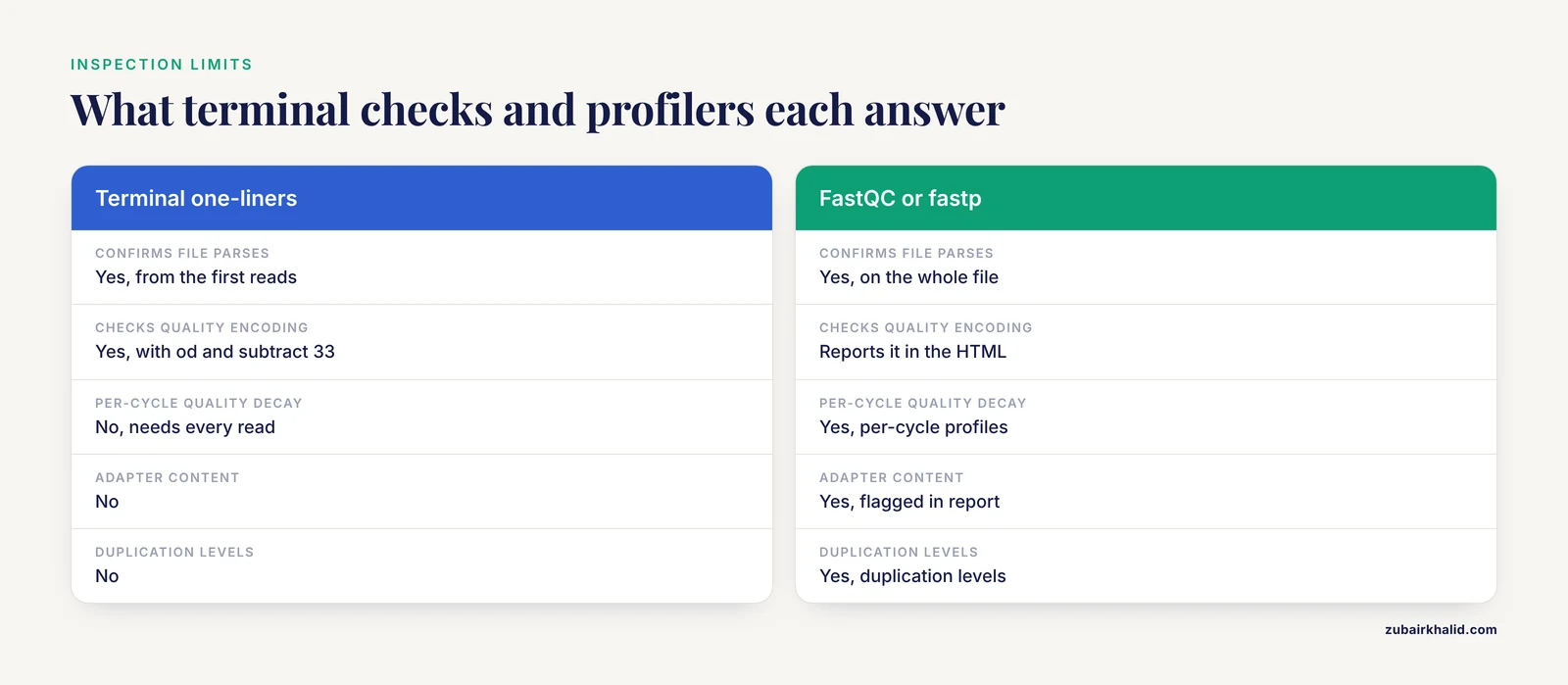
Match the tool to the question. Terminal one-liners answer structural questions. Statistical questions about per-cycle quality, adapter content, duplication, and overrepresented sequences need a dedicated profiler, covered in the next section.
Tools Beyond the Core Utilities
The GNU tools are universal, but purpose-built FASTQ tools make several checks one command instead of three pipes. These tools are standard equipment in Linux for bioinformatics and are worth installing.
seqkit is a single static binary with no dependencies. Two subcommands cover most quick inspections:
seqkit stats sample_R1.fastq.gz sample_R2.fastq.gzExpected output:
file                  format  type  num_seqs   sum_len  min_len  avg_len  max_len
sample_R1.fastq.gz    FASTQ   DNA   12,345,678  3,086,419,500  250  250  250
sample_R2.fastq.gz    FASTQ   DNA   12,345,678  3,086,419,500  250  250  250
One command confirms both files have the same read count, the same length profile, and a valid format. seqkit head -n 2 file.fastq.gz replaces the zcat | head pattern, and seqkit seq -n prints only the headers. seqkit reads gzip, bzip2, and xz transparently.
FastQC produces an HTML report with per-cycle quality profiles, adapter detection, sequence duplication levels, and overrepresented sequences. You run it as fastqc sample_R1.fastq.gz and open the resulting HTML. It answers the question a terminal glance cannot: how quality behaves across the whole file, not just the first two reads.
fastp both profiles and filters in a single fast pass, producing an HTML report and cleaned output in one command.
Where these tools fit in a workflow matters. Tourmaline, for example, wraps QIIME 2, which runs DADA2 or Deblur denoising on the imported FASTQ files, then assigns taxonomy, computes diversity metrics, and generates an HTML report linking all outputs [1]. Denoising algorithms are sensitive to quality encoding and to read-length assumptions, which is exactly the kind of thing you confirm manually before launch. The time you spend in the terminal before running a pipeline is the cheapest quality control you will ever do.
Common Mistakes and Limitations
These are the errors that actually show up in real sessions, with the exact symptom and the fix.
Opening a .gz file directly with head or less. Running head sample_R1.fastq.gz prints a screen of unreadable bytes starting with an escaped escape sequence, and less shows a warning that the file may be a binary. The fix is to always pipe through zcat, or use less only if a lesspipe wrapper is confirmed to be installed.
Counting reads by grepping for @. grep -c '^@' file returns a wildly inflated count because quality lines can also begin with @ when a high-quality base maps to that character, and the separator line can contain the header text. Only the modulo-4 pattern or a real FASTQ-aware tool gives a correct count.
Assuming strict 4-line records. Some historical pipelines and a few submitted archive files contain blank lines or wrapped sequences. If awk 'NR % 4 == 2' produces output that clearly includes headers, the file is not strict 4-line FASTQ. Convert it with a proper parser before line-based tricks will work.
Forgetting that wc -l counts newlines. A file whose final line lacks a newline undercounts by one, which can make an otherwise correct read count come out with a fraction when divided by 4. Suspect this whenever NR / 4 ends in .75 or similar.
Assuming all reads have the same length. Fixed-length expectations hold for short-read amplicon data and break immediately for long-read data. Always compute the distribution rather than eyeballing the first read.
Assuming Phred+33. Modern files are Phred+33, but data converted from older archives may be Phred+64. If quality summaries look shifted or negative scores appear, check the encoding with the od method above before blaming the tool.
Subsetting one mate of a pair. Taking the first 10,000 reads from R1 and a different number from R2 leaves files that pass individual inspection but fail pairing. Always subset both files with the same line count and re-verify with the header comparison from Step 8.
Editing FASTQ files in Excel, Word, or any GUI editor. Spreadsheet applications reformat identifiers as numbers or dates, introduce carriage returns, and silently truncate long lines. Use command-line tools or a dedicated editor for any text-based sequence data.
Trusting a file that opens cleanly. A file can decompress without error yet still be the wrong sample, the wrong lane, or the wrong run. Verify checksums against provider values and spot-check headers against the expected sample sheet before analysis. This matters because analysis workflows that accept a manifest of FASTQ files will happily process whatever you hand them, and provenance tracking records the mistake rather than catching it [1].
Treating manual inspection as quality control. Looking at four reads tells you the file parses. It does not tell you about per-cycle quality decay, adapter contamination, index hopping, or duplication. Run a profiler such as FastQC or fastp on the whole file for those questions, and treat terminal inspection as the first step, not the last.
Next Steps
Once your files pass inspection, the natural path is to move them into a structured workflow rather than a pile of ad hoc commands. Documented pipelines such as Tourmaline take a configuration file that defines the reference database, sample metadata, and FASTQ input, then chain QIIME 2 denoising, taxonomy assignment, diversity analysis, and HTML reporting under Snakemake with support for multiple cores [1]. Having clean, verified, correctly paired FASTQ inputs is the prerequisite that makes such a workflow reproducible.
Between inspection and the full pipeline, run a dedicated quality profiler on the complete files, trim adapters if the profiler flags them, and keep the trimmed files alongside their checksums. Write your one-liners into a small shell script as you develop them, because a script you can rerun on the next dataset is worth more than any command you type once.
Frequently Asked Questions
How do I view a fastq file in Linux without decompressing it?
Pipe it through zcat and page with less: zcat sample.fastq.gz | less -S. The file stays compressed on disk, decompression happens only in memory as you read, and -S keeps the long quality lines from wrapping.
How do I count the number of reads in a FASTQ file?
Run zcat sample.fastq.gz | awk 'END { print NR / 4 }', which divides total lines by 4. Each read occupies exactly four lines in a well-formed FASTQ file, so the result is the read count.
Why does the fourth line of my FASTQ file look like random punctuation?
That line holds per-base Phred quality scores encoded as ASCII characters. In the standard Phred+33 encoding, each character minus 33 gives the quality score, so ! means 0 and I means 40. Higher-quality bases map to letters, which is why good reads look like strings of letters and colons.
How can I tell whether my FASTQ quality scores are Phred+33 or Phred+64?
Convert one quality line to numeric codes with od -An -tu1 and subtract 33. Values ranging from 33 to 74 indicate Phred+33, the modern standard. Values above 74 indicate Phred+64, used by older Solexa and early Illumina pipelines, and downstream tools must be told explicitly.
Can I open a FASTQ file in Excel or a plain GUI text editor?
Excel will corrupt it. Spreadsheets convert identifiers like 1.10E+05 into numbers or dates, strip leading characters, and cannot handle files with more than about a million rows. Use terminal tools, seqkit, or a dedicated text editor designed for large files.
How do I extract a small subset of reads for testing a pipeline?
Take the first 40,000 lines from both mates: zcat R1.fastq.gz | head -n 40000 | gzip > test_R1.fastq.gz and the identical command on R2. Keeping the line counts equal preserves mate pairing. Always subset both files of a pair together.
Why do my paired-end R1 and R2 files have different numbers of reads?
Either one file is truncated from an incomplete transfer, or a subsetting or filtering step touched only one mate. Count lines in both files, compare their headers after normalizing the read-number field, and if the mismatch predates any processing on your side, request the files again from the sequencing provider.
When should I stop inspecting FASTQ files manually and run a quality tool instead?
Manual inspection confirms structure and encoding. Once that passes, run FastQC or fastp on the full files to evaluate per-cycle quality, adapter content, and duplication, because those properties are invisible in a four-line glance and require statistics over every read.