Version Control for Pipeline Documentation: Template and Examples
By Dr. Zubair Khalid, DVM, MS, PhD ·

By the end of this guide you will be able to take a folder of pipeline notes and turn it into a version-controlled documentation repository. You will initialize it with Git, structure it with a copy-ready template, pin the exact software versions your results depend on, tag a release, publish it on GitHub, and stamp every analysis run with the commit hash that produced it. You will also know how to recover when Git complains, because every command here comes with the output you should expect and the errors you will actually hit.
You need a terminal, Git 2.28 or newer (check with git version), a plain-text editor, and a free GitHub account. Conda or Miniforge is recommended for the environment pinning steps. Docker or Apptainer is optional and only needed if you ship containers. Every command shown runs on macOS, Linux, and Windows Subsystem for Linux.
Version control for pipeline documentation matters because documentation drift is a documented failure mode in bioinformatics. A systematic review of prenatal sequencing studies found that reporting of bioinformatics methods was frequently incomplete, that tool names and versions were often omitted, and that quality control steps were poorly described, which led the authors to propose a checklist of essential reporting metrics [1]. Software dependencies make the problem worse, because identical code can produce different results depending on which versions are installed, and incomplete documentation of dependencies and versions undermines reproducibility [2].
Why Pipeline Documentation Drifts Without Version Control
Version control is software that records snapshots of text files over time so that any earlier state can be retrieved with its author, date, and full change history. Git is the standard tool. Three terms cover most of what follows. A repository is the folder Git tracks together with its entire history, stored in a hidden .git directory. A commit is one snapshot, identified by a unique 40-character hash, carrying a message you write. A tag is a permanent, named marker pinned to one commit, which is how releases are recorded.
Documentation drifts for predictable reasons. Notes live in a word processor on one person's laptop. A colleague edits a copy on a shared drive and overwrites the version that matches the published figures. The methods paragraph says a tool was used at some default version, and nobody can say which. Six months later the pipeline produces different numbers and the question "what changed?" has no answer.
The stakes are measurable. In a community audit of twelve crosslinking mass spectrometry pipelines, verifiably false identifications exceeded the requested false discovery rate by up to 29-fold in the worst cases, and the audit could track improvement between software versions, which supports regression testing as routine practice [3]. Git answers "what changed?" mechanically. Every documented state is a commit, every release is a tag, and the difference between any two releases is one command away. The rest of this guide turns that idea into files, commands, and habits.
Version Control Pipeline Documentation Format: The Core File Set
The version control pipeline documentation format that survives contact with real labs is plain text. Markdown (.md files) for prose, YAML (.yml files) for environments and parameters, and tab-separated text for sample sheets. Plain text matters because Git records changes line by line. Git can show exactly which sentence or version pin changed between two commits, but it cannot meaningfully compare a Word document or a PDF, so those formats hide the history you are trying to keep.
A minimal, complete repository holds eight files.
| File | Purpose | Update trigger |
|---|---|---|
| README.md | Entry point with purpose, quick start, inputs, outputs, parameters, contact | Any user-facing change |
| CHANGELOG.md | Human-readable history of every version | Every release |
| environment.yml | Exact pinned software versions | Any tool added, removed, or upgraded |
| config/ | Parameter defaults and sample sheets as versioned text | Any default change |
| docs/ | Deeper guides on provenance, QC interpretation, troubleshooting | As features grow |
| .gitignore | Keeps data, results, and secrets out of Git | When new output types appear |
| .gitattributes | Normalizes line endings across operating systems | Once, at setup |
| LICENSE | Reuse terms for anyone who finds the repository | Once |
Two structural rules make the format work. First, keep documentation beside the pipeline code when code exists, in the same repository, so a single commit captures both the code and the words describing it. Mature community pipelines do exactly this. The nf-core/scnanoseq pipeline, a Nextflow workflow for long-read single-cell and single-nuclei RNA-seq built on the nf-core framework, publishes its source code and detailed documentation together on GitHub [4]. Second, if documentation must live in its own repository, reference the pipeline by its commit hash rather than by a version name alone, because hashes are unique and version names get reused.
The Template: README, Changelog, and Pinned Environment
The template below is deliberately short. Fill every bracketed field, delete nothing else, and extend a section only when a real question from a real user demands it.
README.md
# PIPELINE-NAME

One sentence stating what the pipeline does and on what input data.

- Current version: vX.Y.Z (YYYY-MM-DD)
- Maintainer: NAME, EMAIL
- License: MIT or equivalent

## Quick start

conda env create -f environment.yml
conda activate ENV-NAME
bash run_pipeline.sh config/config.yaml

## Inputs

- Paired-end FASTQ files under data/, one pair per sample
- Sample sheet at config/samples.tsv with columns sample, fastq_1, fastq_2

## Outputs

- results/counts/ one gene count matrix per sample
- results/de/ differential expression tables and plots
- results/qc/ per-sample and aggregated quality control reports

## Software versions

Pinned in environment.yml and mirrored in the vX.Y.Z release.
Do not upgrade a tool without opening a new release.

## Parameters

- reads (default: data/*.fastq.gz): input read files
- genome_index (default: config/hisat2_index): alignment index path
- fdr_cutoff (default: 0.05): adjusted p-value threshold for calling
  differential expression

## Quality control

FastQC runs per sample and MultiQC aggregates the reports into
results/qc/multiqc_report.html. A run is flagged for review when
per-base quality scores fall below Q20 across more than 10 percent
of bases, or when duplication exceeds 50 percent.

## Provenance

Every run directory stores provenance.txt with the commit hash,
release tag, full environment export, and container digest.
See docs/provenance.md for the capture commands.

## Changelog

See CHANGELOG.md. Versions follow MAJOR.MINOR.PATCH semantics.

## Citation and contact

Cite the release tag and repository URL if this pipeline supports
your work. Open a GitHub issue for bugs and questions.
The version line at the top is the most-read line in the file, so keep it current. The quick start must be copy-paste runnable on a clean account, which is also how you test it. The parameter list doubles as the answer to every question a reviewer will ask about your knobs. The quality control section should name each QC tool and link its official documentation, the way the Qualimap project publishes its implementation and documentation together for sequencing quality control [5].
CHANGELOG.md
# Changelog

All notable changes to this pipeline are documented in this file.
Newest entries first. MAJOR.MINOR.PATCH semantics: breaking changes
bump MAJOR, new features bump MINOR, fixes bump PATCH.

## v1.1.0 - 2026-02-14

### Changed

- Upgraded samtools from 1.20 to 1.21 in environment.yml
- Re-ran the three-sample benchmark set and refreshed QC plots

### Added

- Per-sample alignment summary table in results/qc/

## v1.0.0 - 2026-01-08

### Added

- First documented release with pinned environment
- README, parameter list, and provenance capture instructions
Semantic versioning is the MAJOR.MINOR.PATCH convention. Bump MAJOR when outputs move or compatibility breaks, MINOR when you add a feature such as a new output table, and PATCH when you fix an error such as a wrong default. Write the entry before you tag, never after.
environment.yml
name: rnaseq-docs-env
channels:
  - conda-forge
  - bioconda
  - nodefaults
dependencies:
  - python=3.12.3
  - fastqc=0.12.1
  - multiqc=1.22
  - samtools=1.20
  - hisat2=2.2.1
  - bioconductor-deseq2=1.44.0
Conda-forge and bioconda are the two channels that carry most bioinformatics software, listed in that order, and nodefaults prevents silent fallback to the defaults channel. Pin with a single equals sign and pin the versions you actually tested, not the newest releases. A file full of bare package names installs whatever happens to be current the day someone builds it, which is not documentation, it is a lottery ticket.
Git for Scientists: The Commands That Matter
Git for scientists reduces to about a dozen commands. The mental model is snapshots, not saves. A commit is a photograph of every tracked file at one moment, and the commit message is the caption. Write messages that could paste straight into a changelog, such as "Upgrade samtools to 1.21 and re-run benchmark", never "update". Keep commits atomic, one logical change each, because small commits make history searchable and make merge conflicts rare.
| Command | What it does | When you use it |
|---|---|---|
| git init -b main | Creates a repository with the first branch named main | Once, when starting the folder |
| git status | Lists changed and untracked files | Before every commit |
| git add FILE | Stages a file for the next commit | Every commit |
| git commit -m "MESSAGE" | Saves a snapshot with a one-line message | Every logical change |
| git switch -c NAME | Creates a branch and moves you onto it | Drafting any substantial rewrite |
| git merge NAME | Folds a finished branch into the current branch | After review |
| git branch -d NAME | Deletes a merged branch | Housekeeping after a merge |
| git tag -a vX.Y.Z -m "NOTES" | Pins a permanent annotated name to the current commit | Every release |
| git log | Lists commits, newest first | Writing changelogs, tracing edits |
| git diff TAG1 TAG2 | Shows line-level changes between two releases | Release notes and audits |
| git describe | Prints the nearest tag, plus commits past it | Stamping run provenance |
| git rev-parse HEAD | Prints the full 40-character commit hash | Stamping run provenance |
| git push -u origin main | Uploads commits and sets up tracking | Publishing and syncing |
| git pull | Downloads and merges new commits | Before you start editing |
Flag notes. -m supplies the commit or tag message. -a on git tag creates an annotated tag, which stores the tagger, date, and message, and is the right choice for releases. -b names the first branch at git init. -c creates a branch as part of git switch. -u on the first push records the remote pairing so later uploads need only git push.
Worked Example: From Empty Folder to Tagged Release
This walkthrough is the example I give new lab members on their first day. Every command was run in a fresh terminal. Output blocks show what you should see, with hashes and timings that will differ on your machine.
Step 1. Initialize the repository and identify yourself
mkdir -p ~/projects/rnaseq-pipeline-docs
cd ~/projects/rnaseq-pipeline-docs
git init -b main
Initialized empty Git repository in /home/jdoe/projects/rnaseq-pipeline-docs/.git/git init creates the .git directory that stores all history. -b main names the first branch main, which matches what GitHub uses by default and avoids a rename later. Set the identity attached to your commits, scoped to this repository:
git config user.name "Jane Doe"
git config user.email "[email protected]"
git config user.name
Jane DoeWithout a name and email, git commit refuses and asks you to configure them. Local configuration (no flag) applies to this repository only, which is useful when one laptop serves two affiliations.
Step 2. Write .gitignore before anything else
.gitignore lists patterns Git should never track. Write it first, because the easiest way to keep 40 GB of FASTQ files out of history is to never stage them.
# Data and results stay out of Git
data/
results/
*.fastq.gz
*.bam
*.bai
*.vcf.gz

# Secrets never belong in history
.env
credentials*.json

# Editor and operating system noise
.DS_Store
*.swp
Each line is a pattern. data/ ignores the whole directory. *.fastq.gz ignores any gzipped FASTQ file anywhere in the repository. The secret patterns exist because a credential committed once stays in history even after a later commit deletes the file, and public forges scan for exactly these leaks.
Step 3. Draft the README and make the first commit
Copy the README template from the previous section into README.md, fill the bracketed fields for your pipeline, then check what Git sees:
git statusOn branch main
No commits yet
Untracked files:
(use "git add <file>..." to include in what will be committed)
.gitignore
README.md
nothing added to commit but untracked files present (use "git add" to track)Untracked means present in the folder but absent from every snapshot. Stage and commit:
git add .gitignore README.md
git commit -m "Start pipeline documentation with README and ignore rules"
[main (root-commit) 3f9c1ab] Start pipeline documentation with README and ignore rules
2 files changed, 96 insertions(+)
create mode 100644 .gitignore
create mode 100644 README.mdThe first line reads branch, root-commit marker, abbreviated hash, your message. 3f9c1ab is the short form of the full 40-character hash, and the full form is what you will paste into provenance records.
Step 4. Pin the software environment
Create environment.yml from the template with the versions you actually tested, then build it to prove the pins resolve:
conda env create -f environment.ymlChannels:
- conda-forge
- bioconda
Platform: linux-64
Collecting package metadata (repodata.json): done
Solving environment: done
Preparing transaction: done
Verifying transaction: done
Executing transaction: done
#
# To activate this environment, use
# $ conda activate rnaseq-docs-env
#-f names the file. If the solver fails, a pin is misspelled or two pins conflict, and conda prints the offending packages by name. Confirm what was installed, with versions:
conda list -n rnaseq-docs-env# packages in environment at /home/jdoe/miniforge3/envs/rnaseq-docs-env:
#
# Name Version Build Channel
fastqc 0.12.1 hdfd78af_0 bioconda
hisat2 2.2.1 h1b54a9b_6 bioconda
multiqc 1.22 pyhdfd78af_0 bioconda
python 3.12.3 h0a8149c_0_cpython conda-forge
samtools 1.20 h68ea903_1 biocondaBuild strings (the h-prefixed column) vary between platforms, so expect yours to differ. Commit the file:
git add environment.yml
git commit -m "Pin analysis tools in environment.yml"
[main 8d41f02] Pin analysis tools in environment.yml
1 file changed, 14 insertions(+)
create mode 100644 environment.ymlStep 5. Draft the next change on a branch
A branch is a movable line of work. Branches let you rewrite a section, sleep on it, and merge only when it reads well, while main stays clean:
git switch -c update-qc-docsSwitched to a new branch 'update-qc-docs'Edit README.md, add the quality control section, commit on the branch, return to main, and merge:
git add README.md
git commit -m "Document FastQC and MultiQC quality control outputs"
git switch main
git merge update-qc-docs
Updating 8d41f02..c07b9e4
Fast-forward
README.md | 18 ++++++++++++++++++
1 file changed, 18 insertions(+)Fast-forward means main simply advanced to include your branch commits with no conflicts. Delete the finished branch:
git branch -d update-qc-docsDeleted branch update-qc-docs (was c07b9e4).Step 6. Tag the release
git tag -a v1.0.0 -m "Release v1.0.0: initial documented pipeline, pinned environment"
git tagv1.0.0-a creates an annotated tag, which stores the author, date, and message, so treat the -m text as a one-line release note. Tags are permanent in practice, so tag only states you would publish.
Step 7. Publish to GitHub
Create an empty repository named rnaseq-pipeline-docs on GitHub with no README of its own, then connect and upload:
git remote add origin https://github.com/jdoe-lab/rnaseq-pipeline-docs.git
git push -u origin main
git push origin v1.0.0
Enumerating objects: 12, done.
Counting objects: 100% (12/12), done.
Delta compression using up to 8 threads
Compressing objects: 100% (9/9), done.
Writing objects: 100% (12/12), 4.21 KiB | 4.21 MiB/s, done.
Total 12 (delta 1), reused 0 (delta 0), pack-reused 0
remote: Resolving deltas: 100% (1/1), done.
To https://github.com/jdoe-lab/rnaseq-pipeline-docs.git
* [new branch] main -> main
branch 'main' set up to track 'origin/main'.To https://github.com/jdoe-lab/rnaseq-pipeline-docs.git
* [new tag] v1.0.0 -> v1.0.0remote add names the server origin. -u on the first push records the pairing so later uploads need only git push. Tags do not travel with git push by default, which is why the second push exists, and forgetting it is the most common reason a colleague cannot see your release.
Step 8. Stamp provenance onto every run
Provenance is the record of exactly what code, configuration, and software produced a given output. Capture it at run time, into the run directory that .gitignore excludes:
mkdir -p results/run_2026-01-08/provenance
git describe > results/run_2026-01-08/provenance/git_describe.txt
git rev-parse HEAD > results/run_2026-01-08/provenance/commit_hash.txt
conda env export -n rnaseq-docs-env > results/run_2026-01-08/provenance/environment_full.yml
git describe prints the nearest tag, v1.0.0 here, or the tag plus a commit count and short hash once you have moved past it. git rev-parse HEAD prints the full 40-character hash. conda env export -n writes the complete environment including build strings, which is stricter than the committed environment.yml because it captures everything actually installed. If you ship a container, record its digest too:
docker image inspect jdoelab/rnaseq-docs:1.0.0[
{
"RepoDigests": [
"jdoelab/rnaseq-docs@sha256:9b2c5d1e4f6a7b8c9d0e1f2a3b4c5d6e7f8a9b0c1d2e3f4a5b6c7d8e9f0a1b2c"
]
}
]A run without a commit hash is a result you cannot defend in review, so build the capture into the pipeline script itself rather than leaving it as a manual step.
Step 9. Bump the version and tag again
Upgrade a tool, re-run your benchmark, update CHANGELOG.md and README.md, then release:
git add environment.yml CHANGELOG.md README.md
git commit -m "Upgrade samtools to 1.21 and document re-benchmark"
git tag -a v1.1.0 -m "Release v1.1.0: samtools 1.21, refreshed QC benchmark"
Two commands answer "what changed between releases?" without opening a file:
git log v1.0.0..v1.1.0commit b3e4f5a6c7d8e9f0a1b2c3d4e5f6a7b8c9d0e1f2 (tag: v1.1.0)
Author: Jane Doe <[email protected]>
Date: Sat Feb 14 10:02:19 2026 -0500
Upgrade samtools to 1.21 and document re-benchmarkgit diff v1.0.0 v1.1.0 prints the line-level differences, which you can paste into a review ticket or release note. The range v1.0.0..v1.1.0 means commits reachable from v1.1.0 but not from v1.0.0.
When Commands Fail: Exact Messages and Fixes
Running Git outside a repository:
fatal: not a git repository (or any of the parent directories): .gitYou are in a folder Git does not track. Move into the repository with cd, or run git init if you meant to start one.
A rejected push:
 ! [rejected]        main -> main (fetch first)
error: failed to push some refs to 'https://github.com/jdoe-lab/rnaseq-pipeline-docs.git'
hint: Updates were rejected because the remote contains work that you do not have locally.
A collaborator pushed first. Download and merge their work, resolve anything Git flags, commit, and push again with git pull. Never force a push to shared documentation, because force pushes rewrite shared history and destroy collaborators' commits.
A merge conflict:
<<<<<<< HEAD
- Upgraded samtools from 1.20 to 1.21
=======
- Upgraded samtools from 1.20 to 1.21 and re-ran benchmarks
>>>>>>> update-qc-docs
Git found the same lines edited in two places. Open the file, delete the marker lines, keep the correct text, then stage and commit to finish the merge:
git add CHANGELOG.md
git commit -m "Resolve changelog conflict"
Line ending noise:
warning: in the working copy of 'README.md', LF will be replaced by CRLF the next time Git touches itWindows and Unix disagree about line endings, and mixed endings create phantom diffs. Add a .gitattributes file and commit it:
* text=auto
*.md text eol=lf
Ownership on shared systems:
fatal: detected dubious ownership in repository at '/home/jdoe/projects/rnaseq-pipeline-docs'Common on shared servers when the folder belongs to another account. Run Git as the account that owns the directory, or add the repository path to the safe.directory setting in your global Git configuration.
An oversized file:
remote: error: GH001: Large files detected.GitHub rejects any single file over 100 MB. Unstage the file with git reset HEAD FILENAME, add its pattern to .gitignore, and keep the data on lab storage. For text-adjacent artifacts that must be versioned and exceed the limit, Git Large File Storage is the standard remedy.
An SSH authentication failure:
[email protected]: Permission denied (publickey).Your SSH key is not registered with your account. Add your public key under GitHub settings, or switch the remote to HTTPS:
git remote set-url origin https://github.com/jdoe-lab/rnaseq-pipeline-docs.gitChecking That You Got It Right
Three checks, in order. git status must end with "nothing to commit, working tree clean". git tag must list every release you believe exists. Then the test that matters, a fresh clone in a scratch directory:
git clone https://github.com/jdoe-lab/rnaseq-pipeline-docs.git /tmp/doc-check
cd /tmp/doc-check
conda env create -f environment.yml
If the environment solves and the README quick start runs, the documentation is at least executable. If a colleague can complete the quick start without asking you a question, the documentation is good. Sensible next steps from here: add a continuous integration workflow that rebuilds the environment on every push, turn on branch protection for main, and adopt the lab policy checklist further down this page.
Pinning Versions: Conda Environments and Containers
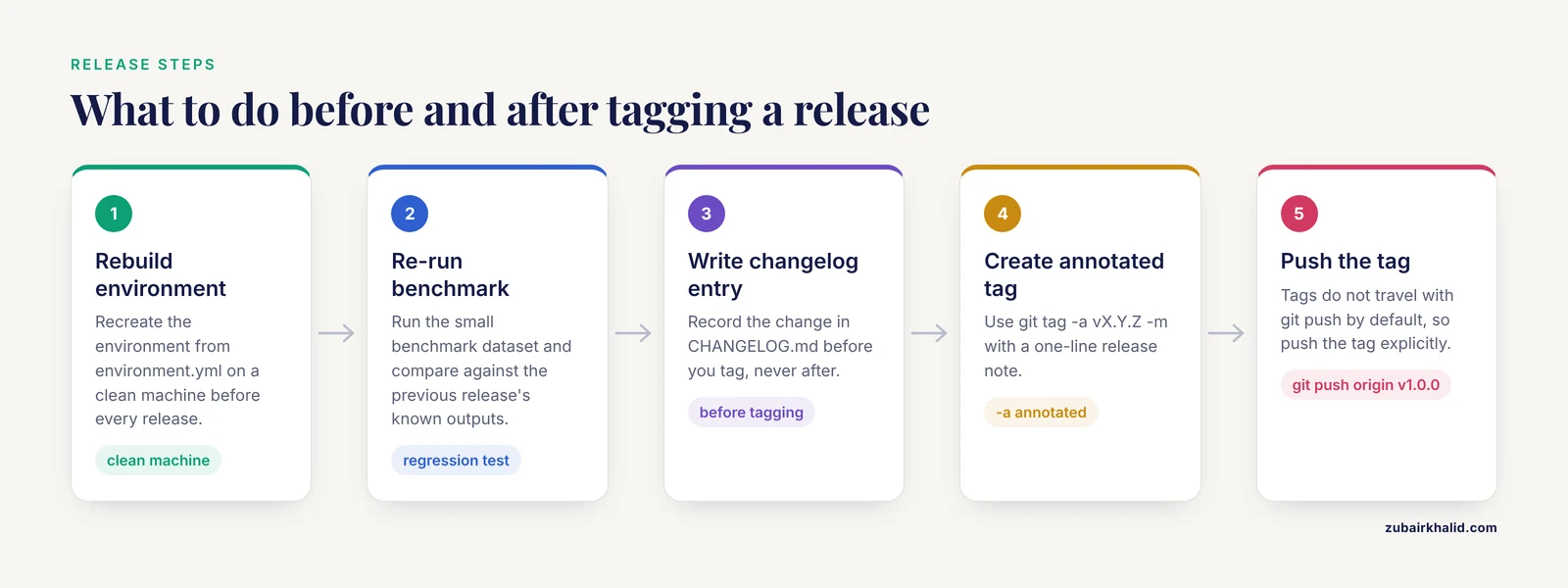
Version pinning means recording exact versions, not ranges. The MAYA pipeline, a rule-based Snakemake workflow for bacterial annotation, integrates eighteen tools and uses per-rule Conda environment isolation to enforce strict version control and reproducibility across all of them, from quality control and assembly through functional annotation [6]. Per-rule isolation gives every step its own pinned environment, so upgrading one tool cannot silently change another step's behavior.
Containers go further by packaging software together with its operating system libraries. In molecular pathology laboratories, containers provide a consistent computational environment and facilitate the validation, version control, and documentation required for clinical laboratory regulatory compliance [7]. Tag the container image to match the Git tag (an image named rnaseq-docs:1.0.0 built from tag v1.0.0) and the mapping between documentation and software becomes unambiguous. The Compi framework demonstrates the same principle from the packaging side, with compi-dk described as a version-control-friendly tool that packages a pipeline application and its dependencies into a Docker image [8].
Practical rules. Pin with single equals signs in environment.yml. Rebuild the environment from the file on a clean machine before every release, because a file that has never been rebuilt is a guess. Export the full environment into run provenance, because it captures build strings the hand-written file omits. When a tool upgrade changes results, treat it as a MAJOR version bump, document the comparison in the changelog, and keep the old tag forever.
Testing What the Documentation Claims
Documentation makes claims: this command works, this output appears, this parameter means this. Verify claims the way you verify code. The cheapest test is the fresh clone rebuild shown in the walkthrough. The next level is continuous integration, where a GitHub Actions workflow rebuilds the environment and runs the quick start on every push, so a broken README fails loudly instead of failing a colleague quietly.
Automated checks can also guard the science inside the pipeline. Phytest automates quality control checks on sequences, trees, and metadata during phylogenetic analyses, integrates into existing pipelines, and ships from GitHub with pip install phytest and a dedicated documentation site [9]. The pattern transfers to any domain: write the checks that catch the failures you have actually seen, and run them inside the pipeline rather than after it.
Version changes themselves deserve regression tests. The crosslinking mass spectrometry community audit explicitly supported regression testing as a use case when it tracked improvement between software versions [3]. The lab version of that habit is simple: when you upgrade a tool, re-run a small benchmark dataset and compare against the previous release's known outputs before you tag.
GitHub for Researchers: Releases, Issues, and Archiving
GitHub for researchers adds four features that local Git lacks. Releases turn a tag into a citable, downloadable snapshot with release notes you can paste straight from CHANGELOG.md. Issues give questions and bugs a public, searchable home next to the documentation, which converts repeated email answers into permanent FAQ entries. Branch protection rules can require a review or a passing check before anything lands on main, which stops accidental overwrites of a stable release. And the repository itself is an off-site backup that survives a dead laptop.
Keep unpublished data out. A documentation repository can be public while the data it describes sits on lab storage or a controlled server, because .gitignore keeps the two apart. When a paper is accepted, archive the release tag of the documentation repository through your institution's archival service and cite the archived snapshot in the paper, so reviewers and readers land on the exact version you used.
Real Pipeline Examples Worth Copying
Five published pipelines show the template's habits at production scale.
nf-core/scnanoseq is a secondary analysis pipeline for long-read single-cell and single-nuclei RNA-seq, implemented in Nextflow on the nf-core framework, delivering gene and transcript-level quantification with portability across computational environments. Its source code and detailed documentation are freely available on GitHub [4]. Copy the habit of shipping documentation in the same repository as the pipeline, under a framework-enforced structure you can borrow even outside nf-core.
The Compi RNA-seq pipeline reached version 2.2 as a fully customizable command-line pipeline, with the update adding FASTQ quality control tasks, two alternative read-counting strategies, and newer differential expression and pathway tools such as DElite and RCPA, then demonstrated the release on an Alzheimer's disease case study [10]. Copy the discipline of versioned releases where each version's additions are stated plainly and backed by a worked case.
DiRT v2.0 documents a computational pipeline for detecting dicistronic tRNA-mRNA transcripts in plants and states exactly what changed from version 1, including expanded detection of tRNA-like structures and of tRNA sequences embedded in untranslated regions [11]. Copy the changelog discipline of enumerating what a new version detects differently.
clonevdjseq pairs a Nextflow workflow with a Django-based management system for sequencing, archiving, and analysis of VDJ sequences from clonal libraries, with modules for read processing, amplicon denoising, and quality control [12]. Copy the treatment of archiving and analysis as one documented system rather than two disconnected ones.
MINI-EX version 2 provides a comprehensive guide covering the entire pipeline, from preparing input files through configuring parameters to interpreting output data [13]. Copy the end-to-end guide structure, because the most common documentation gap is the middle, the parameters, between inputs and outputs.
Making Version Control a Lab Policy
Individual habit keeps one pipeline honest. Policy keeps a lab honest. The Nordic Alliance for Clinical Genomics (NACG) consensus recommendations, written by bioinformaticians running clinical production across thirteen units, call for clinical bioinformatics to operate at standards similar to ISO 15189, with standardized file formats and strict version control [14]. You do not need a clinical accreditation to borrow that discipline.
OpenGeneMed, an informatics hub built to coordinate an NCI precision oncology trial, automates variant annotation and review and is designed to facilitate clear documentation along the pipeline, reducing errors made when transferring data between groups [15]. The lesson generalizes: documentation that lives in the workflow, versioned and adjacent to the processing steps, beats documentation that lives in a separate document nobody updates.
A workable lab policy fits on one page.
- Every pipeline has a Git repository with a README, changelog, and pinned environment file.
- Every release is an annotated tag with a changelog entry, and the environment or container is rebuilt from scratch before the tag.
- Every analysis run writes provenance (commit hash, tag, environment export, container digest) into its output directory.
- Tool upgrades that could change results trigger a benchmark re-run and a MAJOR version bump.
- A quarterly audit picks one release, clones it fresh, rebuilds, and re-runs the benchmark.
- Nobody pushes to main without a review, enforced by branch protection where the repository is hosted.
Common Mistakes and Limitations
Committing data and results. The single most common failure. A repository that holds FASTQ files grows past every practical limit, GitHub rejects files over 100 MB, and clones take hours. Keep data and results ignored from step 2 onward and store them on managed lab storage with their own access controls.
Committing secrets. A token committed once remains in history forever, even after a later commit deletes the file, and public forges scan for leaked credentials. Keep secrets in files .gitignore excludes, and rotate any credential that ever touched a commit.
Messages nobody can search. Commits named "update", "fixes", or "misc" make git log useless six months later. Write each message as a changelog line that names the file and the reason.
Editing in two places. A change made on the GitHub website while the same file changed locally produces the rejected push shown in the walkthrough. Pull before you edit, and pick one primary place to edit.
Never tagging. Untagged history makes "which version produced this figure?" unanswerable. Tag every state you would show a reviewer, starting at v0.1.0.
Versions in prose. Writing that a pipeline used "recent versions" of all tools documents nothing. Versions belong in pinned, machine-readable files that Git tracks.
Treating the repository as validation. Version control records what ran. It does not prove the result is correct, and it does not replace quality control, benchmarking, or review of individual analyses by a qualified professional.
Two hard limits. Git handles text well and large binaries poorly, so sequencing data, images, and proprietary formats belong elsewhere. And Git captures computational provenance, not wet-lab metadata, so sample handling still needs a laboratory information system or a disciplined spreadsheet with its own backup.
Frequently Asked Questions
What is version control for pipeline documentation?
It is the practice of managing a pipeline's README, changelog, configuration files, and environment definitions in Git, so every documented state is saved with an author, a date, and a restorable snapshot. Each commit records what changed and why, and each tag marks a release that corresponds to specific results.
Do I need GitHub, or is local Git enough?
Local Git alone already gives you history, restore points, and tags on your own machine. GitHub adds backup, sharing, Releases, Issues, and review tools, which is what turns private history into lab infrastructure. Start local, publish as soon as anything is worth a colleague's time.
How should I number pipeline versions?
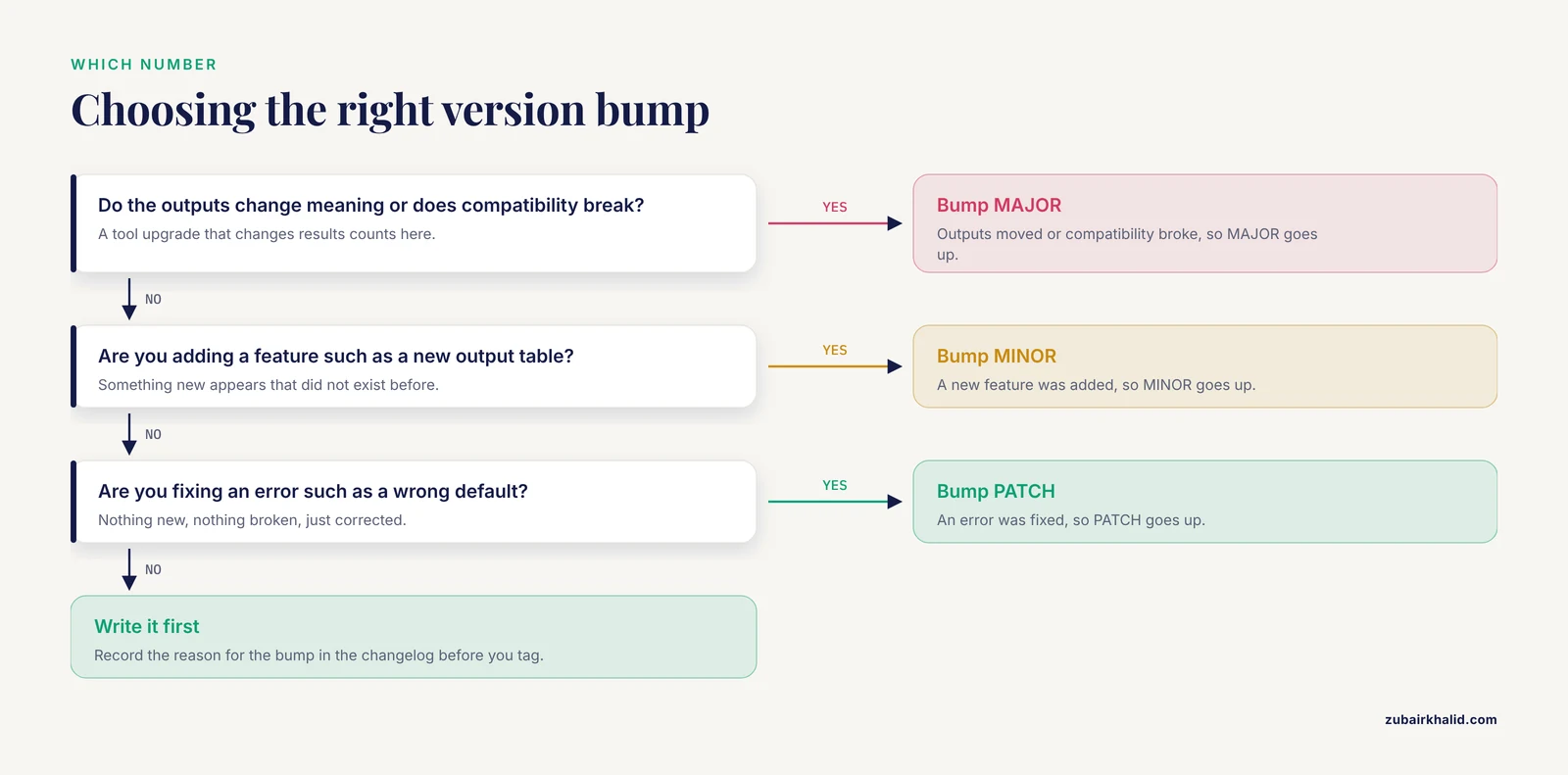
Use semantic versioning with three numbers, MAJOR.MINOR.PATCH. Bump MAJOR when outputs change meaning or compatibility breaks, MINOR when you add a feature, and PATCH when you fix an error. Write the reason for the bump in the changelog before you tag.
What is the difference between a tag and a branch?
A tag is a permanent name pinned to one specific commit and is used for releases. A branch is a movable line of development used to draft and review changes. Branches get merged and deleted, tags persist.
How do I record which software versions a specific run used?
At run time, write the commit hash from git rev-parse HEAD, the nearest tag from git describe, the full conda environment export, and the container digest into the run's output directory. Automate the capture inside the pipeline script so no run can skip it.
Should raw sequencing data live in the documentation repository?
No. Git is built for text, large binary files bloat every clone, and GitHub rejects files over 100 MB. Keep data on managed lab storage, exclude it with .gitignore, and record in the documentation where the data lives.
How much detail does a good README need?
Enough for a colleague to run the pipeline without asking you a question: a copy-paste quick start, inputs and outputs, a parameter table, pinned software versions, and a contact. Anything longer belongs in docs/ pages linked from the README.
How does version control help with peer review and publications?
It lets you state exact versions in the methods section and back the claim with a tag, a release, and an archived snapshot reviewers can inspect. When a reviewer asks what changed, git diff between two tags answers in one command.
Sources
- A Framework for Bioinformatic Reporting in Prenatal Sequencing: Insights From a Systematic Review.
- FairFlow: A transparency-first framework for verifiable and reproducible bioinformatics.
- A community audit of error control in crosslinking mass spectrometry.
- scnanoseq: an nf-core pipeline for Oxford Nanopore single-cell RNA-sequencing.
- Qualimap 2: advanced multi-sample quality control for high-throughput sequencing data.
- Deep Genomic Characterization of Bacillus subtilis SNUY1 & 168 Using MAYA (Multistage Analysis of Prokaryotic Annotations): An Integrated Snakemake-Based Bioinformatics Pipeline.
- Containers in Bioinformatics: Applications, Practical Considerations, and Best Practices in Molecular Pathology.
- Compi: a framework for portable and reproducible pipelines.
- Phytest: quality control for phylogenetic analyses.
- Updates and validation of the Compi RNA-seq pipeline with a case study in Alzheimer's disease.
- DiRT v2.0: An Optimized Pipeline for Detecting Dicistronic tRNA-mRNA Transcripts in Plants.
- clonevdjseq: A workflow and bioinformatics management system for sequencing, archiving, and analysis of VDJ sequences from clonal libraries.
- MINI-EX Version 2: Cell-Type-Specific Gene Regulatory Network Inference Using an Integrative Single-Cell Transcriptomics Approach.
- Recommendations for bioinformatics in clinical practice.
- OpenGeneMed: a portable, flexible and customizable informatics hub for the coordination of next-generation sequencing studies in support of precision medicine trials.