How to Version Control Large Genomics Datasets
By Dr. Zubair Khalid, DVM, MS, PhD ·
By the end of this guide you will be able to build a version control system for a genomics project of any size. You will know how to keep code and metadata under plain Git, how to track terabyte-scale sequence files through content-addressable storage, how to freeze a release so a collaborator can reconstruct your dataset byte for byte, and how to tag each state of a reference genome and its annotation so downstream users never have to guess what "final_v3_reallyfinal.gff" contains.
To follow the walkthrough you need a Unix-like shell (Linux, macOS, or WSL2 on Windows), Git installed, write access to one remote storage location such as an S3 bucket, a Google Cloud Storage bucket, an Azure container, an SSH-mounted NAS, or even a large external drive, and roughly 30 minutes. All commands are shown as they would be typed at the prompt.
Version control for genomics data is the part of bioinformatics data management most labs get wrong, and the failure is rarely technical. The tools are mature. The problem is that standard Git was designed for source code, not for a 40 GB BAM file, and the default workaround, encoding versions in filenames and folder names, does not scale. Researchers examining genome assembly and annotation practice note that version tracking is "left to researchers to organise with filenames, directories, or README files," an approach that cannot keep up with continuous re-annotation of millions of genomes [1]. This guide replaces that habit with a structure that scales.
Why Git Alone Fails on Genomics Files
Git records a content-addressed snapshot of every tracked file. When you commit, Git computes a hash of the file content and stores the object in a compressed packfile. For text source code this is efficient, because small edits produce small deltas between commits. A 35 GB CRAM file produces a new 35 GB object on every commit. Within months, the .git directory exceeds the storage of the data itself, clone times become hours, and Git hosts start refusing the push.
The commonly used hosting services enforce this with hard limits. GitHub warns when a single file exceeds roughly 50 MB and rejects files above 100 MB, producing this message during push:
remote: error: GH001: Large files detected.
remote: error: this exceeds GitHub's file size limit of 100.00 MB
A related failure appears when many large files accumulate in one push:
fatal: pack exceeds maximum allowed sizeThese limits exist because the underlying transport and storage model was never meant for genomics data storage at scale. One consortium-scale project illustrates the magnitude. The Cancer Genome Atlas holds more than 1.2 petabytes of whole genome, whole exome, methylation, RNA expression, proteomic, and clinical data, and the TCGA Expedition system was built specifically to download, extract, harmonize, version, and store that material with explicit version control and archival practices [2]. Nobody achieves that by committing FASTQ files to Git.
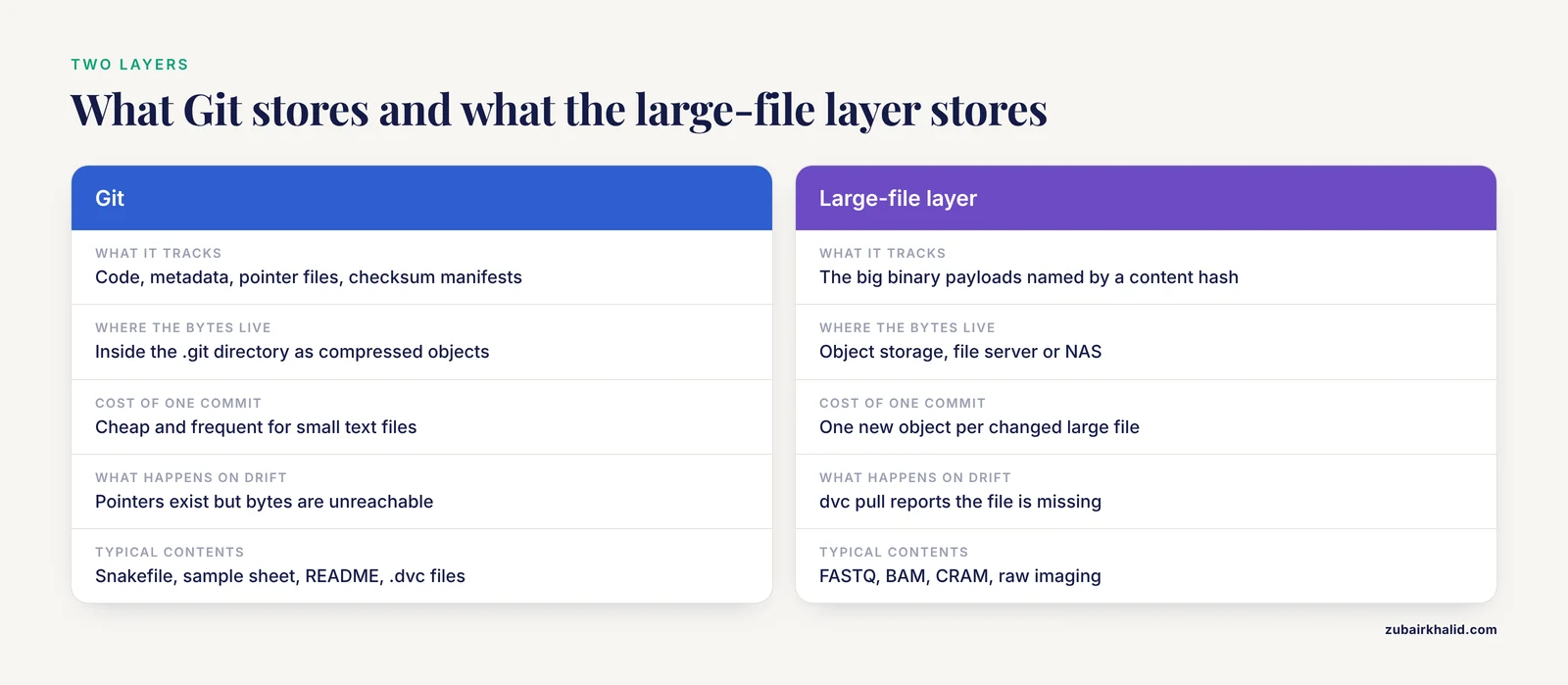
The correct mental model has two layers:
- Git tracks everything small and text-like: pipeline code, configuration files, sample metadata, pointer files, checksum manifests, and README documentation. Commits are cheap and frequent.
- A large-file layer (DVC, git-annex, or Git LFS) tracks the big binary payloads. Git stores only lightweight pointer or symlink files that name a specific content hash. The bytes themselves live in object storage, a file server, or a NAS.
The large-file layer is what makes version control for genomics data actually work. Everything else in this guide follows from that separation.
Design the Versioning Policy Before Touching Any Tool
Bioinformatics data management fails most often at the policy level, not the tool level. Before running a single command, decide the following for your lab or project.
Classify your files into four tiers
| Tier | Examples | Version control treatment |
|---|---|---|
| Code and workflow | Snakefile, R scripts, Dockerfiles | Plain Git, commit freely |
| Metadata and config | sample sheet, reference manifest, README | Plain Git, commit freely |
| Derived results | VCF, counts matrix, tables, figures | Large-file layer or plain Git if small |
| Raw and primary data | FASTQ, BAM, CRAM, raw imaging | Large-file layer plus immutable cold storage, checksummed on ingest |
The raw tier deserves special care. In clinical genomics, raw and intermediate files should remain in appropriately governed laboratory or genomics repositories, while the reusable, meaningful layer (structured, phenotype-linked, versioned findings) is what moves into shared and reinterpretable systems [3]. The same principle applies in research: keep raw reads in a place with controlled access and append-only history, and treat every downstream file as regenerable from raw data plus a pinned pipeline.
Fix your identifier and tagging scheme
Use one canonical sample identifier everywhere, and never encode version information in filenames. Instead of cohortA_v2_final.vcf.gz, keep the filename stable (cohortA.vcf.gz) and let the version control system record that the content changed. Consumers then ask the system, not the filename, which version they have. This is exactly the failure mode identified in the genome assembly literature, where updates to FASTA and GFF files happen without systematic documentation, different annotation versions cannot be computationally compared, and accumulated knowledge lives only in human-readable README files disconnected from the data [1].
Separate immutable raw data from mutable derived data
Raw reads should be written once, checksummed, and never edited. Derived files change constantly, and that change history is precisely what you want to capture. Mixing the two in one Git repository means every derived-file commit falsely implies the raw data changed too. Many labs therefore run two repositories per project: a code-and-metadata repository and a data repository linked through DVC or git-annex.
Choosing a Tool: The Main Options
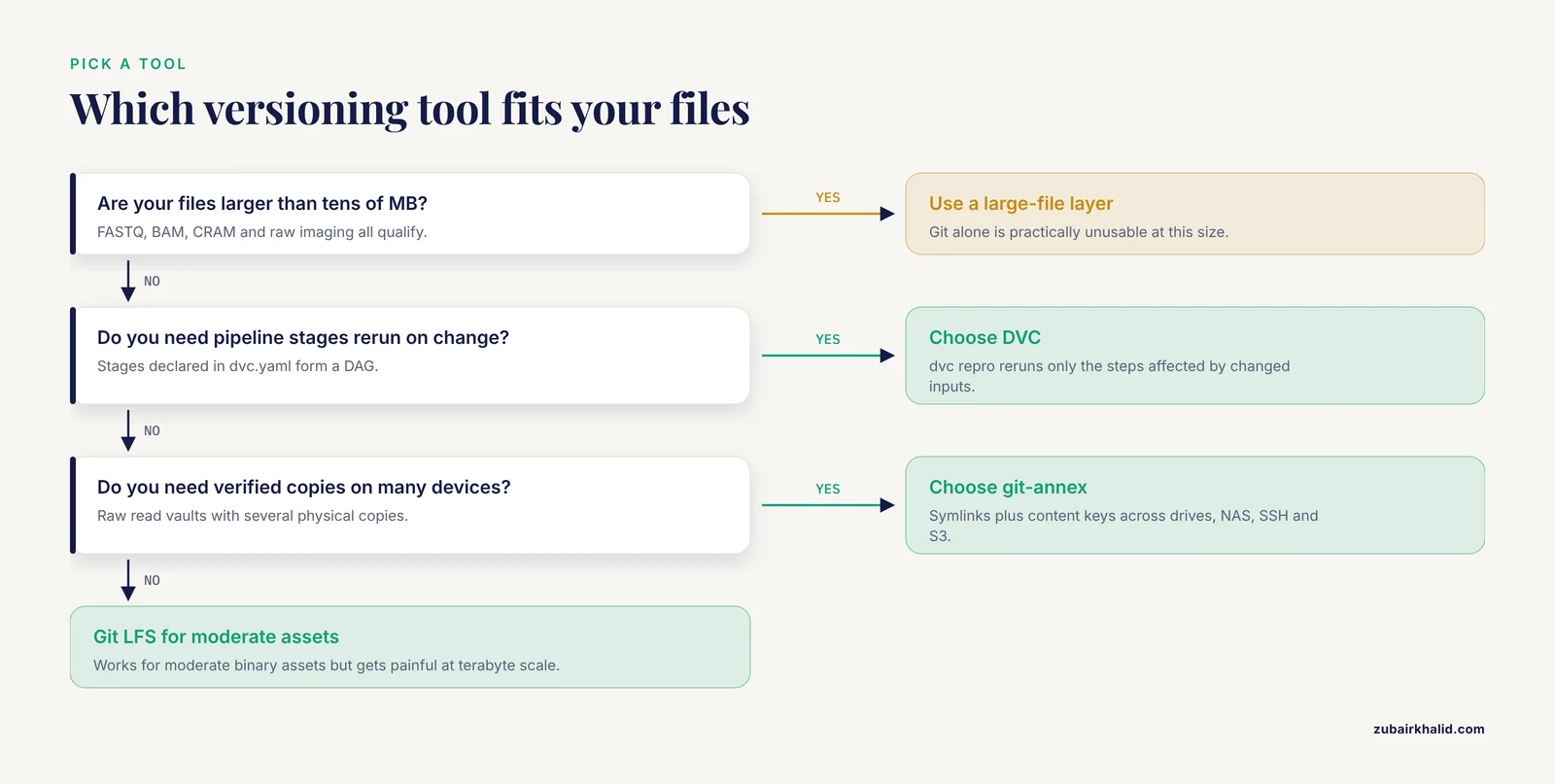
Four tools cover essentially every real-world case. Git LFS works well for moderately sized binary assets but was designed with media files in mind and becomes painful at terabyte scale, so most genomics groups standardize on DVC or git-annex.
| Tool | What Git stores | Where the bytes live | Best for | Key constraint |
|---|---|---|---|---|
| Git alone | Full file contents | The .git directory | Code, metadata, small text results | Practically unusable for files over tens of MB |
| Git LFS | Pointer files | LFS server | Moderate binary assets | Server quota and bandwidth costs grow quickly |
| git-annex | Symlinks plus content keys | Any of many remotes (drives, NAS, SSH, S3) | Raw read archives with many copies | Files appear as symlinks, which surprises some tools |
| DVC | Small .dvc pointer files | S3, GCS, Azure, SSH, local directories | Pipeline-aware versioning, experiments, reproducibility | Two-step commit (DVC, then Git) must become a habit |
DVC is the natural fit when you also want pipeline reproducibility, because stages declared in dvc.yaml form a directed acyclic graph (DAG, a graph of steps connected so no loops exist) and dvc repro reruns exactly the steps affected by changed inputs. git-annex is the natural fit for raw data vaults, where the priority is keeping verified copies on several physical devices. The BioBricks.ai registry shows what mature data-as-code looks like at community scale: each dataset is packaged as a DVC Git repository containing an extract-transform-load pipeline, with a package-manager-style interface handling installation, dependency resolution, and updates across more than 90 curated life sciences datasets [4]. That architecture is a useful template even for a single lab.
Version Control for Genomics Data, Step by Step
This walkthrough builds a complete project. Follow it top to bottom.
Step 1: Install the toolchain
The fastest reproducible route is Conda (a package manager that installs software into isolated environments):
conda create -n vcgenomics -c conda-forge git git-annex dvc rclone
conda activate vcgenomics
If you plan to use S3 or GCS as the DVC remote, install the matching extra:
pip install "dvc[s3]"Step 2: Create the repository skeleton
mkdir -p myproject/{data,results,scripts,config,checksums}
cd myproject
git init
dvc init
git commit -m "Initialize project with DVC"
dvc init creates a .dvc directory and stages a .gitignore entry pattern. DVC works by listing large files inside .gitignore (so Git ignores the bytes) and writing a companion pointer file, such as data/cohortA.vcf.gz.dvc, that Git does track. The pointer contains an MD5 content hash, a size, and a path in the remote cache.
Step 3: Checksum raw data at ingest
The moment data arrives from the sequencer or a collaborator, compute checksums (fixed-length fingerprints of file content used to detect corruption) and record them:
md5sum data/*.fastq.gz > checksums/raw_ingest.md5
sha256sum data/cohortA.vcf.gz
Expected output for the second command looks like:
9f2c1b...a4e8 data/cohortA.vcf.gzSave both manifest files in Git. Any later dispute about whether a file transferred intact is settled with one md5sum -c checksums/raw_ingest.md5 run, which prints OK or FAILED for each file.
Step 4: Add the first large file through DVC
dvc add data/cohortA.vcf.gzExpected output resembles:
100% Add|████████████████|1/1 [00:14<00:00, 0.28s/file]
To track the changes with git, run:

	git add data/.gitignore data/cohortA.vcf.gz.dvc
Then commit the pointer, never the bytes:
git add data/.gitignore data/cohortA.vcf.gz.dvc
git commit -m "Track cohortA VCF callset via DVC pointer"
Run git log, oneline and you will see a history where every meaningful change to the dataset is one reviewable line, even though the underlying file is gigabytes.
Step 5: Configure the remote and push
dvc remote add -d s3store s3://genomics-dvc-store/myproject
dvc push
Expected output:
2 files pushedThe -d flag marks this remote as the default. For a NAS over SSH, use dvc remote add -d nas ssh://[email protected]/mnt/genomics-store instead. Now run the Git half of the pair:
git push origin mainDVC push moves the file bytes. Git push moves the pointers and code. You need both, always, and this two-step habit is the single most common thing new DVC users forget.
Step 6: Declare the pipeline so versions and logic travel together
Create a dvc.yaml describing one analysis stage:
stages:
  call_variants:
    cmd: bcftools mpileup -f config/reference.fa results/reads.bam
         | bcftools call -mv -Oz -o results/calls.vcf.gz
    deps:
      - config/reference.fa
      - results/reads.bam
    outs:
      - results/calls.vcf.gz
Every parameter matters here:
- cmd is the shell command DVC executes. Keep it on the record, not hidden in a shell history file.
- deps lists input files. When any dependency changes,
dvc reproknows the output is stale. - outs lists outputs DVC tracks. Each output gets its own pointer file and checksum, so
dvc statuscan detect silent drift between your declared pipeline and the files on disk.
Now rerunning the pipeline after any change is one command:
dvc reproExpected output:
Data and pipelines are up to date.or, when something changed:
Reproducing stage 'call_variants' from '...
'Running stage 'call_variants':
Updating lock file 'dvc.lock'
The dvc.lock file records the exact checksum of every dependency and output at the time of the run. Commit dvc.lock alongside dvc.yaml. This pairing is what makes an analysis reproducible rather than merely repeatable, and it complements workflow-level version control in engines like Snakemake, where per-rule Conda environment isolation gives strict version control over every constituent tool from quality control through annotation [5].
Step 7: Pin the software environment
Tool versions change results. The GeneMiner2 project demonstrates this concretely: the update from GeneMiner introduced a two-level hash table for k-mer filtering, fine-grained read selection with strand-orientation and structural-anomaly detection, and adaptive k-mer selection, and those changes measurably altered assembly accuracy against competitor tools [6]. If a collaborator reruns your pipeline with the old GeneMiner and a different environment, they will get different numbers. Export the resolved environment and commit it:
conda env create -f envs/calling.yml
conda env export -n vcgenomics > envs/calling.lock.yml
git add envs/calling.lock.yml
git commit -m "Pin calling environment: exact package versions"
The lock file lists every package with its exact build string, which is what makes the environment reproducible on another machine.
Step 8: Tag the first frozen release
git tag -a v1.0.0 -m "First frozen release: raw reads ingested, reference pinned, callset v1"
git push origin v1.0.0
An annotated tag (a named, dated, message-bearing marker on a specific commit) becomes the address of the release. A collaborator reconstructs the exact dataset with:
git clone [email protected]:lab/myproject.git
cd myproject
git checkout v1.0.0
dvc pull
dvc pull reads the pointer files at that tag and fetches exactly the checksummed bytes they name. Anyone, anywhere, can rebuild the dataset state you tagged, which is the entire point of version control for genomics data.
Step 9: Verify integrity and state
Three commands form your routine audit:
dvc status
md5sum -c checksums/raw_ingest.md5
git annex fsck
dvc status prints Data and pipelines are up to date. when pointers, cache, and remote agree. md5sum -c replays the ingest checksums. git annex fsck walks a git-annex repository and verifies each file's checksum on disk, reporting any corruption it finds.
A Worked Example: Versioning a Reference Genome and Annotation
Reference files are the clearest demonstration of why this discipline matters. Genome consortia routinely update assemblies and re-annotate gene models, but those updates historically arrive without systematic documentation, so a user cannot tell whether a coordinate shift came from a new assembly or merely new gene models [1]. Here is a policy that fixes it locally.
When the new assembly and its GFF3 annotation arrive:
sha256sum refs/grch38.fa.gz refs/grch38.gff3.gz > checksums/refs_v1.md5
dvc add refs/grch38.fa.gz refs/grch38.gff3.gz
git add refs/*.dvc checksums/refs_v1.md5
git commit -m "Add reference bundle v1: assembly A + annotation A"
git tag -a ref-v1.0.0 -m "Reference bundle v1"
When the annotation is updated against the same assembly:
dvc add refs/grch38.gff3.gz
git add refs/grch38.gff3.gz.dvc
git commit -m "Reference bundle v2: same assembly, re-annotated gene models"
git tag -a ref-v2.0.0 -m "Reference bundle v2"
Because grch38.fa.gz.dvc did not change, the checksum history proves the assembly is identical and only the annotation moved. Downstream users can run git diff ref-v1.0.0 ref-v2.0.0, refs/ to see precisely which pointer changed, and dvc diff ref-v1.0.0 ref-v2.0.0 to see file-level changes. Results produced against the old annotation remain attributable, recomputable, and comparable, which is exactly the computational comparability that flat-file distribution has lacked for over 25 years [1].
Version Control for Genomics Data: Practical Tips
These are the habits that separate a durable system from a fragile one.
- Write a one-page versioning policy and put it in the repository root. State which tiers go in Git, which go through the large-file layer, what the tag scheme is, and who approves a release. Policy in a README beats policy in someone's memory.
- Tag with a fixed scheme and never move tags. Use
ref-v1.0.0for references,data-v1.2.0for dataset states,pipeline-v0.4.1for pipeline releases. Patch numbers bump for fixes, minor numbers for new samples or stages, major numbers for breaking coordinate or format changes. - Pair every DVC push with a Git push. Make it a single scripted alias so the pointer store and the byte store never drift apart.
- Keep at least three copies, on two media types, with one off-site. Version control records history, backups protect against loss, and the two are not substitutes.
rclone copy /data/raw remote:genomics-raw -Pto a second provider is a five-minute job that has saved many projects. - Record the pipeline version alongside the data version. A results tag means little without the
dvc.lock, Conda lock file, or container digest that produced the results. Workflows like the MAYA Snakemake pipeline combine per-rule Conda isolation with a single end-to-end rule-based framework so tool versions are pinned from quality control through annotation [5]. - Add a checksum column to your sample sheet. When a sample's FASTQ is replaced or corrected, the checksum change is itself a commit, and the history of that sample becomes auditable.
- Publish releases with a persistent identifier. Deposit a tagged snapshot in an archival repository such as Zenodo to obtain a DOI, so papers can cite an immutable dataset version rather than a moving repository head.
- Reuse community versioned resources instead of rebuilding them. Registries such as BioBricks.ai treat each public dataset as a versioned DVC package with dependency resolution and provenance, reducing the bespoke ETL scripting that otherwise produces inconsistent pipelines across a lab [4].
Common Mistakes and Limitations
These are the failures seen repeatedly in real labs, with the fix for each.
- Committing BAMs and FASTQs directly to Git. The repository bloats, pushes fail with the GH001 or pack-size errors shown earlier, and rewriting the history to remove the files is painful. Fix: route anything over a few megabytes through DVC or git-annex from day one.
- Using filenames as the version system.
final,final2,final_final_2024carries no machine-readable meaning, cannot be compared computationally, and breaks as soon as two people rename files concurrently. Fix: stable filenames, versions in Git tags [1]. - Pushing pointers without pushing bytes, or the reverse. A colleague who clones the repository and runs
dvc pullagainst an empty remote getsERROR: 'data/cohortA.vcf.gz' is missingor a cache miss. Conversely, bytes pushed without pointers are orphaned and unreachable by tag. Fix: script the pair, and verify withdvc statusafter every release. - Treating backups as version control. A nightly
rsyncto a NAS has one state, the latest. It cannot answer "what did the callset look like when we submitted the paper in March." Fix: keep both, with distinct roles. - Reprocessing without tagging. Running the pipeline five times with tweaked parameters and overwriting outputs destroys the provenance of the four discarded runs, which are often the ones reviewers ask about. Fix: tag or branch before each reprocessing campaign, or use DVC experiments, which track parameter sets and results in parallel.
- Putting identifiable human data into a shared repository. Repository hosting is not a governed clinical repository. Structured, versioned, phenotype-linked findings may be designed for interoperable reuse, but raw and intermediate clinical genomic files belong in appropriately governed laboratory or genomics repositories with the required access controls [3]. Fix: classify human-derived data as a separate tier with restricted storage, de-identified keys held separately, and access logged.
- Versioning data but not software. A frozen VCF is not reproducible if the caller, its parameters, and its environment are unpinned. Fix: commit lock files and container digests with every data tag.
- Assuming the tools are zero-maintenance. DVC requires learning a two-step commit model. git-annex presents large files as symlinks, which can confuse software that does not follow links, and its content-location bookkeeping needs occasional
git annex fsckattention. Object storage costs grow with every version you push, so decide a retention policy for old data versions rather than keeping every intermediate forever. Plan for these costs and quirks instead of discovering them mid-project.
A final limitation: version control records what changed and when, but it cannot tell you whether a change was biologically correct. That judgment still lives with the analysts and the review process.
Frequently Asked Questions
Can Git alone handle FASTQ or BAM files?
No. Git stores every committed file in full inside its object database, so a 35 GB BAM creates a 35 GB object per commit, and hosting services reject single files above roughly 100 MB. Keep Git for code, metadata, and pointer files, and route large files through DVC, git-annex, or Git LFS.
Should I version raw reads or only derived data?
Version both, but in different ways. Raw reads belong in an append-only, checksummed store tracked through git-annex or DVC with restricted access, while derived files and the pipeline that produced them live in the versioned repository so every result remains traceable to a specific raw data state.
How do DVC and git-annex differ?
DVC stores pointer files and is built around pipeline stages, reproducibility, and experiments, making it a good default for analysis projects. git-annex stores symlinks plus content keys and excels at keeping verified copies of an archive across many drives and servers, making it a good default for raw data vaults. Many labs use both.
How do I hand a collaborator an exact copy of my dataset?
Tag the release, push both Git and DVC remotes, and share the tag name. The collaborator clones the repository, checks out the tag, and runs dvc pull, which fetches exactly the checksummed bytes the pointers name at that release.
Do I still need backups if everything is version controlled?
Yes. Version control answers "what changed," backups answer "what if this disk died." Keep at least three copies on two media types with one off-site, and verify them with checksum replay.
How do I version a reference genome and its annotation?
Add both files through DVC, commit a checksum manifest, and tag the pair, for example ref-v1.0.0. When the annotation is re-issued against the same assembly, only the annotation pointer changes, and the tag history documents that fact computationally rather than in a README.
What do very large consortia-scale projects do?
They build dedicated versioning and archival systems on top of object storage. The TCGA Expedition system, for example, was built to download, extract, harmonize, version, and archive over a petabyte of multi-platform cancer data using scripted pipelines with explicit version control and federal-grade security controls.
How do I make a dataset citable in a paper?
Freeze a tagged release, verify it with dvc status and checksum replay, deposit the snapshot in an archival repository such as Zenodo to obtain a DOI, and cite the DOI in the manuscript so readers land on the exact version you analyzed.
Sources
- Genome assemblies and annotations are not static and need support for tracking their evolution.
- TCGA Expedition: A Data Acquisition and Management System for TCGA Data.
- Making Genomic Data Actionable in Electronic Health Records: Practical Viewpoint on Standards, Governance, and Implementation.
- BioBricks.ai: a versioned data registry for life sciences data assets.
- Deep Genomic Characterization of Bacillus subtilis SNUY1 & 168 Using MAYA (Multistage Analysis of Prokaryotic Annotations): An Integrated Snakemake-Based Bioinformatics Pipeline.
- GeneMiner2: Accurate and Automated Recovery of Genes From Genome Skimming Data.