Version Control for Bioinformatics Workflows with Git
By Dr. Zubair Khalid, DVM, MS, PhD ·

By the end of this article you will be able to initialize a Git repository for a real analysis project, commit pipeline scripts and configuration files, ignore large sequencing files, branch to test an alternative method, publish the project to a remote host such as GitHub, tag a release that matches a manuscript version, and undo mistakes without losing work. You will need a computer with Git installed (version 2.28 or newer so that git init -b main works), a terminal, a text editor, and optionally a free account on GitHub, GitLab, or a university-hosted Git server.
Why Version Control Belongs in Every Bioinformatics Workflow
A bioinformatics workflow is the chain of scripts, configuration files, and documentation that turns raw sequencing data into figures and tables. The data files are usually enormous, but the code that processes them is small text. That small text is where every scientific decision lives: which reference genome, which alignment parameters, which filtering thresholds, which statistical model. Version control with Git records every change to that text, who made it, when, and why.
Git is a distributed version control system (VCS). "Distributed" means every collaborator holds a complete copy of the project history, not just the latest files. A tutorial by Weberpals and Wang on reproducible real-world evidence studies describes Git as the backbone of a FAIR workflow, where FAIR stands for Findable, Accessible, Interoperable, and Reproducible, and notes that a Git repository maintains a complete audit trail of all relevant study documents [1]. They also observe that the principles of version control and analytic code sharing are less established in some quantitative research areas than in computational biology, which makes adopting these habits early a practical advantage for anyone moving between domains [1].
Concretely, Git solves four recurring problems in computational work:
- "Which script version produced this figure?" Every commit has a unique identifier, so a figure in a manuscript can be traced to an exact snapshot of the code.
- "Can we rerun the analysis exactly as reviewed?" A tagged commit, combined with a pinned software environment, lets a reviewer or collaborator recreate the analysis months later.
- "Can we try a different method without breaking what works?" Branches isolate experimental changes until they are validated.
- "How do two analysts edit the same pipeline without overwriting each other?" Git merges concurrent edits and flags genuine conflicts instead of silently losing work.
Core Git Concepts, Defined
Before the walkthrough, here are the terms used throughout this article. Each is defined once and used consistently afterward.
- Repository (repo): A project folder that Git tracks, including the full history of changes. The history lives in a hidden
.gitdirectory inside the folder. - Commit: A permanent snapshot of tracked files at one point in time, with an author, timestamp, and message. Each commit has a unique identifier called a SHA (a 40-character hash, often shortened to its first 7 characters, such as
1a2b3c4). - Working tree: The files you actually see and edit in the project folder.
- Staging area (index): A waiting area where you place changes you intend to include in the next commit.
git addmoves changes into it. - HEAD: A pointer to the commit you currently have checked out, usually the tip of your current branch.
- Branch: An independent line of development. The default branch in this guide is
main. - Remote: Another copy of the repository on a server, such as GitHub or a university GitLab instance.
originis the conventional name for your primary remote. - Clone: A full local copy of a remote repository, including its history.
- Pull request (PR) or merge request (MR): A proposed set of commits submitted for review before being merged into the main branch.
Installing and Configuring Git
On Linux, install with your package manager, for example sudo apt install git on Debian or Ubuntu. On macOS, git is available through the Xcode command line tools, invoked the first time you run any Git command, or through Homebrew with brew install git. On Windows, install Git for Windows, which provides the Git Bash terminal used throughout this article.
Verify the installation and set your identity. Git stamps every commit with a name and email, and hosts use the email to attribute commits to your account.
git --version
# git version 2.43.0

git config user.name "Jane Doe"
git config user.email "[email protected]"
git config -l
The git config -l command lists active settings. Running git config inside a repository sets values for that repository only. To apply your name and email to every repository on the machine, repeat the same commands with the global option placed before the setting name, for example git config followed by the word global and then user.name. Most package documentation and the Git Book describe this option in detail. Also configure your default editor so interactive commands open something you can use:
git config core.editor "nano"Step-by-Step: Version Control for a Bioinformatics Workflow Git Project
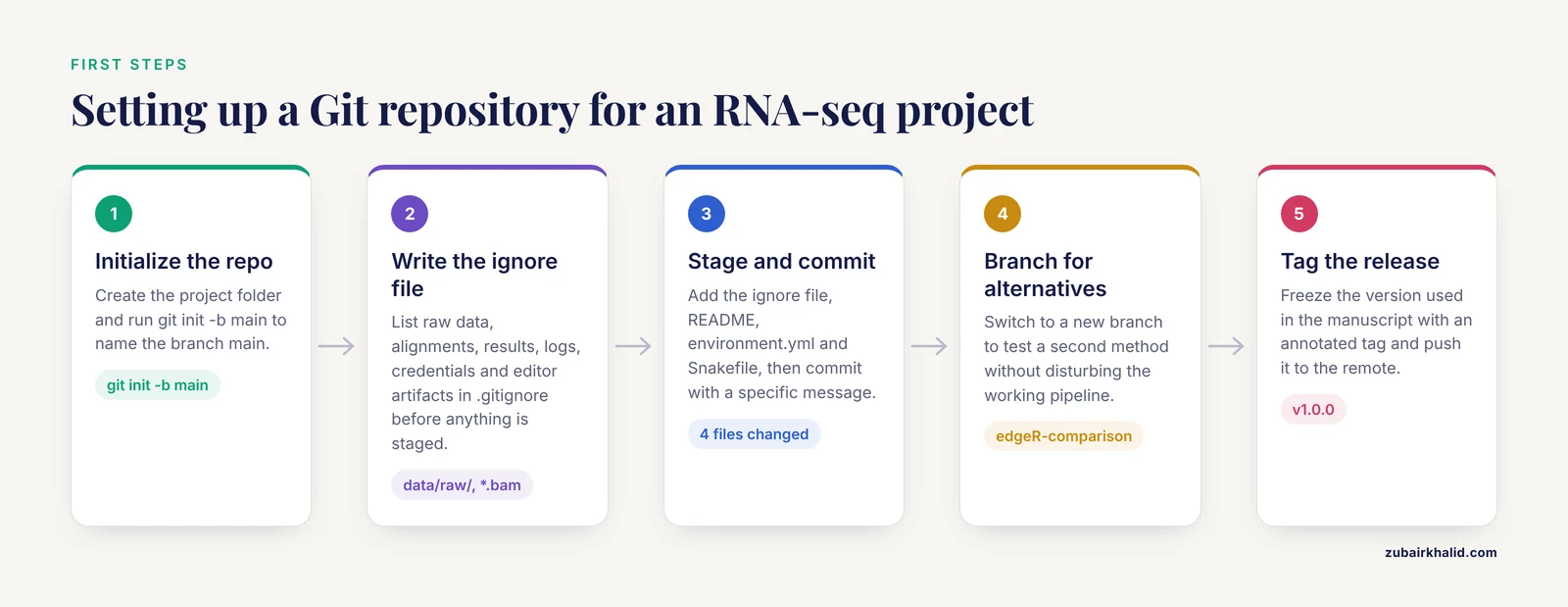
This walkthrough builds version control around a small RNA-seq differential expression project containing a Snakemake pipeline, an R script, and a conda environment file. The same steps apply to Nextflow, CWL, WDL, or plain shell pipelines, and to Python-only projects.
1. Create the Project and Initialize the Repository
mkdir rnaseq-dge
cd rnaseq-dge
git init -b main
Expected output:
Initialized empty Git repository in /home/jane/rnaseq-dge/.git/The -b main flag names the initial branch main instead of the older default master. Inside the folder, .git/ now holds the object database. Check the state:
git statusExpected output:
On branch main

No commits yet

nothing to commit (create/copy files and use "git add" to track)
If you see fatal: not a git repository (or any of the parent directories): .git, you ran the command outside an initialized folder. Move into the project directory or run git init again there.
2. Decide What Git Should Ignore
The .gitignore file lists patterns Git should never track. In bioinformatics this file does most of the work of keeping the repository small, because raw reads, alignments, and result tables do not belong in Git.
Create a file named .gitignore with the following content:
# Raw data and large intermediates
data/raw/
*.fastq.gz
*.bam
*.bai
*.cro

# Pipeline outputs
results/
logs/
.Snakemake/
.snakemake/

# Environment and editor artifacts
.Rhistory
.RData
.Rproj.user/
__pycache__/
*.pyc

# Credentials
secrets.yaml
*.token
.env
Comment lines start with #. Patterns match anywhere in the tree unless they begin with a slash, which anchors them to the repository root. Committing credentials is one of the most damaging mistakes in hosted repositories, so lines for token files belong here from day one.
3. Add Files and Make Your First Commit
Populate the project with a minimal Snakemake file, an environment file, and a README. A realistic environment.yml pinned to specific versions looks like this:
name: rnaseq-dge
channels:
  - conda-forge
  - bioconda
dependencies:
  - snakemake=7
  - star=2.7
  - samtools=1.19
  - featurecounts=2.0
  - r-base=4.3
  - bioconductor-deseq2
Stage the files and commit:
git add .gitignore README.md environment.yml Snakefile
git status
Expected output (abridged):
On branch main

No commits yet

Changes to be committed:
  (use "git rm -r" to unstage...)
        new file:   .gitignore
        new file:   README.md
        new file:   environment.yml
        new file:   Snakefile
git add places files in the staging area. Nothing is recorded yet. Commit now:
git commit -m "Initial pipeline: STAR alignment, featureCounts, DESeq2 skeleton"Expected output:
[main (root-commit) 1a2b3c4] Initial pipeline: STAR alignment, featureCounts, DESeq2 skeleton
 4 files changed, 87 insertions(+)
 create mode 100644 .gitignore
 create mode 100644 README.md
 create mode 100644 environment.yml
 create mode 100644 Snakefile
The string 1a2b3c4 is the shortened SHA of this commit. Write commit messages in the imperative mood and describe the change, not the emotion. "Add DESeq2 contrast for treated versus control" is useful six months later. "Fixes" is not.
4. Inspect History and Changes
After you edit the Snakefile to add a new rule, check what changed before committing:
git diffThis shows every added line prefixed with + and every removed line prefixed with -. To compare your working tree against the last commit including staged changes, use git diff HEAD. To view recent history:
git log -5Expected output (abridged):
commit 9f8e7d6 (HEAD -> main)
Author: Jane Doe <[email protected]>
Date:   Tue Nov 11 09:42:17 2026 -0500

    Add multiqc rule for alignment QC summary

commit 1a2b3c4
Author: Jane Doe <[email protected]>
Date:   Tue Nov 11 09:15:03 2026 -0500

    Initial pipeline: STAR alignment, featureCounts, DESeq2 skeleton
Two other inspection commands earn their keep in collaborative projects. git show 9f8e7d6 prints the full diff of a single commit. git blame Snakefile annotates each line of a file with the commit and author that last changed it, which is the fastest way to find out why a parameter has a particular value.
5. Branch to Test an Alternative Analysis
Suppose a reviewer asks whether results hold with a different normalization, or you want to benchmark a second differential expression method without disturbing the working pipeline. Create a branch:
git switch -c edgeR-comparisonExpected output:
Switched to a new branch 'edgeR-comparison'-c creates the branch and switches to it in one step. Edit the R script on this branch, commit the changes, and compare branches any time with git diff main edgeR-comparison. When the alternative approach proves itself, merge it back:
git switch main
git merge edgeR-comparison
Expected output for a clean merge:
Updating 1a2b3c4..9f8e7d6
Fast-forward
 analysis/dge.R | 14 ++++++++------
 1 file changed, 8 insertions(+), 6 deletions(-)
If both branches edited the same lines, Git pauses and writes conflict markers into the file:
<<<<<<< HEAD
dds <- DESeq2::DESeq(dds)
=======
y <- edgeR::estimateDisp(y)
>>>>>>> edgeR-comparison
Resolve a conflict by editing the file to keep the correct code, removing all three marker lines, then running git add on the file and git commit to conclude the merge. Git lists conflicted files under "Unmerged paths" in git status until every one is resolved.
6. Connect a Remote and Push
A repository without a remote exists only on one disk, which makes it one spilled coffee away from loss. Create an empty repository named rnaseq-dge on your hosting service, then connect and upload:
git remote add origin https://github.com/janedoe/rnaseq-dge.git
git remote -v
git push -u origin main
Expected output (abridged):
Enumerating objects: 12, done.
Writing objects: 100% (12/12), 3.45 KiB | 3.45 MiB/s, done.
To https://github.com/janedoe/rnaseq-dge.git
 * [new branch]      main -> main
branch 'main' set up to track 'origin/main'.
-u links your local main to origin/main so future pushes and pulls need no arguments. From now on the daily rhythm is: git pull to fetch collaborator changes, work and commit locally, git push to publish. When a push is rejected with error: failed to push some refs and a hint that the remote contains work you do not have locally, someone pushed first. Run git pull, resolve any conflict, then push again. Never respond to this error by force pushing to a shared branch, because that erases collaborator commits.
7. Tag the Version You Wrote About
When a set of results goes into a manuscript, preprint, or submission package, freeze it with an annotated tag:
git tag -a v1.0.0 -m "Analysis version used for first manuscript submission"
git tag
git push origin v1.0.0
A tag is a named pointer to one commit that will never move, unlike a branch. Semantic version numbers of the form vMAJOR.MINOR.PATCH work well: bump the major number for a change of analysis design, the minor number for added analyses, and the patch number for bug fixes that do not change results. Hosting services turn tags into downloadable release archives, which is exactly what a reviewer or reader needs to rerun your analysis.
8. Fix Mistakes Without Losing Work
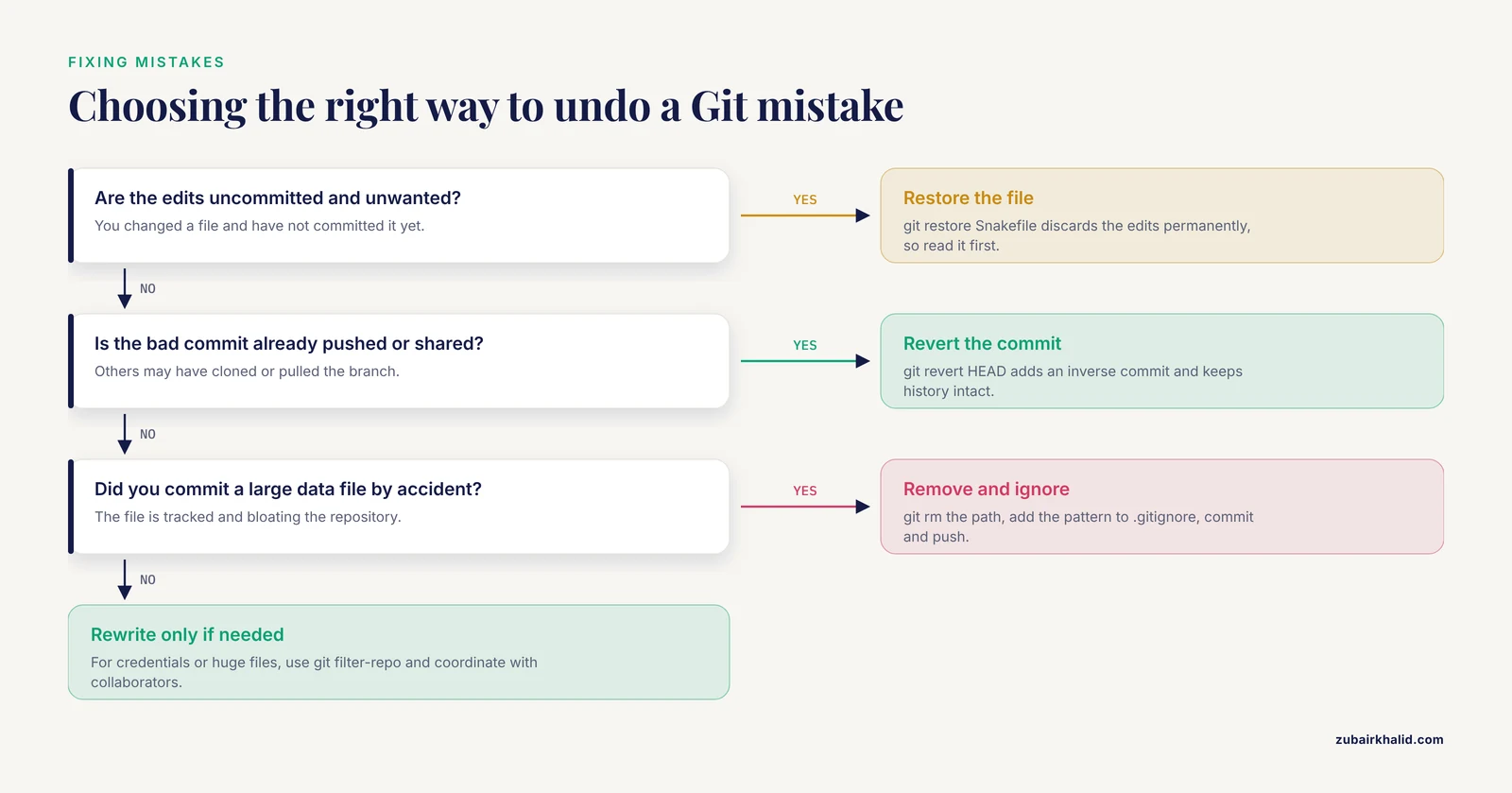
Three situations cover almost everything:
- You edited a file and want to discard the edits.
git restore Snakefilerestores the file from the last commit. This discards uncommitted work permanently, so read the file one more time first. - You committed something wrong.
git revert HEADcreates a new commit that undoes the previous commit while keeping history intact. This is the safe choice on shared branches. - You committed a large data file by accident. Remove it from tracking with
git rm -ron the path, add the pattern to.gitignore, commit, and push. The file remains in older history, so for credentials or genuinely enormous files, rewriting history with a tool such asgit filter-repoand coordinating with collaborators is the follow-up step.
Command Reference
| Task | Command | Notes |
|---|---|---|
| Start tracking a folder | git init -b main | Creates the .git history directory |
| Copy a hosted project | git clone URL | Downloads files plus full history |
| See file states | git status | Run this constantly, it is free |
| Stage changes | git add FILE or git add -A | Staging selects what the next commit contains |
| Record a snapshot | git commit -m "message" | Imperative, specific messages age well |
| View unstaged edits | git diff | Adds and removes shown line by line |
| View all edits vs last commit | git diff HEAD | Includes staged changes |
| View history | git log -5 | Each entry shows SHA, author, date, message |
| See who changed a line | git blame FILE | Maps every line to its last commit |
| Create and use a branch | git switch -c NAME | Isolates experimental work |
| Merge a branch | git merge NAME | Run from the branch receiving changes |
| Discard local edits to a file | git restore FILE | Permanent, use with care |
| Undo a published commit | git revert SHA | Adds an inverse commit, safe for shared branches |
| Connect a remote | git remote add origin URL | git remote -v verifies it |
| Publish commits | git push -u origin main | First push, then plain git push |
| Fetch collaborator work | git pull | Merge or rebase applied to local branch |
| Freeze a release | git tag -a v1.0.0 -m "note" | Annotated tags carry a message and author |
| Stash half-finished work | git stash | git stash pop brings it back |
Version the Environment, Not Just the Code
Git records text files. It does not record the versions of R, Python, Bioconductor, or command-line tools that executed that code, yet a pipeline rerun with different tool versions can produce different numbers. A reproducible project therefore pairs a Git tag with a pinned environment.
For conda-based workflows, export the solved environment and commit the result:
conda env export -n rnaseq-dge -f environment.lock.yml
git add environment.lock.yml
git commit -m "Pin solved environment for v1.0.0 release"
For R projects, the renv package captures exact package versions in an renv.lock file that is committed alongside the code. The Weberpals and Wang tutorial, which demonstrates Git inside R-based research workflows, presents this combination of version control plus locked dependencies as the practical route to FAIR analytic projects with a complete audit trail [1]. For heavier pipelines, a containerfile with a base image such as rocker/r-ver:4.3.1 or a Bioconductor release image, committed to the same repository and built automatically by the hosting service, pins the entire software stack. The rule of thumb is that a reviewer should be able to check out tag v1.0.0, build the committed environment, run the pipeline, and obtain the committed result tables.
Large Data: What Git Can and Cannot Track
Git stores every historical version of every tracked file in the .git directory. Text compresses and diffs efficiently, so a decade of pipeline history is typically a few megabytes. A 20 GB BAM file committed once, however, bloats every future clone for every collaborator, and hosting services cap individual file sizes (GitHub rejects files above 100 MB). Treat Git as a system for code and metadata, not data:
- Keep raw reads and large intermediates in institutional storage, a sequencing core's archive, or object storage, and record their checksums (for example MD5 or SHA-256) and access instructions in a committed
data_manifest.md. - Track small, result-level files that change with each analysis version, such as count matrices for modest experiments, summary tables, and figures, because those are precisely the outputs you want linked to code versions.
- When binary files genuinely must travel with the repository, Git Large File Storage (LFS) replaces file contents with pointers on the hosting service, and Data Version Control (DVC) stores file contents in external storage while committing lightweight
.dvcpointer files to Git. Both require every collaborator to install the matching tool, so decide at project start, not after the repository is already heavy.
Version Control and the Bioinformatics Tools Comparison Process
Git habits also change how you evaluate other people's software. When comparing candidate tools for a pipeline, the repository behind each tool is a primary source of evidence. Recent commits, responsive issue threads, tagged releases, and a clear license indicate active maintenance. A published description alone does not.
Two recent tools illustrate the range of what modern bioinformatics software looks like in practice. scAnnoX is an R package that integrates ten single-cell annotation algorithms, including SingleR, Seurat, sciBet, and scSorter, into one framework for comparative evaluation, and its developers report that SingleR and sciBet showed particularly strong prediction accuracy among the ten evaluated [2]. Garfield is a graph-based contrastive deep-learning framework that learns shared embeddings across single-cell and spatial multi-omics technologies and reports consistent gains over state-of-the-art benchmark models for identifying spatial niches, with applications spanning transcriptomics and chromatin accessibility [3]. One is a conventional R package, the other a geometric deep-learning framework, yet both are the kind of complex, actively developed software for which the repository history, release cadence, and issue tracker reveal more about day-to-day reliability than the original paper does.
The comparison process itself also benefits from version control. Write your benchmark as a branch or a separate directory inside the workflow repo, with each candidate tool wrapped in its own rule or script, so the comparison is rerunnable and the decision is documented in a commit rather than in someone's memory. When you settle on a tool, the commit that adopts it, referencing the benchmark results, becomes part of the methods record.
Git Tips for Bioinformatics Workflows
These tips compress the habits that separate calm projects from chaotic ones.
- Commit before you run anything long. Tag each pipeline launch with a commit first, so the output logs on disk always correspond to an exact code snapshot.
- Make commits atomic. One logical change per commit, such as "Increase STAR mismatch allowance to 0.05," rather than a week of mixed edits.
- Write the README before the analysis. A short file stating the project question, directory layout, and how to run the pipeline forces clarity and helps every future collaborator, including future you.
- Add
.gitignorefirst, not after the first accident. Retrofitting ignore rules after committing 40 GB of reads is painful. - Use branches for reviewer responses. Each round of revision gets a branch and, when accepted, a tag such as
v1.1.0-revision1. This maps manuscript versions to code versions without spreadsheets. - Pull before you push. A quick
git pullbefore every push prevents most rejected-push errors on shared branches. - Never force push to shared branches. Force pushing rewrites history that others have already cloned and silently deletes their work. If history truly must be rewritten, announce it and coordinate.
- Keep secrets out. API tokens for data portals belong in environment variables or ignored credential files, never in commits, because hosted repository history is effectively public forever once pushed.
- Set up two aliases you will use daily. For example, configure
git config alias.lg "log -10"if you prefer a terse interface for frequent history checks, and learngit statusandgit diffreflexively.
Common Mistakes and Limitations
Committing data and outputs. The most common failure mode in research repositories. Raw FASTQ files, BAM files, and intermediate result directories do not belong in Git. They bloat clones, slow every operation, and often violate data-sharing expectations. Commit the code and configuration, reference the data, and checksum the data.
Committing credentials. Tokens for controlled-access data repositories leaked into a public commit cannot be un-leaked by deleting the file later, because history preserves it. Rotate the token immediately if this happens, then rewrite history with git filter-repo and force push after coordinating with collaborators.
Vague commit messages. "Update," "fix," and "changes" carry no information when you are tracing which version produced a suspicious figure. Messages that name the change and, when relevant, the motivation, turn git log into a laboratory notebook.
Treating Git as a backup system only. Commits made once a week with messages like "weekly save" forfeit most of the value. The audit trail described in FAIR workflow guidance depends on granular, attributed commits [1].
Assuming Git makes an analysis reproducible by itself. Git versions your text. Without pinned environments, container images, or locked package versions, the same commit can still produce different results on different machines. Pair every release tag with an environment snapshot.
Expecting Git to handle binaries well. Git's diff and merge machinery is built for text. Binary formats such as XLSX exports or proprietary workspace files produce unreadable diffs and unresolvable conflicts. Prefer plain-text formats (CSV, TSV, YAML) for anything tracked.
Rebasing shared branches. git rebase rewrites commits, which is fine on a private branch and corrosive on a branch others have pulled. A simple rule for most research teams: rebase your own unpushed work if you like, merge everything shared.
One giant commit at paper submission. A repository whose entire history is three commits cannot answer "which version produced this." Commit as you work.
Ignoring the limits of automatic merging. Git merges text mechanically. It will happily merge two changes that are textually compatible but scientifically contradictory, such as two analysts each changing a filtering threshold to different values. Human review of merges that touch analysis parameters is part of the method, not overhead.
Learning curve as a real limitation. Git's conceptual model, with its staging area, branch pointers, and remotes, takes most people days to internalize and weeks to use fluently. Team leaders should budget for that ramp and normalize asking basic questions early, because a team that half-understands Git produces worse histories than one that never adopted it.
Frequently Asked Questions
Should I commit FASTQ or BAM files to Git?
No. Git is designed for text, and committing large binary files bloats the repository for every collaborator and often exceeds hosting size limits. Keep large files in institutional or object storage, record checksums in a committed manifest, and use .gitignore to keep them out.
How often should I commit during an analysis?
Every time you reach a state you might want to return to, which in practice means at least once per working session and before every pipeline launch. Small, frequent commits with clear messages cost seconds and make history useful.
Do I need GitHub, or can I use Git alone?
Git works fully offline, and a local repository with tags already gives you snapshots and history. A remote adds off-machine backup, collaboration, pull requests, and releases, so add one as soon as anyone else needs the work.
How do I undo a bad commit without losing work?
Use git revert SHA, which creates a new commit that cancels the bad one while preserving history, and is safe on shared branches. git reset and history rewriting move or discard commits and should stay on private, unpushed branches.
How does Git relate to conda environments and Docker?
They solve different halves of reproducibility. Git versions your code and configuration, while conda lock files, renv.lock, or container images version the software that ran it. Commit the environment snapshot alongside the code at each release tag.
Can Git track changes in Excel files or other binary formats?
Only at the level of "the file changed," with no readable diff and no merge support. Export tabular results to CSV or TSV for anything under version control, and keep the binary source outside the repository if it must exist at all.
How do I compare candidate bioinformatics tools fairly?
Build the comparison as version-controlled benchmark code, wrapping each tool in its own script or rule on a branch, so reruns and reviewer scrutiny are trivial. Also weigh each tool's repository health, meaning recent commits, releases, and issue responsiveness, alongside published benchmarks.
What is the difference between merge and rebase?
Merge combines two branches and records a merge commit, preserving history exactly as it happened. Rebase moves your commits on top of another branch, producing a linear history but rewriting commit identifiers. Merge is the safe default for shared work, rebase is for tidying your own unpushed commits.
Sources
- The FAIRification of research in real-world evidence: A practical introduction to reproducible analytic workflows using Git and R.
- scAnnoX: an R package integrating multiple public tools for single-cell annotation.
- Graph-based contrastive learning enables unified integration and niche transfer across single-cell and spatial multi-omics.