How to Version Control Bioinformatics Pipeline Scripts with Git
By Dr. Zubair Khalid, DVM, MS, PhD ·

By the end of this guide you will be able to put a bioinformatics pipeline under Git version control, keep large sequencing data out of the repository, develop changes on branches, publish tagged releases on GitHub, record the exact code state behind every analysis run, and recover any earlier version of a pipeline months or years later. You need a computer with Git installed, a text editor, and either a terminal on your own machine or an account on an HPC cluster. A free GitHub account is optional but strongly recommended for backup and collaboration.
This guide is written for researchers who write or maintain pipeline scripts in Snakemake, Nextflow, shell, Python, or R, and who want their analyses to be reproducible and auditable.
Why Version Control Bioinformatics Pipeline Scripts at All
A bioinformatics pipeline is a chain of tools and parameters that turns raw reads into biological results. When any link in that chain changes, results can change. A consensus recommendation set from thirteen clinical bioinformatics units in the Nordic Alliance for Clinical Genomics (NACG) states that clinical bioinformatics in production should operate under strict version control, with standardized file formats and reproducibility ensured through versioned pipelines [1]. The same logic applies to research pipelines, because a result you cannot reproduce is a result you cannot defend in review or reuse six months later.
Two failure modes make version control essential rather than optional.
First, dependency drift. Identical pipeline code can produce different results depending on which versions of its tools are installed, because tools are updated to fix bugs and add features. Incomplete documentation of dependencies and versions therefore undermines reproducibility even when the scripts themselves never change [2]. The MAYA pipeline for bacterial genome characterization addresses this by isolating every Snakemake rule in its own Conda environment, which enforces strict version control across all eighteen constituent tools from quality control through functional annotation [3].
Second, silent change. If you edit a rule, a filter threshold, or a sample sheet directly on the cluster and never record what changed, you lose the ability to connect a figure in a manuscript to the exact code that produced it. Pipelines that handle this well make the analysis trail explicit. SARTools, an R pipeline for RNA-seq differential analysis, produces an HTML report that keeps track of the whole analysis process, including the parameters used, so that diagnostic plots and results can be traced back to a specific configuration [4].
Git solves the code half of this problem. Conda and containers solve the dependency half, and this guide shows how to keep both synchronized under one repository.
Core Git Concepts for Scientists
Git is a distributed version control system. It records snapshots of your files, called commits, in a database that lives in a hidden .git directory inside your project folder. Because the full history is local, you can browse, compare, and restore old versions without network access.
These are the terms you will meet constantly:
- Repository (repo). A project directory tracked by Git. One pipeline, one repository is a sound default.
- Commit. A named snapshot of all tracked files, identified by a unique hexadecimal hash such as
a1b2c3d. Commits form a chain, so you can return to any point. - Staging area (index). A holding area where you choose which changes go into the next commit.
git addmoves changes into it. - Branch. An independent line of development. The default branch is usually called
main. - HEAD. A pointer to the commit you currently have checked out.
- Remote. A copy of the repository on another server, typically GitHub, used for backup and collaboration.
- Tag. A permanent, human-readable label attached to a commit, conventionally used for release versions such as
v1.2.0. - Merge conflict. A situation where two branches changed the same lines and Git needs a human to decide which version wins.
If you have used track-changes in a document, Git is the same idea applied to every file in a project, with the added ability to have many parallel versions in flight at once.
Version Control Bioinformatics Pipeline Scripts Step by Step
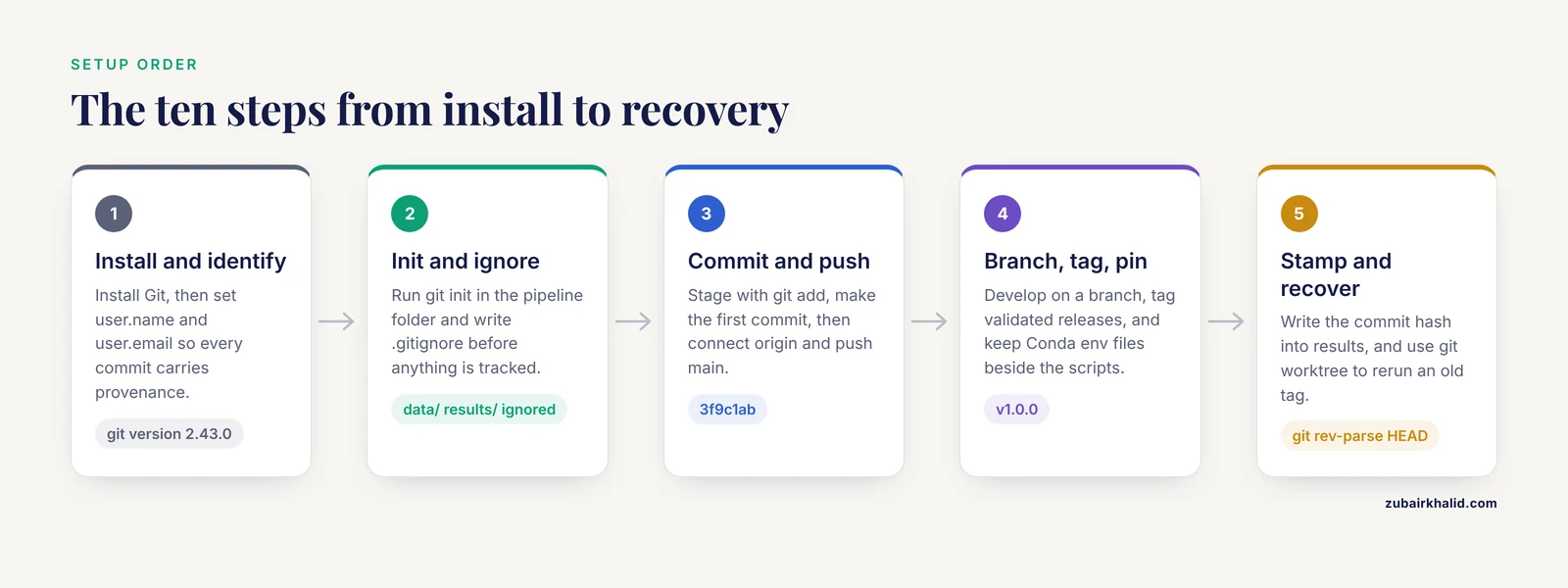
The walkthrough below uses a Snakemake-style layout, but every command applies equally to Nextflow, plain shell, Python, or R pipeline scripts.
Step 1: Install Git and Set Your Identity
Install Git with your system package manager (sudo apt install git on Debian or Ubuntu Linux, brew install git on macOS with Homebrew), or load the module on your cluster (module load git, the module name varies by site). Confirm the installation:
git versionExpected output:
git version 2.43.0Git needs your name and email to label every commit. Run these once per repository, or add the same two lines to the file ~/.gitconfig to make them apply globally:
git config user.name "Your Name"
git config user.email "[email protected]"
Verify:
git config user.nameExpected output:
Your NameThe email matters for provenance. Use the institutional address you will publish under, because GitHub links commits to accounts by email address.
Step 2: Initialize the Repository in Your Pipeline Directory
Move into your existing pipeline folder, or create one:
cd ~/projects/maya-bsubtilis-pipeline
git init
Expected output:
Initialized empty Git repository in /home/you/projects/maya-bsubtilis-pipeline/.git/Everything Git tracks now lives inside that .git directory. Deleting .git deletes the entire history, so back up the whole folder, not just the scripts.
A well-organized pipeline repository separates code, configuration, and data. The layout below matches common conventions for Snakemake and Nextflow projects:
| Path | What belongs there | Under version control? |
|---|---|---|
Snakefile or main.nf | Workflow entry point | Yes |
workflow/rules/ or modules/ | Individual processing steps | Yes |
envs/ | Conda environment YAML files per rule or tool | Yes |
config/ | params.yaml, samples.csv, container definitions | Yes, except secrets |
bin/ or scripts/ | Helper Python, R, or shell scripts | Yes |
assets/ or test/ | A tiny test dataset and expected outputs | Yes, if tiny |
README.md, LICENSE, CHANGELOG.md | Documentation and license | Yes |
results/ | Pipeline outputs | No |
data/ or raw/ | Input FASTQ or BAM files | No |
work/, .snakemake/, .nextflow/ | Scratch directories and caches | No |
logs/ | Run logs | Usually no |
secrets.yaml | Credentials, tokens, database passwords | Never |
Step 3: Write .gitignore Before Your First Commit
The .gitignore file tells Git which files to ignore permanently. Create it now, before anything is tracked, because ignoring files is far easier than untracking them later:
nano .gitignoreA practical starting point for an NGS pipeline:
# Data and outputs, never in git
data/
raw/
results/
work/
logs/
*.fastq
*.fastq.gz
*.bam
*.bam.bai
*.vcf
*.vcf.gz
*.cram
*.fa
*.fna

# Workflow engine scratch and caches
.snakemake/
.nextflow/
.nextflow.log*

# Python and R byproducts
__pycache__/
*.pyc
.Rhistory
.RData

# Secrets
secrets.yaml
config/credentials*
Then check what Git sees:
git statusExpected output:
On branch main

No commits yet

Untracked files:
  (use "git add <file>..." to include in what will be committed)
        .gitignore
        README.md
        Snakefile
        config/
        envs/
        workflow/

nothing added to commit but untracked files present (use "git add" to track)
If data/ or results/ appears in that list, your ignore patterns need fixing before you proceed. This single check prevents the most common beginner catastrophe, which is a multi-gigabyte push that fails and a repository that becomes unusable for collaborators.
Step 4: Make the First Commit
Stage everything and record the snapshot:
git add .
git commit -m "Initial pipeline skeleton with QC, assembly, and annotation rules"
Expected output:
[main (root-commit) 3f9c1ab] Initial pipeline skeleton with QC, assembly, and annotation rules
 14 files changed, 612 insertions(+)
 create mode 100644 .gitignore
 create mode 100644 README.md
 create mode 100644 Snakefile
 ...
The string 3f9c1ab is the commit hash, a short form of a SHA-1 checksum that uniquely identifies this snapshot. Write commit messages in the imperative mood and make them specific. Fix trimming parameters tells a future reader almost nothing. Raise fastp quality filter from Q20 to Q25 after low-complexity sample failure tells them exactly what changed and why. Multi-line messages work with repeated -m flags, where the first -m is the summary line and the second is the body.
Step 5: Connect a GitHub Remote and Push
GitHub is the hosting layer on top of Git, and GitHub for researchers has become the de facto publication venue for pipeline code. Nearly every modern pipeline paper points to a GitHub repository, from nf-core pipelines such as scnanoseq for Nanopore single-cell RNA-seq [5] to methods like lncAPNet, which publishes its R scripts, Python scripts, and Nextflow pipeline in a public GitHub repository [6].
Create an empty repository named maya-bsubtilis-pipeline on github.com, then connect your local copy:
git remote add origin [email protected]:yourname/maya-bsubtilis-pipeline.git
git branch -M main
git push -u origin main
Expected output:
Enumerating objects: 18, done.
Counting objects: 100% (18/18), done.
Writing objects: 100% (14/14), 8.42 KiB, done.
Total 14 (delta 0), reused 0 (delta 0)
To github.com:yourname/maya-bsubtilis-pipeline.git
 * [new branch]      main -> main
branch 'main' set up to track 'origin/main'.
Here origin is simply the nickname for the GitHub URL, and -u links your local main to the remote so future pushes need only git push.
For authentication, SSH keys are the least painful option for daily work. Generate a key and register the public half on GitHub under Settings, SSH and GPG keys:
ssh-keygen -t ed25519 -C "[email protected]"
cat ~/.ssh/id_ed25519.pub
HTTPS works too, but GitHub no longer accepts account passwords for pushes, so you will use a personal access token generated in your GitHub settings.
Step 6: Develop Changes on a Branch
A branch is a parallel line of work. The habit that separates maintainable pipelines from fragile ones is simple: main always runs, and every change, however small, is made on a branch and merged only after it is tested.
git switch -c fix-trimming-paramsExpected output:
Switched to a new branch 'fix-trimming-params'Edit the relevant rule or config file, then inspect exactly what changed:
git diffExpected output (excerpt):
diff --git a/config/params.yaml b/config/params.yaml
index 8a4c1f2..b7e3d90 100644
--- a/config/params.yaml
+++ b/config/params.yaml
@@ -4,7 +4,7 @@
 trimming:
-  qualified_quality_phred: 20
+  qualified_quality_phred: 25
Commit the change, switch back, and merge:
git add config/params.yaml
git commit -m "Raise fastp qualified quality filter from Q20 to Q25"
git switch main
git merge fix-trimming-params
Expected output:
Updating 3f9c1ab..e8d2f04
Fast-forward
 config/params.yaml | 2 +-
 1 file changed, 1 insertion(+), 1 deletion(-)
A fast-forward merge means main had no separate commits, so Git simply moved the pointer forward. When both branches edited the same file, Git performs a three-way merge and usually resolves it automatically.
When you collaborate through GitHub, the equivalent of that local merge is a pull request, which lets a colleague review the diff before it lands on main. For lab pipelines with multiple maintainers, enable branch protection on GitHub so that main accepts changes only through reviewed pull requests.
Step 7: Tag Releases with Semantic Versions
A tag is a permanent label on a commit. Once your pipeline passes its own test dataset, tag it:
git tag -a v1.0.0 -m "First validated release, tested on B. subtilis 168 benchmark"
git push origin v1.0.0
Use semantic versioning, the widespread convention where a version number reads MAJOR.MINOR.PATCH. Increment the patch number for bug fixes that do not change results, the minor number for added features that keep existing behavior, and the major number when results or the interface change incompatibly. On GitHub, a tag can be turned into a Release, a permanent page that archives the code at that point with release notes.
Versioned releases are how published pipelines communicate with their users. The Compi RNA-seq pipeline, for example, is distributed as a specific numbered release, version 2.2, which bundles updated quality control tasks, two alternative read-counting strategies, and recently developed differential expression and pathway analysis tools [7]. The DiRT protocol for detecting dicistronic tRNA-mRNA transcripts in plants was likewise released as version 2, an explicit update over version 1 that expanded detection to tRNA-like structures and UTR-embedded sequences [8]. In both cases, users can state precisely which pipeline version produced their results, which is only possible because the developers tagged and published distinct versions.
Step 8: Pin Tool Versions Next to the Scripts
Version controlling your scripts is necessary but not sufficient, because the tools those scripts invoke also have versions. Keep dependency definitions inside the same repository so that any commit pairs code with its runtime.
A per-rule Conda environment file, stored in envs/, is the standard Snakemake mechanism. This is the pattern MAYA uses, with per-rule Conda environment isolation to ensure strict version control across all constituent tools [3]:
name: qc-env
channels:
  - conda-forge
  - bioconda
dependencies:
  - fastqc=0.12.1
  - multiqc=1.14
Containers go one step further by packaging the tool with its entire operating system layer. FairFlow, a framework for verifiable and reproducible bioinformatics, is built on the observation that identical code can produce different results depending on installed versions, and it executes every analysis inside a version-locked container for exactly that reason [2]. Whatever container system you use, prefer an immutable reference such as an image digest over a mutable latest tag, and record the digest in a file that Git tracks.
When you upgrade a tool, the upgrade is itself a commit. Review it with git diff envs/ and run your test dataset before merging, so that a dependency change never reaches main silently.
Step 9: Record the Code State in Every Output
Provenance closes the loop between results and code. The most reliable method is to have the pipeline itself stamp its outputs with the current commit. In a Snakemake rule, one line is enough:
shell:
    "git rev-parse HEAD > results/commit_id.txt"
Run this only when git status reports a clean working tree, meaning every change is committed. A commit hash recorded alongside uncommitted edits describes code that no longer exists anywhere, which is worse than no hash at all. For stronger provenance, write both the hash and any dirty-file warning, or have the pipeline refuse to run on a dirty tree.
Pipelines with rich reporting already embody this principle. The SARTools HTML report tracks the full analysis process and its parameters so that model choices and quality control checks can be audited later [4]. A commit identifier in every report extends that audit trail from parameters to exact code.
Step 10: Recover an Earlier Version of the Pipeline
Six months after publication, a reviewer asks how a figure was made. Find the state:
git log -5Expected output:
commit e8d2f04a1c3b9d7e2f5a8b0c1d4e7f0a2b3c6d9e
Author: Your Name <[email protected]>
Date:   Tue Mar 3 14:22:05 2026 -0500

    Raise fastp qualified quality filter from Q20 to Q25

commit 3f9c1ab...
Author: Your Name <[email protected]>
Date:   Mon Mar 2 09:10:44 2026 -0500

    Initial pipeline skeleton with QC, assembly, and annotation rules
Then check out a tag into a separate working directory without disturbing your current copy:
git worktree add ../maya-pipeline-v1 v1.0.0
cd ../maya-pipeline-v1
You are now standing in the exact code that produced the published result, ready to rerun it. When you are done, git worktree remove ../maya-pipeline-v1 cleans up.
If you need to undo a mistake on a shared branch, use git revert HASH, which creates a new commit that cancels an old one. Avoid git reset on any branch that others have pulled, because rewriting shared history forces every collaborator to repair their copies.
Common Git Errors and Fixes
These are the errors you will actually hit, with the real messages and the fix for each.
1. Git commands fail outside a repository.
fatal: not a git repository (or any of the parent directories): .gitYou are in a directory with no repository above it. Run pwd to see where you are, cd into your pipeline folder, or run git init if you genuinely intended to start one here. On clusters, this error often means you are on a scratch or head node directory rather than in your project folder.
2. Your push is rejected because the remote moved ahead.
error: failed to push some refs to 'github.com:yourname/maya-bsubtilis-pipeline.git'
hint: Updates were rejected because the remote contains work that you do not have locally.
A collaborator pushed first. Fetch their work and replay yours on top:
git fetch origin
git rebase origin/main
git push
If the rebase reports conflicts, fix the marked files, run git add on them, then git rebase -continue. Do not force-push to shared branches, because it erases collaborators' commits.
3. A merge conflict stops the merge.
CONFLICT (content): Merge conflict in config/params.yaml
Automatic merge failed, fix conflicts and then commit the result.
Open the file. Git marks the disputed region:
<<<<<<< HEAD
  qualified_quality_phred: 25
=======
  qualified_quality_phred: 23
>>>>>>> feature-batch-trimming
Delete the marker lines, keep the correct value, save, then:
git add config/params.yaml
git commit
4. You are in detached HEAD state after checking out a tag.
You are in 'detached HEAD' state. You can look around, make experimental
changes and commit them, and you can discard any commits you make in this
state without impacting any branches by switching back to a branch.
This is normal after git switch v1.0.0. If you only wanted to look, git switch main returns you safely. If you want to build on the old version, create a branch first with git switch -c fix-on-v1 v1.0.0.
5. Authentication fails when pushing.
Permission denied (publickey).
fatal: Could not read from remote repository.
Your SSH key is not registered with GitHub, or your key agent is not running. Confirm the public key in ~ssh/id_ed25519.pub appears under your GitHub SSH settings, and test with ssh -T [email protected], which should greet your username. If you cloned with HTTPS, use a personal access token instead of a password.
6. A push fails because a file is too large.
GitHub rejects individual files it considers too large, and raw sequencing data always qualifies. The push dies with a remote error naming the oversized file. Because the bad file is now in your local history, the fix is to move the directory out of the repository, back it up elsewhere, commit its removal, restore the data from your backup, and confirm .gitignore now covers it. For genuinely large files that must live in Git, such as a small reference genome, the Git Large File Storage extension replaces them with pointer files in the repository, but reserve it for files you truly need in version control.
7. A file stays listed as modified no matter what you commit.
Line-ending differences between Linux clusters and Windows laptops cause this. Add a .gitattributes file in the repository root containing * text=auto, commit it, and renormalize so every platform stores plain LF line endings.
Version Control Bioinformatics Pipeline Scripts Tips
These practices separate a repo that merely works from one your future self and your collaborators can trust.
- Commit early and commit small. One logical change per commit, such as one rule change or one config tweak. Small commits make bisecting a regression and reviewing a pull request straightforward.
- Explain why in commit messages. The diff shows what changed. Only the message records why. Reference the issue number or the sample failure that motivated the change.
- Review parameters as code. Store
params.yaml, sample sheets, and reference genome paths in Git. A parameter change can alter results as much as a code change, so it deserves the same review. Diffingconfig/before every rerun is a two-second audit. - Never commit credentials. A token committed even once lives in history forever until the history is rewritten. Keep
secrets.yamlignored, and provide aconfig.yaml.exampletemplate with placeholder values. - Protect main. On GitHub, turn on branch protection and require pull request review. This costs minutes and prevents the classic accident of an untested push overwriting a working pipeline.
- Add a tiny test dataset and a regression test. Keep a miniature dataset in
test/and run the full pipeline on it whenever you tag a release. Version-based regression testing has real diagnostic value, as demonstrated by a community audit of twelve crosslinking mass spectrometry pipelines that tracked quality improvements between software versions using ground-truth designs [9]. - Write the README as if the reader is a stranger. State what the pipeline does, its input formats, the command to run it, and where results land. Every widely reused pipeline, from nf-core projects [5] to self-contained systems like the PhyloPi phylogenetic pipeline built for an HIV drug resistance testing facility [10], pairs its code with documentation precise enough for an outsider to run.
- Archive releases for citation. When a pipeline accompanies a paper, create a GitHub Release for the tagged version so reviewers and readers can point to an immutable snapshot.
- Document the dependency stack in the same commit as the code change. If a rule switches from one aligner version to another, the environment YAML change belongs in the same commit as the rule change, so the pairing can never drift apart.
Where Git Ends and Workflow Managers Take Over
Git versions text. It does not execute anything, manage dependencies, schedule jobs, or run on a scheduler by itself. Production bioinformatics therefore pairs Git with workflow engines and packaging layers, and understanding the division of labor helps you place version control correctly.
Workflow managers such as Snakemake and Nextflow describe pipelines as rules or processes with declared inputs and outputs, and they handle execution order, parallelism, and restarts. The scnanoseq pipeline for Oxford Nanopore single-cell RNA-seq is implemented in Nextflow on the nf-core framework, which the authors credit for portability across computational environments, scalability, and reproducibility across runs [5]. clonevdjseq, a management system for sequencing and analyzing VDJ sequences from clonal B and T cell libraries, combines Nextflow for the workflow with Django for the web-facing data layer [11]. Compi takes a different route, keeping the readability of shell scripts while adding job scheduling and logging, and its compi-dk tool packages a pipeline application and its dependencies into a Docker image in a way the developers explicitly designed to be version-control-friendly [12]. FairFlow removes even the specification step, generating ready-to-run interfaces for R, Python, Bash, Galaxy, Nextflow, and StreamFlow from one declarative file, each executing inside a version-locked container [2].
All of these systems are themselves distributed through Git repositories. Learning Git well is therefore never wasted, because it is the substrate under every modern pipeline framework. The practical recipe that emerges across these projects is consistent: scripts in Git, dependency versions pinned in Conda or containers alongside the scripts, a workflow engine for execution, and tagged releases for citable states. Pipelines aimed at resource-limited settings show the same pattern in miniature, with PhyloPi bundling its blastn-integrated phylogenetic workflow into a self-contained system running on a Raspberry Pi 3 for an HIV drug resistance laboratory [10].
Common Mistakes and Limitations
Committing raw reads or large binary outputs. This is the single most common failure. A repository holding FASTQ files grows to gigabytes within days, pushes fail, clones take hours, and Git cannot efficiently diff or compress binary sequencing data anyway. Raw data belongs in institutional storage, an object store, or dedicated archival systems. Keep only scripts, configs, environment files, and tiny test fixtures in Git.
Committing intermediate results. Committing results/ seems like a provenance strategy but defeats itself. The pipeline should regenerate results from inputs, code, and pinned environments. If it cannot, that is the actual problem to fix.
Committing credentials. API tokens, database passwords, and cloud keys in tracked config files are a security incident. Since Git history retains everything, removing a secret means rewriting history and rotating the credential. Prevention through .gitignore is the only cheap fix.
Empty or vague commit messages. A history full of update, fix, and changes is a history you cannot search. When a reviewer or collaborator asks why a threshold changed, vague messages force you to rediscover the answer from scratch.
Treating Git as backup only. Pushing to GitHub monthly with giant commits gives you backup but none of the audit, branching, or recovery benefits. The value comes from frequent small commits that document decisions.
Assuming Git alone makes an analysis reproducible. Git pins the code, not the tools. Without pinned Conda environments or containers, the same commit can yield different variant calls on different days, which is precisely the dependency-drift problem that motivated frameworks like FairFlow [2]. Pin dependencies, and version them in the same repository.
Never tagging anything. An untagged repository makes it impossible to state which code version produced a manuscript figure. Tag at every milestone a paper might cite.
Editing directly on the cluster outside the repo. Fixing a script with nano in a scratch directory creates an off-repo copy that will eventually overwrite or diverge from the tracked version. Clone the repository on the cluster, work inside the clone, and push from there.
Confusing version control with validation. Version control records what code ran. It does not establish that the code is correct or fit for a given purpose. Consensus recommendations for clinical bioinformatics place version control alongside test and validation practices, standardization, accreditation-level quality systems, and defined competencies [1]. Research pipelines face proportionally lighter demands, but any result that informs decisions, clinical or otherwise, needs appropriate validation and institutional oversight beyond what Git provides.
Frequently Asked Questions
Do I need GitHub to use Git?
No. Git works entirely on your local machine or cluster, and the full history lives in the hidden .git directory. GitHub adds hosted backup, pull request review, issue tracking, and releases, which is why most researchers add it, but a private repository on an institutional GitLab or Gitea server serves the same role.
Should I commit my raw sequencing data to Git?
Never. Raw FASTQ, BAM, and CRAM files are far too large for Git, they do not compress well in Git's storage model, and pushes will fail. Track the scripts, configs, and environment files that process the data, and keep the data in dedicated storage that the pipeline reads by path.
How do I cite a specific pipeline version in a paper?
Tag the exact commit with a semantic version such as v1.2.0, publish it as a GitHub Release, and cite the version and commit hash in your methods section. For a formal citable archive of the release, use a service that mints Digital Object Identifiers for GitHub repositories.
What is the difference between Git version control and Conda or container version control?
Git versions your pipeline scripts, configs, and documentation. Conda environments and containers version the tools and libraries those scripts invoke. You need both, ideally in the same repository, because unpinned tool versions can change results even when the code is identical.
How do I undo a bad commit?
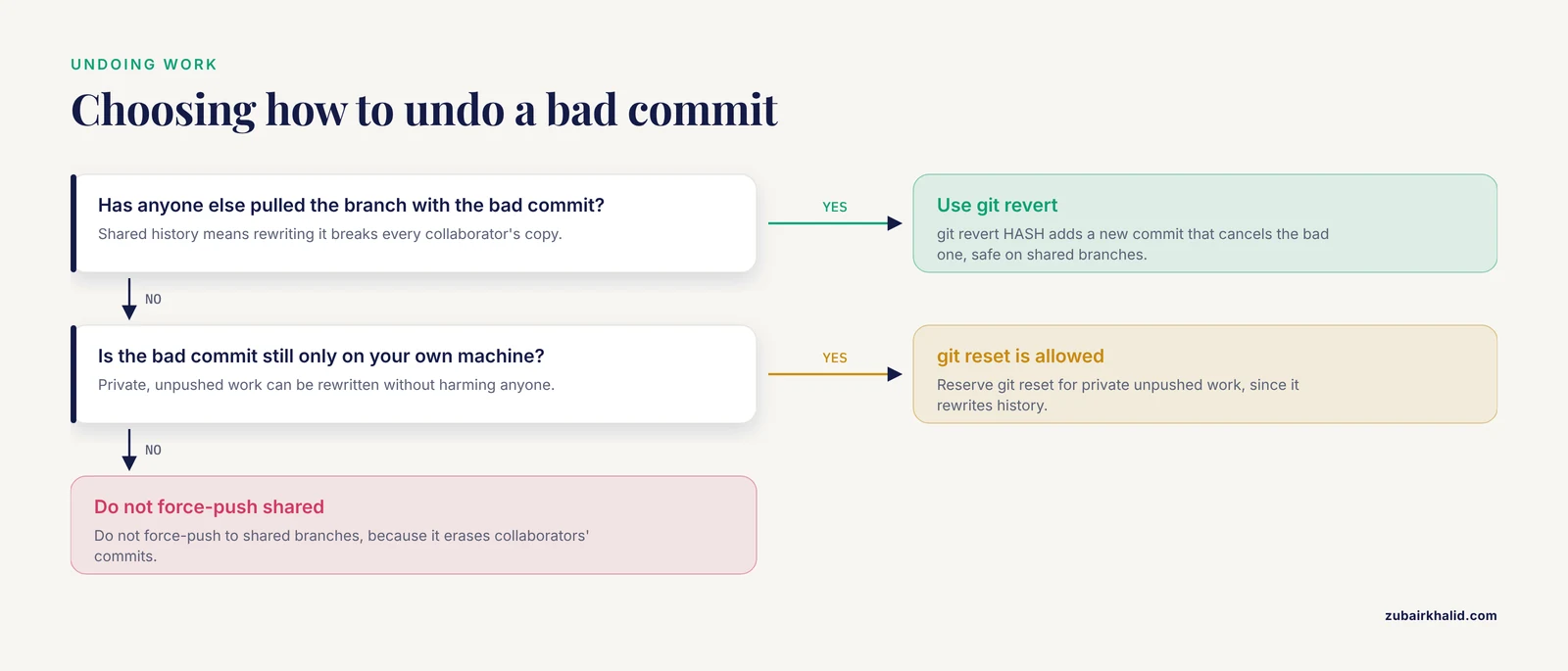
Use git revert HASH to create a new commit that cancels the bad one, which is safe on shared branches. Reserve git reset for private, unpushed work, because it rewrites history and breaks every collaborator who already pulled.
Can I use Git for R and Python analysis scripts, not just pipelines?
Yes, and you should. The same commit, branch, tag, and recovery workflow applies to a single analysis script, a figure-generating notebook, or a hundred-rule pipeline. Small projects often graduate into pipelines later, and starting them under Git costs nothing.
How do I handle a merge conflict?
Open the conflicted file, find the block between the conflict markers, decide which version is correct, delete the marker lines and the losing text, then git add the file and commit. Conflict markers in a YAML or sample sheet almost always mean two people changed a parameter at the same time, so check with the other editor before choosing.
What is the fastest way to prove which code produced a given result?
Have the pipeline write the current commit hash into its output directory on every run, ideally alongside the parameter file it used. Then git switch that hash, or the tagged release containing it, rerun, and compare. A clean working tree at run time is what makes the hash trustworthy.
Sources
- Recommendations for bioinformatics in clinical practice.
- FairFlow: A transparency-first framework for verifiable and reproducible bioinformatics.
- Deep Genomic Characterization of Bacillus subtilis SNUY1 & 168 Using MAYA (Multistage Analysis of Prokaryotic Annotations): An Integrated Snakemake-Based Bioinformatics Pipeline.
- SARTools: A DESeq2- and EdgeR-Based R Pipeline for Comprehensive Differential Analysis of RNA-Seq Data.
- scnanoseq: an nf-core pipeline for Oxford Nanopore single-cell RNA-sequencing.
- lncAPNet enables the deciphering of lncRNA-mRNA connections in patient transcriptomic data.
- Updates and validation of the Compi RNA-seq pipeline with a case study in Alzheimer's disease.
- DiRT v2.0: An Optimized Pipeline for Detecting Dicistronic tRNA-mRNA Transcripts in Plants.
- A community audit of error control in crosslinking mass spectrometry.
- PhyloPi: An affordable, purpose built phylogenetic pipeline for the HIV drug resistance testing facility.
- clonevdjseq: A workflow and bioinformatics management system for sequencing, archiving, and analysis of VDJ sequences from clonal libraries.
- Compi: a framework for portable and reproducible pipelines.