Version Control for Bioinformatics Data: How to Choose
By Dr. Zubair Khalid, DVM, MS, PhD ·

Version control for software records every edit to small text files, while version control for bioinformatics data has to track files that can run to hundreds of gigabytes of binary sequencing output, so the practical solution pairs Git for code and metadata with a separate, checksum-based system for the large files themselves. The rule of thumb that follows from this is simple: anything you can type in a text editor belongs in Git, anything a sequencer or aligner produced belongs in checksum-addressed storage outside Git, and anything you cite in a paper belongs in a repository that issues a permanent identifier.
This article walks through the full set of version control options for bioinformatics data, explains how each one works on its own terms, compares them on the criteria that actually decide real projects, and gives worked scenarios for solo analysts, small labs, and multi-institution consortia.
Why Bioinformatics Data Breaks Normal Version Control
Git, the most widely used version control system, works by storing a snapshot of every file in a repository and letting you move between those snapshots. It performs well when files are small, text-based, and change line by line, because it can store only the differences between versions. A FASTQ file, the standard text format for raw sequencing reads, is technically text but behaves like a binary blob in practice. A single human whole-genome run produces a FASTQ file of tens of gigabytes, and every base is independent, so Git cannot compress changes between versions meaningfully. A BAM file, the standard binary format for aligned reads, is not even text.
The scale of the problem is institutional, not just personal. Estimates reviewed by Vamathevan, Apweiler, and Birney projected 60 to 500 million whole human genomes sequenced by 2022, and their review of biomolecular data resources describes an infrastructure landscape that has had to evolve from simple deposition databases toward federated access systems, added-value knowledgebases, and biology-driven portals to cope with that volume [1]. No file-level version control system designed for source code was ever intended to hold data at that scale.
The second complication is heterogeneity. A single bioinformatics project can contain structured tabular metadata, semi-structured JSON from instrument runs, and unstructured microscope images or clinical free text. Silva and colleagues, in their review of open-source software for bioinformatics data management, describe exactly this problem: data in these fields are diverse in format and subject, which makes storing, tracking, and responsibly sharing them difficult, and they argue that the emerging data lakehouse paradigm is a response to that heterogeneity [2]. Reviews of big data in healthcare make the same point from the clinical side, noting that medical data arrive structured, unstructured, and semi-structured, and that the Hadoop ecosystem grew up specifically to manage that mixture at scale [3].
The third complication is reproducibility. In bioinformatics, a "result" is almost never a single file. It is the endpoint of a pipeline: raw reads, a reference genome, an alignment, a set of parameters, derived count matrices, and the scripts that chained them together. If you version only the scripts, you lose the exact input data. If you version only the data, you lose the exact transformation. Any serious version control strategy for bioinformatics data has to capture both, plus the link between them.
The Three Layers of Any Working Solution
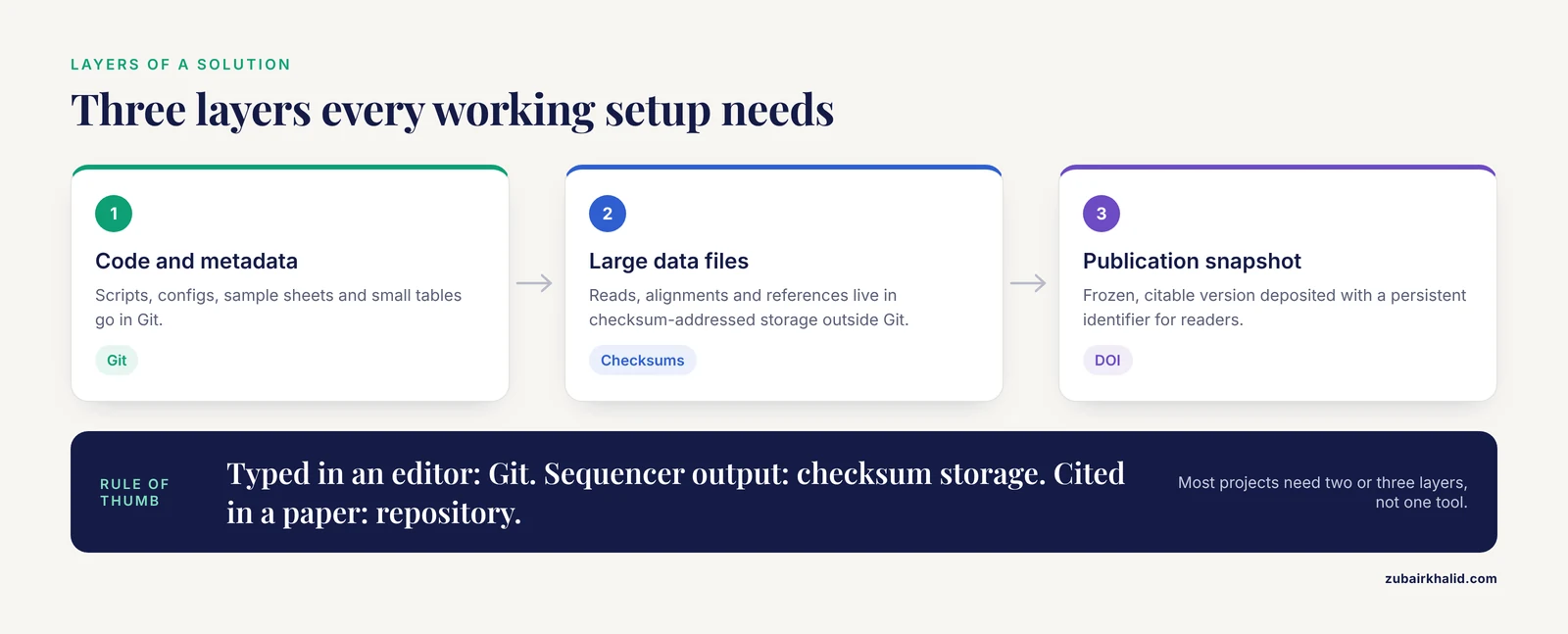
Before comparing individual options, it helps to separate three layers that people often confuse, and that confusion is the single most common source of bad tool choices.
- Code and metadata layer. Scripts, configuration files, sample sheets, README files, small tables of metadata. This is what Git was built for, and it belongs in Git.
- Large data layer. Raw reads, alignments, reference genomes, imaging data, intermediate pipeline outputs. These live in cheap, scalable storage that supports content addressing by checksum, and their checksums and locations are recorded in the code layer.
- Publication and archival layer. Immutable, citable snapshots of the data behind a paper. These belong in a deposition database or repository that issues a persistent identifier, so other researchers can find and reuse the exact version you used [1].
Every option in the comparison below sits in one or more of these layers. When someone asks for the "best version control bioinformatics data" solution, the honest answer is almost always a stack of two or three options rather than a single tool.
Side-by-Side Comparison of the Main Options
| Option | Best for | What it tracks | Pros | Cons |
|---|---|---|---|---|
| Plain Git (GitHub, GitLab, self-hosted) | Code, small metadata, sample sheets | Text files, line-level changes | Free, universal, mature collaboration and review | Fails badly on large or binary files, repository bloat is hard to undo |
| Git Large File Storage (LFS) | Small-to-medium binaries, images, model weights | Pointer files in Git, blobs on an LFS server | Familiar Git workflow, keeps repository browsable | Server quotas fill fast with sequencing data, not designed for terabyte-scale data |
| DVC (Data Version Control) | Pipeline inputs, outputs, and parameters alongside code | Checksums and remote locations of large files in Git, blobs in object storage | Reproducible pipelines, works with S3-style and SSH remotes, no server to buy | Requires discipline, cache directory must be backed up, learning curve |
| Self-hosted Git platform for a lab | Teams that cannot or will not use public cloud services | Same as Git, plus access control and course or project management | Data and code stay on institutional hardware, full administrative control | You own uptime, backups, and security patching |
| Object storage (S3-style buckets) | Raw and processed data at any scale | Objects identified by keys and checksums, versioning enabled at the bucket level | Effectively unlimited scale, low cost, built-in versioning and lifecycle rules | Not a version control system by itself, no diffing or history without extra tooling |
| Data lakehouse | Multi-project, multi-format data platforms for institutes | Governed tables and files with schema and transaction guarantees | Combines lake flexibility with warehouse governance and organization | Significant engineering effort, overkill for a single analyst [2] |
| Hadoop and distributed frameworks | High-volume batch processing of heterogeneous clinical and omics data | Data blocks on a distributed file system | Proven at healthcare scale, handles structured and unstructured data together | Heavy infrastructure, declining mindshare compared with object-storage stacks [3] |
| High-performance key-value stores | Hot, latency-sensitive lookups in large analysis services | Key-value records in memory or fast storage | Extremely fast access for serving layer | Not for archival tracking, an optimization layer rather than a versioning layer [4] |
| ML-scale data organization frameworks | Curating and ordering massive training datasets | Dataset partitions, selection metadata, optimization state | Purpose-built organization for model training data | Narrow use case, not general lab version control [5] |
| Deposition repositories (Figshare and similar platforms, field archives) | Publishing citable, reusable snapshots | Immutable versions with metadata, persistent identifiers | DOIs, discoverability, institutional support, enables replication | Not for day-to-day iteration, size and access rules vary by repository [6] |
| Blockchain-based ledgers | Tamper-evident provenance records across untrusted parties | Cryptographically linked transaction records of data events | Immutability and decentralized trust | High overhead, stores records about data rather than the data itself [7] |
The Options Explained on Their Own Terms
Plain Git repositories
Git is a decentralized version control system: every collaborator holds a full copy of the repository history, and changes are shared by pushing and pulling commits between copies. A commit is a named snapshot, a branch is a parallel line of development, and a merge reconciles two branches. Because of this design, Git excels at exactly what bioinformatics pipelines are made of: Python and R scripts, Snakemake or Nextflow workflow definitions, Dockerfiles, Conda environment files, and small tables of sample metadata.
Git also supports collaboration patterns that labs genuinely need, including branch-based review of analysis changes and issue tracking tied to code. Ani and Vaez describe deploying a dedicated, self-hosted platform built on the Git ecosystem for teaching bioinformatics and artificial intelligence in medicine, noting that the decentralized nature of Git facilitates collaboration among distributed teams and lets students and instructors coordinate tasks and store project documentation through every stage of tool development [8]. Their experience mirrors what research software engineers have long observed: the collaboration machinery around Git is often as valuable as the version tracking itself.
The failure mode is equally well documented. A single committed 4 GB BAM file makes every subsequent clone of the repository transfer roughly that amount of history. Git keeps old versions of every file forever by design, so removing a large file from the current snapshot does not shrink the repository. Once a repository is bloated, fixing it requires rewriting history, which breaks every collaborator's copy.
Git Large File Storage
Git LFS exists to let Git repositories contain large files without actually storing the files in Git. When you configure it, Git replaces each tracked large file with a small pointer file and stores the real bytes on a separate LFS server. The workflow looks like ordinary Git:
git lfs install
git lfs track "*.bam" "*.fastq.gz" "*.h5"
git add .gitattributes
git add results/aligned.bam
git commit -m "Add alignment for cohort A"
The pointer text travels with the repository, so clones stay small until someone actually checks out the large files, at which point the LFS client downloads them from the server. For files in the tens of megabytes range, such as a few PDFs, plots, small pickled models, or single-chromosome VCFs, this is a clean solution.
For real sequencing output it usually fails on economics and scale. LFS storage on hosted services is metered, and a lab that pushes hundreds of gigabytes of reads will exhaust quotas quickly. LFS also does not deduplicate across repositories, so two projects sharing the same reference genome store it twice. Use LFS for the largest files that are still genuinely small, and use a data-oriented tool for the rest.
DVC-style data version control
DVC (Data Version Control) is the tool most often recommended specifically for version control of bioinformatics data, because it was designed to answer the exact question Git cannot: how do I tie a specific snapshot of large data files to a specific snapshot of code? DVC works by computing a checksum for each tracked file and storing that checksum, plus the file's location in a remote store, in a small metadata file that Git does track. The data itself lives in a remote such as an S3 bucket, an SSH-accessible server, or a network drive.
A minimal, correct workflow looks like this:
# Track a large file without putting it in Git
dvc add data/reads/sample_A_R1.fastq.gz
git add data/reads/.gitattributes data/reads/sample_A_R1.fastq.gz.dvc
git commit -m "Track reads for sample A"

# Point the data cache at cheap storage
dvc remote add -d s3remote s3://my-lab-bucket/dvcstore
dvc push
From that point, any collaborator who clones the Git repository can run dvc pull and retrieve exactly the data snapshot that matches the committed checksums. When the pipeline reruns with new parameters, dvc repro re-executes the declared stages and updates the checksums, so the next commit records both the new code state and the new data state together.
The strengths are real. DVC costs nothing in software, works with storage you probably already have, and produces a human-readable history in Git commits where each commit is a complete, reproducible analysis state. The weaknesses are behavioral rather than technical. The DVC cache must live somewhere durable, because if you delete the cache and lose the remote, the checksums in Git become pointers to nothing. And the system only works if everyone actually commits the .dvc files, which requires a team norm, not just software.
Self-hosted Git platforms for labs and courses
Public hosting is unavailable or undesirable for some data and some institutions, whether because of unpublished clinical data, institutional policy, or simple network restrictions. A self-hosted Git platform keeps the entire Git workflow on hardware you control, and adds administrative features on top: user and access management, repository permissions, and in the platform described by Ani and Vaez, educational features such as course definition, teaching material sharing, and assignment submission alongside research repositories [8]. Their implementation demonstrated that a single self-hosted platform could support both an educational program and the development of a new bioinformatics software package, which makes the pattern relevant to any lab that trains students while producing research code.
The trade is control for responsibility. Running your own instance means you own backups, uptime, security updates, and disaster recovery. A self-hosted platform whose disk dies without a tested backup has version-controlled nothing. Budget for administration before choosing this route, and remember that self-hosting solves the access-control problem, not the large-file problem, so it still needs to be paired with LFS or DVC for data.
Object storage with bucket versioning
Cloud object storage, exemplified by Amazon S3 and its many compatible services, has become the default substrate for large scientific data. A review of trajectory data management describes the shift plainly: because of low cost, large capacity, and reliability, S3-style storage has become a new paradigm for gigantic data and is now used inside general-purpose data management systems to balance performance against monetary cost [9]. The same logic applies to sequencing cores, imaging facilities, and any lab whose raw data exceed local disk.
Object storage is not version control in the Git sense. It has no diffs, no commits, no branches. What it does have, and what matters for data tracking, is bucket-level versioning: when enabled, every write to an object key creates a new immutable version, and old versions remain retrievable until a lifecycle rule expires them. Combined with per-object checksums, this gives you an append-only history of every data artifact, which is precisely the property that large files need.
The correct mental model is that object storage provides the durable, versioned home for data blobs, and a tool such as DVC or a workflow engine records which blobs belong to which analysis state. Storage alone is not a strategy.
Data lakehouses
The data lakehouse is the newest paradigm aimed directly at the heterogeneity problem described earlier. A data lake stores anything cheaply but tends to become an ungoverned swamp, while a data warehouse enforces structure but lacks flexibility. The lakehouse combines lake-style storage of raw diverse data with warehouse-style governance, schema management, and organization. Silva and colleagues reviewed the strategies and open-source tools for building such infrastructure for bioinformatics specifically, concluding that the lakehouse model, though still rarely discussed in the bioinformatics literature, is a promising solution for managing heterogeneous data in the field, and they assess available open-source and commercial options for exactly this purpose [2].
For a single analyst or a ten-person lab, a lakehouse is usually the wrong amount of machinery. For a genomics center or a health data science unit serving many projects with shared governance requirements, it is increasingly the right backbone, and its native support for table formats with transactional history gives you a form of data versioning that is richer than bucket versioning alone.
Distributed big data frameworks
The Hadoop ecosystem, including its distributed file system and associated processing engines, was the previous generation's answer to heterogeneous, high-volume healthcare data. Reviews of big data in healthcare catalog the Hadoop-based tooling that was organized to manage data flows from patient care records through medication lists and beyond, and describe how structured and unstructured medical data were handled together at scale [3]. Hadoop-style clusters still run in large biobanks and hospital analytics groups, but for new projects the object-storage-plus-lakehouse stack described above has largely displaced them, because it achieves similar scale with rented infrastructure instead of owned clusters. If you inherit a Hadoop deployment, treat its file system as another storage backend in your versioning stack rather than as the versioning system itself.
High-performance key-value stores
Some bioinformatics services need to look up small pieces of a very large dataset extremely fast, for example serving variant annotations to a web tool or fetching feature vectors during model scoring. Distributed key-value stores such as Memcached, particularly when accelerated with remote direct memory access as demonstrated in RDMA-Memcached, can deliver that performance at scale [4]. This category appears in a version control comparison only to be excluded from it. Key-value stores are a serving and caching layer. They do not track history, and they should never be the system of record for anything. Know what they are for so you do not accidentally place one where a versioned data store belongs.
Data organization frameworks for model-scale datasets
Training large models on biomedical text or molecular data introduces a different problem: not tracking history, but organizing enormous, multi-domain corpora so that training is efficient. DataSculpt, presented at the IEEE International Conference on Data Engineering, formulates the organization of long-context training data as a multi-objective optimization problem covering document relevance within training sequences, the number of concatenated instances, document integrity, and computational cost [5]. Frameworks in this family manage dataset partitions and selection metadata at a scale and with a purpose quite different from lab-level version control. If your project is building foundation models, you will eventually need a layer like this, layered above rather than instead of Git and checksum-based data tracking.
Deposition repositories and archival versions
Public repositories solve a different stage of the data lifecycle. Once a paper is published, the underlying data need to be findable, citable, and immutable. Deposition databases and generalist repositories serve this role, and reviews of biomolecular data resources trace how this layer evolved from simple archives into added-value databases and integrated portals [1]. Figshare is a representative generalist platform, described in a review of its architecture and services as providing institutional data management with metadata handling, interoperability, and sharing features that let researchers preserve data in a citable form and enable replication of studies [6].
These repositories are not where day-to-day iteration happens. They are where finished, frozen versions go. The practical pattern is to version and iterate internally with the tools above, then push a tagged, documented snapshot to a repository at publication time. One caution worth internalizing early: a Git repository on a commercial hosting site is not an archival data repository. Hosts can remove accounts, links rot, and a repository URL is not a persistent identifier in the archival sense.
Blockchain-based provenance records
Blockchain technology enters this space as a way to make provenance records tamper-evident across parties that do not trust each other. Park and Youm proposed a blockchain-based data management system for decentralized artificial intelligence devices in which validated knowledge and raw data are anchored to a blockchain acting as a trust anchor, and they lay out the service flow, security threats, and security requirements for such an architecture [7]. A related financial-sector system uses blockchain's decentralization, immutability, and cryptographic storage in a multi-tier design for credit risk data [10]. For most bioinformatics labs, this category is aspirational rather than practical today. Its realistic future role is as a provenance ledger that records hashes and access events for data whose actual bytes live in the storage layers described above, not as a place to store data or as a day-to-day version control system.
How to Choose: The Criteria That Actually Decide
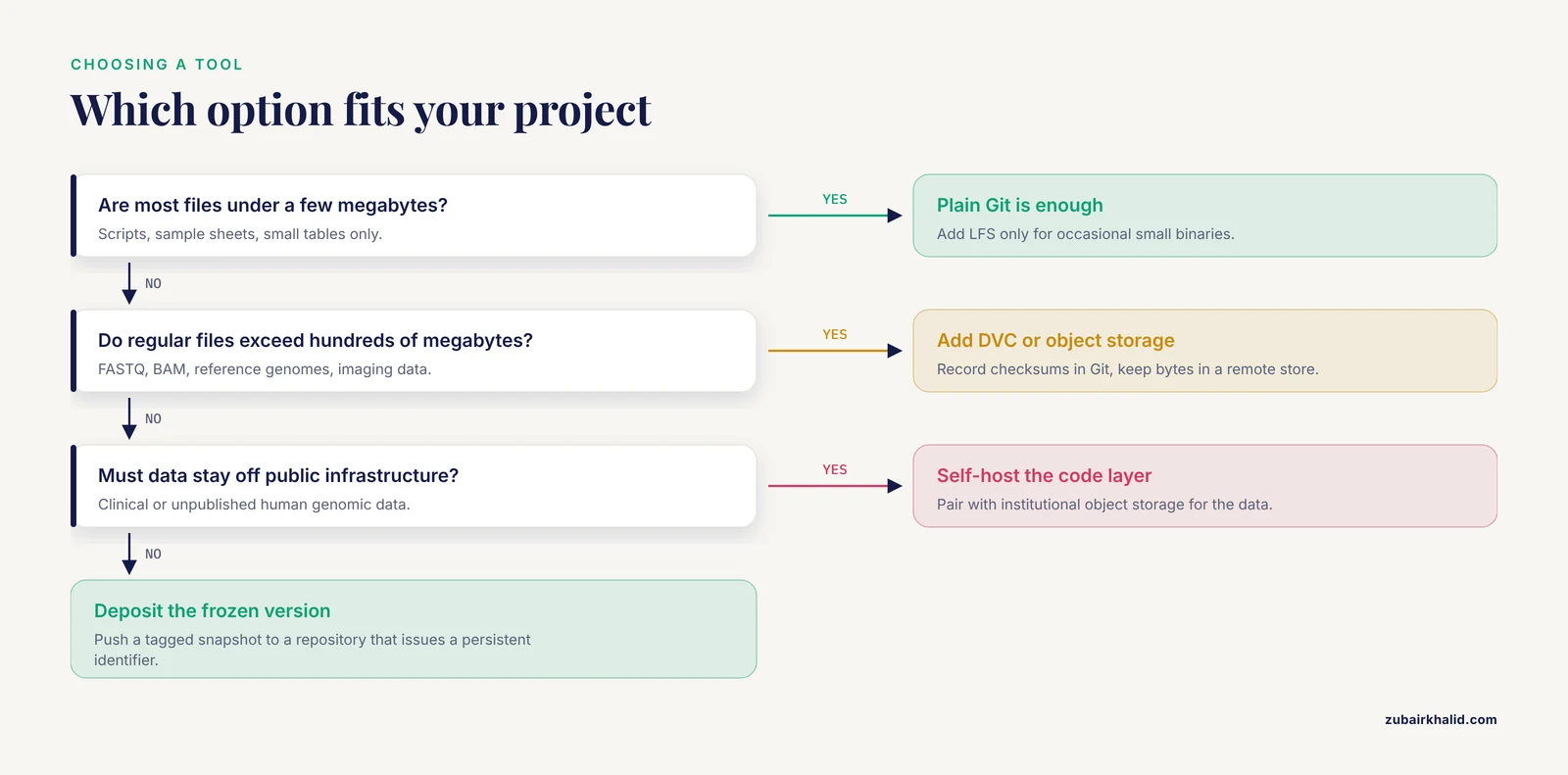
Strip away feature lists and five criteria determine the right choice for a given project.
1. File size distribution. If 99 percent of your files are under a few megabytes, plain Git with occasional LFS covers everything. Once regular files exceed hundreds of megabytes, DVC or object storage becomes mandatory. Once regular files exceed terabytes, object storage with bucket versioning becomes the backbone regardless of anything else you choose.
2. Who needs to reproduce your results. A solo analyst reproducing their own work next year needs checksums and a commit history. A collaborator at another university needs a way to pull the exact data snapshot, which pushes you toward DVC with a shared remote or a well-documented object store bucket. A journal reviewer or unknown future reader needs a deposition repository with a persistent identifier, which pushes you toward the archival layer.
3. Data sensitivity and hosting policy. Human genomic and clinical data often cannot sit on public infrastructure. This forces the self-hosted Git platform option for the code layer [8] and institutional or on-premise object storage for the data layer, with the archival layer chosen to match applicable rules.
4. Heterogeneity and number of projects. A single RNA-seq analysis is a Git repository plus a data remote. Twenty projects sharing references, metadata standards, and governance requirements is the situation the lakehouse paradigm was designed for [2], and the point at which reviewing the open-source tooling for that purpose becomes worth the time [2].
5. Administrative capacity. Every self-hosted or self-built component adds an operations burden. Teams without dedicated technical staff should favor managed services and simple stacks, and should treat any tool that requires running a server as a cost, not a feature.
A useful bioinformatics tools comparison habit here is to evaluate each candidate tool against all five criteria at once rather than against a single shiny feature. The best bioinformatics software for version control is rarely the tool with the most features. It is the tool whose failure modes your team can actually live with.
Worked Scenarios
Scenario 1: A graduate student with a single RNA-seq project
One analyst, one laptop, one university HPC cluster, tens of gigabytes of reads. The right stack is plain Git for scripts, sample sheets, and the workflow definition, plus DVC pointing at university storage or a personal cloud bucket for the FASTQ and derived count files. Reference genome files are downloaded once, checksummed with md5sum, and the checksum is recorded in the repository README rather than the file being versioned at all. Nothing is self-hosted, nothing is metered, and every result in the eventual paper maps to one Git commit that contains the code state and the data checksums together. This is the default recommendation for version control bioinformatics data at the individual scale, and deviating from it should require a reason.
Scenario 2: A lab of ten with shared sequencing data
Multiple analysts, shared instruments, recurring cohort studies. Code moves to a shared Git platform with branch protection and review, either hosted or self-hosted depending on data policy [8]. Raw reads land directly in an institutional S3-style bucket with versioning enabled, sequenced by run date. Each analysis repository uses DVC, with its remote configured to the shared bucket under a project-specific prefix. Published snapshots are exported to an appropriate repository so each paper's data carry a persistent identifier [6]. The critical team norms are two: every pipeline change is a reviewed pull request, and every data artifact referenced by a repository exists in the bucket with its checksum recorded.
Scenario 3: Preparing observational clinical data for evidence synthesis
Consider the workflow described by Lazarev and colleagues for preparing observational study data ahead of an evidence synthesis on asymptomatic hyperuricemia. Their pipeline involved reconciling presentation discrepancies across included studies, pooling subgroups, extracting means and standard deviations from medians and quartiles, synthesizing means in quartiles from lognormal distributions via multiple replications, and calculating pooled uric acid levels with the Hunter-Schmidt estimator [11]. Every one of those steps transforms the derived dataset, and reviewers will want to know exactly which version of each derived dataset fed the final pooled estimates. This is a textbook case for DVC or an equivalent checksum-plus-Git approach applied to each intermediate table, with the transformation scripts in Git, so the provenance chain from raw extraction to pooled estimate is one continuous commit history. It also illustrates why harmonization steps should be scripted rather than done by hand, because a hand edit is the one change no version control system will capture.
Scenario 4: A genomics center serving many projects
Dozens of active projects, mixed data modalities, institutional governance requirements, and data growth that outpaces local disks. Here the layers separate cleanly by scale. Raw data goes to object storage with versioning and lifecycle policies. A lakehouse layer provides governed, schema-aware organization across the heterogeneous projects, built from the open-source tooling reviewed for bioinformatics use [2]. High-volume batch workloads that fit the Hadoop pattern may still run on inherited cluster infrastructure, and latency-sensitive lookup services sit on fast key-value infrastructure [4]. Provenance requirements from external partners may eventually justify a tamper-evident ledger recording access and release events. The version control question at this scale is not "which tool" but "which tool at which layer, and who owns each layer."
Common Mistakes and Limitations
Committing large files to Git and never noticing. The repository keeps working for weeks, then cloning takes an hour and nobody remembers which commit added the 40 GB alignment file. Prevention is cheaper than cure: add large-format patterns to .gitignore on day one, and decide deliberately which files LFS or DVC will handle.
Confusing GitHub or GitLab with an archival data repository. A hosted Git repository is a collaboration tool, not a permanent, citable archive. Data backing a publication belong in a repository that provides persistent identifiers and preservation commitments, and the Git link belongs in the paper's data availability statement [6].
Recording checksums but not backing up the cache or remote. DVC metadata in Git points to blobs by checksum. If the remote bucket or local cache is lost, the metadata describes data that no longer exists. Versioning metadata without versioning the bytes is a false sense of safety.
Hand-editing derived data. Any manual change to a table in a spreadsheet application escapes every version control system in this article. If a harmonization step or an outlier correction is genuinely necessary, script it, commit the script, and rerun.
Treating a lakehouse as automatic governance. The lakehouse paradigm provides the substrate for governance and organization, and its reviewers are explicit that it remains underexplored in bioinformatics, with limited discussion in the current literature [2]. Deploying the infrastructure does not by itself produce curated, documented, well-versioned data. People and processes still do that part.
Versioning the pipeline but not the environment. Results depend on tool versions as much as on data versions. Pin software environments in the same Git repository, whether through Conda environment files, container images, or workflow engine pins, so a commit reconstructs the whole computational context.
Assuming object storage versioning replaces data version control. Bucket versioning protects against accidental deletion and overwrite. It does not tell you which collection of object versions constituted the input to last March's analysis. That mapping is what DVC-style tools or workflow outputs record.
A limitation of the evidence base itself. Directly comparable, head-to-head evaluations of version control strategies specifically for bioinformatics data are scarce. Much of the guidance above rests on architectural reviews, platform case reports [8], and the operational experience of the research software engineering community rather than on randomized comparisons. Tool ecosystems also move quickly, so verify that a chosen tool's community is active before adopting it for a multi-year project.
One final boundary statement: for projects involving patient-level clinical data, tool selection must also satisfy your institution's data governance requirements, and the right compliance office to consult is your own, not a web article.
Frequently Asked Questions
Can I just commit my FASTQ files to Git?
No. Git is built for small text files whose changes compress well, and multi-gigabyte sequencing files will bloat the repository history permanently, slowing every clone for every collaborator. Keep FASTQ, BAM, and similar large files in checksum-addressed storage and record their checksums and locations in the Git repository instead.
What is the best version control option for bioinformatics data in a small lab?
For a small lab, the most common best answer is Git for code and metadata, DVC for large data files with a remote on institutional or cloud object storage, and a deposition repository for published snapshots. This combination costs almost nothing, stays on infrastructure you already have, and ties every analysis result to a specific data snapshot.
Do I need DVC if I already use Git?
You need DVC or an equivalent only when large data files must be tied to specific code states. If your repository contains only scripts and small metadata, plain Git is sufficient. The moment a pipeline result depends on a multi-gigabyte input file, adding checksum-based data tracking prevents the classic failure of reproducing an analysis against slightly different input data.
How do I share versioned data with collaborators outside my institution?
Share the Git repository for code and small metadata through any hosting arrangement both institutions accept, and share the large data through a DVC remote or a read-access bucket that both sides can reach. For publication, deposit the frozen snapshot in a repository that issues a persistent identifier so external collaborators and readers can cite the exact version.
What is the difference between version control and a data repository like Figshare?
Version control tracks ongoing changes so you can reconstruct any previous state during active work. A repository like Figshare publishes a finished, immutable version with descriptive metadata so others can discover, cite, and replicate the work [6]. Most projects use both: iterate with version control internally, deposit the final version publicly.
How should I handle reference genomes and annotation files?
Do not version control them by content. Download each reference once, record its checksum with a tool such as md5sum and its source location in your repository, and note the exact release or version identifier. This keeps the reproducibility guarantee without storing a multi-gigabyte reference in every clone, and it makes reference provenance explicit to reviewers.
Sources
- Biomolecular Data Resources: Bioinformatics Infrastructure for Biomedical Data Science
- Review of open-source software for developing heterogeneous data management systems for bioinformatics applications
- A Review: Importance of Big data in Healthcare and its Key Features
- Scalable and Distributed Key-Value Store-based Data Management Using RDMA-Memcached
- DataSculpt: A Holistic Data Management Framework for Long-Context LLMs Training
- Figshare: A One-Stop Shop for Research Data Management with Diverse Features and Services
- Proposal of a Blockchain-Based Data Management System for Decentralized Artificial Intelligence Devices
- Implementing a Version Control Platform as an Interactive Educational Framework for Bioinformatics and Artificial Intelligence in Medicine.
- A Spatio-Temporal Series Data Model with Efficient Indexing and Layout for Cloud-Based Trajectory Data Management
- Building a Credit Risk Data Management and Analysis System for Financial Markets Based on Blockchain Data Storage and Encryption Technology
- Key features of observational research data preparation for evidence synthesis