How to Filter and Customize VEP Annotations
By Dr. Zubair Khalid, DVM, MS, PhD ·

Raw variant calls from a VCF file tell you what changed in the sequence. They do not tell you which gene is affected, whether the change is synonymous or protein-truncating, how common the allele is in the population, or whether the variant has been linked to disease. The Ensembl Variant Effect Predictor (VEP) answers those questions. It is a free, open-source tool that predicts the molecular consequences of variants using the Ensembl or RefSeq gene sets, and it can attach phenotype associations from ClinVar, allele frequencies from resources such as gnomAD, and deleteriousness predictions from tools like SIFT and CADD in a single pass [1]. VEP is available as a highly configurable command-line tool, a REST application programming interface, and a web interface, so you can pick the access method that fits your data size and experience level [1].
This article walks through the command-line workflow end to end. By the end you will be able to install VEP, annotate a VCF against the correct genome assembly, add plugins and custom annotation tracks, choose exactly which fields appear in your output, and filter the annotated results down to a short candidate list. Everything shown here runs on a standard Linux workstation or an HPC login node.
What You Need Before You Start
Prepare the following before you type a single command:
- A Linux or macOS machine with Perl 5 (VEP is written in Perl) and the standard DBI and Archive-Zip Perl modules. The bundled installer handles most dependencies.
- Network access for the initial setup. After the cache is downloaded you can run VEP fully offline with the
-offlineflag. - Disk space for a human cache. A complete GRCh38 cache with all transcripts occupies tens of gigabytes, so plan for at least that much free space.
- A variant file. VEP accepts VCF, default Ensembl format, and several others. Most workflows start from a VCF produced by GATK, DeepVariant, or a similar caller.
- Optional but recommended, a FASTA reference matching your assembly so VEP can compute HGVS notation.
- If you plan to use plugins such as CADD or SpliceAI, a directory for plugin code and the plugin-specific data files.
VEP is updated roughly quarterly to incorporate the latest gene models, variants, and phenotype associations [1]. Record the VEP version and cache release number in your methods section or pipeline logs every time you run an analysis, because annotation results will drift between releases.
Step 1: Install the Command-Line Tool
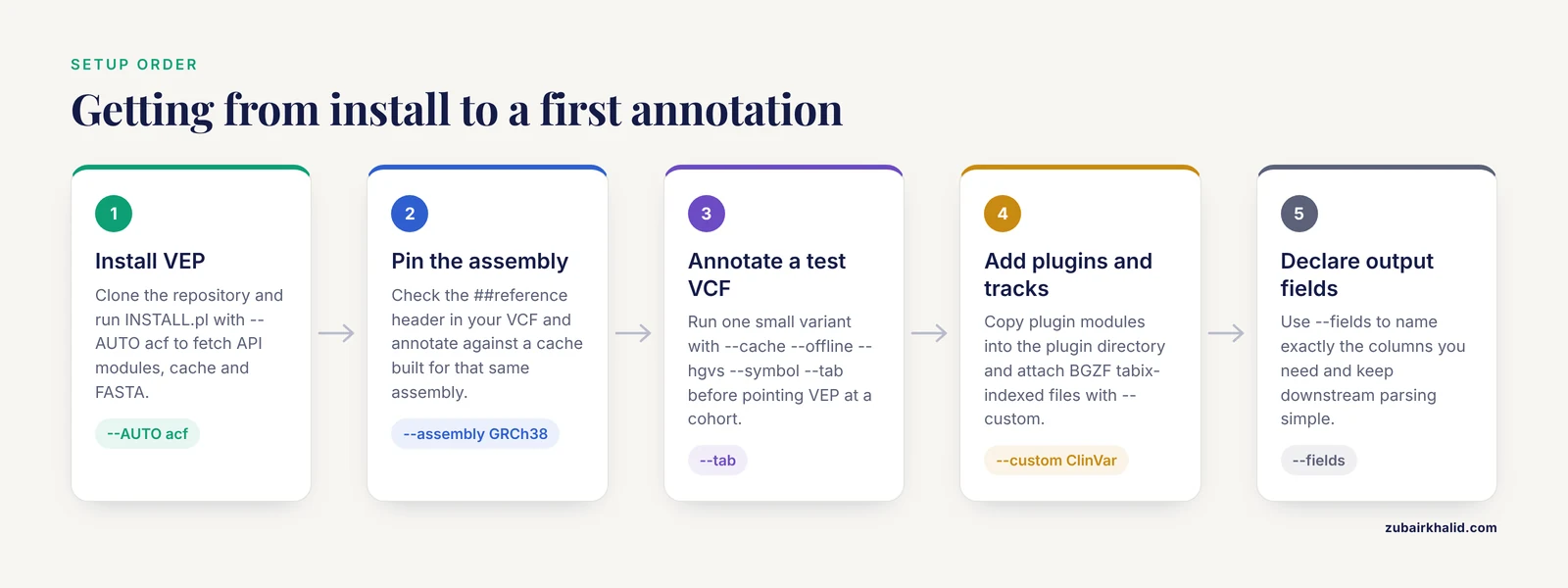
Clone the repository and run the installer. The installer can download the cache, the FASTA reference, and the required API modules in one pass.
git clone https://github.com/Ensembl/vep.git
cd vep
perl INSTALL.pl --AUTO a --SPECIES homo_sapiens --ASSEMBLY GRCh38
The -AUTO a option installs the VEP API modules. To also fetch the cache and a FASTA in the same run, use:
perl INSTALL.pl --AUTO acf --SPECIES homo_sapiens --ASSEMBLY GRCh38The installer prompts for a cache directory. The default is a hidden directory named .vep in your home folder. Confirm the installation works by printing the help text:
./vep --helpExpected output begins with the usage summary and version line, for example:
Usage:
./vep [options]

Options:
--input_file | -i     Input file
--output_file | -o    Output file
...
If Perl complains about a missing module such as DBI or Compress::Zlib, install it with your system package manager or with cpan and rerun the installer.
Step 2: Pick the Right Genome Assembly and Cache
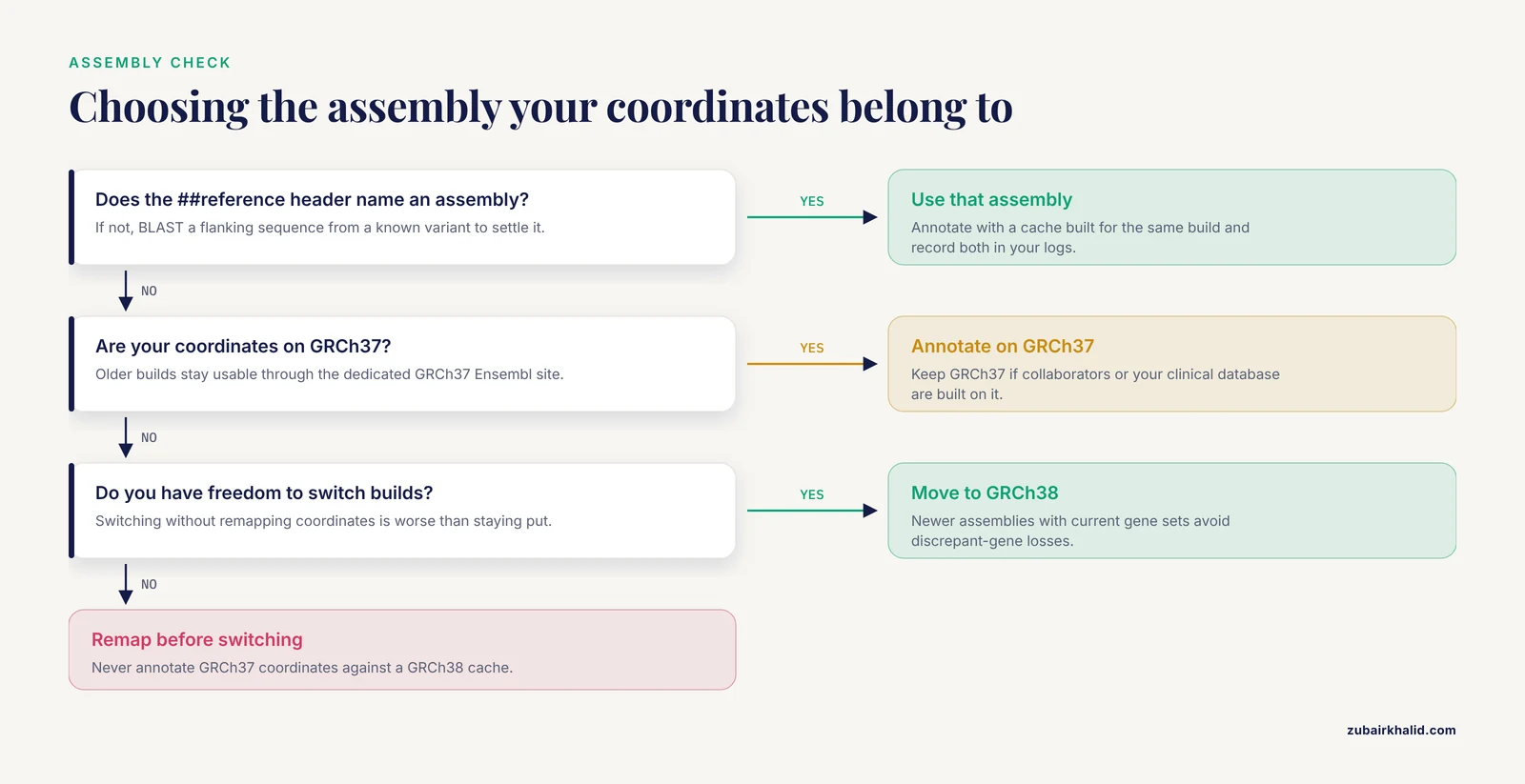
Assembly choice is the single most consequential decision in the whole workflow, and it is where careless pipelines quietly produce wrong answers. VEP coordinates and annotations are assembly specific. Variant coordinates from an alignment against GRCh37 must be annotated against GRCh37 resources, and coordinates from GRCh38 against GRCh38 resources. Ensembl continues to support GRCh37 through a dedicated site, so older assemblies remain usable, but the two assemblies are not interchangeable [2].
The deeper problem is that archived gene annotations do not stay frozen in a harmless way. Researchers comparing gene annotations between GRCh37 and GRCh38 identified hundreds of genes with discrepant annotations, 267 in that study, meaning genes that are recognized as protein coding in one assembly's gene set but not the other. Variants in those discrepant genes are effectively discarded by any prioritization tool that relies on the outdated GRCh37 Ensembl gene annotations [3]. The practical lesson is not simply "always use GRCh38." If your collaborators, your clinical database, or your variant coordinate space are built on GRCh37, switching assemblies without remapping coordinates is worse than staying put. The rule is consistency: know which assembly your VCF coordinates refer to, and annotate against a cache built for that same assembly. When you do have the freedom to choose, newer assemblies with current gene sets avoid the class of errors described in that comparison [3].
If you are unsure which assembly your VCF belongs to, check the ##reference= header line in the file, or BLAST a flanking sequence from a known variant to settle it. A quick sanity check after annotation is to verify that the reported genes and transcript positions match expectations for at least one well-characterized variant.
Step 3: Run Your First Annotation
Create a small test VCF so you can see the machinery work before pointing VEP at a large cohort file.
##fileformat=VCFv4.2
#CHROM POS     ID           REF ALT QUAL FILTER INFO
1      762273  rs149249600  G   A   .    .      .
Run the annotation:
./vep \
  -i variants.vcf.gz \
  -o variants.vep.txt \
  --cache --offline --assembly GRCh38 \
  --dir_cache $HOME/.vep \
  --hgvs --fasta $HOME/reference/GRCh38.fa \
  --symbol --numbers --domains --canonical --biotype --protein \
  --dir_plugins $HOME/vep_plugins \
  --tab --force_overwrite
Each flag that matters here does a distinct job:
-cacheuses the downloaded cache instead of querying an Ensembl database over the network. It is much faster and required for-offline.-offlinedisables all network access. Required in controlled compute environments and good for reproducibility.-assemblypins the assembly. Never rely on the default.-hgvsadds HGVS cDNA and protein notation such asOR4F5:c.327C>TandOR4F5:p.Pro109Ser. It requires a FASTA.-symboladds gene symbols alongside Ensembl gene IDs.-numbersadds exon and intron numbers and coding position, which you will want for reporting.-canonicalflags the canonical transcript for each gene.-biotypetells you whether the transcript is protein coding, miRNA, and so on.-tabwrites tab-delimited text instead of the default VEP report format, which is easier to post-process. A tabular output with explicit allele fields is also the format used by downstream workflows that need machine-readable, per-allele annotation [4].
Expected output for the test variant looks like this, with columns abbreviated:
#Uploaded_variation  Location    Allele  Gene             Feature           Consequence       cDNA_position  Protein_position  Amino_acids  Codons  Existing_variation  IMPACT
rs149249600          1:762273    A       ENSG00000186092  ENST00000335137   missense_variant  327            109               P/S         Cca/Tca  rs149249600         MODERATE
Note one behavior that surprises new users: VEP emits one line per transcript overlapping the variant, not one line per variant. A variant that overlaps two genes and has three transcripts per gene produces six output lines. That is a feature, because different transcripts genuinely have different consequences, but it means naive row counts overstate the number of variants.
Step 4: Customize the Annotation with Plugins and Custom Files
Out of the box, VEP reports consequences. Customization is where VEP becomes a prioritization engine. There are two mechanisms, plugins and -custom annotation files.
Plugins are Perl modules that compute or import extra annotations. Common choices include LoF, LoFtee, CADD, SpliceAI, dbNSFP-based predictors, and AlphaMissense. Modern clinical pipelines routinely bundle many of these, and one Nextflow-based annotation pipeline integrates VEP with 22 curated plugins including AlphaMissense, CADD, SpliceAI, and Enformer precisely because single-source annotation is rarely sufficient for clinical interpretation [5]. A clinical variant report for a hereditary spastic paraplegia case, for example, drew on VEP together with LoFTEE, CADD, SIFT, PolyPhen-2, and SpliceAI to classify a novel frameshift variant [6].
Install a plugin by copying its Perl module into your plugin directory and invoking it by name:
mkdir -p $HOME/vep_plugins
git clone https://github.com/Ensembl/vep-plugins.git
cp vep-plugins/LoFtool.pm $HOME/vep_plugins/
Then add to the VEP command:
--dir_plugins $HOME/vep_plugins --plugin LoFtoolPlugins that need data files, such as CADD or SpliceAI, require you to download their score files separately and point the plugin at them. Read each plugin's header comments for the exact setup, and record the data file versions, because a CADD score from an old distribution is not comparable to a current one.
The -custom flag attaches any BGZF-compressed, tabix-indexed annotation file, for example a ClinVar VCF:
bgzip ClinVar.vcf
tabix -p vcf ClinVar.vcf.gz

./vep ... --custom ClinVar=ClinVar.vcf.gz,vcf
After this run, every variant that overlaps a ClinVar record carries fields such as ClinVar_CLNSIG in the annotation. This is how you merge external evidence into a single file rather than joining tables later with fragile scripts. The categories VEP covers through built-in and plugin mechanisms, clinical significance, population frequencies, and deleteriousness scores, mirror the resources that make VEP useful for variant prioritization in the first place [1].
For oncology, knowledgebase-driven customization matters as much as scores. The CIViC knowledgebase curates clinical evidence linking variants to disease progression, prognosis, and therapy, and tools such as CIViCutils handle matching large variant sets against that evidence and evaluating the accuracy of each match [7]. A reasonable pattern is to let VEP attach gene and consequence context, then run a dedicated evidence matcher over the reduced candidate set.
Finally, disease-specific filtering can be folded directly into VEP. The G2P system extends VEP with curated panels that pair allelic requirement and mutational consequence at a locus with phenotypic terms, so the annotation step itself knows, for example, that a gene requires biallelic loss of function for the phenotype in question. Applied to a developmental disorders panel, that approach showed a sensitivity of 97.3 percent for de novo pathogenic genotypes and 81.6 percent for inherited ones in whole-exome data [8]. If your use case is diagnostic exome filtering, a consequence-and-allelic-requirement model is a strong prior that plain consequence filtering lacks.
Step 5: Control the Output Format and Fields
Default VEP output is verbose. For pipelines you almost always want to declare exactly the fields you need with -fields, which keeps files small and downstream parsing trivial:
./vep ... --tab \
  --fields "Uploaded_variation,Location,Allele,Gene,Feature,Consequence,cDNA_position,CDS_position,Protein_position,Amino_acids,Codons,Existing_variation,IMPACT,SYMBOL,BIOTYPE,CANONICAL,EXON,INTRON,HGVSc,HGVSp,LoFtool_score"
Three format choices are worth knowing:
-tabgives one row per variant-transcript pair, the format used by workflows that need standardized, explicit allele fields in germline annotation [4].-vcfwrites the annotations into the CSQ INFO key of an output VCF, which keeps annotation attached to the original call file and is convenient for bcftools operations.- Human-readable TSV output is also the endpoint of streamlined pipelines built for researchers who want annotation without writing format-conversion scripts themselves [9].
One warning from practice applies here. Annotated variant tables are frequently imported into spreadsheets for manual review, and spreadsheet import can distort data through automatic type conversion, for example coercing long gene IDs into scientific notation or mangling variant identifiers. If reviewers will read the file, provide a controlled viewer or a CSV with explicit quoting rather than encouraging raw spreadsheet import [4].
Step 6: Filter Variants with filter_vep and, filter
VEP ships with a companion script, filter_vep, that applies the same filter expression language to any annotated file. Filter expressions compare annotation field values using operators such as is, matches, in, <, >, and !=, and combine clauses with and, or, and parentheses.
You can also filter during annotation itself by passing -filter directly to VEP. Variants that fail the expression are omitted from the output, and with -vcf output the FILTER column records the outcome.
The canonical high-impact filter:
./filter_vep \
  -i variants.vep.txt \
  -o high_impact.txt \
  --filter "IMPACT is HIGH"
Expected output summary line:
2026-11-11 10:32:01 - Read 48,213 variants from file
2026-11-11 10:32:02 - 612 variants passed filter
A compound filter targeting likely loss-of-function consequences in protein-coding transcripts:
./filter_vep \
  -i variants.vep.txt \
  -o candidate_lof.txt \
  --filter "(Consequence in stop_gained,frameshift_variant,splice_acceptor_variant,splice_donor_variant) and (BIOTYPE is protein_coding)"
A filter that also checks a plugin or custom field:
./filter_vep \
  -i variants.vep.txt \
  -o candidates.txt \
  --filter "(IMPACT is HIGH) and (CANONICAL is YES)"
For numeric thresholds such as population allele frequency, the field name depends on the plugin or custom track you used, so check the header line of your annotated file first. The header block at the top of VEP tab output lists every field name in order, which is the authoritative reference for writing expressions.
Because every output line is a variant-transcript pair, filtered counts do not equal variant counts. A single variant can pass the filter on one transcript and fail on another. If you want per-variant decisions, either filter first and then collapse to canonical transcripts, or collapse with the -pick logic at annotation time and accept the tradeoffs discussed below.
Step 7: A Worked Rare-Disease Filtering Example
Put the pieces together in a realistic germline prioritization chain. Published whole-exome studies routinely follow this shape, annotating against the reference genome with VEP and then filtering on predicted pathogenicity and population allele frequency to focus on rare variants of concern [10]. Here is the same logic as commands.
Start from an annotated file and filter in stages:
# Stage 1: restrict to rare alleles. Adjust the threshold and
# field name to the frequency track you annotated with.
./filter_vep -i variants.vep.txt -o step1_rare.txt \
  --filter "(gnomADg_AF < 0.001) or (gnomADg_AF is -)"

# Stage 2: keep protein-altering consequences on protein-coding transcripts.
./filter_vep -i step1_rare.txt -o step2_lof_missense.txt \
  --filter "(Consequence in missense_variant,stop_gained,frameshift_variant,splice_acceptor_variant,splice_donor_variant,start_lost) and (BIOTYPE is protein_coding)"

# Stage 3: remove variants in genes not on your phenotype-relevant panel.
./filter_vep -i step2_lof_missense.txt -o step3_panel.txt \
  --filter "SYMBOL matches ^(SPAST|ATL1|KIF1A|ALS2)$"
Each stage should shrink the file by one to two orders of magnitude. If a stage barely changes the count, the expression is probably wrong, most commonly because the field name does not exist in your header. Missing fields make the clause evaluate false for everything, so an unexpectedly small output is a bug signal, and an unexpectedly large one usually means the numeric comparison never applied.
At this point the remaining variants are candidates, not findings. Move them through your own interpretation framework, drawing on frequency evidence, constraint data, clinical databases, and segregation, before classifying anything. The example case cited above used the filtered annotation output together with absence from population and clinical repositories and segregation in the family to reach a likely pathogenic classification [6]. That reasoning happens outside VEP.
Step 8: Check Your Results in the Ensembl Genome Browser
Command-line output is easy to get subtly wrong, and the Ensembl genome browser is the fastest independent check. Ensembl's own documentation treats VEP as one of the specialist tools in a broader platform that includes genome browsers, search interfaces, and programmatic access [11], and the project provides the most current annotation plus querying tools across species [2].
A short browser verification routine:
- Go to the Ensembl website and paste the variant, for example
1:762273 G>A, into the search box, specifying the assembly if prompted. - Open the variation page and compare the listed consequences and transcripts against your VEP output row for the same variant.
- Click through to the transcript view and confirm exon numbering, protein position, and amino acid change. This catches most
-hgvsand coordinate errors immediately. - Check that the gene symbol in your output matches the gene page. Gene symbols are notoriously ambiguous, with a large share of human protein-coding genes sharing symbols with other genes, which is why stable gene identifiers such as Ensembl gene IDs should anchor any automated join, with symbols treated as labels rather than keys [12].
For bulk verification across many variants, the REST API offers programmatic access to the same annotation data [2], and the web interface itself can process variant sets of modest size without any installation at all, which suits users who need sophisticated analysis through a simple interface rather than a full pipeline [1].
Quick Reference: Key Options and Filter Expressions
| Option or expression | What it does | When to use it |
|---|---|---|
-cache, offline | Annotate from a downloaded cache with no network | Standard for pipelines and restricted clusters |
-assembly GRCh38 | Pin the genome build | Always, explicitly, on every run |
-hgvs, fasta FILE | Add HGVS notation | Clinical reporting and cross-database lookups |
-pick | Report one consequence per variant on the most severe transcript | Quick reviews where you accept transcript-selection risk |
-canonical | Flag the canonical transcript per gene | Prioritization, panel design |
-fields "..." | Restrict tab output to named columns | Reducing file size and parser complexity |
-plugin NAME | Attach a plugin, for example LoFtool | Scores not in the base annotation |
-custom Track=file.gz,vcf | Attach a BGZipped, tabix-indexed external track | ClinVar, gnomAD sites, your own tracks |
-filter "IMPACT is HIGH" | Keep only high-impact annotation lines | First-pass rare-disease triage |
-filter "(A) and (B)" | Combine clauses | All realistic candidate searches |
Common Mistakes and Limitations
Annotating against the wrong assembly. This is the most damaging error because it usually produces plausible-looking output. Coordinates in GRCh37 and GRCh38 differ by more than a release-number change, and gene models differ too, including the hundreds of genes whose coding status differs between the assemblies. Variants in those genes vanish silently from downstream prioritization when outdated GRCh37 gene annotations are used [3]. Verify the ##reference header, annotate with the matching cache, and record both in your logs.
Treating one output row as one variant. VEP reports every transcript affected. Counts, burden tests, and manual reviews all go wrong when people forget the one-to-many structure. Decide early whether your question is per-variant or per-transcript, and collapse accordingly.
Using -pick reflexively. -pick is convenient, but it hands the transcript choice to a severity heuristic. The disease-relevant transcript is not always the picked one, and for splice or start-loss questions the picked annotation can be the wrong one. Keep the full transcript table for anything you intend to publish or report clinically, and reserve picked output for quick looks.
Trusting gene symbols as identifiers. Symbols are ambiguous and change over time. Automated filtering and joining should key on stable gene IDs from Ensembl or equivalent authorities, using symbols only for display [12].
Feeding annotated tables into spreadsheets. Automatic type conversion during spreadsheet import corrupts identifiers and coordinates. Distribute final tables as properly quoted CSV or TSV, or use a purpose-built viewer.
Filtering against the wrong transcript set. VEP can use Ensembl or RefSeq gene sets, and consequence calls can differ between them [1]. If a collaborator's pipeline used RefSeq transcripts and yours used Ensembl, do not expect matching outputs, and never mix consequence calls produced against different gene sets.
Treating annotation versions as interchangeable. VEP and its caches update quarterly [1], so identical input annotated a year apart can produce different scores and even different consequence terms. Pin the version, rerun critical analyses after upgrades, and diff the outputs before trusting a new release in production.
Forgetting that consequence is not pathogenicity. Filtering on IMPACT and consequence identifies candidate biology, not clinical significance. Studies that combine VEP consequences with population frequency, constraint, and clinical evidence do so deliberately, in stages [10], and clinical-grade classification follows ACMG/AMP style reasoning with multiple evidence streams rather than a single annotation field [6].
Assuming offline means feature-complete. The -offline cache covers core annotation, but some database-dependent behaviors and certain plugin data sources differ from database mode. If your analysis must run offline, validate a handful of known variants against the web interface before trusting the batch.
Frequently Asked Questions
How do I filter VEP output for high-impact variants only?
Run ./filter_vep -i variants.vep.txt -o high_impact.txt, filter "IMPACT is HIGH". This keeps annotation lines whose impact class is HIGH, such as stop_gained and frameshift_variant. Remember the output is per transcript, so a variant can appear on multiple rows.
Can I filter on population frequency like gnomAD allele frequency directly in VEP?
Yes, if you annotated with a frequency plugin or a -custom gnomAD track so the frequency appears as a field. Then filter on that field, for example -filter "gnomADg_AF < 0.001". The exact field name is listed in the header block of your annotated file.
What is the difference between the VEP cache and the database?
The cache is a downloaded, compressed copy of transcript and variation data that lets VEP run fast and fully offline with -cache, offline. Database mode queries Ensembl servers directly and reflects the live release. Pipelines favor the cache for speed and reproducibility.
How do I add ClinVar annotations to my VEP output?
Download the ClinVar VCF, compress it with bgzip, index it with tabix, and pass -custom ClinVar=ClinVar.vcf.gz,vcf to VEP. Matching variants then carry ClinVar significance fields such as ClinVar_CLNSIG, which you can filter on directly.
Which genome assembly should I annotate against, GRCh37 or GRCh38?
Use the assembly your variant coordinates were called against, and no other. GRCh38 has current gene sets, but GRCh37 remains widely used and supported, and mixing coordinate spaces or gene annotations between assemblies silently loses variants in discrepant genes [3].
How do I get only one line of output per variant?
Use the -pick option, which reports one consequence per variant on the transcript VEP judges most severe. It is convenient for review but discards the multi-transcript reality, so keep the full output for anything you plan to publish or report clinically.
Can VEP run without an internet connection?
Yes. After the cache and any plugin data files are downloaded, run with -cache, offline and provide a FASTA if you use -hgvs. All annotation is then computed locally on the cluster or workstation.
How do I check that my VEP annotations are correct?
Pick a few well-characterized variants, look them up in the Ensembl genome browser, and compare consequences, transcript IDs, and protein changes against your output. Discrepancies usually point to an assembly, cache version, or transcript-set mismatch rather than a bug in VEP itself.
Sources
- Annotating and prioritizing genomic variants using the Ensembl Variant Effect Predictor-A tutorial.
- Ensembl 2015
- Lost in translation: the pitfalls of Ensembl Gene annotations between human genome assemblies and their impact on diagnostics
- Germline VCF Annotator: a lightweight pipeline for processing germline VCFs with robust variant extraction and read evidence quality control.
- MuSA: a Nextflow pipeline for deep, reproducible annotation and clinical ranking of genomic variants.
- A Novel Frameshift Variant in the SPAST Gene Causing Hereditary Spastic Paraplegia in a Bulgarian-Turkish Family
- CIViCutils: Matching and downstream processing of clinical annotations from CIViC
- Flexible and scalable diagnostic filtering of genomic variants using G2P with Ensembl VEP.
- GATES: A Lightweight Tool Automating Pathogenic Variant Discovery From Raw Whole-Exome Sequencing Data
- Whole-exome sequencing identifies a missense variant in the cytoskeletal gene SVIL implicating actin remodeling in COVID-19 severity in a Pakistani cohort.
- Ensembl 2021
- Protein-coding genes in humans and model mammals (mouse, rat and pig): gene identifiers and disambiguation of gene nomenclature retrieved from the Ensembl genome browser