UniProt vs. InterPro for Protein Family Classification
By Dr. Zubair Khalid, DVM, MS, PhD ·

UniProt classifies a protein by curated knowledge about that specific entry, while InterPro classifies it by matching diagnostic computational models called signatures against the sequence. Put simply, UniProt tells you what is known about a protein and which family its curators place it in, and InterPro tells you which families, domains, repeats, and functional sites the sequence actually matches according to a coordinated set of member databases.
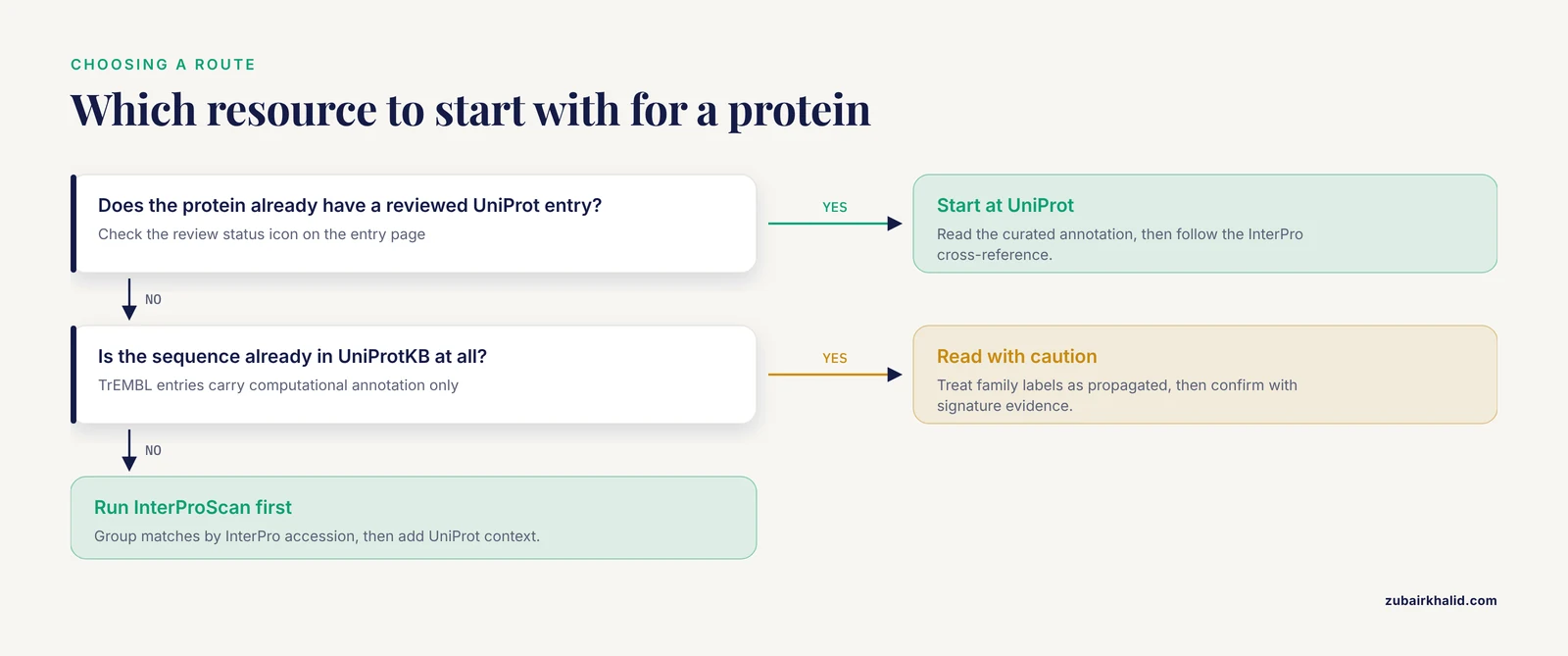
The rule of thumb for choosing between them is short. If your protein already has an entry in the UniProt Knowledgebase, start at UniProt, read the curated annotation, and then follow the InterPro cross-reference to see the full family and domain evidence. If your sequence is new, for example a predicted gene product from a fresh genome assembly, run InterProScan to get the signature-based classification first, then use UniProt to place the results in biological context. Most real projects use both resources in this order, and the difference between uniprot and interpro protein family classification is less about which one is correct and more about which question you are asking: retrieval and context, or systematic classification logic.
This article compares the two resources on the criteria that decide real choices, shows worked workflows for both, and lists the mistakes that cost people the most time.
The Core Distinction in One Table
| Criterion | UniProt | InterPro |
|---|---|---|
| Primary role | Curated protein knowledgebase with functional annotation, sequence data, and cross-references | Integrated database of protein families, domains, and functional sites built from signature databases |
| Classification basis | Manual curation, similarity-based automatic annotation, and imported family cross-references | Diagnostic signatures from member databases such as Pfam, PROSITE, PANTHER, and SMART, integrated into InterPro entries |
| What a "family" looks like | A curated entry field plus cross-references to family databases, supported by keywords and GO terms | An InterPro entry of type family, backed by one or more member database signatures |
| Also classifies | Full proteins, isoforms, proteomes, orthology through similarity | Families, domains, repeats, active sites, binding sites, and post-translational modification sites |
| Sequences covered | UniProtKB (Swiss-Prot and TrEMBL), UniParc, UniRef clusters | Matches provided for all UniProtKB and UniParc proteins |
| Curation depth | Reviewed entries in Swiss-Prot are manually curated, TrEMBL entries are computationally annotated | InterPro entries are manually integrated and curated from member database signatures |
| Best used for | Retrieving known proteins, downloading proteomes, reading curated function, ID mapping | Assigning families to novel sequences, systematic domain architecture analysis, bulk family membership queries |
| Typical entry point | uniprot.org search or REST API | EBI InterPro website, InterProScan software, or InterPro BioMart |
| Output for your pipeline | Protein entries with annotations, families, keywords, GO terms | Signature matches, InterPro entry accessions, GO mappings, pathway links |
What UniProt Is and How It Classifies Families
The UniProt Knowledgebase, or UniProtKB, is the central public repository for protein sequence and functional information. Nucleic acid sequences from genome projects arrive as raw data, and curators work to add predicted and experimental functional information to the resulting protein entries [1]. UniProtKB has two divisions. Swiss-Prot contains reviewed entries with manual curation, and TrEMBL contains unreviewed entries with computationally generated annotation. Alongside UniProtKB sit UniParc, the sequence archive, and UniRef, the clustered reference sets used for fast similarity searches and redundancy reduction.
Family information inside a UniProt entry comes from several places at once. A reviewed entry typically carries a protein name, gene names, keywords, Gene Ontology terms, taxonomy, and cross-references to family and domain resources such as PROSITE, Pfam, and, through those resources, InterPro. The family assignment in UniProt therefore reflects what curators judged to be true for that entry, informed by experimental literature where it exists and by similarity- and signature-based methods where it does not. This is the key character of uniprot protein family classification: it is an endpoint of annotation, a distilled statement about a specific entry.
UniProt also operates at the proteome scale. Researchers who want to analyze the complete set of proteins from a genome can access non-redundant proteome sets and proteome-level analyses, which matters when the goal is whole-genome protein characterization rather than single-protein lookup [1]. Because TrEMBL grows with every genome submission, UniProt is where nearly all known protein sequences live, and it functions as the hub that other resources, including InterPro, classify against.
The practical consequence is that UniProt answers questions like these well. Which reviewed proteins exist for this gene in this organism? What does the curator say about this protein's function and family? Which proteins in this proteome carry a specific keyword? Which sequences are closest to mine by similarity? It answers poorly, on its own, the question of why a protein was assigned to a family, because the underlying model evidence sits in the member databases that InterPro integrates.
What InterPro Is and How It Classifies Families
InterPro is an integrated resource for protein families, domains, and functional sites. It does not generate its own sequence models from scratch. Instead, it integrates the major protein signature databases, including PROSITE, PRINTS, ProDom, Pfam, SMART, TIGRFAMs, PIRSF, and SUPERFAMILY, with Gene3D and PANTHER added in later releases [2][3]. Each member database contributes its own models, called signatures. A signature can be a profile hidden Markov model, as in Pfam and TIGRFAMs, a regular expression pattern, as in PROSITE, a profile, a fingerprint of multiple motifs, as in PRINTS, or a structure-based homologous superfamily model, as in Gene3D and SUPERFAMILY.
Curators manually integrate signatures that describe the same biological entity into a single InterPro entry. Each entry carries an abstract describing the family or domain, Gene Ontology mappings, taxonomic range information, links to specialized databases, and structural data where available [3]. Entry types are explicit. InterPro release 8.0 contained 11,007 entries representing 2,573 domains, 8,166 families, 201 repeats, 26 active sites, 21 binding sites, and 20 post-translational modification sites [3]. That typology is the practical answer to what InterPro offers beyond any single member database: one accession, such as an IPR number, that stands for a consensus definition reconciled across many models.
The integration is what makes InterPro a classification layer rather than just a portal. Because InterPro provides a classification of UniProtKB sequences [1], every UniProtKB protein carries a record of which InterPro entries match it. Coverage has been substantial for years, with the release 13.0 containing more than 13,000 entries and covering over 78% of all UniProtKB proteins [2]. Match data are distributed both through the website and through match XML files on the FTP site, and InterProScan, the search tool that computes these matches, is available as downloadable software and through a web service [2].
The practical consequence is that InterPro answers the questions UniProt leaves open. Why does this protein belong to the kinase family? Because Pfam, PROSITE, and PANTHER signatures for the protein kinase domain all match, and InterPro reconciles them into one entry with a shared accession. Which residues form the active site? Because a site-level InterPro entry maps onto the alignment. What is the domain architecture of this protein? Because the ordered set of domain matches is shown directly.
UniProt vs. InterPro for Protein Family Classification: The Deciding Criteria
When choosing uniprot or interpro protein family classification for a project, five criteria do most of the deciding.
Coverage of your sequences
InterPro historically covered just over three quarters of UniProtKB proteins [2]. That means a meaningful fraction of sequences, especially short ones, low-complexity ones, and proteins from poorly studied lineages, match no InterPro entry at all. UniProtKB, by contrast, contains essentially every publicly deposited protein sequence, because TrEMBL ingests the translation of every coding sequence annotation. If your goal is a list of all proteins, UniProt is the only option of the two. If your goal is a list of all proteins that belong to a definable family, InterPro is the classification engine, but you must plan for the unclassified remainder.
Curation depth and evidence
A reviewed Swiss-Prot entry represents consolidated, curator-checked knowledge, and it is the highest-confidence statement available about a protein's family and function [1]. An InterPro entry represents reconciled consensus across signature databases, also curated, but anchored in sequence models rather than per-protein literature review. These are complementary strengths. For a specific well-studied protein, UniProt's curated entry is the richer read. For a protein with no reviewed entry anywhere, the InterPro match is often the strongest available evidence of family membership, and it comes with the specific models that produced the match, which lets you judge the evidence yourself.
Granularity
UniProt classification is mostly about whole proteins. InterPro classification is hierarchical in a different axis: the same protein can match a family entry, several domain entries, repeat entries, and site entries simultaneously [3]. If your analysis needs domain architecture, for example counting how many proteins in a proteome carry both a kinase domain and an SH2 domain, InterPro is the natural tool. If your analysis needs whole-protein groupings, for example counting kinase-encoding genes per genome, either resource works, but UniProt's family cross-references and keywords give you the curated version.
Identifier semantics
An InterPro accession denotes a family or domain definition that is stable across organisms and across member database updates, which makes it a good key for bulk pipelines. A UniProt accession denotes a specific protein entry, which changes when sequences merge or split. Building a dataset of "all proteins in family X" is most naturally keyed on an InterPro accession, then resolved to UniProt accessions for downstream analysis.
Bulk access and scale
Both resources support bulk queries, but they differ in shape. UniProt offers proteome downloads, ID mapping, and a REST API for retrieving entries and fields. InterPro offers precomputed match files for all UniProtKB and UniParc proteins [2], plus the InterPro BioMart, which provides query-optimized access to family classification, domain, and functional site predictions and can efficiently return thousands of rows in a variety of formats, including through a web service [4]. For large custom queries, BioMart's federated model is often the faster path [4].
How to Use UniProt for Family Classification: A Practical Tutorial
This section is a compact uniprot database tutorial aimed at family classification work. It covers the search interface, the query syntax, and the batch tools you will actually use.
Searching and filtering on the website
Start at the UniProt website search box. The most useful filters for family work are the reviewed filter and the taxonomy filter. A query such as reviewed:true AND organism_id:9606 returns only manually curated human proteins, which is the cleanest starting set when you want high-confidence family members. Keyword searches let you pull curated protein sets directly, for example all reviewed entries carrying a keyword that names a family or a functional category. Every entry page shows the family section, the cross-references to PROSITE, Pfam, and InterPro, and the evidence tags that tell you whether a statement comes from experiment, curation, or computational prediction.
Retrieving a family as a dataset
To build a family dataset, pick the defining cross-reference. Open a reviewed seed entry, find its PROSITE or InterPro cross-reference, and follow it. From the cross-reference target you can list all linked UniProtKB entries and download them in FASTA, TSV, or Excel format. For programmatic retrieval, the UniProt REST API accepts the same query syntax. A query of the form database:interpro:IPR000001 AND reviewed:true returns reviewed proteins matched to that InterPro entry, with fields selectable as tab-separated columns, for example accession, protein name, organism, and the family cross-references themselves.
Using BLAST and UniRef for similarity-based classification
When your protein is not yet in UniProtKB, sequence similarity is the first route to a family assignment. UniProt provides BLAST against UniProtKB, and UniRef clusters offer reduced-redundancy targets that speed searches without losing most representational diversity. A high-scoring hit to a reviewed Swiss-Prot entry, backed by a matching family cross-reference, is usually sufficient to propose a family assignment, which you should then confirm by checking the signature evidence on the InterPro side.
ID mapping and proteome downloads
UniProt's ID mapping service converts between gene identifiers, Ensembl transcripts, RefSeq accessions, and UniProt accessions, which is a daily necessity when integrating family annotations with expression or genomic data. Proteome sets for organisms with completely sequenced genomes can be downloaded directly, giving you the non-redundant proteome background you need for enrichment and comparative analyses [1].
Reading an entry correctly
Two habits prevent most misreads. First, check the review status icon. An annotation on a TrEMBL entry is computational, not experimentally verified. Second, check evidence tags line by line. A family assignment marked as "By similarity" was transferred from another organism, while one with an experimental citation rests on direct data. Both are useful, but they carry different weight, and confusing them is the single most common error in UniProt-based classification.
Running InterProScan on Your Own Sequences
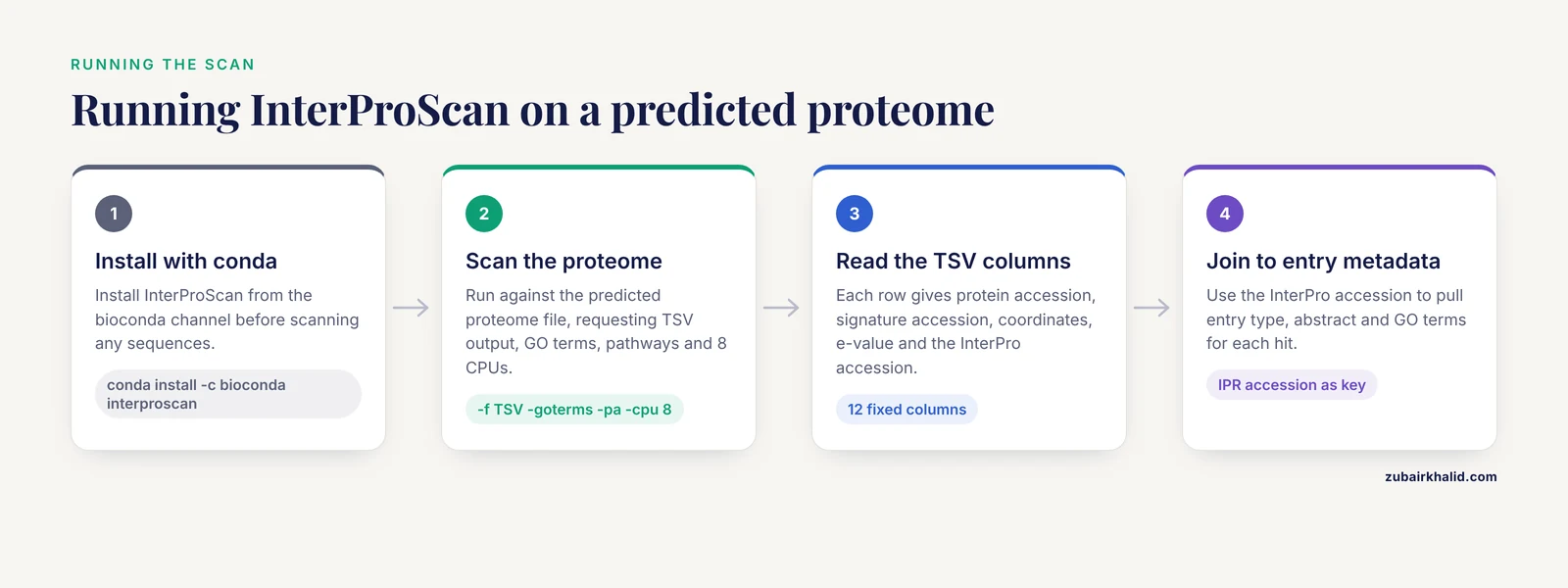
InterProScan is the executable core of InterPro-based classification. It scans your sequences against the member database signatures and reports every match, grouped under InterPro entries where signatures agree.
A standard local installation through conda looks like this:
conda install -c bioconda interproscanA typical run against a predicted proteome file is:
interproscan -i proteins.fasta -f TSV -goterms -pa -cpu 8The -f TSV flag produces a tab-delimited table, -goterms adds Gene Ontology mappings, -pa adds pathway annotations, and -cpu controls parallelism. The TSV columns follow a fixed order: protein accession, sequence MD5, sequence length, analysis name, signature accession, signature description, start coordinate, stop coordinate, e-value or score, status, run date, InterPro accession, and InterPro entry description. When a hit carries an InterPro accession, you can immediately join it to InterPro entry metadata such as type, abstract, and GO terms.
Three practical notes save hours. First, InterProScan versions are tied to specific signature library versions, so record the version number with your results, because family definitions do evolve. Second, analyses such as the structure-based superfamily methods are slower than the HMM libraries, and you can disable individual analyses if your question only needs domain families. Third, if you cannot run the software locally, the EBI provides InterProScan through a web service [2], and the InterPro website accepts pasted sequences for interactive scans.
Bulk Access: InterPro BioMart and Precomputed Match Files
For queries across whole proteomes or many families, three bulk routes matter.
The InterPro BioMart lets you build custom, federated queries, for example every UniProtKB protein matching a given InterPro entry, filtered by taxonomy, returned with selected fields in a chosen format [4]. It supplements the primary InterPro web interface and exposes the same data through a web service for scripted access [4]. Because the predictions cover both UniProtKB and UniParc sequences [4], BioMart queries can reach archived sequences that no longer have living UniProtKB entries.
The precomputed match files distributed through the FTP site contain InterPro matches for all UniProtKB proteins, and additional matches to UniParc proteins in the match XML files [2]. If your analysis only needs a static snapshot of family membership across the full protein universe, downloading the match files and joining them locally is faster and more reproducible than repeated web queries.
On the UniProt side, the REST API handles batch retrieval and field selection, and proteome downloads give you complete, labeled protein sets per organism [1]. In practice, a robust pipeline uses UniProt as the source of sequences and entry metadata, InterPro as the source of classification logic, and joins the two on accessions.
Worked Scenarios
Scenario 1: Annotating a newly sequenced genome
You have a fresh assembly and a set of predicted coding sequences. Translate the coding sequences, run InterProScan on the protein set, and group proteins by InterPro family accession. Map InterPro entries to GO terms to seed functional annotation. Then download the UniProt proteome set for the closest well-studied relative and use reciprocal similarity to transfer curated annotations [1]. This combined order, signature-based classification first, curated UniProt context second, is the standard route from raw genome to defensible family assignments. Studies that refine genome annotation by adding new evidence, such as proteogenomic analyses that uncover novel coding regions and N-terminal extensions, still need this family classification layer afterward to say anything about what the newly confirmed products do [5].
Scenario 2: Characterizing one uncharacterized protein
Paste the sequence into UniProt BLAST. If strong hits point to a reviewed Swiss-Prot family, read the curated entry, then follow its InterPro cross-reference to see the domain composition and the underlying signature evidence. If hits are weak or absent, run InterProScan on the sequence and look for domain-level matches even when whole-protein similarity fails, because a single recognizable domain often anchors a functional hypothesis that similarity searches miss.
Scenario 3: Building a family dataset for machine learning
Choose the InterPro entry that defines the family you want. Query the InterPro BioMart for all matching UniProtKB proteins, filtered to reviewed entries and your taxa of interest [4]. Download sequences from UniProt, then cluster them, for example with a UniRef-style redundancy reduction, to prevent near-duplicate sequences from inflating your training set and leaking between splits. This join, InterPro entry as the classification key and UniProt as the sequence source, is exactly the division of labor the two resources were designed for.
Scenario 4: When family definitions disagree
Nomenclature conflicts between resources are real. In the carbohydrate-binding module 13 family, a data mining study showed that public protein databases use different nomenclature systems to describe CBM13 modules and the closely related ricin-B lectin domains, and the authors proposed new CBM13 InterPro domain identifiers and extended cross-references to keep the groups distinct [6]. Sequence similarity networks revealed that the ricin-B and CBM13 superfamily may be larger than initially thought [6]. The lesson for classification work is concrete: when two resources disagree about whether a protein belongs to a family, drill down to the signature level, check which member databases produced each call, and record the InterPro accession and the member database accessions separately in your provenance rather than flattening everything into one label.
Scenario 5: Transferring family knowledge across distant species
Domain and family information travels across larger evolutionary distances than whole-sequence similarity. A rice functional annotation workflow combined public transcriptome data with structural and domain information to annotate understudied heat stress genes, using shared domain information between rice and human proteins alongside structural similarity for candidates with low sequence similarity [7]. Family and domain classifications, which are exactly what InterPro provides, were the bridge that made distant comparison tractable.
When to Use UniProt
The question of when to use uniprot has a clean answer set. Use UniProt when you need the sequences themselves, because UniProtKB and UniParc are the sequence substrate that everything else annotates. Use UniProt when you need the highest-confidence functional statement about a specific protein, which means a reviewed Swiss-Prot entry with evidence tags and literature links [1]. Use UniProt when you need proteome sets for organisms with completely sequenced genomes, since these are provided as non-redundant, analysis-ready collections [1]. Use UniProt when you need identifier conversion, keyword-based retrieval of curated protein sets, or a stable target for BLAST searches.
Use InterPro when you need a systematic, model-based family definition that generalizes across organisms, when you need domain and site granularity, or when you need to classify sequences that are not yet in any database. The two answers are not competing. In the difference between uniprot and interpro protein family classification, UniProt is the library and InterPro is the classification scheme stamped onto the books.
Common Mistakes and Limitations
Treating an InterPro family as an orthology group. InterPro families can span many paralogous subgroups across all of life. A protein's membership in an InterPro family entry does not tell you which organism-specific ortholog it corresponds to. Resolve orthology with similarity and taxonomy, not with family membership alone.
Confusing TrEMBL annotation with curation. Family labels and function statements on unreviewed TrEMBL entries are computationally propagated. They are usually reasonable, but they are not the same as a reviewed entry, and pipelines that treat them as equivalent inherit propagation errors at scale.
Mixing signature granularities silently. A PIRSF signature often describes a full-length family with implied functional annotation, while a Pfam signature may describe a single recurring domain that occurs in many unrelated contexts. Aggregating matches from different member databases into one "family" column without recording which database each came from produces results that cannot be audited later. The InterPro integration mitigates this, but the member database behind each signature remains visible in every InterProScan report and should stay visible in your results.
Assuming complete coverage. InterPro matched just over 78% of UniProtKB proteins at release 13.0 [2], and the unclassified fraction is not random. It is enriched for short, low-complexity, lineage-restricted, and novel proteins. Report the fraction of your proteome that received no InterPro classification instead of quietly dropping it.
Ignoring version and release drift. Signature models are revised, merged, and retired. Family definitions evolve as sequence space fills in, a phenomenon documented in systematic comparisons of clustering resources over time [8]. Pin the InterPro release version and the UniProt release date in your methods, and expect family membership lists to change between pipeline runs months apart.
Equating family membership with function. Domains recur in different functional contexts, and family-level labels are hypotheses, not measurements. Annotation resources are increasingly complemented by deep learning approaches that integrate structure and sequence for function prediction beyond homology-based inference [9], and by workflows that combine computational prediction with experimental validation. Treat signature-based classification as strong prior evidence that still benefits from orthogonal support.
Overlooking nomenclature conflicts at family boundaries. As the CBM13 and ricin-B example shows, related families with overlapping signatures can be described differently across databases, and even experts have historically treated overlapping groups as fully distinct [6]. Where a family boundary is contested, record both the InterPro accession and the member database accessions rather than choosing one label arbitrarily.
Forgetting UniParc. Sequences can be archived in UniParc after their UniProtKB entries merge or change. Because InterPro matches cover UniParc as well [2], a family survey that queries only UniProtKB can miss archived sequences. Decide explicitly whether your analysis should include them.
Frequently Asked Questions
Should I use UniProt or InterPro to classify a new protein sequence?
Run InterProScan on the sequence first, since it reports which family, domain, and site signatures match regardless of whether the protein is already in a database. Then look up the strongest UniProt hits to add curated context. For a sequence that already has a reviewed UniProt entry, start at UniProt and read across to InterPro instead.
What is the difference between UniProtKB, Swiss-Prot, and TrEMBL?
UniProtKB is the UniProt Knowledgebase, split into two divisions. Swiss-Prot holds reviewed entries with manual curation and evidence-tagged annotation. TrEMBL holds unreviewed entries with computationally generated annotation, and it absorbs the translation of newly submitted genome annotations. Family work that needs high confidence should filter to reviewed entries.
Can I download every protein that belongs to a specific InterPro family?
Yes. Query the InterPro BioMart for all UniProtKB proteins matching a given InterPro entry and export the accessions or sequences in your chosen format [4]. The precomputed InterPro match files on the FTP site also list every UniProtKB and UniParc match [2], which works well for static, reproducible snapshots.
Do UniProt and InterPro ever disagree about protein families?
They can, especially at family boundaries where related groups share signature models. A documented example is the CBM13 module and ricin-B lectin overlap, where different public databases used conflicting nomenclature for intertwined groups [6]. When this happens, inspect the individual member database matches and record each source accession rather than trusting any single flattened label.
How do I keep my family classifications reproducible across projects?
Record the InterPro release version, the InterProScan version, the UniProt release date, and the exact query or command line used. Signature libraries and curated entries change between releases, and family definitions demonstrably evolve as coverage of sequence space grows [8], so a pinned version is the only way to reproduce a classification later.
Do I still need InterProScan if my proteins are already in UniProtKB?
Usually no. Precomputed InterPro matches exist for all UniProtKB proteins [2], so you can retrieve matches through the InterPro website, BioMart [4], or match files. Run InterProScan locally when you need custom parameters, nonstandard member database subsets, or classification of sequences absent from UniProtKB.
Sources
- In silico characterization of proteins: UniProt, InterPro and Integr8.
- New developments in the InterPro database.
- InterPro, progress and status in 2005.
- The InterPro BioMart: federated query and web service access to the InterPro Resource.
- Identification of new protein-coding potential in Leishmania donovani using a proteogenomics approach.
- Investigating diversity and similarity between CBM13 modules and ricin-B lectin domains using sequence similarity networks.
- Functional annotation of novel heat stress-responsive genes in rice utilizing public transcriptomes and structurome.
- ProtoNet 6.0: organizing 10 million protein sequences in a compact hierarchical family tree.
- Deep learning revolutionizes protein research: Advances in structure prediction, functional annotation, and engineered design.