How to Link from UniProt to Pfam and Other Domain Databases
By Dr. Zubair Khalid, DVM, MS, PhD ·

By the end of this article you will be able to do four things. First, you will find the Pfam families that are cross-referenced on any UniProt entry, both in the web interface and through the REST API. Second, you will batch-retrieve Pfam and InterPro cross-references for hundreds or thousands of UniProt accessions with a single shell loop. Third, you will run your own HMMER scan against Pfam when a sequence is not in UniProt or when you need domain boundaries computed directly on your own sequences. Fourth, you will translate Pfam accessions into InterPro, PROSITE, SMART, CDD, and PANTHER terms so that one domain list can serve several analyses.
Here is what to have on hand before you start:
- A terminal on Linux, macOS, or Windows Subsystem for Linux with
curlandjqinstalled - A text file of UniProt accessions if you plan batch work, one accession per line
- Optional but recommended, HMMER 3 installed if you want to run your own Pfam searches
- Optional, InterProScan if you want signatures from all member databases at once
A note on terminology for readers who are new to this area. UniProt is the comprehensive, curated resource for protein sequence and functional information. Each protein record, called an entry, has a stable accession such as P04637 for human p53. Pfam is a database of protein families, where each family is represented by a hidden Markov model (HMM) profile built from a curated multiple sequence alignment. Pfam entries carry stable accessions such as PF00069 for the protein kinase domain. The two resources are connected through explicit cross-references that you can query, export, and pipe into your own analysis.
This article is written as a practical uniprot database tutorial focused on one workflow, the uniprot to pfam link, with real commands and expected output at each stage.
How the UniProt to Pfam Link Works Under the Hood
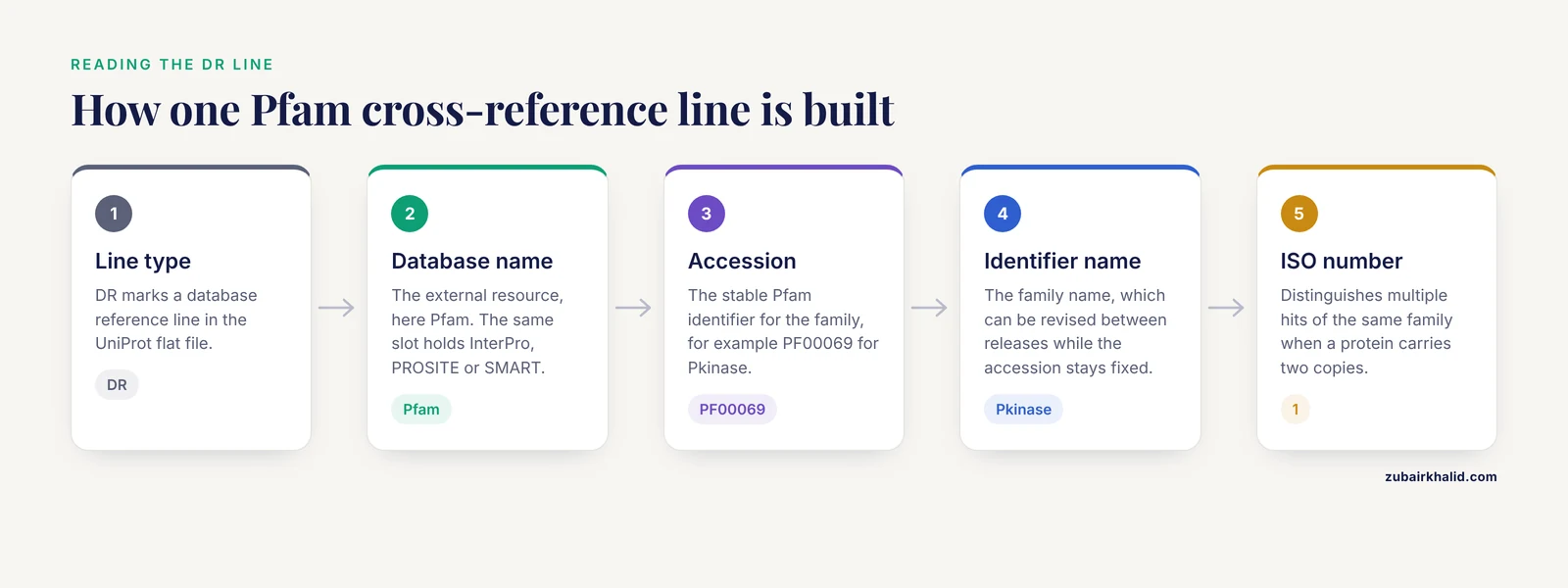
Every UniProt entry stores cross-references to external databases as DR (database reference) lines in its flat-file format. When you request the flat file for an entry, you see lines like these, taken from a kinase entry:
DR   Pfam; PF00069; Pkinase; 1;
DR   InterPro; IPR000719; Prot_kinase_dom; 1;
DR   PROSITE; PS50011; PROTEIN_KINASE_DOM; 1;
Read this line by line. DR marks the line type. Pfam is the external database. PF00069 is the external identifier, the Pfam accession. Pkinase is the external identifier name. 1 is the ISO number, which distinguishes multiple hits of the same family when a protein contains two copies of a domain. The same logic applies to every other cross-referenced database, so a single UniProt entry is a hub that points outward to Pfam, InterPro, PROSITE, SMART, CDD, PANTHER, and many others.
Three structural facts matter for correct work.
- The link lives on the UniProt side. Pfam does not maintain a curated table of "proteins in this family" that you must join against. Instead, UniProt entries carry the cross-reference, and Pfam itself serves protein lists through the InterPro infrastructure at EMBL-EBI. Either direction works, but the UniProt cross-reference is the authoritative, release-synchronized link for a given entry.
- Pfam is a member database of InterPro. InterPro integrates signatures from member databases, including Pfam, PROSITE, SMART, CDD, PANTHER, TIGRFAMs, HAMAP, CATH-Gene3D, and others, into a single classification. UniProt entries cross-reference both the member signature (for example
PF00069) and the integrated InterPro entry it belongs to (for exampleIPR000719). This is why the InterPro accession is often the most convenient joining key across databases.
- Accessions are stable, names are not. A Pfam accession such as
PF00069never changes, while the family name can be revised between releases. Always join on accessions, and record the Pfam release version alongside your results so that a colleague can reproduce the exact annotation set.
A Short UniProt Database Tutorial: Reading an Entry Before You Query It
If you are learning how to use UniProt for the first time, spend two minutes on the entry page because everything downstream depends on reading it correctly. Open https://www.uniprot.org/uniprotkb/P04637 in a browser. The page is organized into sections, and the ones that matter here are:
- Function, a concise curated description of what the protein does
- Domains and features, inline annotation of regions such as domains, repeats, active sites, and low-complexity regions, drawn from UniProt curation and from automatic annotation rules
- Cross-references, grouped by external database, which is where the Pfam lines appear in the web interface
- Sequence and isoforms, where the canonical sequence length and any alternative isoforms are listed
Two distinctions on this page prevent most beginner errors. The first is reviewed versus unreviewed. UniProtKB is split into Swiss-Prot (reviewed, manually curated) and TrEMBL (unreviewed, computationally annotated). When you filter or query, reviewed:true restricts results to Swiss-Prot. The second is the accession versus the entry name. P04637 is the stable accession, while P53_HUMAN is a mnemonic entry name that can be reused or changed. Accessions are the correct join key for pipelines.
UniProt to Pfam Link Step by Step
This section is the core walkthrough. Follow it in order for a small set of proteins, then scale up with the batch method in Step 4.
Step 1: Start from a valid UniProt accession
If your starting identifiers are RefSeq, Ensembl, or gene symbols, convert them to UniProt accessions first, because the Pfam cross-reference sits on the UniProt entry. The UniProt ID mapping service at https://www.uniprot.org/id-mapping accepts a list of identifiers, asks you for the source and target identifier types, and returns a job you can download as a table. A typical job is 2,000 RefSeq protein identifiers with RefSeq Protein as the source and UniProtKB as the target. Download the result and keep the mapping table, because unmapped identifiers are a data quality signal, not a nuisance to delete.
Step 2: Confirm the link in the web interface
Open an entry such as P04637, scroll to Cross-references, and expand the Pfam group. You should see one or more Pfam accessions with the family name and, in most cases, the number of matches on the sequence. Click the Pfam accession to land on the Pfam page at EMBL-EBI, which shows the multiple sequence alignment, the consensus, and the list of proteins matched by that family. This manual check calibrates your expectations before you trust any automated export.
Step 3: Pull Pfam cross-references for a single entry with the REST API
The UniProt REST API serves the same cross-references in JSON. One command returns everything:
curl -s "https://rest.uniprot.org/uniprotkb/P04637.json" \
| jq '.uniProtKBCrossReferences[] | select(.database == "Pfam") | {accession: .id, name: .properties.value}'
A trimmed version of the expected output looks like this, with exact family names varying by release:
{
  "accession": "PF00870",
  "name": "P53"
}
If you prefer the flat-file view, change .json to .txt:
curl -s "https://rest.uniprot.org/uniprotkb/P04637.txt" | grep "^DR Pfam"The same pattern works for any cross-referenced database. Replace Pfam with InterPro, PROSITE, or SMART in the jq filter to harvest those links from the same response.
Step 4: Batch retrieval for many accessions
For a set of accessions, the efficient route is the UniProt streaming endpoint with a query built from your list, using the xref_pfam and xref_interpro fields so the output is a compact table rather than full JSON.
# Build an OR query from a file of accessions, 300 at a time
ACC_LIST=$(paste -sd ',' < accs_chunk.txt)
curl -s -G "https://rest.uniprot.org/uniprotkb/stream" \
  --data-urlencode "query=(accession:${ACC_LIST}) AND reviewed:true" \
  --data-urlencode "format=tsv" \
  --data-urlencode "fields=accession,length,xref_pfam,xref_interpro" \
  -o chunk_${i}.tsv
Expected output, one row per protein, tab separated:
accession	length	xref_pfam	xref_interpro
P04637	393	PF00870	IPR008968; IPR011615; ...
P00533	1210	PF00069	IPR000719; IPR013532; ...
The fields argument controls the columns, and the table below summarizes the ones you will use most.
| Field name in the API | What it returns | Typical use |
|---|---|---|
accession | UniProt accession | Your join key |
id | Entry name such as P53_HUMAN | Human-readable labels |
length | Canonical sequence length in amino acids | Sanity check against domain boundaries |
xref_pfam | Pfam accessions cross-referenced on the entry | The direct uniprot to pfam link |
xref_interpro | InterPro accessions | The hub key for other member databases |
xref_prosite | PROSITE profile and pattern accessions | Orthogonal domain and motif evidence |
ft_domain | UniProt domain feature annotations | Domain regions, not limited to Pfam sources |
Three practical rules make batch retrieval reliable. Chunk your accession list into groups of a few hundred and pause briefly between requests rather than firing thousands of accessions in one query. Save each response to a file with a descriptive name that includes the retrieval date. Record the UniProt release current at retrieval time, which the service reports alongside results, so your analysis can be tied to a specific annotation version.
Step 5: The reverse direction, from a Pfam family back to proteins
Frequently you want the opposite query. You have PF00069 and you want every reviewed human protein carrying that family. The InterPro REST API at EMBL-EBI answers this directly. A call shaped like the following returns the Pfam entry metadata plus matched proteins, paginated:
curl -s "https://www.ebi.ac.uk/interpro/api/entry/pfam/PF00069" | jq '.metadata | {accession, name, type}'Expected output:
{
  "accession": "PF00069",
  "name": "Pkinase",
  "type": "family"
}
To list the proteins matched by a family, the InterPro API supports combined entry and protein paths documented at the API help page on the InterPro site, and the page-size and pagination parameters follow the same conventions as the entry endpoints above. Because endpoint shapes are revised periodically, treat the InterPro API documentation page as the source of truth for the exact path when you write a long-lived script, and wrap any hard-coded URL in a variable so a future change is a one-line edit.
Running Your Own Pfam Search When Cross-References Are Not Enough
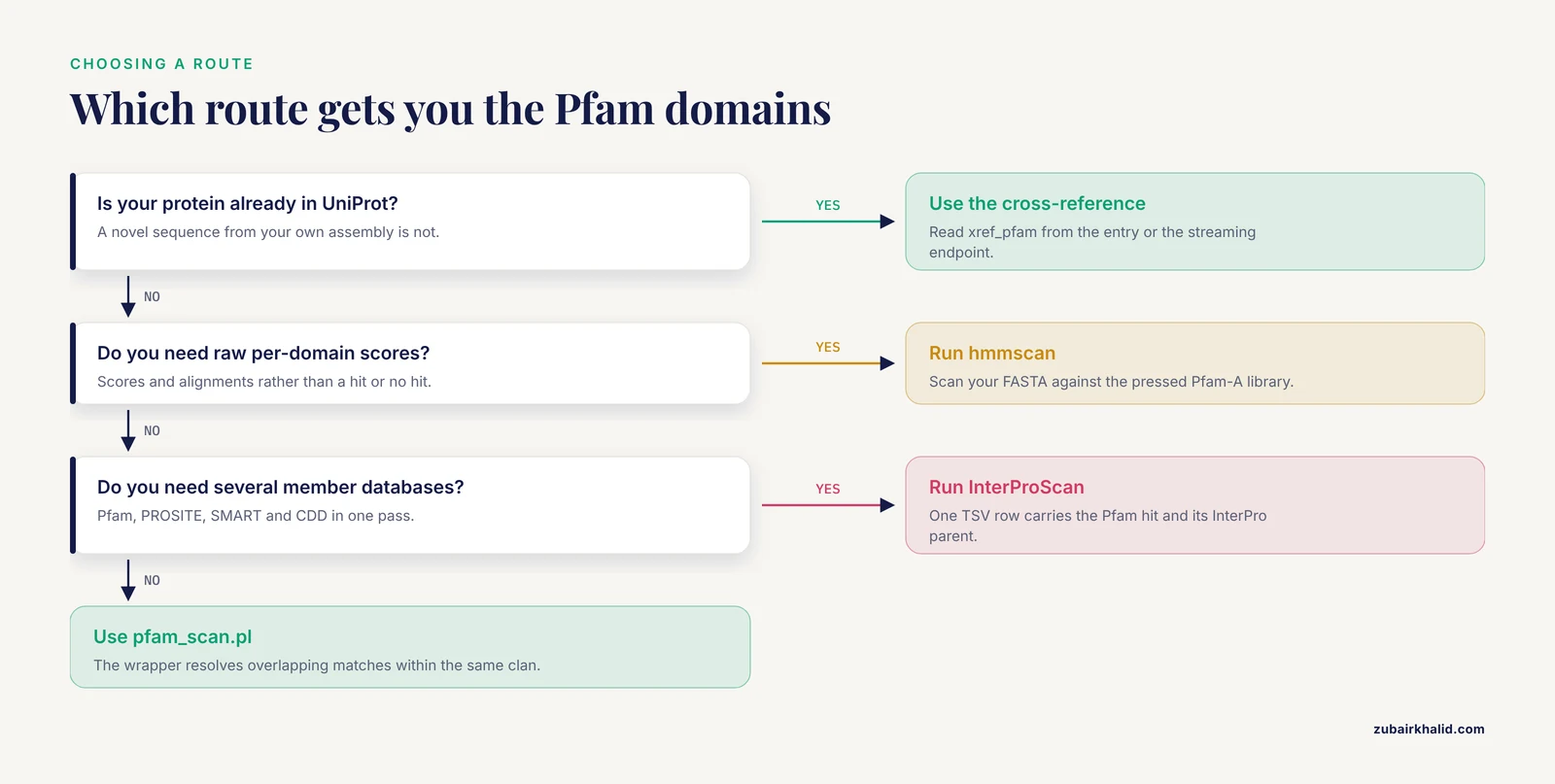
UniProt cross-references answer "which Pfam families are on this exact UniProt sequence." There are three common situations where you must compute the answer yourself instead:
- Your protein is not in UniProt, for example a novel sequence from an assembly you produced
- You need the domain match on a specific isoform or a user-supplied sequence
- You need the raw per-domain scores and alignments rather than a binary "hit or no hit"
The standard toolchain is HMMER. The workflow is to download the current Pfam model library, press it into HMMER binary format, then scan your sequences.
# Download the current Pfam-A library from EMBL-EBI
wget https://ftp.ebi.ac.uk/pub/databases/Pfam/current_release/Pfam-A.hmm.gz
wget https://ftp.ebi.ac.uk/pub/databases/Pfam/current_release/Pfam-A.hmm.dat.gz
gunzip Pfam-A.hmm.gz

# Press the library once, then reuse it
hmmpress Pfam-A.hmm

# Scan a FASTA file of your sequences
hmmscan --domtblout p53_scan.domtbl Pfam-A.hmm p53.fasta
The -domtblout flag produces the domain table format, one row per domain match, with far more information than the flat file cross-reference. A typical row, reformatted here for readability, looks like this:
# target name   accession   query name   E-value   score   ali from  ali to   description
P53             PF00870.x   p53_human    2.1e-95   315.8   95        286      Cellular tumor antigen p53
The fields that matter in daily work are the target accession (with a version suffix such as .x that records the exact model build), the full-sequence E-value, the alignment start and end coordinates on your protein, and the description column. Pfam families use trusted cutoffs curated per family, which is why a low-scoring marginal hit that a generic E-value threshold would admit is often correctly rejected by the family's own threshold.
The pfam_scan.pl wrapper automates several judgments, including resolution of overlapping matches within the same clan:
pfam_scan.pl -fasta p53.fasta -dir /path/to/pfam_dir -cpu 8Expected output rows look like this, with column positions per the script documentation:
p53_human 95 286 92 292 PF00870.x P53 Domain 1 187 - 1If your needs go beyond Pfam, InterProScan runs every integrated analysis over your FASTA file and emits a tabular result:
interproscan.sh -i proteins.fasta -f TSV -goterms -paThe TSV columns are, in order, protein accession, MD5, sequence length, analysis name, signature accession, signature description, start, stop, score, status, date, InterPro accession, and InterPro description. This single file gives you the Pfam hit and its InterPro parent in one row, which saves you a join later.
Other Domain Databases Linked from UniProt
Because the same DR cross-reference mechanism and the same InterPro integration serve every member database, the workflow you learned for Pfam transfers with one change of the field name or the API path. The table summarizes the major databases and how their identifiers appear.
| Database | Identifier prefix | What it annotates | Notes for joining |
|---|---|---|---|
| Pfam | PF | Protein families as curated HMM profiles | The primary profile family resource, hosted within InterPro at EMBL-EBI |
| InterPro | IPR | Integrated entries abstracting member signatures | Best universal join key across member databases |
| PROSITE | PS | Profiles and short patterns, often enzyme active sites | Patterns can signal small motifs that HMMs miss |
| SMART | SM | Signaling and extracellular domains with an emphasis on architecture | Strong for repeat and domain organization |
| CDD | cd-prefixed | NCBI conserved domain models | Includes curated subclass hierarchies |
| PANTHER | PTHR | Family and subfamily HMMs with phylogeny-backed function | Subfamily level is useful for functional specificity |
| CATH-Gene3D | G3DSA | Structural domain assignments from CATH | Structural view even when sequence similarity is weak |
A useful habit is to export xref_pfam and xref_interpro together in every batch job. The InterPro accession lets you translate Pfam's view into a neutral vocabulary, and from there into PANTHER or CDD assignments when a collaborator uses a different reference set.
Visualizing Domain Architectures Across a Protein Set
A flat table of accessions and Pfam families is hard to read once a project grows to dozens or hundreds of proteins, because the interesting biology, such as domain gain, loss, repeats, and order along the sequence, is spatial. For this step, dedicated visualization tools that consume the same UniProt and InterPro annotations you just retrieved are the practical answer. ProFeatMap takes a user-defined list of UniProt accession codes, extracts the major annotated features for each protein, including domains, repeats, intrinsic disorder, and post-translational modification sites, from UniProt or InterPro, and arranges them into a customizable two-dimensional map in which proteins are sorted by shared feature content [1]. The tool was designed to let large protein families be explored at once and to expose patterns such as feature redundancy that single-protein views overlook [1]. In a pipeline sense, ProFeatMap sits exactly at the end of the workflow in this article: you produce the accession list and cross-reference table, and the tool turns that same annotation space into a figure you can inspect and publish.
Downstream Use: Domain-Level Features for Variant Interpretation
Domain annotations from the uniprot to pfam link are not only for drawing pictures. They are standard features in computational variant interpretation. KinMutRF, a random forest classifier for human protein kinase variants, illustrates the pattern clearly. The method combines three tiers of features: gene-level membership in kinase groups and Gene Ontology terms, PFAM domain-level features, and residue-level annotations drawn from UniProt, Phospho.ELM, and FireDB [2]. Trained and cross-validated on 3,689 human kinase variants from UniProt annotated as neutral or pathogenic, it reached an accuracy of 0.88, a precision of 0.82, a recall of 0.75, an F-score of 0.78, and an MCC of 0.68 [2]. The takeaway for your own pipeline is architectural: once you have joined UniProt entries to Pfam families and extracted domain boundaries, that per-domain representation plugs directly into feature tables for machine learning, burden testing, or simple region-level filtering, and the same join supports it all.
Common Mistakes and Limitations
The following mistakes account for most of the frustration in this workflow. Each has a concrete check that catches it.
- Joining on entry names instead of accessions. Entry names such as
P53_HUMANare not guaranteed stable. Accessions are. If a join silently loses rows, grep both files for the entry name you assumed was constant. - Treating isoforms as the canonical sequence. Cross-references and Pfam matches correspond to the sequence on the entry, which is the canonical sequence by default. If your query sequence is a specific isoform or a truncated construct, domain coordinates taken from the UniProt view will be shifted relative to your sequence. Verify by comparing the length column in your batch output against the length of your local sequence.
- Assuming
ft_domainequals Pfam. Theft_domainfield returns UniProt domain feature annotations from any source, including PROSITE-derived or rule-based annotation. A protein can show a domain feature without a Pfam cross-reference. If you need Pfam specifically, filter onxref_pfam. - Confusing InterPro accessions with Pfam accessions. One InterPro entry can integrate several member signatures, so an IPR accession neither implies nor equals a PF accession. When a collaborator asks for "the Pfam ID," give the PF accession, and record the IPR accession separately.
- Expecting your hmmscan run to reproduce UniProt cross-references exactly. Cross-references reflect the annotation integration at the time of the release and are computed against the full UniProt sequence, while your scan runs on your own sequences with your own tool version. Small differences in domain boundaries, extra marginal hits, or a missing low-scoring family are normal. Document both sources rather than blending them silently.
- Forgetting
hmmpress. Scanning against an unpressed HMM file fails with an error pointing at the missing HMMER press files. The fix is one command,hmmpress Pfam-A.hmm, executed after every fresh download of the library. - Choking
jqon missing fields. If an entry has no Pfam cross-reference, the filter overuniProtKBCrossReferencesreturns nothing, and a downstream pipe can fail withjq: error: Cannot iterate over null. Guard with// emptyor check that the array exists before iterating. - Sending unbounded accession lists in one request. Very long OR queries are fragile and hard to debug. Chunk the list, log each response file, and reconcile the accession counts at the end so you know every protein in your input produced a row.
- Ignoring version drift. Pfam releases retire or merge entries occasionally, and UniProt cross-references update in step with releases. A result set generated a year ago may reference entries that resolve differently today. Pin the release, save the raw response files, and re-derive derived tables rather than editing them.
- Over-reading domain names. A family name such as
Pkinasedescribes sequence-level classification, not enzymatic activity, which depends on further evidence such as catalytic residue annotation. Cross-reference the domain to Function sections and GO terms rather than inferring mechanism from the name.
One limitation applies to any computational domain analysis: automated annotation assigns families on sequence evidence, and individual cases, particularly novel sequences with unusual architecture, need expert review rather than a single pipeline pass.
Practical Tips for a Reliable UniProt to Pfam Link
These tips are the difference between a one-off query and a pipeline your colleagues can rerun.
- Prefer TSV over JSON for bulk work. The
tsvformat with explicitfields=is compact, greps cleanly, and loads directly into R or pandas. Keep JSON for single-entry inspection where you need properties nested on each cross-reference. - Keep
reviewed:truein exploratory queries. Restricting to Swiss-Prot keeps cross-reference sets curated and small. Expand to TrEMBL deliberately, for a defined proteome, when you need broad coverage. - Cache raw responses. Store the raw curl output for every accession chunk with the retrieval date in the filename. Annotations change, code bugs get fixed, and the raw file lets you rebuild without re-requesting.
- Validate with a known protein. Before trusting a batch run, run one accession you can check by eye in the web interface and confirm your parser reproduces those exact cross-references.
- Record versions in your metadata table. One row per run recording the UniProt release, the Pfam release if you scanned locally, HMMER version, and command line costs nothing now and saves a reproduction crisis later.
- Use InterPro as the pivot when databases disagree. If Pfam, SMART, and CDD disagree on boundaries for the same region, the InterPro entry is the neutral parent, and reporting coordinates from the member database you cite is cleaner than averaging them.
Quick Reference: Commands and Fields
| Goal | Command or field | Output you get |
|---|---|---|
| Pfam links for one entry | curl rest.uniprot.org/uniprotkb/ACC.json plus a jq filter on Pfam | Accession and name per cross-reference |
| Pfam links for many entries | stream endpoint with fields=accession,xref_pfam,xref_interpro | Tab-separated table, one row per protein |
| Pfam entry to proteins | InterPro REST API entry endpoints at EMBL-EBI | Entry metadata and matched protein pages |
| Identifier conversion | UniProt ID mapping page or ID mapping API | Mapping table from RefSeq or Ensembl to UniProt |
| Self-computed Pfam hits | hmmscan, domtblout Pfam-A.hmm query.fasta | Per-domain table with coordinates and E-values |
| Curated Pfam-only scan | pfam_scan.pl -fasta query.fasta -dir pfam_dir | Clan-resolved domain list per sequence |
| All member databases at once | interproscan.sh -i proteins.fasta -f TSV | TSV with Pfam, PROSITE, and other signatures plus InterPro IDs |
Frequently Asked Questions
Is the UniProt to Pfam link stored on the UniProt side or the Pfam side?
It is stored as cross-references on the UniProt entry, in the DR lines of the flat file and the cross-reference section of the web page. Pfam-side protein lists are served through the InterPro infrastructure, so for a per-protein workflow the UniProt entry is the primary place to read the link.
Do I need to install anything to get the UniProt to Pfam link?
No. A browser and a terminal with curl and jq are enough for everything in the step-by-step section. Install HMMER only if you need to scan sequences that are not in UniProt or want raw per-domain scores.
Why do UniProt Pfam cross-references and my hmmscan results differ?
Cross-references reflect release-synchronized integration computed on the UniProt sequence, while your scan runs on your own sequences with your own tool versions. Modest differences in boundaries and marginal hits are expected, and both result sets are legitimate if you document how each was produced.
How do I retrieve Pfam domains for an entire proteome?
Query the UniProt streaming endpoint with organism_id: plus the NCBI taxonomy identifier, for example organism_id:9606 AND reviewed:true, and request the xref_pfam field in TSV format. This returns one row per protein with all Pfam cross-references in a single pass.
What is the difference between an InterPro entry and a Pfam entry?
Pfam is a member database of HMM-based families, and InterPro integrates signatures from Pfam and other member databases into a unified classification. A Pfam accession points at one member family, while the InterPro accession it maps to may cover signatures from several member databases.
Can I map RefSeq or Ensembl protein IDs directly to Pfam?
Map them to UniProt accessions first using the UniProt ID mapping service, then read the Pfam cross-references from the UniProt entries. The mapping step also tells you which input identifiers failed to resolve, which is worth reviewing rather than discarding.
How stable are Pfam accessions and names over time?
Accessions such as PF00069 are stable, while family names and descriptions are revised between releases, and occasional entries are merged or folded into clans. Join on accessions and record the release version you used.
Which tools can display Pfam domain architecture for a large list of UniProt proteins?
Web tools built for this purpose accept a list of UniProt accession codes and render the domain, repeat, disorder, and modification features of the whole set on one map. ProFeatMap is one such tool, and it sorts proteins by shared feature content to reveal architecture patterns across large families [1].