How to Link UniProt to PDB Cross-References
By Dr. Zubair Khalid, DVM, MS, PhD ·

By the end of this article you will be able to take any UniProtKB accession, such as P04637 (human p53), and produce an accurate list of the PDB entries and chains that cover it, at three levels of detail: entry level, chain level, and residue-range level. You will also be able to run the same mapping in reverse, from a PDB ID back to its UniProt entry, and to do all of this at scale for thousands of proteins without scraping web pages.
Here is what you need on hand:
- A UniProtKB accession or a list of accessions (the six-character-plus-isoform identifiers like P04637 or Q9Y6K4-2)
- Python 3.8 or later with the
requestsandpandaspackages installed - Optional:
jqfor quick JSON inspection from the shell, and access to an FTP client or simply a browser for the SIFTS bulk files - No database key, registration, or fee. UniProt, PDBe, and the SIFTS data files are all open
The article follows the actual data infrastructure. Cross-reference information between PDB and UniProt is not hand-maintained one entry at a time. The SIFTS resource (Structure Integration with Function, Taxonomy and Sequences), run jointly by the Protein Data Bank in Europe and UniProt, maintains the cross-reference data for every protein chain in every PDB entry and refreshes it with each weekly PDB release [1]. Identifier mapping between protein databases more broadly is handled through UniParc, the UniProt sequence archive, which is what the PICR service uses to reconcile identifiers across more than 70 source databases based on 100 percent sequence identity [2]. Understanding those two mechanisms tells you exactly which tool to reach for and, just as importantly, which tool will mislead you.
Background: Why UniProt to PDB Mapping Is Not Trivial
Each protein database assigns its own identifiers using its own conventions, and those identifiers can be unstable over time. Resolving the many identifiers that refer to the same protein is a long-standing problem, particularly when you try to unify datasets annotated from multiple sources [2]. A UniProt to PDB cross reference sits inside that larger problem, and it has specific complications worth naming before you write any code.
One protein, many structures. A well-studied protein such as human p53 appears in hundreds of PDB entries: different domains, different constructs, complexes with DNA or binding partners, mutants, and structures from X-ray crystallography, cryo-EM, and NMR. A cross reference is a one-to-many relationship.
One structure, many proteins. A PDB entry for a ribosome or a polymerase complex contains dozens of protein chains, each mapping to a different UniProt entry, sometimes from different organisms.
Partial coverage. Most structures cover a domain, not the full-length protein. A cross reference exists even when the structure covers 100 residues out of 1,000. If you assume the structure represents the whole protein, your analysis will be wrong.
Isoforms and precursor sequences. UniProt entries describe a precursor sequence with annotated isoforms and processed chains. PDB structures usually cover one mature chain or a fragment. The residue numbering between the two frequently does not match one to one.
Identifier drift. Accessions merge, demerge, and gain secondary status. A pipeline hard-coded to a 2015 accession list will silently lose entries. This is the general problem PICR was built to address, using UniParc as the underlying warehouse so that mappings survive identifier churn [2].
SIFTS solves the PDB side of this systematically. It is a semi-automated process, run as a collaboration between PDBe and UniProt, that maintains up-to-date cross-reference information to UniProt entries for all protein chains in PDB entries, refreshed with every weekly PDB release [1]. Every route described below either reads that cross-reference data directly or queries the same underlying mapping.
The Reliable Routes at a Glance
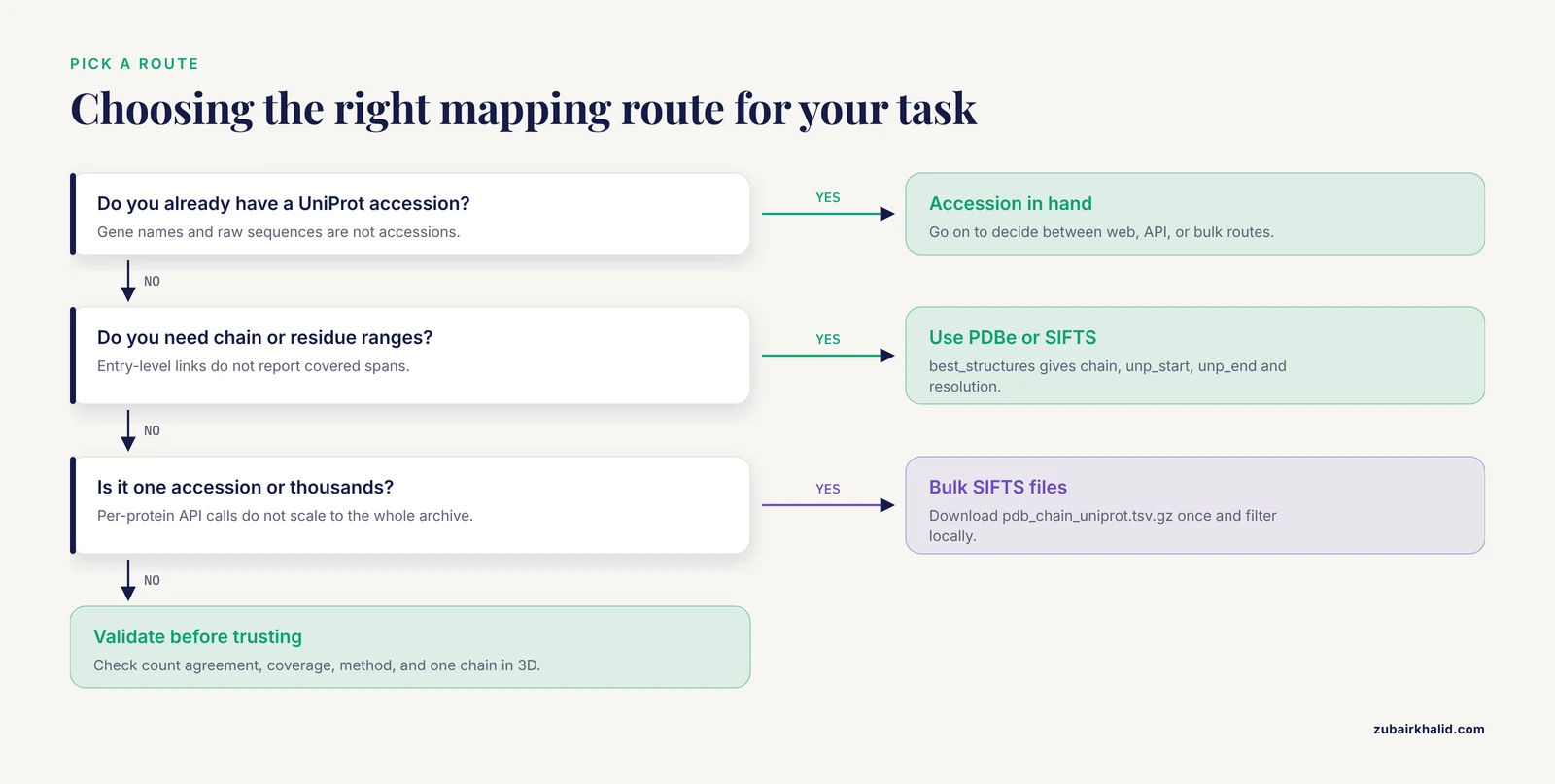
Different questions need different tools. Use this table to pick a route, then follow the matching walkthrough.
| Route | Input | Output | Granularity | Best for |
|---|---|---|---|---|
| UniProt web interface | One accession | List of PDB IDs | Entry level | A quick, human-readable lookup |
| UniProt ID mapping REST API | Up to 100,000 accessions per job | PDB IDs per accession | Entry level | Batch conversion of a protein list |
UniProt REST search with xref_pdb field | A UniProt query | Table including PDB IDs | Entry level | Filtering by organism, review status, or keyword while getting PDB links |
| PDBe API mappings endpoints | PDB ID or UniProt accession | Chains and residue ranges | Chain and residue level | Asking which chain covers which residues, and at what resolution |
| SIFTS flat files over FTP | Nothing (whole PDB) | TSV or per-entry XML | Chain and residue level | Bulk pipelines and local mirrors |
| PICR | Accessions or FASTA sequences | Cross references across 70+ databases | Sequence-identity based (100%) | Heterogeneous identifier sets, or mapping from sequence rather than accession [2] |
Route 1: How to Link From UniProt to PDB in the Web Interface
If you are learning how to use UniProt for the first time, start here. This route takes two minutes and teaches you where cross-references live on an entry page.
- Go to the UniProt website and search for an accession, for example
P04637. - On the entry page, scroll to the Structure section. This section shows three things: cross-references to PDB entries, the residues covered by each, and interactive 3D views where structures are available. Each PDB ID is a link to the corresponding PDB entry.
- Scroll further to the Cross-references section. Find the subsection labeled 3D structure databases. It lists every PDB cross reference for the entry, one per line, with the four-character PDB ID and a short description.
- Click any PDB ID. You land on the PDB entry page (hosted by RCSB in the US or PDBe in Europe, both serving the same underlying archive), where the Macromolecules table shows each polymer chain, its author-assigned chain ID, and its linked UniProt accession.
- To go the other way, from a PDB entry, open the PDB entry page and read the UniProt accession listed for each chain. Both PDB sites display SIFTS-derived UniProt links for every chain [1].
A tip that saves time: the number in the Structure section of a UniProt page is a live count. For heavily studied proteins it can run into the hundreds, so use the interactive viewer filter in that section to jump to structures of a specific domain rather than paging through the cross-reference list.
This route is perfect for one-off lookups. It does not scale, and it gives you entry-level links only, without residue ranges. For those, use the routes below.
Route 2: Uniprot to PDB Cross Reference Step by Step With the UniProt REST API
This is the route to use for a batch of accessions, and it is the core of any uniprot to pdb cross reference step by step pipeline. The UniProt ID mapping service accepts up to 100,000 identifiers per job, converts them between database identifier types, and runs entirely over REST. The following script submits a job, polls until it finishes, and writes a TSV file of accession-to-PDB pairs.
import requests
import time

# Step 1: submit the mapping job
submit_url = "https://rest.uniprot.org/idmapping/run"
response = requests.post(submit_url, data={
    "from": "UniProtKB_AC-ID",
    "to": "PDB",
    "ids": "P04637,Q9Y6K4,P00533",
})
response.raise_for_status()
job_id = response.json()["jobId"]
print("Job submitted:", job_id)

# Step 2: poll until the job finishes
status_url = f"https://rest.uniprot.org/idmapping/status/{job_id}"
while True:
    status = requests.get(status_url).json()
    if status.get("jobStatus") == "FINISHED":
        break
    if status.get("jobStatus") in ("ERROR", "FAILED"):
        print("Job failed:", status)
        break
    time.sleep(2)
print("Job finished")

# Step 3: download results as TSV
results_url = (
    f"https://rest.uniprot.org/idmapping/uniprotkb/results/stream/{job_id}"
    "?format=tsv&fields=accession,id"
)
results = requests.get(results_url)
results.raise_for_status()
with open("uniprot_to_pdb.tsv", "w") as handle:
    handle.write(results.text)
print("Wrote uniprot_to_pdb.tsv")
Run it and you will see output like this:
Job submitted: 6f2a1c4e8b9d4a7f
Job finished
Wrote uniprot_to_pdb.tsv
Open the output file and you will see one row per mapping:
From	To
P04637	1TUP
P04637	1TSR
P00533	1M17
P00533	2ITX
Three parameters matter here, and each one is a common failure point:
frommust be exactlyUniProtKB_AC-IDif your input is accessions. Passing a value likeUniProtKBoruniprotproduces an HTTP 400 with a JSON body listing valid source and target types. Read that body. It names every valid identifier type.tomust be exactlyPDBfor this workflow. The full list of targets includes dozens of databases, and a typo here gives a 400 error rather than a silent wrong mapping.idstakes comma-separated identifiers with no spaces. Gene names such asTP53are not accessions. If you only have gene names, chain two mapping jobs, first from a gene-name type such asGene_NametoUniProtKB_AC-ID, then fromUniProtKB_AC-IDtoPDB.
An alternative single-request pattern works when you want PDB links as a column alongside other UniProt annotation. Query UniProtKB directly and request the xref_pdb field:
https://rest.uniprot.org/uniprotkb/search?query=accession:P04637&format=tsv&fields=accession,protein_name,xref_pdbThe response is a one-row TSV where the third column holds the comma-separated list of PDB IDs for that entry. This pattern is ideal when you already filter UniProtKB by organism, reviewed status, or keyword, because you get the cross references in the same request instead of making a second call per protein.
Route 3: Chain-Level and Residue-Level Mapping With the PDBe API
Entry-level links answer "does a structure exist". They do not answer "which chain, which residues, and how well". For that you need SIFTS data, which PDBe exposes through a well-documented JSON API. The SIFTS process maintains cross-reference information for all protein chains in PDB entries and re-processes every weekly PDB release, so the API reflects the current archive [1].
The two endpoints you will use most:
https://www.ebi.ac.uk/pdbe/api/mappings/best_structures/{uniprot_accession}returns, for a UniProt accession, the PDB structures that give the best coverage of the protein, ranked by coverage and resolution.https://www.ebi.ac.uk/pdbe/api/mappings/{pdb_id}returns, for a PDB entry, the UniProt mapping for every chain, including the segment of the UniProt sequence covered by each chain.
Here is a script for the first endpoint:
import requests

accession = "P04637"
url = f"https://www.ebi.ac.uk/pdbe/api/mappings/best_structures/{accession}"
response = requests.get(url)
response.raise_for_status()
data = response.json()

for row in data[accession][:10]:
    print(
        row["entry_id"],
        row["chain_id"],
        "unp", row["unp_start"], "-", row["unp_end"],
        "res", row.get("resolution"),
        row.get("experimental_method"),
    )
A representative slice of the output for p53 looks like this:
1TUP A unp 94 - 292 res 2.9 X-RAY DIFFRACTION
1TSR B unp 94 - 292 res 1.7 X-RAY DIFFRACTION
2OCJ 2 unp 94 - 312 res 2.2 X-RAY DIFFRACTION
The fields that matter in that response:
entry_idis the four-character PDB ID.chain_idis the author chain identifier, the letter you would use in a visualization tool.unp_startandunp_endgive the covered span in UniProt residue numbering. This is the field that prevents the single most common analytical error, which is assuming full-length coverage.resolutionandexperimental_methodlet you filter for structural quality. A 1.7 Å X-ray chain and a low-resolution cryo-EM chain are not interchangeable evidence.
To map in the reverse direction, from a PDB entry to its UniProt entries, swap the endpoint:
import requests

pdb_id = "1tup"
url = f"https://www.ebi.ac.uk/pdbe/api/mappings/{pdb_id}"
data = requests.get(url).json()
for chain_id, chains in data[pdb_id]["UniProt"].items():
    for mapping in chains:
        print(chain_id, mapping["identifier"],
              mapping["start"]["unp_begin"], "-", mapping["end"]["unp_end"])
This returns every UniProt entry referenced by the entry, with the residue ranges in both PDB and UniProt numbering for each segment. Complex entries such as ribosome structures return dozens of mappings, which is exactly what you want when annotating a multi-chain structure.
Route 4: Bulk Workflows With SIFTS Files Over FTP
When your pipeline involves the whole PDB, thousands of accessions, or a local mirror, calling an API per protein is the wrong shape. SIFTS exports its data in bulk. The resource distributes its mapping information as XML, one file per PDB entry, over FTP, and many bioinformatics resources use exactly this data to build their own PDB-to-UniProt cross references [1].
The most convenient bulk file is the flat TSV of chain-level mappings. Download it once and filter locally:
import pandas as pd

url = "https://ftp.ebi.ac.uk/pub/databases/msd/sifts/flatfiles/tsv/pdb_chain_uniprot.tsv.gz"
df = pd.read_csv(url, sep="\t")
print(df.columns.tolist())
print(len(df))

p53 = df[df["SP_PRIMARY"] == "P04637"]
print(p53.head())
The columns are PDB, SP_PRIMARY (the UniProt accession), RES_BEG, RES_END, PDB_BEG, PDB_END, SP_BEG, and SP_END. Each row is one chain of one PDB entry mapped to one UniProt accession, with the residue ranges in both numbering schemes. Filtering SP_PRIMARY == "P04637" gives every p53 chain in the archive in a single line of code, at chain and residue resolution, with no API calls.
For per-entry detail, including mapping to other resources such as Pfam, CATH, GO, and NCBI taxonomy alongside UniProt, download the split XML files, which are organized under the first character of each PDB ID:
import gzip
import requests

pdb_id = "1TUP"
xml_url = f"https://ftp.ebi.ac.uk/pub/databases/msd/sifts/split/1/{pdb_id.lower()}.xml.gz"
raw = gzip.decompress(requests.get(xml_url).content)
Each XML file contains a dbReference block for every cross-referenced database, with the UniProt accession, the chain details, and aligned segment boundaries. Because SIFTS also carries Pfam, SCOP, CATH, GO, InterPro, and taxonomy links in the same files, one download annotates a structure against many resources at once [1].
Two operational tips for bulk work:
- Re-download on a schedule tied to the PDB weekly release cycle. SIFTS reprocesses every release, so a file cached for six months is missing every structure deposited since [1].
- Keep the gzip files gzipped until you parse them. The uncompressed chain-mapping table is large, and parsing gzipped input directly with pandas is fast and avoids doubling your disk usage.
Route 5: Sequence-Based Mapping With PICR
Every route above assumes you already know the UniProt accession. Sometimes you do not. You have a raw sequence from a mass spectrometry report, an old spreadsheet full of identifiers from different databases, or a FASTA file from a collaborator, and you need to reconcile it all. This is the problem the Protein Identifier Cross-Referencing (PICR) service was built for.
PICR is a web application providing interactive and programmatic access, through both SOAP and REST, to a mapping algorithm that uses UniParc, the UniProt sequence archive, as a data warehouse. It returns cross-references to proteins from more than 70 distinct source databases, based on 100 percent sequence identity [2]. The 100 percent identity rule is the key design decision. PICR will not guess that two nearly identical sequences are the same protein. It will only map sequences that are identical, which means its output is high precision and its misses are informative.
The interactive workflow:
- Open the PICR service through the EBI website.
- Paste your identifiers or upload a FASTA file of sequences.
- Select the target databases you want mappings for. Limiting to PDB, or to PDB plus UniProtKB, keeps the result table readable.
- Optionally restrict by taxonomic ID and by activity status in the source database, so that inactive or obsolete identifiers from other databases do not clutter the result [2].
- View the results as a simple or detailed HTML table, or download them for further processing [2].
Because you can input sequences directly, PICR handles the case the accession-based routes cannot: you have a sequence but no identifier at all. The mapping happens through UniParc, which stores every distinct protein sequence ever loaded into UniProt, so the same sequence submitted as an accession, as another database's identifier, or as raw FASTA resolves to the same canonical sequence record and the same set of cross references [2].
One practical caveat: service interfaces at the EBI change over the years, and some legacy services are retired or superseded as the underlying APIs evolve. Before you build a long-lived pipeline on PICR, check the current EBI tools pages for the service status and the current REST syntax. The algorithmic approach, UniParc-based identity matching across source databases, remains the reference point for this problem regardless of the front door [2].
Validating Your Cross-References
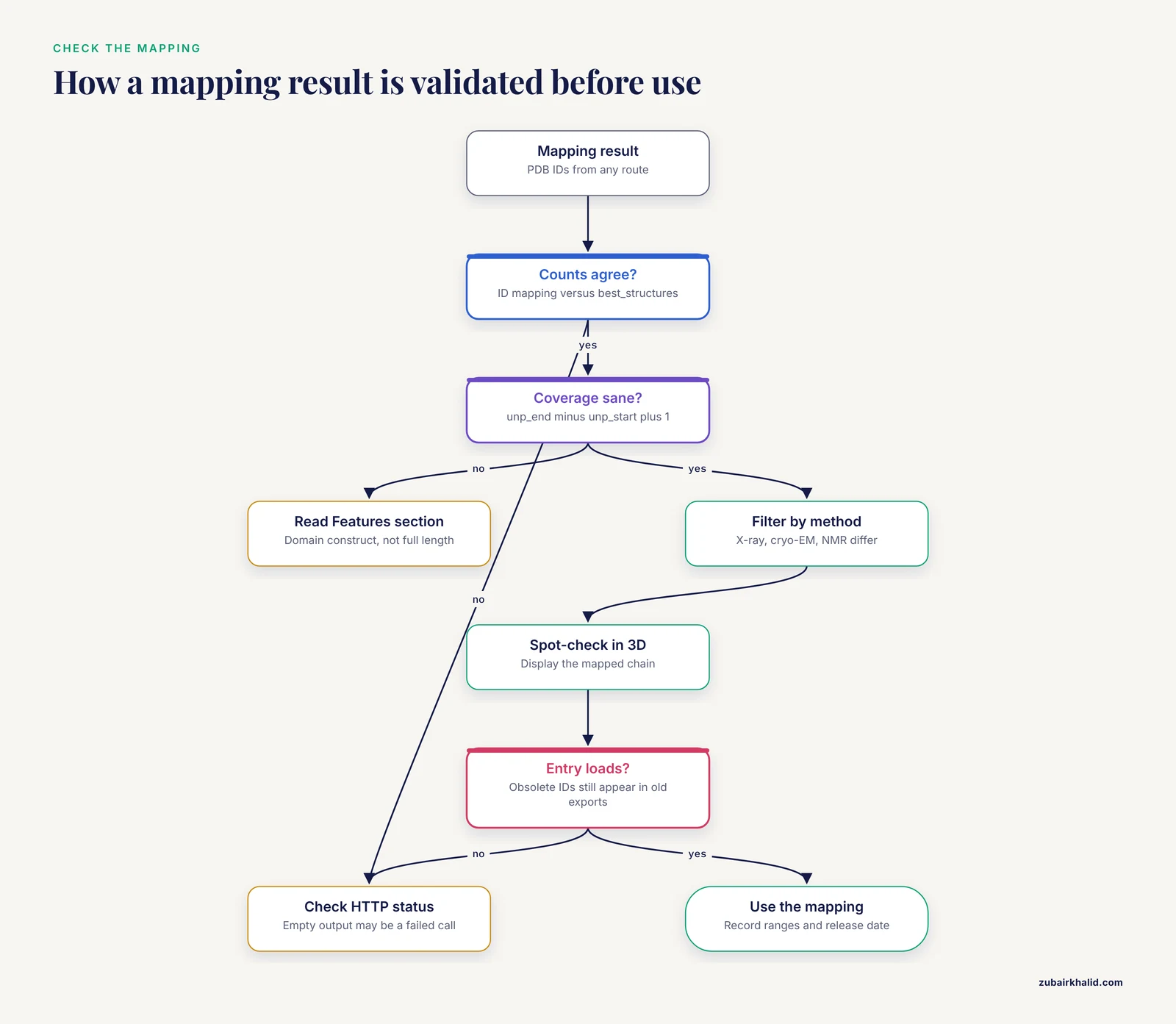
A mapping is not done until you have checked it. These checks catch almost every real-world error.
- Count agreement. Run the same accession through the UniProt ID mapping service and the PDBe
best_structuresendpoint. The set of PDB IDs should be consistent, with the API route sometimes returning fewer entries because it filters and ranks. A large discrepancy means one of your calls failed silently, so check HTTP status codes in your scripts rather than trusting empty output. - Coverage sanity. Sum the residue ranges. If
unp_endminusunp_startplus 1 for the best chain is a small fraction of the UniProt sequence length, you have a domain construct, not a full-length structure. Read the UniProt entry's Features section to see whether the covered region corresponds to an annotated domain. - Method check. Filter on
experimental_methodwhen structural quality matters. X-ray, cryo-EM, and NMR entries carry different evidence types, and low-resolution or model-derived entries should be treated accordingly. - Spot-check in 3D. Load one mapped PDB file, display the mapped chain, and confirm the residue range visually. Thirty seconds of looking at a structure has caught more pipeline errors than any automated test.
- Status check. If a PDB ID in your results fails to load, query it against the PDB's obsolete-entry list. Superseded entries still appear in some older cross-reference exports, and the replacement entry usually carries the same UniProt link.
A Worked Example End to End
Put the pieces together for one protein, human cellular tumor antigen p53, UniProt accession P04637.
Goal. For a p53 variant paper, find a high-resolution experimental structure of the DNA-binding domain, extract the exact residues covered, and produce a table for the supplement.
Step 1, entry-level survey. Submit P04637 through the UniProt ID mapping service with from=UniProtKB_AC-ID and to=PDB. The result TSV contains on the order of hundreds of PDB IDs, because p53 is one of the most structurally characterized human proteins. This confirms structures exist but does not narrow anything.
Step 2, chain-level ranking. Call the PDBe best_structures endpoint for P04637. The response ranks structures by coverage and resolution. Near the top you find entries such as 1TUP, the classic structure of the p53 core domain bound to DNA, with chain A covering the p53 core residues in the mid-90s through the low 290s in UniProt numbering, at an X-ray resolution under 3 Å. The exact numbers come from the API response, and you record them as they appear rather than from memory.
Step 3, residue-range confirmation. Call the per-entry PDBe mappings endpoint for the chosen PDB ID and read unp_start and unp_end for the chain of interest. Because the DNA-binding domain is an internal region of the 393-residue p53 protein, the ranges confirm partial coverage. In the supplement table you state the covered span explicitly, which prevents a reviewer from assuming you modeled full-length p53.
Step 4, format for output. Assemble a table with the columns uniprot_accession, pdb_id, chain_id, unp_start, unp_end, resolution, experimental_method, one row per selected structure. This table is machine-readable, regenerable from the script, and free of hand-transcription errors.
Step 5, archive the pipeline. Save the script with the date and note the release date of the data you downloaded. Because SIFTS refreshes weekly [1], anyone re-running the script a year later may get additional structures in the list, which is a feature when you document it and a confusion when you do not.
Common Mistakes and Limitations
These are the errors that appear repeatedly in real pipelines and in peer review. Each one has a specific fix.
Passing gene names where accessions are required. The mapping service treats TP53 and P04637 as completely different inputs. A gene-name string maps through a different identifier type, and an ambiguous gene name can map to several proteins. Convert gene names to accessions first, in a separate mapping step, and record which gene-name-to-accession mapping you used.
Assuming full-length coverage. The most consequential mistake. A cross reference is not a coverage statement. Always read unp_start and unp_end from SIFTS data before claiming a structure represents a protein [1].
Confusing author chain IDs with structural chain labels. The letter on the PDB entry page, the author chain ID, and the internal label_asym_id used in mmCIF files can differ, especially in large complexes where one author chain is split across multiple asym units. When you select a chain for analysis in a library such as Biopython or gemmi, use the correct identifier for that library, and use the SIFTS mapping table to translate.
Hard-coding accessions that later demerge. UniProt accessions occasionally split, leaving the original as a secondary accession. Pipelines that fail silently on secondary accessions lose data without an error message. Resolve your input list through UniParc or PICR before analysis so that every identifier maps through the sequence record and stays valid across identifier churn [2].
Treating all mapped structures as equally good evidence. A mapped PDB entry might be a 1.5 Å X-ray structure of your exact construct, or a 30 Å cryo-EM density map where your protein is a fuzzy stick figure. Cross references say nothing about quality. Filter on resolution and method, which the PDBe API provides alongside the mapping.
Ignoring taxonomy when mapping heterogeneous inputs. Orthologs from different species share highly similar sequences but are different proteins. PICR allows restricting mappings by taxonomic ID precisely to prevent cross-species confusion [2]. Leave that filter off and a mouse sequence can silently map to a human structure.
Using scraped HTML instead of the API. Copy-pasting PDB IDs from rendered web pages breaks when layouts change and drops IDs hidden behind collapsed sections. Every route described here has a stable programmatic interface. Use it.
Working from a stale local copy of SIFTS. The mapping is refreshed with every weekly PDB release [1]. A six-month-old cached file excludes every structure since then. Date-stamp your downloaded files and refresh on the release cycle.
Not handling the empty result. An accession with no PDB cross reference is a real and common outcome, especially for membrane proteins, intrinsically disordered proteins, and proteins from poorly studied organisms. An empty result is a finding, not a bug. Write your pipeline to distinguish "no structures exist" from "the request failed", which means checking the HTTP status before interpreting empty output.
Assuming the cross reference proves biological relevance of the construct. SIFTS links are based on sequence correspondence between the PDB chain and the UniProt entry [1]. They do not certify that the construct, its tags, its mutations, or its bound ligands match what you want to study. Read the PDB entry's method and construct annotations before drawing conclusions.
One honest limitation applies to this whole article: cross-reference resources evolve, service endpoints occasionally move or retire, and any pipeline built on them should be re-validated against current official documentation when you first deploy it and whenever it misbehaves.
Frequently Asked Questions
What is a UniProt to PDB cross reference?
It is a link, stored in the UniProt entry, connecting a UniProt protein to one or more PDB structure entries that contain chains corresponding to that protein's sequence. The mapping data behind those links is maintained for all protein chains in PDB entries through the SIFTS collaboration between PDBe and UniProt, refreshed with every weekly PDB release [1].
Why does one UniProt entry map to so many PDB entries?
Because a cross reference is one-to-many. Each PDB entry is a separate experiment, and a well-studied protein accumulates structures of different domains, constructs, mutants, complexes, and method types. Hundreds of entries can legitimately map to one UniProt accession.
Why is my UniProt accession not linked to any PDB entry?
Most often because no experimental structure of that protein has been deposited. This is common for membrane proteins, disordered proteins, and proteins from understudied organisms. Verify first that you are using a current primary accession rather than a gene name or a retired secondary accession, which you can resolve through UniParc [2].
Do cross references guarantee the structure covers the whole protein?
No. Most structures cover a domain or a fragment. The chain-level SIFTS mapping reports the exact residue ranges in UniProt numbering, and you should treat those ranges as part of the result rather than an optional detail [1].
How current is the mapping data?
The SIFTS process runs for every weekly PDB release, so the cross references reflect the current structure archive within days of each release [1]. If you mirror the bulk files, refresh them on the same schedule.
Can I map PDB entries back to UniProt instead of the other direction?
Yes. Use the PDBe mappings API with a PDB ID, which returns the UniProt accession and residue ranges for every chain in the entry, or parse the per-entry SIFTS XML files, which carry the same information [1].
Is PICR still the right tool for identifier mapping?
For reconciling heterogeneous identifier sets or mapping raw sequences to databases at 100 percent sequence identity, the PICR approach through UniParc remains the reference solution, covering more than 70 source databases [2]. Before building a pipeline on it, confirm the current service interface on the EBI website, since legacy service endpoints can change or retire over time.
Which PDB chain should I pick when several map to the same UniProt entry?
Rank by the fields the PDBe API gives you: coverage of your residues of interest first, then resolution, then experimental method. If your question concerns a specific domain, choose the chain whose unp_start to unp_end range contains that domain, regardless of overall coverage.