How to Find Tissue-Specific Expression Data in UniProt
By Dr. Zubair Khalid, DVM, MS, PhD ·

By the end of this article you will be able to answer three questions with UniProt. Which human proteins have a curated statement about expression in a given tissue such as brain, liver, or heart. How do you pull those annotations out in bulk, either through the website or the REST API. And how do you judge whether a given tissue specificity statement is strong enough evidence to build a study or a target list on.
You need three things to follow along. A web browser for the website workflow. A terminal with curl and Python 3 installed for the command line and scripting workflows. And a short gene list of your own if you want to run the batch example on real data. Every command in this article runs against the public UniProt REST API at rest.uniprot.org and requires no API key, no installation beyond standard tools, and no account.
What UniProt Actually Stores About Tissue Expression
Before touching a search box, you need to know what kind of data you are asking for. UniProt is a protein knowledgebase. It stores annotated information about individual proteins, not raw expression measurements. For each curated protein entry, UniProt maintains a "Tissue specificity" annotation, which is a free text summary describing where the protein is expressed, sometimes with distinctions between isoforms, developmental stages, or healthy versus pathological tissue.
Three layers of tissue expression information coexist in and around UniProt, and confusing them is the single most common error people make.
First, the curated "Tissue specificity" line inside a UniProtKB entry. This is written by UniProt biocurators, backed by cited publications, and tagged with evidence codes. It summarizes the literature for that one protein. It does not give you a numeric expression value.
Second, keyword tags. UniProt assigns controlled vocabulary keywords to entries, and one of them is "Tissue specificity". Searching by this keyword finds every entry that carries a tissue specificity annotation of any kind, which is useful when you want the full set of annotated proteins rather than proteins of one tissue.
Third, integrated external expression resources. Expression Atlas, EMBL-EBI's knowledgebase of gene and protein expression across tissues, cell types, and conditions, is integrated into UniProt and other EMBL-EBI resources, so a UniProt entry can lead you directly to quantitative tissue profiles [1]. Expression Atlas has grown to more than 4,500 studies from 67 species, including single-cell RNA-seq experiments across 21 species and updated Genotype-Tissue Expression (GTEx) tissue profiles [1]. GTEx itself is the large multitissue human resource built on 1,641 postmortem samples covering dozens of body sites, designed to measure how expression varies across tissues and individuals [2] [3].
A good working rule for how to use UniProt in this area. Use UniProt to answer "what has been curated and published about where this protein is found" and to retrieve that answer in bulk. Use Expression Atlas or GTEx, linked from the same ecosystem, when you need numbers such as transcripts per million or fold changes [1] [2].
How UniProt Compares With Dedicated Expression Resources
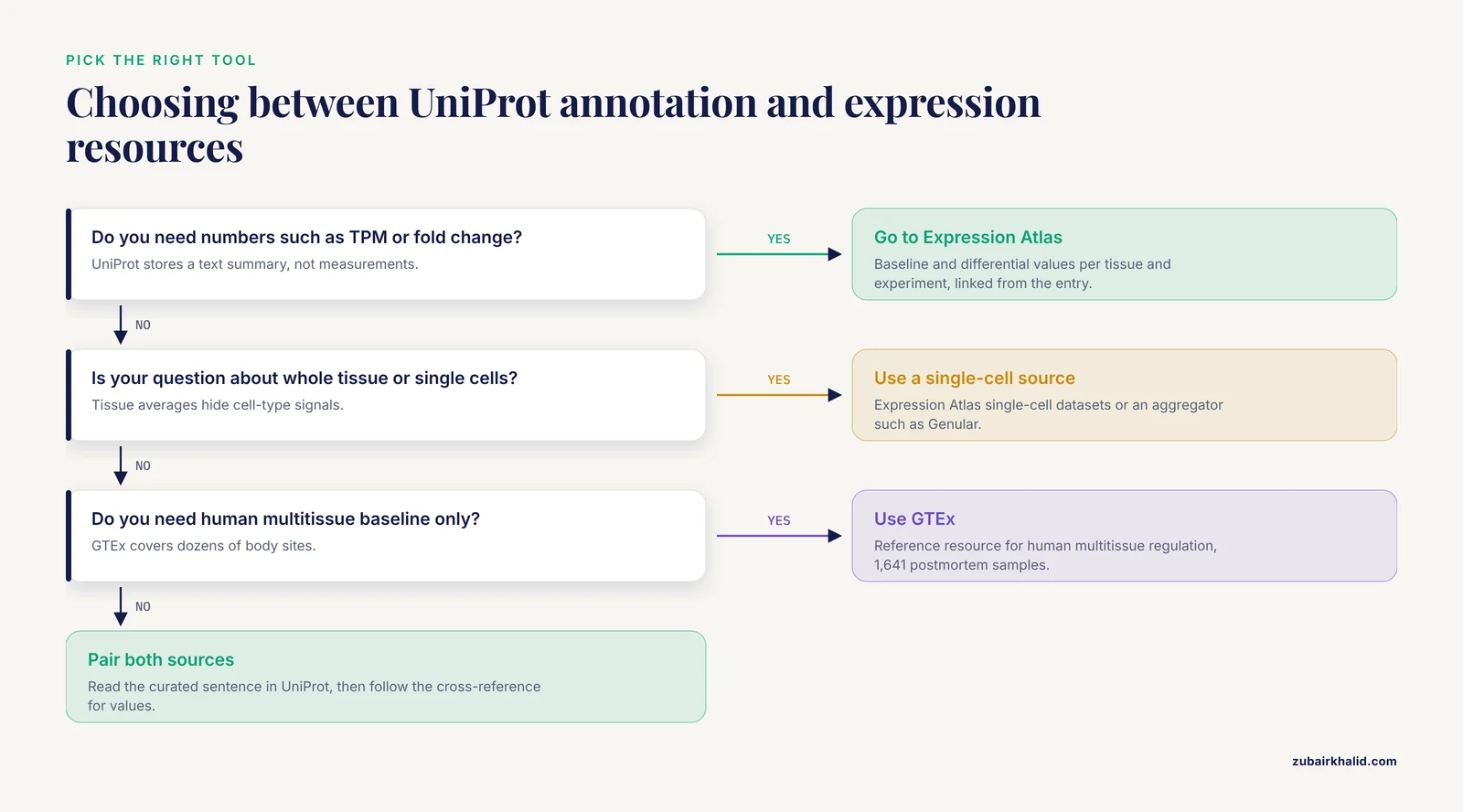
A short orientation helps you pick the right tool before you invest time in a workflow.
UniProt is strongest when you want protein-centric, literature-backed statements that you can download as structured text for thousands of entries at once. Because the annotation is tied to a stable protein accession, it slots directly into downstream pipelines. Machine learning studies have used lists of known tissue-specific genes collected from the UniProt database as ground truth for predicting tissue-selective genes from microarray data [4]. In silico drug target pipelines pull UniProt annotations alongside GEO expression samples and compute tissue specificity indices such as the tau index across tissues [5].
Expression Atlas is strongest when you want baseline and differential expression values per tissue, per experiment, with the underlying study identified, and its data feed into UniProt so the two resources reinforce each other [1]. GTEx is the reference resource for human multitissue regulation and is the source of the updated tissue profiles inside Expression Atlas [1] [2].
Aggregators occupy a third niche. Genular, for example, integrates single-cell RNA-seq data from more than 2,893 experiments with information from 16 databases including UniProt, the Human Protein Atlas, and NCBI Gene, and computes a marker score per gene across cell types and tissues [6]. If your question is cell-type-level rather than whole-tissue-level, a single-cell aggregator built on top of UniProt may serve you better than UniProt alone [6].
Older dedicated resources such as TissueMap, an expression database of human genes and proteins, pioneered this space but have largely been superseded by the EMBL-EBI ecosystem [7].
Prerequisites
For the website workflow you need only a browser. For the API workflow you need:
curl --version
python3 --version
Both commands should print a version number. Any curl from the last decade works. Any Python 3.7 or newer works. You do not need to install any Python packages, because the standard library urllib module is enough for the batch example.
UniProt Tissue Expression Step by Step on the Website
This walkthrough answers the most common version of the question, how to find tissue-specific expression data in UniProt for a single protein, and then scales it to a whole-tissue search.
Finding tissue specificity for one protein
- Go to
uniprot.organd type your protein into the search bar, for exampleMBP human. Restrict to the human entry rather than an ortholog from another species. - Click the reviewed (Swiss-Prot) result. Reviewed entries carry the curator-written annotation. Unreviewed TrEMBL entries mostly carry automatically transferred annotation and are covered below.
- On the entry page, look at the section navigation on the left side. Find the "Expression" block and open it. Under it you will see "Tissue specificity".
- Read the text. A typical entry states where the protein is found and, in many cases, narrows it to cell types or regions. Each sentence carries a small evidence badge. Hover or click to see whether the statement comes from direct experimental evidence, a cited publication, a curator summary, or an automatic inference.
- While you are on the entry page, check the same "Expression" block for cross-references to expression databases such as Expression Atlas and Bgee. These links take you from the curated sentence to the quantitative profiles behind or beside it [1].
- To record the finding for a report, copy the UniProt accession (the six-character identifier such as P02686), the entry name, the version number shown on the page, and the evidence tag for the tissue statement.
Searching all proteins annotated for a tissue
To move from one protein to every annotated protein of a tissue, use fielded query syntax directly in the UniProt search bar:
(organism_id:9606) AND (reviewed:true) AND (ft_tissue_specificity:brain)This query says, in order, limit to human, limit to reviewed entries, and require the word brain inside the tissue specificity annotation. Press enter and you get the result table. To add the annotation as a visible column, click the column selector (the gear or columns icon above the table) and enable "Tissue specificity". Each row then shows the annotated text, often truncated, with a link to the full entry.
To retrieve the whole result set rather than paging through it, click the Download button above the table, choose TSV, and check that the "Tissue specificity" field is included in the selected columns. UniProt will prepare the file and download it.
Reading the search bar syntax
The fielded syntax is worth learning because it is the same syntax the REST API uses. The pieces that matter:
| Goal | Syntax element | Example |
|---|---|---|
| , - | , - | , - |
| Restrict to species | organism_id: with the NCBI taxonomy ID | organism_id:9606 for human |
| Restrict to curated entries | reviewed:true | reviewed:true |
| Require a tissue term in the annotation | ft_tissue_specificity: | ft_tissue_specificity:liver |
| Find any entry with a tissue annotation | keyword: | keyword:"Tissue specificity" |
| Search by gene symbol | gene: or gene_exact: | gene_exact:MBP |
| Choose output columns | fields= in the URL | fields=accession,ft_tissue_specificity |
| Cap rows per page (search endpoint) | size= | size=500 |
The taxonomy ID is the NCBI taxonomy number, 9606 for human, 10116 for rat, 10090 for mouse. If you leave it out, a tissue query returns proteins from every species and the result list becomes much harder to interpret.
UniProt Tissue Expression Step by Step With the REST API
The API is where this becomes a reproducible workflow. Everything the website shows is available as a URL.
Single query from the terminal
Retrieve every reviewed human protein whose tissue specificity annotation mentions the brain, as a tab separated file:
curl -o human_brain_tissue.tsv \
  "https://rest.uniprot.org/uniprotkb/search?query=(organism_id:9606)%20AND%20(reviewed:true)%20AND%20(ft_tissue_specificity:brain)&format=tsv&fields=accession,id,protein_name,gene_primary,ft_tissue_specificity&size=500"
Note the quotes around the whole URL. Without them, the shell treats the ampersands as job control characters and curl runs in the background with a truncated request, which produces a confusing empty or partial file. Note also that %20 is the URL encoding of a space. Most shells accept literal spaces inside the quoted URL, but encoding them makes the command portable.
Check the result:
head -3 human_brain_tissue.tsv
wc -l human_brain_tissue.tsv
Expected output, abridged and illustrative:
Entry	Entry Name	Protein Names	Gene Names (primary)	Tissue specificity
P02686	MBP_HUMAN	Myelin basic protein	MBP	Central nervous system and peripheral nervous system myelin...
P09471	GNAO1_HUMAN	Guanine nucleotide-binding protein G(o) subunit alpha	GNAO1	...(brain)...
The first line is the header, one column per requested field. Subsequent lines are one protein per row. wc -l tells you how many entries you retrieved, including the header, so subtract one for the protein count.
What each parameter does
query is the search itself, identical to the website syntax. format=tsv requests a table. fields= selects columns. ft_tissue_specificity is the field that carries the curated tissue specificity text. size=500 is the maximum page size for the search endpoint. If your query returns more than 500 entries, UniProt gives you a Link header pointing to the next page with a cursor token, and you keep following it until the header disappears:
curl -sI "https://rest.uniprot.org/uniprotkb/search?query=(organism_id:9606)%20AND%20(reviewed:true)%20AND%20(ft_tissue_specificity:brain)&format=tsv&fields=accession&size=500" | grep -i linkFor complete downloads rather than pagination, use the stream endpoint, which returns everything in one response without a size cap:
curl -o human_all_tissue_annot.tsv \
  "https://rest.uniprot.org/uniprotkb/stream?query=(organism_id:9606)%20AND%20(reviewed:true)%20AND%20(keyword:%22Tissue%20specificity%22)&format=tsv&fields=accession,id,gene_primary,protein_name,ft_tissue_specificity"
That command pulls every reviewed human entry carrying the "Tissue specificity" keyword, which is the full annotated set regardless of tissue, ready for any filtering you want to do locally.
Finding quantitative expression from the entry page
When a UniProt entry links to Expression Atlas, follow that cross-reference for numbers. Expression Atlas provides baseline expression per tissue and differential expression per experiment, now covering more than 4,500 studies, with GTEx tissue profiles updated inside it and hundreds of single-cell datasets across 21 species [1]. This is the correct place to get a value such as expression level in liver versus brain, because the UniProt annotation itself is a summary statement, not a measurement.
Step by Step With Python for a Gene List
Real projects usually start with a list of candidate genes, for example from a differential expression analysis, and ask which of them carry tissue-restricted annotation. Here is a complete script using only the standard library.
import urllib.parse
import urllib.request

genes = ["MBP", "SYP", "GNAO1", "ALB"]

query = (
    "(organism_id:9606) AND (reviewed:true) AND ("
    + " OR ".join("gene_exact:" + g for g in genes)
    + ")"
)

url = (
    "https://rest.uniprot.org/uniprotkb/search"
    "?query=" + urllib.parse.quote(query)
    + "&format=tsv"
    + "&fields=accession,id,gene_primary,protein_name,ft_tissue_specificity"
    + "&size=500"
)

with urllib.request.urlopen(url) as response:
    text = response.read().decode("utf-8")

with open("tissue_specificity.tsv", "w") as out:
    out.write(text)

rows = text.splitlines()
print("Header:", rows)
print("Entries retrieved:", len(rows) - 1)
Expected console output:
Header: Entry	Entry Name	Gene Names (primary)	Protein Names	Tissue specificity
Entries retrieved: 4
The output file is a standard TSV you can open in R with read.delim() or in pandas with read_csv(sep="\t"). To filter for one tissue locally:
import csv

with open("tissue_specificity.tsv") as f:
    reader = csv.DictReader(f, delimiter="\t")
    hits = [r for r in reader if "brain" in r["Tissue specificity"].lower()]

for r in hits:
    print(r["Entry"], r["Gene Names (primary)"])
This pattern, query once in bulk, filter locally, is deliberately simple. It beats looping over genes and making one API request per gene, both for speed and because UniProt asks programmatic users to batch queries rather than hammering the service with thousands of tiny requests.
Reading and Judging the Annotation Correctly
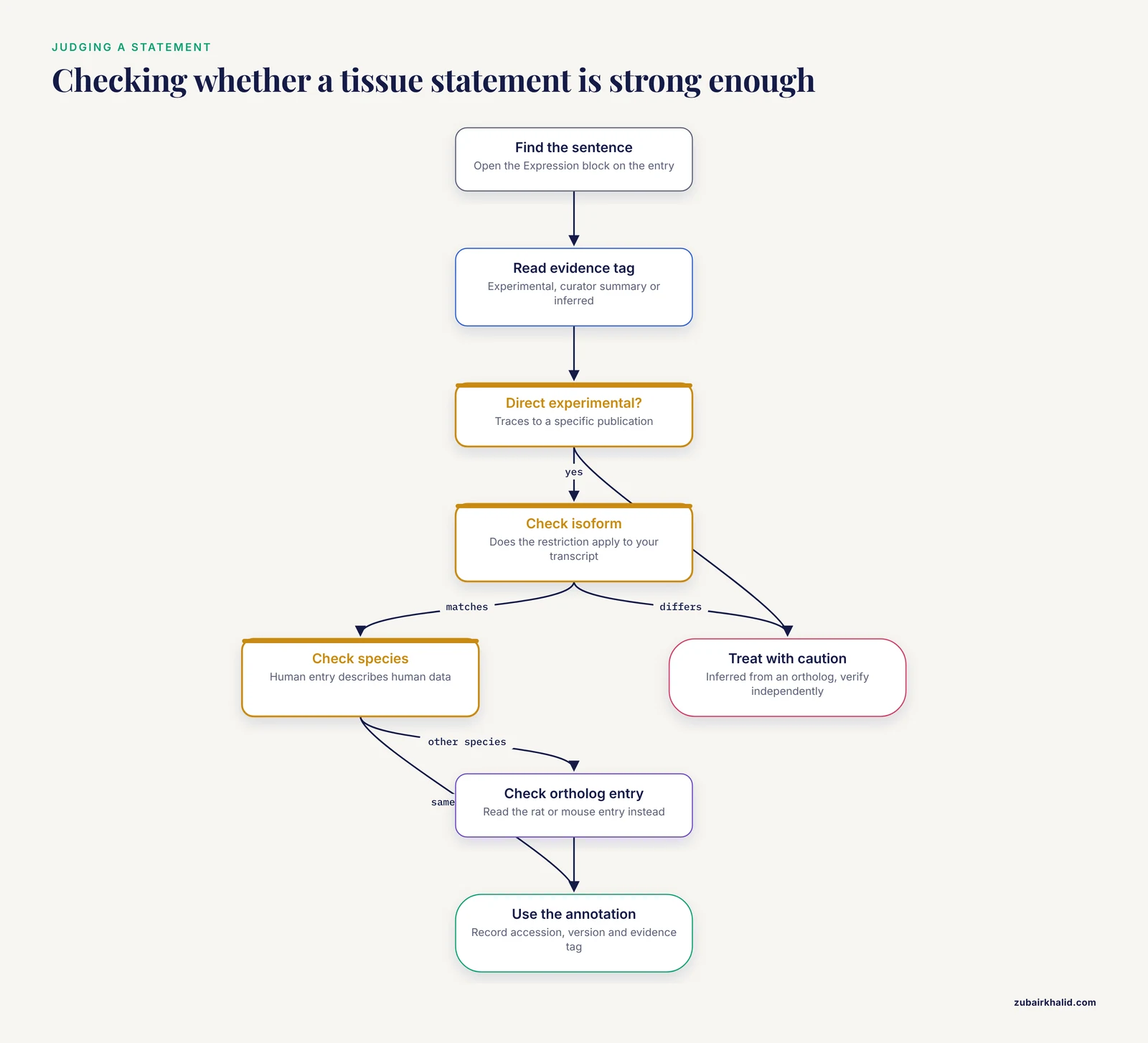
A tissue specificity sentence is a claim about a protein, and claims vary in strength. Three things to check every time.
Evidence provenance. Each sentence in the annotation carries an evidence tag. Experimental evidence traces to a specific publication. Curator summaries combine multiple sources. Automatic annotations, more common in unreviewed TrEMBL entries, may be inferred by similarity. A statement backed by direct experimental evidence in the species you care about is worth far more than an inferred one transferred from an ortholog.
Isoform specificity. Some entries state that only a particular isoform shows the tissue restriction. UniProt annotations can distinguish between isoforms produced by alternative splicing, so read the full text rather than grabbing the first sentence. If your downstream work involves a specific transcript, check that the isoform numbering matches.
Species transfer. Annotations on a human entry describe human data. If you work in rat, as many translational studies do, check the rat ortholog entry rather than assuming the human annotation applies. Studies that identify proteins by mass spectrometry in rat tissue, for example in bone around dental implants, search their spectra against a species-specific protein database downloaded from UniProt, which is exactly the right practice because it keeps species boundaries explicit [8].
A Worked End-to-End Example
Here is how these pieces fit together in a realistic analysis, based on the kind of workflow published in the literature.
A spinal cord injury study set out to find transmembrane proteins whose genes change after injury. The authors downloaded microarray data from GEO, identified differentially expressed genes, and then used UniProt annotation together with transmembrane helix prediction to recognize which of those genes encode transmembrane proteins, before validating candidates in a rat model with PCR and western blotting [9].
Reconstruct that in UniProt terms. Start with your gene list. Query UniProt in bulk with the Python script above, requesting the tissue specificity field plus the subcellular location field. Filter locally for entries whose annotation mentions the tissue system you care about, such as central nervous system. Cross-check each surviving candidate on Expression Atlas for the quantitative profile, since Expression Atlas integrates curated single-cell and bulk datasets and feeds UniProt [1]. What UniProt contributed to the pipeline was structured, accession-anchored functional annotation that let the authors filter hundreds of differentially expressed genes down to a manageable candidate set [9].
The same shape of workflow recurs across domains. A study of anesthesia-related cardiovascular biomarkers pulled zinc finger protein-related genes from the UniProt database, intersected them with differentially expressed genes from atrial tissue samples, and used network and machine learning methods to nominate biomarkers [10]. A cold stress pipeline drew on UniProt, GEO, and AlphaFold to profile tissue-restricted E3 ligases, computing a tau index of tissue specificity that averaged 0.85 across flagged candidates, where a value near 1 means expression concentrated in one tissue [5]. The common denominator is using UniProt as the structured annotation layer between raw expression data and biological interpretation.
How Tissue Proteomics Studies Use the Same Database
A related but distinct use of UniProt deserves mention because the literature references it constantly. When researchers profile the proteins present in a tissue by mass spectrometry, they search their spectra against a reference proteome file downloaded from UniProt. A comparative proteomics study of visceral adipose tissue and liver in metabolic disease searched peptides against the human FASTA UniProt database and identified dozens of significantly differentially expressed proteins between tissue and disease groups [11]. A breast tissue proteomics study searched against the UniProt human reference proteome, 20,419 entries in the 2023/11 release, with a target-decoy approach to control the false discovery rate below 1 percent [12]. In these workflows UniProt is the search database, not the source of tissue specificity claims. The tissue specificity comes from the experiment, but the proteins are identified and anchored by UniProt accessions, which is what makes the results comparable across studies.
The distinction matters for your own design. If you are identifying proteins in a tissue, download the species-appropriate UniProt FASTA and record the release date. If you are asking where a known protein is expressed, use the annotation and Expression Atlas link as described above.
UniProt Tissue Expression Tips
These are the practical adjustments that separate a clean retrieval from a messy one.
Search synonyms, not one word. Annotations are written by humans. A protein expressed in brain may be annotated with "cerebral cortex", "central nervous system", "neuron", or "brain". If a single-term query returns too little, run several queries or download the full annotated set with the keyword query and filter locally against a list of synonyms.
Start reviewed, expand only when needed. reviewed:true gives you Swiss-Prot quality. If your protein of interest is absent, check whether an unreviewed entry exists, and read its evidence tags with extra skepticism.
Use the keyword query to scope the universe. keyword:"Tissue specificity" returns every annotated entry. Run it once for your organism, download it, and you have a local master table that makes every subsequent tissue question a text filter.
Record the release. UniProt updates on a regular release cycle, and annotations change. For reproducibility, save the release number, the query string, and the download date with your results. The wider EMBL-EBI ecosystem emphasizes FAIR and reproducible dissemination of expression data for exactly this reason [1].
Pair annotation with quantitative profiles. The curated sentence tells you what the literature supports. Expression Atlas, with its expanded proteomics coverage and updated GTEx tissue profiles, tells you how strongly and in which study [1]. GTEx remains the reference for multitissue regulation in humans across dozens of sites and hundreds of individuals [2] [3].
For cell-type questions, go single cell. Tissue-level averages hide cell-type signals. Expression Atlas now includes hundreds of single-cell RNA-seq experiments, including externally analyzed community datasets such as Tabula Sapiens and GTEx single-nucleus profiles, browsable while keeping their original analytical framework [1]. Single-cell aggregators built on UniProt and Human Protein Atlas data add marker scores across cell states and lineages [6].
Validate in your own system. Curated annotation and public datasets describe other samples. Plant genomics studies illustrate the point well, because they routinely annotate assembled transcriptomes against UniProt and then validate tissue-specific expression of candidate genes by quantitative PCR in their own tissues, as done for flavonoid biosynthesis genes across fruit, root, and leaf tissues [13] and for secondary metabolite genes across root and stem tissues [14].
Common Mistakes and Limitations
Mistake 1, expecting expression values in UniProt. The most common misunderstanding in this area is treating the "Tissue specificity" line as data. It is a text summary. There are no TPM values, no fold changes, no sample counts. When a project needs numbers, the same entry links to Expression Atlas for quantitative tissue and cell-type profiles [1], and GTEx underlies much of the human baseline [2].
Mistake 2, confusing tissue specificity with subcellular location. UniProt has two separate annotation types that sound similar. "Subcellular location" says which compartment the protein occupies, nucleus, membrane, mitochondrion. "Tissue specificity" says which tissues express the gene and protein. A nuclear protein can be ubiquitous across tissues. Filtering by subcellular location keywords when you meant tissue specificity produces a subtly wrong candidate list.
Mistake 3, ignoring unreviewed entries or, the opposite error, treating them as equivalent to reviewed ones. Unreviewed TrEMBL entries exist for every predicted protein and mostly carry automatic annotation. Including them inflates result counts with fragments and uncurated predictions. Excluding them can hide a poorly studied protein. The fix is to work reviewed-first and to state explicitly which category you used.
Mistake 4, assuming no annotation means no expression. Absence of a tissue specificity statement means the curators have not written one from available evidence, not that the protein is not expressed there. Poorly studied proteins have thin annotations. Cross-checking with Expression Atlas or GTEx catches real expression that has not yet reached the curated text [1].
Mistake 5, conflating transcript and protein. mRNA abundance and protein abundance correlate imperfectly, and a gene classified as tissue-specific at the RNA level may not be tissue-specific at the protein level. Expression Atlas now covers both transcriptomics and proteomics [1], and direct tissue proteomics studies show protein profiles that require their own analysis rather than inference from RNA [11].
Mistake 6, losing reproducibility. A search run today and the same search run after the next release can differ. Every pipeline that reads UniProt should log the query URL, the release version, and the file checksum of the download. Workflows that fail to do this cannot be re-run faithfully.
Mistake 7, querying the wrong species silently. Omitting organism_id returns matching entries from all species, and a rat gene symbol can match a human entry at the top of the list. Always pin the taxonomy ID when species matters, as it did in the rat proteomics work where the search database had to be Rattus norvegicus [8].
One honest limitation to state plainly. Curated annotation covers what has been published and what curators have had time to integrate. For very recent tissues, conditions, or cell types, or for non-model organisms where homology-based transfer is the only evidence available, expect thin coverage and plan an experimental validation step in your own material.
Frequently Asked Questions
Does UniProt contain raw RNA-seq or proteomics data?
No. UniProt stores curated text summaries such as the tissue specificity annotation, not raw or quantitative expression measurements. For numeric tissue profiles, follow the entry's cross-references to Expression Atlas, which compiles thousands of transcriptomics and proteomics studies [1].
What is the difference between UniProt tissue specificity and Expression Atlas?
The UniProt annotation is a curator-written literature summary for one protein. Expression Atlas is the quantitative resource, with per-tissue baseline and differential expression values from more than 4,500 studies, and its data are integrated into UniProt so you can move between them [1].
How do I download every human protein annotated for brain expression?
Use one curl command against the REST API with the query (organism_id:9606) AND (reviewed:true) AND (ft_tissue_specificity:brain), format tsv, and the ft_tissue_specificity field, as shown in the API section above. For more than 500 results, follow the cursor link header or use the stream endpoint.
Should I use reviewed or unreviewed UniProt entries for tissue expression?
Use reviewed Swiss-Prot entries first, because their tissue specificity statements are curator-written with cited evidence. Unreviewed TrEMBL entries carry mostly automatic annotation and should be checked individually if a protein exists only there.
How current is the tissue expression information in UniProt?
UniProt updates on a regular release cycle and annotations change between releases, so record the release number with your download. Expression Atlas, which feeds UniProt, publishes substantial content updates, including updated GTEx tissue profiles and growing single-cell coverage [1].
Why does my protein show no tissue specificity even though papers report expression?
The annotation may not yet reflect those papers, the statement may use different tissue vocabulary, or the entry may be unreviewed. Search synonyms such as cortex or central nervous system instead of brain, check the cross-references to Expression Atlas, and check whether unreviewed entries carry automatic annotation [1].
Can I get tissue expression annotation for species other than human?
Yes, but coverage shrinks with distance from well-studied organisms. Use organism_id with the NCBI taxonomy ID of your species. For non-model species, researchers commonly annotate assembled transcriptomes against UniProt by sequence similarity and then validate tissue-specific expression experimentally, as done in medicinal plant transcriptome studies [13] [14].
How should I cite UniProt and record which version I used?
Cite UniProt by its database citation and record the release number, the exact query URL, and the download date alongside your results. Storing the accession, the entry version, and the evidence tags lets anyone reproduce the retrieval, consistent with the FAIR data practices the resource ecosystem promotes [1].
Sources
- Expression Atlas in 2026: enabling FAIR and open expression data through community collaboration and integration
- The Genotype-Tissue Expression (GTEx) pilot analysis: Multitissue gene regulation in humans
- The Genotype-Tissue Expression (GTEx) project
- Genome-wide prediction and analysis of human tissue-selective genes using microarray expression data
- Tissue-Specific Profiling of E3 Ubiquitin Ligases under Cold Stress: An Integrated in Silico Pipeline for PROTAC Target Discovery
- Genular: An Integrated Platform for Defining Cellular Identity and Function through Single-Cell Gene Expression and Multi-Domain Biological Data
- TissueMap:The Expression Database of Human Gene and Protein
- Influence of nicotine on protein expression around hydrophilic osseointegrated implants: A proteomic study in male rats.
- Spinal Cord Injury Affects Gene Expression of Transmembrane Proteins in Tissue and Release of Extracellular Vesicle in Blood: In Silico and In Vivo Analysis
- Identification of Anesthetic-Induced Cardiovascular Biomarkers in Off-Pump Coronary Artery Bypass Grafting Surgery Using Weighted Gene Co-Expression Network Analysis and Machine Learning.
- Comparative Analysis of the Human Proteome Profile in Visceral Adipose and Liver Tissue in Individuals with Obesity with and Without MASLD and MASH
- Abstract 2340: Proteomic profiling of breast tissue: identifying protein associations with breast density in premenopausal women
- Comparative transcriptome analysis of Alpinia oxyphylla Miq. reveals tissue-specific expression of flavonoid biosynthesis genes
- De novo transcriptome and tissue specific expression analysis of genes associated with biosynthesis of secondary metabolites in Operculina turpethum (L.)