UniProt Search Fields Explained
By Dr. Zubair Khalid, DVM, MS, PhD ·

UniProt search fields are the labeled, structured parts of a protein record, such as gene name, organism, sequence length, or accession number, that you can target directly in a query on UniProt.org. A fielded query like gene:BRCA1 AND organism_id:9606 instructs the search engine to match a specific value in a specific field rather than matching any word anywhere in the record.
This distinction matters because UniProt is the main provider of protein sequence and annotation data for much of the life sciences community, and its website is the primary access point to that data [1]. A plain keyword search for a common word such as kinase can return results in the tens of thousands, mixing reviewed entries with unreviewed ones, humans with bacteria, and true gene-name matches with passing mentions in a description line. Fielded searching turns that haystack into a precise, reproducible filter. The same skill carries over directly to the UniProt REST API, which supports structured search queries with logical operators and parentheses and lets you select exactly which fields appear in your downloaded results [2]. If you learn the fields once, you can drive both the website and the API.
What Are UniProt Search Fields?
A UniProt entry is not a free-form paragraph. It is a structured record assembled from many labeled components: one or more accession numbers, a recommended protein name, gene names, an organism, sequence data, length, mass, cross-references to other databases, and controlled-vocabulary annotations such as keywords, Gene Ontology terms, and domain annotations. Each labeled component is a field. Each field holds one or more values.
Searching with fields works like filtering a spreadsheet. If the database were a spreadsheet with one row per protein, then every search field would be a column, and a fielded query would be a rule applied to specific columns. The query gene:BRCA1 matches only rows where the gene column contains BRCA1. The query length:[100 TO 200] matches only rows whose sequence length falls between 100 and 200 amino acids. A query with no field name at all, such as insulin receptor, is a full-text search that matches words anywhere in the record and is far less precise.
The concept of field-based text search has been central to the UniProt website since its unified launch. When the consortium consolidated three separately maintained sites into one common website in 2008, field-based text search was listed alongside similarity search, multiple sequence alignment, batch retrieval, and identifier mapping as the core tools the site provides [1]. The modern site keeps that design, and the same field vocabulary now powers both the search box on UniProt.org and the REST API that serves roughly 303 million requests per month [2].
The databases you can search
Before using any field, choose the dataset, because each dataset has its own field vocabulary. The main ones are:
- UniProtKB, the knowledgebase of protein sequences with functional annotation. It splits into Swiss-Prot, the manually reviewed and curated section, and TrEMBL, the computationally annotated, unreviewed section.
- UniRef, clustered sequence sets built at several identity thresholds, useful for reducing redundancy.
- UniParc, an archive of all unique protein sequences, without annotation.
- Proteomes, the set of proteins expressed in a reference organism genome or proteome.
- Gene-centric datasets, UniRule, and ARBA, which group annotation rules and associated evidence.
- ID Mapping, the tool that converts identifiers between databases [2].
Most day-to-day searching happens in UniProtKB, and most of the field examples in this article apply there. The same query language applies across datasets, but a field like length exists in UniProtKB and UniRef while a field like proteome exists only where proteome assignments make sense.
How a UniProt Query Is Structured
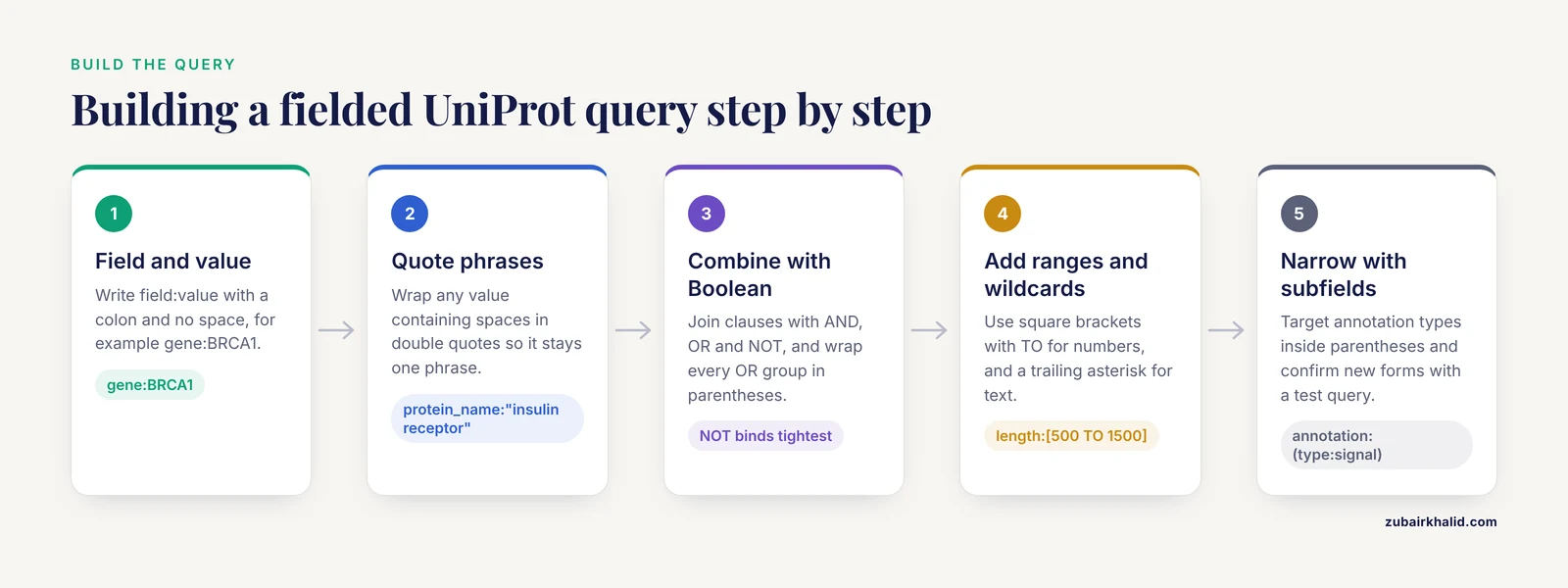
UniProt queries follow a Lucene-style query language, the same family of syntax used by Apache Solr, which underlies the UniProt search backend. The grammar is simple enough to memorize.
Step 1: Start with a field and a value
The basic unit is field:value, written with a colon and no space.
- gene:BRCA1
- organism_id:9606
- reviewed:true
The field name is case sensitive in practice, so write it exactly as documented. Values are usually case insensitive for text fields, meaning gene:brca1 and gene:BRCA1 behave the same, but punctuation in values matters.
Step 2: Quote phrases
If a value contains spaces, wrap it in double quotes so the engine treats it as one phrase.
- protein_name:"insulin receptor"
- organism_name:"Escherichia coli"
Without quotes, protein_name:insulin receptor is parsed as two separate terms, one constrained to the protein name field and one unconstrained, which silently widens your search.
Step 3: Combine fields with Boolean operators
UniProt supports the logical operators AND, OR, and NOT, together with parentheses for grouping [2]. Operator precedence follows the usual Lucene convention: NOT binds tightest, then AND, then OR. Because few people remember precedence reliably, always use parentheses to make your intent explicit.
- gene:(BRCA1 OR BRCA2) AND organism_id:9606 AND reviewed:true
- keyword:kinase AND NOT organism_name:"Homo sapiens"
The first query returns curated human records for either BRCA gene. The second returns kinase-annotated records from any organism except human.
Step 4: Use ranges and wildcards
Numeric fields accept open and closed ranges with square brackets and the TO keyword.
- length:[500 TO 1500]
- length:[0 TO 100]
Text fields accept a trailing asterisk as a wildcard.
- gene:brca*
- protein_name:collagen*
A wildcard at the start of a term is either rejected or slow on most Lucene backends, so anchor your wildcards at the end of the word.
Step 5: Narrow with subfield queries
Some annotation fields accept a structured subquery inside parentheses. The most useful is the annotation field, which targets specific annotation types in the entry, for example annotation:(type:signal) for signal peptide annotations. Subfield syntax is the one area where the exact accepted forms vary most between datasets, so treat the official UniProt help documentation as the authority for the full list and confirm any new subfield with a quick test query.
The Search Fields You Will Use Most
The table below collects the fields that cover the large majority of practical UniProtKB queries. Exact field names are documented on the UniProt help pages, and the list below reflects long-standing, standard usage.
| Category | Field | What it matches | Example |
|---|---|---|---|
| Identity | accession | UniProtKB accession number | accession:P04637 |
| Identity | id | Entry name (mnemonic) | id:P53_HUMAN |
| Identity | gene | Gene name, including synonyms | gene:BRCA1 |
| Identity | protein_name | Recommended and alternative protein names | protein_name:"tumor protein p53" |
| Organism | organism_id | NCBI taxonomy identifier | organism_id:9606 |
| Organism | taxonomy_id | Taxonomy identifier, equivalent usage | taxonomy_id:10090 |
| Organism | organism_name | Organism scientific or common name | organism_name:"Escherichia coli" |
| Status | reviewed | Curated Swiss-Prot status | reviewed:true |
| Status | existence | Protein existence evidence level | existence:1_0 |
| Annotation | keyword | Controlled vocabulary keyword | keyword:kinase |
| Annotation | go | Gene Ontology term by ID or text | go:0006915 |
| Annotation | interpro | InterPro protein family or domain | interpro:IPR011009 |
| Annotation | ec | Enzyme Commission number | ec:3.4.21.- |
| Annotation | annotation | Structured annotation subqueries | annotation:(type:signal) |
| Properties | length | Sequence length in amino acids | length:[100 TO 500] |
| Properties | mass | Molecular mass in daltons | mass:[50000 TO 100000] |
| Cross-reference | xref | Cross-references to source databases | xref:pdb |
Three of these deserve special explanation because they behave differently from what newcomers expect.
gene matches the gene name field including synonyms, which means gene:BRCA1 may match records that list BRCA1 only as a synonym. This is usually what you want for biological completeness, but if you need an exact token match, for instance to distinguish a gene symbol from a substring of another symbol, UniProt provides an exact variant of the field. Test both forms when a gene symbol is short or is a common word.
reviewed is the single highest-value field in routine work. reviewed:true restricts results to Swiss-Prot, where entries carry manual curation, evidence-tagged annotations, and stable nomenclature. reviewed:false restricts to TrEMBL, which is much larger and computationally annotated. For a question such as how many kinases humans have, reviewed:true gives a defensible curated answer. For an exhaustive catalog of predicted proteins, you may need both sections, and you should say in your methods which you searched.
existence filters on the Protein Existence evidence level assigned to each entry, where level 1 indicates experimental evidence at the protein level and higher levels indicate transcript-level evidence, homology-based inference, or prediction only. This field lets you separate proteins whose existence is directly demonstrated from those inferred computationally, which matters when you are building a protein list for quantitative work.
UniProt Search Fields Examples: Worked Queries
The following four examples show how fields combine into realistic, reusable queries. Each is written the way you would type it into the UniProtKB search box.
Example 1: reviewed human records for a gene family
gene:(BRCA1 OR BRCA2) AND organism_id:9606 AND reviewed:trueThis query states, in order, that the gene field must contain BRCA1 or BRCA2, the organism must be human (taxonomy identifier 9606), and the entry must be manually reviewed. The parentheses around the OR clause are required. Without them, operator precedence could apply reviewed:true only to the last term, and you would get unreviewed BRCA1 records mixed into the results. This query typically returns a small, stable set of entries, which is exactly what you want when extracting a reference protein sequence for primer design or antibody targeting.
Example 2: size-filtered enzymes with a localization annotation
reviewed:true AND ec:2.7.* AND annotation:(type:signal) AND length:[500 TO 1500]This query asks for reviewed entries that carry an enzyme classification beginning with 2.7., which corresponds to transferases transferring phosphorus-containing groups and includes protein kinases, that also carry a signal peptide annotation, and whose sequences fall between 500 and 1500 amino acids. Read it as a screening protocol for candidate receptor-type kinases. Each clause independently removes a large share of the database, and the AND structure means you can relax one clause at a time if the result set is empty.
Example 3: controlled-vocabulary retrieval by Gene Ontology term
reviewed:true AND organism_id:9606 AND go:0006915Gene Ontology term 0006915 is the apoptotic process term. This query returns reviewed human entries annotated to that term, including annotations propagated through the ontology hierarchy depending on how UniProt indexes GO associations. Controlled-vocabulary fields such as go and keyword are powerful precisely because they are curated: you are matching against a managed vocabulary rather than free text, so synonym drift and spelling variation disappear.
Example 4: the same query through the REST API
The website query translates directly into a REST API call. The UniProt REST API powers the website itself and exposes structured queries, field selection, and multiple output formats [2]. A minimal call against UniProtKB looks like this:
https://rest.uniprot.org/uniprotkb/search?query=(gene:(BRCA1%20OR%20BRCA2)%20AND%20organism_id:9606%20AND%20reviewed:true)&format=tsv&fields=accession,id,protein_name,gene,organism_name,lengthThe query parameter holds the same Boolean expression, URL-encoded so that spaces become %20. The format parameter requests tab-separated values. The fields parameter selects exactly the columns you want, in this case accession, entry name, protein name, gene names, organism, and length. The same call works with format=json for programmatic parsing, format=fasta to retrieve the sequences themselves, or format=xlsx for colleagues who prefer spreadsheets [2]. The API documentation page provides generated code snippets in several programming languages, so you can wrap this call in Python, R, or Java without writing the HTTP plumbing yourself [2].
A practical pattern for pipelines is to run a broad fielded query once, download the accession list as TSV, and then use the accessions as the fixed input for everything downstream. This separates retrieval, which changes as the database updates, from analysis, which should operate on a frozen set of identifiers.
How to Use UniProt: Website Versus API Workflows
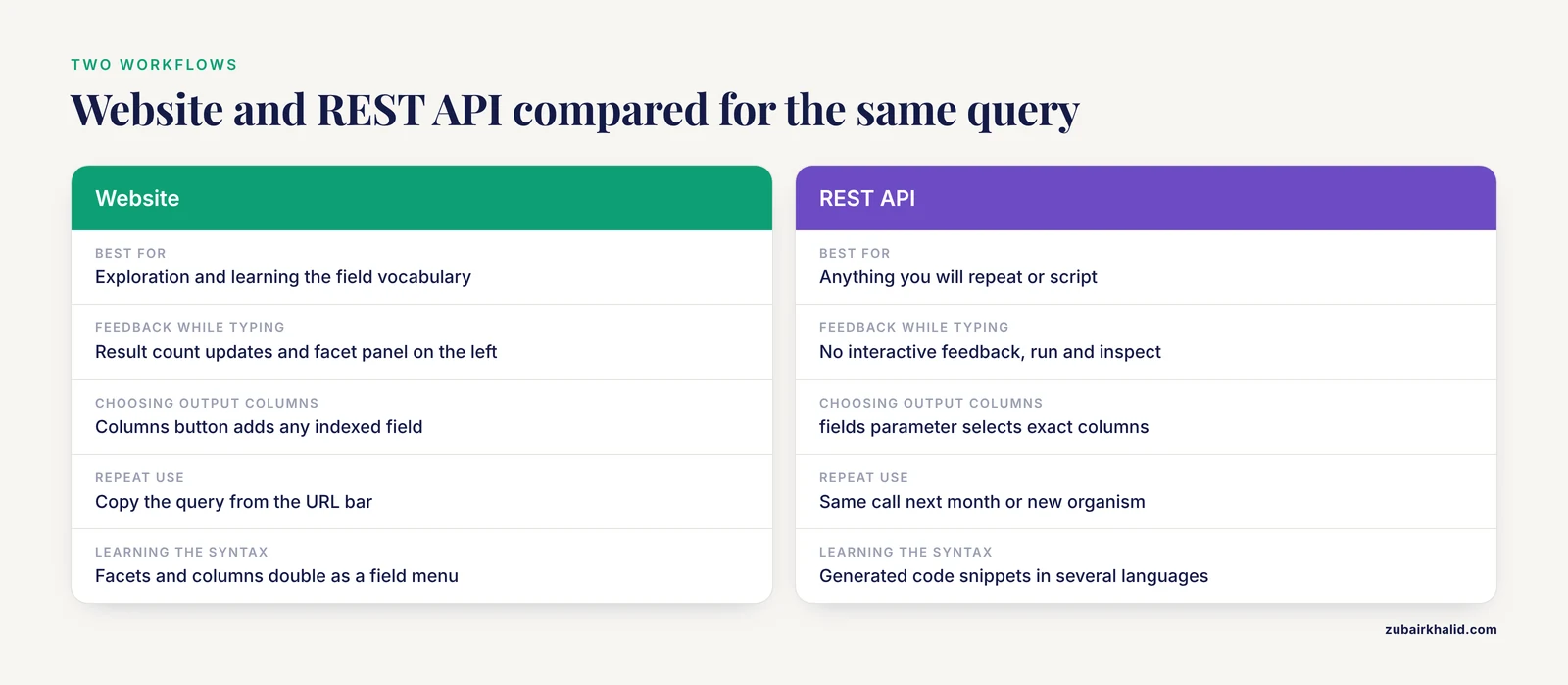
Choosing between the web interface and the API is a workflow decision, not a capability decision, because both run the same underlying search engine.
When to use the website
The website is the right tool for exploration and for learning the field vocabulary. Type a query into the search box and the interface responds with three kinds of feedback that teach you the syntax faster than any documentation page. First, the results count updates as you type, so you immediately see whether reviewed:true dropped your results from 40,000 to 900. Second, the facet panel on the left of the results page shows the distribution of values for fields such as organism, keyword, and annotation type, and clicking a facet value appends the corresponding field query to your URL. Third, the columns button lets you add any indexed field as a visible column, which doubles as a menu of field names you can later use in queries. The field-based text search tool has been part of the site since its launch, alongside similarity search, alignment, batch retrieval, and identifier mapping [1], so these affordances are mature and well tested.
When to use the REST API
The API is the right tool for anything you will repeat. If you will run the same retrieval next month, against a new organism, or as part of a script that processes hundreds of queries, write it as an API call. The API accepts the identical query language, returns results in a choice of formats, and lets you specify which fields appear in the output so that downloads integrate directly into downstream workflows without manual cleanup [2]. Because the API documentation generates example code in multiple languages, the marginal cost of automating a search you already validated on the website is a few minutes.
A recommended hybrid workflow
- Explore on the website. Build the query interactively, use facets to discover which fields separate your results, and stop when the result count and preview look right.
- Copy the query from the URL bar. The browser URL contains the full encoded query, so you can lift it directly into an API call.
- Add fields and format parameters. Choose the minimal set of columns your analysis needs and a machine-friendly format.
- Save the accession list. Treat the list of accessions as the stable artifact your analysis depends on.
- Record the query and the date. UniProt content changes with every release, so a published paper should report both the exact query string and the retrieval date or release version.
How Fielded Search Fits Among the Other UniProt Tools
Students often conflate the search box with the other retrieval tools on UniProt.org. Each solves a different problem, and picking the wrong one wastes an afternoon.
| Tool | Question it answers | Input | When to choose it |
|---|---|---|---|
| Fielded text search | Which entries match these structured criteria? | Field:value query | You know attributes such as gene, organism, keyword, or domain |
| Full-text search | Which entries mention these words anywhere? | Plain words | You only have a fragment of a name or a phrase from a paper |
| Similarity search (BLAST) | Which entries contain sequences like mine? | A sequence | You have a sequence and want homologs or identification |
| Batch retrieval | What are the full records for these identifiers? | A list of accessions | You already know which entries you need |
| ID mapping | What are these identifiers called in another database? | Identifiers plus target database | You need to convert between UniProt, Ensembl, RefSeq, and others |
These five tools correspond to the tool set the unified UniProt website was built around [1]. Fielded search and full-text search share one interface, which is why they are confused, but they behave differently. Similarity search and fielded search answer orthogonal questions: BLAST finds neighbors of a sequence, while a fielded query finds members of a defined set. In a typical project you use fielded search to assemble a candidate set, similarity search to check membership or find missing homologs, and ID mapping to connect the set to your other data sources.
Reading and Interpreting Your Results
A fielded query returns a ranked list, and understanding the result presentation prevents most downstream errors.
Each result row shows the accession, entry name, protein name, organism, and a reviewed status indicator by default. Add columns for any field in your query so you can verify that the filter did what you intended. If you queried length:[500 TO 1500], display the length column and scan for outliers that indicate a parsing surprise. If you queried a keyword, display the keyword column and confirm the sense of the term matches your intent, because broad keywords such as kinase cover very different protein families.
Pay attention to the reviewed indicator on every record you cite. A reviewed Swiss-Prot entry carries evidence-tagged annotations and stable naming maintained by curators. An unreviewed TrEMBL entry carries computational annotations that are often correct but are not manually checked. Mixing the two in a count, or quoting an unreviewed annotation as if it were curated, is the most common source of silent errors in student projects.
Finally, remember that results are a snapshot. UniProt releases updates continuously, entries gain or lose annotations, and the result count for a fixed query can shift between months. For reproducible work, capture the accessions, not just the query, and note the release or date.
Common Mistakes and Limitations
These are the errors that show up repeatedly in teaching and in review comments.
- Forgetting reviewed:true. The default search covers both Swiss-Prot and TrEMBL. Most curatorial questions need the reviewed subset, and leaving the filter off inflates result counts by a wide margin.
- Omitting parentheses around OR. In the query gene:A OR gene:B AND organism_id:9606, precedence groups the AND clause first, so the organism restriction does not apply to gene:A. Always wrap every OR group in parentheses.
- Unquoted multiword values. organism_name:Escherichia coli searches the organism field for Escherichia and searches everything else for coli. Quote the phrase.
- Treating gene field matches as unique gene identity. Gene symbols are reused across organisms and the gene field includes synonyms. Combine the gene query with an organism_id filter, and when precision is critical, verify the match by accession.
- Assuming TrEMBL entries are wrong. Unreviewed does not mean incorrect. It means the annotation is computational rather than manually verified. For many organisms, TrEMBL is the only coverage available, and the honest reporting practice is to state which section you searched.
- Expecting identical field names across all datasets. UniProtKB, UniRef, UniParc, and Proteomes expose partly different field vocabularies because the underlying records differ [2]. A query that works in UniProtKB may need adjustment in UniRef.
- Relying on leading wildcards. A pattern beginning with an asterisk is slow or unsupported on many Lucene-based backends. Anchor wildcards at the end of the term.
- Treating a result count as a finding. Counts change with every release as annotations are added and corrected. A number such as the count of reviewed human kinases is a property of the database at a moment in time, so report the query, the release, and the date together.
- Hammering the API from a script loop. The API serves a very large monthly request volume [2] and is a shared community resource. Cache responses, batch what you can, and respect the documented fair-use expectations so the service stays available for everyone.
One structural limitation is worth stating plainly. Fielded search can only express conditions on fields that exist in the record. If the discriminating information you need lives in a full-text description, a publication, or a comment line that is not indexed as a discrete field, you will need the full-text search, manual inspection, or a downstream script that filters downloaded records on richer criteria.
Quick Review
- A search field is a labeled component of a UniProt record, and a fielded query matches values in specific fields rather than anywhere in the text.
- The core syntax is field:value, combined with AND, OR, NOT, and parentheses, in a Lucene-style query language.
- Quote any value containing spaces, such as protein_name:"insulin receptor".
- reviewed:true restricts results to manually curated Swiss-Prot entries and should appear in most precision-critical queries.
- Ranges use square brackets and TO, for example length:[500 TO 1500], and wildcards use a trailing asterisk.
- The same query runs on the website and the REST API, where the fields parameter selects output columns and the format parameter chooses TSV, JSON, FASTA, or XLSX.
- For reproducibility, save the accession list and record the query string with the retrieval date or release.
Frequently Asked Questions
What is a UniProt search field?
It is a labeled, structured component of a UniProt record, such as gene, organism, keyword, or length, that you can target in a query with the syntax field:value. Fielded queries match specific columns of the record, which makes them far more precise than plain keyword searches.
How do I search UniProt for a specific gene?
Use the gene field combined with an organism filter and a review filter, for example gene:BRCA1 AND organism_id:9606 AND reviewed:true. The gene field matches synonyms as well as the primary symbol, so add the organism restriction to avoid cross-species symbol collisions.
What does reviewed:true versus reviewed:false mean?
reviewed:true restricts results to Swiss-Prot, the manually curated section of UniProtKB, while reviewed:false restricts to TrEMBL, the larger computationally annotated section. Most questions about well-studied biology should start with reviewed:true.
Can I use Boolean operators in UniProt searches?
Yes. UniProt supports AND, OR, and NOT with parentheses for grouping, both on the website and through the REST API. Always use parentheses around OR groups because operator precedence can otherwise apply your filters to fewer terms than you intended.
How do I download specific fields from UniProt?
Use the REST API search endpoint with the fields parameter to select columns and the format parameter to choose TSV, JSON, FASTA, or XLSX. For example, appending fields=accession,id,protein_name,length&format=tsv to a search URL returns exactly those four columns as a spreadsheet-ready table.
Do UniProt search fields work the same in the REST API and on the website?
Yes. The REST API powers the UniProt.org website itself and accepts the same structured query language with logical operators and parentheses. The API adds field selection, output formats, and code snippets in multiple programming languages, which makes it the better choice for repeatable workflows.