How to Search UniProt by Protein Name, Gene Name, or Identifier
By Dr. Zubair Khalid, DVM, MS, PhD ·

A UniProt search by gene name asks the database to match a symbol such as BRCA1 against the gene fields of every entry, while a search by identifier asks it to match a fixed code such as the accession P38398 or the entry name BRCA1_HUMAN. Gene names are shared, reused, and variable, so gene name searches return more noise and need species filters. Identifiers are unique and stable, so identifier searches return exactly one entry every time.
The rule of thumb is simple. If you have one gene or protein and you know roughly what you are looking for, use the UniProt search box with field tags and filter to a reviewed entry in your organism of interest. If you have a list of gene symbols or identifiers and need to convert them to UniProt accessions, use the ID Mapping tool instead of searching one name at a time. If you need to reproduce the search inside a script or a pipeline, use the REST API with the same field tags. This article walks through each option, compares them on the criteria that actually decide which one to use, works through realistic scenarios, and catalogs the mix-ups that produce wrong or incomplete results.
How UniProt Organizes Names and Identifiers
Before comparing search options, you need to understand what a UniProt entry actually carries, because every search strategy works by matching one of these labels.
The Four Labels on Every UniProt Entry
Every UniProtKB entry carries four distinct name-like fields, and confusing them is the root cause of most failed searches.
Accession number. A stable, unique identifier such as P38398 for human BRCA1 or P60709 for human ACTB. Accessions never change meaning, which is why publications and databases cite them. When a version suffix appears, such as P38398-1, the number after the hyphen refers to a specific protein isoform, not a different entry.
Entry name. A mnemonic identifier such as BRCA1_HUMAN or ACTB_HUMAN. The four or five characters after the underscore are a species code, here HUMAN for Homo sapiens. Entry names are memorable, but UniProt can change an entry name when nomenclature or annotation changes, so the accession remains the citable identifier.
Protein name. A descriptive label such as "Breast cancer type 1 susceptibility protein" or "Actin, cytoplasmic 1." Protein names are free text with synonyms, subunit names, and fragment descriptions, which makes them useful for browsing and terrible for exact matching.
Gene name. A symbol such as BRCA1, ACTB, or EGFR, together with alternative symbols and synonyms recorded in the entry. UniProt pulls gene names from model organism databases and nomenclature committees, so one entry can carry a primary symbol plus several alternates.
A single query that "works" against one of these fields can fail against another. Searching the protein name "actin" hits hundreds of actin and actin-like proteins across species, while searching the identifier P60709 returns exactly one entry.
Gene Names Are Ambiguous in Both Directions
The reason this article spends so much time on gene name searches is that gene names fail in two directions at once. First, one gene has many names. Synonyms, retired symbols, and database-specific names all describe the same protein. Second, one name describes many genes. A symbol like "MST1" has been used for kinases in different families, and short symbols of three or four characters collide constantly across species and gene families.
This is not a small problem at the margins. BioThesaurus, a resource built to map protein and gene names to UniProt Knowledgebase entries, collected over 2.8 million distinct names covering more than two million proteins, drawn from multiple molecular biology databases through the cross-references in iProClass [1]. A mapping resource needs millions of names because the same protein is called different things in different places, and because the same string can refer to different proteins depending on species and context. Any search strategy that treats a gene name as a unique key will trip over this.
Text-mining systems face the same problem and solve it the same way, by normalizing names against UniProt. FACTA, a search engine over MEDLINE abstracts, pre-indexes concepts from thesauri including UniProt, BioThesaurus, UMLS, KEGG, and DrugBank, so that a user can query a gene or protein concept and immediately see associated diseases, chemicals, and other concepts ranked by co-occurrence [2]. The lesson for your own searches is the same one those systems learned during development: decide early whether you are searching for a string or for a protein, and let UniProt's identifier fields carry the uniqueness that gene names cannot.
Reviewed versus Unreviewed Entries
UniProtKB contains two divisions. Swiss-Prot entries are reviewed, meaning curators have checked the sequence, annotation, gene names, and literature. TrEMBL entries are unreviewed, meaning they are computationally annotated records awaiting full curation, including many redundancy-reduced records from other databases and predicted or fragmentary sequences. Reviewed entries carry the reviewed:true flag in the query language and a gold badge in the web interface.
For gene name searching, this distinction matters more than anything else. A gene symbol search without the reviewed filter will often bury the canonical curated entry under dozens of unreviewed records from the same species that merely mention the symbol in a synonym or a cross-reference. Nearly every search strategy in this article ends with the same advice, so it is worth stating once here: filter to reviewed entries unless you have a specific reason not to, such as hunting for a protein in an organism whose proteome has little curated coverage.
UniProt Search by Gene Name: The Options Compared
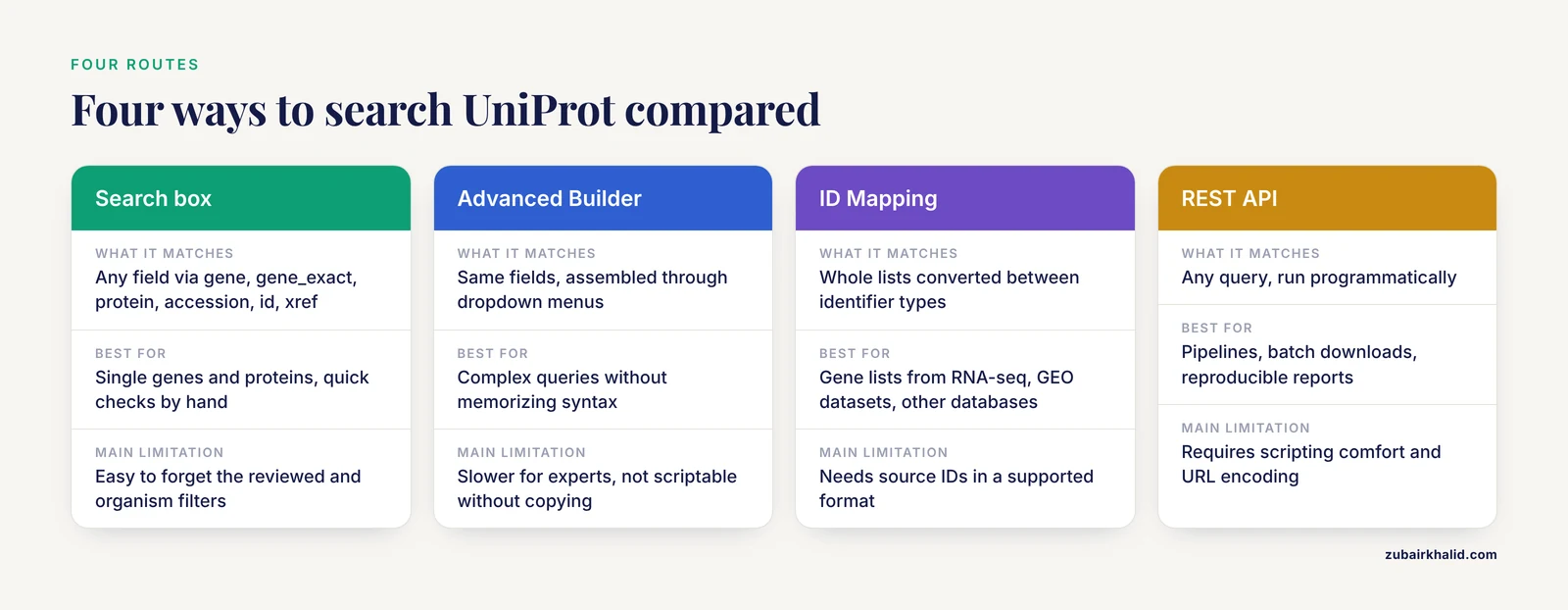
There are four practical ways to search UniProt by gene name, protein name, or identifier, and each one earns its place in a different workflow. The table below is the core of this article. The sections after it explain each option in detail, and the scenarios section shows when each one wins.
| Option | What it matches | Best for | Pros | Cons |
|---|---|---|---|---|
| Search box with field tags | Any field: gene:, gene_exact:, protein:, accession:, id:, xref: | Single genes and proteins, quick checks, building a query by hand | Fast, flexible, works with Boolean logic, query is shareable in the URL | You must know the field tags, easy to forget the reviewed and organism filters |
| Advanced Search Builder | Same fields, assembled through menus | Building complex queries without memorizing syntax | No syntax errors, good for learning which fields exist, filters visible on screen | Slower for experts, not reproducible in a script without copying the generated query |
| ID Mapping tool | Whole lists converted between identifier types, for example Ensembl IDs or NCBI GeneIDs to UniProt accessions | Converting a gene list from RNA-seq, a GEO dataset, or another database | Handles hundreds to thousands of names in one job, reports unmapped identifiers, gives one canonical accession per source ID | Needs source IDs or names in a supported format, not ideal for browsing, results may need filtering by organism and reviewed status |
| REST API | Any query, programmatically | Pipelines, batch downloads, reproducible reports | Fully scriptable, output fields controlled by parameters, identical results to the web interface | Requires command line or scripting comfort, URL encoding needed for spaces and quotes |
These four approaches are not competitors so much as layers. The field-tagged query is the common language underneath all of them. The builder constructs the same query for you. ID Mapping wraps queries around a list. The API runs the same query unattended.
Option 1: The Search Box with Field Tags
The single search box at the top of the UniProt website accepts field-tagged queries, and learning five or six tags covers almost every search you will ever need. This is the fastest route into how to use UniProt productively, because the tags make your intent explicit instead of hoping the default ranking guesses correctly.
The Core Field Tags
The tags below are documented in the UniProt help for searching UniProtKB, and they behave as follows.
gene: searches the gene name fields, including primary symbols, synonyms, and ORF names. The field is tokenized, which means the search engine splits names on word boundaries. A search for gene:brca1 will match BRCA1 and also entries where BRCA1 appears as part of a longer tokenized context, and a search for a short symbol such as gene:tpi will match TPI1 and other entries containing that fragment. Tokenized matching is forgiving when you only remember part of a name and unreliable when you need an exact symbol.
gene_exact: matches complete gene name tokens without partial-word matching. Searching gene_exact:BRCA1 returns entries whose gene names include the exact symbol BRCA1 and excludes entries where the string appears only inside a longer name. This is the tag most people actually want when they say "search by gene name," and switching from gene: to gene_exact: fixes a surprising number of noisy result sets.
protein: searches protein names and their synonyms. Use it when you know the protein but not the gene, for example protein:"insulin receptor". Because protein names are descriptive free text, put phrases in double quotes to keep the words together.
accession: searches the stable accession number. accession:P38398 returns exactly one entry. This is the most precise search UniProt offers.
id: searches the entry name, for example id:BRCA1_HUMAN. Useful when you have an entry name copied from a figure, a FASTA header, or a paper.
xref: searches by cross-reference to another database. For example, you can retrieve entries linked to a given Ensembl or NCBI Gene identifier without going through the mapping tool. This is handy when your source data already carries foreign identifiers and you only need the one corresponding UniProt entry.
Combining Tags with Boolean Logic
Field tags combine with AND, OR, and NOT, and parentheses control grouping. The single most useful query pattern in UniProt looks like this:
(gene_exact:BRCA1) AND (organism_id:9606) AND (reviewed:true)That query reads as three sentences. Find entries whose gene names contain exactly the symbol BRCA1, restrict to humans (taxonomy identifier 9606), and keep only reviewed entries. It returns the canonical human BRCA1 entry in one step, with no ranking luck involved.
Other taxonomy identifiers you will use constantly are 10090 for mouse and 10116 for rat. The same pattern works for any species whose identifier you know, and you can look up an identifier by opening any UniProt entry for that species and reading the taxonomy line.
When a Plain Untagged Search Is Fine
If you type BRCA1 into the search box with no tag, UniProt searches across fields and ranks results. For a famous gene this usually works, and the canonical human entry appears near the top. The danger appears with short or ambiguous symbols, where untagged search mixes gene name hits, protein name hits, and cross-reference hits together. The habit worth building is to always add at least gene_exact: plus the organism and reviewed filters, because the extra typing costs ten seconds and removes an entire class of wrong-answer problems.
Option 2: The Advanced Search Builder
On the UniProt search page, the Advanced option expands a query builder where you add one field per row, choose the field type from a dropdown, enter a value, and join rows with AND or OR. Underneath, the builder writes the same field-tagged query that Option 1 produces, and you can see that query in the address bar once results load.
The builder earns its place in three situations. First, when you are learning the field vocabulary, seeing the dropdown list of fields is faster than reading documentation. Second, when you need a query with mixed logic, such as (gene_exact:ACTA1 OR gene_exact:ACTA2 OR gene_exact:ACTA3) AND (organism_id:9606) AND (reviewed:true), assembling it in the builder avoids syntax slips. Third, when you want to show a colleague how to construct a search, the visual interface communicates structure better than a string of tags.
Once the results load, copy the query string from the URL. That string is now a reusable artifact. You can paste it back into the search box, send it to a collaborator, or drop it into a REST API call unchanged. The builder is not a separate search engine. It is a front end for the same query language, which means nothing you build there is locked in.
Option 3: The ID Mapping Tool
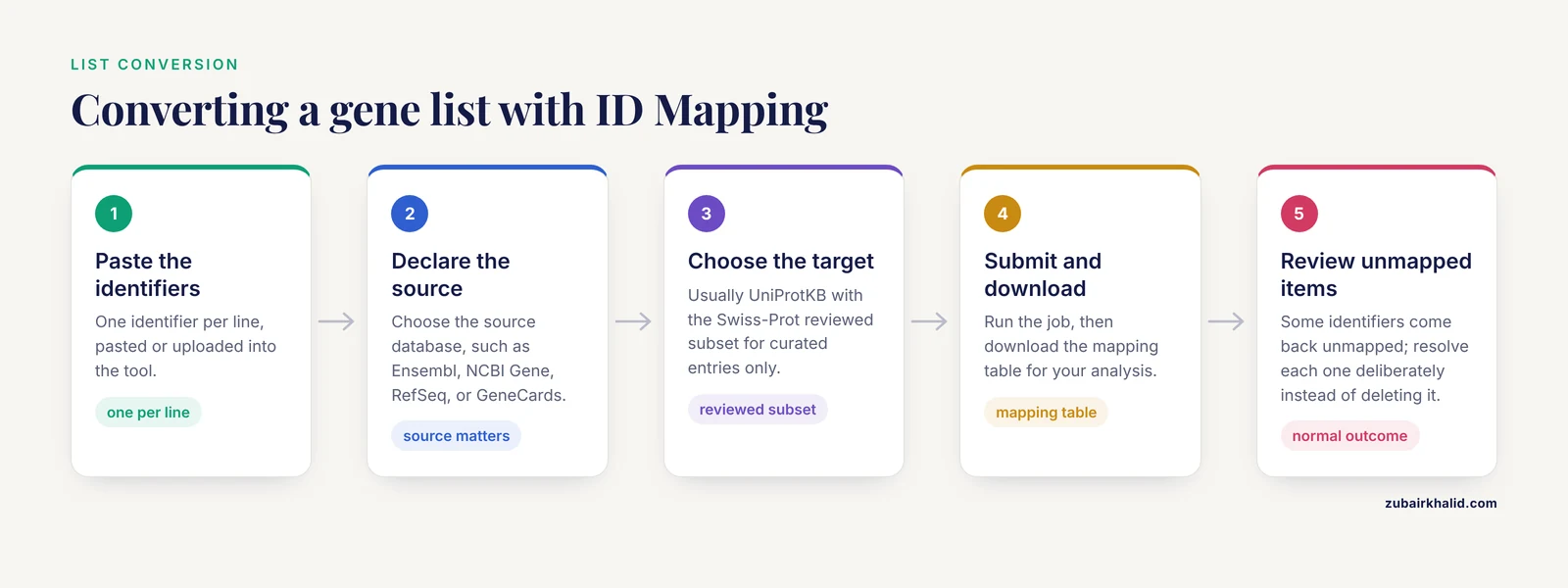
When your input is a list rather than a single name, searching becomes the wrong shape of operation. A differential expression table can contain hundreds of gene symbols, Ensembl transcript IDs, or NCBI GeneIDs, and running hundreds of separate searches by hand invites both tedium and transcription errors. The UniProt ID Mapping tool, reachable from the uniprot.org website, converts a whole list in one job.
The workflow has four steps. First, paste or upload your identifiers, one per line. Second, declare what the identifiers are, choosing the source database from a long list that includes Ensembl, NCBI Gene, RefSeq, GeneCards, and many model organism databases. Third, declare the target, which is usually UniProtKB with the Swiss-Prot (reviewed) subset if you want only curated entries. Fourth, submit the job and download the mapping table.
Three details make or break this step. You must set the source database correctly, because an Ensembl transcript ID interpreted as an NCBI GeneID will simply fail to map. You should use the official symbol or identifier from your source, because truncated or typo versions of names map poorly or map to the wrong entry. And you should expect some identifiers to come back unmapped, which is normal. Unmapped names usually mean the source used a name UniProt does not carry, the protein is only in TrEMBL, or the species annotation lives elsewhere.
ID Mapping also solves the reverse direction. Given a list of UniProt accessions from a mass spectrometry report, the same tool converts them to Ensembl gene IDs, NCBI GeneIDs, or the gene symbols your downstream enrichment software expects.
Option 4: The REST API for Programmatic Searches
Every field-tagged query that works in the web interface works identically in the REST API, with results returned in the format you specify. The base endpoint for UniProtKB searches is https://rest.uniprot.org/uniprotkb/search, and the query, output format, and returned columns are all URL parameters.
A minimal example that retrieves the canonical human BRCA1 entry as a table, directly from the command line:
curl "https://rest.uniprot.org/uniprotkb/search?query=(gene_exact:BRCA1)%20AND%20(organism_id:9606)%20AND%20(reviewed:true)&format=tsv&fields=accession,id,gene_names,protein_name,organism_name"The same query in Python using the requests library:
import requests

query = "(gene_exact:BRCA1) AND (organism_id:9606) AND (reviewed:true)"
params = {
    "query": query,
    "format": "tsv",
    "fields": "accession,id,gene_names,protein_name,organism_name",
}
r = requests.get("https://rest.uniprot.org/uniprotkb/search", params=params)
r.raise_for_status()
print(r.text)
Because the requests library URL-encodes the parameters for you, quotes and spaces in the query need no manual escaping, which is why the Python form is friendlier for scripts that build queries dynamically from gene lists.
Three practical notes on the API. Output formats include TSV, FASTA, JSON, XML, and the flat-file text format, so a single call can deliver either a spreadsheet-ready table or raw protein sequences. The fields parameter controls exactly which columns come back, which keeps downloads small and analysis clean. And because the API executes the same query language as the website, you can prototype a search interactively, confirm the results look right, then paste the query string straight into a script with no translation step. This equivalence is what makes a UniProt workflow reproducible. The query is the artifact, and both the website and the API interpret it the same way.
Worked Scenarios
Abstract pros and cons become clear in concrete situations. The four scenarios below cover the situations where people most often ask how to search UniProt correctly.
Scenario 1: Find the Canonical Entry for One Human Gene
You read a paper about EGFR signaling and want the reviewed human entry with its sequence, domains, and cross-references. This is the purest uniprot search by gene name use case, and the best uniprot search by gene name here is the one that filters in the query rather than by eye afterward.
Type the query (gene_exact:EGFR) AND (organism_id:9606) AND (reviewed:true) into the search box. One result comes back, the reviewed human EGFR entry. From that entry you can download the FASTA sequence, follow cross-references to pathways, structures, and expression resources, and grab the accession for citation. The whole task takes under a minute once the query pattern is in your notes.
Skip the reviewed filter and the same search returns additional records that mention EGFR in synonyms or cross-references. Skip the organism filter and you get EGFR entries from every species with curated annotation. Neither outcome is wrong, but neither answers the question you asked.
Scenario 2: Resolve Target Names in a Network Pharmacology Workflow
Network pharmacology studies generate drug target lists from a source database and then need those targets reconciled against standard gene identifiers before pathway analysis. A published example shows the shape of the problem. In a study of the wuyao-ginseng medicine pair for diarrhea-type irritable bowel syndrome, the authors retrieved candidate compound targets from the TCMSP database and used the UniProt database to search for the target gene name, standardizing the targets before intersecting them with 1,257 differentially expressed genes from two GEO microarray datasets, GSE36701 and GSE14841. That workflow yielded 171 drug targets, 20 drug-disease intersection genes, and core targets including NCOA2, EGFR, and VEGFA, which then fed into a protein-protein interaction network and pathway analysis [3].
The UniProt step in that pipeline is exactly Option 3. A list of protein targets arrives in a source database's own naming scheme, and each name must become a standard gene symbol or UniProt accession before it can join with a second gene list. Doing this conversion against UniProt, rather than trusting the source database's names to match downstream databases, is what makes the intersection step valid. If a target name maps ambiguously or not at all, the mapping tool surfaces it rather than silently dropping the gene from the analysis. When many candidate targets arrive at once, the ID Mapping option beats one-at-a-time searches on both speed and error rate, which is why it is the standard choice in this workflow family.
Scenario 3: Convert a Gene Symbol List from RNA-seq to UniProt Accessions
Your differential expression table has 800 gene symbols from a mouse experiment, and a proteomics collaborator wants UniProt accessions to compare against her mass spectrometry identifications. This is ID Mapping territory with two twists.
First, mouse gene symbols follow a different capitalization convention from human ones. Human symbols are all uppercase, such as ACTB, while mouse and rat symbols capitalize only the first letter, such as Actb. If your list comes from a mouse analysis but carries uppercase symbols copied from a human template, check the capitalization before mapping, because a symbol submitted in the wrong case can fail to map or map to the wrong ortholog group in strict contexts. Second, restrict the mapping target to reviewed UniProtKB entries if your collaborator will compare against curated proteomics databases, since unreviewed records would introduce entries with less reliable annotation and possible redundancy.
Download the mapping table, keep the accession, entry name, organism, and gene name columns, and flag every input that failed to map for manual review rather than deleting it. A handful of unmapped symbols often hides the most interesting genes in the experiment, such as newly renamed or poorly annotated ones.
Scenario 4: Distinguish Species and Orthologs with a Shared Symbol
You have the symbol "TP53" and you need both the human and mouse entries, clearly separated, because you will build cross-species primers. The trap is that a bare gene name search returns entries from many species in one interleaved list.
Run the query once per organism and label the results yourself:
(gene_exact:TP53) AND (organism_id:9606) AND (reviewed:true)
(gene_exact:Trp53) AND (organism_id:10090) AND (reviewed:true)
Two details deserve attention. Gene names in the mouse query use the mouse convention, though UniProt's search handles the string in a case-insensitive way for many fields, so the safer habit is to write the symbol as the relevant nomenclature committee records it. And the two queries return two separate, unambiguous result sets, which you can then compare directly for orthology using the cross-references each entry carries. The general principle, useful far beyond TP53, is that species disambiguation belongs in the query, not in your eyes scanning a mixed result list.
Choosing Between Options: Pros and Cons in Real Situations
The uniprot search by gene name options differ along five criteria that decide real choices. Here is the honest assessment of each.
Precision. Identifier searches win absolutely. accession:P38398 has no ambiguity at all. gene_exact: with an organism and reviewed filter is nearly as precise for well-annotated genes. Untagged or tokenized gene: searches are the least precise and should be treated as exploratory.
Recall. The ranking reverses. Tokenized gene: and protein: searches find entries that exact matching misses, including entries where your term appears as a synonym or inside a compound name. When you are trying to discover everything related to a protein family, precision is your enemy and recall is your friend. BioThesaurus illustrates why broad recall matters, having assembled millions of synonymous names mapped to UniProt entries precisely because valuable names hide in synonyms and alternate labels [1].
Scale. One name, use the search box. Ten names, still the search box or the builder. A hundred to hundreds of thousands of names, ID Mapping or the API. Fighting scale by hand is the single most common workflow failure among newcomers.
Reproducibility. The API and the field-tagged query string are fully reproducible, because the query is text you can archive. The builder generates reproducible queries once you copy them out of the URL. Clicking filters in the interface without capturing the resulting query string is reproducible only in your memory, which is not a storage medium.
Learning curve. The builder is the gentlest entry point and teaches the field vocabulary. The search box with tags takes an afternoon to master and then outpaces the builder. ID Mapping needs the least syntax knowledge but the most care about input formats. The API needs scripting comfort but pays for itself the second a task repeats.
A reasonable personal progression, and the answer to "how to use UniProt" for most working scientists, is to start with the builder, graduate to typed queries within a week, adopt ID Mapping the first time a list crosses your desk, and reach for the API when any task repeats more than twice.
Common Mistakes and Limitations
These are the errors that generate wrong results, silent omissions, and wasted afternoons. Each one has a concrete fix.
Searching gene: when you meant gene_exact:. The tokenized gene field matches fragments of names. Searching a short symbol without gene_exact: can pull in entries whose gene names merely contain the fragment. Fix: default to gene_exact: for symbols and drop to gene: only when exploring.
Forgetting the organism filter. Gene symbols are reused across species far more than people expect, and an unfiltered search interleaves human, mouse, yeast, and bacterial entries sharing a symbol. Fix: always add organism_id: with the taxonomy code, or use the Organism filter in the interface.
Forgetting the reviewed filter. Unreviewed TrEMBL records often outnumber reviewed entries in a result set, and they carry lower-confidence annotation. Fix: add reviewed:true unless you specifically need unreviewed coverage.
Confusing accession with entry name. An accession is the stable citable identifier, while an entry name can change over time. Citing an entry name in a manuscript risks a dead identifier later. Fix: cite accessions, and use accession: rather than id: whenever the input might be either.
Assuming one gene name equals one entry. Isoforms, fragment entries, and species variants mean a name can resolve to several legitimate records. Conversely, some genes have changed symbols enough times that an old name from a 2005 paper no longer appears as the primary symbol anywhere. Fix: read the gene name block of the entry you land on, which lists all synonyms, and check whether the paper's context matches the entry's organism.
Trusting a list of names without checking unmapped items. In any mapping job, silent removal of unmapped identifiers shrinks your gene set invisibly and can bias downstream enrichment results. Fix: download the unmapped list, review it, and resolve each item deliberately.
Skipping the isoform question. Where an entry lists multiple isoforms, a UniProt accession with no version refers to the canonical sequence, while a versioned identifier pins one isoform. Mixing these up in proteomics or primer design produces mismatches. Fix: decide whether your application needs the canonical sequence or a specific isoform, and record which you used.
Copying results without the query. A result table pasted into a lab notebook with no record of the query, filters, and date cannot be regenerated or audited. Fix: save the query string alongside every result set. This habit costs nothing and converts every search into a reproducible method.
A final limitation sits outside the software entirely. Name resolution depends on the nomenclature and curation state of the organism you are working in. Well-studied organisms have thoroughly reviewed entries, while poorly studied organisms may have few or no reviewed records for your gene, in which case the honest result of a reviewed-only search is an empty one, and the TrEMBL division becomes the right place to look, read with appropriate caution.
Frequently Asked Questions
What is the difference between searching UniProt by gene name and by protein name?
A gene name search matches symbols like BRCA1 against the gene name fields of entries, while a protein name search matches descriptive labels like "breast cancer type 1 susceptibility protein" against the protein name fields. Gene symbols are short and reused across species, so they need an exact-match tag plus organism and reviewed filters. Protein names are long and descriptive, so phrase them in double quotes and expect synonym-driven recall rather than precision.
How do I get an exact match for a gene symbol instead of partial matches?
Use the gene_exact: field tag instead of gene:, for example (gene_exact:BRCA1) AND (organism_id:9606) AND (reviewed:true). The plain gene: field splits names into tokens and matches fragments, while gene_exact: requires the complete symbol. Adding the organism and reviewed filters on the same line removes the remaining noise.
Why does my gene name search return entries from the wrong species?
Because gene symbols are shared across species, and an unfiltered search matches the symbol wherever it appears. Fix it by adding an organism restriction such as (organism_id:9606) for human or (organism_id:10090) for mouse to the query, or by selecting the organism in the filter panel. Then double-check that your symbol follows the capitalization convention of the species you want, since human symbols are uppercase and mouse symbols capitalize only the first letter.
Can I convert a list of gene names to UniProt accession numbers in one step?
Yes. Use the UniProt ID Mapping tool, paste your list with one identifier per line, declare the source database correctly, choose UniProtKB as the target, and download the mapping table. For a published example of this pattern in a network pharmacology pipeline, target lists were standardized against UniProt gene names before intersection with disease gene sets [3]. Review any identifiers that fail to map rather than deleting them.
Should I trust unreviewed TrEMBL entries that appear in my results?
Treat them as leads rather than references. Unreviewed entries have computationally assigned annotation without full curator verification, so their gene names, function, and sequence quality are less certain than reviewed Swiss-Prot entries. Filter to reviewed:true for routine work, and consult unreviewed records mainly when your organism has little or no curated coverage.
Is there a way to automate UniProt searches in a script?
Yes. The REST API at rest.uniprot.org/uniprotkb/search accepts the same field-tagged queries as the website, with parameters for output format and returned fields. Build the query interactively on the website, confirm the results, then send the identical query string from Python or curl. Because the website and API interpret the same query language, your interactive search and your scripted search cannot drift apart.