How to Retrieve Protein Sequences for a Specific Organism from UniProt
By Dr. Zubair Khalid, DVM, MS, PhD ·

Retrieving protein sequences from UniProt is one of the first moves in almost any protein analysis, and learning how to use UniProt well saves hours of rework later. Published workflows rely on this step constantly. Studies of thermophilic alcohol dehydrogenases pulled their starting sequences from UniProt before alignment and structure modeling [1]. A drug target modeling study for the fish pathogen Renibacterium salmoninarum retrieved 412 protein sequences from UniProt and carried all of them through homology modeling [2]. The pattern is the same every time: identify the organism precisely, issue a query that returns exactly the intended set of proteins, download them in a format your downstream tools accept, and confirm that what arrived is what you asked for.
This guide walks through uniprot retrieve sequences by organism workflows step by step. By the end you will be able to do the following with confidence.
- Find the correct taxonomy identifier for your organism, including strain-level distinctions.
- Build a UniProt query that combines organism, review status, and proteome filters.
- Download results in FASTA or tabular format from the website, the REST API, the command line, or a short Python script.
- Fetch a complete reference proteome as a single bulk file.
- Verify the downloaded file with simple shell checks.
- Avoid the mistakes that most often produce wrong or bloated sequence sets.
You need a web browser and a computer with internet access. For the command line portions you need curl, which ships with macOS, Linux, and Windows 10 or later. For the scripted example you need Python 3 with the requests library installed. No accounts, keys, or fees are involved. UniProt is free and open to everyone.
How UniProt Is Organized
A few definitions make everything that follows easier.
UniProt is a family of databases maintained by the UniProt consortium. The core resource is UniProtKB, the UniProt Knowledgebase, which has two divisions. Swiss-Prot contains reviewed entries, meaning sequences checked and annotated by expert human curators. TrEMBL contains unreviewed entries, meaning sequences annotated computationally and awaiting full curation. Swiss-Prot holds a few hundred thousand entries. TrEMBL holds hundreds of millions, because it absorbs translated coding sequences from the EMIRGE-grade flow of genome and transcriptome submissions. Every UniProtKB entry carries a stable accession, for example P04637, which is the accession for human cellular tumor antigen p53.
Three companion resources matter when you retrieve sequences by organism.
UniParc is an archive of every distinct protein sequence ever loaded, with no annotation, no organism-level organization of duplicates, and no sequence thrown away. You rarely query UniParc by organism.
UniRef clusters sequences by identity to reduce redundancy. UniRef100 merges identical sequences and subfragments from any organism into a single entry, and UniRef90 and UniRef50 cluster at 90 percent and 50 percent sequence identity. When UniRef was introduced, UniRef100 already covered more than 4 million source sequences, and clustering reduced database size by roughly 10 percent at 100 percent identity, 40 percent at 90 percent identity, and 70 percent at 50 percent identity [3]. Redundant sequences hinder similarity searches and inflate sampling bias, which is the problem UniRef was built to solve [3]. If you later run BLAST or build profile models, a UniRef subset rather than a raw proteome may serve you better.
Reference proteomes are curated representative proteomes, one per organism or well-studied strain, chosen to give maximal coverage with minimal redundancy. External resources build on them. Pfam, the protein families database, constructs its families primarily from UniProtKB reference proteome sequences, which brings stability and keeps family statistics interpretable [4]. If your organism has a reference proteome, that set is almost always the right starting point for downstream work.
A proteome identifier looks like UP000005640, which is the reference proteome for human. Pairing the proteome identifier with a taxonomy identifier, for example 9606 for human, gives you a precise handle on exactly one set of proteins.
Why Organism Precision Matters
Taxonomy identifiers, often called taxon IDs, come from the NCBI Taxonomy database and are used across all major resources. The number is not decoration. Common names collapse real biological differences.
Escherichia coli as a species carries taxon ID 562, but the laboratory workhorse K-12 MG1655 carries taxon ID 83333. If you retrieve sequences under 562 you get proteins from many strains, which mixes nonidentical versions of the same gene into one file. That is fine for broad questions and wrong for strain-specific ones. Saccharomyces cerevisiae is taxon ID 4932. Zymomonas mobilis is taxon ID 542, the organism used in comparative alcohol dehydrogenase analyses for bioethanol work [1]. Human is 9606.
The distinction between species-level and strain-level retrieval is one of the most common sources of silently wrong datasets, so the walkthrough below starts with the taxonomy lookup rather than the search box.
Retrieving Protein Sequences by Organism, Step by Step
Step 1. Find the taxonomy identifier
Open the UniProt taxonomy browser at uniprot.org/taxonomy and type the organism name. The result table lists taxon ID, scientific name, rank, and how many UniProtKB entries exist under that node.
For a scripted lookup, query the taxonomy REST endpoint.
curl "https://rest.uniprot.org/taxonomy/search?query=Escherichia+coli&format=tsv&fields=id,scientific_name,rank"Expected output looks like this, with one row per match.
id	scientific name	rank
562	Escherichia coli	species
83333	Escherichia coli K-12 MG1655	strain
...
Pick the row that matches your experimental material. If your sequencing run or reference genome is K-12 MG1655, use 83333, not 562. Write the number down. It anchors every query that follows.
Step 2. Search on the website
Go to uniprot.org/uniprotkb. In the search box enter a structured query rather than plain words.
organism_id:9606 AND reviewed:trueThis returns all reviewed human entries. The query language supports these field names.
| Field | Example query | What it selects |
|---|---|---|
| organism_id | organism_id:562 | All entries under that taxon ID, including child taxa |
| organism_name | organism_name:"Escherichia coli" | Entries matched by organism name |
| reviewed | reviewed:true | Swiss-Prot only, omit for Swiss-Prot plus TrEMBL |
| proteome | proteome:UP000005640 | Entries assigned to that proteome |
| gene | gene:groL | Entries for a specific gene |
| keyword | keyword:Kinase | Entries carrying that UniProt keyword |
| protein_name | protein_name:"alcohol dehydrogenase" | Entries matched by protein name |
Combine fields with AND, OR, and NOT. Quoted phrases match exactly. A query such as organism_id:562 AND reviewed:true AND keyword:Ribosomal protein returns a small, well-defined slice.
The results page shows a count, a sortable table, and columns you can customize through the Columns button. Check the count against expectations before downloading anything. Human reviewed entries number close to 20,000. E. coli K-12 reviewed coverage is nearly complete at roughly 4,000 proteins. If your count is wildly different from these orders of magnitude, reread your query.
Step 3. Decide the scope of your download
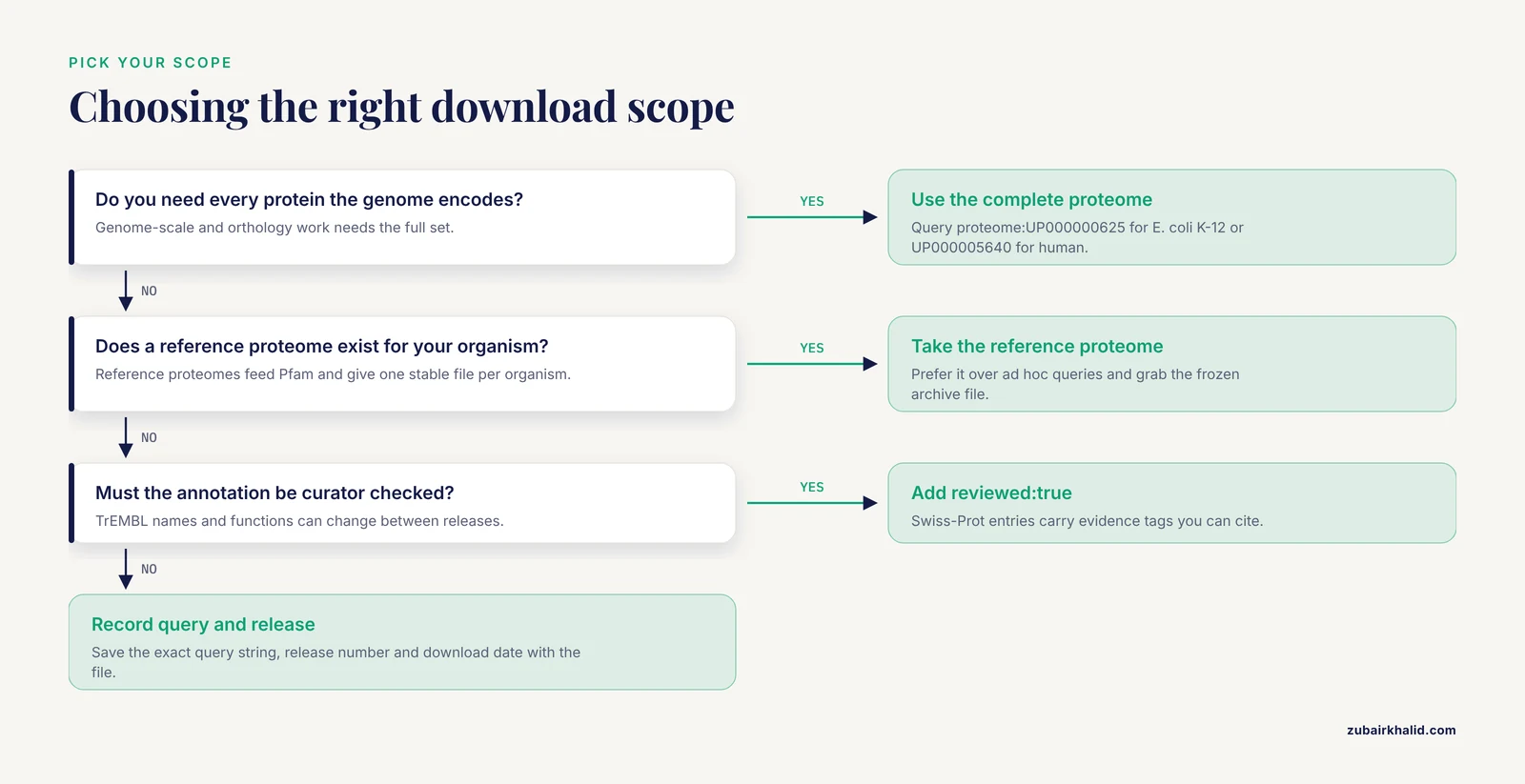
Three scopes cover nearly every need.
Reviewed entries only, using reviewed:true, gives a high-confidence set with rich annotation. This is the right choice for training, teaching, motif analysis, and most small-scale comparative work.
Complete proteome, using proteome:UP000000625 for E. coli K-12 or proteome:UP000005640 for human, gives every protein UniProt assigns to that proteome, including unreviewed ones. Proteome-complete sets are what genome-scale analyses require.
Reference proteome, which is the curated subset UniProt designates for the organism. Reference proteomes feed resources like Pfam and give a stable, one-file-per-organism snapshot [4]. When a reference proteome exists for your organism, prefer it over ad hoc queries.
A practical note on review status. For well-annotated model organisms, TrEMBL adds little because most proteins are already reviewed. For non-model organisms, TrEMBL may hold most or all of the sequences, and the complete proteome becomes the only way to capture everything. A pipeline such as ExUTR, which predicts 3 prime untranslated regions from transcriptome assemblies in organisms lacking reference genomes, integrates UniProt alongside other resources precisely because UniProt's coverage pattern differs across organisms and the pipeline must handle both cases [5].
Step 4. Download from the website
After running your query, use the Download button above the results. A dialog offers two choices that matter.
Target: select "All entries" if you want everything the query matched. The default "This batch" caps at the page size, currently 500 rows, and is the single most frequent silent mistake in website-based retrieval. Downloading "This batch" from a 20,000-row result gives you 500 sequences and looks successful while doing so.
Format: choose FASTA for sequences, TSV for a spreadsheet-like table, or the flat file format for the full annotated entry. Choose uncompressed unless a downstream tool expects gzip.
For a human reviewed download, FASTA is the usual pick. Confirm the downloaded file size is plausible before moving on. A human reviewed FASTA is roughly 14 MB. A 14 KB file means you downloaded one page, not the set.
Step 5. Download through the REST API with curl
The REST API makes retrieval reproducible, which matters when you need to document or repeat the download months later. The search endpoint handles small requests. The stream endpoint handles sets of any size in one response.
Single small request, tabular output.
curl "https://rest.uniprot.org/uniprotkb/search?query=organism_id:83333+AND+reviewed:true&format=tsv&fields=accession,id,protein_name,gene_names,organism_name,length&size=5"Expected output is a header row followed by rows.
Entry	Entry Name	Protein names	Gene Names	Organism	Length
P0A6F5	CH60_ECOLI	Chaperonin GroEL	groL	b Escherichia coli K-12	548
...
Full proteome download with the stream endpoint.
curl "https://rest.uniprot.org/uniprotkb/stream?query=organism_id:9606+AND+reviewed:true&format=fasta&compressed=true" -o human_reviewed.fasta.gzThe stream endpoint returns everything matching the query in a single response, so there is no page cap to trip over. The compressed parameter returns gzip directly, which saves bandwidth on large sets. Omit compressed and change the output name to .fasta if your downstream script cannot read gzip.
Expected FASTA output begins like this.
>sp|P04637|P53_HUMAN Cellular tumor antigen p53 OS=Homo sapiens OX=9606 GN=TP53 PE=1 SV=1
MEEPQSDPSVEPPLSQETFSDLWKLLPENNVLSPLPSQAMDDLMLSPDDIEQWFTEDPGP
...
Read the header carefully, because each token answers a verification question. The sp prefix marks a Swiss-Prot entry. P04637 is the accession. P53_HUMAN is the entry name. OS is the organism, OX is the taxon ID, which lets you confirm 9606 landed in the file, GN is the gene, PE is the evidence level where 1 means experimentally confirmed, and SV is the sequence version.
To fetch one known accession directly.
curl "https://rest.uniprot.org/uniprotkb/P04637.fasta"Step 6. Script the retrieval in Python
For integration into pipelines, a short script beats repeated manual calls.
import requests

base_url = "https://rest.uniprot.org/uniprotkb/stream"
params = {
    "query": "organism_id:542 AND reviewed:true",
    "format": "fasta",
}
response = requests.get(base_url, params=params, timeout=120)
response.raise_for_status()
with open("zmobilis_reviewed.fasta", "w") as handle:
    handle.write(response.text)
print(response.text.count(">"), "sequences written")
This example retrieves reviewed Zymomonas mobilis entries, the starting material used in published alcohol dehydrogenase comparisons for bioethanol research [1]. The count printed at the end doubles as your first verification check.
For very large unreviewed sets, use the search endpoint with cursor-based pagination instead of the stream endpoint. Each search response includes a Link header whose next relation carries the URL for the following page. Follow that URL until no next link appears, accumulating FASTA text as you go. The stream endpoint usually makes this unnecessary for whole-proteome retrievals.
Step 7. Bulk download a reference proteome
When you want a whole proteome as a stable file, the reference proteomes archive is faster than any query.
curl -O "https://ftp.uniprot.org/pub/databases/uniprot/current_release/knowledgebase/reference_proteomes/UP000005640_9606.fasta.gz"Files in that directory follow the naming pattern of proteome identifier, underscore, taxon identifier, then format. Browse the directory listing to find the exact filename for your organism, because the suffix varies with content type. These files update with each UniProt release, which is exactly why they suit reproducible pipelines: the file for a given release date is frozen forever.
Step 8. Query by SPARQL when the logic gets complex
SPARQL is the query language for structured databases. UniProt exposes a SPARQL endpoint at sparql.uniprot.org, useful when your selection depends on annotations rather than organism alone.
PREFIX up: <http://purl.uniprot.org/core/>
PREFIX taxon: <http://purl.uniprot.org/taxonomy/>

SELECT ?accession ?name
WHERE {
  ?protein a up:Protein .
  ?protein up:organism taxon:542 .
  ?protein up:reviewed true .
  ?protein up:recommendedName ?rec .
  ?rec up:fullName ?name .
  ?protein up:accession ?accession .
}
This lists accession numbers and recommended names for reviewed Z. mobilis proteins. Treat SPARQL as the specialist tool. For organism-level retrieval the REST endpoints above are simpler and faster.
A Compact Reference Table
| Task | Endpoint or interface | Key parameters |
|---|---|---|
| Look up taxon ID | rest.uniprot.org/taxonomy/search | query, format, fields |
| Small query, many formats | rest.uniprot.org/uniprotkb/search | query, format, fields, size, cursor |
| Full download in one response | rest.uniprot.org/uniprotkb/stream | query, format, compressed |
| One accession | rest.uniprot.org/uniprotkb/ACCESSION.fasta | none, path carries the ID |
| Reference proteome file | ftp.uniprot.org reference_proteomes directory | filename contains UP ID and taxon ID |
| Identifier conversion | rest.uniprot.org/idmapping/run | from, to, ids |
| Annotation-driven queries | sparql.uniprot.org | SPARQL query body |
| Interactive search | uniprot.org/uniprotkb | query box, Download button |
The identifier conversion service accepts a job with the source database, target database, and a list of accessions.
curl -H "Content-Type: application/x-www-form-urlencoded" -d "from=UniProtKB_AC-ID&to=RefSeq&ids=P04637,P68871" "https://rest.uniprot.org/idmapping/run"The response includes a job ID you poll until results are ready. This service underlies most cross-database workflows, because UniProt accessions act as a hub that connects to RefSeq, Ensembl, PDB, and many other resources. Integration across heterogeneous databanks is a long-recognized necessity in bioinformatics, since no single source carries every association a research question demands.
Verifying Your Download
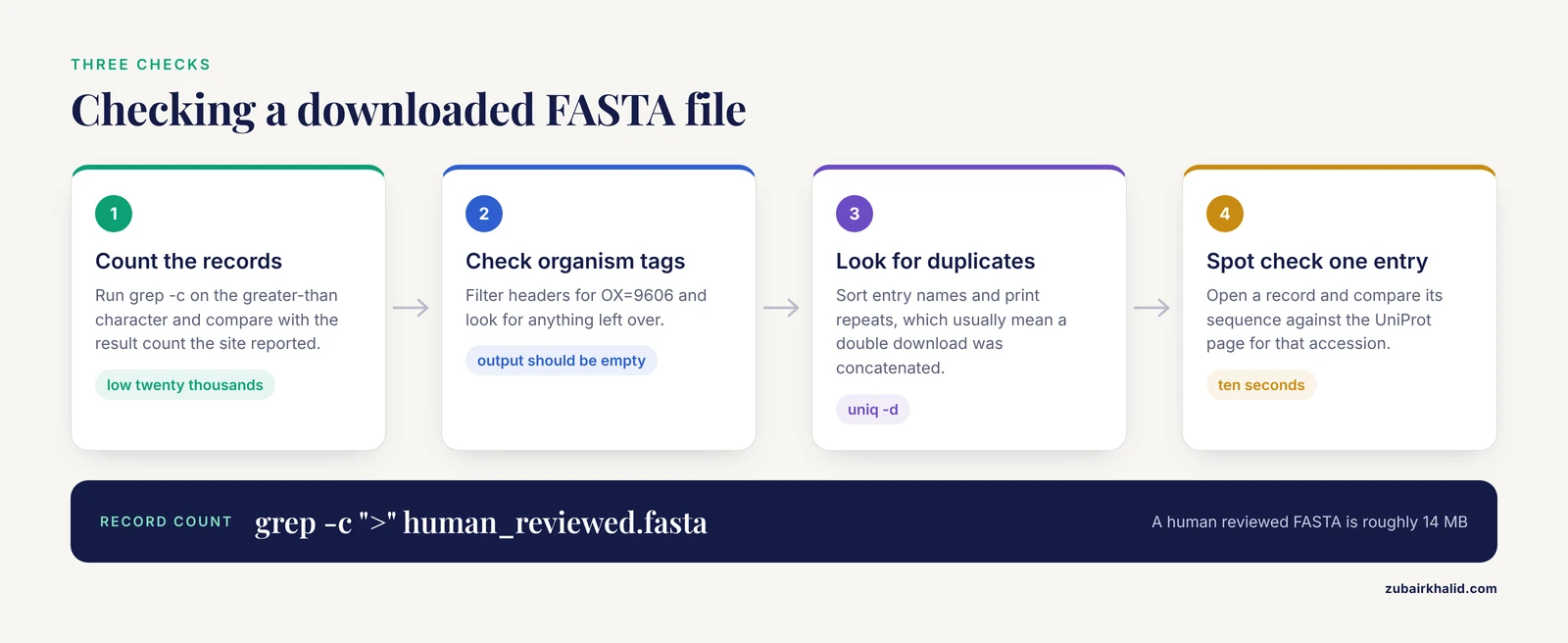
Never trust a retrieval until three checks pass.
Count the records. In a FASTA file every record starts with the greater-than character.
grep -c ">" human_reviewed.fastaFor a human reviewed download this should print a number in the low twenty thousands. Compare the count against the result count the website or API reported for the same query. A mismatch means the download was truncated or the query changed between steps.
Confirm the organism tags are uniform.
grep ">" human_reviewed.fasta | grep -v "OX=9606" | headIf this prints anything, some records belong to a different organism, which happens when a query used a broad taxon ID or a proteome filter was dropped. The output should be empty.
Check for duplicates and inspect lengths.
grep ">" human_reviewed.fasta | awk '{print $2}' | sort | uniq -d | headDuplicate entry names within one UniProtKB query usually indicate an accidental double download concatenated together. For a length overview, parse the sequences themselves rather than trusting headers.
import requests

fasta_text = open("zmobilis_reviewed.fasta").read()
lengths = []
sequence = []
for line in fasta_text.splitlines():
    if line.startswith(">"):
        if sequence:
            lengths.append(len("".join(sequence)))
            sequence = []
    else:
        sequence.append(line.strip())
if sequence:
    lengths.append(len("".join(sequence)))
print(min(lengths), max(lengths), sum(lengths) // len(lengths))
Real proteomes contain a few very short proteins and a longest protein in the low tens of thousands of residues. A minimum length of zero or a maximum in the millions signals a parsing problem or a corrupted file.
Finally, open one record and compare its sequence against the UniProt web page for that accession. Ten seconds of spot checking catches more errors than any automated filter.
Common Mistakes and Limitations
Mistake 1. Using the common name as the query. Searching "E. coli" in the plain search box matches text fields and can pull entries annotated with that phrase in unexpected places. Structured queries with organism_id are deterministic. Always resolve the taxon ID first.
Mistake 2. Confusing species with strain. Taxon ID 562 and 83333 both say Escherichia coli, but they select different protein sets. The same trap exists for every species with widely used strains. Match the taxon ID to the genome or experiment you actually have.
Mistake 3. Downloading only the visible page. The website download dialog defaults to the current batch of 500. Select "All entries" or use the stream endpoint. Verify record counts after every download, as described above.
Mistake 4. Ignoring redundancy. Complete proteomes contain every protein the source genome annotation produced, including near-identical proteins across strains when you query at species level. Redundancy slows similarity searches and biases sampling, which is the motivation for UniRef clusters that merge identical sequences and subfragments at 100 percent identity and cluster further at 90 and 50 percent [3]. If your analysis tolerates representatives rather than every sequence, retrieve or build a UniRef subset instead.
Mistake 5. Treating unreviewed annotation as fact. TrEMBL annotation is computational. Protein names, functions, and even existence calls in unreviewed entries can change between releases. Reviewed Swiss-Prot entries carry curator-checked annotation with evidence tags. Match the stringency of your claim to the stringency of the annotation.
Mistake 6. Expecting UniProt counts to match genome annotation counts. UniProt imports coding sequences from the nucleotide collaborators, and the set of proteins present in UniProtKB reflects what has been ingested and processed, which can differ from the gene count in a genome annotation file. Differences of a few percent between a proteome download and a GFF gene count are normal and not an error.
Mistake 7. Mixing canonical sequences with isoforms. Each UniProtKB entry displays a canonical sequence, the representative form, and may list additional isoforms produced by alternative splicing. FASTA downloads contain canonical sequences by default. If your analysis requires a specific isoform, request it explicitly through the isoform identifier rather than assuming it is in the file.
Mistake 8. Forgetting versioning. UniProt releases continuously, and entry sequences gain version numbers in the SV field. Record the release number, the download date, and the exact query string with every dataset you save. A retrieval that cannot be re-run is a liability, and the REST API exists precisely so the query itself becomes part of your methods section.
Limitation. UniProt is a protein resource. If your question needs nucleotide sequences, cross-references on each entry point to the source databases, and automated approaches exploit exactly these cross-references to move between protein records and the DNA sequences that encode them [6]. Orthology-aware analyses that compare many proteomes at once typically build on complete UniProt proteome sets as input.
Where These Sequences Go Next
Retrieval is the input layer, and knowing the downstream steps tells you which retrieval options to choose.
For homology modeling and structure work, complete proteomes feed template searches and model building. The R. salmoninarum study retrieved 412 candidate sequences from UniProt, built models for each with SwissModel, refined them, and carried 143 reliable models forward to docking analysis [2]. For that kind of workload, a single proteome-level download plus scripting beats hundreds of page visits.
For structural prediction at scale, the AlphaFold Database is keyed to UniProt accessions, and tools exist to bulk download predicted structures using taxonomy IDs, RefSeq accessions, or locus tags, with tested support for up to 5,000 inputs per request and an identifier mapping file that traces each input to its accession [8]. Your UniProt retrieval step therefore determines which AlphaFold structures you can pull in one pass.
For family and domain annotation, Pfam builds its families against reference proteomes [4], so starting from the reference proteome file aligns your dataset with the counts and coverage you see on Pfam pages.
For phylogenetic and orthology work, complete, nonredundant proteomes from each organism are the standard input, and methods that combine clustering with phylogenetic reasoning exist for large-scale classification across many species [7].
For pipeline integration, UniProt slots into automated workflows alongside other resources, as ExUTR demonstrates by chaining UniProt with UTRdb and custom scripts into a single automated run [5]. The REST endpoints described in Step 5 and Step 6 are the interfaces pipelines actually call.
Practical Tips for Faster, Cleaner Downloads
Use the stream endpoint whenever a query returns more than a few hundred entries. One response, no pagination logic, no truncation risk.
Add compressed=true to any stream call over a few megabytes. The bandwidth saving is large and gzip decompression is universal.
Put reviewed:true into queries by default and remove it deliberately. A query that forgets the filter can return millions of TrEMBL rows, and the surprise usually appears as a disk full error rather than a warning.
Encode spaces in query strings as + when writing URLs by hand. organism_name:"Escherichia coli" becomes organism_name:%22Escherichia+coli%22 in a raw URL. The Python requests library handles this encoding for you when you pass parameters as a dictionary.
Keep a small manifest next to every downloaded file, recording the URL or query, the UniProt release, the download timestamp, the record count, and a checksum from sha256sum. This single habit converts a fragile download into a reproducible methods step.
When a query returns zero results, check three things in order: the taxon ID spelling, whether the organism has any reviewed entries at all, and whether your AND clauses are too restrictive. Removing one clause at a time isolates the culprit in seconds.
Frequently Asked Questions
What is the difference between UniProtKB, UniParc, and UniRef?
UniProtKB is the annotated knowledgebase with reviewed Swiss-Prot and unreviewed TrEMBL divisions. UniParc is a pure sequence archive with no annotation. UniRef clusters sequences by identity to reduce redundancy, with UniRef100 merging identical sequences and UniRef90 and UniRef50 clustering at 90 and 50 percent identity [3].
Should I download reviewed or unreviewed sequences?
Choose reviewed entries for annotation-dependent work and small comparative studies. Choose the complete proteome, which includes unreviewed entries, when you need every protein, for example in genome-scale or orthology analyses. Non-model organisms often have few or no reviewed entries.
How do I get sequences for one strain instead of a whole species?
Look up the strain-specific taxon ID in the taxonomy browser, such as 83333 for E. coli K-12 MG1655, and query organism_id with that number, or filter by the strain's proteome identifier with proteome:UP.
Why does my UniProt download contain a different number of proteins than the genome annotation?
UniProt's protein set reflects what has been imported and processed from collaborating nucleotide databases, which can differ modestly from a genome annotation's gene count. A small difference is normal. A large difference usually means your query used a broad taxon ID or dropped the proteome filter.
How do I download tens of thousands of sequences without timing out?
Use the stream endpoint, which returns all matches in one response, and add compressed=true. For interactive website downloads, select "All entries" in the dialog rather than the default current batch of 500.
Can UniProt give me the DNA sequence that encodes a protein?
UniProtKB entries are protein records, but each entry carries cross-references to nucleotide and genome resources, and these cross-references can be followed programmatically to obtain the encoding DNA sequences [6].
How do I know which UniProt release my file came from?
Record the release shown on the UniProt home page at download time, or use the reference proteomes archive files, which are frozen per release. The SV field in each FASTA header gives the per-entry sequence version.
Can I map UniProt accessions to NCBI or Ensembl identifiers?
Yes, through the UniProt ID mapping service at rest.uniprot.org/idmapping/run, which converts between UniProt accessions and target databases including RefSeq and Ensembl. Tools built for bulk structure retrieval use the same identifier mapping logic and report unmapped IDs separately [8].
Sources
- COMPUTATIONAL ANALYSIS AND PROTEIN STRUCTURE MODELING OF ZINC- AND IRON- DEPENDENT ALCOHOL DEHYDROGENASES FOR BIOETHANOL YIELD IN THERMOPHILES
- Construction of 3D Model of Protein Drug Targets for Renibacterium Salmoninarum - A Bacterial Pathogen Causing Bacterial Kidney Disease in Young Salmonid Fish
- UniRef: comprehensive and non-redundant UniProt reference clusters.
- The Pfam protein families database: towards a more sustainable future
- ExUTR: a novel pipeline for large-scale prediction of 3′-UTR sequences from NGS data
- Retrieving Protein Domain Encoding DNA Sequences Automatically Through Database Cross-referencing
- Graph-based methods for large-scale protein classification and orthology inference
- AlphaFold Database Structure Extractor: a web server and API to download AlphaFold structures using common protein accessions.