How to Retrieve Protein Sequences for a Gene Family from UniProt
By Dr. Zubair Khalid, DVM, MS, PhD ·

By the end of this guide you will be able to define a gene family precisely, build a UniProt query that returns exactly the members you want, download their sequences in FASTA format through both the web interface and the REST API, map your own gene identifiers to UniProt accessions, and verify that the sequence set you downloaded is clean enough for alignment, phylogenetics, or machine learning work.
Here is what you need on hand:
- A web browser for the UniProt website at uniprot.org
- A command line with
curlinstalled (macOS and Linux ship with it, Windows 10 and later include it) - Python 3.8 or later if you want the scripted workflow, with the
requestspackage installed (pip install requests) - Optionally, Biopython (
pip install biopython) for parsing and checking the FASTA output
Everything in this guide works against the public UniProt servers and requires no account.
What a Gene Family Means Inside UniProt
A gene family is a group of genes that descend from a common ancestor and usually encode proteins with related sequence, structure, and function. The solute carrier family 6 (SLC6), for example, groups membrane transporters that move small amino acids and amino acid-like molecules, and its members are linked to conditions such as schizophrenia, depression, and Parkinson's disease [1]. A bacterial example is the M4 family of zinc-containing metalloproteases, which includes virulence factors of pathogenic bacteria and enzymes with biotechnology applications [2].
UniProt does not store one single authoritative list of families. Instead, it layers several family annotations onto each protein entry, and you can query any of them:
- The curated protein family line, a short text label such as "Solute carrier family 6" assigned by UniProt curators to reviewed entries
- Keywords, controlled vocabulary terms such as "Transmembrane" or "Neurotransmitter transport"
- Cross-references to family databases, most importantly Pfam, where families are defined as profile hidden Markov model matches to conserved domains
Pfam is the model most family-level work converges on. Since its reorganization, Pfam builds its families primarily on UniProtKB reference proteomes, which brings stability to family membership counts and reduces manual curation effort, while matches against the full UniProtKB remain available for individual sequences [3]. The Pfam 29.0 release contained 16,295 entries and 559 clans [3].
The practical consequence matters for your design decisions. A UniProt family label or a Pfam accession will often define a slightly different set of proteins. Pfam membership is domain based, so a large multi-domain protein can belong to two Pfam families at once, and a protein can be a true family member while lacking the specific domain the model detects. Published workflows handle this in different ways. One deep learning study of protein family classification trained on all reviewed UniProt sequences with their assigned families and then verified the model against unreviewed records [4]. A machine learning study of SLC6 mutation pathogenicity retrieved missense mutation data from UniProt across multiple protein-coding transcripts and sliced the sequences into twelve transmembrane domains for analysis [1]. Decide before you query whether you want full proteins sharing an ancestry or proteins sharing one domain, because those are different questions with different queries.
Reviewed Versus Unreviewed Entries
UniProtKB, the core UniProt knowledge base, consists of two sections. This distinction is the single most consequential choice you will make when you retrieve protein family sequences.
- Swiss-Prot, now labeled "reviewed" entries are manually annotated by expert curators. Each entry has a validated sequence, a curated function, gene names, family assignment, and cross-references. There are a few hundred thousand reviewed entries.
- TrEMBL, now labeled "unreviewed" entries are computationally annotated and have not passed through manual curation. There are more than 200 million of them, largely generated from the translation of coding sequences in the nucleotide databases.
For most family-level analyses you want reviewed:true. Reviewed entries carry one canonical sequence per protein, reliable organism assignment, and curated family labels. Reviewers of family studies routinely prefer this subset. The CNN family classification study cited above used reviewed sequences for training [4]. That said, unreviewed entries are not useless. The same study validated its classifier against unreviewed records, which most comparable methods ignore [4], and if you study a poorly sampled taxon or a newly sequenced genome, the reviewed set will be too small and you will need TrEMBL entries with appropriate filtering.
A useful middle path is to restrict TrEMBL queries to a reference proteome, a curated, non-redundant set of proteins representing one organism. The human reference proteome has the identifier UP000005640. Queries of the form reviewed:false AND proteome:UP000005640 give you a genome-representative set rather than every fragment submitted for the species.
Choosing the Right Family Identifier
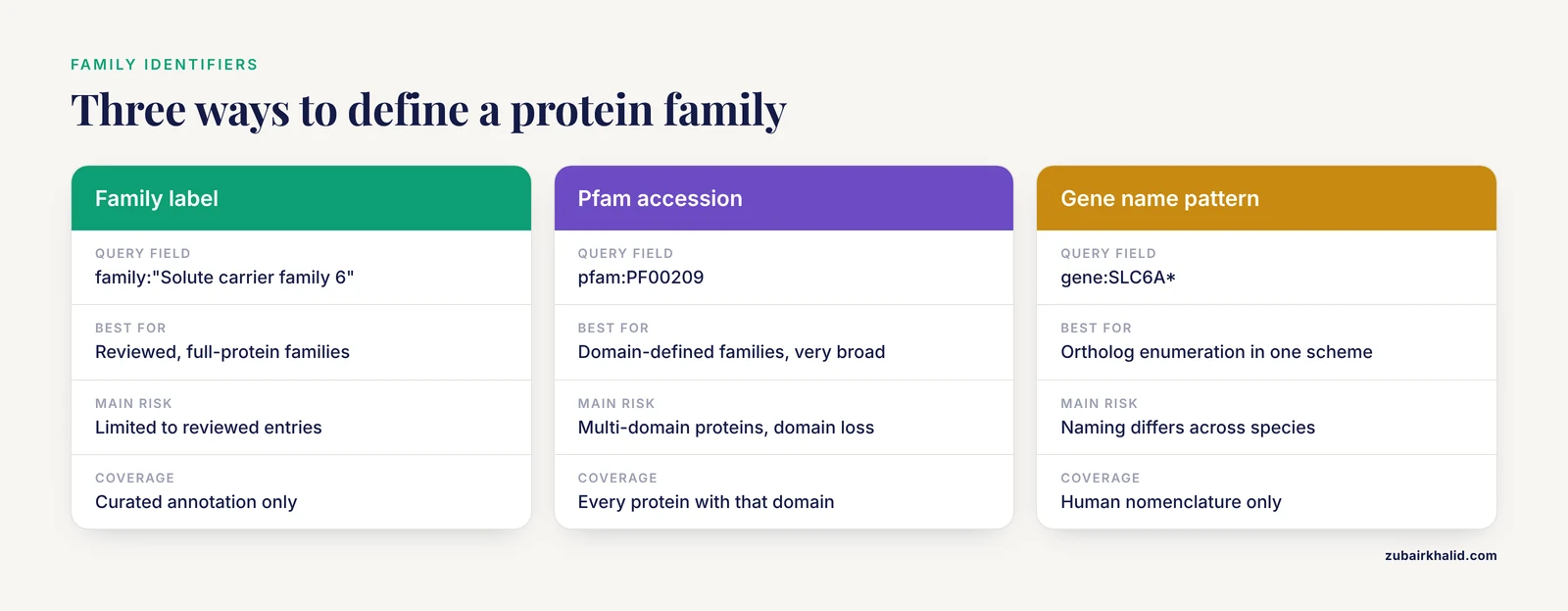
Before typing any query, decide which identifier defines your family. The main options, with the query field names you will actually use, are summarized here and again in the reference table later.
| Definition strategy | Query field | Best for | Main risk |
|---|---|---|---|
| , - | , - | , - | , - |
| UniProt curated family label | family:"Solute carrier family 6" | Reviewed, full-protein families | Label coverage is limited to reviewed entries |
| Pfam accession | pfam:PF00209 | Domain-defined families, very broad | Multi-domain proteins, domain loss at family edges |
| Keyword | keyword:"Neurotransmitter transport" | Functional groupings | Coarser than a family, mixes related roles |
| Gene name pattern | gene:SLC6A* | Ortholog enumeration within a naming scheme | Gene naming conventions differ across species |
| Proteome restriction | proteome:UP000005640 | Keeping one representative per organism | Misses proteins absent from the reference set |
The wildcard in gene:SLC6A* matches SLC6A1 through SLC6A20 and related names. It works for human nomenclature but breaks down in species that name orthologs differently, which is why family and Pfam queries are usually the backbone of a cross-species retrieval, with gene name patterns used as an additive filter.
How to Use UniProt: Retrieving Protein Family Sequences Step by Step
This walkthrough retrieves the human SLC6 family, the transporter family studied for mutation pathogenicity modeling [1], and then generalizes to any family. Follow the steps in order the first time. Once you understand each piece, you will usually skip straight to the API calls.
Step 1. Define the family scope in one sentence
Write down, before searching, the answer to four questions. Which family definition are you using, Pfam accession or curated family label? Which organisms, all of them or a specific taxonomy? Reviewed only, or reviewed plus filtered unreviewed? Canonical sequences only, or isoforms as well? For the worked example: Pfam PF00209 and the UniProt family label "Solute carrier family 6", restricted to human, reviewed only, canonical sequences.
Step 2. Search in the UniProt web interface
Open the UniProt website and enter this query in the search box on the UniProtKB page:
(family:"Solute carrier family 6" OR pfam:PF00209) AND reviewed:true AND organism_id:9606Each piece does one job. family:"Solute carrier family 6" matches the curated family label, and the quotation marks are required because the label contains spaces. pfam:PF00209 adds proteins matched by the sodium neurotransmitter symporter domain model, which catches family members whose family line is phrased differently. organism_id:9606 restricts results to Homo sapiens, whose NCBI taxonomy identifier is 9606. reviewed:true keeps Swiss-Prot entries only. Parentheses control the logic so that the OR is evaluated before the two AND filters.
If the query bar returns nothing, check two things. First, confirm the quotation marks survived pasting. Second, confirm you are searching UniProtKB rather than the whole UniProt site, because the site-wide search interprets field syntax differently.
Step 3. Download the results from the web interface
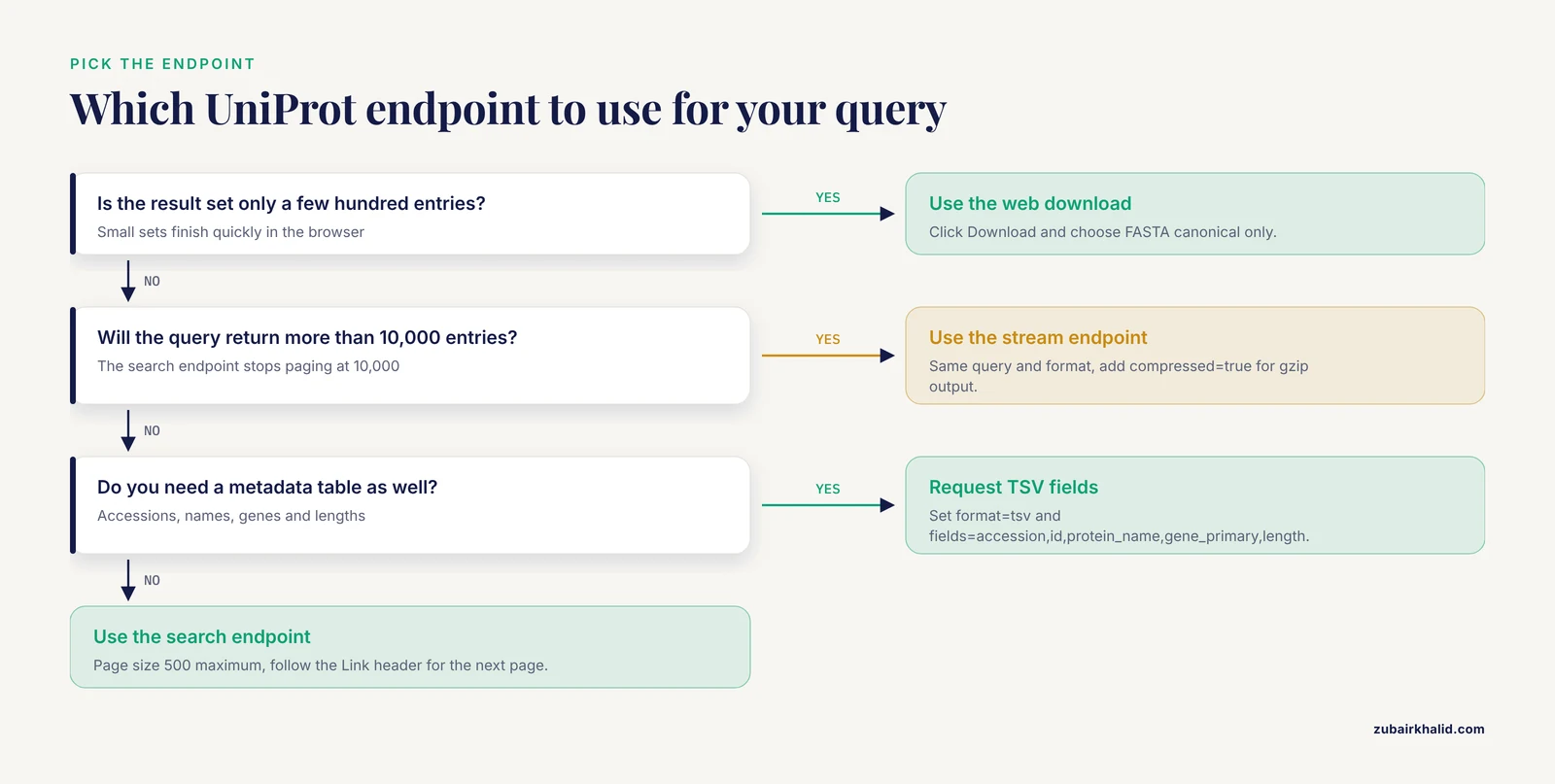
Above the result table, click Download. In the dialog, choose FASTA (canonical only) unless you specifically need isoforms, choose uncompressed or compressed output, and download. For a few hundred entries this is the fastest path and the file is ready for immediate use.
For results in the tens of thousands of entries or larger, the web download can be slow or time out. The API route in the next steps handles any size, so make it your default whenever a query is not tiny.
Step 4. Query the REST API with curl
The UniProt REST API lives at rest.uniprot.org. The search endpoint returns results in the format you name with format=, and FASTA is one of the options:
curl -s "https://rest.uniprot.org/uniprotkb/search?query=family:%22Solute%20carrier%20family%206%22%20AND%20reviewed:true%20AND%20organism_id:9606&format=fasta" -o slc6_human.fastaThe query is URL-encoded, so the quotes around the family label become %22 and the space becomes %20. The -s flag suppresses the progress meter and -o writes the body to a file. After it finishes, look at the first two lines:
head -n 2 slc6_human.fastaExpected output, with your exact entries varying as releases update:
>sp|P30531|SC6A3_HUMAN Sodium-dependent dopamine transporter OS=Homo sapiens OX=9606 GN=SLC6A3 PE=1 SV=2
MDNCNGPPFPEL...
That header encodes everything you need for downstream bookkeeping. The sp prefix means reviewed. P30531 is the accession. SC6A3_HUMAN is the entry name. OS= gives the organism, OX=9606 the taxonomy identifier, GN=SLC6A3 the primary gene name, PE=1 the evidence level where 1 means experimentally confirmed at the protein level, and SV=2 the sequence version.
Step 5. Get metadata as a table alongside the sequences
FASTA files carry only headers and sequence text. For a family analysis you almost always want a companion table with accessions, names, gene symbols, and lengths. Request tab-separated output with the fields parameter:
curl -s "https://rest.uniprot.org/uniprotkb/search?query=family:%22Solute%20carrier%20family%206%22%20AND%20reviewed:true%20AND%20organism_id:9606&format=tsv&fields=accession,id,protein_name,gene_primary,length&size=500" -o slc6_human.tsvExpected output shape:
Entry	Entry Name	Protein names	Gene Names (primary)	Length
P30531	SC6A3_HUMAN	Sodium-dependent dopamine transporter	SLC6A3	620
P23975	SC6A2_HUMAN	Sodium-dependent noradrenaline transporter	SLC6A2	617
The size=500 parameter sets the page size, and 500 is the maximum for the search endpoint. If your result set is larger, the response includes a Link header pointing to the next page, which the Python loop in Step 7 follows automatically.
Step 6. Use the stream endpoint for large families
The search endpoint stops paging after 10,000 entries. Family-wide queries across all organisms in TrEMBL routinely exceed that, so UniProt provides the stream endpoint, which returns the complete result set in a single streamed response:
curl -s "https://rest.uniprot.org/uniprotkb/stream?query=pfam:PF00209%20AND%20reviewed:true&format=fasta&compressed=true" -o snf_family.fasta.gzcompressed=true returns gzip-compressed output, which is what you want for anything large. The same query, format, and field parameters work on both endpoints, so moving a query from search to stream is just changing the path.
Step 7. Automate with Python
For reproducible pipelines, script the retrieval. This follows pagination correctly and is polite to the server:
import time
import requests

BASE = "https://rest.uniprot.org/uniprotkb/search"
query = 'family:"Solute carrier family 6" AND reviewed:true AND organism_id:9606'
url = (
    f"{BASE}?query={requests.utils.quote(query)}"
    "&format=tsv&fields=accession,id,protein_name,gene_primary,length&size=500"
)

rows = []
while url:
    r = requests.get(url, timeout=60)
    r.raise_for_status()
    lines = r.text.strip().split("\n")
    rows.extend(lines[1:])
    url = r.links.get("next", {}).get("url")
    time.sleep(1)

with open("slc6_human.tsv", "w") as handle:
    handle.write("accession\tentry_name\tprotein_name\tgene\tlength\n")
    for row in rows:
        handle.write(row + "\n")

print(f"{len(rows)} entries written")
Expected output for the current release is a small integer in the low tens, one line per reviewed human SLC6 transporter, written to slc6_human.tsv. The r.links object parses the HTTP Link header, and its next URL already contains the cursor for the following page, so you never paginate manually.
To download the sequences themselves in the same script, request format=fasta instead of format=tsv and concatenate the bodies. To grab both in one pass, note that you can also request a custom FASTA where each header line carries your chosen fields, using the fields parameter together with format=fasta on the stream endpoint.
Step 8. Map your own gene identifiers when the family is defined outside UniProt
Many projects start from Ensembl gene IDs or RefSeq transcripts rather than a family name. UniProt ID mapping converts between them. The web tool at uniprot.org/id-mapping takes a pasted list, and the API version works like this:
JOB=$(curl -s -X POST https://rest.uniprot.org/idmapping/run \
  -F 'from=Ensembl' -F 'to=UniProtKB' -F 'ids=ENSG00000142599,ENSG00000099949' \
  | python3 -c "import sys,json,print" 2>/dev/null || true)
The shell gymnastics above are easy to get wrong, so the reliable pattern is two explicit calls. First, submit the job and capture the job identifier from the JSON response:
curl -s -X POST https://rest.uniprot.org/idmapping/run \
  -F 'from=Ensembl' \
  -F 'to=UniProtKB' \
  -F 'ids=ENSG00000142599' > job.json
The response contains a "jobId" field. Then poll the results stream, replacing the identifier with your own job identifier:
curl -s "https://rest.uniprot.org/idmapping/uniprotkb/results/stream/JOBIDHERE?format=tsv&fields=accession,id,protein_name,gene_primary" -o mapped.tsvOne Ensembl gene can map to more than one UniProt entry when isoforms or related proteins exist, so inspect the mapped table rather than assuming a one-to-one correspondence. This is exactly the situation the SLC6 mutation study navigated when it gathered mutation data covering multiple protein-coding transcripts across UniProt, LitVar, and ClinVar [1].
A Second Worked Example: Bacterial Metalloprotease Family M4
Family retrieval does not always start from a Pfam accession. One published characterization of the M4 metalloprotease family retrieved 31 protein sequences from UniProt representing different bacterial species, then analyzed physicochemical properties, built a phylogenetic tree, and modeled tertiary structure [2]. If you were assembling a comparable set, a defensible query looks like this:
curl -s "https://rest.uniprot.org/uniprotkb/stream?query=%22M4%20metalloprotease%22%20AND%20reviewed:true%20AND%20bacteria&format=tsv&fields=accession,id,protein_name,organism_name,length" -o m4_bacteria.tsvTwo things to notice. The text phrase in quotes searches free text across the entry, which is broader and less precise than a family field, so expect to inspect the table and drop false positives by hand. The bacteria filter restricts the superkingdom, which matters because the M4 family is known almost exclusively from bacteria [2] and unreviewed eukaryotic entries matching the phrase are usually noise. A curated small set like this is also a common pattern in the literature. Structural and interaction modeling work has begun from a single UniProt accession, such as the hepatitis B virus protein-x sequence extracted from UniProt under Q80IU5 before similarity searching and threading [5], and curated resources such as NeuroPep, which holds 5,949 non-redundant neuropeptide entries across 493 organisms in 65 families, were built by extracting entries from UniProt and other databases followed by manual checking [6].
Checking That Your Sequence Set Is Correct
Never trust a download blindly. Run this four-part check before you align anything.
Count against an expectation. You should know roughly how many members the family has. The human SLC6 family should land in the low twenties. If you get 3 or 300, the query logic is wrong, not the database.
Parse and summarize lengths. Outlier lengths usually indicate fragments, artifacts, or misannotation:
from Bio import SeqIO

records = list(SeqIO.parse("slc6_human.fasta", "fasta"))
lengths = [len(r.seq) for r in records]
print(f"{len(records)} sequences")
print(f"shortest {min(lengths)} aa, longest {max(lengths)} aa, mean {sum(lengths)/len(lengths):.0f} aa")
A healthy family of full-length transporters shows a tight length band. For the M4 metalloproteases analyzed in one study, molecular mass ranged from 38 to 66 kDa [2], which corresponds to sequences in the rough hundreds of residues, and a retrieved set whose lengths fall far outside the expected band for your family signals a problem.
Inspect headers for the right organisms. Grep the FASTA for OS= values and confirm every organism is intentional. A missing organism filter is the most common silent contamination.
Spot-check with similarity search. Take two or three sequences at random and BLAST them against UniProtKB to confirm they retrieve other family members and not unrelated proteins. Precomputed similarity resources make this cheap in principle. PairsDB, for example, was built to store BLAST and PSI-BLAST alignments for all sequences in UniProt so that similarity relationships can be explored and filtered instantly, and its all-against-all graph is a starting point for clustering protein families and defining orthologs [7]. Whether you use a precomputed service or run BLAST yourself, the logic is the same. Family members should hit each other convincingly, and non-members should not.
Common Mistakes and Limitations
These are the errors that cost people the most time, with the exact failure you will see and the fix.
Mixing reviewed and unreviewed entries unknowingly. Without reviewed:true, a human gene query can return hundreds of near-identical TrEMBL entries from other species and redundant submissions. The result set balloons and downstream redundancy removal becomes painful. State the reviewed status explicitly in every query.
Omitting quotation marks around multi-word family labels. family:Solute carrier family 6 without quotes returns an HTTP 400 with a message stating the query is invalid, because the parser chokes on the unquoted spaces. Always write family:"Solute carrier family 6" and URL-encode the quotes as %22 when using curl.
Using the search endpoint for huge result sets. When a query exceeds 10,000 entries, the search endpoint will not return them all no matter how you page. Switch to the stream endpoint. If you see a truncated set with no error message, this is why.
Forgetting that Pfam membership is domain based. A query on a Pfam accession returns every protein containing that domain, including proteins that belong to other families by full-sequence ancestry, and misses degenerate members the profile does not detect. Pfam organizes related entries into clans for exactly this reason, and the tooling for viewing relationships between families within a clan was improved for that purpose [3]. Decide which definition you mean and document it in your methods section.
Assuming one sequence per gene. By default, FASTA downloads give the canonical sequence of each entry, not every isoform. If your biology depends on splice isoforms, request isoform sequences explicitly in the download options or the API, and expect roughly one accession to yield several sequences.
Downloading fragments without filtering. Unreviewed entries frequently contain partial sequences. Add NOT fragment:true to the query, or post-filter by length, before aligning. A fragment in a multiple sequence alignment produces misleading gaps and can distort a phylogeny.
Confusing accession version with sequence version. In the header SV=2 is the sequence version. The accession stays stable while the sequence itself can change across releases. When reproducing an analysis months later, record both the accession and the sequence version, or download and archive the FASTA files with your project.
Treating UniProt family labels as complete. Family labels are curated annotations on reviewed entries, and coverage is not exhaustive across all taxa or all family naming schemes. Machine learning studies that need family labels across every reviewed protein still rely on the curated family assignments in UniProt as ground truth [4], which is reasonable, but completeness for your specific family should be checked against Pfam and against recent literature rather than assumed.
hammering the API. UniProt is a shared public service. Keep scripted access to roughly one request per second and use the stream endpoint with compressed output for bulk needs. If you receive HTTP 429 responses, back off.
Ignoring data provenance. Sequence sets that cannot be regenerated are a reproducibility failure. Record the full query string, the endpoint, the date, and the release, and store the raw download in version control alongside the analysis.
Key Query Parameters Reference
| Parameter or field | Example value | What it does |
|---|---|---|
| , - | , - | , - |
query | family:"Solute carrier family 6" AND reviewed:true | Boolean query, fields joined with AND, OR, NOT |
format | fasta, tsv, json, list | Output format of the response body |
fields | accession,id,protein_name,gene_primary,length | Columns returned for tabular formats |
size | 500 | Page size for the search endpoint, maximum 500 |
compressed | true | Gzip-compressed response, intended for the stream endpoint |
organism_id | 9606 | Restricts to an NCBI taxonomy identifier |
proteome | UP000005640 | Restricts to a reference proteome |
pfam | PF00209 | Matches proteins with that Pfam domain |
family | "Solute carrier family 6" | Matches the curated UniProt family label |
reviewed | true or false | Swiss-Prot versus TrEMBL |
fragment | NOT fragment:true | Excludes partial sequences |
length | length:[300 TO 800] | Restricts sequence length in residues |
Next Steps After Retrieval
A clean family sequence set is the input to a standard pipeline. Multiple sequence alignment with MAFFT or Clustal Omega reveals conserved positions. Building a profile hidden Markov model with HMMER lets you search for new family members on your own terms. Phylogenetic reconstruction groups members into subfamilies. The M4 metalloprotease study followed roughly this arc, moving from retrieved UniProt sequences through physicochemical characterization to a phylogenetic tree and a validated tertiary structure model [2]. The SLC6 study sliced aligned transporter sequences into twelve transmembrane domains to ask which regions drive pathogenicity prediction of point mutations [1]. Whatever your downstream goal, the quality ceiling of the analysis is set at the retrieval step, which is why the query discipline and verification checks above are worth the effort.
Frequently Asked Questions
What is the difference between reviewed and unreviewed UniProt entries?
Reviewed entries, formerly Swiss-Prot, are manually curated by expert biologists and carry validated sequences and family annotations. Unreviewed entries, formerly TrEMBL, are computationally annotated and far more numerous, so most family analyses start from the reviewed subset and add filtered unreviewed entries only when needed.
How do I retrieve protein family sequences from UniProt in FASTA format?
Build a query with the family field or a Pfam accession plus your organism and reviewed filters, then either use the Download button on the results page or call https://rest.uniprot.org/uniprotkb/search?query=YOURQUERY&format=fasta. For more than 10,000 entries, use the stream endpoint at the same domain with format=fasta.
Why does my UniProt search return fewer proteins than the Pfam family page shows?
Pfam pages count matches across all of UniProtKB including unreviewed entries, while a reviewed-only query restricts you to curated entries, and Pfam itself builds families primarily on UniProtKB reference proteomes [3]. Loosen the reviewed filter or drop the organism restriction and the counts will converge, though they rarely match exactly because the definitions differ.
How do I download isoform sequences instead of only canonical sequences?
Canonical sequences are the default FASTA output. In the web download dialog, select the option that includes isoforms, or use the API to retrieve isoform sequences for specific entries. Expect multiple sequences per accession and plan your redundancy handling accordingly.
Can I retrieve sequences for one family restricted to a single organism?
Yes. Add organism_id: with the NCBI taxonomy identifier, for example organism_id:9606 for human, or restrict to a species reference proteome with proteome:UP000005640. Both combine freely with family, Pfam, and reviewed filters in the same query string.
How do I convert Ensembl or RefSeq gene identifiers to UniProt accessions?
Use UniProt ID mapping, available as a web tool at uniprot.org/id-mapping and as a REST API at rest.uniprot.org/idmapping/run. Submit your identifiers with the source and target databases, poll for the job result, and review the mapping table carefully because one gene identifier can map to several UniProt entries.
What should I do about fragments and partial sequences in my family set?
Filter them at query time with NOT fragment:true and confirm the filter worked by checking the length distribution of the downloaded set. If you must keep them, for example when a species has only partial sequences available, flag them in your alignment and consider excluding them from phylogenetic inference.
How should I cite the UniProt sequences I download?
Cite the UniProt Consortium database publication for the resource itself, the specific entry accessions in your methods section, and any family database such as Pfam that defined your set [3]. Record the release version, query string, and download date so others can reproduce your exact sequence set.
Sources
- ProteoMutaMetrics: machine learning approaches for solute carrier family 6 mutation pathogenicity prediction.
- In silico characterization and structural modeling of bacterial metalloprotease of family M4.
- The Pfam protein families database: towards a more sustainable future.
- Protein Family Classification from Scratch: A CNN Based Deep Learning Approach.
- Protein-x of hepatitis B virus in interaction with CCAAT/enhancer-binding protein α (C/EBPα)--an in silico analysis approach.
- NeuroPep: a comprehensive resource of neuropeptides.
- PairsDB atlas of protein sequence space.