How to Get a FASTA Sequence from a UniProt ID Using the REST API
By Dr. Zubair Khalid, DVM, MS, PhD ·

By the end of this article you will be able to take any UniProt accession number, such as P04637, and download its protein sequence in FASTA format directly from the UniProt REST API, either one entry at a time or hundreds at once, using nothing more than a terminal, a browser, or a short Python script. You will also be able to recognize the most common failure modes, from a mistyped accession to a malformed batch query, and fix each one quickly.
To follow the walkthrough you need a computer with an internet connection and one of the following:
- A terminal with
curlinstalled.curlships with macOS, most Linux distributions, and Windows 10 and later. - Python 3 with the
requestslibrary installed, if you prefer scripts over shell commands. Install it withpip install requests. - Optionally, R with the
httrpackage, if R is your main working environment.
No API key, registration, or account is required. The UniProt REST API is open and free. UniProt, which is maintained by a consortium including EMBL-EBI and the SIB Swiss Institute of Bioinformatics, documents its programmatic access on the UniProt help pages, and this tutorial follows the endpoints described there.
A Quick Orientation to UniProt and FASTA
What UniProt is
UniProt is the central public database for protein sequence and functional information. The part most people work with is UniProtKB, the UniProt Knowledgebase, which contains two sections:
- Swiss-Prot, the reviewed section. Entries here are curated by professional annotators, and the entries carry the tag
reviewed:truein queries. These accessions are the ones you should prefer when a choice exists, because the annotation has been checked by a human. - TrEMBL, the unreviewed section. These entries are computationally annotated and have not been manually checked. They carry the tag
reviewed:false.
UniProt also runs two related resources you may encounter. UniParc stores a nonredundant archive of every unique protein sequence ever loaded into UniProt, identified by UniParc identifiers that begin with UPI. UniRef clusters sequences at 50, 90, and 100 percent identity to speed up similarity searches. This article focuses on UniProtKB, which is what nearly everyone means when they say they need to get a FASTA sequence from UniProt.
What a UniProt ID actually is
The phrase "UniProt ID" is used loosely for two different things, and the distinction matters when you build API calls.
- The accession is a stable identifier such as
P04637. Accessions never change, even when the entry is updated. UniProt recommends using accessions in any automated work. - The entry name is a mnemonic identifier such as
P53_HUMAN, which combines a protein mnemonic with a species mnemonic. Entry names can change when nomenclature is revised, so treat them as labels rather than keys.
When this article says "UniProt ID," you can supply either form to the endpoints shown below, and the API will resolve both. Prefer the accession in scripts and pipelines.
What FASTA format is
FASTA is the de facto standard text format for biological sequences. A FASTA file contains one or more records. Each record starts with a header line beginning with the greater-than character, followed by the raw sequence on subsequent lines, typically wrapped at 60 or 80 characters. A minimal example looks like this:
>sp|P04637|P53_HUMAN Cellular tumor antigen p53 OS=Homo sapiens OX=9606 GN=TP53 PE=1 SV=1
MEEPQSDPSIEPQSQETFSDLWKLLPENNVLSPLPSQAMDDLMLSPDDIEQWFTEDPGPDE
...
Every part of that header carries information, and knowing how to read it doubles as a quality check:
| Header component | Example | Meaning |
|---|---|---|
| Database tag | sp | Swiss-Prot, the reviewed section. Unreviewed entries carry tr instead. |
| Accession | P04637 | The stable accession you requested. |
| Entry name | P53_HUMAN | The mnemonic entry name. |
| Description | Cellular tumor antigen p53 | The recommended protein name. |
OS= | Homo sapiens | Organism name, the organism source. |
OX= | 9606 | NCBI taxonomy identifier for the organism. Human is 9606. |
GN= | TP53 | Gene name. |
PE= | 1 | Protein existence level. 1 means experimental evidence at the protein level. |
SV= | 1 | Sequence version. This integer increments whenever the sequence itself changes. |
The SV number deserves special attention. Two FASTA records with the same accession but different sequence versions contain different sequences. If a collaborator reports a discrepancy between two downloads of the same accession, compare the SV values first.
The REST API in one paragraph
REST stands for Representational State Transfer, a style of web service where you retrieve resources by requesting ordinary URLs with standard HTTP methods. A GET request, which is what a browser performs when you open a link, returns the resource at that URL. The UniProt REST API follows this model. The base URL for the knowledgebase is https://rest.uniprot.org, and appending the accession plus the format you want to the path /uniprotkb/ returns that entry in the chosen format. Because everything is an ordinary HTTPS GET, the API works with curl, any browser, Python, R, wget, or any HTTP client in any language.
Step by Step: Getting One FASTA Sequence from UniProt
This walkthrough uses p53, the human cellular tumor antigen, as the running example. Its accession is P04637 and its entry name is P53_HUMAN. Every command shown works the same way for any accession in UniProtKB.
Step 1. Find the UniProt accession
If you already know the accession, skip to Step 2. If you only know a gene name or protein name, use the UniProt website at https://www.uniprot.org.
- Type the gene name, for example
TP53, into the search box on the homepage. - In the results, check the Reviewed filter so Swiss-Prot entries appear at the top, and check the organism column to pick the right species.
- Click the entry you want. The accession appears at the top of the entry page and in the URL, for example
https://www.uniprot.org/uniprotkb/P04637/entry.
A practical tip for later automation: the website search box runs the same query language the REST API uses, so anything you can search on the website you can also search through the API. Learning to build queries on the website and then transferring them into API calls is the fastest way to learn how to use UniProt for scripted work.
Step 2. Fetch the FASTA with curl
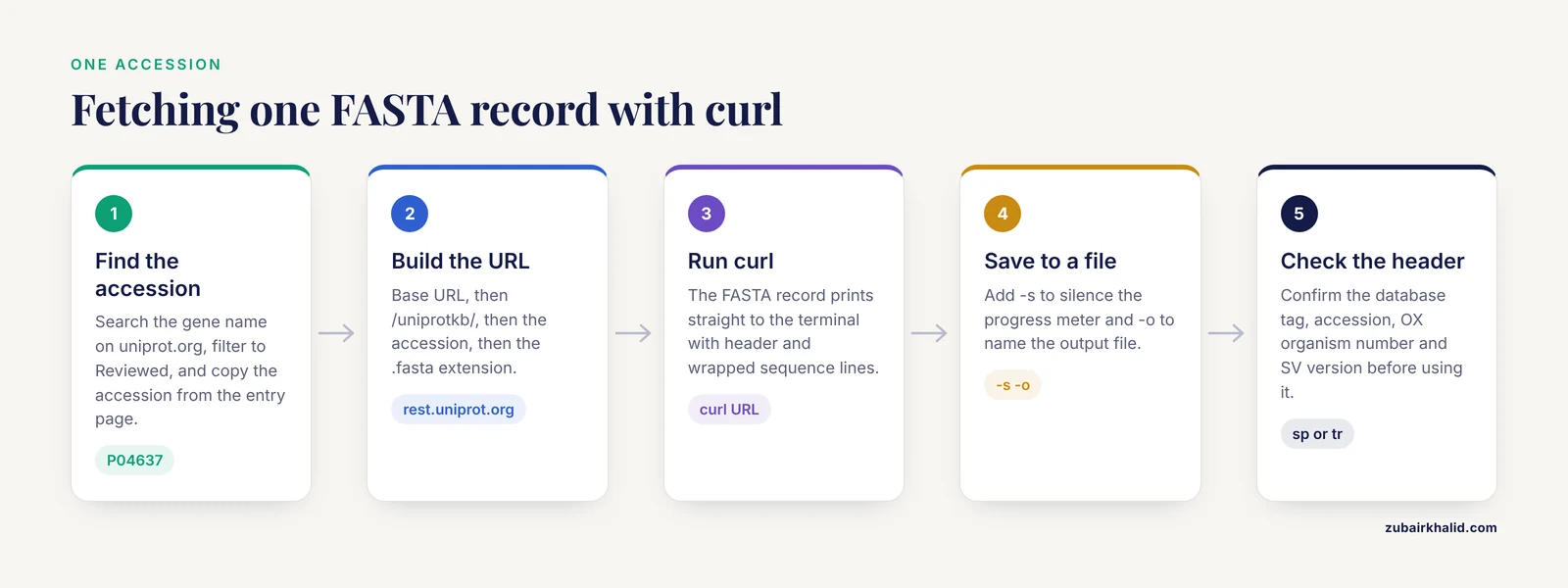
Open a terminal and run:
curl https://rest.uniprot.org/uniprotkb/P04637.fastaThe response is the FASTA record itself, printed to your terminal:
>sp|P04637|P53_HUMAN Cellular tumor antigen p53 OS=Homo sapiens OX=9606 GN=TP53 PE=1 SV=1
MEEPQSDPSIEPQSQETFSDLWKLLPENNVLSPLPSQAMDDLMLSPDDIEQWFTEDPGPDE
APRMPEAAPPVAPAPAAPTRTAPAPPPSWATSSAGRPVGPQEEP...
That single command is the core answer to how to get a FASTA sequence from a UniProt ID. Everything else in this article elaborates on it, scales it up, and keeps it from going wrong.
The URL breaks down as follows:
https://rest.uniprot.orgis the API base URL./uniprotkb/selects the UniProt Knowledgebase.P04637is the identifier, either accession or entry name..fastaselects the output format as a file extension.
Alternative ways to request the same thing, all documented by UniProt:
# Query parameter instead of extension
curl "https://rest.uniprot.org/uniprotkb/P04637?format=fasta"

# Content negotiation with an Accept header on the plain accession URL
curl -H "Accept: text/x-fasta" https://rest.uniprot.org/uniprotkb/P04637
Content negotiation means asking the server to choose the format from the HTTP Accept header rather than from the URL. It is useful in libraries that make it easy to set headers, and less useful in quick terminal commands. The .fasta extension is the most readable choice for shell work.
One caution about older URLs. The legacy address https://www.uniprot.org/uniprot/P04637.fasta still functions because it redirects to the new REST service. Redirects add a round trip and can break inside strict environments, so write scripts against rest.uniprot.org directly.
Step 3. Read the output carefully
Before you build anything on top of a downloaded sequence, confirm three things from the header line:
- The database tag is
sportr, matching what you intended. If you expected a reviewed entry and seetr, your accession points into TrEMBL. - The accession in the header matches the one you requested. If it does not, you followed a redirect or supplied an alias that resolved elsewhere.
- The
OXtaxonomy number matches your expected organism. This is the field that catches cross-species mix-ups, which are among the most damaging silent errors in downstream analysis, because a wrong-species sequence looks perfectly valid on its own.
Step 4. Save the sequence to a file
For real work you want the record in a file rather than on the screen:
curl -s -o P04637.fasta https://rest.uniprot.org/uniprotkb/P04637.fastaThe flags here are:
-sruns silently, suppressing the progress meter.-onames the output file instead of printing to standard output.
To append many records into one multi-FASTA file, use the append redirect:
curl -s https://rest.uniprot.org/uniprotkb/P04637.fasta >> my_proteins.fasta
curl -s https://rest.uniprot.org/uniprotkb/Q9Y6K9.fasta >> my_proteins.fasta
A well-formed multi-FASTA file simply concatenates records, each beginning with its own header line, so appending is a legitimate way to build one. Keep track of what you appended and when, because a flat file gives you no provenance.
Step 5. Fetch with Python
For scripts and pipelines, Python with the requests library gives you clean status handling:
import requests

accession = "P04637"
url = f"https://rest.uniprot.org/uniprotkb/{accession}.fasta"

response = requests.get(url, timeout=30)
response.raise_for_status()  # raises an exception for 4xx and 5xx responses

fasta_text = response.text
print(fasta_text.split("\n")[0])  # the header line

# Write the record to a file
with open(f"{accession}.fasta", "w") as handle:
    handle.write(fasta_text)
Run this and you should see the header printed and a file named P04637.fasta created in your working directory. Three details make this production-ready rather than a toy:
timeout=30prevents your script from hanging forever if the network stalls.requestsdoes not apply a timeout by default, which is a classic source of stuck jobs.raise_for_status()turns HTTP errors into Python exceptions so a bad accession fails loudly instead of writing an error page into your FASTA file.- Writing
response.textdirectly preserves the exact FASTA text, headers and all, so the file is immediately usable by BLAST, alignment tools, or any FASTA reader.
If you are building a parser on top of the raw text, the standard idiom is to split the header from the sequence and strip newlines from the sequence:
lines = fasta_text.splitlines()
header = lines[0]
sequence = "".join(lines[1:])
print(header)
print(len(sequence), "amino acids")
For p53 this prints 393 amino acids, which matches the length reported on the UniProt entry page.
Step 6. Fetch with R
R users can call the same endpoint with the httr package:
library(httr)

accession <- "P04637"
url <- sprintf("https://rest.uniprot.org/uniprotkb/%s.fasta", accession)

response <- GET(url, timeout(30))
stop_for_status(response)
fasta_text <- content(response, as = "text", encoding = "UTF-8")
writeLines(fasta_text, paste0(accession, ".fasta"))
The same logic applies as in Python: set a timeout, check the HTTP status explicitly, and write the response body as text. Bioconductor packages such as UniProt.ws wrap this kind of call into a higher-level interface if you prefer working within that ecosystem, but the raw call is short enough that the direct approach is often simpler.
Step 7. Verify the result
A downloaded sequence is only useful if it is the sequence you think it is. Build these checks into your habit:
- Check the header line. The accession, entry name, organism, and
SVversion should all match your expectation. A one-second glance catches most mistakes. - Check the sequence length. The UniProt entry page shows the length in the sequence section. Compare it with the character count of your parsed sequence.
- Count residues directly in the shell:
tail -n +2 P04637.fasta | tr -d '\n' | wc -cThis prints the number of sequence characters, excluding the header and line breaks. For P04637 the count is 393.
- Check for nonstandard characters. Protein FASTA sequences should contain only the one-letter amino acid codes, with
X,B,Z, and occasionallyUandOappearing for ambiguous or unusual residues. If you see digits, whitespace inside the sequence, or anything else, your download was corrupted or you saved an error page instead of a FASTA record.
Choosing the Right Endpoint and Parameters
The accession endpoint takes a format extension or a format parameter. The stream endpoint, covered in the next section, takes a query parameter and can return thousands of records in one response. The table below summarizes the options you will use most.
| Option | Where it goes | Example | What it does |
|---|---|---|---|
.fasta | URL extension | uniprotkb/P04637.fasta | Returns the FASTA record. |
format=fasta | Query parameter | uniprotkb/P04637?format=fasta | Same result, parameter style. |
.txt | URL extension | uniprotkb/P04637.txt | Full flat-file entry with annotations. |
.json | URL extension | uniprotkb/P04637.json | Structured JSON, best for programs. |
.tsv | URL extension | uniprotkb/P04637.tsv | Tabular output, good for spreadsheets. |
query | Stream endpoint | uniprotkb/stream?query=reviewed:true&format=fasta | Selects which entries the stream returns. |
compressed=true | Stream parameter | ...&compressed=true | Returns gzip-compressed output. |
download=true | Stream parameter | ...&download=true | Sets a filename in the response so browsers save a file. |
Accept: text/x-fasta | HTTP header | Accept: text/x-fasta | Content negotiation for the format. |
Two related endpoints complete the picture. Replacing uniprotkb with uniparc and using the base URL https://rest.uniparc.org fetches sequences from the UniParc archive, for example https://rest.uniparc.org/uniparc/UPI00000001A2.fasta. UniRef sequences are served from https://rest.uniref.org. You rarely need these unless you are tracking sequence history or working with clustered databases, but knowing they exist prevents confusion when a search result points you at a UPI or UniRef50 identifier instead of a UniProtKB accession.
Getting Many Sequences at Once with the Stream Endpoint
Requesting hundreds of accessions one at a time works, but it is slow and it hammers the service with separate connections. For sets of sequences, the stream endpoint accepts a query in the same search language as the website and returns every matching entry in the requested format, in one response.
Stream by query
To download all reviewed human proteins, which is a large download, the URL would be:
curl -s "https://rest.uniprot.org/uniprotkb/stream?query=reviewed:true+AND+organism_id:9606&format=fasta" -o human_reviewed.fastaThe query syntax mirrors the website search. Useful field terms include:
accession:P04637gene:TP53organism_id:9606, where 9606 is the NCBI taxonomy identifier for humanreviewed:truefor Swiss-Prot andreviewed:falsefor TrEMBLprotein_name:p53
Combine terms with AND, OR, and parentheses. Test any query on the website first, confirm the result count looks sensible, then paste the identical query into the stream URL.
Stream from a list of accessions
When you have your own list of accessions rather than a search criterion, build a query from them. UniProt supports querying accession lists, and for large lists the cleaner path is the UniProt ID mapping service, which accepts an uploaded list and returns a job you can poll. For modest lists, a simple approach in Python builds the query for you:
import requests

accessions = ["P04637", "Q9Y6K9", "P01308"]
query = " OR ".join(f"accession:{acc}" for acc in accessions)

url = "https://rest.uniprot.org/uniprotkb/stream"
params = {"query": f"({query})", "format": "fasta"}

with requests.get(url, params=params, stream=True, timeout=60) as response:
    response.raise_for_status()
    with open("batch.fasta", "wb") as handle:
        for chunk in response.iter_content(chunk_size=8192):
            handle.write(chunk)
Two details matter here:
stream=Truewithiter_contentwrites the response to disk in chunks instead of holding the whole body in memory. For large downloads this keeps your memory use flat.- Wrapping the joined query in parentheses makes operator precedence explicit, which protects you when the list is generated dynamically.
Space out single requests
If you do need many individual calls, for example because you are enriching each result differently, add a short pause between requests:
import time

for accession in accessions:
    response = requests.get(
        f"https://rest.uniprot.org/uniprotkb/{accession}.fasta",
        timeout=30,
    )
    response.raise_for_status()
    print(response.text.splitlines()[0])
    time.sleep(0.5)
A half-second pause keeps a few thousand sequential calls well within polite use of a public service. UniProt's help documentation notes that excessive request rates can be throttled, and throttled clients may receive an HTTP 429 status, meaning too many requests. If you see 429 responses, slow down and retry with increasing delays rather than looping harder. For genuinely bulk workflows, UniProt offers downloadable full-database files from its download pages, which are the right tool when you want the entire reviewed human proteome or the whole of Swiss-Prot on disk.
Isoforms and Sequence Versions
Proteins frequently exist in multiple forms within one organism, produced when the messenger RNA is spliced differently. UniProt annotates these as isoforms when there is evidence for them. The canonical sequence is the one shown first on the entry page, and additional isoforms are numbered by appending a dash and an integer to the accession, for example P04637-2.
To fetch a specific isoform, append the isoform number to the accession in the URL:
curl https://rest.uniprot.org/uniprotkb/P04637-2.fastaRules worth internalizing:
- A plain accession without a dash always returns the canonical sequence.
- The
-1suffix refers to the canonical sequence and is accepted, but most people omit it. - Not every entry has isoforms. Check the Isoforms and processing section of the entry page to see what exists before guessing a suffix.
- The FASTA header of an isoform record identifies it, so read the header to confirm you received the form you wanted.
Sequence versions interact with this. If the underlying sequence of an entry is corrected, the SV number increments and every mirror of the old sequence becomes out of date. Downstream databases that mirror UniProt sequences occasionally lag, which is why fetching directly from the UniProt REST API is the most reliable way to get the current sequence for a given accession.
Troubleshooting: Errors and Their Fixes
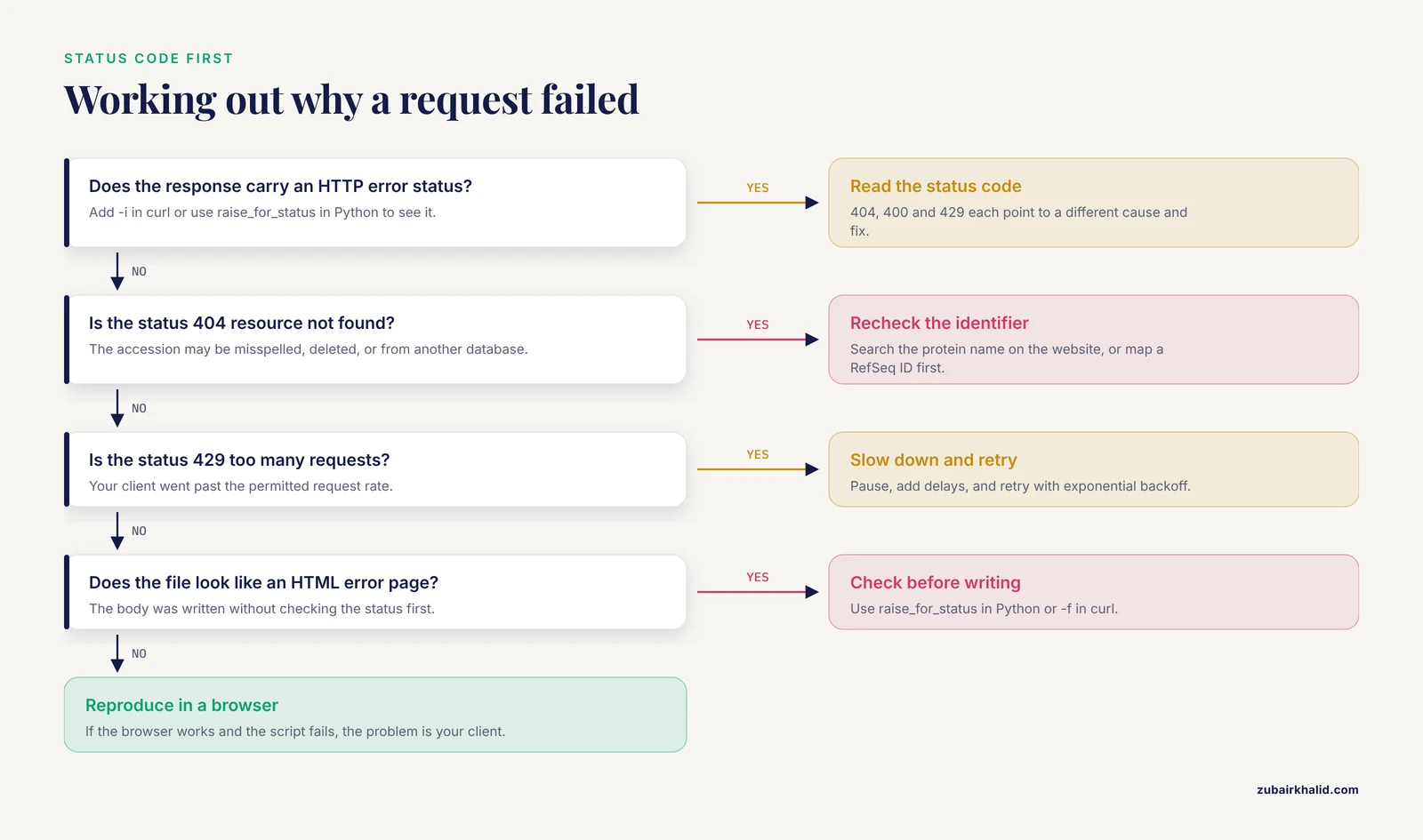
Most failures you will encounter fall into a small set of categories. Diagnose by checking the HTTP status code first. In curl, add the -i flag to print response headers, or use -w to print the status code alone:
curl -s -o /dev/null -w "%{http_code}\n" https://rest.uniprot.org/uniprotkb/P04637.fasta| Symptom | Likely cause | Fix |
|---|---|---|
| HTTP 404, resource not found | The accession does not exist, was deleted from UniProtKB, or you misspelled it | Recheck the spelling. Search the gene or protein name on the UniProt website to find the current accession. Deleted UniProtKB entries are typically moved to UniParc, so search the sequence there if the entry was removed. |
| HTTP 400, bad request | Malformed query on the stream endpoint, such as unbalanced parentheses or an unknown field term | Copy the query into the UniProt website search box. The website reports query syntax errors with more context than a bare 400. |
| HTTP 429, too many requests | Your client exceeded the permitted request rate | Pause, then retry with exponential backoff. Reduce concurrency and add delays between calls. |
| Empty response body | You queried an entry that matched zero results, or a redirect hid the real status | Remove -s temporarily, add -i, and inspect the status line. Verify the URL character by character. |
curl: (6) Could not resolve host | DNS or network problem, not a UniProt problem | Confirm general connectivity, check whether you are behind a proxy or captive portal, and retry. |
curl: (7) Failed to connect | The connection was refused or timed out | Retry, check firewall rules, and consider adding a timeout with -m 30 so failures surface quickly. |
| Sequence in the file looks like an HTML error page | Your script wrote the response body without checking the status code | Check the status before writing. In Python use raise_for_status(). In curl use -f, which makes curl fail on server errors and write nothing on failure. |
| Truncated or short sequence | The connection dropped mid-transfer | Delete the partial file and download again. Compare the residue count against the length on the entry page. |
The single most valuable debugging habit is to reproduce a failing script URL in your browser or plain curl. If the browser succeeds and the script fails, the problem is in your client, its proxy settings, or its headers. If both fail, the problem is in the URL or the identifier.
Common Mistakes and Limitations
These are the errors that recur across students and experienced pipeline builders alike. Each one produces a plausible-looking wrong answer, which is worse than a loud failure.
Using the wrong identifier entirely. UniProt accessions look like P04637. They are not NCBI RefSeq accessions such as NP_000537, not Ensembl protein identifiers such as ENSP00000269305, and not PDB codes such as 1TUP. Pasting a RefSeq accession into the UniProt endpoint returns a 404 or resolves to nothing useful. If your identifier comes from another database, use the UniProt ID mapping service to convert it first, or find the cross-reference on the relevant entry page.
Grabbing the first search hit without checking the organism. Searching a gene name returns entries from many species. The OX field in the FASTA header is the fastest check. A human-to-mouse or mouse-to-human swap is silent, plausible, and can invalidate an entire downstream analysis.
Assuming the canonical sequence is the one you want. Many entries have isoforms with distinct biology. If your experiment targets a specific splice form, fetch that isoform explicitly and confirm it from the header. If you compare your sequence against literature molecular weights, note that isoform lengths differ.
Ignoring the sequence version. Two downloads of the same accession years apart can differ. Record the SV value alongside your data, and prefer fetching fresh from the API over reusing cached sequences of unknown provenance.
Writing error pages into sequence files. A script that saves response.text unconditionally will, on a 404, write whatever error body the server returns into a file named like a FASTA record. Downstream tools then choke or, worse, misbehave quietly. Always check the status code before writing.
Requesting thousands of single entries in a tight loop. This is slow for you and unwelcome on a shared public service. Use the stream endpoint for sets, the ID mapping service for converting identifier lists, and the downloadable database files when you need everything.
Confusing UniProtKB with UniParc and UniRef identifiers. A UPI identifier is a UniParc archive entry, and UniRef50_A0A... is a cluster representative. These have their own endpoints and their own release semantics. Fetching UPI00000001A2 from the UniProtKB endpoint fails. Route each identifier type to its correct service.
Treating API data as frozen. UniProt entries change. Annotations, and occasionally sequences, are updated continuously. If a result depends on a specific annotation state, record the retrieval date and the SV value in your methods.
Next Steps Once You Have the Sequence
With a working retrieval pattern, natural extensions include:
- Full annotations. Swap
.fastafor.jsonand you get the complete entry, including function, domains, cross-references to structures in the Protein Data Bank, and variants, in a machine-readable form. - Field-selective tabular output. The stream endpoint accepts a
fieldsparameter with tabular formats, so you can pull accession, protein name, gene, organism, and length for thousands of entries in one call, which is far more efficient than scraping entries one by one. - ID mapping. The
idmappingservice under the same base URL converts RefSeq, Ensembl, PDB, and dozens of other identifier types to UniProt accessions through an asynchronous job pattern, where you submit the list, then poll a status URL until the result is ready. - Local FASTA tooling. Once sequences are on disk, tools such as BLAST, MAFFT, or any Biopython and Bioperl script consume the records directly. The API's job ends at delivering clean FASTA, and every downstream tool works from there.
Frequently Asked Questions
What is a UniProt ID and where do I find one?
A UniProt ID is either the stable accession, such as P04637, or the entry name, such as P53_HUMAN, that identifies a protein entry in UniProtKB. You find accessions by searching a gene or protein name at uniprot.org, or in the cross-reference tables of other databases such as NCBI and Ensembl.
How do I get a FASTA sequence with a single command?
Run curl https://rest.uniprot.org/uniprotkb/ACCESSION.fasta, replacing ACCESSION with the accession of interest, for example P04637. The FASTA record prints directly to your terminal, and adding -o filename.fasta saves it to a file.
Do I need an API key or account to use the UniProt REST API?
No. The UniProt REST API is open, free, and requires no registration or key. You only need to keep your request rate reasonable and use the stream endpoint or bulk downloads for large jobs.
Can I download many UniProt sequences at once?
Yes. Use the stream endpoint with a query, for example uniprotkb/stream?query=reviewed:true+AND+organism_id:9606&format=fasta, or build a query from your accession list joined with OR. For very large lists, the UniProt ID mapping service handles uploads more efficiently.
How do I download a specific isoform instead of the canonical sequence?
Append the isoform number to the accession, for example https://rest.uniprot.org/uniprotkb/P04637-2.fasta. The plain accession without a suffix always returns the canonical sequence, and the entry page lists which isoforms exist.
Why did my request return a 404 error?
A 404 usually means the accession is misspelled, the entry was deleted and merged elsewhere, or you supplied an identifier from a different database, such as a RefSeq or Ensembl ID. Search the protein name on the UniProt website to find the correct accession, and use the ID mapping service to convert foreign identifiers.
How do I check that I downloaded the right sequence?
Read the FASTA header line to confirm the accession, organism taxonomy number, and sequence version, then count the residues and compare the count with the length shown on the UniProt entry page. The shell one-liner tail -n +2 file.fasta | tr -d '\n' | wc -c gives the residue count.
Can I use the UniProt REST API in Python and R pipelines?
Yes. Any HTTP client works. In Python, requests.get("https://rest.uniprot.org/uniprotkb/P04637.fasta") with a timeout and raise_for_status() is the standard pattern. In R, the httr package provides the equivalent with GET() and stop_for_status().