UniProt Protein Report Annotation Sections Explained
By Dr. Zubair Khalid, DVM, MS, PhD ·

By the end of this article you will be able to open any UniProt protein report, identify every annotation section, understand what each line of the flat file format means, pull the same data through the REST API, and convert feature coordinates into real amino acid positions on the sequence. You need a web browser for the web interface. For the command line examples you need a Unix-like shell, curl, and Python 3. Nothing else is required. Every command in this tutorial runs against the live UniProt Knowledgebase, so you can reproduce each step exactly as written.
UniProt is the reference protein database used across molecular biology. Its core, UniProtKB, comes in two flavors. Swiss-Prot entries are reviewed by human curators who read the primary literature and attach structured annotations to each protein. TrEMBL entries are computationally analyzed and unreviewed. When people ask how to use UniProt properly, the single biggest skill is learning to read the annotation sections of a reviewed entry, because those sections condense decades of literature into a structured report that downstream tools, machine learning datasets, and variant databases build on [1], [2].
What a UniProt protein report actually is
A UniProt protein report is a structured summary of one protein entry. It contains a canonical sequence, cross-references to dozens of external databases, and a set of annotation sections curated by UniProt staff. Each annotation carries an evidence tag that tells you whether the claim is experimental, inferred by similarity from a homolog, predicted by an automated pipeline, or asserted by a curator. Learning to read those evidence tags is as important as reading the annotation itself.
This article uses human p53, accession P04637, as the running example. p53 is a good choice because it is one of the most heavily annotated proteins in the database. Its entry contains examples of nearly every section type, including a dense natural variant catalog that links individual missense mutations to cancer phenotypes, the kind of single amino acid polymorphism record that UniProt curators have maintained with strict literature-based inclusion criteria for years [1].
A UniProt database tutorial in four commands
Before dissecting the annotation sections, let us get a protein report in three formats. This is the fastest working answer to "how to use UniProt" from a terminal.
Step 1. Fetch the flat file.
curl -s https://rest.uniprot.org/uniprotkb/P04637.txt -o P04637.txt
head -20 P04637.txt
Expected output, first lines:
ID   TP53_HUMAN              Reviewed;         393 AA.
AC   P04637;
DT   17-JUL-1986, integrated into UniProtKB/Swiss-Prot.
DT   01-AUG-1990, sequence version 1.
DT   29-OCT-2025, entry version 250.
DE   RecName: Full=Cellular tumor antigen p53;
DE   AltName: Full=Antigen NY-CO-13;
DE   AltName: Full=Phosphoprotein p53;
DE   AltName: Full=Tumor suppressor p53;
OS   Homo sapiens (Human).
OC   Eukaryota; Metazoa; Chordata; Craniata; ...
OX   NCBI_TaxID=9600;
The .txt endpoint returns the classic flat file. Entry names follow the pattern TP53_HUMAN, where the first block is the mnemonic gene-style name and the suffix is the organism code.
Step 2. Fetch structured JSON.
curl -s "https://rest.uniprot.org/uniprotkb/P04637.json" | python3 -m json.tool | head -50JSON is what you want for scripts. Every flat file section becomes a JSON key such as primaryAccession, proteinDescription, comments, and features.
Step 3. Search rather than fetch by ID.
curl -s "https://rest.uniprot.org/uniprotkb/search?query=gene:TP53%20AND%20organism_id:9606&format=tsv&fields=accession,id,protein_name,length"Expected output:
accession    id          protein_name             length
P04637       TP53_HUMAN  Cellular tumor antigen p53   393
The query language accepts field restrictions like gene:, organism_id:, reviewed:true, and annotation_score:. Adding reviewed:true to any query is the single habit that keeps you inside the curated half of the database.
Step 4. Pull the sequence only.
curl -s https://rest.uniprot.org/uniprotkb/P04637.fastaThe annotation sections, one by one
The web report at uniprot.org groups information into named tabs. The flat file encodes the same content in typed line prefixes. The table below maps the web sections to the flat file line codes you will see when you read the raw entry. Use it as a template for interpreting any protein report you open.
| Web report section | Flat file code | What it contains | Typical feature keys |
|---|---|---|---|
| Function | CC, FT | Full descriptive paragraphs and short structured function statements | ACT_SITE, BINDING, SITE |
| Names and taxonomy | DE, OS, OC, OX, GN | Protein name, alternative names, gene name, organism, taxonomic lineage | none |
| Subcellular location | CC, FT | Compartment localization with evidence | none |
| PTM and processing | FT, CC | Chain cleavage, signal peptides, post-translational modifications | SIGNAL, CHAIN, PROPEP, PEPTIDE, MOD_RES, CARBOHYD, LIPID |
| Expression | CC | Tissue and developmental expression statements | none |
| Interaction | CC, DR | Binary protein-protein interactions and interaction database cross-references | none |
| Structure | DR, FT | PDB links, secondary structure, residue-level topology | HELIX, STRAND, TURN |
| Domains and sites | FT, DR | Functional sites, domains, repeats, compositional bias, family membership | DOMAIN, REPEAT, ZN_FING, REGION, COILED, MOTIF, COMPOSBIAS |
| Sequence | SQ | Amino acid sequence, length, mass, checksum | none |
| Sequence similarities | DR | Protein family domain database links | none |
| Variants | FT, CC | Natural variants with phenotype and disease links | VARIANT, VAR_SEQ |
| Antigen annotation | FT | Epitope-level detail for antibody design | none |
| Cross-references | DR | Links to dozens of external databases | none |
| Keywords | KW | Controlled vocabulary terms | none |
| Literature | R, DR | PubMed references supporting the entry | none |
Function section
The Function section opens with one or more curated paragraphs describing what the protein does at a molecular and biological level. For P04637 the functional text describes p53 as a tumor suppressor acting as a transcription regulator activated by genotoxic stress. Below the paragraph, short structured function lines summarize the same claims in machine-readable form. Curators attach an evidence tag to each statement. An "Experimental evidence" tag means a published experiment directly demonstrated the claim on this protein. A "By similarity" tag means the claim was transferred from a well-characterized homolog in another species, which is extremely common for proteins in poorly studied organisms.
Names and taxonomy
The DE lines give the recommended name and any alternative names. The GN lines give the gene name and ordered locus names. The OS, OC, and OX lines describe the organism, its full lineage, and the NCBI taxonomy identifier, 9606 for human. Always read the OX line when you download protein sets programmatically, because it is the reliable field for filtering by organism.
Subcellular location
This section states where the protein acts, for example "Nucleus" for p53. Curated subcellular locations come from the UniProt-controlled vocabulary and often include qualifiers such as "By similarity" or evidence for translocation events. If your downstream analysis needs compartment information, parse the JSON key comments where commentType equals SUBCELLULAR LOCATION rather than scraping the prose.
PTM and processing
This is the section that tells you how the translated chain becomes the mature protein. The feature keys here follow a consistent grammar in the flat file. For a protein like p53 you will see lines such as:
FT   CHAIN          1..393
FT                   /note="Cellular tumor antigen p53"
FT                   /id="PRO_0000154217"
FT   MOD_RES        18
FT                   /note="N-acetylalanine"
CHAIN marks the mature chain boundaries. SIGNAL marks an N-terminal signal peptide that directs secretion and is removed. PROPEP and PEPTIDE cover propeptides and active peptides. MOD_RES marks modified residues such as acetylation or phosphorylation sites, and CARBOHYD marks glycosylation sites. Each feature carries positions in 1-based residue numbering. The most common computational mistake in the whole database is confusing this 1-based convention with 0-based array indexing in code. We will fix that explicitly in the worked example later.
Domains and sites
The Domains and Sites section is where residue-level biology lives. For p53 you find DNA_BIND type features spanning the core DNA-binding domain, oligomerization regions, and individual binding sites. The keys to know are:
DOMAINfor defined regions of a protein with a distinct functionREGIONfor regions of interest that lack formal domain definitionMOTIFfor short conserved sequence motifsREPEATfor internal sequence repeatsZN_FINGfor zinc finger regionsACT_SITEfor catalytic residuesBINDINGfor residues that bind ligands or cofactorsCOILEDfor coiled-coil regionsCOMPOSBIASfor compositional bias stretches
Site-level binding annotations from UniProt are precise enough that researchers compile them into training datasets for residue-level prediction. One published calcium-binding predictor, for example, was built on a dataset compiled from complete UniProt sequences and annotations covering calcium-binding, nucleic acid-binding, protein-binding, and small ligand-binding residues, and used that structure-aware ground truth to separate true calcium-binding residues from residues that merely bind other molecule types [2].
Variants section
The Variants section records single amino acid polymorphisms and larger natural sequence variants. UniProt maintains these with strict inclusion criteria derived from the literature, and for each variant it stores the position, the amino acid change, and structured information on effects on protein structure and function and on disease association [1]. This depth is what distinguishes the Swiss-Prot variant section from a simple SNP list. A typical flat file block for p53 looks like this:
FT   VARIANT        175
FT                   /note="R->H"
FT                   /id="VAR_003555"
FT                   /note="Found in numerous cancers"
Reading that block: position 175 in the 1-based numbering, the wild-type residue arginine is replaced by histidine, the variant has a stable identifier, and the free-text note links it to cancer. To go from this block to an actual sequence segment, you need the position conversion discipline shown in the walkthrough below.
In one snapshot of the database at release 53.2 in June 2007, UniProtKB/Swiss-Prot recorded 32,282 single amino acid polymorphisms across 6,086 human proteins, of which 16,043 were annotated as disease-related, 14,266 as polymorphisms, and 1,973 as unclassified. The catalog has grown substantially since, but the structure of the records has stayed the same: position, change, phenotype evidence, and cross-references to disease and gene-specific databases [1].
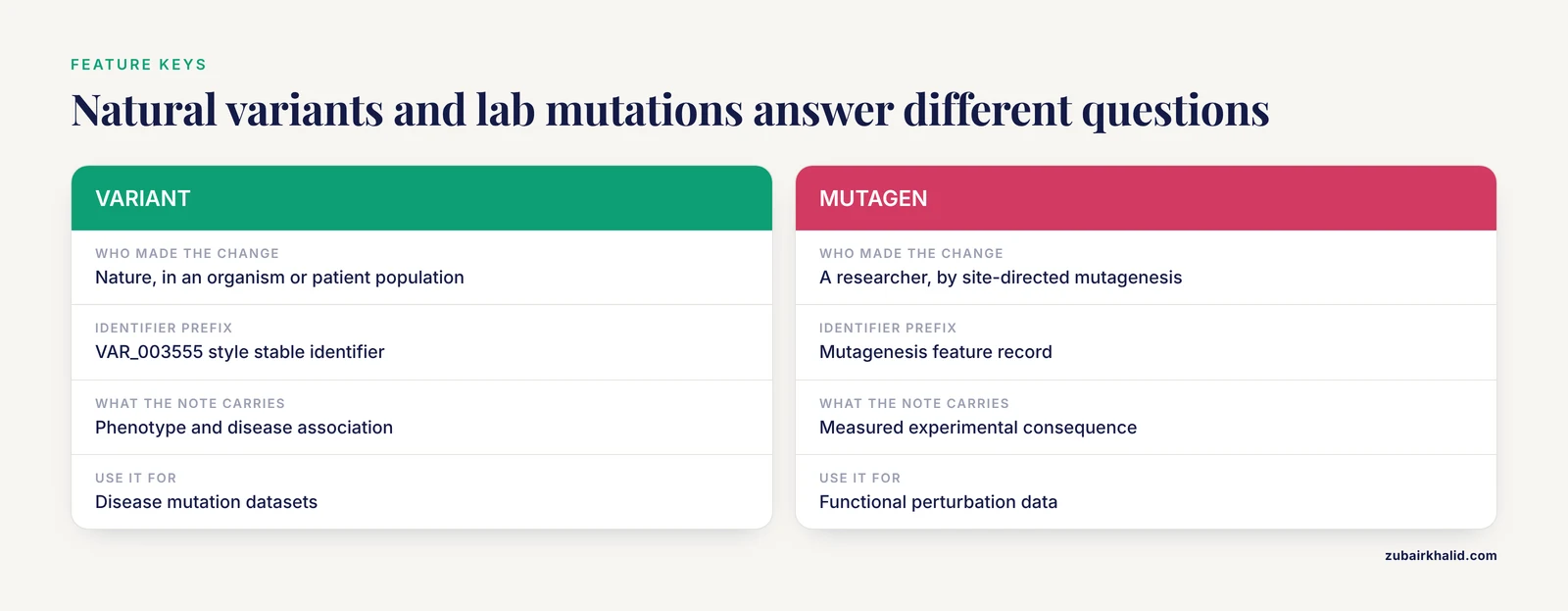
Beyond natural variants, the MUTAGEN feature key records experimentally introduced mutations, such as site-directed mutagenesis used in functional studies. Confusing VARIANT and MUTAGEN is a classic error. VARIANT means nature made the change in some organism or patient population. MUTAGEN means a researcher made the change in the lab. If you are building a dataset of disease mutations, filter on VARIANT. If you are collecting functional perturbation data, MUTAGEN is often the richer source because it carries the measured experimental consequence in the note.
Cross-references section
The DR lines are the connective tissue of the whole resource. Each one links the UniProt entry to another database record. For a typical reviewed entry you will see cross-references to the Gene Ontology for function, process, and location terms, to Pfam and PROSITE for domains, to PDB for structures, to Ensembl and NCBI Gene for genes, to OMIM for disease, and to specialist resources. Cross-references are also how annotation sections link out to complementary databases. For example, UniProt surfaces intrinsically disordered region information from MobiDB, a knowledgebase that aggregates disorder annotations from experimental evidence and predictions across protein sequences. MobiDB version 6, released in July 2024, added integration of AlphaFoldDB-derived predictions and a homology transfer pipeline that increased the number of entries carrying high-quality disorder annotations, and its interface presents disorder, binding, and disorder-function information mapped directly onto the protein sequence [3]. Intrinsically disordered regions are widespread, making up roughly 30 percent of eukaryotic proteomes, so checking that cross-reference matters whenever your protein of interest is a signaling or scaffolding protein [3].
Sequence section
The SQ header gives sequence length, molecular mass in daltons, and a CRC64 checksum, followed by the sequence itself in blocks of 60 residues. The sequence shown is the canonical sequence. If the protein has isoforms produced by alternative splicing, a separate section lists each isoform, which residues differ, and whether the isoform is shown by experiments or predicted from transcript evidence. Alternative splicing can produce substantial protein diversity, and the isoform mapping in UniProt tells you exactly which exon-derived segments differ between isoforms.
Worked walkthrough: convert a UniProt variant annotation to an actual sequence slice
Here is the full loop from annotation to real residues, the operation you will repeat constantly once you start using UniProt data in pipelines.
Step 1. Load the flat file and find the variant block.
grep -A 3 "VARIANT 175" P04637.txtExpected output:
FT   VARIANT        175
FT                   /note="R->H"
FT                   /id="VAR_003555"
FT                   /note="Found in numerous cancers"
Step 2. Extract the sequence in Python and apply the 1-based rule.
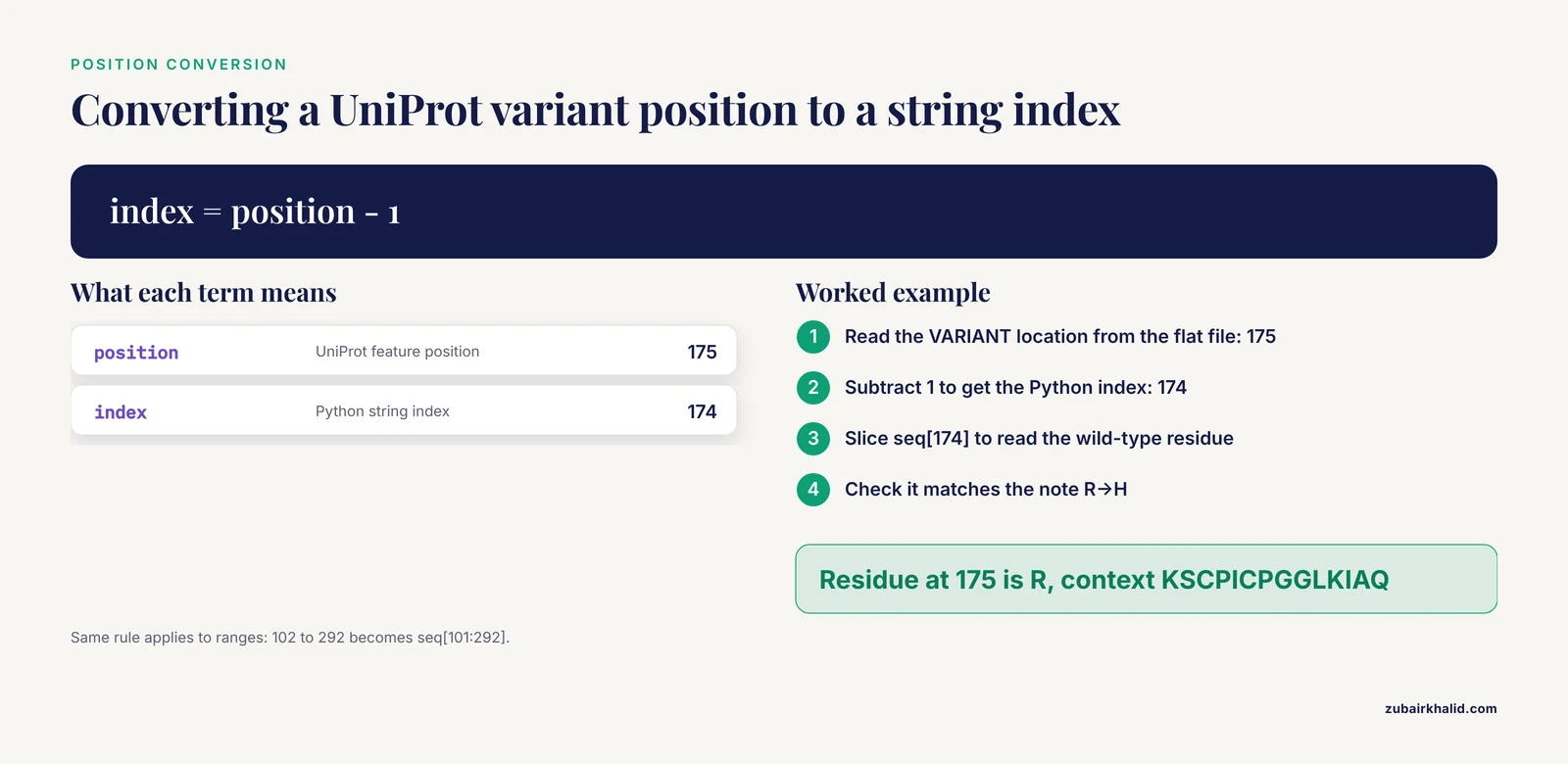
UniProt positions are 1-based. A feature annotated at position 175 refers to the 175th residue. In a Python string, that is index 174.
seq = ""
with open("P04637.fasta") as f:
    for line in f:
        if not line.startswith(">"):
            seq += line.strip()

# Feature position is 1-based, string index is 0-based
pos = 175
wt = seq[pos - 1]
window = seq[pos - 8 : pos + 7]
print("Length:", len(seq))
print("Residue at 175:", wt)
print("Context:", window)
Expected output:
Length: 393
Residue at 175: R
Context: KSCPICPGGLKIAQ
The residue at position 175 is arginine, R, which matches the annotation note "R->H". If your extraction produces a different residue, the most likely cause is that you used seq[pos] instead of seq[pos - 1], or that you loaded an isoform sequence instead of the canonical sequence. Both are covered in the error table below.
Step 3. Do the same for a domain feature with a range.
A DOMAIN feature spans a range, for example a DNA-binding domain annotated with start and end positions. A range annotation of 102 to 292 in 1-based numbering becomes indices 101 to 292 inclusive in Python:
start, end = 102, 292
domain_seq = seq[start - 1 : end]
print(domain_seq[:40])
Expected output, first 40 residues of the domain:
SSSQKTYQGSYGFRLGFLHSGTAKSVTCTYSPALNKStep 4. Extract all variant positions in one pass.
import re

positions = []
with open("P04637.txt") as f:
    for line in f:
        m = re.match(r"FT   VARIANT\s+(\d+)", line)
        if m:
            positions.append(int(m.group(1)))

print(f"{len(positions)} variant positions parsed")
print("First five:", positions[:5])
This gives you a list you can use for any downstream analysis, from plotting variant density along the sequence to annotating your own patient data.
UniProt protein report annotation sections format: how to parse the flat file reliably
The flat file format predates the web and follows strict column conventions. Line types are identified by a two-character code in columns 1 and 2, and feature table lines (FT) continue across multiple physical lines with fixed indentation. The parsing rules that matter:
- Lines beginning with
IDcontain the entry name, review status, and sequence length - Lines beginning with
ACcontain accession numbers, the stable identifiers you should propagate in your own pipelines - Lines beginning with
DE,GN,OS, andOXcontain names, gene names, organism, and taxonomy - Lines beginning with
FTare feature table entries, where the feature key occupies columns 6 through 20 and the location columns 22 through 34, followed by qualifier lines indented under the key - Lines beginning with
CCare free-text comment blocks, with topic headers such asFUNCTION,PTM, orDISEASE - Lines beginning with
DRare cross-references with the format database identifier, primary ID, secondary ID, and an optional third field - The
//line marks the end of an entry
When you parse FT lines with regular expressions, anchor on the two spaces after the key rather than assuming fixed columns, because qualifier lines like /note= and /evidence= hang below their parent key with different indentation. For most work, though, skip the flat file entirely and use the JSON API, which gives you every feature as a structured object with type, location, description, and evidences fields.
Programmatic access patterns for bulk work
For more than a handful of proteins, query and stream results instead of fetching entries one at a time.
curl -s "https://rest.uniprot.org/uniprotkb/stream?query=reviewed:true%20AND%20organism_id:9606%20AND%20gene:P53&format=json" > p53_human.jsonFor large result sets, the stream endpoint with Content-Type negotiation returns the whole set without pagination headaches. To pull a custom tabular digest of many proteins, use the fields parameter:
curl -s "https://rest.uniprot.org/uniprotkb/search?query=reviewed:true%20AND%20organism_id:9606&format=tsv&fields=accession,id,gene_primary,length,go_id,disease" > human_reviewed_digest.tsv
head -3 human_reviewed_digest.tsv
Expected output shape:
accession    id       gene_primary   length   go_id                      disease
O14788       KAT5_HUMAN  KAT5         464      GO:0004468;GO:0006355 ...
Every column name in the fields list corresponds to a section of the report, so this is effectively the annotation section template for building your own lightweight protein table. When you build such datasets, remember the known failure mode of automated feature extraction: residue-level functional predictions trained on annotation-derived labels can cross-predict, confusing one binding type with another, which is exactly the problem the calcium-binding study cited earlier engineered its two-layer classifier to avoid [2]. Keep binding-type features separated by ligand class when you train on them.
Common errors with exact messages and fixes
404 Not Foundfrom the REST endpoint. The accession is wrong or the entry was merged. UniProt retires and merges accessions over time. Query by gene and organism instead, or use the UniProt ID mapping service to convert an old accession.400 Bad Requestwith the message about invalid query syntax. Your query contains raw spaces. In URLs, spaces must be encoded as%20or the whole query string must be quoted in the shell, as in the examples above.- Residue extraction returns the wrong amino acid. You are off by one. UniProt features are 1-based, Python strings are 0-based. Subtract 1 from the feature start index before slicing.
- Variant slice contains unexpected residues. You loaded an isoform sequence rather than the canonical sequence, or you sliced a FASTA file without stripping the header line. Filter lines starting with
>when reading FASTA. - Empty
featuresarray in JSON. The entry is a TrEMBL record with little or no feature annotation. Restrict your query withreviewed:trueto land on Swiss-Prot entries. Field 'disease' not foundin the fields parameter. Field names are case-sensitive and use underscore notation. Check the API field list rather than guessing, and useft_variantstyle compound names for feature-derived columns where applicable.
How to check that you parsed the entry correctly
Run three cheap validation checks before trusting any parsed output. First, verify the sequence length in your parsed object equals the number reported in the ID line, 393 for P04637. Second, verify that for every VARIANT feature the residue at the annotated position in the canonical sequence equals the wild-type letter in the /note change field. If 10 random spot checks pass, your indexing convention is right. Third, verify the CRC64 checksum if you use the flat file checksum line, or simply confirm the sequence round-trips through your FASTA writer and reader unchanged. Skipping these checks is how off-by-one errors silently propagate into papers.
Common Mistakes and Limitations
- Trusting TrEMBL annotation as if it were reviewed. Unreviewed entries carry computational predictions. If a claim matters, confirm the entry says "Reviewed" and read the evidence tags.
- Ignoring "By similarity" tags. An annotation transferred from a homolog may not hold exactly for your organism, especially for residues in interaction interfaces.
- Confusing VARIANT with MUTAGEN. Natural variants and lab-introduced mutations live in different feature types and answer different questions [1].
- Using entry names instead of accessions in scripts. Entry names like
TP53_HUMANcan change. Accessions likeP04637are stable. Store accessions. - Mixing isoforms with the canonical sequence when mapping features. Feature coordinates are given relative to a specific sequence. If a variant note references an isoform, check the isoform section for the coordinate mapping before slicing.
- Assuming absence of annotation means absence of biology. A residue without a binding or modification annotation is usually an uninvestigated residue, not a functionless one. Computational predictors trained on UniProt labels inherit this incompleteness, which is a recognized problem when building residue-level predictors [2].
- Treating free-text notes as structured data. The
/notefields are informative but not controlled vocabulary. For machine-readable disease links, follow the cross-references to disease databases that UniProt maintains alongside variant records [1]. - Forgetting that disorder and structure claims come from different evidence worlds. Disorder annotations aggregated from resources like MobiDB mix experimental and predicted evidence, and the provenance of each annotation matters when you interpret a sequence region [3].
UniProt annotations reflect current curated knowledge at the moment you download them, and entries change version with each release. For analyses that must be reproducible months later, save the downloaded files with the entry version recorded, rather than re-fetching at analysis time and hoping the annotation has not changed.
Frequently Asked Questions
What is the difference between Swiss-Prot and TrEMBL entries in a UniProt protein report?
Swiss-Prot entries are manually reviewed by curators who base annotations on published experimental evidence, while TrEMBL entries are computationally annotated and unreviewed [1]. The review status appears on the ID line and on the web page. For anything involving variants, function, or disease, prefer reviewed entries.
Where in the report are disease-causing mutations annotated?
Disease-relevant single amino acid polymorphisms appear in the Variants section as VARIANT features with notes on structural and functional effects and disease involvement, supported by cross-references to disease databases [1]. On the web report, open the Variants tab, and check the Disease tab for the curated prose.
What does "By similarity" mean in an evidence tag?
It means the annotation was transferred from an experimentally characterized homologous protein in another organism rather than demonstrated directly on this protein. Treat such annotations as strong hypotheses, not proven facts.
How do I find the position of a variant in the actual amino acid sequence?
Read the position from the VARIANT feature location, then subtract 1 to convert from UniProt's 1-based numbering to a 0-based string index. The worked example above shows the exact slicing code for position 175 in TP53.
How current is the information in a UniProt report?
Every entry carries an entry version date on the DT lines, and the whole database is updated on a regular release cycle. Heavily studied proteins like p53 accumulate new annotation with each release, so record the entry version in your methods for reproducibility.
Can I download annotations for thousands of proteins at once?
Yes. Use the UniProt REST search or stream endpoints with a query and the fields parameter to select the sections you want, in TSV or JSON format. The bulk commands in this article show the pattern.
Why does the variant section list only some mutations from the literature?
UniProt applies strict inclusion criteria for recording single amino acid polymorphisms, favoring variants with published, verifiable evidence and structured functional or disease information [1]. Comprehensive raw variant catalogs live in resources like dbSNP, which UniProt cross-references.
How do intrinsically disordered regions appear in a UniProt report?
Disorder information appears through cross-references and feature data connected to specialist resources such as MobiDB, which aggregates experimental and predicted disorder annotations and, in its version 6 release, integrates AlphaFoldDB-derived predictions with a homology transfer pipeline to expand annotation coverage [3].
Further Reading
- Emotion Understanding under Naturalistic Stimuli via Neural Encoding and Decoding
- Decoding Time Series with LLMs: A Multi-Agent Framework for Cross-Domain Annotation
- Decoding the m6A epitranscriptomic landscape for biotechnological applications using a direct RNA sequencing approach