How to Find Protein-Protein Interaction Partners in UniProt
By Dr. Zubair Khalid, DVM, MS, PhD ·

By the end of this guide you will be able to find protein-protein interaction partners in UniProt for any entry you care about, both by browsing and by script. You will pull a sorted list of partner accessions with one command, resolve those accessions into gene names, judge how well each interaction is supported, and route the result into structure prediction, motif discovery, or network analysis. You need a web browser and a terminal with curl and jq installed. Cytoscape and R are optional additions for the downstream sections.
A protein-protein interaction (PPI) is a specific physical contact between two proteins. UniProt, the Universal Protein Resource, is the standard reference database for protein sequence and functional information, and every well-annotated entry carries an Interaction section that condenses decades of curated literature into a few lines. That section is the fastest way to answer the question of what a protein binds before you design a pull-down, interpret a mass spectrometry result, or prioritize variants. The payoff is concrete. Sequence variants that fall inside experimentally validated interaction sites are a recognized route to disease mechanism, and systematic comparisons of variant positions against curated PPI regions have surfaced disease-associated variants that would otherwise look like noise [1].
Treat what follows as a UniProt database tutorial focused on interaction annotations. The worked example is human p53, accession P04637, chosen because its interaction list is long and well curated. Every command works for any accession.
What UniProt Contains (and What It Does Not)
The UniProt Knowledgebase (UniProtKB) has two divisions. Swiss-Prot entries are reviewed, which means human curators read the literature and write the annotation. TrEMBL entries are unreviewed and annotated computationally. Curated interaction annotations are written on reviewed entries, so the first skill in how to use UniProt well is picking the right record.
Every protein has a stable accession, for example P04637, and a mnemonic entry name, for example P53_HUMAN. Script against the accession. Accessions persist across releases, while other labels can change.
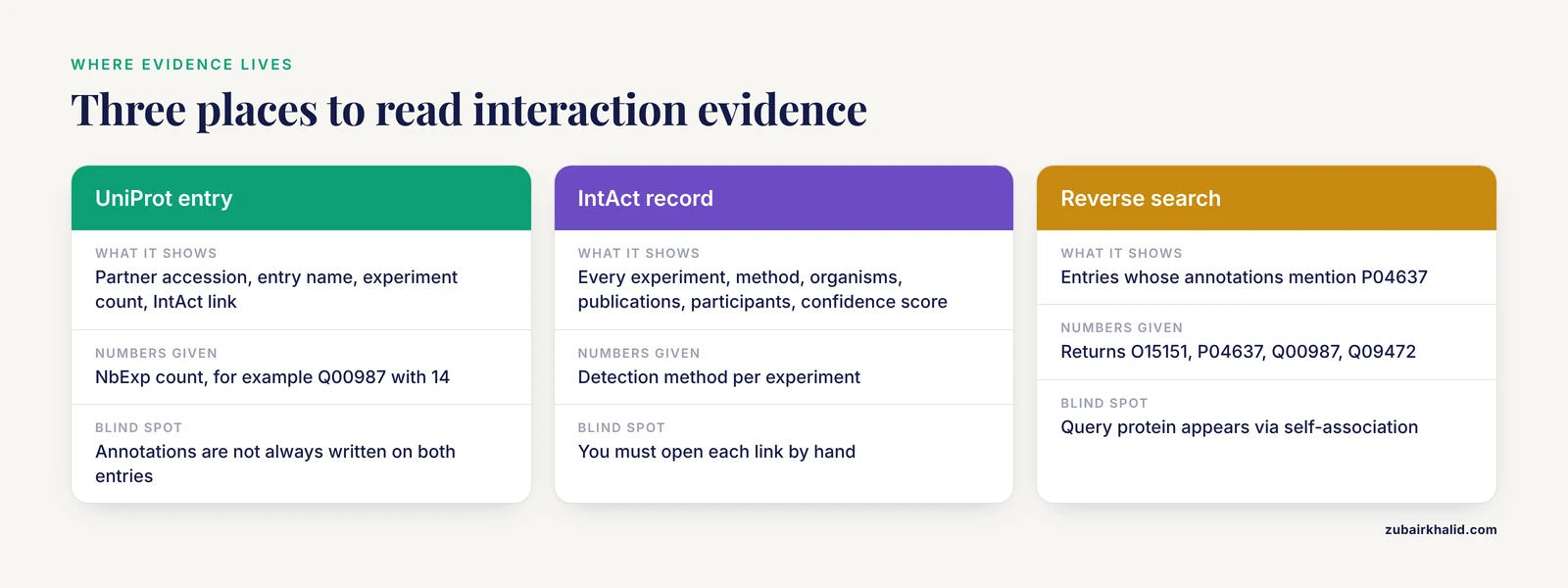
The Interaction section of a reviewed entry lists binary interactions, meaning one protein contacting one other protein. Each line gives the partner accession and entry name, a count of the experimental records supporting the interaction, and a cross-reference into IntAct, the EMBL-EBI molecular interaction database that stores the underlying evidence. UniProt also cross-references other interaction resources, including BioGRID and STRING, so a single entry page connects you to the wider graph.
Interaction annotations come in two shapes. A heterotypic line records a contact between the entry and a different protein. A self-association line records the protein contacting another copy of itself, which matters for complexes built from multiple copies of one protein and is easy to overlook when scripting. Some annotations also name the binding region or the modification state required for the contact, and those details are gold when you plan mutagenesis.
UniProt does not aim to be a complete interactome. It curates what the literature supports, and its interaction annotations describe physical contacts rather than predicted functional associations. Treat the section as a high-confidence core and widen the search afterward.
Check the quality of the entry itself before trusting anything downstream. UniProt assigns each entry an evidence-of-existence level, from PE1, experimental evidence at the protein level, down through PE5, uncertain. The level has consequences. The human DEspR receptor was listed in the NCBI gene database as a transcribed pseudogene because automated sequences showed a stop codon, and the authors had to assemble protein-level evidence, including expression, apparent molecular size, glycosylation, internalization, and partner interactions, to satisfy UniProt criteria for existence at the protein level [2]. A reviewed PE1 entry carries that kind of grounding. A PE5 entry may not.
You can consume all of this three ways. Read the entry page at uniprot.org. Download files in JSON, XML, plain text, or FASTA from the REST API at rest.uniprot.org. Or pull tabular slices of the database through the search endpoint. The walkthrough below uses all three.
Before You Start
Install jq, a command-line JSON processor, and curl, the standard command-line URL transfer tool.
# macOS with Homebrew
brew install jq

# Debian or Ubuntu
sudo apt-get install -y jq curl

# verify the install
jq --version
curl --version
Any recent version works. Every request below is a plain GET, so you can also paste the URLs into a browser and inspect the same data by eye.
Step-by-Step: Find Protein-Protein Interaction Partners in UniProt
Step 1. Locate the correct reviewed entry
Start from the gene symbol and the organism. Human p53 is the gene TP53. The mouse equivalent is Trp53, a different UniProt entry with its own interaction list, so an organism filter is not optional.
On the website, type TP53 into the search box at uniprot.org, then filter by Human and Reviewed. From a script, query the REST (Representational State Transfer) API:
curl -s "https://rest.uniprot.org/uniprotkb/search?query=(gene:TP53%20AND%20organism_id:9606%20AND%20reviewed:true)&format=tsv&fields=accession,id,protein_name"The parameters matter as follows. gene:TP53 matches the gene name. organism_id:9606 is the NCBI taxonomy identifier for human. reviewed:true restricts results to Swiss-Prot. format=tsv returns tab-separated values, and fields= selects the columns.
Expected output, a single row:
accession	id	protein_name
P04637	P53_HUMAN	Cellular tumor antigen p53
If you get several rows, you dropped the reviewed or organism filter. If you get zero rows, check the symbol spelling, because gene symbols differ across species and nomenclature authorities. You can also search by protein name, and when all you have is a raw sequence from an uncharacterized organism, a sequence search is the right entry point, since symbols are unreliable across species.
Step 2. Read the Interaction section on the entry page
Open https://www.uniprot.org/uniprotkb/P04637 and scroll to the Interaction section. For p53 the list is long. Each line names the partner by accession and entry name, gives the number of supporting experimental records, labeled NbExp in the downloadable flat file, and links to an IntAct identifier of the form EBI- followed by digits. A line whose partner is P04637 itself records self-association, and p53 does self-associate. Some lines add context in plain language, for example an interaction that requires a particular modification state of one partner.
Read this section before scripting. It tells you roughly how many partners to expect, whether the partners cluster around one protein family, and whether the list is dominated by a single large-scale study. That last observation shapes how you judge evidence in step 5.
Step 3. Pull the partner list from the REST API
The same annotations are available as JSON. Fetch the entry and filter the comments array for interaction records with jq:
curl -s https://rest.uniprot.org/uniprotkb/P04637.json \
  | jq -r '
      .comments[]
      | select(.commentType == "INTERACTION")
      | .interactantTwo.interactantId // empty
    ' \
  | sort -u > p53_partners.txt

wc -l p53_partners.txt
Three things happen in the jq filter. .comments[] walks every annotation block in the entry. select(.commentType == "INTERACTION") keeps only interaction blocks. .interactantTwo.interactantId // empty prints the partner accession and skips any block where the field is absent.
Expected output, sorted and truncated:
O15151
P04637
Q00987
Q09472
P04637 appears because p53 self-associates. Remove the self line if you only want contacts between different proteins:
grep -v '^P04637$' p53_partners.txt > p53_partners_noself.txtThe full p53 list runs to dozens of partners. For a protein with no curated interactions the command prints nothing, which is a real result rather than an error. Absence of an annotation means the curators had no adequate evidence, not that the protein works alone.
Step 4. Convert accessions into gene names
Accessions are stable but unreadable at the bench. Resolve them in one request with an OR query:
curl -s "https://rest.uniprot.org/uniprotkb/search?query=accession:(O15151%20OR%20Q00987%20OR%20Q09472)&format=tsv&fields=accession,id,protein_name"Expected output:
accession	id	protein_name
O15151	MDM4_HUMAN	Mdm4 p53-binding protein homolog
Q00987	MDM2_HUMAN	E3 ubiquitin-protein ligase Mdm2
Q09472	EP300_HUMAN	[Histone acetyltransferase](/knowledge/molecular-biology/histone-acetyltransferase) p300
For large lists, generate the OR query from your file, or use the UniProt ID mapping service at uniprot.org/id-mapping, which converts identifier sets between gene names, accessions, and other database namespaces. ID mapping is the step people skip and then wonder why their network has disconnected nodes. Note that some partners, especially poorly characterized proteins from model organisms, resolve to unreviewed entries, which is normal and does not invalidate the interaction. Queries returning more than a few hundred entries are paginated, and the link to the next page arrives in the response headers.
Step 5. Read the evidence behind each interaction
A partner list says nothing about confidence by itself. Extend the jq filter to report the experiment count for each interaction:
curl -s https://rest.uniprot.org/uniprotkb/P04637.json | jq -r '
  .comments[]
  | select(.commentType == "INTERACTION")
  | [
      (.interactantTwo.interactantId // ""),
      ((.interactions.experiments // "n/a") | tostring)
    ]
  | @tsv
' | sort -u | head -n 8
Expected output, tab separated, with illustrative numbers because counts change as IntAct grows:
O15151	7
P04637	3
Q00987	14
The second column counts experimental records supporting the interaction in IntAct. To also capture the IntAct identifier, add (.interactions.xref.id // .interactions.id // "") as a third element in the array. More records usually means more independent support, but the number is not a significance test. Open the IntAct link for interactions you care about and read the detection method. Yeast two-hybrid, co-immunoprecipitation, and affinity purification with mass spectrometry are common, and each has a different error profile. The UniProt entry also carries evidence tags on each annotation, linking to source publications and controlled terms from the Evidence Ontology (ECO), so you can trace any interaction back to the paper that demonstrated it.
The plain text format, fetched by replacing .json with .txt in the URL, encodes the same information as comment lines that begin with CC and carry the partner accession, the experiment count, and the IntAct identifiers. JSON is easier to parse programmatically, but the flat file is convenient for quick reading.
Step 6. Search in the reverse direction
To find every human entry whose interaction annotations mention P04637, search the interaction field directly:
curl -s "https://rest.uniprot.org/uniprotkb/search?query=(cc_interaction:P04637)%20AND%20organism_id:9606&format=tsv&fields=accession,id" | head -n 6Expected output, truncated:
accession	id
O15151	MDM4_HUMAN
P04637	P53_HUMAN
Q00987	MDM2_HUMAN
Q09472	EP300_HUMAN
The query protein appears in its own results because of the self-association. The reverse search is not redundant with step 3. Interaction annotations are not always written on both entries, because a curator may annotate the interaction on the p53 entry and leave the partner entry untouched. Checking both directions catches partners that a single-entry view misses. If a reverse query returns nothing for an entry you know carries interactions, open the entry page and confirm the Interaction section directly before debugging the query.
Step 7. Cross-check in IntAct and export the network
Each interaction line on the UniProt entry links to an IntAct record. Open it. IntAct shows every experiment behind the interaction, with the method, the organisms, the publications, the participants, and a confidence score. This is where you learn that an interaction you planned to mutate was detected once, in a large-scale two-hybrid screen, in a heterologous system.
For network work, export from IntAct in PSI-MITAB, the tabular interchange format of the Proteomics Standards Initiative, or in PSI-MI XML, and import the file into Cytoscape, the standard open platform for interaction network visualization. Cytoscape is also where hypothesis-driven subset selection happens, for example pulling out the proteins that share a given interaction partner before motif analysis [3].
You can also build the graph yourself. Treat each partner accession as a node, draw an edge from your query protein to each partner, and import the node and edge tables into Cytoscape. This route gives you full control over attributes such as the experiment count, which you can map onto edge width.
When a command fails
Three failures cover most cases.
A mistyped accession returns HTTP 404 with a JSON body whose messages array says the entry was not found. Check the status code directly:
curl -s -o /dev/null -w "%{http_code}\n" https://rest.uniprot.org/uniprotkb/P04637.jsonExpected output: 200.
If jq prints jq: error (at <stdin>:0): Cannot iterate over null, you fetched an error page instead of an entry, so the comments field is missing. Recheck the accession and the status code.
If curl prints curl: (6) Could not resolve host, the machine has no working DNS or no network. Fix connectivity before blaming the query.
An empty search result is different from an error. A TSV response containing only the header row means the query matched nothing. Recheck the field names, the organism identifier, and the URL encoding of spaces as %20.
Quick Reference: Commands and Where They Point
| Task | Tool or endpoint | Command or location | What you get |
|---|---|---|---|
| Browse curated interactions | UniProt entry page | uniprot.org/uniprotkb/P04637, Interaction section | Partners, experiment counts, IntAct links |
| Scripted partner list | REST API | curl plus jq on commentType INTERACTION | Sorted, deduplicated accession list |
| Partner details in bulk | REST search endpoint | format=tsv, fields=accession,id,protein_name | Entry names and protein names |
| Reverse lookup | REST search endpoint | query cc_interaction:ACCESSION | Entries annotating that partner |
| Evidence detail | IntAct | IntAct link on each interaction row | Methods, publications, participants, scores |
| Network export | IntAct to Cytoscape | PSI-MITAB or PSI-MI XML import | Graph for visualization and apps |
| Template-based prediction | HOMCOS | Submit sequence to the server | Candidate partners and interface models |
Keep this table next to your notes. The same seven moves cover nearly every interaction question UniProt can answer, and the rest of this article covers what to do when the curated list is not enough.
Going Beyond the Curated List
Curated interactions end where the literature ends. Three extensions push past that boundary, and each one consumes the partner list you just built as input.
Predict partners and interfaces from structure
HOMCOS, short for Homology Modeling of Complex Structure, predicts interacting protein pairs and interacting sites by modeling complexes on known structures. From two query sequences it finds homologous templates in a representative set of heterodimer structures derived from the PQS structure database, evaluates model validity by combining sequence similarity with a knowledge-based contact potential, and returns a sequence-replaced model together with a MODELLER script for the full atomic model. It also models homodimers from a single sequence, and, most relevant here, it identifies potentially interacting proteins for one query by searching for homologous templates and returning candidate interacting sequences in UniProt [4].
Interface predictions improve when evolutionary conservation is used. Conserved residues cluster at protein-protein interfaces, with antibody-antigen interfaces the notable exception, and building conservation information into the generation stage of a docking pipeline increased the number of near-native models in a benchmark of 48 well-characterized complexes [5]. The practical rule is to prioritize a predicted partner whose proposed interface sits on a conserved surface patch over one that does not.
Mine short linear motifs across the network
Short linear motifs (SLiMs) are compact sequence patterns, typically 3 to 10 residues, that mediate a large share of PPIs involved in complex formation, signal transduction, localization, and stabilization, and pathogen proteins mimic them to hijack host machinery [3]. Because motifs are short, searching one sequence at a time is noisy. The successful strategy is enrichment, meaning you look for a pattern that recurs across non-homologous proteins that share a property, such as a common interaction partner.
SLiMScape, a Cytoscape app, embeds the SLiMSuite tools for this workflow. SLiMFinder and QSLiMFinder perform de novo motif discovery with a statistical model built on evolutionary relationships, amino acid composition, and predicted disorder, while SLiMProb finds occurrences of known motifs. The intended workflow is to select, inside Cytoscape, the proteins that share an interaction partner, export that focused subset, and search it [3]. Input quality is the deciding variable, which is another reason the careful partner extraction in the steps above pays off.
Account for phosphorylation-dependent interactions
A static partner list is a snapshot. Phosphorylation, the reversible addition of a phosphate group to a protein by a kinase, can abolish an existing interaction or create a new one. Databases increasingly capture this conditionality, and text-mining systems such as eFIP extract phosphorylation-dependent PPIs from full-length articles in the PubMed Central open-access collection. eFIP pairs its PPI module with RLIMS-P 2.0, which extracts the kinase, the substrate, and the modified site, and with iSimp, which simplifies sentences to reduce extraction errors [6].
When you read an interaction annotation, check whether the evidence text states a condition. An interaction observed only for the phosphorylated form of one partner is not a property of the unmodified protein, and that distinction decides whether your experiment will reproduce it.
Validate Candidates and Annotate Them
A partner list from UniProt is a set of hypotheses. The standard validation toolkit converts those hypotheses into data, and the published examples below show the full cycle from screen to database annotation.
Yeast two-hybrid screening tests pairs directly. In one study of the Orf virus Bcl-2-like protein ORFV125, a yeast two-hybrid screen identified five host cell interaction partners, cytochrome b, GUCY2C, BIRC5, GTF3C6, and SERBP1, after which the authors used Gene Ontology, UniProt, and KEGG to analyze the functions and pathways associated with them [7]. Note the order of operations, screen first, then annotate against reference databases.
Affinity purification coupled to mass spectrometry scales the same logic to complex samples. Co-immunoprecipitation uses an antibody to pull a protein and its bound partners out of cell lysate, and liquid chromatography with tandem mass spectrometry (LC-MS/MS) identifies what was pulled down from peptide masses and fragmentation patterns. A study of the human papillomavirus 16 E6 oncoprotein used co-immunoprecipitation with LC-MS/MS and stringent peptide-based selection criteria to identify 25 candidate host partners, then a pathway-based selection approach to reach 171 target proteins, and interpreted the results against UniProt, BioGRID, and Reactome [8]. GST pull-down is the affinity variant in which a glutathione S-transferase (GST) fused bait protein immobilized on glutathione beads captures partners from a lysate, and it combines naturally with mass spectrometry, as in the analysis of the bacterial membrane protein S2PLP2 in Rhodococcus ruber [9].
Whatever the method, the annotation step runs back through UniProt. Function, domains, subcellular location, and orthology for each validated partner come from the same entries you learned to read above, which is why fluency with UniProt sits both upstream and downstream of the bench work.
Analyze the Network and Its Variants
From partner lists to perturbed network modules
Once you have partners for many proteins, map all identifiers to a common namespace with the UniProt ID mapping service, then analyze the graph. The VAN R package is built for exactly this pipeline. It identifies hubs, meaning densely connected proteins or microRNAs, extracts a module consisting of a hub and all its interaction partners, and, through its identifySignificantHubs function, flags dysregulated modules by testing changes in expression correlation between a hub and its partners across biological states [10]. In practice you supply an expression matrix across your biological states plus the interaction network, and VAN handles the mapping, module extraction, and testing in one place. This is the analysis that turns a static partner list into a statement about which interactions behave differently between your disease and control samples.
Overlay variants on interaction sites
Variants gain mechanistic meaning when they land inside interaction regions. In one systematic effort, variant positions taken from UniProt were compared against the start and end coordinates of experimentally validated interaction regions, producing a catalogue of 603 sequence variants located within validated protein interaction sites, mostly PPI sites, previously associated through databases including COSMIC, GAD, PharmGKB, and dbSNP with cancer, reproduction, aging, renal, and immune system phenotypes [1]. The same comparison scales down to a single project. Take your variant list, take the interaction annotations and their region coordinates from the relevant UniProt entries, and intersect the positions. A variant inside a validated binding region is a stronger functional candidate than one elsewhere in the protein.
Common Mistakes and Limitations
- Grabbing the unreviewed entry. A gene symbol search often returns several TrEMBL fragments alongside the reviewed Swiss-Prot entry, and unreviewed entries rarely carry interaction annotations. Filter on reviewed:true or the Reviewed checkbox before you parse anything.
- Ignoring isoform suffixes. A partner written Q13625-2 is isoform 2 of that gene. The interaction was demonstrated for that isoform and may not transfer to other isoforms, which can differ at exactly the binding region.
- Treating the list as complete. UniProt curates what the literature supports. Absence of an interaction annotation is not evidence of absence, and specialized databases hold interactions UniProt has not integrated. Cross-check IntAct and BioGRID before concluding a protein works alone.
- Mixing organisms. Without an organism filter, orthologs flood the results, and interactions are organism-specific. A partner curated for human p53 is not automatically a partner of mouse Trp53.
- Confusing physical interactions with functional associations. UniProt interaction annotations describe physical contacts. Predicted functional links, as computed by STRING, are a different evidence class and should be labeled as such in any figure you publish.
- Reading the experiment count as effect size. The count reflects how many experimental records support the interaction. One large-scale screen can add many records with a single method, so read the methods on the IntAct record rather than trusting the number alone.
- Assuming annotations are reciprocal. An interaction may be written on one entry and missing from its partner. Check both directions as in step 6.
- Scripting against retired endpoints. UniProt retired its legacy programmatic interfaces. Point scripts at rest.uniprot.org and parse JSON rather than scraping HTML.
- Parsing the flat file naively. The plain text format encodes interactions as comment lines carrying partner accessions, experiment counts, and one or more IntAct identifiers, and isoform or chain details break naive string splitting. The JSON plus jq route in step 3 is more robust.
- Over-trusting predicted partners. Template-based predictions inherit the errors of their templates and alignments. Treat every predicted pair as a hypothesis for the kind of experimental validation described above.
The deeper limitation is biological. Curated interaction lists rarely encode tissue, timing, or modification state, and a pair documented in one cell line may not interact in yours. Design experiments with that gap in mind rather than treating the database as ground truth for every context.
Frequently Asked Questions
Does UniProt list every protein that interacts with my protein?
No. UniProt lists curated binary interactions drawn from the literature and from IntAct, so the Interaction section is a high-confidence subset rather than a complete interactome. Cross-check IntAct, BioGRID, and STRING for a fuller picture.
Should I use the reviewed or the unreviewed entry?
Use the reviewed Swiss-Prot entry whenever one exists. Reviewed entries carry manually curated interaction annotations with linked evidence, while unreviewed TrEMBL entries usually do not.
How do I get interaction partners for hundreds of proteins at once?
Script the REST API. Loop over your accessions, parse each JSON with the jq filter from step 3, or pull a bulk TSV with the interaction annotations included as a column. Map identifiers with the UniProt ID mapping service before building any network.
Why does a partner accession end in -2?
The suffix marks a specific isoform of the partner protein. The interaction was demonstrated for that isoform, so it may not hold for other isoforms of the same gene.
What does the number of experiments on an interaction mean?
It counts the experimental records supporting that interaction in IntAct. Higher counts usually indicate more independent support, but read the detection methods, because a single large-scale study can add many records at once.
How can I tell whether an interaction is direct?
Open the IntAct record from the interaction link and read the detection method. Two-hybrid and co-purification evidence supports direct contact, while some methods only detect indirect membership in a complex.
Can I export UniProt interactions into Cytoscape?
Yes. Export the interaction records from IntAct in PSI-MITAB or PSI-MI XML format and import them into Cytoscape, or build the graph yourself from the jq output. Apps such as SLiMScape then operate on that network.
How do I check whether a mutation falls inside an interaction site?
Compare the residue position against the interaction region annotations on the UniProt entry and against interface residues in the IntAct record or a structural template. Intersecting variant coordinates with those regions is the standard approach.
Sources
- Identification of Sequence Variants within Experimentally Validated Protein Interaction Sites Provides New Insights into Molecular Mechanisms of Disease Development.
- Confirmation of translatability and functionality certifies the dual endothelin1/VEGFsp receptor (DEspR) protein.
- SLiMScape 3.x: a Cytoscape 3 app for discovery of Short Linear Motifs in protein interaction networks.
- HOMCOS: a server to predict interacting protein pairs and interacting sites by homology modeling of complex structures.
- Residue conservation information for generating near-native structures in protein-protein docking.
- Construction of phosphorylation interaction networks by text mining of full-length articles using the eFIP system.
- Identification and function analysis of the host cell protein that interacted with Orf virus Bcl-2-like protein ORFV125.
- Virus-Host Protein-Protein Interactions between Human Papillomavirus 16 E6 A1 and D2/D3 Sub-Lineages: Variances and Similarities.
- Site-2 protease-like protein 2 mediates phenol tolerance in Rhodococcus ruber through transcriptomic and functional analyses.
- VAN: an R package for identifying biologically perturbed networks via differential variability analysis.