How to Search UniProt for Protein Families
By Dr. Zubair Khalid, DVM, MS, PhD ·

By the end of this guide you will be able to find every reviewed member of a protein family in UniProt, restrict that set to a species or taxonomic group of your choice, export the accessions and sequences for downstream analysis, and reproduce the same search from the command line so a collaborator can rerun it exactly. You need a web browser for the interactive workflow and, for the scripted workflow, any computer with curl or Python 3 installed. No accounts, subscriptions, or local databases are required.
A UniProt protein family search means something specific here. You are not looking for a single protein by name. You are asking the database for a set of proteins that share an evolutionary origin, a conserved domain, or an annotated functional role, such as all human kinases, the solute carrier 6 (SLC6) transporter family, or the spike glycoproteins across coronaviruses. Published workflows rely on this operation routinely. Researchers tracing viral host interactions searched UniProt to collect candidate membrane proteins and identified HSPA5 as an interaction partner of goose astrovirus [1]. Model builders retrieved SLC6 family mutation data from UniProt to train pathogenicity predictors [2]. Vaccine designers pulled spike protein sequences for nine coronaviruses from the UniProt database before aligning them to find conserved epitope regions [3]. Each of those projects started from the same basic operation this article teaches, scaled to different needs.
How UniProt Organizes Protein Families
Before you type a query, understand what the database actually stores. UniProt is maintained by a consortium that includes EMBL-EBI, and its core product is UniProtKB, the knowledgebase of protein sequences and annotation. UniProtKB has two sections. Swiss-Prot contains reviewed entries, meaning curators have manually checked the sequence, function, and annotation. TrEMBL contains unreviewed entries, which are computationally annotated and much larger. This split matters more for family searches than for any other query type, because family membership evidence ranges from curator-written text to automated domain predictions, and the reliability differs accordingly.
UniProt encodes family membership in four distinct layers, and a good UniProt protein family search usually combines at least two of them.
Curated keywords. Every Swiss-Prot entry carries controlled vocabulary keywords such as Kinase, Transport, or Complete proteome. Keywords are broad but trustworthy. If a curator labeled an entry as a member of a named family, that label appears in the Keywords section of the entry and is searchable.
Cross-references to family databases. Each entry links out to Pfam, PROSITE, CATH, SUPERFAMILY, and InterPro, which classify proteins by domains and families. Pfam assigns stable accession codes of the form PF00069 (the protein kinase domain). InterPro uses codes of the form IPR000719. PROSITE uses signatures like PS00107. Searching these cross-reference fields is the most precise way to define a family computationally, and downstream studies build on exactly this logic. One ensemble method for function prediction trains on UniProt annotation data and uses CATH domain resources to identify protein families, then scores GO term prevalence within those families [4].
Feature annotations. Entries list domains, repeats, and sites in a Features table, for example a "Protein kinase domain" spanning residues 262 to 495 of a given kinase. Feature text is searchable and useful when a family database has no clean accession for what you want.
Free annotation text. The function comments, family comment lines (the "Family" line in flat-file format), and names all appear in full-text search. This layer is the most flexible and the least precise, because words like "family" appear in gene names, protein descriptions, and organism names alike.
The scale problem explains why these layers matter. Annotation cannot keep pace with sequencing, and the number of unannotated proteins in UniProt grows rapidly every year because experimental characterization is slow and expensive [4]. Domains of unknown function illustrate the frontier. The DUF507 family protein from Aquifex aeolicus, UniProt entry O67633, turned out to have a crystal structure representing an entirely new protein fold, discovered only after someone went looking [5]. When you search for a family, part of your result set will be well-characterized entries and part will be entries annotated largely by prediction, and the query fields you choose determine how much of each you get.
Choosing a Search Strategy
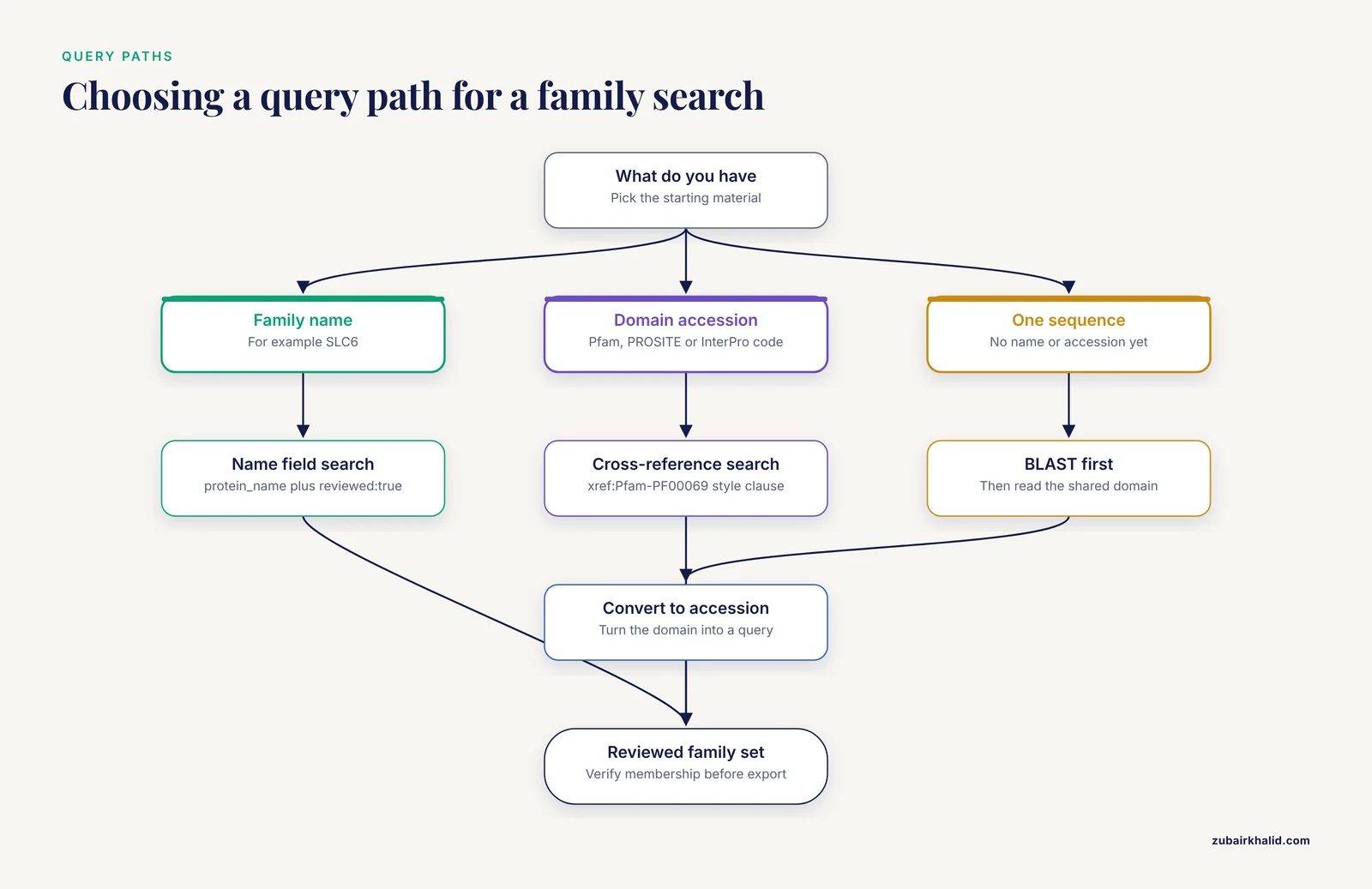
The right entry point depends on what you already know. Researchers studying how people use search systems have repeatedly found that most users submit short, simple queries and get mixed results, while structured queries retrieve more relevant sets when the user knows the query fields [6]. Web search research makes the same point from the other direction, that advanced query techniques dramatically improve precision for users who learn them [7]. Information access work in the biomedical domain specifically shows that bridging from free keyword queries to structured patterns is a general pain point, which is exactly the gap this section closes [8].
| Your starting point | Strategy | Query layer used | Precision |
|---|---|---|---|
| Family name you know (for example, SLC6) | Structured field search on gene or protein name plus reviewed filter | Cross-references, names | High |
| A domain accession from Pfam, PROSITE, or InterPro | Cross-reference field search | Cross-references | Highest |
| One member protein sequence | BLAST against UniProtKB, then extract common domain | Sequence similarity | High, needs confirmation |
| A short motif or conserved peptide | Peptide search or PROSITE pattern search | Motif matching | High for exact matches |
| Only a vague functional description | Full-text keyword search, then refine with filters | Annotation text | Low, iterate |
One rule applies to every strategy. Decide before you search whether you want reviewed entries only. For a first pass at a family, restrict to Swiss-Prot (reviewed:true). Once you trust your query, widen to TrEMBL to catch distant or recently sequenced members.
Step-by-Step: UniProt Protein Family Search on the Website
This walkthrough uses a concrete target, the human protein kinase family, because kinases are a large, well-curated family with a single defining Pfam domain. The same steps work for any family. Replace the domain accession and organism as needed.
Step 1. Open the correct search scope
Go to uniprot.org. The homepage offers several databases. Choose UniProtKB (the label reads "UniProtKB" or "Protein knowledgebase"). Searching "All" or UniParc at this stage mixes nucleotide-level and archived sequences into your results and makes family counts hard to interpret.
Step 2. Run a plain keyword search and inspect a representative entry
Type protein kinase into the search box and press Enter. You will get hundreds of thousands of hits, most of them unreviewed, because the words appear in almost every organism's gene repertoires. That result is not your answer. Its purpose is reconnaissance. Click any familiar reviewed entry, for example human SRC (accession P12931), and read three parts of the page:
- The Keywords section, which shows curator-assigned vocabulary.
- The Family and domain databases section, which lists the Pfam, PROSITE, and InterPro accessions assigned to this entry. Here you will find Pfam PF00069, the protein kinase domain.
- The Features table, which shows the domain boundaries in residue numbers.
This step gives you the machine-readable family identifier that every precise UniProt search for protein families is built on.
Step 3. Open the query builder and construct the core query
Click Advanced above the search box. The query builder lets you add field-value clauses. Build the following query, either through the builder menus or by typing it directly into the search box:
(reviewed:true) AND (organism_id:9606) AND (xref:Pfam-PF00069)Three fields do the work here, and each is defined below.
reviewed:truerestricts results to Swiss-Prot, the manually curated section. Every hit has been inspected by a curator.organism_id:9606restricts results to a taxonomy identifier (the NCBI taxonomy ID for human is 9606). If you want all mammals, all vertebrates, or all bacteria, apply the organism facet filter in the left sidebar instead, which expands to child taxa automatically.xref:Pfam-PF00069matches entries that carry a cross-reference to Pfam domain PF00069. This is the family-defining clause.
Step 4. Read the results the right way
The result count for this query lands in the low hundreds, which is consistent with the accepted size of the human kinome. Each row shows the accession (for example P12931), the entry name, protein names, gene names, organism, and length. Two quick quality checks:
- Confirm that the Reviewed column shows "Reviewed" for every row. If some rows say "Unreviewed", your query clause did not apply.
- Open one or two random entries and confirm the Pfam cross-reference PF00069 is actually listed. This takes ten seconds and catches clipboard typos in the domain accession.
If the count comes back suspiciously large, the usual cause is that the query was parsed as free text rather than field syntax. The next section covers this error in detail.
Step 5. Adjust the result columns and sort
Click Customize columns. For family work, useful columns are Accession, Protein names, Gene Names, Length, and the Domain subset of cross-references. Sort by length if you want to spot fragment entries, which are unusually short sequences flagged as fragments in their entry names or descriptions.
Step 6. Export the family set
Click Download. Choose a format and, where prompted, which columns to include.
- TSV (tab-separated values) for a gene list you will load into R, Python, or Excel.
- FASTA for sequences you will align, build a tree from, or feed to a motif tool.
- XML or JSON for programmatic processing with full annotation.
For the human kinome example, the FASTA download is on the order of a few hundred sequences and opens in any text editor. Each header line looks like this:
>sp|P12931|SRC_HUMAN Tyrosine-protein kinase Src OS=Homo sapiens OX=9606 GN=SRC PE=1 SV=2That header encodes the database section (sp for Swiss-Prot), accession, entry name, description, organism, and taxonomy ID. Most downstream tools parse it automatically.
Step 7. Save and share the query URL
The URL in your browser address bar encodes the entire query. Bookmark it or paste it into your methods section. Anyone opening that URL later reruns the same UniProt protein family search against the current release, which is how many published pipelines keep their protein sets reproducible.
UniProt Query Syntax for Family Work
The following worked examples cover the family search situations you will meet most often. Each block shows the query and what to expect. All of these run both in the website search box and in the REST API shown later.
All reviewed human members of a Pfam-defined family.
(reviewed:true) AND (organism_id:9606) AND (xref:Pfam-PF00069)A named transporter family, by curated protein name. The SLC6 family of amino acid transporters is a standard test case in disease-association research, which is why mutation databases draw SLC6 data directly from UniProt [2].
reviewed:true AND protein_name:"solute carrier family 6"Combine this with an organism clause as needed. Expect hits for SLC6A1 through the higher SLC6A numbers, the transporters that move amino acids and amino acid-like molecules.
A viral protein family across many species. Coronavirus spike proteins are the classic example, since cross-family vaccine design depends on aligning spike sequences from related viruses [3].
protein_name:"spike glycoprotein" AND reviewed:trueViral entries are curated much like cellular ones, and this query returns spike glycoproteins across coronavirus species that Swiss-Prot covers. Add an organism facet to narrow to a genus.
A family of unknown function. Domain-of-unknown-function (DUF) families have Pfam accessions like any other family, so the cross-reference syntax works identically. To find reviewed members of the DUF507 family, the family behind the O67633 structure study [5], look up its Pfam accession on the Pfam website and substitute it:
reviewed:true AND xref:Pfam-PFxxxxxAn enzyme class as a functional grouping. The EC (Enzyme Commission) field retrieves by reaction classification rather than ancestry, which sometimes overlaps a family and sometimes does not:
reviewed:true AND ec:2.7.11.1That accession is serine and threonine protein kinase activity. Use EC when your question is catalytic function, and Pfam or InterPro when your question is shared ancestry.
Combining clauses with Boolean logic. UniProt supports AND, OR, and NOT with parentheses for grouping, and case-sensitive uppercase operators are the safe convention:
(organism_id:9606) AND (xref:Pfam-PF00069 OR xref:Pfam-PF00330) NOT (reviewed:false)This retrieves human entries carrying either the protein kinase domain or the dehydrogenase domain PF00330, then drops any unreviewed stragglers. Think of each parenthesized clause as a filter that either unions or intersects with the others.
Step-by-Step: Command-Line Workflow with the UniProt REST API
Interactive searches are fine for exploration, but a UniProt protein family search you intend to publish should run from a script. UniProt provides a REST API (Representational State Transfer, a plain web interface where a URL is the command) that mirrors the website query language exactly.
Step 1. Query to TSV
curl -s "https://rest.uniprot.org/uniprotkb/search?query=(reviewed:true)+AND+(organism_id:9606)+AND+(xref:Pfam-PF00069)&format=tsv&fields=accession,id,protein_name,gene,length&size=500"Parameters that matter:
queryaccepts the identical syntax as the website, with+standing in for spaces.format=tsvreturns a tab-delimited table. Other options include fasta, xlsx, xml, and json.fieldsselects the columns, comma separated. Order in the URL is order in the output.sizesets rows per page, with 500 as the maximum for this endpoint.
Expected output begins like this, a header row followed by one line per protein:
Entry	Entry Name	Protein Names	Gene Names	Length
P12931	SRC_HUMAN	Tyrosine-protein kinase Src...	SRC	536
...
Step 2. Count the family
curl -s -o kinase_human.tsv -w "%{http_code}\n" "https://rest.uniprot.org/uniprotkb/search?query=(reviewed:true)+AND+(organism_id:9606)+AND+(xref:Pfam-PF00069)&format=tsv&fields=accession,id,protein_name,gene,length&size=500"
tail -n +2 kinase_human.tsv | wc -l
The -o flag writes the table to a file, -w "%{http_code}" prints the HTTP status so you can confirm 200, and the tail | wc -l combination counts data rows. For family sets larger than 500 entries, use the stream endpoint, which returns everything in one response:
curl -s "https://rest.uniprot.org/uniprotkb/stream?query=(xref:Pfam-PF00069)&format=fasta" > pf00069_all.fastaStep 3. Load the table in Python
import pandas as pd

df = pd.read_csv("kinase_human.tsv", sep="\t")
print(df.shape)
print(df.head())

df["length"].describe()
Typical output shows roughly 500 rows in the DataFrame for a capped search, with the length summary giving minimum, median, and maximum sequence lengths. A minimum length far below the family norm is your signal to check for fragment entries.
Step 4. Fetch sequences for the family
import urllib.request

query = "(reviewed:true) AND (organism_id:9606) AND (xref:Pfam-PF00069)"
url = ("https://rest.uniprot.org/uniprotkb/stream?"
       f"query={urllib.parse.quote(query)}&format=fasta")
urllib.request.urlretrieve(url, "human_kinases.fasta")
The FASTA file from this command feeds directly into Clustal Omega, MAFFT, HMMER, or any alignment and phylogeny pipeline. The same pattern underlies published proteome-scale motif workflows, where researchers map UniProt annotations against PROSITE patterns to find functional motifs across entire viral proteomes [9].
Verifying That Your Family Set Is Correct
A search returns proteins, but a family is a biological claim. Close the gap with three checks.
Check membership, not just retrieval. Open a handful of results and confirm the family-defining annotation appears on the entry itself, in the cross-references or the family comment line. Free-text queries in particular retrieve proteins that merely mention the family name.
Check coverage against an independent resource. If Pfam lists 500 human members of a family and your UniProt query returns 480 reviewed entries, the difference is usually entries where curators used a different or narrower classification. Browse the Pfam page for the accession and compare its UniProt tab against your export. Classification resources disagree at their edges, and knowing where they disagree is part of the result, not a failure.
Check for split or fragment genes. Sort your results by length and inspect the shortest entries. Fragments are legitimate records of partial sequences, but they can distort alignments and abundance counts if you treat them as full-length members.
If you started from a sequence rather than a name, run BLAST at uniprot.org/blast against UniProtKB, take the top hits, identify the domain they share via their InterPro annotations, and convert that domain accession into the cross-reference query above. This two-step path, similarity first and classification second, is how most de novo family searches should proceed. For alignment-heavy projects, an intermediate sanity check is to align the family sequences and confirm the conserved regions fall where the Features table says the domains are. That alignment-driven logic is exactly how the coronavirus spike study moved from retrieved UniProt sequences to a conserved epitope region [3].
Common Mistakes and Limitations
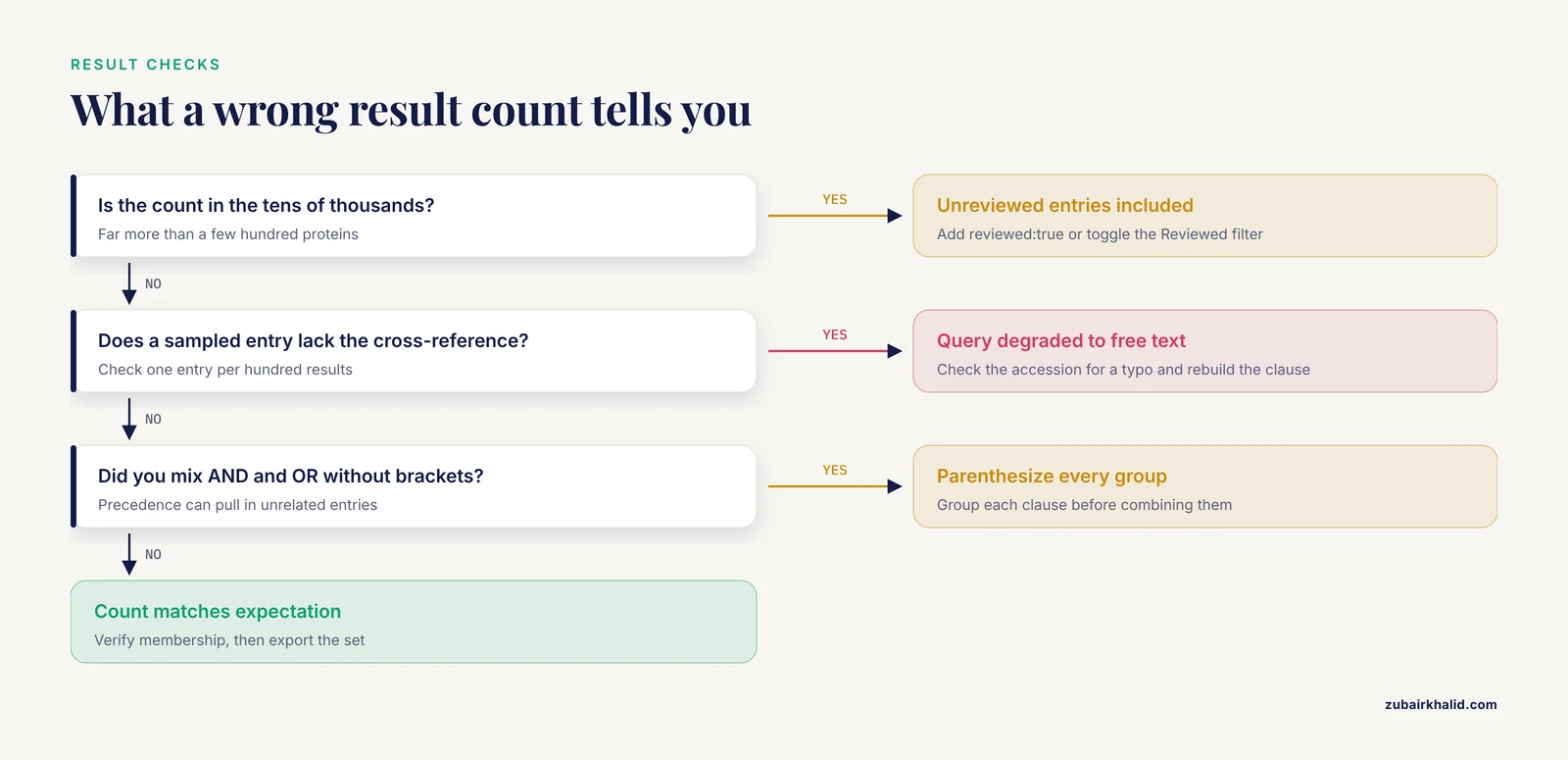
These are the errors that account for most failed or misleading family retrievals, with the exact symptoms you will see.
Confusing Swiss-Prot and TrEMBL. A full-text search across all of UniProtKB returns a wall of unreviewed TrEMBL entries where the family name appears in a predicted protein description. Symptoms are result counts in the tens of thousands for what should be a few hundred proteins. Fix: add reviewed:true, or toggle the Reviewed filter in the sidebar. Reviewed and unreviewed annotation differ in reliability, and for family membership the difference is often the difference between curator-verified and predicted.
Letting the query degrade to free text. If a field clause contains a typo, for example xref:Pfam-PF000699 with an extra digit, the search engine may treat the whole string as keywords rather than raising an error, and you get a broad full-text result. The website may show a notice that part of the query was not understood. Fix: check result counts against expectation, and verify one entry per hundred results carries the intended cross-reference. When the REST API receives genuinely malformed syntax it returns an HTTP 400 status with a JSON error message naming the problem, so scripted runs should always check the status code.
Using OR and AND without parentheses. Boolean precedence means a AND b OR c is not the same as a AND (b OR c). The first form can pull in every entry matching c regardless of your other filters. Fix: parenthesize every group, even when you think precedence is unambiguous.
Mistaking a protein family for a taxonomic family. A search for "coronavirus family" as free text can hit taxonomic descriptions, host-protein annotations about coronaviruses, and literature references, in addition to the viral spike or polymerase proteins you wanted [3]. Fix: search the protein name field (protein_name:"spike glycoprotein") rather than the words "coronavirus family", and constrain organism with facets if needed.
Assuming family names are unique strings. Short family names collide with gene symbols and organism names in full-text search. This is the same failure mode documented across web search research, where simple keyword queries retrieve noisy result sets because the engine matches terms, not concepts [6]. Fix: quote multiword names, use structured fields, and iterate. Starting from keywords and refining into structured patterns is a recognized strategy for making biomedical retrieval precise [8].
Downloading a whole proteome when you want a family. Selecting a proteome and filtering locally works, but it moves a filtering step into your own code where it can drift from the published query. Fix: express the family definition in the UniProt query itself so the retrieval is self-documenting and reproducible.
Ignoring the fact that UniProt is a snapshot. Entries, cross-references, and counts change with each release. A shared query URL reruns against current data, which is a feature for reproducibility but means last year's count and this year's count can differ. Cite the release version and date alongside your query in any methods section.
Treating classification boundaries as truth. Pfam, PROSITE, InterPro, and CATH each classify with different methods and thresholds, and a protein can sit in a family under one resource and not another. CATH-based work on function prediction exploits exactly these fine-grained functional families, and its authors note that the boundaries between FunFams carry real biological signal [4]. Fix: pick one classification resource as your primary definition, report it, and treat agreement across resources as a robustness check rather than a requirement.
Next Steps After You Have the Family
Once your family set is exported, the standard pipeline continues with a multiple sequence alignment, a phylogenetic tree to visualize subfamilies, and motif or domain analysis to connect conserved regions to function. UniProt annotations on each entry, especially the PROSITE pattern matches, give you candidate functional sites to test [9]. If your family feeds a disease or mutation project, UniProt's mutation and variant data integrate with external resources such as ClinVar, a pattern used in the SLC6 pathogenicity modeling work [2]. If your family includes poorly characterized members, the DUF literature is a reminder that structure prediction and crystallography can still resolve entirely novel folds for such entries [5].
Individual research questions vary, and the search you build here is the starting material, not the analysis. The retrieval step is where most downstream errors originate, so invest the ten minutes to verify membership before you align.
Frequently Asked Questions
What is the difference between Swiss-Prot and TrEMBL for a protein family search?
Swiss-Prot contains reviewed entries with manually checked annotation, while TrEMBL contains unreviewed entries with computational annotation. For family searches, start with reviewed:true because family membership is curator-verified there, then widen to TrEMBL if you need distant or newly sequenced members.
Can I search UniProt by Pfam domain?
Yes. Use the cross-reference field with the Pfam accession, for example xref:Pfam-PF00069, combined with reviewed:true and an organism_id clause to scope the search. This is the most precise way to retrieve a domain-defined family.
How do I download all sequences of a protein family?
Build the family query on the website or in the API, then use the Download button and choose FASTA, or use the REST stream endpoint with format=fasta. The stream endpoint returns the complete set in one response, which avoids pagination limits on large families.
What is the difference between a protein family and a domain?
A protein family is a set of proteins descended from a common ancestor, often across their full length, while a domain is a conserved structural or functional segment that can appear in many otherwise unrelated proteins. Domain accessions like Pfam PF numbers define many families in practice, but a family can also be defined by full-length similarity or curated annotation.
How do I find family members across many species?
Leave out the organism_id clause and instead use the organism facet in the web interface to select a taxonomic group such as vertebrates or bacteria, which includes child taxa. In the API, run the query without the organism restriction and filter by taxonomy afterward, or query per organism.
How do I search UniProt for a protein family when I only have a sequence?
Run BLAST at uniprot.org/blast against UniProtKB with your sequence, inspect the domain and family annotations on the top hits, then convert the shared Pfam or InterPro accession into a cross-reference query to retrieve the full family.
Are UniProt search URLs stable enough to share in a paper?
Yes. The query is encoded in the URL, and reopening it reruns the same search against the current release. Record the release version and date with the URL in your methods, since result counts can change between releases.
How current is the data in UniProt?
UniProt releases updates on a regular schedule, integrating new sequences and new computational and literature-based annotation. Check the release version shown on the site, and note that cross-references to family databases like Pfam and InterPro update on their own release cycles, which may lag or lead the UniProt release you are viewing.
Sources
- Screening and identification of protein interacting with goose astrovirus.
- ProteoMutaMetrics: machine learning approaches for solute carrier family 6 mutation pathogenicity prediction.
- Coronavirus epitope prediction from highly conserved region of spike protein.
- FunPredCATH: An ensemble method for predicting protein function using CATH.
- Crystal structure of domain of unknown function 507 (DUF507) reveals a new protein fold.
- An Investigation Into the Use of Simple Queries On Web IR Systems
- The Art of Effective Web Searching: Six Advanced Search Techniques That Will Help You Find the Best Results Faster
- Enriching Simple Keyword Queries for Domain-Aware Narrative Retrieval
- A bioinformatics pipeline to search functional motifs within whole-proteome data: a case study of poxviruses.