How to Find Peptide Annotations in UniProt
By Dr. Zubair Khalid, DVM, MS, PhD ·

By the end of this guide you will be able to locate peptide-level annotations inside UniProt protein entries, find every UniProtKB protein that contains a given peptide sequence, retrieve peptide feature annotations in bulk through the REST API, and mine peptide features from downloaded flat files with standard command-line tools. You will also know how to map your own mass spectrometry peptide list back onto UniProt sequences so that experimental identifications sit next to the curated annotations.
You need a web browser, Python 3.8 or later with the requests and pandas packages if you want the scripted workflows, and either a protein accession, a peptide sequence, or a list of peptide sequences to work with. Everything runs against the public UniProt service at https://www.uniprot.org/, so no local database installation is required unless you choose the bulk download route.
What Counts as a Peptide Annotation in UniProt
The phrase "peptide annotation" means two different things in UniProt, and knowing which one you need saves hours.
The first meaning is a peptide feature inside a protein entry. UniProtKB, the UniProt Knowledgebase, stores protein sequences together with functional annotations [1]. Among those annotations are feature lines of the type PEPTIDE, which mark the exact start and end coordinates of specific peptide sequences observed within the parent protein, usually derived from mass spectrometry evidence and linked to the publication that reported them. When someone says they are looking for peptide annotations in UniProt, they most often mean these positional features plus the related annotations such as modified residues and signal peptides that define peptide boundaries.
The second meaning is a peptide used as a query. UniProt provides a dedicated Peptide Search tool that retrieves every protein in the knowledgebase containing a short peptide sequence as an exact substring [2]. This is the reverse direction. You start from the peptide and ask which proteins contain it.
Both directions are supported and both are covered in the walkthroughs below. Understanding the scale of the resource helps set expectations. UniProtKB has grown to more than 227 million sequences, with a smaller core of expert-reviewed entries that carry detailed annotations extracted from the literature [3]. Expert curators manually annotate the reviewed Swiss-Prot section, while the much larger unreviewed TrEMBL section receives annotations from automated rule-based and machine-learning systems [1], [4]. Peptide-level features are far denser in reviewed entries than in unreviewed ones, so the first tip in this guide is to decide early whether you need the whole knowledgebase or only the curated subset.
How UniProt Stores Peptide Information
The structure of an entry
Every UniProtKB entry follows a standard layout. The entry page on the website organizes information under headings such as Function, Names and Taxonomy, Subcellular location, Sequence, and Features. The Features section is where peptide-level positional information lives.
Feature types relevant to peptides include:
- PEPTIDE, the exact coordinates and sequence of a peptide observed in the protein, typically by mass spectrometry.
- Signal, the signal peptide that is cleaved off before the mature protein circulates, which determines the numbering offset between the gene sequence and the processed product.
- Chain and Propeptide, defining mature protein boundaries.
- Modified residue, such as phosphorylation sites, which are the amino-acid-level annotations most proteomics workflows try to validate against UniProt [5].
- Variant and Alternative sequence (isoform), which change which peptides a given protein isoform can produce.
In the raw flat file, a peptide feature looks like this:
FT   PEPTIDE         414..427
FT                   /evidence="ECO:0000269|PubMed:12345678"
FT                   /note="Observed by MS"
The numbers are one-based inclusive coordinates in the canonical sequence shown in the entry. The evidence code follows the Evidence and Conclusion Ontology, and the PubMed identifier links to the source experiment.
Review status and annotation scores
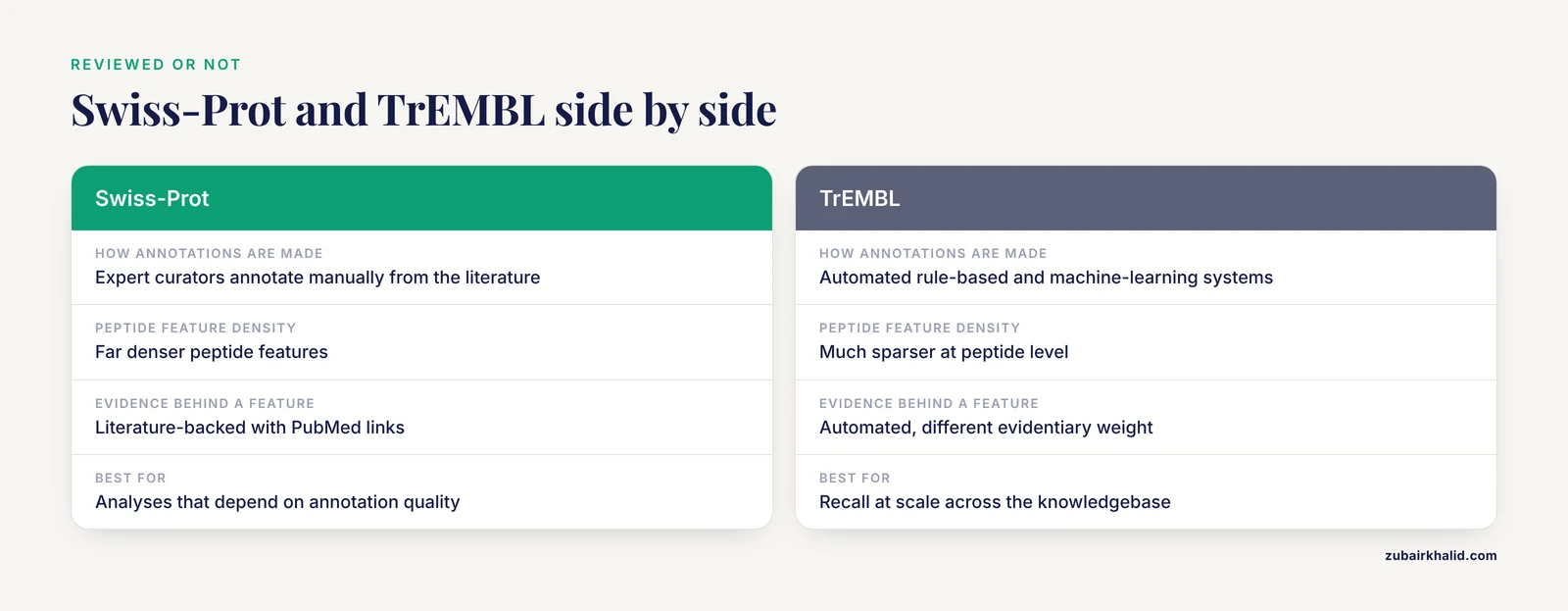
Each entry carries a review status flag, reviewed (Swiss-Prot) or unreviewed (TrEMBL), and an annotation score. The annotation score was introduced by the UniProt consortium as a summary measure of how much knowledge, both from the literature and from automated methods, exists for a given protein [6]. The score runs from 0 to 5. High annotation scores correlate with richer feature sections, so if you are sampling proteins to build a positive control set of peptide annotations, filter for high scores first.
Peptide information beyond the single entry
UniProt also supports retrieval patterns that go beyond one entry. The SPARQL endpoint exposes the knowledgebase as linked data with more than 22 billion triples, which allows complex graph queries across the whole database. The Retrieve/ID Mapping tool converts between UniProt accessions and identifiers from external databases so that peptide information can be joined to gene-level data [2]. And for visualization, tools such as AlphaMap read UniProt annotations and map experimental peptide identifications, including post-translational modifications, back onto the protein sequence for visual inspection [7]. The ProtGraph system goes further and represents proteins as graphs that include isoforms and annotated amino acid variations, expanding the peptide search space well beyond the canonical sequence [8].
Walkthrough 1: Find Peptide Features on a Single Protein Entry (Website)
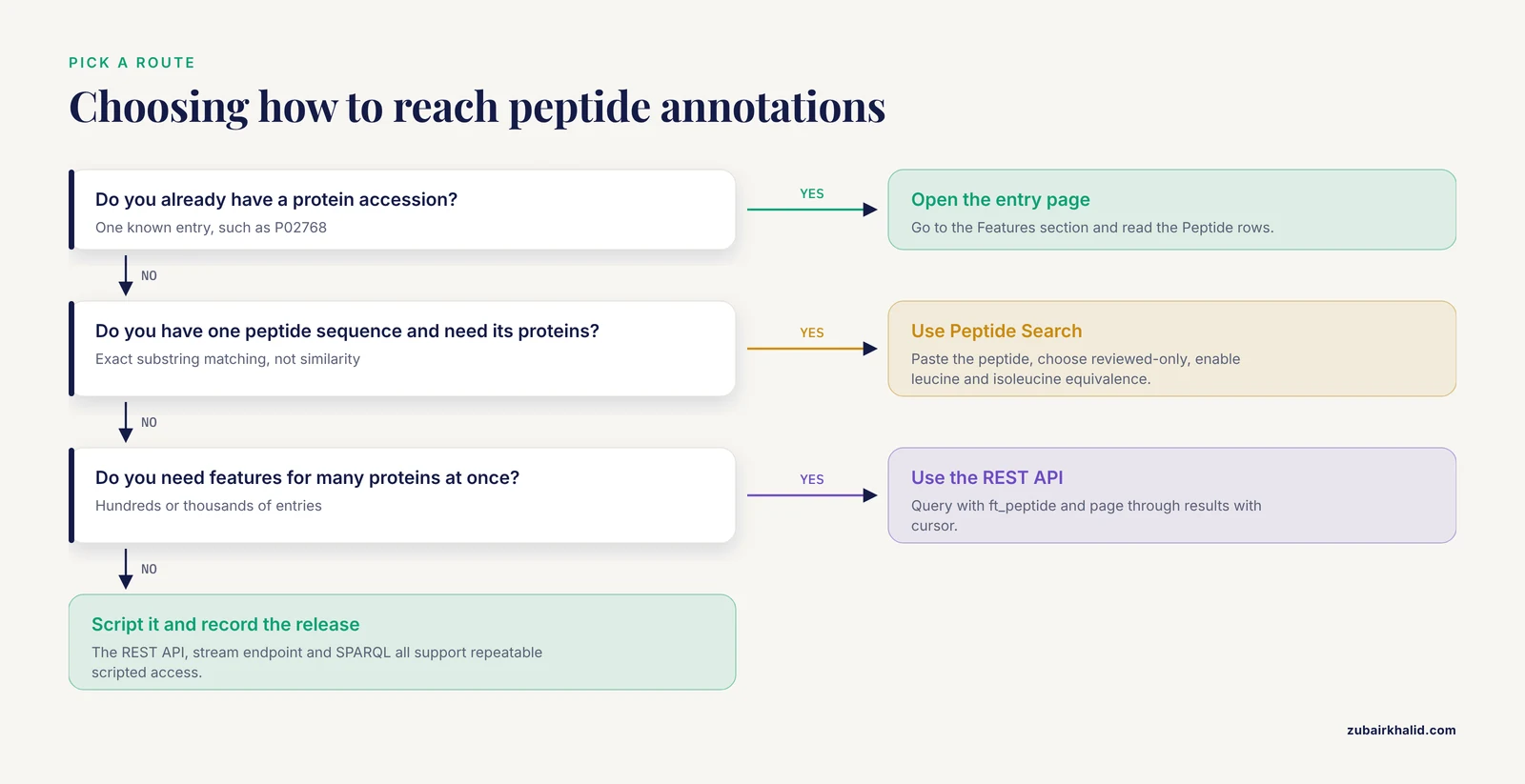
This is the fastest route when you have one accession. The example uses human serum albumin, P02768, one of the most heavily annotated entries in the database.
- Go to https://www.uniprot.org/ and type
P02768into the main search box. Press Enter. - Open the entry. The summary shows the protein name, organism, review status, and annotation score at the top.
- Scroll to the Features section, or click the Features heading in the left-hand table of contents on the new entry pages.
- Look for rows labeled Peptide. Each row gives the coordinates, for example
414 to 427, and hovering over it shows the source and evidence. Clicking a feature highlights the corresponding residues in the sequence viewer. - Check the Sequence section for the canonical sequence and any isoforms listed under "Alternative products". Peptide coordinates always refer to the canonical sequence unless the feature explicitly states an isoform.
- Note the signal peptide row if one exists. For P02768 the mature chain begins after residue 24, so any peptide coordinate above 24 in the canonical numbering also works as a coordinate in the mature protein numbering if you subtract 24. Confirm the exact offset from the Chain feature line rather than assuming it.
Expected result: a Features table containing at least one Peptide row with coordinates, evidence, and publication links. On very well-studied proteins you will also see dozens of modified residue rows that matter for interpreting peptide identifications.
How to check you did this right: cross-check one peptide coordinate manually. Copy residue 414 through 427 of the canonical FASTA sequence and confirm it equals the peptide sequence shown in the feature. This one-line check catches most coordinate-off-by-one errors before they propagate into downstream work.
Walkthrough 2: Peptide Search, Finding Proteins That Contain a Peptide
The Peptide Search tool is one of the four main tools UniProt provides on its website, alongside BLAST, Align, and Retrieve/ID Mapping [2]. It performs exact substring matching of your peptide against all stored sequences.
Worked example using a well-known albumin tryptic peptide, KVPQVSTPTLVEVSR:
- Go to https://www.uniprot.org/peptide-search.
- Paste
KVPQVSTPTLVEVSRinto the search box. - Choose the target section. Options let you restrict the search to reviewed Swiss-Prot entries or search the full knowledgebase. For a clean first pass, restrict to reviewed entries, then broaden if needed.
- Optionally enable the leucine and isoleucine equivalence option. Mass spectrometry cannot distinguish these two isobaric residues by ordinary fragment spectra, so the equivalence toggle makes the search return both interpretations.
- Run the search. The result page lists matching proteins with accessions, names, organisms, and the position of the match inside each sequence.
Expected output: a results table containing P02768 among the hits, with the peptide matched at its exact location in human serum albumin. The number of hits depends on your section restriction. Searching the full knowledgebase typically returns many more hits because the unreviewed TrEMBL section contains hundreds of millions of sequences [3], including many redundant or identical ones.
The same service is available programmatically. The peptide search REST service accepts parameters including the peptide list, the isoleucine and leucine equivalence flag (lEQi), and a Swiss-Prot-only flag (spOnly), and it runs as an asynchronous job you poll for completion. A minimal command-line example:
curl -s -D - "https://peptidesearch.uniprot.org/asyncrest?peps=KVPQVSTPTLVEVSR&lEQi=off&spOnly=off"The service responds with a job location header. Poll that location with curl until the results are returned as tab-separated output of accession and peptide position pairs. If the service interface has changed when you read this, the UniProt help documentation for Peptide Search carries the current parameters.
How to check you did this right: take the top hit, open its FASTA sequence, and search for your peptide as a literal substring. Exact matching means this verification always passes for a correct result.
Walkthrough 3: Bulk Retrieval of Peptide Feature Annotations with the REST API
When you need peptide features for hundreds or thousands of proteins, the website does not scale. UniProt exposes a REST search endpoint that returns chosen annotation fields in tab-separated format.
The key query field is ft_peptide, which corresponds to the PEPTIDE feature type. A query of (ft_peptide:*) selects entries that possess at least one peptide feature annotation.
Worked example, all reviewed human proteins carrying peptide features:
curl -s "https://rest.uniprot.org/uniprotkb/search?query=(organism_id:9606)%20AND%20(reviewed:true)%20AND%20(ft_peptide:*)&fields=accession,id,protein_name,ft_peptide&format=tsv&size=100"Parameters that matter:
| Parameter | Purpose | Notes |
|---|---|---|
query | Selects entries | Combine clauses with AND, OR, NOT. Use parentheses for nesting. |
fields | Columns returned | ft_peptide returns peptide features with coordinates and evidence. |
format | Output type | tsv for spreadsheets, json for scripts, txt for flat files. |
size | Page size | Maximum 500 per request. Page through with cursor. |
cursor | Pagination token | Copy the x-total-results and next cursor from the response headers. |
Expected output looks like this:
Entry	Entry Name	Protein names	Peptide
P02768	ALBU_HUMAN	Serum albumin (Allerg...	414..427 /note="..."; ...
Each peptide feature appears as a semicolon-separated group within the Peptide column, containing the coordinate range, note text, and evidence tags.
A Python version with pagination:
import requests

BASE = "https://rest.uniprot.org/uniprotkb/search"
query = "(organism_id:9606) AND (reviewed:true) AND (ft_peptide:*)"
params = {
    "query": query,
    "fields": "accession,id,protein_name,ft_peptide",
    "format": "tsv",
    "size": 500,
}
rows = []
cursor = None
while True:
    p = dict(params)
    if cursor:
        p["cursor"] = cursor
    r = requests.get(BASE, params=p, timeout=60)
    r.raise_for_status()
    lines = r.text.strip().split("\n")
    if cursor is None:
        header = lines.split("\t")
    for line in (lines[1:] if cursor is None else lines):
        if line.strip():
            rows.append(line.split("\t"))
    cursor = r.links.get("next", {}).get("url")
    if not cursor:
        break

import pandas as pd
df = pd.DataFrame(rows, columns=header)
print(df.head())
print(len(df), "entries with peptide features")
How to check you did this right: compare the row count for the reviewed-only query against the same query without reviewed:true. The unreviewed result should be larger, and every row in the reviewed result must show a peptide feature in the last column. An empty Peptide column means your field name or query is wrong, not that the protein lacks peptides.
Walkthrough 4: Download Flat Files and Mine Peptide Features on the Command Line
For reproducible pipelines, downloading data once and parsing locally avoids API flakiness. UniProt streams results directly:
curl -s "https://rest.uniprot.org/uniprotkb/stream?query=(reviewed:true)%20AND%20(organism_id:9606)&format=txt&compressed=true" -o human_reviewed.txt.gz
gunzip human_reviewed.txt.gz
Each entry in the flat file is a block of lines ending with //. Peptide features appear as FT PEPTIDE lines. Extract them together with their accessions:
grep -B 40 "FT PEPTIDE" human_reviewed.txt | awk '/^ID /{id=$2} /^FT PEPTIDE/{print id, $2, $3}'Expected output:
ALBU_HUMAN 414..427
ALBU_HUMAN 498..511
The grep -B approach works because feature lines follow the identifier line within the same entry block, and typical entries contain fewer than 40 lines before the first peptide feature. For entries with long feature sections before the peptide rows, raise the -B window or write a proper parser in Python, splitting the file on // and scanning each block.
Two practical notes. First, the knowledgebase grows by tens of millions of sequences in some years, so restrict downloads to the taxonomic or review subset you actually need rather than pulling all of UniProtKB [3], [1]. Second, flat files are stable and diff-able, which makes them the right format when a reviewer asks how your annotation set was derived.
Walkthrough 5: Map Your Own Peptide List onto UniProt Annotations
This is the most common practical scenario in proteomics. You have a list of identified peptides from a mass spectrometry experiment and you want the surrounding UniProt annotations: which protein, which coordinates, what is known about nearby residues.
Step 1, resolve protein accessions
If your search database used gene symbols or external identifiers rather than UniProt accessions, run the identifiers through the Retrieve/ID Mapping tool, which converts between UniProt accessions and identifiers from external databases [2]. The REST equivalent is the idmapping service. Keep the mapping file in your project archive, because identifier lifetimes differ across databases and unmapped identifiers are a standard source of silent data loss.
Step 2, fetch annotations for the matched proteins
Use the same REST search pattern from Walkthrough 3, this time selecting the fields you need:
import requests

fields = "accession,id,protein_name,ft_signal,ft_chain,ft_mod_res,ft_peptide,sequence"
accessions = ["P02768", "P02666", "P02775"]

for acc in accessions:
    url = f"https://rest.uniprot.org/uniprotkb/{acc}.json?fields={fields}"
    entry = requests.get(url, timeout=30).json()
    print(acc, entry.get("proteinDescription", {}).get("recommendedName", {}).get("fullName", {}).get("value"))
    for f in entry.get("features", []):
        if f["type"] in ("Signal", "Chain", "Modified residue", "Peptide"):
            print("  ", f["type"], f["location"]["start"]["value"], f["location"]["end"]["value"])
Expected output for P02768 includes the signal peptide at 1 to 24, the mature chain at 25 to 609, and any annotated peptide and modified residue features. The JSON structure mirrors the flat file feature types, so a single parser serves both.
Step 3, visualize peptide-level data in context
Rather than writing custom plotting code, AlphaMap provides a Python package and graphical interface that map identified peptides and their post-translational modifications onto the protein sequence together with UniProt annotations and expected proteolytic cleavage sites [7]. Install from the project repository with pip and pass your peptide list together with the matching UniProt accessions. Publication-quality sequence maps come out of the box.
Step 4, use peptide annotations to validate PTM calls
A concrete use case comes from combined top-down and bottom-up proteomics. The PTM-TBA pipeline integrates both mass spectrometry approaches with UniProt annotations and validated a substantial fraction of observed mass shifts by matching them to annotated PTMs in UniProt entries [5]. The general lesson transfers to any project: UniProt annotated modification sites serve as a positive control set, and peptides you observe near those sites gain credibility.
Step 5, annotate whole peptide sets functionally
If your starting point is a large set of proteolytic peptides rather than a single protein, tools built on top of UniProt annotations can summarize function. PANDORA maps input sets to proteins and integrates annotations from Gene Ontology, UniProt Keywords, InterPro, Enzyme, and taxonomy into a graph-based hierarchy, with statistical enrichment testing against defined background sets [9]. For peptide-derived drug and biomarker discovery this step turns a flat list of sequences into a ranked summary of biological themes.
Walkthrough 6: SPARQL for Graph-Style Queries
The SPARQL endpoint at sparql.uniprot.org lets you query UniProt as linked data. Use it when a tabular REST query cannot express the relationship you want, such as joining peptide-containing entries to cross-references or taxonomy in one round trip.
A simple worked query finds reviewed proteins whose sequence contains a given peptide:
PREFIX up: <http://purl.uniprot.org/core/>
PREFIX rdfs: <http://www.w3.org/2000/01/rdf-schema#>

SELECT ?protein ?sequence
WHERE {
  ?protein a up:Protein .
  ?protein up:sequence ?seq .
  ?seq rdf:value ?sequence .
  FILTER(contains(?sequence, "KVPQVSTPTLVEVSR"))
}
Run it at the endpoint or POST it from Python. Expect the query to be slower than the REST search for common peptides and to require the endpoint's pagination when result sets are large. Start every SPARQL development session with a taxonomy-restricted query so iteration stays fast.
Practical Tips for UniProt Peptide Annotations
These tips come up repeatedly in real projects.
Decide reviewed versus unreviewed first. Swiss-Prot entries carry expert curation and richer peptide evidence. TrEMBL carries automated annotations at scale. If your analysis depends on annotation quality rather than recall, restrict to reviewed:true, [4].
Use the annotation score to triage. When you need a representative set of well-annotated proteins, for example as a benchmark, sort or filter by annotation score [6]. Low-score entries often lack the very features you are searching for, so an absence of peptide annotations on a low-score entry may reflect limited knowledge rather than absent biology.
Exploit exact matching. Peptide Search is an exact substring search, not a similarity search [2]. For short exact queries it is both faster and more precise than BLAST. Switch to BLAST when the query is long, degenerate, or from a distant species.
Remember leucine and isoleucine ambiguity. Enable the equivalence option in Peptide Search whenever your peptide came from untargeted mass spectrometry, where these isobaric residues are indistinguishable in most collision-based fragmentation.
Account for processing events. Signal peptides, propeptides, and initiator methionines shift numbering between the gene-encoded sequence and the mature protein. Always read the Chain and Signal features before comparing UniProt coordinates to mass spectrometry coordinates or to positions reported in the literature.
Work at isoform level when it matters. Canonical sequences are convenient but incomplete. Peptide search space tools that include isoforms and annotated variants reveal peptides that canonical-only searches miss [8]. If your proteomics database searched isoform sequences, do your UniProt comparisons against the same isoform.
Treat annotations as living data. Gene Ontology annotations in particular change over time as the ontology and annotation sets evolve, and those changes can affect functional interpretation without meaning that earlier annotations were wrong [10]. Record the release version and retrieval date in your methods section so your results stay reproducible.
Automate for reproducibility. The REST API, the stream endpoint, and SPARQL all support scripted access. A short Python script with a recorded release date beats a copy-paste from the website for anything you will repeat.
The following table summarizes the access routes:
| Method | Best for | Output | Key parameter |
|---|---|---|---|
| Website entry view | One accession | Interactive feature table | Features section |
| Peptide Search (web) | One peptide, many proteins | Hit table with positions | Reviewed-only toggle |
| Peptide Search REST | Scripted peptide queries | Accession and position pairs | peps, lEQi, spOnly |
| REST search | Bulk feature retrieval | TSV or JSON columns | query, fields=ft_peptide |
| Stream download | Reproducible local pipelines | Full flat files | format=txt |
| SPARQL | Relational graph queries | Arbitrary result sets | Endpoint at sparql.uniprot.org |
Common Mistakes and Limitations
Mistake 1, assuming every observed peptide is annotated. UniProt curates from the literature, and curation of the reviewed core is continuous but selective [11]. A peptide observed in one paper may not appear as a PEPTIDE feature, especially on unreviewed entries. Absence of annotation is not evidence of absence. For your own proteomics results, your experimental evidence is the primary record and UniProt is the context layer.
Mistake 2, confusing peptide features with PTM annotations. The PEPTIDE feature records that a peptide region was observed. It does not itself record post-translational modifications, which live in separate Modified residue and Cross-link features. Projects that conflate the two misinterpret both. When validating PTMs, query ft_mod_res as well as ft_peptide.
Mistake 3, mixing coordinate systems. UniProt coordinates refer to the canonical sequence as displayed. Proteomics software often reports positions in the mature protein, in a specific isoform, or after in silico cleavage that removes the initiator methionine. The mismatch is the single most common cause of "the annotation is wrong" bug reports, when in fact the offset is. Recompute offsets from the Signal and Chain features every time.
Mistake 4, over-trusting unreviewed annotations. TrEMBL annotations are generated by automated systems including rule-based propagation and machine-learning annotators [4], [12]. They are useful at scale but carry different evidentiary weight than literature-backed Swiss-Prot annotations. Check evidence codes on any annotation that drives a conclusion.
Mistake 5, ignoring redundancy. A large fraction of UniProtKB sequences arise from genome sequencing projects, and many are identical to existing sequences [6]. Peptide searches against the full knowledgebase return redundant hits that can inflate apparent support for a peptide. Collapse hits by identical sequence or restrict to reference proteomes before counting.
Mistake 6, treating the knowledgebase as static. Entries, ontology mappings, and annotation sets change between releases, and Gene Ontology annotations in particular evolve as quality assurance improves them [10]. Pin your analyses to a named release.
Limitation, functional context for bioactive peptides. UniProt annotates the parent protein, not the bioactivity of every proteolytic fragment. Bioactive peptide research, for example on milk-derived peptides with antioxidant or antihypertensive properties, typically combines UniProt sequence context with specialized prediction databases and literature review [13]. Expect UniProt to supply sequence coordinates and parent function, and expect specialized databases to supply fragment-level bioactivity claims.
Limitation, complex search space exploration. When you need the peptide space implied by isoforms, variants, and other features rather than canonical sequences, the REST search and flat files become awkward. Graph-based representations such as ProtGraph are designed for that exploration and can filter the expanded search space by peptide mass [8].
Frequently Asked Questions
What is the difference between a peptide annotation and a peptide search in UniProt?
A peptide annotation is a PEPTIDE feature inside a protein entry that marks the coordinates of an observed peptide. A peptide search is the reverse operation, where you supply a peptide sequence and UniProt returns every protein that contains it as an exact substring [2].
How do I find all UniProt proteins that contain a specific peptide sequence?
Use the Peptide Search tool on the UniProt website or its REST service. Paste the peptide, choose reviewed-only or the full knowledgebase, and enable the leucine and isoleucine equivalence option if the peptide came from mass spectrometry [2].
Where in a UniProt entry do I find peptide features?
Open the entry and go to the Features section. Peptide rows show coordinate ranges, notes, and evidence links, and clicking one highlights the corresponding residues in the sequence viewer.
Does UniProt peptide search cover unreviewed TrEMBL entries?
Yes, unless you restrict it. The default full search covers the entire knowledgebase, which now exceeds 227 million sequences, while a toggle restricts results to reviewed Swiss-Prot entries [3].
How can I download peptide annotations in bulk?
Use the REST search endpoint with fields=ft_peptide for tabular output, or the stream endpoint with format=txt for complete flat files you can parse with grep or a Python script.
Why do peptide coordinates in UniProt differ from my mass spectrometry numbering?
UniProt coordinates refer to the canonical gene-derived sequence, while experimental numbering often refers to the mature protein after signal peptide removal or to a specific isoform. Recompute the offset from the Signal and Chain features in the entry.
Can UniProt tell me if a peptide is bioactive?
UniProt annotates the parent protein's function, not fragment-level bioactivity. For bioactive peptide properties such as antioxidant or ACE inhibitory activity, combine UniProt sequence context with specialized prediction tools and literature [13].
Is there an API for UniProt peptide search?
Yes. The peptide search REST service accepts parameters including the peptide list, the isoleucine and leucine equivalence flag, and a reviewed-only flag, and returns results asynchronously. Check the UniProt help documentation for the current endpoint details [2].
Sources
- The Universal Protein Resource (UniProt)
- UniProt Tools: BLAST, Align, Peptide search and ID mapping
- UniProt: the Universal Protein Knowledgebase in 2023
- UniProt: a worldwide hub of protein knowledge
- Characterization of proteoform post-translational modifications by top-down and bottom-up mass spectrometry in conjunction with UniProt annotations
- UniProt: a hub for protein information
- AlphaMap: an open-source Python package for the visual annotation of proteomics data with sequence-specific knowledge
- ProtGraph: a tool for the quick and comprehensive exploration and exploitation of the peptide search space derived from protein sequence databases using graphs
- PANDORA: analysis of protein and peptide sets through the hierarchical integration of annotations
- Understanding how and why the Gene Ontology and its annotations evolve: the GO within UniProt
- UniProt: the Universal Protein Knowledgebase in 2025
- UniProt: the universal protein knowledgebase in 2021
- Functional attributes of bioactive peptides of bovine milk origin and application of in silico approaches for peptide prediction and functional annotations