How to Find a Specific Protein Isoform in UniProt
By Dr. Zubair Khalid, DVM, MS, PhD ·

By the end of this guide you will be able to take a gene symbol, run a UniProt isoform search that narrows to one reviewed entry for your organism, read that entry's isoform table, decide which isoform matches your experiment, and export exactly that sequence in FASTA format. You will also be able to do the same job from a terminal against the UniProt REST API, and to pull every reviewed isoform sequence for offline work.
Here is what to have on hand. A browser covers the main walkthrough. For the command-line sections, install curl and jq (one package-manager command each on Linux and macOS, and both work under Windows Subsystem for Linux), plus the gzip, grep, and awk utilities that already ship with those systems. Everything runs against the public UniProt website and API, so no accounts or credentials are needed.
A short definition set before the walkthrough. An isoform is one of several distinct protein sequences produced from a single gene, most often through alternative splicing. UniProt stores all isoforms of a given protein inside one entry, headed by a canonical sequence, which is the representative sequence UniProt shows by default. Every isoform carries an isoform ID built from the entry accession plus a number, for example P14618-2, where P14618 is the accession of human pyruvate kinase PKM. Treat this article as a focused UniProt database tutorial for one specific job: going from a gene name to a verified isoform sequence you can cite.
How to Use UniProt: the Parts That Matter for Isoform Work
UniProt, maintained by the UniProt Consortium, is the reference protein knowledgebase used across molecular biology. Its core is UniProtKB, the UniProt Knowledgebase, which comes in two layers. Swiss-Prot holds reviewed entries, meaning human curators have worked through the literature and experimental data and attached evidence to the annotations. TrEMBL holds unreviewed entries, annotated computationally from coding sequences submitted to the nucleotide archives. Both layers live at uniprot.org and share the same search interface.
Around UniProtKB sit companion databases you will see in menus. UniParc is a sequence archive that keeps every distinct protein sequence ever loaded, UniRef clusters similar sequences to speed up large searches, and the Proteomes section organizes entries by complete genome sets. For isoform work you will touch UniProtKB almost exclusively.
Inside a UniProtKB entry, isoforms live in one place. The entry carries an alternative-products block that lists each named isoform with an isoform ID, a name, synonyms, and notes on what makes it different from the canonical sequence. The features table adds one row per changed segment under the feature type Alternative sequence. Nothing about an isoform lives in a separate entry, and that is the single most important structural fact for this task.
Search behavior matters too. Analyses of web search transactions consistently show that most people issue short, simple keyword queries rather than fielded or Boolean ones [1]. On a general web engine that habit costs a little accuracy. On UniProt it buries the entry you want under thousands of unreviewed fragments from other species, because a bare keyword matches any text containing that string. Advanced search interfaces exist to solve exactly this problem by exposing the structured fields behind a database [2], and building custom query interfaces for structured collections has a long history in information retrieval [3]. UniProt supports both routes: a query builder in the web interface, and a typed query syntax that works in the search box and the API alike.
Step-by-Step: A UniProt Isoform Search for Human PKM
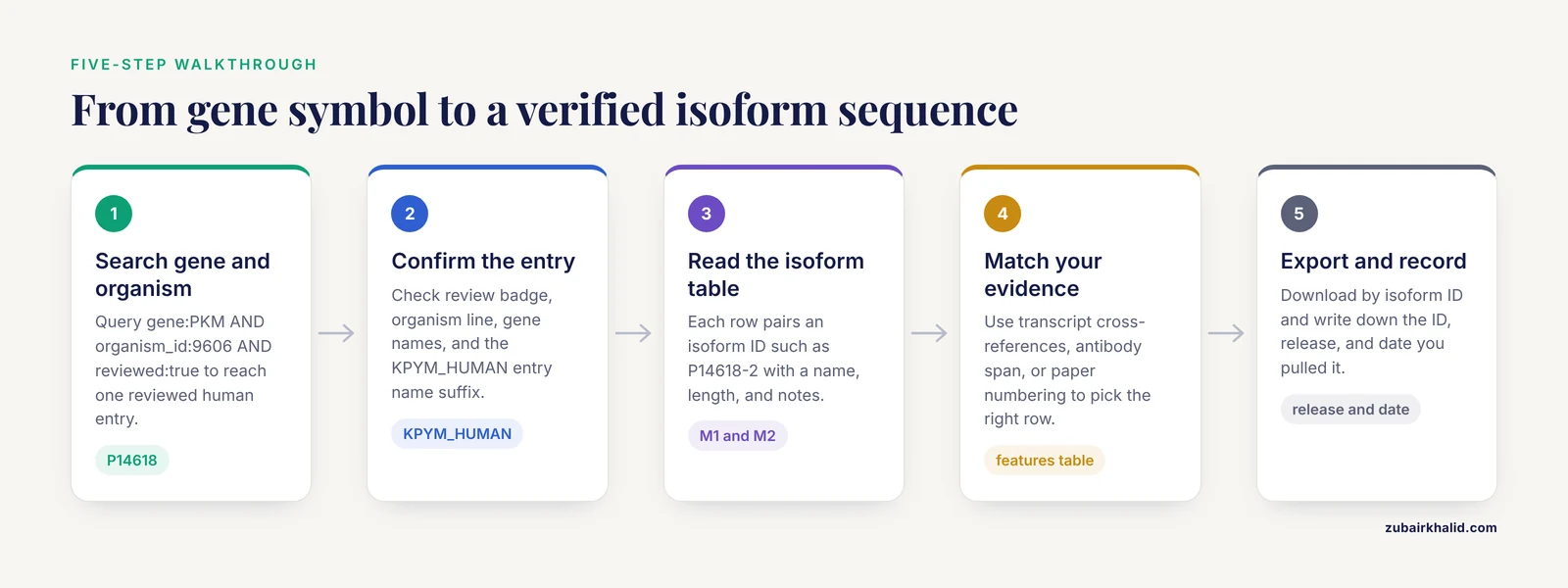
The walkthrough uses human pyruvate kinase, gene symbol PKM, because its two main isoforms are famous, differently regulated, and easy to confuse. The same five steps work for any gene in any organism.
Step 1. Search the gene and organism, not the isoform name
Open https://www.uniprot.org and type this into the main search box:
gene:PKM AND organism_id:9606 AND reviewed:trueEach clause does one job:
- gene:PKM restricts the search to the gene name field, so you stop matching proteins that merely mention PKM in a description.
- organism_id:9606 restricts to one species. The number 9606 is the NCBI taxonomy identifier for Homo sapiens, and UniProt indexes a taxonomy ID for every entry.
- reviewed:true restricts results to Swiss-Prot, the manually reviewed layer of UniProtKB.
- AND combines clauses. UniProt expects operators in uppercase. Lowercase and is treated as a search term rather than an operator, which silently wrecks the query.
Expect a short result list with exactly one reviewed human entry, Pyruvate kinase PKM, accession P14618, entry name KPYM_HUMAN. If you see hundreds of hits, a clause is missing. If you see none, check field spellings and operator case.
There is a reason to start from the gene rather than the isoform. Names like PKM2 are synonyms and literature conventions, and free-text search matches them inconsistently. Research on information access in the biomedical domain finds that structured query patterns are powerful but hard for users to write from scratch, and that a workable strategy is to begin with a keyword query and refine it into structured clauses [4]. The three-clause query above is exactly that kind of refinement.
Step 2. Confirm the entry is the one you meant
Before trusting the entry, confirm four things on its page.
First, the review status badge at the top. Reviewed means Swiss-Prot. Unreviewed means TrEMBL. If your search returned an unreviewed entry while a reviewed one exists, you picked a redundant or fragmented record.
Second, the organism line. Gene symbols collide across species, and PKM in mouse is not the record you want when your experiment ran in human cells.
Third, the gene names line, which lists the primary symbol plus synonyms. This helps when older papers use different names for the same gene.
Fourth, the entry name, KPYM_HUMAN here. UniProt entry names carry a species suffix such as _HUMAN, _MOUSE, or _YEAST, which gives you a fast visual check. Entries also carry a protein-existence evidence level, from experimental protein-level evidence down to predicted-only, so you can see how firmly the protein itself is established.
Paralogs are the other trap. The gene PKLR encodes the liver and red blood cell pyruvate kinase, a related but distinct protein with its own entry. If a search for PKM surfaces PKLR through shared description words, tighten the query with gene_exact:PKM, which matches the symbol exactly.
Step 3. Read the isoform table
Scroll to the Sequence section of the entry and open the Isoforms table, which presents the alternative products of the entry. Each row pairs an isoform ID such as P14618-1 or P14618-2 with a name (M1, M2), any synonyms, the sequence length, notes, and the features that differ from the canonical sequence. One row carries the canonical flag, and the default FASTA download always returns that sequence.
For PKM the table lists two named isoforms. M1 is the typical form of adult muscle and brain, with high constitutive activity. M2 predominates in fetal tissue and proliferating cells, is allosterically regulated, and is the form central to tumor metabolism. The two sequences come from mutually exclusive exons, so they differ over one segment while sharing everything else.
Here is the detail that trips people up. M1 and M2 have the same length, because the alternative exons encode segments of equal size. Length alone cannot tell them apart. You must match by name, by the changed segment, or by the exact isoform ID.
Contrast that with BCL2L1, accession Q07817, which encodes Bcl-xL and the shorter Bcl-xS. There the isoforms differ by a deletion, the lengths differ, and the functions pull in opposite directions, with Bcl-xL protecting cells from apoptosis and Bcl-xS promoting it. Reading the notes column is what saves you in both cases, because the table states what each isoform is and where it differs.
Step 4. Match the isoform to your evidence
Decide which row is yours using the evidence you actually hold.
If your source is a transcript, use the entry's cross-references to Ensembl and RefSeq and match the transcript or protein identifier against the isoform notes. The notes state which segments change, which is usually enough to connect a transcript to an isoform.
If your source is an antibody or a construct, match the sequence span. The features table lists each changed segment with its boundaries on the canonical sequence, and the isoform table records which features apply to which isoform. An antibody raised against residues inside a segment that only M2 contains is an M2 reagent.
If your source is a paper, check the numbering frame. UniProt positions features on the canonical sequence. Papers frequently number residues within a specific isoform, and when an isoform carries deletions the two frames drift apart. To convert, walk the isoform-specific segments listed in the features table and add the length of any canonical segment that sits upstream of your residue but is absent from your isoform. Doing this arithmetic once, with the entry open, beats guessing.
Finally, skim the literature linked from the entry. Curators attach references to isoform evidence, and those papers usually describe the biological distinction you are relying on.
Step 5. Export the sequence and record what you used
Take the sequence away in the form your downstream tool needs.
For the canonical sequence, use the Download control on the entry page or the REST URL shown in the next section. The FASTA header identifies the entry and the sequence version.
For one specific isoform, use its isoform ID directly. UniProt treats isoform IDs as addresses, so https://www.uniprot.org/uniprotkb/P14618-2 resolves to the entry with that isoform in view, and the isoform table links each row to its sequence.
For many isoforms at once, skip the website and pull the reviewed isoform FASTA file described in the command-line section below.
Whichever route you take, write down three things: the isoform ID, the UniProt release shown in the website footer, and the date you pulled it. UniProt releases updates roughly every two weeks, and a result that cannot be traced to a release is hard to reproduce.
UniProt Isoform Search Tips: Query Syntax That Pays Off
The three-clause query from Step 1 generalizes. Exact-phrase quoting, field restriction, and nested Boolean logic are standard tools of advanced database searching [5], and Boolean combinations of keywords remain the backbone of formal query languages across information systems [6]. UniProt implements all of them in one syntax that works in the web search box and in the REST API.
| Clause | What it does | Example |
|---|---|---|
| , - | , - | , - |
| reviewed:true | Limits results to manually reviewed Swiss-Prot entries | reviewed:true |
| organism_id:9606 | Limits to one species by NCBI taxonomy ID (9606 is human) | organism_id:9606 |
| gene:PKM | Matches the gene name field | gene:PKM |
| gene_exact:PKM | Matches the gene symbol exactly | gene_exact:PKM |
| protein_name:"pyruvate kinase" | Matches an exact phrase in protein names | protein_name:"pyruvate kinase" |
| accession:P14618 | Looks up a specific accession | accession:P14618 |
| length:[500 TO 560] | Limits sequence length to a range | length:[500 TO 560] |
| AND, OR, NOT | Combine or exclude clauses (uppercase) | gene:PKM AND organism_id:9606 |
| ( ... ) | Groups clauses to control precedence | (gene:PKM OR gene:PKLR) AND organism_id:9606 |
Three habits produce most of the gains. Quote multiword names, because unquoted pyruvate kinase matches entries containing either word anywhere. Group clauses with parentheses whenever you mix AND and OR, because operator precedence surprises are common. Prefer taxonomy IDs over species names, because organism text varies while the ID never does.
If you prefer menus to syntax, the query builder behind the filter controls on the results page assembles the same clauses for you. Build one search with the builder, inspect the query string it produces in the results URL, and you will be typing the syntax directly within a few sessions.
Command-Line Workflow: The UniProt REST API and the Isoform FASTA File
Everything the website does is also available over the UniProt REST API, a plain HTTP interface that returns JSON, TSV, FASTA, or flat text. The commands below assume a POSIX shell (Linux, macOS, or Windows Subsystem for Linux) with curl and jq installed.
List the isoforms of one entry
curl -s "https://rest.uniprot.org/uniprotkb/P14618.json" |
  jq -r '.comments[]
        | select(.commentType == "ALTERNATIVE PRODUCTS")
        | .isoforms[]
        | "\(.id)\t\(.name)"'
Expected output, with names and IDs exactly as the current entry lists them:
P14618-1	M1
P14618-2	M2
The .comments array holds the entry's annotation blocks, the filter picks the alternative-products block, and .isoforms lists every named isoform with its ID. Treat the pairing of names to IDs as something you read from the data rather than assume, because isoform numbering follows the entry's internal order, not any external convention.
To see the sequence differences themselves, list the Alternative sequence features:
curl -s "https://rest.uniprot.org/uniprotkb/P14618.json" |
  jq -r '.features[]
        | select(.type == "Alternative sequence")
        | "\(.description)\t\(.location.start.value)-\(.location.end.value)"'
This prints one line per changed segment, with the isoform it belongs to and the segment boundaries on the canonical sequence. Lined up against the isoform table on the website, the two views should agree.
Search UniProtKB from the terminal
curl -s "https://rest.uniprot.org/uniprotkb/search?query=(gene:PKM)+AND+(organism_id:9606)+AND+(reviewed:true)&format=tsv&fields=accession,id,protein_name,organism_name,length"Expected output:
Entry	Entry Name	Protein Names	Organism	Length
P14618	KPYM_HUMAN	Pyruvate kinase PKM	Homo sapiens	531
Parameters that matter:
- query takes the same syntax as the website search box, URL-encoded with plus signs for spaces.
- format accepts tsv, json, fasta, list, and others. list returns bare accessions, which is convenient for feeding a downstream loop. fasta returns the sequences of the whole result set.
- fields selects the columns for tabular output. Field names must match UniProt's vocabulary exactly, and a wrong field name is the usual cause of an empty or failed response.
- Large result sets arrive in pages. Follow the link header marked rel="next" to walk the full set instead of raising the page size blindly. For heavy bulk work, use the stream endpoint and keep request rates modest, since the service is shared public infrastructure.
A classic shell error comes from leaving the URL unquoted. Spaces split the command into separate arguments, and curl tries to resolve a host named AND:
curl: (6) Could not resolve host: ANDQuote the whole URL and the error disappears. A malformed query clause, meanwhile, returns an HTTP 400 response with a messages array pointing at the invalid part, which is your cue to check field names and operator case.
Download every reviewed isoform sequence for offline work
UniProt publishes a dedicated FASTA file of the isoform sequences annotated in reviewed entries:
curl -O "https://ftp.uniprot.org/pub/databases/uniprot/current_release/knowledgebase/complete/uniprot_sprot_varsplic.fasta.gz"
gunzip uniprot_sprot_varsplic.fasta.gz
Enumerate the isoforms of your protein:
grep -F
## Common Mistakes in a UniProt Isoform Search and How to Fix Them
Most failed isoform lookups fail in one of a small number of predictable ways. Walking through each failure mode once will save you hours later, and knowing the fix matters as much as knowing the diagnosis.
**Mistake 1: Searching the isoform name instead of the gene.** Typing PKM2 into the search box runs a free-text match against every field of every entry. You will get the human entry, the mouse entry, entries that cite PKM2 in a description, and unreviewed fragments from genome projects. The isoform nickname is a literature convention, not a database key. The fix is to anchor on the gene symbol and taxonomy ID, then read the isoform table from the single reviewed entry, as the walkthrough in this guide shows.
**Mistake 2: Trusting the first hit.** UniProt ranks results by relevance, and a fragment entry from an unreviewed genome annotation can outrank the curated record. Always check the review badge, the organism line, and the entry name suffix before reading anything else. If two entries look similar, the reviewed one with the fuller isoform table is the one to work from.
**Mistake 3: Assuming isoform numbers are universal.** The number in P14618-2 is assigned by UniProt curators for that entry, in the order the curators listed the isoforms. It has no relationship to exon numbering, to RefSeq variant numbering, or to the numbering a paper uses. Two databases can describe the same protein with entirely different isoform labels. Never cite an isoform number alone; cite the full isoform ID with its accession.
**Mistake 4: Using length to identify an isoform.** As the PKM example shows, two biologically very different isoforms can have identical lengths. Length is a weak discriminator. Match by isoform ID, by name, or by the exact changed segments listed in the features table.
**Mistake 5: Writing lowercase Boolean operators.** UniProt treats `and` as a search term, not an operator, so `gene:PKM and organism_id:9606` silently becomes a query for entries containing the literal word "and". The symptoms are subtle: you get hits, but the wrong ones, and the count is inflated. Uppercase AND, OR, and NOT, every time.
**Mistake 6: Quoting mistakes in phrase searches.** Unquoted multiword terms match entries containing any of the words anywhere. Quote them: `protein_name:"pyruvate kinase"`. Conversely, do not quote single field values where quoting is unnecessary, because it adds visual noise without changing semantics.
**Mistake 7: Confusing paralogs with isoforms.** PKM and PKLR are different genes with different entries. An isoform is always within one entry. If your results include a related gene, add `gene_exact:` for the symbol or wrap alternatives in parentheses, for example `(gene:PKM OR gene:PKLR) AND organism_id:9606`, when you actually want both.
**Mistake 8: Skipping the evidence check on the isoform itself.** A named isoform in the table may rest on mRNA evidence, on protein-level evidence, or only on prediction. The notes column and the linked references state which. If your experiment depends on the isoform existing in your sample, read that evidence before you design primers or order an antibody.
A habit that prevents most of these: after every search, spend thirty seconds confirming entry, organism, review status, and isoform ID before touching the sequence. That checkpoint catches nearly every error downstream.
## What the Canonical Sequence Is and What It Is Not
The canonical sequence causes more confusion than any other part of an entry, so it deserves a precise definition and a list of things it is not.
The canonical sequence is the representative sequence UniProt displays by default and the one the standard FASTA download returns. Curators choose it, typically the longest or the most biologically significant isoform, and the alternative-products block defines every other isoform relative to it. Every feature position in the entry, including phosphorylation sites, domains, variants, and the Alternative sequence rows themselves, is expressed on the canonical coordinate frame.
What the canonical sequence is not:
**It is not necessarily the most common isoform.** The canonical row is a curation choice, not a statement about abundance in any tissue. For PKM, do not assume the canonical sequence is M1 or M2 based on biology; read the table and the notes.
**It is not the "wild type".** Wild type is a population or reference-genome concept. The canonical sequence is one curated isoform of one entry. Disease variants listed in the entry sit on the canonical frame, which is a separate question from which isoform a paper studied.
**It is not necessarily complete in the proteomics sense.** Some canonical sequences are shorter than the full translation because curators trim uncertain terminal regions or annotate them separately as chain or transit-peptide features. If a construct you are comparing was designed from a [nucleotide sequence](/knowledge/molecular-biology/nucleotide-sequence), translate it and align rather than assume the lengths should match.
**It is not stable across releases in principle.** Curators can revise the canonical choice, renumber isoforms, or add isoforms as new evidence arrives. Sequences carry version numbers precisely so that a change is visible. The practical consequence: if you downloaded a FASTA two years ago, re-verify before reusing it, and record the release with every download.
A useful mental model is that the canonical sequence is the coordinate system and the isoforms are documented edits of it. When you read "Missing 12 to 30" in the features table, that is a deletion expressed in canonical coordinates. When an isoform row says it differs from the canonical sequence at certain positions, the features table is where the exact boundaries live. Holding this frame in mind makes the rest of the entry readable, because every annotation speaks canonical coordinates by default.
One more consequence for scripting: if you fetch a sequence by accession alone, you get the canonical sequence. If you fetch by isoform ID, you get that isoform. Code that silently treats those two as equivalent will occasionally, and quietly, produce the wrong protein.
## Reading the Features Table: Alternative Sequence Rows in Detail
The isoform table tells you what exists. The features table tells you exactly how each isoform differs from the canonical sequence, and learning to read it precisely is what separates a confident isoform assignment from a guess.
Each Alternative sequence row carries a description, a position range on the canonical sequence, and a note of which isoforms the change applies to. The description vocabulary is small and worth memorizing:
- **Missing** means the segment is deleted in the listed isoform. Bcl-xS relative to the canonical Bcl-xL is this pattern: an internal deletion, which is why the lengths differ and why downstream residue numbering drifts.
- **VARS_0, VARS_1, and similar identifiers** label alternative sequence segments, meaning one block of residues is substituted by another block of different sequence. PKM uses this pattern: the mutually exclusive exon segments swap, the lengths match, and the substitution is annotated as a replaced segment.
- **Var seq** annotations in the flat-file view mark the same structure in a different notation.
Three reading rules prevent most errors. First, positions are always canonical-frame positions, so a row that says Missing 12 to 30 describes residues 12 through 30 of the canonical sequence, not of the isoform. Second, a single isoform can be assembled from several rows: one isoform might have a substitution plus a deletion plus an insertion elsewhere, so read all rows that name your isoform, not just the first. Third, rows that name no isoform apply to all, which usually indicates the default assembly.
For PKM, the features table approach is the cleanest way to see why the two isoforms confuse people. The alternative segments cover one exon-encoded block, the two versions have equal length, and everything outside the block is identical. If you align the two sequences yourself, the alignment will show one large mismatched block flanked by long identical stretches, which is exactly the signature of mutually exclusive exons. For BCL2L1, the alignment signature is different: a clean internal gap in the shorter isoform and identical sequence on both sides.
This reading skill generalizes beyond isoforms. The same features table carries glycosylation, active sites, domains, and variants, all on canonical coordinates. Once you can locate an Alternative sequence row, you can also ask sharper questions, such as whether an antibody epitope falls inside a variable segment, or whether a reported phosphorylation site exists in every isoform. Those questions, in turn, are the practical ones behind most isoform searches in the first place.
A final workflow tip: when you need to document your isoform choice for a methods section, copy both the isoform row and the relevant Alternative sequence rows into your [lab notebook](/knowledge/molecular-biology/lab-notebook) or electronic record. The isoform ID plus the changed-segment description is a complete, unambiguous specification of the sequence you used, independent of any database release.
## Converting Residue Numbers Between Canonical and Isoform Frames: a Worked Example
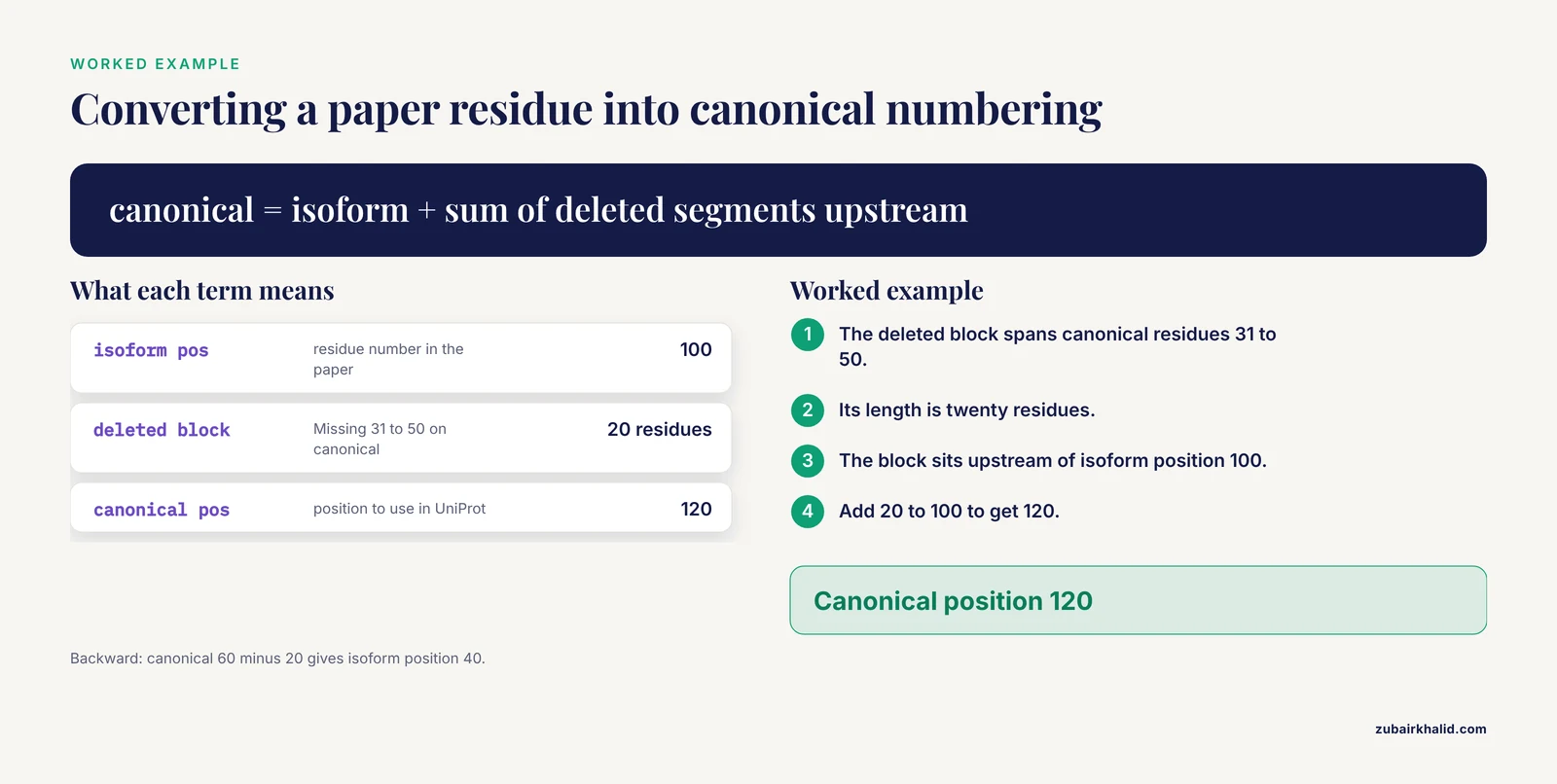
Papers number residues within the isoform they studied. UniProt annotates on the canonical sequence. When an isoform contains deletions, the two frames drift apart, and residue 200 in a paper may be residue 230 in UniProt. Here is the arithmetic, done once, carefully.
Take a hypothetical but structurally accurate example built on the BCL2L1 pattern. Suppose the features table lists one Alternative sequence row: Missing, positions 31 to 50 on the canonical sequence, applying to the short isoform. The short isoform is therefore the canonical sequence with twenty residues removed.
Work forward first, from paper to UniProt. A paper studying the short isoform reports a residue of interest at isoform position 100. To convert, ask how many canonical residues upstream of that point are absent from the isoform. The deleted block spans canonical residues 31 to 50, which lies entirely upstream of isoform position 100, and its length is twenty. The canonical position is therefore 100 plus 20, or 120. The general rule: canonical position equals isoform position plus the total length of all deleted canonical segments that fall upstream of the residue in question.
Work backward the same way. A UniProt variant annotated at canonical position 40 needs conversion to the short-isoform frame before you can compare it with the paper. Canonical 40 falls inside the deleted block, so the residue simply does not exist in the short isoform, and any apparent match is a frame error. Canonical 60, by contrast, sits downstream of the deletion: isoform position equals 60 minus 20, or 40.
Substitutions between equal-length blocks, as in PKM, change a simpler question: residue numbers do not drift at all if the blocks have equal length and the change is upstream-agnostic, but residues inside the swapped block correspond one to one across isoforms only positionally, not chemically. Residue 400 of one isoform and residue 400 of the other occupy the same ordinal position but may be different amino acids, so a mutation reported "at position 400" must be checked against the specific isoform's sequence at that position before you transfer it.
For insertions, the direction of the drift reverses: the isoform is longer, so isoform position equals canonical position plus the inserted length for residues downstream of the insertion.
Two safeguards keep this arithmetic honest. First, always count segment lengths directly from the features table positions rather than from memory. Second, verify your conversion empirically whenever possible: fetch both sequences, extract a short peptide window around the converted position, and confirm that the surrounding residues match the paper's stated context. If a paper says "the leucine at position 100", and your converted position sits in a stretch of acidic residues, the conversion is wrong and no amount of arithmetic will fix a misread segment boundary.
Doing this once, with the entry open and both sequences in view, takes minutes and removes the largest source of silent error in isoform work.
## Connecting Transcripts to Isoforms: Ensembl, RefSeq, and the Cross-Reference Trail
The most common real-world trigger for an isoform search is a transcript identifier: an Ensembl transcript ID from an RNA-seq annotation, or a RefSeq accession from a paper or a primer datasheet. The job is to connect that identifier to a UniProt isoform ID, and the entry's cross-references are the trail.
Start from the reviewed entry's X-ref section. UniProt cross-references nucleotide and transcript resources, including Ensembl and RefSeq, and these links are how a transcript identifier becomes a protein sequence. The mapping logic differs between the two resources, and understanding that difference prevents the classic mismappings.
Ensembl transcripts and proteins follow genome annotation. An Ensembl protein ID corresponds to one transcript's translation, and alternative transcripts frequently yield the translations recorded as UniProt isoforms. When you follow the Ensembl cross-reference from a UniProt entry, compare the sequence of the Ensembl protein against the isoform table: matching lengths plus matching changed segments identify the isoform. Where Ensembl annotates a transcript that UniProt does not list as an isoform, that transcript usually corresponds to a CDS-level difference UniProt has not curated, and the honest answer is that no named isoform matches.
RefSeq works differently. RefSeq maintains separate accession series for transcripts and proteins, and where alternative splicing is annotated, distinct protein accessions correspond to distinct products. UniProt's cross-references to RefSeq generally point at the products matching the curated isoforms. As with Ensembl, the verification step is comparative: fetch the RefSeq protein sequence, align it against the isoform sequences you are choosing among, and let the alignment decide.
Do not rely on numeric or naming similarity. A RefSeq variant number and a UniProt isoform number are assigned independently, and an Ensembl transcript number encodes no information about either. This is the same trap as isoform numbering discussed earlier, and it bites just as hard at the transcript level.
When the cross-reference trail runs out, the features table still resolves most cases. If a paper says a transcript skips exon 7, find the Alternative sequence row whose canonical-frame span corresponds to exon 7's protein product, and the row names the isoform. Translating exon boundaries to protein coordinates requires care with reading frames, but for internal in-frame events the correspondence is usually one segment to one exon.
For pipelines that must do this mapping at scale, the practical approach is sequence-based: collect all candidate protein sequences from Ensembl or RefSeq for the gene, fetch all UniProt isoform sequences for the entry, and run exact or near-exact matching. Identity matching with a short flanking check is robust and removes every naming ambiguity in one step. It is slower than a lookup table, but it is correct without requiring you to maintain one.
## Comparing Your Options: UniProt, Ensembl, and NCBI Protein for Isoform Sequences
UniProt is not the only source of isoform sequences, and knowing when to prefer each resource prevents both wasted effort and wrong sequences. The three resources differ in what they curate, how they identify isoforms, and what their sequences guarantee.
UniProtKB's strength is curation depth. Reviewed entries attach evidence, names, function, and a maintained isoform table to a stable accession, and the alternative-products block is curated by people who read the literature. For the question "which isoforms of this protein are real, named, and documented", UniProt is the right first stop, and this guide's workflow is built on that premise. Its isoform identifiers are also the cleanest citation target: an isoform ID resolves unambiguously.
Ensembl's strength is genome grounding. Every Ensembl protein sequence descends from an identified transcript on a specific genome assembly, so if your project is anchored to genomic coordinates, such as a CRISPR design or a splice-junction analysis, Ensembl's transcript-centric view is the natural frame. Its weakness for this task is that transcript sets change with annotation releases, and a translation that existed in one release may be reclassified in the next. UniProt's isoform table, by contrast, changes slowly and documents the evidence for each entry.
[NCBI Protein](/blog/guides/ncbi-protein), including the RefSeq set, occupies a middle position. RefSeq records are curated at the nucleotide level, provide stable accessions, and are widely used in primer and probe documentation. If an antibody datasheet or a construct map cites a RefSeq protein accession, working in that frame is reasonable, and the cross-reference trail from UniProt connects the two.
Three practical rules emerge from the comparison. First, use UniProt to decide which isoforms exist and which one you mean, because curation quality is the deciding factor there. Second, use Ensembl or RefSeq when the downstream work is genome- or transcript-anchored, and carry the mapping, not just the sequence, with you. Third, when two resources disagree about whether an isoform exists, treat that as information rather than noise: the disagreement usually reflects different evidence standards, and the UniProt entry's references and the notes column explain what is known.
A final structural note explains why UniProt is often the safest endpoint. UniProt stores all isoforms inside one entry, so the relationship between isoforms is explicit in one place. Resources that give each isoform its own record, as some do, leave the relationship implicit, and reconstructing it means comparing sequences by hand. For the specific job of choosing one isoform and documenting the choice, one entry with one table is the easier frame to defend in a methods section.
## Website or API: Choosing the Right Route for Each Job
UniProt offers the same data through a website and a REST API, and choosing deliberately between them speeds up every task. The choice is not about power, since both expose the same records and the same query syntax, but about workflow shape.
Use the website when the task is exploratory or one-off. Reading the isoform table, checking the review badge, following a cross-reference to Ensembl, and skimming curated references are inherently visual tasks. The query builder behind the filter controls assembles the same typed clauses the search box accepts, which makes it a learning tool as much as a convenience: build a filter, inspect the query string in the results URL, and the syntax teaches itself [2]. For a single protein, a single decision, the website is faster end to end.
Use the API when the task is repeatable, bulk, or must feed a pipeline. Any lookup you will perform again next month, for a different gene or after a database update, should live in a script. The API returns structured formats, so JSON with jq, or TSV with cut and awk, and the same query syntax works unchanged. The search endpoint's field selection lets a script pull exactly the columns it needs, which keeps downstream parsing trivial.
A useful hybrid exists for medium-sized jobs: run the search on the website, copy the query string from the results URL, and paste it into an API call. You get the convenience of interactive filtering with the reproducibility of a command. This is the fastest way for a newcomer to move from menus to scripts, and it matches the general finding that users refine keyword searches into structured clauses iteratively rather than writing structured queries from scratch [4].
Consider maintenance burden as part of the choice. Scripts that hardcode accessions are brittle across releases; scripts that run a gene-and-organism query each time self-update. The query-based approach costs one extra HTTP round trip and buys immunity to accession renumbering and to your own transcription errors. For anything in a pipeline, prefer the query.
Rate and volume considerations complete the picture. Interactive browsing imposes no constraints, while scripted access shares public infrastructure with everyone else, so keep request rates modest and follow pagination rather than inflating page sizes. For genuinely bulk needs, such as every reviewed isoform sequence at once, the downloadable files on the FTP site exist precisely so that large jobs never need per-record requests at all.
In practice, most bioinformaticians converge on a stable split: the website for reading and deciding, scripts for fetching and processing, bulk files for anything genome-scale. Adopting that split early avoids both the trap of hand-copying sequences from browser windows and the trap of writing scraping code against a site that already offers a clean API.
## Troubleshooting Guide: When the Search Returns Nothing, Too Much, or the Wrong Thing
Every UniProt search fails in one of three directions: zero hits, too many hits, or hits that are subtly wrong. Each direction has a short diagnostic checklist.
**Zero hits.** Work through these in order. First, check operator case, because lowercase `and` turns your query into a free-text search that can accidentally exclude everything. Second, check field names against the vocabulary: `gene:`, `organism_id:`, `reviewed:`, `accession:`, `length:`. A misspelled field is treated as a term, which usually yields nothing useful. Third, replace the taxon ID with the organism name to test whether the ID itself is wrong, then restore the ID once the gene clause works. Fourth, try the gene clause alone; if that returns hits, the combining clauses are at fault. Fifth, consider whether the gene symbol is current: older literature symbols, species-specific symbols, and aliases all exist, and the entry's gene-names line lists the accepted set. Sixth, if the protein may be unreviewed only, drop `reviewed:true` and check whether a TrEMBL record exists, which itself is informative about curation status.
**Too many hits.** The usual cause is a bare keyword, which matches any text containing the string; survey work shows short keyword queries dominate real-world search behavior, and on a curated database that habit is exactly what produces noise [1]. Add clauses one at a time in this order: organism, then reviewed, then the gene field. If two genes share a symbol across species, the organism clause resolves it. If one organism has two related genes, `gene_exact:` resolves it. If the protein name phrase is matching loosely, quote it.
**Wrong-looking hits.** Two subcases dominate. A paralog appears because a description word matched: fix with `gene_exact:` or an explicit OR-group over the genes you want. An unreviewed fragment outranks the reviewed entry: scan the result list for the reviewed badge and the complete-looking entry, or add `reviewed:true` from the start. Remember that the structured query interface exists precisely to expose these fields for filtering [2], and that building precision into queries is a long-established information-retrieval problem rather than a UniProt quirk [3].
**API-side failures.** An HTTP 400 response means the query itself is malformed; the response body's messages array points at the offending clause, so read it rather than guessing. A "could not resolve host" error on the word AND means the URL was unquoted in the shell and the spaces split the command. Empty TSV output with an otherwise valid query usually means a field name in the `fields` parameter is misspelled, since UniProt rejects or ignores unknown fields rather than returning partial guesses. Truncated results mean pagination: follow the link header marked rel="next" until the set ends.
**Sequence-side surprises.** If a fetched sequence is shorter or longer than expected, first confirm which isoform you actually received: accession-only requests return the canonical sequence, while isoform IDs return specific rows. If a downloaded FASTA seems to lack your isoform, check whether the entry lists it in the isoform table at all; sequences exist only for isoforms the entry documents.
Print this checklist, or save it beside your scripts. The failure modes are stable across releases, and diagnosing them takes minutes once you know the order in which to check.
## Bulk and Scripted Workflows: Many Genes, Many Isoforms
Single-protein lookups scale badly once a project involves dozens of genes. This section lays out the scripted patterns that scale cleanly, all built on the API and the downloadable files already introduced.
**Pattern 1: Query-driven per-gene fetches.** Keep your gene list in a plain text file, one symbol per line, and loop over it, running the three-clause query for each gene and saving the TSV or FASTA output per gene. This pattern is deliberately simple: one process, one request per gene, files you can inspect individually. Keep request rates modest, since the API is shared public infrastructure, and if you add a small pause between requests you will never need to think about throttling.
**Pattern 2: One search, many genes.** The query syntax accepts OR-groups, so `(gene:PKM OR gene:PKLR OR gene:BCL2L1) AND organism_id:9606 AND reviewed:true` returns every reviewed human entry for the list in one request. Use `format=tsv` with the fields you need for a summary table, or `format=list` to collect accessions for a second pass. The OR-group must be parenthesized, because precedence surprises between OR and AND are the classic error here.
**Pattern 3: Pull isoform structure after the search.** Once you have accessions, loop the JSON per-entry request and extract, for each entry, the isoform IDs with names and the Alternative sequence feature rows. Written to a tabular file, this gives you a project-wide isoform inventory: every isoform, its name, and its differences from canonical, in one document you can share with collaborators who never touch the command line.
**Pattern 4: Offline FASTA against the whole reviewed isoform set.** The dedicated reviewed-isoform FASTA file contains every isoform sequence annotated in reviewed entries, headed by isoform identifiers. Download it once per project cycle, index or grep it as needed, and derive per-project subsets from it locally. Because the file is release-pinned, a project that archives the file archives its own sequence truth.
**Validation steps worth automating.** After any bulk pull, run three cheap checks. Count records: `grep -c` on the FASTA header character gives the sequence count, which should match expectations from your search counts. Check identifiers: extract headers and confirm each isoform ID pattern matches the accession-plus-number form, which catches truncated downloads. Spot-check one entry end to end: fetch a single isoform by ID and confirm its sequence appears verbatim in your bulk file. These three checks catch the overwhelming majority of bulk-download failures, from interrupted transfers to partial files.
**Provenance for bulk work.** Record, per pull, the release identifier from the FTP directory name or the website footer, the download date, and the query strings used. A results table that says which release every sequence came from is the difference between a reproducible analysis and a one-time artifact.
These patterns compose: a typical project uses the OR-group search to enumerate entries, the JSON loop to build the isoform inventory, and the bulk FASTA to attach sequences, with each step's output checked before the next consumes it.
## Practical Applications: Antibody Validation, Mass Spectrometry, Constructs, and Primers
The isoform search is never the end goal. Four common experimental contexts show where the careful lookup pays for itself, and each adds a specific verification step.
**Antibody validation.** Antibody datasheets usually cite an immunogen region by residue range, without stating the isoform frame. Before trusting the reagent, locate that range on the correct isoform's coordinates, then check the features table: if the immunogen overlaps an Alternative sequence segment, the antibody distinguishes isoforms, which may be exactly what you want or exactly what invalidates a pan-isoform experiment. An antibody raised inside a segment unique to one isoform is an isoform-specific reagent; an antibody raised in a shared region detects all isoforms carrying that region. The PKM pattern, two isoforms differing over one swapped segment, is the clean illustration: a shared-region antibody detects both M1 and M2, while a segment-embedded antibody detects one. Document the epitope's isoform frame in your reagent records, using the same habit as recording the isoform ID itself.
**Mass spectrometry.** Peptide-level identification depends on the sequence database you search against. Searching against canonical sequences only will miss peptides unique to non-canonical isoforms, and peptides within a shared region cannot distinguish isoforms at all. The practical fix is database construction: build your search database from the reviewed isoform FASTA file rather than canonical-only sequences, so every curated isoform is a candidate. Then interpret peptide evidence honestly: a peptide inside the variable segment assigns reads to one isoform, a peptide in shared sequence supports the protein without resolving the isoform, and an absence of variable-segment peptides means your experiment cannot distinguish the isoforms regardless of depth.
**Expression constructs.** When ordering or cloning a cDNA for an isoform, verify three things against the entry: the isoform ID, the exact coding sequence implied by the isoform's differences, and the residue frame you will use to describe tags and mutations. Because construct maps often cite residue numbers from a paper, run the frame-conversion check described earlier before annotating the map. A tag placed at "the C-terminus" is unambiguous only once the isoform is fixed, since isoforms with different termini put the tag in biologically different places.
**Primer design for isoform discrimination.** Primers that distinguish isoforms need a binding site inside a variable segment, which is precisely the information the Alternative sequence rows provide with canonical-frame boundaries. Design within the segment, check the segment's isoform membership in the features table, and validate specificity against every isoform listed for the entry, not just the two headline forms many genes have. A common failure is a primer pair that works on the two named isoforms but also amplifies an additional documented isoform that shares the segment.
Across all four applications, the pattern is identical: fix the isoform ID first, express every downstream choice in the correct frame, and let the features table decide which reagents, peptides, or primers carry isoform-specific information. The five-minute lookup prevents the expensive discovery that an experiment measured the wrong molecule.
## Reproducibility: Recording Releases, Versions, and Provenance
A sequence is only reproducible if the record states exactly which sequence, from which database state, obtained how. UniProt provides the versioning machinery; the discipline of using it is yours.
**Record the release.** UniProt releases updates on a regular cadence, and both the website footer and the FTP directory names identify the current release. Write the release number next to every downloaded file, every saved search, and every results table that depends on sequences. For scripted work, capture the release automatically: a script that fetches sequences can also record the release string it ran against, turning provenance into a byproduct of the pipeline rather than a chore.
**Record sequence versions.** Within a release, an entry's sequence carries its own version number, visible in the FASTA header and on the entry page. A sequence version bump means the residues changed, which is the single most important event to detect if you downloaded sequences earlier. The cheap check is comparative: keep a checksum per sequence, and on re-pull, compare. A changed checksum with an unchanged accession tells you the sequence was revised and that every downstream artifact, from alignments to construct maps, needs review.
**Record the query, not just the result.** An isoform choice is justified by the query that found the entry plus the table rows that identified the isoform. Save the query string verbatim, because query syntax is precise and a paraphrase loses the exact clauses. Saving the URL of the website search, or the full API call, is sufficient and unambiguous.
**Pin identifiers, quote them fully.** Cite the accession, the isoform ID, and the sequence version together where relevant. An isoform ID alone is a strong identifier, but the release pin makes the citation auditable years later. In methods sections, a single sentence covering isoform ID, UniProt release, and access date satisfies almost every reviewer and reproducer.
**Archive what you downloaded.** For bulk files, keep the compressed file itself in project storage, with the release in the filename. The file is modest in size, and having the exact bytes removes any dependence on server state at replication time. For small pulls, a plain-text file of FASTA records with a header note stating release and date achieves the same.
**Re-verify before reuse.** Data from a prior project, or sequences embedded in an old protocol, should be re-checked against the current entry before reuse in a new experiment. Curators revise entries as evidence accumulates, isoform tables grow, and canonical choices occasionally change. A five-minute re-verification is inexpensive; discovering mid-project that a construct was designed against a superseded sequence is not.
The overarching principle is that provenance lives with the data, not in your memory. Every identifier, release, and query string that a stranger would need to reproduce your sequence choice belongs in the same folder as the sequences themselves.
## A Verification Checklist Before You Trust an Isoform Sequence
Before an isoform sequence enters an experiment, a pipeline, or a paper, run this end-to-end checklist. It condenses the whole guide into a review you can complete in minutes, and each line traces back to a failure mode documented above.
1. **Entry identity confirmed.** The accession, entry name with its species suffix, organism line, and gene-names line all agree with the gene and organism you intended. A paralog or a wrong species is fatal at this stage and trivially cheap to catch.
2. **Review status appropriate.** The entry is reviewed, or, if unreviewed, you have a stated reason for accepting it. The review badge is the first thing on the page and the cheapest quality signal in the database.
3. **Isoform exists as a curated row.** The isoform appears in the entry's isoform table with an ID, a name, and notes, not merely as a claim in a paper or a datasheet. If the isoform you need is absent from the table, stop and resolve that discrepancy before proceeding.
4. **Evidence for the isoform checked.** The notes and linked references establish the isoform's basis, and the evidence level suits your use. For a clinical or quantitative application, isoform-level evidence deserves the same scrutiny as any other reagent.
5. **Differences understood in canonical coordinates.** The Alternative sequence rows for your isoform are read, their positions and types noted, and the consequences for length and numbering worked through. If numbering conversion was needed, the arithmetic was verified against actual sequence text.
6. **Sequence retrieved through a traceable route.** The FASTA came from a specific isoform ID, or from a release-pinned bulk file, with the release and date recorded. Accession-only fetches were used deliberately, knowing they return the canonical sequence.
7. **Sequence itself sanity-checked.** Length matches the isoform table, the sequence contains only valid amino acid characters, and, where a paper or transcript provides an independent check, a short peptide window aligns as expected.
8. **Downstream artifacts re-expressed in the right frame.** Antibody epitopes, peptides, primers, tags, and mutation sites are all stated in the chosen isoform's coordinates, with any conversions documented.
9. **Provenance archived.** Isoform ID, accession, release, date, and query string are stored beside the sequence in project records.
Items 1 through 3 protect against choosing the wrong protein, items 4 through 6 protect against choosing the wrong sequence, and items 7 through 9 protect against propagating an error into the permanent record. The checklist takes on the order of ten minutes for a new protein and under two once the habits form, which is a small price against the cost of an experiment built on the wrong molecule.
Treat the checklist as a habit rather than a hurdle. The biologists and bioinformaticians who rarely stumble in isoform work are not more careful people; they have simply routinized exactly these checks, so that verifying an isoform is as automatic as labelling a tube.
## Sources
1. [An Investigation Into the Use of Simple Queries On Web IR Systems](https://www.semanticscholar.org/paper/a36cee70fe814b9fe29f11e76d9089c83ede0e7e)
2. [SAFQuery: a simple and flexible advanced Web search interface](https://doi.org/10.1108/EL-12-2014-0207)
3. [Custom interfaces for advanced queries in search engines](https://doi.org/10.1108/EUM0000000007070)
4. [Enriching Simple Keyword Queries for Domain-Aware Narrative Retrieval](https://doi.org/10.1109/JCDL57899.2023.00029)
5. [The Art of Effective Web Searching: Six Advanced Search Techniques That Will Help You Find the Best Results Faster](https://www.semanticscholar.org/paper/a828fc6a82a78964dc2e14469543df6848490f6c)
6. [Searchable Public Key Encryption Supporting Simple Boolean Keywords Search](https://doi.org/10.1587/transfun.2019cip0006)