UniProt Interaction Section Explained
By Dr. Zubair Khalid, DVM, MS, PhD ·

The UniProt Interaction section is the part of a UniProtKB entry that lists experimentally documented binary interactions between a protein and other molecules, together with the experimental method that detected each interaction and the database that supplied the record. In plain terms, when you open a protein entry on uniprot.org and scroll to Interaction, you are looking at a curated summary of who this protein is known to bind, how scientists proved that binding, and where the full interaction record lives.
This section matters because protein function in a cell is inseparable from partnership. A kinase is only as interesting as its substrates, a transcription factor only as interesting as its partners on DNA, and a viral protein often matters precisely because of which host proteins it hijacks. UniProt is a worldwide hub holding sequences and annotations for more than 120 million proteins, with expert-curated detail for more than half a million of them [1]. The Interaction section concentrates the protein-protein interaction slice of that knowledge into a few readable rows, and since the 2018 website redesign it is presented as a dedicated data visualization rather than a plain annotation line [1]. Learning to read it correctly, and to export it programmatically, is one of the highest-yield skills in a practical UniProt database tutorial.
What Does the UniProt Interaction Section Mean
If you have ever asked "what does the UniProt interaction section mean," the honest answer has three layers. It means a curated list of binary partners, it means attached evidence in the form of experimental methods and publications, and it means pointers to specialized interaction databases where the full machine-readable record lives.
Where you find it in an entry
Open any reviewed entry, for example human TP53 (accession P04637), on uniprot.org. The entry view is organized into sections such as Function, Subcellular location, PTM/Processing, Expression, Structure, and Interaction [2]. The Interaction section sits between Structure and the alphabetical annotation sections in the default view. If the section is absent, the entry has no curated binary interactions, which is common for proteins from less-studied organisms or for records that carry only automatic annotation.
UniProtKB has two sections with different curation levels. UniProtKB/Swiss-Prot entries are fully, manually curated by expert biologists, while UniProtKB/TrEMBL entries carry automated classification and annotation [3][4]. The Interaction section behaves exactly as you would expect from that split. Swiss-Prot entries receive interaction rows added by curators who read the primary literature. TrEMBL entries may show interaction information only when it can be propagated by rule-based systems or imported from partner resources [1].
The three content types inside the section
The section is not one flat list. It typically contains three distinguishable kinds of content, and confusing them is the root of most interpretation errors.
- Binary interaction rows. Each row pairs your protein with one specific interactant. The pair is described as a direct two-partner event, such as TP53 binding MDM2. UniProt distinguishes self-interaction explicitly, so a protein that homodimerizes shows itself as the partner with a "self" note.
- An interaction count. UniProt displays the number of distinct interactors near the top of the section, which gives you an immediate sense of interaction degree before you read anything else.
- Interaction notes and related cross-references. Some entries carry a short free-text interaction note, which is especially common for pathogen proteins that contact many host factors. The section also connects to interaction-database cross-references stored elsewhere in the entry [5].
The field-by-field breakdown
Here is the interpretation layer that most users need. Each column in a binary interaction row answers one question.
| Field | What it answers | Typical content |
|---|---|---|
| Interactant identifiers | Who is the partner | UniProt accession, entry name, and gene name of the partner protein |
| Interaction type note | Is it self-binding or cross-species | "self-association" or an organism note when the partner comes from a different species |
| Number of interactors | How connected is this protein | An integer count of distinct partners displayed for the entry |
| Experimental evidence | How was the interaction detected | Method labels such as two-hybrid, coimmunoprecipitation, or X-ray crystallography, tied to a publication |
| Source database | Where does the full record live | IntAct or another interaction resource, with a stable identifier you can click through to |
The evidence attribution principle runs through all of UniProt. Functional annotations, feature annotations, and cross-references carry explicit evidence and literature attribution so that scientists can trace every claim [5]. The Interaction section is simply the most concrete expression of that principle, because every row can be traced to a published experiment.
How UniProt Builds Its Interaction Data
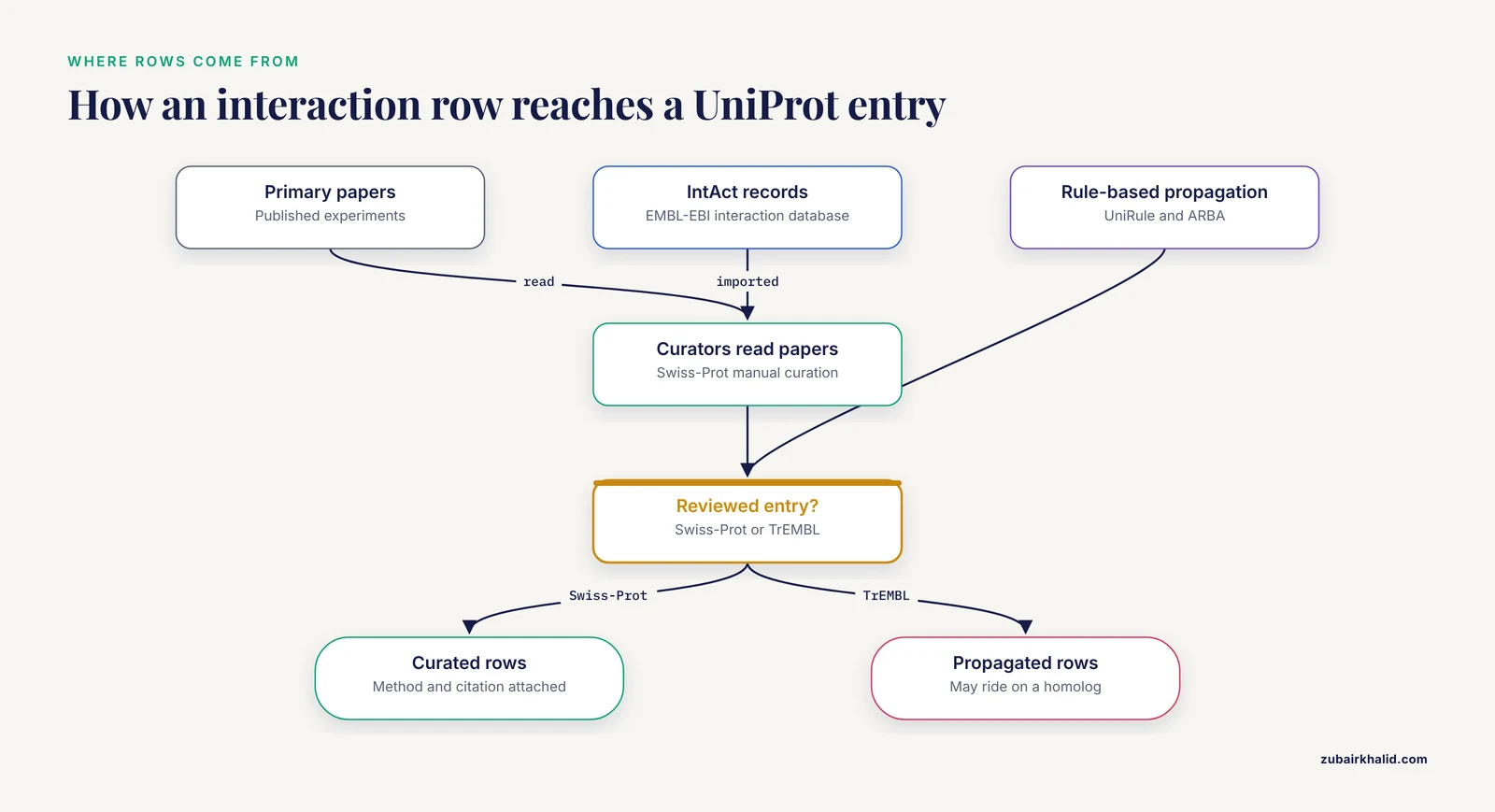
Understanding the pipeline behind the section changes how you should trust and use it. UniProt does not run experiments. It aggregates, curates, and standardizes interaction information produced by the experimental community and by partner databases.
Manual curation from the literature
For Swiss-Prot entries, trained curators read primary papers and encode what those papers demonstrate. This is the same editorial machinery that produces every other manually curated annotation in UniProt, described in detail in the official guide to the entry view [2]. The curation model dates back to the founding architecture of UniProt, in which the Knowledgebase combines fully manually annotated Swiss-Prot entries with automatically annotated TrEMBL entries [3].
Import from interaction databases
Much of the binary interaction content flows in from specialized interaction resources, most prominently IntAct, the open molecular interaction database maintained at EMBL-EBI. UniProt then normalizes partner identifiers to UniProt accessions, which is exactly why the section is so useful as a stable reference layer. The founding design goal of UniProt was to serve as a single, centralized, authoritative resource with extensive cross-references, so that a scientist can start in one database and query across many [3][5].
Rule-based and automatic propagation
When a well-characterized protein has documented interactions, related proteins can inherit interaction information through annotation rules. The UniProt infrastructure includes rule-based systems such as UniRule and the Automatic Rule Generation (ARBA) pipeline, which extend curated knowledge to related sequences [6]. For interactions this matters practically. If you see an interaction row on a TrEMBL entry with no publication attached to the row itself, the evidence may be riding on similarity to a characterized homolog rather than on a direct experiment for that exact protein.
What the section deliberately does not contain
The Interaction section is a summary layer, not an archive. Full details, including all participating experimental evidence, scores, and complex composition, remain in the source database. UniProt points to that record rather than duplicating it. This division of labor keeps the entry readable and keeps a single source of truth for interaction data [5].
Reading and Interpreting Interaction Rows Correctly
This is the part of the UniProt interaction section explained interpretation that separates casual users from reliable analysts.
Binary means two, not a complex
Every row describes a pairwise event. If a paper describes a four-protein complex, UniProt may represent it as several binary rows, one for each observed pairwise contact, or the full complex composition may live in a complex-focused resource reached through cross-references. When you later build a network, remember that several binary rows derived from one complex are not several independent discoveries.
Method labels are not all equal
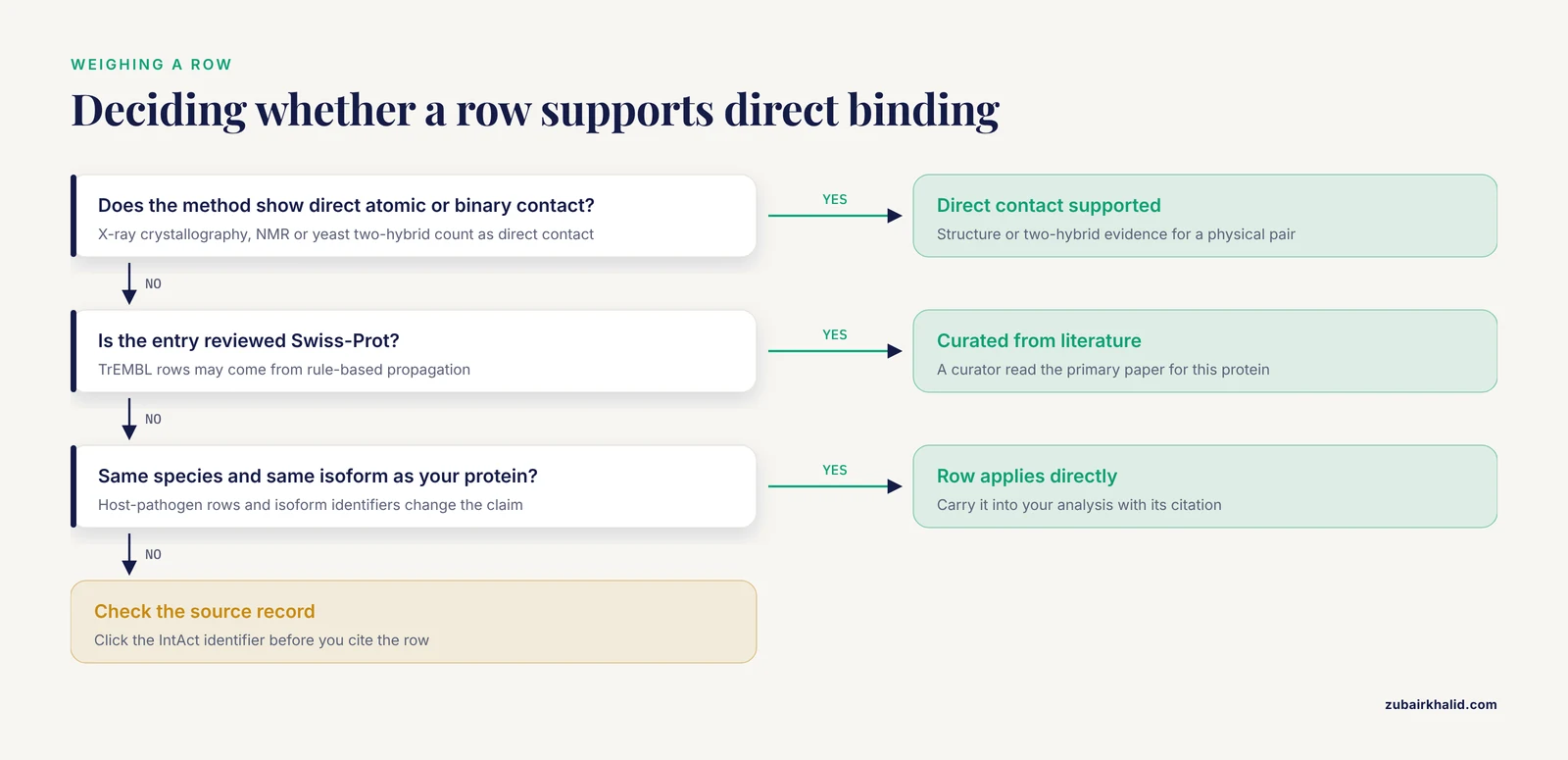
Each row cites the experimental method used. The methods you will see most often fall into three broad groups.
- Direct physical evidence in vitro or in silico from structures. X-ray crystallography or nuclear magnetic resonance structures show two chains in direct atomic contact. This is the strongest form of evidence that two proteins touch.
- Direct biochemical and biophysical tests. Coimmunoprecipitation, affinity pull-down assays, and surface plasmon resonance detect binding in controlled conditions.
- Genetic or cellular co-detection. Yeast two-hybrid assays report interaction through reconstitution of a transcriptional activator in yeast, and co-localization or co-purification approaches report association in cells.
A good practice when interpreting a row is to ask whether the method measures direct binding or co-occurrence in a complex. Yeast two-hybrid and structural evidence speak to direct contact. Coimmunoprecipitation of a known complex can leave partner identity within the complex ambiguous. UniProt preserves this distinction for you in the method labels, but only if you read them.
Cross-species and isoform subtleties
Watch for two quiet complications. First, some rows describe an interaction between proteins of different species, which is common for host-pathogen systems, where for example a viral protein is annotated against host factors. Second, interaction specificity can be isoform-specific. If a partner is annotated with a specific isoform identifier rather than the canonical accession, the interaction may not hold for every splice form your experiment expresses.
The count is a degree, not a truth score
The displayed number of distinct interactors is the count of documented partners in UniProt's current snapshot. Highly studied proteins such as TP53 have large counts partly because they have been studied intensively, a well-known phenomenon in interaction network analysis. A low count on a poorly studied protein usually means little experimental attention, not a lonely protein.
A Worked Example: How to Use UniProt to Check TP53 Interactions
Here is a complete, reproducible walkthrough you can adapt to any protein. This is the core of any practical how to use UniProt session on interactions.
Step 1. Find the right entry
Type TP53 into the search bar at uniprot.org, or search gene:TP53 AND organism_id:9606 to restrict to human. Filter to "Reviewed (Swiss-Prot)" so you get manually curated content rather than automatic prediction [3]. Confirm you have P04637.
Step 2. Read the Interaction section
Scroll to Interaction. For TP53 you will see a substantial count of distinct interactors. Scan the rows for the partners relevant to your question. MD M2-mediated degradation of TP53, for instance, appears as a binary row with its own method and citation. Note the method label on each row that matters to you and click the publication to read what the experiment actually showed.
Step 3. Follow the source record
Click through the IntAct identifier attached to the interaction. IntAct shows the full evidence tree, including every publication, method, and annotation for that interaction. This two-click path, from summary row to full record, is the intended design.
Step 4. Export programmatically with the REST API
Manual reading does not scale. The UniProt REST API powers the website itself and gives programmatic access to UniProtKB with structured queries, selectable fields, and multiple download formats [6]. The following command pulls accession, entry name, and all interaction data for TP53 as tab-separated values.
curl "https://rest.uniprot.org/uniprotkb/search?query=accession:P04637&fields=accession,id,interaction&format=tsv"Two details from the API documentation make this production-ready. The API supports structured search queries with logical operators and parentheses, so you can run queries like gene:TP53 AND organism_id:9606 directly in the URL [6]. The API handles on the order of 303 million requests per month, is free, and requires no login [6]. To batch a whole gene list, first use the ID Mapping service, which converts gene names or database identifiers to stable UniProt accessions, then query by those accessions [6].
Step 5. Record your provenance
Note the UniProt release and date, the accessions you queried, and the source database for each interaction you carry into your analysis. UniProt content is continuously updated, so an interaction export from last year is not identical to one from today. This habit costs seconds and saves reviews.
From Interaction Rows to Networks: Three Real Workflows
The Interaction section earns its keep when it feeds a larger analysis. Three published workflows show the range.
Workflow 1. UniProt plus STRING plus Cytoscape for pathway biology
A study of salt-response mechanisms in Arabidopsis thaliana retrieved proteins annotated with the response to salt stress term from UniProt, then analyzed them with PANTHER, DAVID, KEGG, Cytoscape, and STRING [7]. The STRING step built the interaction network layer, and Cytoscape visualized and clustered it, ultimately revealing that salt-responsive proteins participate in cross-tolerance networks spanning abiotic and biotic stresses [7]. The lesson for your own workflow is straightforward. UniProt gives you a vetted protein list and per-protein interaction starting points. STRING scales network construction to hundreds of proteins. Cytoscape turns the network into an analyzable object. If your protein list is small, start with the per-entry Interaction sections. If it has hundreds of members, go straight to a network tool and use UniProt accessions as the join key.
Workflow 2. Prediction tools that start from UniProt associations
UniReD analyzes biomedical literature to extract known protein associations and suggest undocumented ones, benchmarking against public databases of experimentally validated protein-protein interactions and experimentally validating several of its predictions [8]. Its intended use is as a complement to experimental approaches such as mass spectrometry, producing ranked candidate lists for validation [8]. In a UniProt-centric workflow, you can treat the Interaction section as the confirmed core of a network and use literature-mining predictors like UniReD to propose the next experiments.
Workflow 3. UniProt accessions as the identifier backbone for structure and docking
Computational drug design tools routinely accept a UniProt accession as the definition of the receptor of interest. The M01 tool, a package for generating and docking small molecule-peptide hybrids, automates receptor preparation using UniProt or PDB IDs and integrates docking through established engines [9]. The interaction logic flows in both directions. Interaction rows in UniProt tell you which partner structures are worth docking into, and stable UniProt accessions make the receptor definition reproducible across pipeline runs [9].
Workflow 4. Whole-database sequence sampling
Interaction studies sometimes need sequences rather than annotations. A toxinology study assembled its entire dataset from all African snake toxin protein sequences available in UniProt at the time of study design, then measured antivenom binding against those targets on high-density peptide microarrays [10]. The workflow pattern is the same one you would use for an interaction screen. Query UniProt by taxonomy and keyword, download the sequence set through the API, and feed it to your experimental or computational platform [10][6].
How Interaction Evidence Is Observed and Tested in Practice
A brief methods primer makes the evidence labels legible. These are standard techniques covered in any molecular biology curriculum.
Yeast two-hybrid. Two proteins of interest are fused to separated halves of a transcription factor. If the proteins bind in yeast nucleus, the transcription factor reassembles and activates a reporter gene. The method detects direct binary contact but in an artificial compartment, so membrane proteins and proteins needing specific modifications can behave unnaturally.
Coimmunoprecipitation. An antibody against one protein pulls it out of cell lysate along with anything bound to it. Detection of a partner by western blot or mass spectrometry reports association in a native-ish environment, though it cannot always distinguish direct binding from membership in the same complex.
Structural methods. X-ray crystallography and related structural techniques place atoms. When a structure contains two chains, the contacting interface is direct physical evidence, which is why structure-derived interactions carry special weight.
Affinity purification followed by mass spectrometry. One protein is tagged and purified, and co-purifying partners are identified by mass spectrometry. This yields high-throughput interaction maps, often with many indirect associations.
UniProt's role is to standardize how these heterogeneous methods are recorded so that a reader can weight each row appropriately.
The Interaction Section Compared With What Students Confuse It With
Students routinely blur the Interaction section with several neighboring concepts. This table draws the boundaries.
| Concept | What it is | Relationship to the Interaction section |
|---|---|---|
| UniProt Interaction section | Curated binary interaction summary inside a UniProtKB entry | The subject of this article. Summary rows with methods and links to source records |
| IntAct | A dedicated molecular interaction database at EMBL-EBI | The primary upstream source of UniProt interaction rows and the destination when you click through for full evidence |
| STRING | A network resource that combines experimental and predicted associations, including genomic-context and text-mining evidence | Reached by cross-reference from UniProt entries. Broader and includes predicted links that are not curated binary interactions [7] |
| PDB cross-references | Links to solved three-dimensional structures | A structure showing two chains supports an interaction row but lives in the Structures section of the entry, not the Interaction section |
| KEGG or Reactome pathway cross-references | Representations of proteins as participants in pathways | Pathways describe functional context and processes. An interaction row describes a specific physical partnership |
| UniRef | Clusters of related sequences at 100, 90, or 50 percent identity, built to compress sequence space for faster similarity searches [5] | Unrelated to interactions. Belongs to the sequence-similarity layer of UniProt |
| UniParc | The archive of all publicly available protein sequences with source-database history [5] | Unrelated to interactions. Belongs to the sequence-archive layer |
The UniProt architecture itself separates these layers. The consortium produces three database layers, the archive, the knowledgebase, and the reference clusters, with the knowledgebase as the annotated centerpiece [3][5]. Keeping the layers straight prevents most "why is this data missing" confusion.
Common Mistakes and Limitations
These are the errors that show up repeatedly in student projects and manuscript reviews.
Mistake 1. Treating a TrEMBL interaction row like a Swiss-Prot one. TrEMBL entries carry automated annotation. An interaction on a TrEMBL entry may reflect rule-based propagation from a homolog rather than direct curation of the literature for that sequence [1][3]. Check the reviewed status before you cite a row.
Mistake 2. Reading interaction rows as a complete network. UniProt interaction data is curated, which means accurate but deliberately conservative. Absence of a row is evidence of absence of curation, not evidence of absence of interaction. For exhaustive network reconstruction, pair UniProt with STRING and literature mining, exactly as the Arabidopsis workflow did [7].
Mistake 3. Ignoring the method label. A two-hybrid row and a crystal-structure row do not support the same claim. If your downstream analysis depends on direct physical binding, filter rows by method, not by count.
Mistake 4. Assuming interactions are cell-type and condition independent. Curated interactions describe whether two proteins can associate, usually aggregated across experiments, tissues, and conditions. They do not tell you that the association happens in your cell type under your treatment. Context requires targeted experiments.
Mistake 5. Confusing interaction rows with pathway membership. Two proteins in the same pathway do not necessarily bind each other. The Interaction section lists physical partnerships. Pathway cross-references list functional co-participation [5].
Mistake 6. Using gene names as identifiers in scripts. Gene names are ambiguous and change over time. Resolve every identifier to a UniProt accession through the ID Mapping service before batch queries [6]. Every docking and receptor-preparation tool that accepts UniProt IDs inherits the benefit of this stability [9].
Mistake 7. Hardcoding API results without checking the format. The API returns configurable fields and formats [6]. If your parser expects a column that is not in your field list, you will get silent empty values. Print the header row and verify field names before integrating into a pipeline.
Limitation. The section reflects the curation snapshot at your access date. Interaction databases update on their own schedules, and UniProt synchronizes periodically. For a formal analysis, record the retrieval date and consider re-exports before submission.
Quick Review
- The Interaction section of a UniProtKB entry lists experimentally documented binary partners, the experimental method for each, and links to the full record in the source interaction database.
- Swiss-Prot interactions are manually curated from literature, while TrEMBL interaction information can arrive through automatic rule-based propagation [1][3].
- Every row carries evidence attribution, a defining property of UniProt annotation since its earliest architecture [5].
- Method labels distinguish direct contact, such as structural evidence, from association evidence such as coimmunoprecipitation.
- Binary rows do not capture complex composition or pathway context. Click through to IntAct for full records and to STRING for network-scale association.
- The REST API exposes interactions as a selectable field, supports structured queries with logical operators, and requires no login [6].
- Always resolve gene names to UniProt accessions via ID mapping before batch analysis [6].
Frequently Asked Questions
What does the UniProt interaction section mean?
It is the part of a UniProtKB entry that lists the protein's experimentally documented interaction partners, one binary interaction per row, each with its experimental method, publication, and a link to the source interaction database. The section summarizes curated interaction knowledge and points to the full records elsewhere.
Where does UniProt get interaction data?
Curators add interaction information by reading the primary literature for reviewed entries, and a large share of binary interactions is imported and normalized from dedicated interaction resources such as IntAct at EMBL-EBI. Automatic rule-based systems can propagate interaction annotations to related proteins in TrEMBL [6][1].
How do I download all interactions for a protein with the API?
Use a search query restricted to the accession and request the interaction field. For example, curl "https://rest.uniprot.org/uniprotkb/search?query=accession:P04637&fields=accession,id,interaction&format=tsv" returns the interaction data as tab-separated text. The API documentation shows how to adapt queries, fields, and formats in many programming languages [6].
Are UniProt interactions physical bindings or functional associations?
The Interaction section focuses on physical partnerships between specific molecules, supported by named experimental methods. Functional co-participation in pathways is recorded separately, through pathway annotations and cross-references. Network resources like STRING add predicted and text-mined associations on top of experimental data, which is why network edges from STRING are a broader category than curated UniProt rows.
Do all UniProt entries have an interaction section?
No. The section appears only when interaction information exists. TrEMBL entries for less-studied organisms often lack it, and even within Swiss-Prot, proteins from understudied systems may have sparse or absent interaction records because little has been published [1][2].
How is the Interaction section different from the Structure section?
The Structure section lists three-dimensional structure cross-references and related visualization, while the Interaction section lists partnerships. They overlap only when a solved structure contains two chains in contact, in which case the structure can serve as evidence for an interaction row, but the two sections answer different questions and link to different resources [1][2].
Sources
- UniProt: a worldwide hub of protein knowledge
- UniProtKB/Swiss-Prot, the Manually Annotated Section of the UniProt KnowledgeBase: How to Use the Entry View.
- The Universal Protein Resource (UniProt)
- UniProt: the Universal Protein knowledgebase
- The Universal Protein Resource (UniProt): an expanding universe of protein information
- The UniProt website API: facilitating programmatic access to protein knowledge
- Investigation on salt-response mechanisms in Arabidopsis thaliana from UniProt protein knowledgebase
- UniProt-Related Documents (UniReD): assisting wet lab biologists in their quest on finding novel counterparts in a protein network
- M01 tool: an automated, comprehensive computational tool for generating small molecule-peptide hybrids and docking them into curated protein structures.
- An interactive database for the investigation of high-density peptide microarray guided interaction patterns and antivenom cross-reactivity