How to Map UniProt IDs to Gene Ontology Annotations
By Dr. Zubair Khalid, DVM, MS, PhD ·

By the end of this guide you will be able to take a list of UniProt identifiers and produce a clean table of Gene Ontology (GO) term IDs, term names, ontology branches, and evidence codes. You will be able to do this interactively on the UniProt website, in bulk through the UniProt REST API, and offline from the UniProtKB-GOA annotation files. You will also be able to route gene names, Ensembl IDs, or RefSeq accessions through UniProt first, reconcile unstable cross-database identifiers with PICR [1], and validate every GO ID against the ontology itself.
Have on hand:
- A list of protein identifiers, one per line, in a plain text file.
- A terminal with curl (a command-line tool for making HTTP requests, preinstalled on macOS and most Linux systems).
- Optional: Python 3 with the requests package, jq (a command-line JSON parser), and wget (a file downloader).
- Nothing beyond a browser, if you use the website route in Step 2.
GO is a controlled vocabulary, a fixed set of terms with stable IDs that describe what gene products do, where they act, and how, organized into three branches. UniProt is the practical center of gravity for this mapping because every UniProtKB entry carries its GO annotations directly, with evidence codes, and because UniParc (the sequence archive behind UniProt) links sequences to identifiers from many source databases. That matters because each major protein database assigns identifiers with its own conventions, and those identifiers are potentially unstable, which is exactly the problem this workflow solves [1].
What You Are Mapping Between
UniProt identifiers: accessions, entry names, isoforms, and UniParc
UniProt maintains UniProtKB, the protein knowledgebase, in two sections. Reviewed entries (Swiss-Prot, about 570,000 entries) are curated by human annotators. Unreviewed entries (TrEMBL, more than 250 million) are annotated automatically. Both carry GO annotations, but reviewed entries have richer, manually checked annotation.
Four identifier types matter:
- Accession. The stable primary identifier, for example P04637 for human TP53. Classic accessions have six characters, newer entries use longer forms (10 or 12 characters). Accessions keep their meaning across releases, which is why every route below keys on them.
- Entry name. A mnemonic such as P53_HUMAN. Readable but not stable, UniProt can rename it between releases. Never use it as a database key.
- Isoform ID. An accession plus a numeric suffix, for example P04637-2. Some GO annotations attach to a specific isoform rather than to the whole entry.
- UniParc ID. A UPI (UniParc identifier) in UniParc, the archive that stores every protein sequence ever loaded and keeps it even after a source database retires or renames an entry. UniParc is the backbone for reconciling identifiers that drift over time.
Gene Ontology terms and annotations
GO organizes tens of thousands of terms into three branches, each term carrying a stable GO:ID:
- Biological process (aspect code P), for example GO:0006915, apoptotic process.
- Cellular component (C), for example GO:0005634, nucleus.
- Molecular function (F), for example GO:0003700, DNA-binding transcription factor activity.
A GO annotation is a statement that a specific gene product carries a specific term, backed by an evidence code and a reference. The evidence codes you will see most often:
- Experimental: EXP, IDA (direct assay), IPI (physical interaction), IMP (mutant phenotype), IGI (genetic interaction), IEP (expression pattern).
- High-throughput variants: HTP, HDA, HMP, HGI, HEP.
- Electronic: IEA (inferred electronically, no human curation), RCA (from reviewed computational analysis).
- Curatorial: IC (inferred by curator), TAS (traceable author statement).
- ND, no biological data available.
In UniProtKB-GOA (the GO annotation project based at EMBL-EBI), electronic IEA annotations make up the large majority of all annotations, because software propagates functional predictions across millions of unreviewed entries. Carry the evidence code with every term so downstream users can filter.
Two more details matter. A qualifier of NOT means the gene product is explicitly not associated with the term, so dropping those rows silently corrupts results. And annotations can be isoform-specific, flagged in the GAF file format by a Gene_Product_Form_ID column holding an ID such as P04637-2.
Choose a Mapping Route
| Route | Best for | Input | Output | Notes |
|---|---|---|---|---|
| UniProt entry page | One or a few accessions | Accession in the search box | GO terms with evidence on screen | No code |
| Website search plus GO columns | Small lists, manual review | Query in the search box | TSV or Excel export | Add GO columns, then download |
| REST single query | Scripted lookups | curl call | TSV, JSON, XML | Fields control the columns |
| REST search or stream | Hundreds to millions of accessions | Query string | TSV file | Use size and cursor paging |
| ID mapping API | Gene names, Ensembl, RefSeq inputs | ids, from, to, taxIds | Identifier pairs | GO is a valid target |
| UniProtKB-GOA GAF download | Offline, reproducible, term-level evidence | wget of the GAF file | 17-column GAF rows | Filter on column 2 |
| QuickGO API | Per-protein annotations with filters | geneProductId parameter | JSON | Same underlying annotation sets |
| PICR | Reconciling IDs from many source databases | Accessions or FASTA | UniParc IDs and cross-references | UniParc-based [1] |
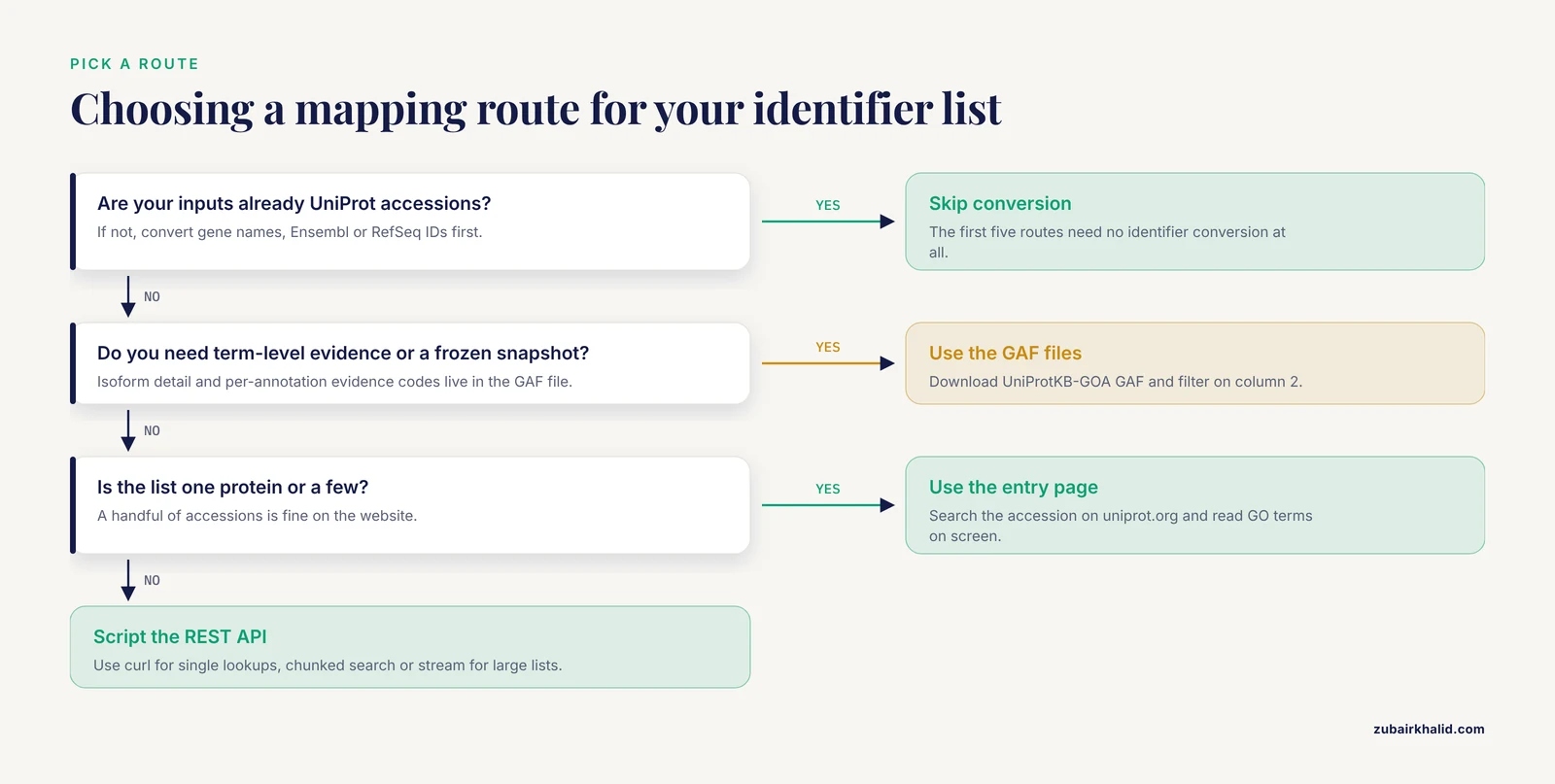
If your input is already UniProt accessions, the first five routes need no identifier conversion at all. If your input is gene names or IDs from other databases, convert to UniProt accessions first (Step 5), or use sequence-based reconciliation through UniParc when table lookups are not enough [1]. If you need term-level evidence codes, isoform detail, or a frozen snapshot for a paper, use the GAF files in Step 6.
Step-by-Step: Map UniProt IDs to GO Annotations
Step 1. Clean and validate your identifier list
Put your identifiers in a plain text file, one per line:
# ids.txt
P04637
P01308
P69905
TP53_HUMAN
Keep only well-formed accessions and count what you dropped:
grep -E '^[OPQ][0-9][A-Z0-9]{3}[0-9](-[0-9]+)?$' ids.txt | sort -u > ids_clean.txt
wc -l ids_clean.txt
grep -vcE '^[OPQ][0-9][A-Z0-9]{3}[0-9](-[0-9]+)?$' ids.txt
Expected output:
3 ids_clean.txt
1 ids.txt
The regex matches classic six-character accessions and isoform suffixes. The entry name TP53_HUMAN fails the filter, which is fine, the ID mapping API in Step 5 accepts entry names under the UniProtKB_AC-ID type. Newer longer accessions will also be flagged, so review that list by hand rather than deleting it.
Step 2. Read one protein on the UniProt website (no code)
Go to uniprot.org and search for P04637. The entry page lists GO annotations with their evidence codes, grouped by biological process, cellular component, and molecular function, each linked to the supporting reference.
For a list of proteins, use the ID Mapping tool at uniprot.org/id-mapping. Paste your identifiers, choose the source type (for example UniProtKB_AC-ID or Gene_Name), choose Gene Ontology as the target, run the job, and download the result as TSV. On any search results page, the Columns button adds Gene Ontology columns to the table and the Download button exports what you see as TSV or Excel. This is the fastest way to learn how to use UniProt before automating anything.
Step 3. Pull annotations for one accession with curl
curl "https://rest.uniprot.org/uniprotkb/search?query=accession:P04637&format=tsv&fields=accession,id,go_id,go_c,go_f,go_p&size=1"Expected output (abridged, UniProt separates multiple values with a semicolon and a space):
Accession	Entry Name	Gene Ontology IDs	Gene Ontology (cellular component)	Gene Ontology (molecular function)	Gene Ontology (biological process)
P04637	P53_HUMAN	GO:0003700; GO:0005634; GO:0006915; ...	GO:0005634; ...	GO:0003700; ...	GO:0006915; ...
Each parameter matters:
query=accession:P04637restricts the search to that entry.format=tsvreturns a spreadsheet-ready table (json, xml, fasta, and txt also work).fieldscontrols the columns. go_id returns all GO terms, go_c, go_f, and go_p return terms per branch, and go_evidence returns evidence as ECO codes (an evidence ontology), for example ECO:0000269 for experimentally supported assertions.size=1caps rows per page at 1 (the maximum page size is 500).
Quote the whole URL. Without quotes, the shell splits your command at the ampersand and you get a truncated query and confusing output.
Step 4. Bulk export for many accessions
For a known, short list, one call does it:
curl "https://rest.uniprot.org/uniprotkb/search?query=accession:(P04637%20OR%20P01308%20OR%20P69905)&format=tsv&fields=accession,id,go_id,go_evidence&size=500"(%20 is a URL-encoded space.)
For hundreds to thousands of accessions, chunk the list with a small script:
import time
import requests

BASE = "https://rest.uniprot.org/uniprotkb/search"
FIELDS = "accession,id,go_id,go_evidence"

def fetch_chunk(chunk):
    query = " OR ".join("accession:" + acc for acc in chunk)
    params = {"query": query, "format": "tsv", "fields": FIELDS, "size": 500}
    response = requests.get(BASE, params=params, timeout=60)
    response.raise_for_status()
    return response.text.splitlines()

ids = [line.strip() for line in open("ids_clean.txt") if line.strip()]
rows = []
for i in range(0, len(ids), 100):
    lines = fetch_chunk(ids[i:i + 100])
    if i == 0:
        rows.extend(lines)
    else:
        rows.extend(lines[1:])
    time.sleep(1)

with open("uniprot_go_map.tsv", "w") as out:
    out.write("\n".join(rows) + "\n")
print("wrote", len(rows) - 1, "rows to uniprot_go_map.tsv")
Expected console line:
wrote 3 rows to uniprot_go_map.tsvFor a whole proteome, use the stream endpoint, which returns everything matching the query in one response:
curl "https://rest.uniprot.org/uniprotkb/stream?query=(organism_id:9606)%20AND%20(reviewed:true)&format=tsv&fields=accession,id,go_id,go_evidence" > human_reviewed_go.tsvHere organism_id:9606 is the NCBI taxonomy identifier for human and reviewed:true restricts results to Swiss-Prot. Expect roughly 20,000 rows.
The query syntax also runs the reverse direction, from a GO term to proteins:
curl "https://rest.uniprot.org/uniprotkb/search?query=go_id:GO:0006915%20AND%20organism_id:9606&format=tsv&fields=accession,id,protein_name&size=500"That returns every human protein annotated to apoptotic process.
Step 5. Map gene names and other identifier types through the ID mapping API
Gene names
Step 5 (continued): Running the ID Mapping API End to End
The interactive tool at uniprot.org/id-mapping is convenient for a dozen identifiers, but for anything scripted you want the ID mapping REST service. It runs as an asynchronous job: you submit the job, poll for completion, then stream the results. The parameters mirror the website form exactly, which makes the website a good place to debug your parameter choices before committing them to a script.
The three required parameters are from (the source identifier type), to (the target database), and ids (your identifiers, comma separated). An optional taxIds parameter restricts matching to one or more NCBI taxonomy identifiers, which is the single most useful safeguard when working with gene names, because the same gene symbol frequently exists in dozens of species.
Submit a job that maps human gene names to UniProtKB accessions:
curl -X POST "https://rest.uniprot.org/idmapping/run" \
  -d from="Gene_Name" \
  -d to="UniProtKB_AC-ID" \
  -d taxIds="9606" \
  -d ids="TP53,INS,ALB,EGFR"
The response is a small JSON object containing a jobId. Poll the status endpoint until it reports COMPLETED:
curl "https://rest.uniprot.org/idmapping/status/JOBID"Once complete, stream the mapped results and request GO columns in the same call, so the mapping and the annotation retrieval collapse into one job:
curl "https://rest.uniprot.org/idmapping/uniprotkb/results/stream?fields=accession,id,gene_primary,go_id,go_evidence&format=tsv&size=500" > mapped_go.tsvThree things to understand about what comes back:
- The mapping is one-to-many by design. One gene name can map to several UniProtKB entries, because gene symbols are reused across species and because one gene can correspond to multiple protein entries. The
taxIdsparameter removes the cross-species ambiguity but not the within-species one. Always keep the input identifier in your output table so every output row traces back to what you asked for. - Unmapped identifiers vanish silently. If a gene name matches nothing, it simply produces no row. After the run, compare the set of input identifiers against the set that appears in the output and report the difference explicitly. A mapping that quietly drops 30 percent of your input is not a mapping, it is a loss.
- GO is a valid target database. If your input is already UniProt accessions, you can set
to=Gene_Ontologyand get gene-product-to-term pairs directly. In practice most people preferto=UniProtKB_AC-IDwith GO columns in the fields parameter, because that preserves the entry-level context and lets you pull other columns later without rerunning the job.
When your input identifiers come from Ensembl or RefSeq, the same service handles the conversion: set from=Ensembl or from=RefSeq_Protein and keep the taxonomy restriction. Be aware that cross-database mapping is inherently fuzzy for exactly the reason the UniParc architecture exists: each source database assigns identifiers with its own conventions and those identifiers can change meaning over time [1]. When a table lookup gives you ambiguous or missing results for entries you know exist, the sequence-based route in the PICR section below is the fallback [1].
Step 6. Build an Offline Mapping from UniProtKB-GOA GAF Files
Everything so far talks to a live service. For a paper, a pipeline, or anything you need to rerun identically months later, download the annotation file and do the mapping locally. The UniProtKB-GOA project distributes annotations in GAF format (Gene Association File), a 17-column tab-delimited format with one annotation per row.
To get the file, go to the UniProtKB-GOA download pages, copy the current link for the organism-specific or complete annotation file you need, and download it with wget. The file names change with release cycles, so paste the current link rather than hardcoding one you found in an old tutorial:
wget -O goa_current.gaf.gz "PASTE_CURRENT_GAF_LINK_HERE"
gunzip goa_current.gaf.gz
Then filter on column 2, which holds the database object identifier, typically the UniProt accession:
grep -P "^\t"? /dev/null; awk -F'\t' '$2 == "P04637" || $2 == "P01308" || $2 == "P69905"' goa_current.gaf > subset.gafSimpler and faster for many accessions, convert your list to a pattern file and use grep:
grep -F -f ids_clean.txt goa_current.gaf > subset.gaf
wc -l subset.gaf
Every surviving row is one annotation. The columns that matter for mapping work:
| use | column | content |
|---|---|---|
| - | - | - |
| join key | 2 | UniProt accession |
| filter | 4 | qualifier, NOT, contributes_to, or empty |
| the term | 5 | GO ID, for example GO:0006915 |
| provenance | 6 | supporting reference |
| filter | 7 | evidence code, for example IDA or IEA |
| branch | 9 | aspect, P, C, or F |
| isoform | 17 | gene product form ID, present only for isoform-specific annotations |
The GAF format is genuinely 17 columns, but many rows end at column 15 because columns 16 and 17 are only populated when needed, so a naive parser that assumes exactly 17 fields per row will crash. Parse defensively:
import gzip

def parse_gaf(path):
    with gzip.open(path, "rt") as fh:
        for line in fh:
            if line.startswith("!"):
                continue
            f = line.rstrip("\n").rstrip("\t").split("\t")
            if len(f) < 15:
                continue
            accession = f[1]
            qualifier = f
            go_id = f
            evidence = f
            aspect = f
            isoform = f if len(f) > 16 else ""
            if qualifier == "NOT":
                continue  # or record it, but never silently drop it
            yield accession, go_id, evidence, aspect, isoform

rows = list(parse_gaf("goa_current.gaf"))
print(len(rows), "annotations")
Decide deliberately what to do with NOT annotations before you parse, and record the decision. A NOT annotation is a curated negative statement, and discarding it is different from excluding it from a positive-association analysis; the first corrupts your data model, the second is a defensible analysis choice.
The offline route gives you three things the live routes do not. First, term-level evidence for every single annotation pair, not evidence packed into a semicolon-joined string. Second, isoform specificity through column 17, so you can distinguish annotations that apply to entry P04637 generally from annotations that apply only to P04637-2. Third, a frozen snapshot: record the file name, its release date, and the download date, and your results become reproducible no matter what UniProt publishes next year.
Step 7. Validate Every GO ID Against the Ontology
A GO ID string is only useful if it is current, non-obsolete, and correctly assigned to a branch. Annotation files can contain terms that were valid when the annotation was made but have since been merged or obsoleted, so a validation pass against the ontology itself belongs in every pipeline. Download the ontology file (go.obo, available from the Gene Ontology Consortium downloads page) and check your IDs against it:
def parse_obo_terms(path):
    terms = {}
    current = None
    with open(path) as fh:
        for line in fh:
            line = line.rstrip("\n")
            if line == "[Term]":
                current = {"id": None, "name": None, "namespace": None,
                           "obsolete": False, "replaced_by": None}
            elif line.startswith("id: ") and current is not None and current["id"] is None:
                current["id"] = line[4:]
            elif line.startswith("name: ") and current is not None:
                current["name"] = line[6:]
            elif line.startswith("namespace: ") and current is not None:
                current["namespace"] = line[11:]
            elif line.startswith("is_obsolete: true") and current is not None:
                current["obsolete"] = True
            elif line.startswith("replaced_by:") and current is not None:
                current["replaced_by"] = line.split(":", 1)[1].strip()
            elif line == "" and current is not None:
                if current["id"]:
                    terms[current["id"]] = current
                current = None
    return terms

terms = parse_obo_terms("go.obo")
Then run your collected GO IDs through three checks:
- Existence. Every ID must be present in the ontology. An ID that is absent is either a typo, an artifact of a malformed split, or a term removed from the ontology entirely.
- Obsolete status. Obsolete terms carry a
replaced_byorconsiderpointer where a merge or rename occurred. Replace where a replacement is given, and flag rather than guess where it is not. - Branch consistency. The namespace field should agree with the aspect column in your GAF data (P maps to biological_process, C to cellular_component, F to molecular_function). A mismatch means a parsing error upstream, and it is worth finding before it propagates.
This step also solves a presentation problem: enrichment tools and reviewers both expect term names, and the obo file is the authoritative source for the name that pairs with each ID. Join your mapping table against the parsed terms and you have the full four-column deliverable promised at the top of this guide: GO ID, term name, branch, and evidence.
Step 8. Quality Control Before You Ship the Table
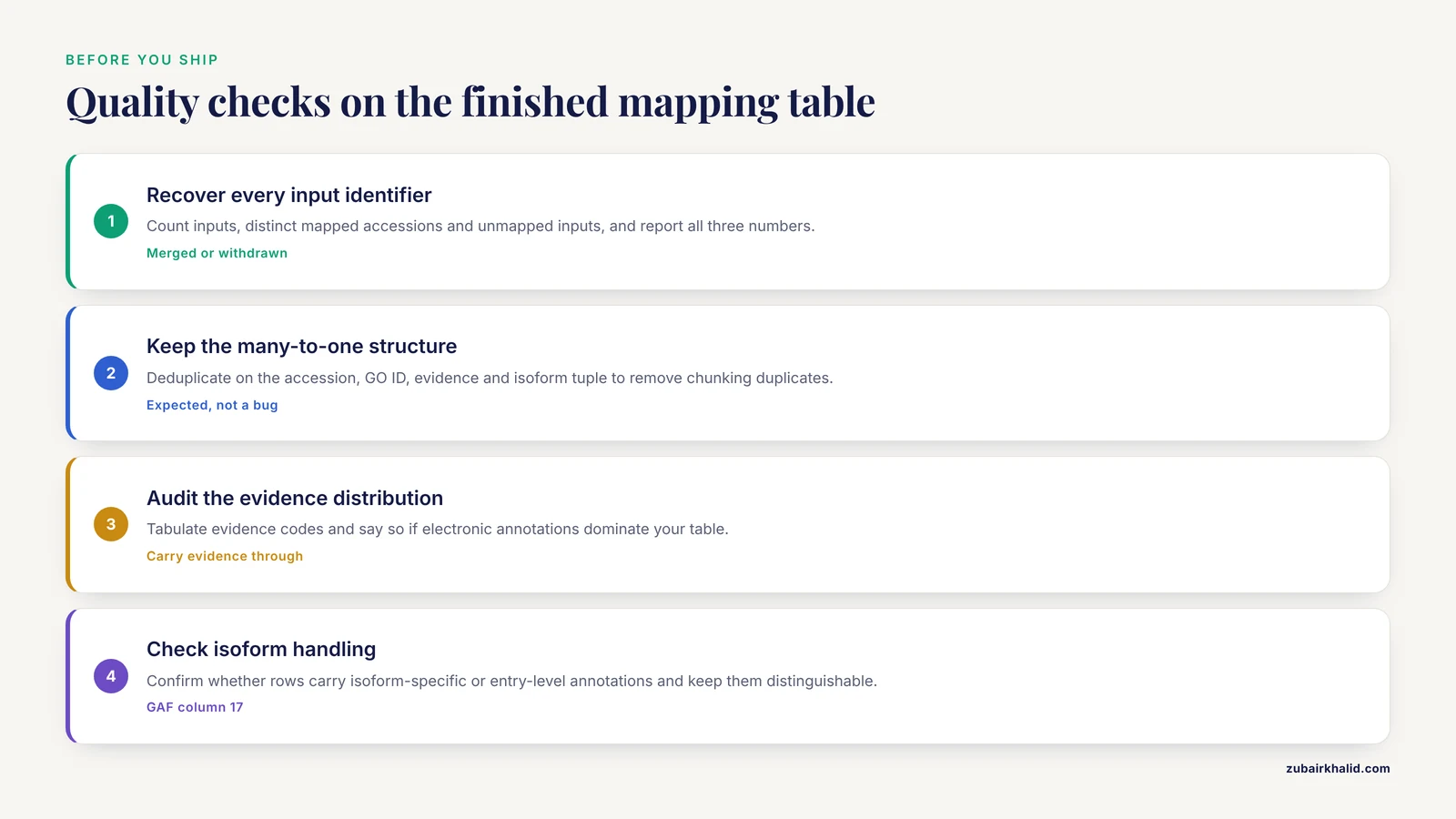
Run this checklist on the final mapping table. Each item corresponds to a failure mode seen repeatedly in real analyses.
Recover every input identifier. Count inputs, count distinct mapped accessions, and count unmapped inputs. Report all three numbers. For unmapped accessions, check whether they were merged into another accession, which the UniProt search resolves transparently, or withdrawn, which leaves them unmapped. The distinction matters for how you describe coverage in your methods section.
Preserve the many-to-one structure. If one input accession produced multiple GO terms, that is expected and correct. If one GO term appears for an accession under two different rows because of a chunking artifact in your download script, that is duplication, and it will double-count in any downstream frequency calculation. Deduplicate on the (accession, GO ID, evidence, isoform) tuple.
Audit the evidence distribution. Tabulate evidence codes. If electronic annotations dominate your table, say so, and decide whether your application warrants filtering to experimentally supported codes. Do not delete IEA rows by reflex; for broad functional surveys of large proteomes they are the only coverage available, and hiding their presence is worse than using them with a disclosure.
Check isoform handling. If your input contained isoform IDs with numeric suffixes, confirm whether your output rows carry isoform-specific annotations or entry-level ones, and keep the two distinguishable in the output. Collapsing P04637-2 annotations onto P04637 is a defensible simplification only if you state it.
Reparse the TSV safely. UniProt separates multiple values within a cell with a semicolon and a space. Splitting on a bare semicolon leaves a leading space on every term after the first, which will fail exact string joins downstream. Strip whitespace after splitting, every time.
Beware spreadsheet tools. Opening exported files in a spreadsheet application can silently mangle identifiers: long numeric strings lose precision, and some gene symbols convert to dates. If a spreadsheet must touch the file, import everything as text and verify row counts before and after.
Reconciling Drifting Identifiers with PICR and UniParc
Identifier drift is the quiet killer of cross-database workflows. Ensembl gene and protein identifiers are routinely versioned and superseded, RefSeq accessions gain version suffixes and sometimes change meaning, and even UniProt entry names are not guaranteed stable between releases, which is why this guide pins everything on accessions. When your input comes from a source database whose identifiers have shifted since your data were generated, a static cross-reference table can miss entries that still exist under new names.
PICR (Protein Identifier Cross Reference Service) addresses this by resolving identifiers through UniParc, the sequence archive that stores every protein sequence ever loaded and retains it regardless of what happens to the source database entries that pointed at it [1]. Because UniParc keys on sequence rather than on any single database's naming scheme, it can follow an identifier across renames, merges, and retirements in ways a snapshot table cannot [1].
Use PICR in two situations. First, when a table-based mapping from Ensembl or RefSeq to UniProt leaves gaps: submit the unmatched accessions, or the sequences themselves if you have them, and let sequence identity recover the correspondence through UniParc [1]. Second, when you suspect your identifiers are stale relative to the current release of their source database: resolving through UniParc reconnects the old identifier to the sequences it referred to, and from there to the accessions that currently name those sequences [1].
Two honest caveats. Sequence-based resolution is exact only when the sequences are exact; highly similar isoforms and redundant proteome entries can produce multiple plausible targets, and you must handle ambiguity explicitly, either by keeping all matches with a flag or by applying a documented tiebreaker such as reviewed-versus-unreviewed status. And resolution through UniParc answers a different question than a curated cross-reference does: it establishes that two identifiers referred to the same sequence, not that two database entries carry the same curated meaning. For GO annotation transfer, the sequence identity is usually what you want, but record which route produced each mapping row.
Worked Example: A Short Protein List, End to End
Here is the complete flow for the three clean accessions from Step 1, runnable in under a minute and serving as a template for larger jobs.
Validate the list (Step 1): ids_clean.txt holds P04637, P01308, and P69905; the entry name TP53_HUMAN was set aside for the ID mapping route.
Grab annotations in one call (Steps 3 and 4 combined, since the list is short):
curl "https://rest.uniprot.org/uniprotkb/search?query=accession:(P04637%20OR%20P01308%20OR%20P69905)&format=tsv&fields=accession,id,go_id,go_evidence,go_c,go_f,go_p&size=500" > go_map.tsvSanity-check the output:
wc -l go_map.tsv
cut -f1 go_map.tsv | tail -n +2 | sort -u
The second command lists the distinct accessions recovered. All three should appear; if one is missing, query it individually with the Step 3 command and read the entry page on the website to find out why.
Cross-check against the GAF file (Step 6): pull the same three accessions from the offline annotation file and confirm that the term sets agree. Small disagreements are normal, because the live search view and the GAF snapshot can differ by one release cycle, and because the live view collapses evidence codes across isoforms while the GAF rows keep them separate. Disagreements larger than that usually mean one of the two inputs was malformed.
Resolve the leftover entry name (Step 5): run TP53_HUMAN through the ID mapping API with from=UniProtKB_AC-ID, confirm it lands on P04637, and merge it into the same table with a note recording which input identifier produced which row.
The finished table has one row per annotation, columns for accession, GO ID, term name, branch, and evidence code, and a provenance line in your methods stating the API endpoints, the field parameters, the GAF file version, and the date of every retrieval.
Common Mistakes and Misconceptions
Using entry names as database keys. P53_HUMAN reads well in a notebook and breaks in a pipeline when UniProt renames the mnemonic in a later release. Accessions persist; entry names do not. Convert entry names to accessions at ingestion time and store only accessions.
Assuming GO annotation equals pathway membership. GO biological process terms describe biological programs at varying granularity, not canonical signaling pathways. Annotated to apoptotic process does not mean member of a specific apoptosis pathway model. If your question is pathway-level, GO is the wrong target and you should say so in your methods rather than stretching the terms.
Treating all evidence codes as equal. An IEA annotation is a computational inference with no human review; an IDA annotation rests on a direct assay with a cited reference. Aggregating them without recording the distinction produces tables that look comprehensively annotated while resting largely on inference. Always carry the evidence column through to the final deliverable.
Dropping NOT rows mid-parse. As noted in Step 6, NOT is a curated negative. A parser that filters rows on evidence code or aspect and incidentally discards NOT rows has changed your data's semantics without a decision being made. Filter explicitly on the qualifier column and document the choice.
Ignoring the isoform dimension. Annotation volume differs between isoforms of the same entry, and some annotations attach only to a specific isoform. If your analysis is isoform-sensitive, the GAF column 17 is the only route in this guide that exposes that distinction directly.
Confusing one-to-many with errors. Newcomers frequently treat a gene name mapping to five UniProt entries, or an accession carrying forty GO terms, as a pipeline bug. Both are the normal, correct shape of the data. The bugs are silent drops and silent duplicates, which is why the QC checklist focuses on counts and deduplication rather than on making everything one-to-one.
Trusting a single retrieval date. UniProtKB grows continuously, reviewed entries gain and lose annotations, and TrEMBL churns constantly. A mapping built today is not the mapping you built last quarter. Pin the release, or pin the GAF file version, or record the exact retrieval timestamp, and make rerunning against the same snapshot possible.
Putting the Mapping to Work Downstream
A clean UniProt-to-GO table feeds several common applications, and the mapping choices above shape how well each one works.
Over-representation and enrichment analysis. Enrichment tools take gene-product-to-term associations as their background. The evidence-filtering decision from Step 8 directly changes enrichment results: an IEA-heavy background spreads annotations across more terms and dilutes enrichment signals, while an experimentally restricted background concentrates them. Choose the background deliberately, apply it identically to your test set, and state it in your methods.
Building a protein annotation table for a proteome release. The stream endpoint (Step 4) plus the obo join (Step 7) produces the standard five-column deliverable in one pipeline, and rerunning it against a pinned GAF version makes each proteome release internally consistent.
Set operations between studies. Because every row carries stable accessions and stable GO IDs, two studies mapped months apart can be intersected reliably, provided both recorded their snapshot versions. This is the quiet payoff of doing the mapping properly: comparability across time.
Annotation transfer audits. When a collaborator hands you a protein list with claimed functions, reconstructing the GO annotations independently through this workflow, with evidence codes visible, is the fastest way to confirm or correct the claims.
Reproducibility: Pinning Versions and Recording Provenance
Close every mapping project with a provenance block that a stranger could rerun. At minimum it should record:
- The input identifier file and the regex or filter applied at Step 1, including how many identifiers the filter removed and why.
- Every REST endpoint called, with the exact query string, field list, and page size.
- The ID mapping job parameters, including the taxonomy restriction, and the job's completion date.
- The GAF file used, its version identifier from the download page, and the go.obo file version used for validation.
- The date of every retrieval, because the live database and the file snapshots move on different schedules.
- The decisions: what happened to NOT rows, how isoform annotations were handled, how ambiguous PICR resolutions were resolved [1], and which evidence codes were retained or filtered.
None of this is glamorous, but it is the difference between a mapping table that supports a conclusion and one that merely decorates it. The UniProt identifiers you start from are designed to be stable, the GO terms you land on are designed to be stable, and the workflow between them should be stable too.