How to Filter UniProt Results by Organism, Reviewed Status, and More
By Dr. Zubair Khalid, DVM, MS, PhD ·

By the end of this tutorial you will be able to build precise UniProt queries that return exactly the proteins you want, for example every reviewed human kinase, every bacterial protein with a specific EC number, or a clean FASTA file of one species filtered by sequence length. You will be able to do this both on the UniProt website and through the REST API from the command line, and you will know how to verify that the set you downloaded is the set you intended.
Here is what you need on hand:
- A web browser for the UniProt website at uniprot.org
- A terminal with
curlorwgetinstalled (both ship with most Linux distributions, macOS, and Windows with WSL) - Optionally Python 3 with the
requestslibrary if you want to script retrievals - A rough idea of your target organism or its NCBI taxonomy ID, which you can look up at ncbi.nlm.nih.gov/taxonomy
The UniProt Landscape in Two Minutes
Filtering in UniProt only makes sense once you understand what the database actually contains, because the filter you choose depends on which part of UniProt you are searching.
The core product is the UniProt Knowledgebase, usually called UniProtKB. It holds two divisions. Swiss-Prot contains manually reviewed entries that curators have read the literature on, checked the sequence, standardized the names, and annotated with controlled vocabulary. TrEMBL contains computationally annotated entries that have not been manually reviewed. The reviewed and unreviewed distinction is the single most consequential filter in UniProt, and the website exposes it with a toggle labeled "Reviewed" plus a query term reviewed:true or reviewed:false.
UniProtKB also deals with redundancy, and this matters when you filter. High-throughput sequencing flooded the knowledgebase with near-identical proteomes, especially large sets of nearly identical bacterial genomes, which slowed searches and made result analysis cumbersome. To address this, UniProt developed a method that identifies redundant proteomes by pairwise alignment of their protein sets and then applies graph theory to find dominating sets, meaning a non-redundant subset of proteomes with minimal loss of information. This procedure was implemented for bacteria in mid-2015 and resulted in removal of redundant proteomes from the knowledgebase [1]. The practical consequence for you is that a broad bacterial query is cleaner than it would have been a decade ago, but redundancy can still creep into unreviewed results, which is one more reason to filter on reviewed status when a smaller set will do.
Sitting beside UniProtKB are two other products with different filter behavior:
- UniRef clusters UniProtKB sequences into UniRef100, UniRef90, and UniRef50 at 100%, 90%, and 50% sequence identity. UniRef sets are built to speed up similarity searches and reduce database size. In comparative evaluations of annotation pipelines for viral metagenomes, researchers compared NCBI NR against Uniref as reference databases and compared BLAST against DIAMOND and Taxonomer as annotation tools, and recommended DIAMOND with UniRef when computing resources and data transfer speed are limiting [2]. If your end goal is annotating thousands of reads quickly, UniRef filtered down to a reasonable set is usually the right substrate.
- UniParc is a sequence-only archive. It stores every distinct protein sequence ever seen, with no annotations, so most of the filters discussed here do not apply to it.
When you search at uniprot.org with the default search box, you are searching UniProtKB unless you switch tabs. Every filter in this article applies to UniProtKB unless stated otherwise.
Uniprot Filter Results Step by Step on the Website
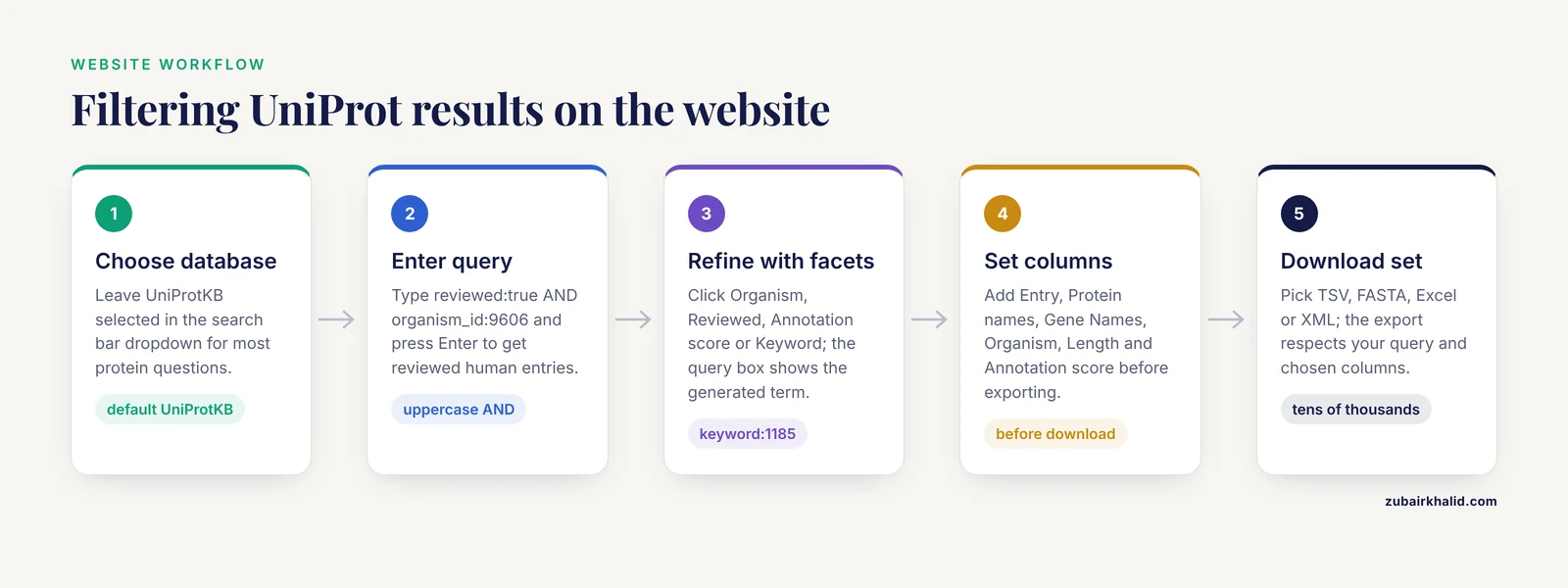
This is the fastest path for interactive exploration. Follow it once and the query syntax will make sense for the API later.
Step 1. Pick the correct starting point
Go to uniprot.org. In the search bar, choose the target database from the dropdown if you need something other than UniProtKB. For most protein questions, leave the default UniProtKB selected, which covers both reviewed and unreviewed entries.
Step 2. Write your first query
The search box accepts field-value terms joined with Boolean operators. Type this exactly:
reviewed:true AND organism_id:9606Press Enter. This returns every manually reviewed entry from human, taxon ID 9606 in the NCBI taxonomy. The result count appears at the top of the page, and for this query it is on the order of 20,000 entries, the size of the curated human proteome.
Three syntax rules cover most errors you will ever hit:
- Boolean operators must be uppercase:
AND,OR,NOT. Lowercaseandis treated as a search term. - Field names are lowercase, followed by a colon, with no space around the colon.
- Multi-word values need quotes, as in
protein_name:"insulin receptor".
Step 3. Refine with the facets panel
On the results page, the left sidebar offers filters for Organism, Reviewed, Annotation score, Keyword, Gene, and more. Clicking a facet appends the corresponding term to your query and updates the count. This is a good way to learn the syntax, because the search box at the top shows the exact query the facet generated. For example, clicking a Keyword facet will show you a term like keyword:1185 appended to your query.
If you want proteins from a group of organisms rather than one species, search on a higher-rank taxon ID. A query such as organism_id:40674 (Mammalia) returns proteins from every species below that node in the taxonomy tree. Pick the narrowest taxon that covers your question, because a vertebrate-wide query drags in a lot of fish and a lot of noise.
Step 4. Choose your columns
Click the "Table" or columns button above the results table. You can add columns for Entry, Protein names, Gene Names, Organism, Length, Annotation score, EC number, Go, Keywords, and more. The columns you select here determine the columns in the TSV file you export next, so set them before downloading.
Step 5. Download the filtered set
Click "Download" above the table. You get format choices including TSV (tab-separated values, opens cleanly in R, pandas, or Excel), FASTA (sequences only, what you need for BLAST or multiple alignment), Excel, and XML. The export respects your current query and your selected columns.
One practical limit: the website download path is comfortable up to tens of thousands of entries. Beyond that, use the REST API, which is the subject of the next section.
Filtering Through the UniProt REST API
The REST API mirrors the website query syntax exactly, which means everything you learned above transfers. The base URL is rest.uniprot.org/uniprotkb/.
A single filtered request
Retrieve reviewed human proteins as a TSV with a handful of useful columns:
curl "https://rest.uniprot.org/uniprotkb/search?query=reviewed:true+AND+organism_id:9606&format=tsv&fields=accession,id,protein_name,gene_primary,organism_name,length&size=500"Expected output looks like this, one header line followed by one line per protein:
Entry	Entry Name	Protein names	Gene Names	Organism	Length
P04637	P53_HUMAN	Cellular tumor antigen p53	TP53	Liber qui usque...	393
P02701	FOLH_HUMAN	...
Spaces inside a URL must be encoded, which is why the example uses + between query terms. If you pass the query in a shell variable or in Python, percent-encoding (%20) works identically.
Paging through large result sets
The search endpoint returns at most 500 entries per page. The response includes a Link header with a cursor URL for the next page. The simplest robust pattern in Python:
import requests

base = "https://rest.uniprot.org/uniprotkb/search"
query = "reviewed:true AND organism_id:9606"
url = f"{base}?query={requests.utils.quote(query)}&format=tsv&fields=accession,length&size=500"

rows = []
while url:
    r = requests.get(url)
    lines = r.text.splitlines()
    if not rows:
        rows.append(lines)
    rows.extend(lines[1:])
    url = r.links.get("next", {}).get("url")

with open("human_reviewed.tsv", "w") as f:
    f.write("\n".join(rows))

print(f"Retrieved {len(rows) - 1} entries")
Expected output for the reviewed human query is a count near 20,000, and a TSV whose first line is Entry\tLength.
Streaming an entire filtered set in one request
For downloads where you want every hit in one file, use the stream endpoint, which has no page size and is designed exactly for bulk retrieval:
curl "https://rest.uniprot.org/uniprotkb/stream?query=(reviewed:true)+AND+(organism_id:9606)&format=fasta" -o human_reviewed.fastaCheck what you got:
grep -c ">" human_reviewed.fastaExpected output is one integer, the number of sequences, matching the result count the website showed for the same query.
A filtered proteome download
When you want one organism's complete proteome rather than a keyword-driven subset, filter on the proteome accession. Proteome accessions have the form UP000005640 for human, and you can find them on each organism's entry page. Combine proteome and reviewed filters:
curl "https://rest.uniprot.org/uniprotkb/stream?query=(proteome:UP000005640)+AND+(reviewed:true)&format=fasta" -o human_swissprot.fastaQuery Fields That Matter Most
The table below collects the filters you will use most, with a working example for each. Every example can be pasted into either the website search box or the query= parameter of the REST API.
| Field | Example query | What it returns |
|---|---|---|
| reviewed | reviewed:true | Manually curated Swiss-Prot entries only |
| organism_id | organism_id:9606 | Entries from one organism by NCBI taxon ID |
| gene | gene:BRCA1 | Entries with a matching gene name |
| protein_name | protein_name:"insulin receptor" | Entries whose standardized name matches a phrase |
| ec | ec:3.4.21.4 | Entries annotated with that enzyme commission number |
| go | go:0006915 | Entries annotated with that Gene Ontology term |
| keyword | keyword:Toxin | Entries carrying that controlled keyword |
| proteome | proteome:UP000005640 | Entries belonging to one reference proteome |
| length | length:[100 TO 500] | Entries with sequence length in that range, in amino acids |
| annotation_score | annotation_score:[4 TO 5] | Entries with high annotation depth, most useful in TrEMBL |
| created | created:[2024-01-01 TO 2024-12-31] | Entries first released in that window |
Combine any of these with AND, OR, and NOT, and use parentheses to control grouping:
(reviewed:true OR annotation_score:[4 TO 5]) AND organism_id:511693 AND NOT fragment:trueThat query reads as: well-annotated entries from Bacillus cereus, excluding entries flagged as fragments.
Uniprot Filter Results Tips
These are the practices that separate a reproducible filtered dataset from a one-off screen grab.
Start narrow with reviewed:true, then widen only if needed. A reviewed-only query returns a small, curator-checked set. If your screen comes back empty or thin, switch to reviewed:true OR reviewed:false for that organism and accept that unreviewed entries carry computationally inferred annotations.
Use taxon IDs, not species names, in scripts. The website tolerates strings like human, but taxon IDs are unambiguous and stable across every UniProt release. Ten seconds at the NCBI taxonomy site saves a failed retrieval later.
Choose columns before you export, every time. A FASTA header from UniProt contains the entry name, but useful identifiers such as the gene name and the organism are easiest to carry alongside your sequences in a TSV. Exporting both a TSV with metadata and a FASTA of the same query is a cheap form of insurance.
Keep the query string with the data. Save the exact query text in a README or in the filename. Six months from now, ecoli_reviewed_2026.fasta with the query reviewed:true AND organism_id:83333 recorded next to it is reproducible. A bare FASTA file is not.
Remember the redundancy work when choosing how broad to go. Because UniProt actively identifies and removes highly redundant proteomes rather than simply growing with every deposited genome [1], a broad query is less bloated than it used to be. Still, for similarity searches, a clustered set is faster. UniRef90 and UniRef50 exist for exactly this reason, and in head-to-head tests of annotation tools and reference databases, the combination of DIAMOND with UniRef was recommended when computing resources and transfer speed were limited [2]. If you are building an annotation reference rather than a curated species list, filter inside UniRef instead of UniProtKB.
Bookmark your query URL. The full query lives in the website URL. Bookmarking that URL is your saved search. When UniProt releases a new version, rerunning the same URL refreshes the set against current data.
Common Mistakes and Limitations
Every one of these errors has an exact symptom and an exact fix. Learn them once.
Lowercase Boolean operators
Symptom: you type reviewed:true and organism_id:9606 and get wildly wrong counts or an error. Cause: UniProt requires uppercase AND, OR, NOT. Fix: capitalize the operators.
Symptom: an error message like organsim_id:9606 is not a valid query field. Cause: a typo in the field name. Fix: check the field against the table above. Field names are lowercase with underscores.
Species name versus taxon ID in the API
Symptom: organism_id:human returns zero results or an error. Cause: organism_id expects a numeric NCBI taxonomy identifier. Fix: look up the ID (human is 9606, Escherichia coli K-12 is 83333) and use the number.
Symptom: your single-species query returns proteins from related species. Cause: you searched a taxon ID above the species level, and the search expands to all descendant taxa in the taxonomy tree. Fix: use the species-level ID, or add the species name to the website facet to confirm which node you actually selected.
Unreviewed entries sneak into a "clean" dataset
Symptom: your protein list contains entries with names like Uncharacterized protein and annotation that looks auto-generated. Cause: you never filtered on reviewed status, or you searched a taxon group where most entries are TrEMBL. Fix: add AND reviewed:true, or, if you must use TrEMBL, add AND annotation_score:[4 TO 5] and inspect a sample of entries by hand.
Note what reviewed status does and does not mean. Reviewed means a curator has verified the entry against available evidence. It does not mean every function listed was experimentally demonstrated in that exact protein. For critical claims, read the evidence tags on the entry page.
Downloading TrEMBL by accident
Symptom: your download is gigabytes when you expected megabytes. Cause: an unfiltered or unreviewed query. TrEMBL is orders of magnitude larger than Swiss-Prot. Fix: add reviewed:true or a proteome filter, and check the result count on the website before running the API call.
Confusing UniProtKB filters with UniRef
Symptom: you try to apply reviewed:true to a UniRef search and get nothing sensible. Cause: UniRef clusters are built from UniProtKB sequences but the clusters themselves are not reviewed or unreviewed, they have identity thresholds. Fix: decide which product you actually need. For curated per-protein records with rich annotation, filter UniProtKB. For a compact search database for high-throughput annotation, query UniRef at the identity level you want.
URL escaping in curl
Symptom: curl returns a 400 error or the shell treats spaces oddly. Cause: unencoded spaces and unquoted URLs. Fix: wrap the whole URL in double quotes and encode spaces as + or %20, as shown in the examples above.
A broader limitation to state plainly
UniProt filtering gives you a well-defined sequence set. It cannot tell you which of those proteins are actually expressed in your sample or tissue, and no query substitutes for reading the evidence on entries that matter to your conclusions. Individual research cases need domain-specific judgment, and the filtered list is an input to that judgment, not a substitute for it.
Verifying That Your Filtered Set Is Right
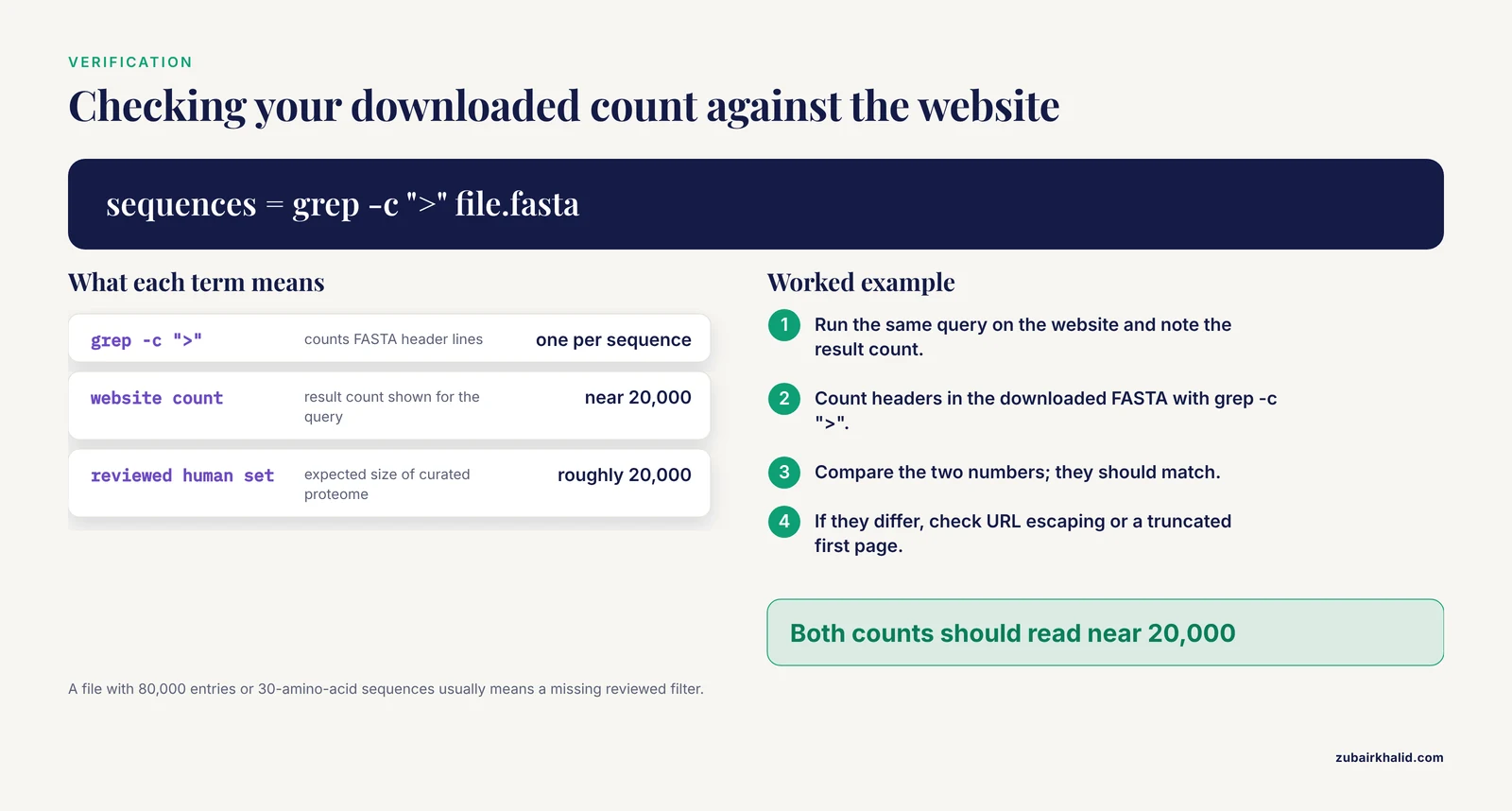
Three checks take two minutes and catch most retrieval errors.
- Count check. Run the same query on the website and note the result count. Then count your downloaded file. For FASTA,
grep -c ">" file.fastagives the sequence count. The two numbers should match. If they differ, check whether the API call truncated your results or whether the website query and the API query differ in escaping.
- Spot check. Open three or five random entries from your set on the website and confirm the organism, reviewed status, and gene name match what you filtered on. In a TSV, do the same against the organism and length columns.
- Sanity check the size. A reviewed human proteome should be roughly 20,000 entries with typical lengths in the hundreds of amino acids. If your file has 80,000 entries or 30-amino-acid sequences, something in the query is off, usually a missing reviewed filter or an accidental fragment inclusion.
If your downstream tool complains about sequence headers, remember that UniProt FASTA headers carry the entry name in the first token and metadata in the remainder, which most parsers handle natively.
A Worked End-to-End Example
Here is the whole workflow assembled, from query to a searchable BLAST database of curated human proteins.
# 1. Download the reviewed human proteome
curl "https://rest.uniprot.org/uniprotkb/stream?query=(reviewed:true)+AND+(organism_id:9606)&format=fasta" -o human_reviewed.fasta

# 2. Verify the count
grep -c ">" human_reviewed.fasta

# 3. Build a BLAST protein database
makeblastdb -in human_reviewed.fasta -dbtype prot -out human_reviewed_db

# 4. Search your query sequences against it
blastp -query my_proteins.fasta -db human_reviewed_db -outfmt 6 -evalue 1e-5 -out hits.tsv
Expected results: step 2 prints a number near 20,000, step 3 reports a successful database build with the number of sequences added, and step 4 produces a tabular hit file where each line is one match with query subject identity alignment coordinates and e-value.
The same pattern scales to non-model organisms. Replace the taxon ID with your species of interest, drop the reviewed filter if the organism has little curated content, and consider whether a UniRef search serves you better. For metagenomic read annotation specifically, published comparisons of annotation tools and reference databases support DIAMOND against UniRef as a resource-efficient default [2], so a filtered UniRef subset or even the full clustered set may serve you better than an unfiltered UniProtKB download.
Next Steps
Once filtering feels routine, three directions extend the workflow. First, automate refreshes by rerunning your saved query on a schedule, so your local protein sets track UniProt releases. Second, learn the proteomes endpoint at rest.uniprot.org/proteomes/ to enumerate proteome accessions programmatically instead of looking them up by hand. Third, integrate filtering into a pipeline, for example downloading a filtered FASTA as the first step of a Snakemake or Nextflow rule so that every analysis starts from a reproducibly defined protein set.
The discipline that ties all of this together is simple. Write the query down, run the count check, and record both alongside the data. Filtered UniProt results are only as reproducible as the query that produced them.
Query Syntax from the Ground Up: How UniProt Parses Your Filter
Most failed UniProt queries fail at the level of syntax, not biology. Before you build complex filters, it is worth understanding exactly what the search engine does with the text you type, because every behavior you learn here transfers directly between the website and the REST API.
The anatomy of a field-value query
A UniProt query is a Boolean expression built from field-value pairs. Each pair has three parts: a lowercase field name, a colon with no surrounding spaces, and a value. The value can be a single token such as 9606, a quoted phrase such as "insulin receptor", a range such as [100 TO 500], or a keyword such as true. Pairs combine with AND, OR, and NOT, and parentheses group subexpressions.
Three parsing behaviors explain most surprises:
- Bare words search everything. If you type
insulin receptorwith no field name, UniProt runs a general search across many fields, which is convenient for exploration but useless for reproducibility. A reproducible query names its fields explicitly. - The colon binds tightly.
protein_name:insulin receptormeans "proteins whose name is insulin, and separately the bare word receptor." That parses as an accidental Boolean expression and returns a sprawling result set. Quote the phrase:protein_name:"insulin receptor". - Ranges use square brackets and uppercase TO.
length:[100 TO 500]is a closed range, meaning entries whose length is exactly 100 or exactly 500 are included. If you want to exclude a boundary, widen or narrow the numbers yourself rather than guessing at bracket semantics.
Reading a query out loud
A useful habit when building complex filters is to narrate the query in plain English before running it. Take the example from the main article:
(reviewed:true OR annotation_score:[4 TO 5]) AND organism_id:511693 AND NOT fragment:trueRead aloud, this is: "Entries from Bacillus cereus where either a curator reviewed the entry or the annotation score is 4 or 5, and in all cases the entry is not flagged as a fragment." Narrating catches two classic errors: parentheses that group the wrong clauses, and a NOT that accidentally applies to only one side of an AND.
Consider what happens if you forget the parentheses:
reviewed:true OR annotation_score:[4 TO 5] AND organism_id:511693 AND NOT fragment:trueThis now reads as "everything reviewed, anywhere in the database, plus well-annotated Bacillus cereus proteins that are not fragments." Because AND binds more tightly than OR in this query language, the organism filter silently stops constraining the reviewed half of your results. The query still runs, the count still looks plausible, and your downstream dataset is quietly contaminated with reviewed proteins from every species on Earth. This is the single most dangerous class of syntax error because nothing crashes. The only symptom is a result count larger than you expected, which is why the count check later in the article matters so much.
Practicing syntax safely on the website
The cheapest way to learn this grammar is to build queries with the facet panel and read the query that each click generates. The article describes this in the refinement steps; here is how to use it deliberately as a training tool:
- Run a broad query, for example a species name in the search box.
- Click one facet, such as a Keyword, and observe the query string update.
- Click a second facet, such as Reviewed, and observe how the query combines them.
- Edit the query directly in the search box, replacing a facet value with one of your own, and press Enter.
After a dozen rounds of this loop, the syntax stops being something you memorize and becomes something you read. The facet panel effectively translates your intent into the formal query language, and the search box lets you take over once the translation is visible.
One more habit worth forming: before you export anything, add a temporary narrowing clause such as AND gene:TP53 to your working query, run it, confirm the count drops to a small number of obviously correct entries, then remove the clause. This is a cheap positive control that confirms your field names and organism scope are doing what you believe they are doing.
Organism Filtering Done Right: Taxonomy, Taxon IDs, and Scope
Organism filtering looks like the simplest filter in UniProt, and it is the one that most often produces subtly wrong datasets. The reason is the taxonomy tree. Every UniProt entry is attached to a node in the NCBI taxonomy, and organism_id: returns entries from that node plus every node beneath it. This is a feature when you want a clade and a hazard when you want a species.
Choosing the right node
Suppose you are studying a protein family in primates. A query on the human taxon ID gives you human proteins only. A query on a higher primate node gives you human, chimpanzee, macaque, and more, which may be exactly what a comparative analysis needs. The filter is doing the right thing in both cases; the question is whether you have picked the node that matches your biological question.
A practical rule: filter at the narrowest taxon that still covers every organism you intend to analyze, then check the Organism facet on the results page to see which species actually contributed entries. The facet list doubles as an audit trail. If you filtered on a species node and still see other species in the facet list, your node selection or your query text is wrong.
A reference table of common taxon IDs
Taxon IDs are stable, so a small table of frequently used organisms is worth keeping beside your notebook. All of the following are species-level NCBI taxonomy identifiers:
| Organism | Taxon ID |
|---|---|
| - | - |
| Human (Homo sapiens) | 9606 |
| Mouse (Mus musculus) | 10090 |
| Rat (Rattus norvegicus) | 10116 |
| Zebrafish (Danio rerio) | 7955 |
| Fruit fly (Drosophila melanogaster) | 7227 |
| Roundworm (Caenorhabditis elegans) | 6239 |
| Baker's yeast (Saccharomyces cerevisiae) | 4932 |
| Thale cress (Arabidopsis thaliana) | 3702 |
| Escherichia coli (species) | 562 |
| Escherichia coli K-12 | 83333 |
Two rows in that table deserve a comment. The species-level entry for Escherichia coli, taxon 562, aggregates entries from many strains, while the K-12 entry, taxon 83333, restricts results to that strain lineage. If your experiment used K-12 and you filter on 562, you will pull in proteins from pathogenic strains whose genomes differ substantially from your organism. For bacteria, where strain-to-strain variation can include whole gene repertoires, always check whether a strain-level taxon ID exists for your organism and prefer it.
Multi-organism queries with OR
Comparative projects often need the union of several species rather than a clade. Join the taxon IDs with OR inside parentheses:
reviewed:true AND (organism_id:9606 OR organism_id:10090 OR organism_id:10116)This returns reviewed human, mouse, and rat entries in one set. The parentheses are doing the same load-bearing work described in the syntax section: without them, reviewed:true would apply only to the human clause and the mouse and rat clauses would return everything, reviewed or not.
To see the species breakdown of the result, add the Organism facet column to your table export, or simply open the Organism facet panel on the results page and read the counts per species. Both views let you confirm that the union contains what you intended and nothing more.
Organism filtering by name versus by ID
On the website, typing a common name such as human or a Latin binomial generally works because the search layer resolves names to taxonomy nodes. In scripts, this convenience is a liability. Names collide and change; taxon IDs do not. The article's advice to use organism_id: with numeric identifiers in any scripted retrieval is worth repeating here with the reasoning attached: a query recorded as organism_id:9606 in your lab notebook will mean the same thing in ten years, while a query recorded as organism:human depends on name resolution that you did not perform and cannot audit.
If you genuinely need name-based filtering, for example to catch an organism whose taxon placement shifted between database releases, combine the approaches: look up the current taxon ID once, record it, and write your query with the numeric ID.
Getting Reviewed Status Right: What the Toggle Really Tells You
The reviewed filter is the highest-impact filter in UniProt, but it is also the most commonly over-interpreted. This section separates what the filter guarantees from what it does not.
What reviewed:true actually certifies
A reviewed entry is a Swiss-Prot record that curators have processed: the sequence has been checked, the names have been standardized, controlled vocabulary has been applied, and the entry reflects the curator's synthesis of available evidence. The article makes the crucial caveat and it bears expanding: reviewed does not mean experimentally proven for every annotation line. Within a single reviewed entry, some functions rest on direct biochemical experiments in that exact protein, others on experiments in an ortholog, and others on similarity or computational inference that the curator judged credible enough to record.
The distinction lives in the evidence tags on each entry page. For any protein whose function matters to a conclusion in your paper, click through and read those tags rather than trusting the filter alone. The reviewed filter certifies the quality of the curation process, not the experimental pedigree of every statement in the record.
Why reviewed status is the right default anyway
Given the caveat above, why is reviewed:true still the recommended starting filter? Three reasons:
- Precision per unit of reading time. A reviewed result set is small enough to inspect. A typical reviewed mammalian proteome is on the order of twenty thousand entries, a scale where spot checks and even systematic audits are feasible. The unreviewed complement for the same clade can be an order of magnitude or more larger, much of it repetitive or poorly characterized.
- Annotation consistency. Swiss-Prot entries use standardized gene names, protein names, and controlled vocabulary consistently, which makes downstream text mining, gene set construction, and cross-referencing dramatically easier. TrEMBL entries mix naming conventions from automatic pipelines.
- Known provenance. When a reviewer of your manuscript asks where a protein sequence came from, a Swiss-Prot accession is a stable, curator-vouched citation. A TrEMBL accession may be replaced or re-annotated as the underlying nucleotide record changes.
The redundancy work described for the knowledgebase reinforces this economics: because UniProt actively identifies redundant proteomes and removes them rather than simply absorbing every deposited genome [1], the unreviewed division is cleaner than it once was, but the per-entry value of a reviewed record remains far higher for most analysis purposes.
A tiered strategy for organisms with thin curation
For many non-model organisms, reviewed:true returns nothing or nearly nothing, and researchers reasonably worry that dropping the filter reintroduces noise. A tiered approach works well in practice:
- Tier 1:
reviewed:true AND organism_id:YOUR_TAXON. If this returns a usable set, stop here. - Tier 2: If Tier 1 is empty, relax to the parent taxon. A reviewed entry from a close relative is usually a better anchor than a predicted protein from your exact species, because the curator-vouched annotation is what you actually need.
- Tier 3: If curated content is genuinely absent, work in TrEMBL with quality guards:
reviewed:false AND organism_id:YOUR_TAXON AND annotation_score:[4 TO 5] AND NOT fragment:true. Treat every functional claim from this tier as a hypothesis requiring evidence tags or literature verification before it enters a manuscript.
The tiered approach also maps cleanly onto the reporting section below: each tier has a different evidentiary weight, and documenting which tier every protein came from lets collaborators and reviewers calibrate their trust accordingly.
A Query Cookbook for Common Tasks
The fastest way to internalize UniProt filtering is to see complete queries for tasks that come up repeatedly in real projects. Each recipe below states the goal, the query, and the reasoning, and every query works both in the website search box and in the query= parameter of the REST API.
Recipe 1: Every reviewed enzyme with a specific EC number
reviewed:true AND ec:3.4.21.4EC numbers partition enzymatic function, so this query answers "which curated proteins catalyze this reaction, in any organism." The result set is deliberately cross-species, which suits surveys and primer design for conserved enzymes. Add AND organism_id: with your taxon of choice to narrow to a species. EC hierarchies matter here: querying the full four-part number returns only that specific reaction, so if your question is "serine proteases in general," you may need several queries covering the relevant sub-classes rather than a prefix match.
Recipe 2: A single gene across organisms
gene:ACTB AND reviewed:trueGene names are a common entry point, and they are also a common trap. Gene nomenclature is not globally unique, so a gene symbol can match entries in unrelated organisms or unrelated genes with the same symbol. Always export the Organism column when filtering by gene and scan it before trusting the set. The reviewed filter helps enormously here because curators standardize names, but it does not eliminate symbol collisions across species.
Recipe 3: A protein family by name phrase
protein_name:"insulin receptor" AND reviewed:true AND organism_id:40674Phrase matching on the standardized protein name finds family members across mammals. Note the quotes: without them, the query degenerates as described in the syntax section. Name-based family queries are a reasonable first pass, but controlled Keyword and GO filters, discussed below, are usually more complete because they capture proteins whose free-text names vary.
Recipe 4: A GO term with descendants in mind
go:0006915 AND reviewed:true AND organism_id:9606Gene Ontology terms give you function-based filtering with a formal hierarchy behind it. When you filter on a GO term, check on the entry pages or in the GO column whether the hits carry the exact term or one of its more specific descendants. For a biological process term such as the apoptotic process term used here, the descendant structure determines whether your set captures narrow sub-processes as well. If your question demands a specific granularity, filter on the most specific term that fits and let the hierarchy do the aggregation, rather than filtering on a broad term and manually excluding irrelevant children.
Recipe 5: Size-restricted sequences for structural work
reviewed:true AND organism_id:9606 AND length:[50 TO 300]Structural modeling, synthetic constructs, and many alignment pipelines have practical size windows. A length range converts a proteome-scale download into a tractable subset. Combine the length filter with an EC or Keyword filter to make the subset biologically coherent rather than merely small.
Recipe 6: Everything new in a time window
created:[2024-01-01 TO 2024-12-31] AND organism_id:9606The created field supports date ranges, which is how you answer "what changed for my organism recently." This is useful for two purposes: keeping a local reference database current, and writing a methods paragraph that states exactly which release era your dataset reflects. Pair a created query with the count check so you can report the number of entries added in your window.
Recipe 7: Excluding fragments from any query
YOUR_EXISTING_QUERY AND NOT fragment:trueFragment entries carry only partial sequences, and they quietly corrupt multiple sequence alignments and length-based statistics. The Bacillus cereus example earlier in the article uses this clause; make it a standing addition to nearly every query you build, unless your project deliberately catalogs fragments.
Recipe 8: The union of two function definitions
(reviewed:true AND keyword:Toxin) OR (reviewed:true AND go:0006915)This deliberately contrived example returns reviewed toxin entries plus reviewed entries annotated with the apoptotic process term. The pattern matters more than the biology: when you union two differently-typed filters, write the shared condition, here reviewed:true, inside each parenthesized arm rather than applying it once outside the OR. Duplicated conditions are verbose but unambiguous, and unambiguous is what reproducibility requires.
Recipe 9: A high-quality TrEMBL subset for a poorly annotated genome
reviewed:false AND organism_id:YOUR_TAXON AND annotation_score:[4 TO 5] AND NOT fragment:trueThis is Tier 3 from the reviewed-status section in query form. The annotation score filter selects entries whose annotation depth is substantial even without manual curation. Sample a few dozen entries by hand before committing to the set: read the protein names, check whether functions are described as probable or by similarity, and decide whether that evidentiary standard suits your project.
Recipe 10: One proteome, complete and unambiguous
proteome:UP000005640 AND reviewed:trueProteome filtering is the cleanest way to define "the protein set of this organism as UniProt defines it." The proteome accession pins the exact set of sequences assembled for that organism, which is more precise than a taxon ID when multiple genome assemblies or proteome definitions exist for related material. When a manuscript says "the reviewed proteome," a proteome-accession-backed query is the claim you want behind it.
Choosing Output Formats and Columns: TSV, FASTA, Excel, and XML in Practice
The format dropdown at download time is easy to click carelessly, and the wrong choice costs hours downstream. Here is what each format is actually for and how column selection interacts with them.
TSV as the working metadata format
TSV is the format to default to for anything that is not a sequence file. It opens in R, pandas, and Excel, it diffs cleanly, and it keeps one row per protein with exactly the columns you selected. The columns you check before export are the ones you get, so decide the column list as part of the query design, not as an afterthought.
A sensible default column set for most projects: Entry (the accession), Entry Name, Protein Names, Gene Names, Organism, Length, and, when relevant to the query, the field you filtered on, such as EC number, GO, or Keyword. Including the filtered field in the export lets you verify during the spot check that the downloaded values match your query terms, which is a stronger check than trusting the query alone.
One Excel-specific caveat: when a TSV opens in a spreadsheet program, some accessions and gene symbols can be mangled by automatic type conversion. If your pipeline passes through Excel at any point, re-check that accession strings survived intact. For script-to-script transfer, keep everything in TSV and skip the spreadsheet stage.
FASTA for sequences, with headers you should understand
FASTA carries sequences plus a header line per entry. UniProt FASTA headers lead with the entry name and follow with metadata tokens. Most parsing tools handle this natively, but two habits prevent problems:
- If a downstream tool chokes on long or richly annotated headers, export a minimal version, or post-process the headers to a simple identifier before feeding the file to the tool.
- If you need per-sequence metadata aligned with your sequences, export the TSV from the same query and join the two files on the accession. Exporting both files from one query, as the article recommends, is the cheapest insurance in this workflow.
Excel and XML for specific handoffs
Excel is convenient when a collaborator will read the results in a spreadsheet and never touch a script. XML is the format to choose when you need the full structured record, including nested annotation elements that do not flatten neatly into TSV columns. For most bioinformatic purposes, TSV plus FASTA covers the ground, and XML is the format of last resort when you discover the flat columns are losing detail you need.
The fields parameter on the API
On the REST API, the fields= parameter plays the role of column selection. The field names mirror what you see in the table: accession, id, protein_name, gene_primary, organism_name, length, and corresponding names for other data types such as EC and GO annotations. Two practices keep scripted exports reliable: list fields explicitly rather than relying on defaults, and record the exact fields= string alongside your query string in the project README. A reproducible retrieval is defined by the pair of the query and the field list; either one changing without the other can silently alter the dataset.
Scripting the API Reliably: Paging, Retries, and Safe Downloads
The Python example in the main article covers the basic cursor-following pattern. This section hardens it for real projects, where networks fail mid-download and result sets change between runs.
A hardened retrieval pattern
import requests
import time

BASE = "https://rest.uniprot.org/uniprotkb/search"
QUERY = '(reviewed:true) AND (organism_id:9606) AND NOT fragment:true'
FIELDS = "accession,id,protein_name,gene_primary,organism_name,length"
PARAMS = {
    "query": QUERY,
    "format": "tsv",
    "fields": FIELDS,
    "size": 500,
}

def get_with_retry(url, params=None, attempts=3):
    for i in range(attempts):
        try:
            r = requests.get(url, params=params, timeout=60)
            r.raise_for_status()
            return r
        except requests.RequestException:
            if i == attempts - 1:
                raise
            time.sleep(2 ** i)

session = requests.Session()
r = get_with_retry(BASE, params=PARAMS)

header = None
rows = []
while True:
    lines = r.text.splitlines()
    if header is None:
        header = lines
    rows.extend(lines[1:])
    nxt = r.links.get("next", {}).get("url")
    if not nxt:
        break
    r = get_with_retry(nxt)

with open("human_reviewed.tsv", "w") as f:
    f.write("\n".join([header] + rows))

print(f"Retrieved {len(rows)} entries")
Three things are new here and all three earn their place. The retry helper catches transient connection failures and re-issues the request with a short backoff, which turns a fragile network hiccup into a non-event. The params dictionary lets requests handle URL encoding, eliminating the manual quote-and-escape step where many scripts introduce their first bug. And the loop separates the header line from data rows, which prevents the repeated-header bug where every page contributes its own header and the joined file has one header per page.
Passing the URL for the next page through requests parameters is deliberate: the Link header URL from the previous response is used verbatim, which is exactly what the cursor protocol expects. Do not rebuild the next-page URL yourself from scratch; the cursor is opaque and the server-managed URL is the supported path.
When to page and when to stream
The article presents both endpoints; here is the decision rule stated plainly. If you need structured columns, use search with paging, because it gives you TSV and field control. If you need every sequence in one file and no columns, use stream, which has no page size and delivers the whole set in one response. A common error is to stream a large set when you actually needed per-entry metadata, then re-derive the metadata by hand. Decide your downstream needs before choosing the endpoint, not after.
Politeness and failure handling for scheduled retrievals
If you schedule queries to refresh local databases, add three safeguards to any script that runs unattended. First, log the HTTP status of every response so a silent failure is visible in the log rather than invisible in a stale file. Second, write to a temporary file and rename to the final name only after the download completes, so an interrupted run never leaves a truncated file that a downstream step mistakes for complete data. Third, record the retrieval date and the exact query string in the log or in a small sidecar text file, so that when a result count shifts between runs you can tell a data change from a script bug.
The same recording discipline that the article applies to queries applies to scripts: the combination of query text, field list, retrieval date, and result count is the minimal provenance record for any filtered dataset.
Comparing Filter Strategies: Keywords versus GO versus EC
UniProt offers several overlapping ways to filter by function, and choosing among them is a judgment call that trips up newcomers. The three main routes are controlled Keywords, GO terms, and EC numbers, and they answer different questions.
Controlled Keywords are UniProt's own vocabulary, applied by curators to reviewed entries and propagated through annotation. They are broad category labels: a keyword such as Toxin groups entries whose shared property is the point, regardless of mechanism or organism. Use a Keyword filter when you want a coarse, curator-vouched partition of the database, and when you want the filter to behave nearly identically across reviewed entries from many species. The Keyword facet on the results page is also the friendliest discovery tool: browsing the facet list for an organism you know well is an efficient way to find categories you did not think to search for.
GO terms offer a formal, hierarchically structured vocabulary shared with the wider annotation ecosystem. Choose GO when your question is functional and needs the ontology's specificity and structure, for example when distinguishing a parent biological process from its child terms, or when you will join your UniProt set to other GO-annotated data downstream. The cost is that you must reason about the hierarchy: a query on a term does not automatically give you the same view of descendant terms that a GO-aware analysis tool would, so decide deliberately whether you want the exact term, its descendants, or both.
EC numbers are the right tool only for enzymes, and for them they are precise. An EC number identifies a catalyzed reaction, so filtering by EC answers "who catalyzes this chemistry." The limitation is the flip side of the precision: anything not an enzyme is invisible to EC filtering, and reaction-based grouping can lump together proteins whose biological roles differ. For enzyme-centric projects, though, EC is often the most direct route, and combining an EC filter with organism and reviewed filters, as in the cookbook, gives a compact set suitable for comparative enzymology.
A practical tie-breaker: start with the filter type that matches how your question is phrased. If you can state the question using the word "category," start with Keywords. If the question is phrased as a function or process, start with GO. If it is phrased as a reaction, start with EC. Then, if completeness matters, run a second query with a different filter type and compare the two result sets; agreement between independently-defined filters is itself evidence that your set is sound, and disagreement tells you exactly where the boundary cases live.
Common Misconceptions About UniProt Filtering
Several beliefs about UniProt filtering circulate widely and lead projects astray. Correcting them explicitly is worth a section of its own.
Misconception: reviewed means experimentally characterized. As covered above, reviewed certifies curation, not experimental proof of every annotation. The reviewed filter raises the floor on annotation quality; it does not convert inference into experiment. Evidence tags on the entry page are the arbiter for individual claims.
Misconception: filtering on a species name is equivalent to filtering on its taxon ID. On the website, name searches are resolved for you. In scripts and in precise reproducible queries, they are not the same operation, and the taxon ID is the only representation with the stability that reproducibility requires. This connects directly to the redundancy history of the knowledgebase: as UniProt curated down redundant proteomes through alignment-based identification and graph-based subset selection rather than passive accumulation [1], the entry-to-taxon mapping became an actively maintained structure, and filtering against that structure with stable identifiers is how you inherit the benefit of that maintenance.
Misconception: more results means a better search. A sprawling result set that includes unreviewed fragments from a whole order of organisms is not a thorough search, it is an uncontrolled one. The goal of filtering is a set where every entry earns its place under a stated criterion. A tight query returning hundreds of defensible entries beats a loose query returning tens of thousands that you cannot audit.
Misconception: the download is the dataset. A file without its query, field list, retrieval date, and result count is an artifact with no provenance. Two colleagues who download "human reviewed proteins" in different years hold different datasets, and neither can explain the difference without the query record. The discipline of keeping query and data together is what converts a download into a dataset.
Misconception: UniProt filters replace downstream verification. A filtered set is an input to analysis, not a conclusion. The article's closing limitation states this plainly, and it extends to the filter-choice level: choosing a Keyword over a GO term is itself an analytical judgment about your question, and individual research cases need domain-specific judgment about which criteria capture the biology you care about [2]. The filters structure that judgment; they do not remove it.
Filtering for Non-Model Organisms
Everything in this article assumes the organism you care about has meaningful UniProt content, and for model organisms that assumption holds. For non-model species, the filtering workflow changes shape, and the changes are worth planning for in advance.
Expect a reviewed deficit
For most non-model organisms, Swiss-Prot coverage is sparse or absent, and nearly everything arrives through TrEMBL with computational annotation. This is not a defect in the database; it is the correct reflection of how much curation attention the species has received. The practical consequences are that the reviewed filter becomes less useful, the annotation score filter becomes more useful, and manual inspection of entries becomes part of the workflow rather than an occasional spot check.
Work through the parent taxon deliberately
When the species itself is thin, the parent-taxon strategy from the reviewed-status section applies, but with a caution: the higher you climb the taxonomy tree, the more you import orthologs that may differ functionally from your organism's proteins. Set expectations by inspecting the Organism facet counts. If the parent-taxon query returns fifty species and you intended a genus, the query is wrong; if it returns the expected relatives and you treat their entries as informed proxies rather than species-specific facts, the query is doing useful work.
Proteome filtering matters more, not less
For non-model organisms, the proteome accession is often the only unambiguous statement of "the protein set of this genome assembly as assembled." Where annotation is computationally derived, versions and assemblies matter, and filtering on proteome: ties your dataset to one specific, versioned definition. Look up the proteome accession on the organism's proteome page the way the article describes for human, and record it with the same care you would give a taxon ID.
Consider whether a clustered reference serves the science
For non-model projects whose goal is annotation rather than curation, the UniRef route deserves consideration. Published comparisons of annotation workflows for non-model metagenomes evaluated reference databases and tools head to head and recommended DIAMOND with UniRef where computing resources and data transfer speed were the limiting factors [2]. Translated to a filtering decision: if you are building a search target rather than a curated species list, filter within UniRef at the identity level that matches your divergence tolerance, and reserve UniProtKB filtering for the subset of hits you will interpret biologically.
Auditing and Documenting a Filtered Dataset for Publication
The final stage of any filtering workflow is making the result defensible to a collaborator, a reviewer, or your own future self. The three checks in the main article, count, spot check, and size sanity, catch retrieval errors. Publication-grade documentation goes further with a short audit protocol.
The five-line provenance record
For every filtered dataset, write five lines into the README or a sidecar file:
- The exact query string, character for character, including the field list if you used the API.
- The retrieval date and the UniProt release if you know it.
- The result count you obtained.
- The output format and column list.
- Any post-filtering you performed locally, such as removing fragments or deduplicating accessions with
sort -u.
Line 5 is the one most often omitted, and it matters because local post-processing is invisible to anyone re-running the query. If you trimmed sequences below a length threshold after download, a re-run of the original query will not reproduce your file unless the trimming step is documented or, better, folded into the query itself with a length: clause where possible.
Reconciliation between filters
Before claiming a dataset is complete, run at least one alternative query for the same biological concept, as suggested in the filter-strategy comparison above, and reconcile the results. For example, if your primary filter was a Keyword and your alternative was a GO term, list the entries that appear in one set but not the other. Each difference is either a genuine boundary case, which is worth knowing about and stating in your methods, or a sign that one of your queries is miswritten, which is worth catching before a reviewer catches it for you.
Reporting the method in a paper
A methods paragraph built from this workflow writes itself if you have kept the provenance record. State the database and product, the query fields and values, the retrieval date, the entry count, and any local filtering. A sentence in that shape reads as: "We retrieved N reviewed proteins from organism X from UniProtKB on DATE using the query reproduced in the supplementary material, and retained M after excluding fragments." Every clause corresponds to a line of your provenance record, and the supplementary query string lets any reader reproduce the set exactly, which is the standard that filtered database results should meet.
The connective thread across this entire workflow, from the taxonomy node you choose to the README line you write, is that filtering is a claim you make about your data. UniProt gives you the machinery to make that claim precisely; the counting, auditing, and documentation habits described here are what make the claim true, checkable, and reusable by the next person who touches the project.
Frequently Asked Questions
What is the difference between reviewed and unreviewed UniProt entries?
Reviewed entries belong to Swiss-Prot and have been manually checked by curators, while unreviewed entries belong to TrEMBL and carry computationally generated annotation. Filter with reviewed:true or reviewed:false.
How do I filter UniProt by organism in the REST API?
Add organism_id: followed by the NCBI taxonomy ID to the query parameter, for example query=reviewed:true+AND+organism_id:9606. Higher-rank taxon IDs return all descendant species.
Why does my organism filter return proteins from other species?
You probably searched a taxon ID above the species level, and the filter expands to every species below that node in the taxonomy tree. Use the species-level ID for a single organism.
How do I download only reviewed human proteins in FASTA?
Use the stream endpoint with a combined query: curl "https://rest.uniprot.org/uniprotkb/stream?query=(reviewed:true)+AND+(organism_id:9606)&format=fasta". Verify the sequence count with grep -c ">".
Can I combine multiple filters in one UniProt query?
Yes. Join any field terms with uppercase AND, OR, and NOT, and use parentheses to group. For example, (reviewed:true AND organism_id:9606) AND length:[100 TO 500].
What is the difference between UniProtKB, UniRef, and UniParc?
UniProtKB holds annotated individual protein entries, UniRef holds sequences clustered at 100%, 90%, or 50% identity for fast similarity searches, and UniParc is a sequence-only archive without annotations. The standard filters apply mainly to UniProtKB.
Why do my API results differ from the UniProt website count?
The most common causes are missing URL encoding, lowercase Boolean operators, and the search endpoint's 500-entry page limit when a script reads only the first page. Use the stream endpoint or cursor paging to get the full set.
How do I filter UniProt by sequence length or annotation quality?
Use length:[100 TO 500] for a length range in amino acids and annotation_score:[4 TO 5] for deeply annotated entries, which is most useful when you must work with unreviewed TrEMBL records.