UniProt Sequence Headers Explained
By Dr. Zubair Khalid, DVM, MS, PhD ·

A UniProt FASTA header is the single descriptive line that begins with the greater-than character at the start of each sequence record in files downloaded from UniProt. In the standard UniProt FASTA header format, that line carries the database prefix, the accession number, the entry name, and a set of tags describing the protein name, organism, gene, evidence level, and sequence version.
That one line of text does more work than any other part of a sequence file. It is how you tell two nearly identical sequences apart, how you trace a BLAST hit back to a real protein, and how you join sequence data to the annotations stored in UniProtKB. If you parse it carelessly, your gene lists, BLAST reports, and downstream tables develop silent errors that are painful to debug later. This guide walks through every field in the header, shows how to download sequences the right way, and gives you parsing recipes that survive contact with real files.
What Does the UniProt FASTA Header Format Mean?
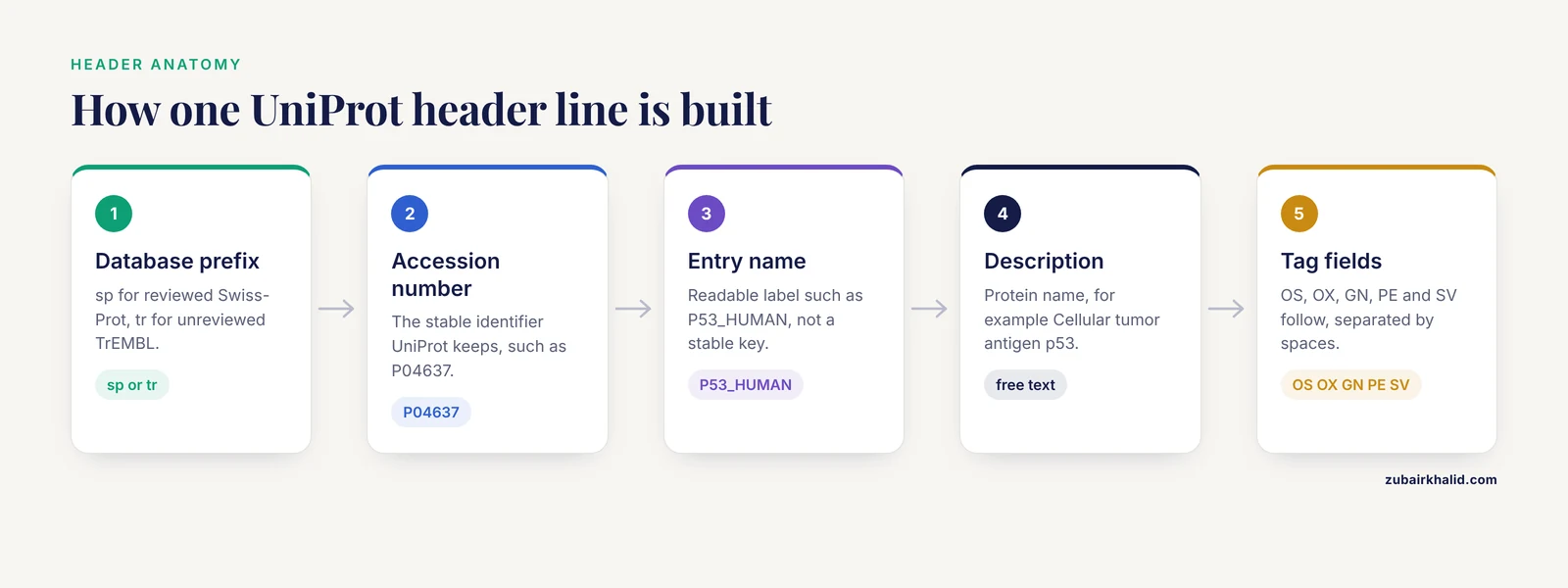
The UniProt FASTA header format follows one general pattern for UniProtKB records:
>db|UniqueIdentifier|EntryName Description OS=... OX=... GN=... PE=... SV=...Each piece has a defined meaning:
- db is the source database, almost always
spfor reviewed Swiss-Prot entries ortrfor unreviewed TrEMBL entries. - UniqueIdentifier is the UniProtKB accession number, such as
P04637. - EntryName is the entry name, such as
P53_HUMAN. - Description is the protein name, followed by space-separated key-value tags:
OS(organism species),OX(organism taxonomy ID),GN(gene names),PE(protein existence level), andSV(sequence version).
A real-world example of the header format interpretation, taken from the way human p53 appears in UniProtKB FASTA files:
>sp|P04637|P53_HUMAN Cellular tumor antigen p53 OS=Homo sapiens OX=9606 GN=TP53 PE=1 SV=1Reading that line left to right: this sequence comes from the reviewed Swiss-Prot database, its stable accession is P04637, its entry name is P53_HUMAN, the protein is called cellular tumor antigen p53, the organism is Homo sapiens, the NCBI taxonomy ID is 9606, the gene is TP53, the existence of the protein itself is supported by experimental evidence, and this is version 1 of the sequence. Everything after the entry name is separated from it by a single space, and the tags are separated from each other by spaces as well.
Two properties of this format explain most of its behavior. First, the first three pipe-delimited fields contain no pipes of their own, so they can be split safely. Second, everything after the third pipe is free-form description text that has changed over the years, which is why robust scripts stop splitting at the third field.
The UniProt Header at a Glance
| Field | Example | Meaning | Stable over time? |
|---|---|---|---|
db prefix | sp | Reviewed Swiss-Prot entry | Yes |
db prefix | tr | Unreviewed TrEMBL entry | Yes |
| UniqueIdentifier | P04637 | Accession number, the stable protein identifier | Yes, unless the entry merges into another |
| EntryName | P53_HUMAN | Identifier and species mnemonic | No, it can change |
| Description | Cellular tumor antigen p53 | Protein name, may include flags such as (Fragment) | No, names are updated |
OS= | Homo sapiens | Organism species name | Rarely changes |
OX= | 9606 | NCBI taxonomy identifier | Rarely changes |
GN= | TP53 | Gene name(s), primary first | Can change with nomenclature |
PE= | 1 | Protein existence level, 1 through 5 | Changes when evidence improves |
SV= | 1 | Sequence version, increments when the sequence itself changes | Increments after sequence updates |
The single most useful takeaway from this table: use the accession as your identifier in scripts and databases, and treat the entry name and description as human-readable labels that can change without notice.
Field-by-Field Breakdown of the UniProt FASTA Header Format
The database prefix: sp, tr, and what they tell you
The first field tells you which part of UniProt the sequence came from. The two prefixes you will encounter in normal UniProtKB FASTA downloads are sp and tr.
spmarks entries from Swiss-Prot, the reviewed section of UniProtKB. Entries here are curated by human annotators, have standardized names, evidence-based annotations, and limited taxonomic scope.trmarks entries from TrEMBL, the unreviewed, computationally annotated section. TrEMBL is far larger and covers far more species, but its annotation is generated by automated systems rather than curators.
This distinction matters when you build a search database or a reference set. If you want high-confidence, non-redundant protein names and function calls, start with sp entries. If you need broad coverage of an organism that has few reviewed entries, you will include tr entries and accept the added redundancy. Many workflows download both files and mark the source in their own tables using this first header field.
The accession: the stable identifier
The second field is the accession number, and it is the identifier UniProt treats as permanent. According to UniProt documentation, accessions are stable and are not reassigned to other entries, while other attributes of an entry, including the entry name and description, can change.
Current accessions are six characters long, and UniProt has defined an extension path that allows them to grow to eight characters and, in a reserved newer style, to ten characters as the database expands. You will notice that recently added entries often have accessions beginning with letters other than O, P, and Q and containing zeros in predictable positions, for example accessions of the form A0A followed by more characters. The practical consequence for you is simple: never hard-code an assumption that an accession is exactly six characters or starts with a specific letter. Treat the accession as an opaque string.
Two accession behaviors deserve attention in any workflow:
- Secondary accessions. When entries are merged, the accession of the absorbed entry becomes a secondary accession. If you query UniProt with a secondary accession, you get back the merged entry, usually with the current primary accession in the header. A sequence ID you recorded years ago may therefore resolve to a different-looking accession today.
- Isoform suffixes. Isoform sequences carry the accession plus a numeric suffix, such as
P05067-2for the second isoform of the amyloid precursor protein. The canonical sequence has no suffix. A naive string match onP05067will also matchP05067-2, which is either convenient or dangerous depending on your intent.
The entry name: short, readable, and not stable
The third field is the entry name, built from an identifier and a species mnemonic joined by an underscore. Examples include P53_HUMAN, TP53_MOUSE is actually the entry name for mouse p53 in Swiss-Prot style, and CYC_BOVIN for bovine cytochrome c. The species mnemonic is a standardized short code: HUMAN for Homo sapiens, MOUSE for Mus musculus, ECOLI for Escherichia coli, BOVIN for Bos taurus.
The identifier portion is usually derived from the gene or protein name and is kept short. It can contain digits, which is why names like 1433B_HUMAN for 14-3-3 protein beta begin with numbers. UniProt reviews and updates entry names when nomenclature changes, and the documentation is explicit that the entry name is not the stable identifier, the accession is. Students often treat the entry name as a permanent key because it looks meaningful. Resist that habit. Use it for reading, use the accession for computing.
The description: protein name and flags
After the third pipe and a space, you get the protein name, which comes from the entry's description lines. This is the standardized name in Swiss-Prot, such as Cellular tumor antigen p53, or a descriptive name in TrEMBL. Names can carry standardized flags that encode biologically meaningful status:
(Fragment)marks a sequence known to be incomplete.- Names of precursor forms may include words like
precursor, and a record may describe a proprotein from which a mature peptide is processed. - Alternative names appear in the entry itself rather than in the FASTA header, so the header usually carries the recommended name plus the tags described below.
Because the description is free text, it is the least reliable field for machine parsing and the most useful field for human reading.
OS and OX: organism name and taxonomy ID
The OS tag gives the organism species name, for example OS=Homo sapiens or OS=Escherichia coli. The OX tag gives the NCBI taxonomy database identifier for that organism, for example OX=9606 for human, OX=10090 for house mouse, and OX=562 for Escherichia coli. The OX value is the one to use when you need a machine-friendly organism key, because species names contain spaces and strain-level naming can vary, while the numeric taxonomy ID is stable and unambiguous.
A practical subtlety: OX reflects the taxonomy ID of the source organism as recorded for the entry, and for organisms with many sequenced strains, different entries can carry different, closely related taxonomy IDs. When you group results by organism, decide whether you want exact taxon IDs or a normalized grouping such as species-level IDs, and handle it deliberately in your pipeline.
GN: gene names
The GN tag lists gene names, with the primary gene name first and any synonyms following, separated within the tag value. For example, GN=TP53. A gene field may be absent for entries where no gene name is known, which is common in unreviewed entries from less-studied organisms. Do not assume GN is present in every header, and do not assume the first name is the only name.
PE: protein existence level
The PE tag encodes the protein existence level, a five-point evidence scale defined by UniProt:
PE=1, experimental evidence at the protein level.PE=2, evidence at the transcript level, meaning the protein is inferred from mRNA or cDNA evidence but the protein itself has not been demonstrated.PE=3, inferred from homology, meaning a closely related protein provides the evidence.PE=4, predicted, meaning the sequence is a pure prediction from nucleic acid sequence.PE=5, not certain, used where the authors or curators doubt the existence of the protein.
For Swiss-Prot entries, curators assign these levels during review. For TrEMBL, the values are assigned by automated rules. In practice, PE is a quick filter when you prioritize hits: a PE=1 reviewed entry is the strongest kind of reference record you can pull, while PE=4 and PE=5 records deserve caution before you build claims on them.
SV: sequence version
The SV tag gives the sequence version. According to UniProt, the sequence version number increases when the sequence itself changes, not when annotations or other entry content change. This distinction matters for reproducibility. If you report that you used P04637 with SV=1, another researcher knows exactly which amino acid sequence you analyzed even if the annotation has been expanded since. When you archive results or publish, record accession plus sequence version, not accession alone.
Isoforms, Secondary Accessions, and Entry History
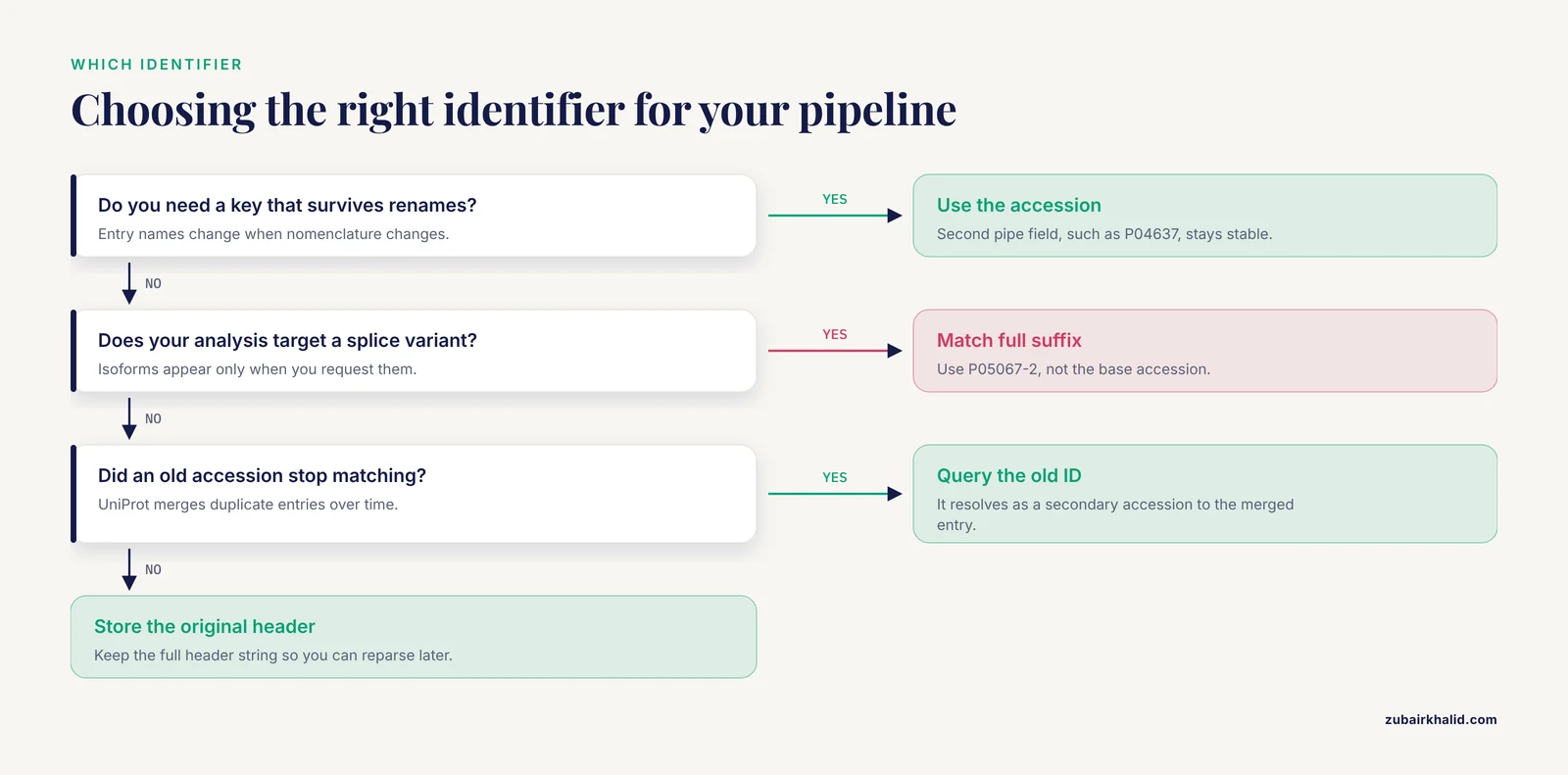
Three aspects of UniProt identifiers trip up newcomers, and all three show up directly in FASTA headers.
Canonical sequences and isoforms. Each UniProtKB entry has one canonical sequence, and, for entries where alternative splicing is annotated, additional isoform sequences. By default, FASTA downloads contain only the canonical sequence. The UniProt website download options and the REST API let you include isoform sequences, which appear as separate records with suffixed accessions such as P05067-2. If your analysis targets a specific splice variant, you need those suffixed records, and you must match on the full suffixed accession rather than the base accession.
Secondary accessions from merges. UniProt merges duplicate entries over time. The absorbed accession does not disappear, it becomes a secondary accession that redirects to the surviving entry. When a script that worked last year suddenly finds no match for a known accession, a merge is a likely explanation. Querying UniProt with the old accession still resolves, because UniProt handles the redirect.
Sequence versions and history. The combination of accession and SV pins down a precise sequence state. The UniProt entry history records these changes, so you can trace what changed and when. For pipelines that must be reproducible, this is the level of specificity reviewers and collaborators expect.
How to Download UniProt Sequences: A Practical Tutorial
This section is the short UniProt database tutorial half of this guide: how to get the FASTA files whose headers you now know how to read.
Downloading from the UniProt website
The standard path through the UniProt website is:
- Go to uniprot.org and enter a search term, for example a gene symbol, protein name, or organism name.
- Narrow results with the filters on the left. The most important filter is Reviewed versus Unreviewed, which selects Swiss-Prot versus TrEMBL entries. Add a taxonomy filter to restrict to your organism, for example Homo sapiens or Mus musculus.
- Tick the checkboxes for the entries you want, or leave them unticked to download all matching results.
- Click Download. In the download dialog, choose the format. The relevant options are FASTA (canonical only) and FASTA (canonical and isoform). Choose compressed output for anything large.
- Keep the search URL. Re-running the same query later gives you an updated file, which is convenient but also means your file is a snapshot, not a frozen version.
Retrieving sequences with the REST API
For scripts and reproducible pipelines, the UniProt REST API is the better tool. Single records come back directly:
curl https://rest.uniprot.org/uniprotkb/P04637.fastaBatch retrieval by query uses the same base URL with query and format parameters:
curl "https://rest.uniprot.org/uniprotkb/stream?query=reviewed:true+AND+organism_id:9606+AND+gene:TP53&format=fasta&compressed=true"That command retrieves reviewed human TP53 sequences, compressed. Useful query components include reviewed:true for Swiss-Prot only, organism_id:9606 for a taxonomy ID, gene:TP53 for a gene name, and combinations joined with AND, OR, and NOT. Replacing format=fasta with format=tsv and adding a fields parameter, for example fields=accession,id,protein_name,gene_primary,organism_name, gives you the same entries as a tab-separated table, which is the reliable way to get structured metadata for the same entries whose FASTA files you are parsing.
You can also retrieve a defined list of accessions:
curl "https://rest.uniprot.org/uniprotkb/stream?query=accession:(P04637+OR+P01308)&format=fasta"This is the cleanest way to rebuild a custom reference set from a fixed accession list, and it sidesteps every parsing ambiguity because you already know the IDs.
Downloading whole databases
UniProt publishes complete FASTA files for Swiss-Prot and TrEMBL on its downloads page. The files are compressed and large, with TrEMBL being orders of magnitude bigger than Swiss-Prot. Whole-database files are the right choice when you format a local BLAST database or need every known sequence, and the per-entry headers in these bulk files follow exactly the format described above.
Parsing UniProt FASTA Headers Safely
Now the workflow half: turning those headers into clean identifiers. The central rule comes from the structure itself. The header is meaningful only up to and including the entry name, that is, the first three pipe-separated fields. Everything after that is description text where spaces separate tags, and where tag values such as organism names can contain spaces and quotes.
Command-line parsing
To list all headers:
grep "^>" uniprot.fastaTo extract accessions:
grep "^>" uniprot.fasta | cut -d"|" -f2To extract database prefix, accession, and entry name together:
awk "/^>/{split(\$0,a,\"|\"); print substr(a[1],2), a[2], a[3]}" uniprot.fastaTo count records by source database:
grep "^>" uniprot.fasta | cut -d"|" -f1 | sort | uniq -cTo pull the taxonomy IDs from the OX tags:
grep "^>" uniprot.fasta | grep -o "OX=[0-9]*" | sort | uniq -cEach of these commands operates on only the fields it can trust, which is the whole point.
Parsing headers in Python
A minimal parser that respects the three-field rule:
def parse_header(line):
    body = line[1:].rstrip("\n")
    db, acc, rest = body.split("|", 2)
    entry_name, _, description = rest.partition(" ")
    return db, acc, entry_name, description
The split("|", 2) call limits the split to three pieces so any pipe characters inside the description, which older files and third-party exports sometimes contain, cannot break the record boundaries. Extracting the OS, OX, GN, PE, and SV tags from the description requires care because tag values can contain spaces inside quotation marks, as in OS="Homo sapiens". A simple whitespace split will break those values apart.
For that reason, the most robust production practice is different: parse only the three identifier fields from the FASTA header, then retrieve the structured metadata for those accessions from UniProt in TSV format using the REST API. The header tells you what the sequence is, the API tells you everything else in a form that will not change shape between downloads.
Keeping headers linked to metadata
Whatever parser you build, preserve the full original header string in your intermediate files. Reasons to reparse or to recover information you did not anticipate appear regularly, and the original header is cheap to store and impossible to reconstruct if you threw it away.
Using UniProt Headers with BLAST and Other Tools
Building a local BLAST database
A typical setup with a downloaded Swiss-Prot file:
makeblastdb -in uniprot_sprot.fasta -dbtype prot -parse_seqids -out swissprot
blastp -query my_proteins.fasta -db swissprot -outfmt "6 qseqid sseqid pident length evalue" -out hits.tsv
The -parse_seqids flag matters because of the header format. With it, BLAST stores the pipe-delimited identifier, and the sseqid column of tabular output gives you the recognizable sp|P04637|P53_HUMAN form, from which you can extract the accession directly. Without it, BLAST treats the entire header as one opaque string, and your downstream parsing inherits every description quirk. If you are mirroring a public BLAST database rather than building your own, note that NCBI's protein databases include UniProtKB records with these same sp and tr prefixed identifiers, so the same extraction logic applies to hits against nr as well.
One more BLAST-era detail: when the same sequence appears in many TrEMBL entries, a BLAST search can return several hits with different accessions, identical sequences, and overlapping descriptions. This is normal. Collapse them by sequence or prefer the reviewed entry with a lower PE number.
UniRef and UniParc headers are different
UniProt operates companion databases whose FASTA output does not follow the UniProtKB pattern. UniRef clusters, such as UniRef100, UniRef90, and UniRef50, provide clustered, reduced-redundancy sets, and their FASTA headers begin with the cluster identifier, for example identifiers of the form UniRef90_ followed by the representative accession, rather than the db|accession|entry triple. UniParc, the comprehensive sequence archive, identifies records by UPI accessions rather than UniProtKB accessions. When you download from these resources, check the header conventions on the corresponding documentation pages before writing parsers, because assuming the UniProtKB format will produce garbage.
Common Mistakes and Limitations
These are the errors that show up repeatedly in real pipelines, along with honest limits of the format.
- Treating the entry name as a stable key. Entry names change when nomenclature changes. The accession is the stable identifier. If your database keys on
P53_HUMANand UniProt updates the name, your joins break. - Splitting the entire header on pipes. Description text can contain pipe characters, especially in older files and third-party exports. Split with a limit of three fields, or parse only the first three fields, and your parser survives.
- Confusing canonical and isoform accessions.
P05067andP05067-2are different sequences. Substring matching will conflate them. Decide explicitly whether isoforms are in scope and match on the complete accession. - Reading
PEas a quality guarantee.PE=1means experimentally demonstrated existence at the protein level, but it does not mean the annotation is complete or error-free, and TrEMBL records are automated regardless ofPEvalue. - Ignoring sequence version. Recording only the accession loses the exact sequence you analyzed if the protein sequence is later corrected. Record accession and
SVfor anything you will defend later. - Assuming every header has every tag.
GNcan be absent, and unusual entries can lack parts of the description. Write parsers that tolerate missing tags instead of crashing on them. - Mixing download dates. Two FASTA files pulled from UniProt on different dates can differ in entries, descriptions, and sequence versions. Note the retrieval date and, where it matters, pin specific versions in your records.
- Re-deriving metadata from headers when the API exists. Header tags are a compressed snapshot. When you need gene names, organism lineage, cross-references, or function, pull structured fields from the REST API in TSV form for the accessions you extracted. One honest limitation covers individual project choices as well: the right mix of reviewed versus unreviewed entries, isoform inclusion, and organism filtering depends on the question you are asking, and no header field makes that decision for you.
Quick Review
- The UniProt FASTA header format is
>db|UniqueIdentifier|EntryName Descriptionfollowed byOS=,OX=,GN=,PE=, andSV=tags separated by spaces. spmeans reviewed Swiss-Prot andtrmeans unreviewed TrEMBL.- The accession in the second field is the stable identifier, and the entry name is not.
PEencodes protein existence on a scale from 1, experimental at the protein level, to 5, uncertain.SVincrements only when the sequence itself changes, so accession plusSVpins down an exact sequence.- Isoform records carry suffixed accessions such as
P05067-2and appear only when you request them. - Parse only the first three pipe-delimited fields, and get structured metadata from the REST API instead of over-parsing the description.
Frequently Asked Questions
What does the sp or tr prefix in a UniProt FASTA header mean?
It tells you the source database within UniProtKB. sp marks a reviewed Swiss-Prot entry curated by human annotators, and tr marks an unreviewed TrEMBL entry annotated computationally.
Which part of a UniProt header should I use as a stable identifier?
Use the accession number, the second pipe-delimited field, such as P04637. UniProt keeps accessions stable while entry names and descriptions can change, and merged entries keep their old accessions as secondary accessions that redirect.
What does PE=1 mean in a UniProt header?
It is the protein existence level, the evidence for the protein's actual existence. PE=1 means experimental evidence at the protein level, and the scale runs to PE=5, meaning the protein's existence is not certain.
Why does the same protein show up with different accessions?
Multiple UniProtKB entries can contain identical or near-identical sequences, especially in TrEMBL, and merged entries leave behind secondary accessions. Prefer the reviewed entry for a protein, and expect redundant tr hits when searching broad databases.
How do I download all FASTA sequences for a single organism from UniProt?
Search the UniProt website with the organism name, apply the taxonomy filter, choose the reviewed or unreviewed scope, and download in FASTA format. For scripts, use the REST API with a query such as organism_id:9606 and format=fasta, adding reviewed:true if you want Swiss-Prot only.
How do I parse a UniProt FASTA header in Python without breaking it?
Split the header into at most three pipe-delimited fields with split("|", 2), take the accession from the second field and the entry name from the start of the remainder, and stop there. For tag values like organism names, retrieve structured metadata from UniProt's TSV output instead of parsing the free-text description.