How to Export Expression and Localization Data from UniProt
By Dr. Zubair Khalid, DVM, MS, PhD ·

By the end of this guide you will be able to export two kinds of protein annotation from the UniProt database: expression information (tissue specificity, induction, developmental stage) and subcellular localization (nucleus, membrane, secreted, and so on). You will do this two ways, first through the UniProt website with a few clicks, then through the UniProt REST API with reproducible commands you can rerun whenever the database is updated. You will also learn how to connect UniProt annotations to quantitative expression resources such as the Human Protein Atlas, how to spot the errors that corrupt most first attempts, and how to verify that the file you downloaded is actually correct.
What you need on hand:
- A web browser for the website workflow. Nothing to install.
- A terminal with
curl, or Python 3 with therequestslibrary, for the API workflow. - A plain text editor or a spreadsheet program that does not mangle gene symbols (see the Common Mistakes section before opening anything in Excel).
- A list of UniProt accessions or gene names if you are exporting for a specific protein set, for example the output of a differential expression analysis.
How to use UniProt: what counts as expression and localization data
UniProt (the Universal Protein Resource) maintains UniProtKB, the protein knowledgebase, which comes in two sections. Swiss-Prot contains entries that have been reviewed by expert curators. TrEMBL contains computationally annotated entries that have not been manually reviewed. Every UniProt entry carries an accession, for example P04637 for human TP53 or Q9BYF1 for human ACE2. When you export data you should almost always start from the reviewed section, because the annotations are curated and traceable to evidence. The value of working from the reviewed section is easy to see in practice. One large-scale study of protein charge distribution analyzed 551,705 reviewed Swiss-Prot proteins from across organisms, roughly 180 million protein segments, and drew biologically meaningful conclusions about N-terminal charge and translation from that curated set [1].
Within an entry, the data you want live in specific annotation blocks:
- Subcellular location. A curated text block, for example "Membrane, Single-pass type I membrane protein" or "Nucleus." Some entries include isoform-specific location, meaning different splice variants sit in different compartments.
- Tissue specificity. Curated free text describing where the protein is expressed, for example "expressed predominantly in X tissue." This is qualitative curation, not a quantitative measurement.
- Induction and Developmental stage. Smaller text blocks that describe what induces expression and when during development the protein appears.
- Gene Ontology (GO) cellular component annotations. Structured terms with stable identifiers, for example GO:0005634 for nucleus and GO:0005615 for extracellular space. These are the terms you filter on when you want machine-readable localization.
- Keywords. Controlled vocabulary terms prefixed SL- for subcellular location, such as a Nucleus or Secreted keyword. Filtering on a keyword is often cleaner than filtering on free text.
- Cross-references. Links out to resources that hold quantitative data. The two that matter for expression and localization are the Human Protein Atlas and Expression Atlas. This division of labor is standard practice in published workflows. One pan-cancer study of the methyltransferase N6AMT1 established its nuclear localization by checking both UniProt and the Human Protein Atlas, then pulled quantitative expression from TCGA cohorts elsewhere [2].
A frequent and legitimate question from people learning how to use UniProt is whether the database itself contains quantitative expression values. It does not. UniProt stores curated statements about expression and localization, backed by evidence tags that tell you whether the statement is experimental, inferred by similarity, or predicted. Quantitative abundance lives in the linked resources. Understanding this split early prevents most downstream confusion, and it is the reason the workflow in this article ends with cross-references rather than pretending UniProt is an expression matrix.
Export expression and localization data step by step: the website
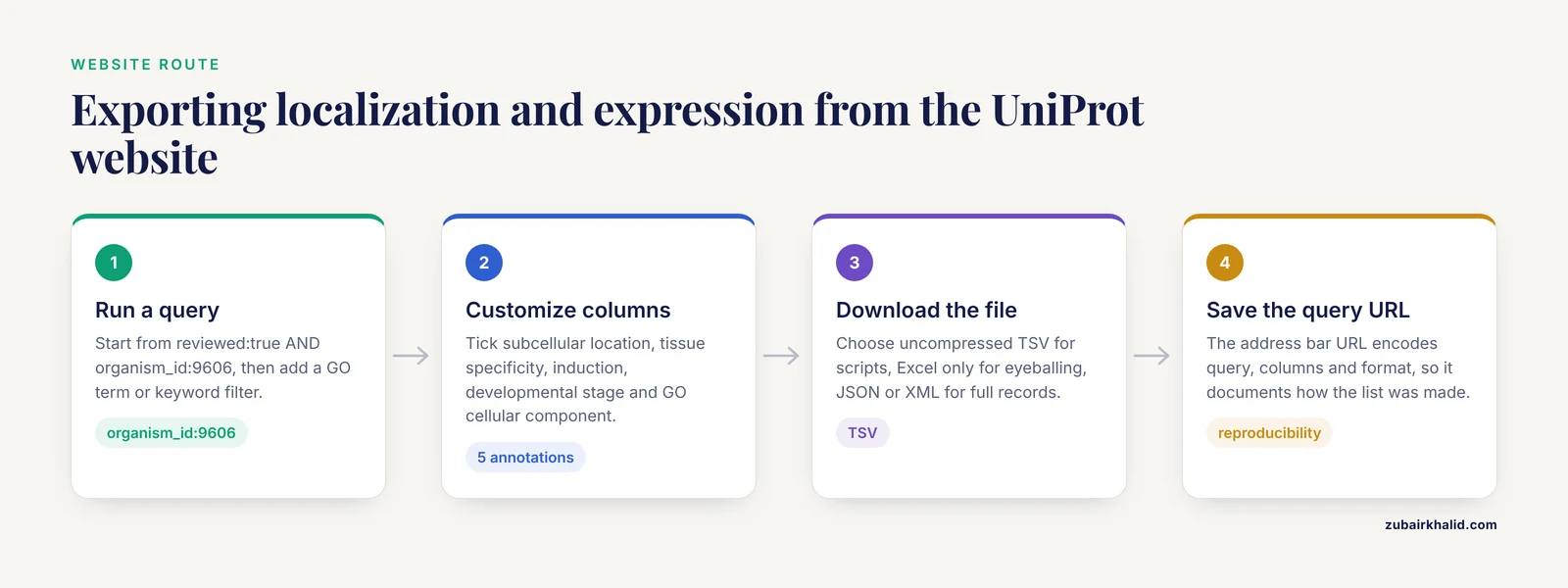
This is the fastest route and the one most people should start with. It handles sets of tens of thousands of entries without any code.
Step 1. Open UniProtKB and run a query
Go to uniprot.org and select UniProtKB. In the search box, build a query using UniProt's field syntax. A safe starting query for human curated entries looks like this:
reviewed:true AND organism_id:9606reviewed:true restricts results to Swiss-Prot. organism_id:9606 restricts results to human, using the NCBI taxonomy identifier. Add a localization filter with either a GO term or a keyword:
reviewed:true AND organism_id:9606 AND go:GO:0005615This query returns reviewed human proteins annotated to the extracellular space. Replace GO:0005615 with GO:0005634 for the nucleus, GO:0005737 for the cytoplasm, or GO:0005886 for the plasma membrane. If you prefer keywords, keyword:Secreted and keyword:Nucleus work in the same position. To pull one protein, query by accession directly:
accession:Q9BYF1Step 2. Customize the result columns
On the results page, open the column customization menu (labeled "Table" or "Customize columns" depending on the current interface) and tick these annotations:
- Subcellular location
- Tissue specificity
- Induction
- Developmental stage
- Gene Ontology (cellular component), often shown as "Go" with the "C" (component) column
The results table now shows one row per protein with the localization and expression text inline. A row for a secreted protein will show something like "Secreted" in the subcellular location column and a tissue specificity sentence in the next column.
Step 3. Download
Click the download button above the results and choose:
- Uncompressed TSV for anything you will parse with Python, R, or a script. This is the format this article uses everywhere.
- Excel only if you will eyeball the file, and only after reading the Excel warning in the Common Mistakes section.
- JSON or XML if you need the full structured entry, including evidence codes and cross-references.
The downloaded file contains every entry in your result set with exactly the columns you selected. If you ran the extracellular space query, expect a header row like this:
Entry Reviewed Entry Name Protein Names Gene Names Subcellular location [CC] Tissue specificity Gene Ontology (cellular component)followed by one row per protein. The exact column headers change as UniProt updates its interface, so always treat the first row as the schema of the file and parse by header name, never by column position.
Step 4. Save the query, not just the file
Copy the URL from the browser address bar after the search. That URL encodes the query, the columns, and the format. Saving it is the cheapest possible reproducibility measure. When a reviewer or collaborator asks how you generated a protein list twelve months from now, the URL answers the question.
Export expression and localization data step by step: the REST API
The website is fine for a one-off export. For anything you will repeat, or anything you need to document in a methods section, use the REST API. UniProt documents its API at uniprot.org, and the endpoints below are stable and versioned.
Single entry retrieval
To pull one entry as a flat text file, which is the quickest way to inspect what UniProt knows about a protein:
curl -s "https://rest.uniprot.org/uniprotkb/Q9BYF1.txt" | grep -A 3 "SUBCELLULAR"Expected output, abridged:
CC   -!- SUBCELLULAR LOCATION: Membrane; Single-pass type I membrane protein.
CC       Cell membrane...
This matches the known biology of ACE2, the receptor the SARS-CoV-2 spike protein engages on airway epithelial cells. It is the kind of annotation researchers use to confirm that a modeled or predicted protein feature is consistent with curated knowledge, the same way one modeling study verified that its predicted spike protein binding site residues were compatible with annotations in the UniProt database [3]. Drop the grep to see the whole entry, including the TISSUE SPECIFICITY block:
curl -s "https://rest.uniprot.org/uniprotkb/Q9BYF1.txt" | grep -B 1 -A 4 "TISSUE SPECIFICITY"Bulk TSV export for a protein set
To export localization and expression fields for a list of accessions in one request, use the search endpoint with an OR query. This is the standard way to annotate a candidate list from a differential expression or proteomics analysis:
curl -s "https://rest.uniprot.org/uniprotkb/search?query=accession:(P04637%20OR%20Q9BYF1%20OR%20P00533)&fields=accession,id,protein_name,gene_primary,cc_subcellular_location,cc_tissue_specificity&format=tsv" > candidates_localization.tsvExpected output (abridged, the annotation text is longer in the real file):
Entry    Reviewed    Entry Name    Protein Names    Gene Names    Subcellular location [CC]    Tissue specificity
Q9BYF1   true        ACE2_HUMAN    Angiotensin-converting enzyme 2 ...    ACE2    Membrane; Single-pass type I membrane protein...    ...
P04637   true        P53_HUMAN     Cellular tumor antigen p53 ...         TP53    Nucleus. Cytoplasm...    ...
The fields that matter for this article:
| What you want | Query filter | API field | What you get |
|---|---|---|---|
| , - | , - | , - | , - |
| Curated human entries only | reviewed:true AND organism_id:9606 | (filter, not a field) | Swiss-Prot quality annotations |
| Subcellular location text | none needed | cc_subcellular_location | Curated location sentences, possibly multiple per protein |
| Tissue specificity text | none needed | cc_tissue_specificity | Curated expression description, qualitative |
| Induction | none needed | cc_induction | Curated induction conditions |
| Developmental expression | none needed | cc_developmental_stage | Curated developmental timing |
| Machine-readable location | go:GO:0005634 (nucleus), go:GO:0005615 (extracellular space), go:GO:0005737 (cytoplasm), go:GO:0005886 (plasma membrane) | go_id, go_c | Stable GO identifiers and term names |
| Location keywords | keyword:Nucleus, keyword:Secreted | keyword | Controlled vocabulary terms |
| One protein | accession:Q9BYF1 | all fields | Full entry |
Pagination for large result sets
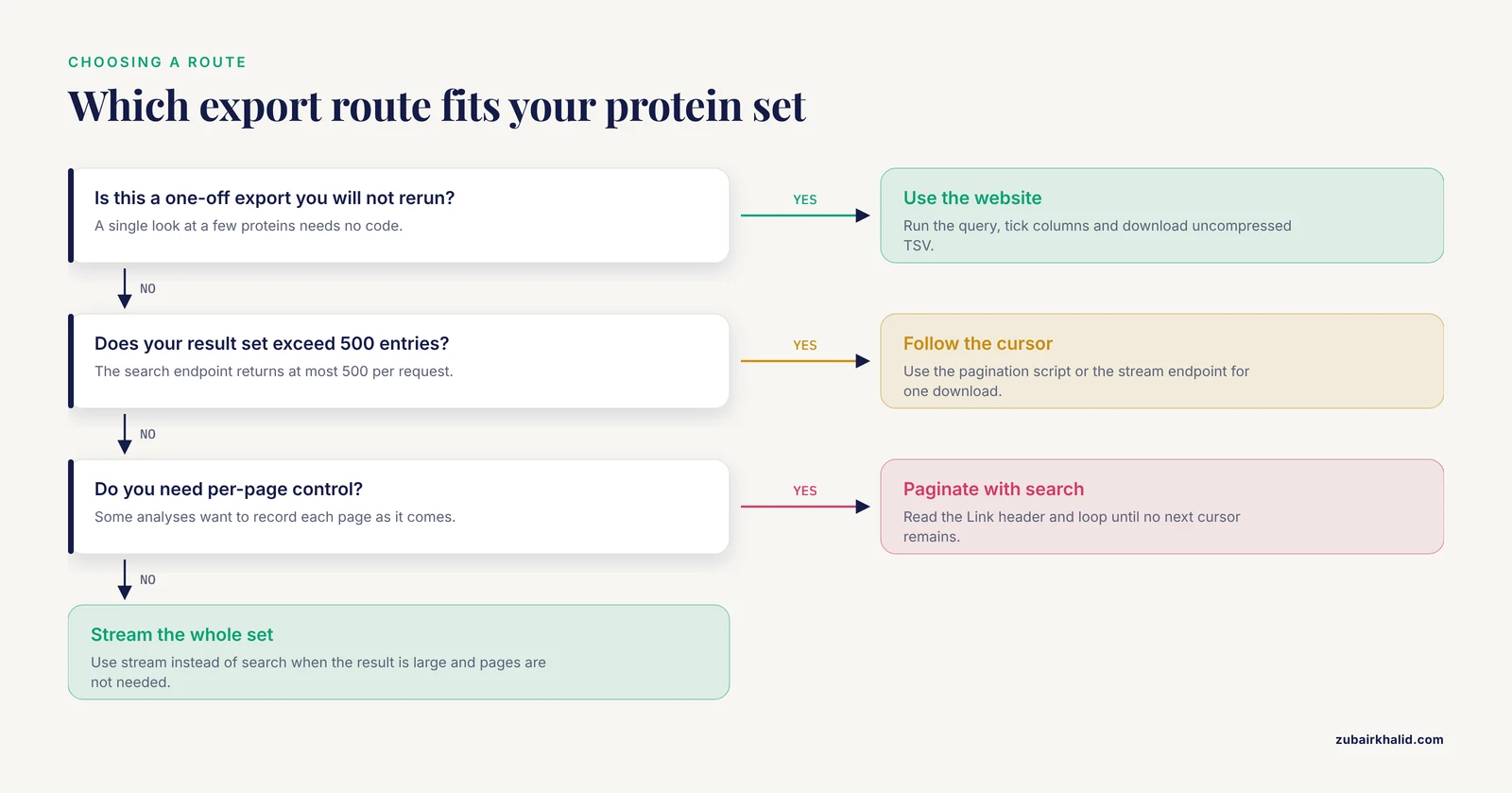
The search endpoint returns at most 500 entries per request. Human TrEMBL alone contains far more than that, and even broad reviewed queries can exceed the cap. UniProt handles this with a cursor embedded in the HTTP Link response header. This Python script follows the cursor until every page is downloaded, then writes a single TSV:
import requests, csv, io

BASE = "https://rest.uniprot.org"
query = "(organism_id:9606) AND (reviewed:true) AND (go:GO:0005615)"
fields = "accession,id,protein_name,gene_primary,cc_subcellular_location,cc_tissue_specificity"
url = f"{BASE}/uniprotkb/search?query={query}&fields={fields}&format=tsv&size=500"

rows = []
while url:
    r = requests.get(url, timeout=60)
    r.raise_for_status()
    reader = csv.DictReader(io.StringIO(r.text), delimiter="\t")
    rows.extend(list(reader))
    url = None
    link = r.headers.get("Link")
    if link and 'rel="next"' in link:
        url = link.split("<")[1].split(">")

with open("secreted_human_reviewed.tsv", "w", newline="") as fh:
    writer = csv.DictWriter(fh, fieldnames=rows.keys(), delimiter="\t")
    writer.writeheader()
    writer.writerows(rows)

print(f"Wrote {len(rows)} entries")
Expected output:
Wrote 3142 entriesYour count will differ, because UniProt annotations grow with every release. The point of printing the count is that it becomes part of your record. If you rerun this in a year and the count moves, that is real database drift, not a bug in your script.
For genuinely large exports where you want the entire result in one stream rather than paginated pages, UniProt offers a stream endpoint that accepts the same parameters. Use stream instead of search when the result set is large and you do not need per-page control.
Getting the cross-references you will actually need
For quantitative expression, the annotations you exported are pointers, not measurements. The Human Protein Atlas and Expression Atlas cross-references live inside the full entry record. Retrieve one entry as JSON and inspect the cross-reference block:
curl -s "https://rest.uniprot.org/uniprotkb/Q9BYF1.json" | python3 -m json.tool | grep -B 2 -A 4 -i "proteinatlas"The cross-reference gives you the identifier to construct the Human Protein Atlas page for that protein, where RNA and protein expression levels per tissue are displayed and downloadable. This UniProt-plus-HPA combination is exactly how published biomarker studies operate. The N6AMT1 pan-cancer study confirmed nuclear localization through UniProt and HPA before moving to TCGA expression and survival data [2], and the prostate cancer biomarker study behind SPON2 and MSMB used UniProt annotations together with the Human Protein Atlas to decide which differentially expressed genes encode secretory proteins worth pursuing as diagnostic targets [4].
Worked example: filtering secreted protein candidates from a gene list
Suppose your differential expression analysis produced a list of upregulated genes and you want only the ones whose proteins are secreted, because those are plausible circulating biomarkers. A published version of this exact workflow took 243 differentially expressed genes, filtered for secretory proteins using UniProt and Human Protein Atlas annotations, and arrived at five candidates, of which SPON2 and MSMB showed strong diagnostic performance [4]. Here is the UniProt half of that workflow as commands.
First, format your gene list into a query. If your list is short, write it inline:
curl -s "https://rest.uniprot.org/uniprotkb/search?query=(organism_id:9606)%20AND%20(reviewed:true)%20AND%20(keyword:Secreted)%20AND%20(gene:(SPON2%20OR%20MSMB%20OR%20GENE3%20OR%20GENE4%20OR%20GENE5))&fields=accession,gene_primary,cc_subcellular_location,cc_tissue_specificity,keyword&format=tsv"For longer lists, build the query from a file:
import requests, urllib.parse

genes = [g.strip() for g in open("my_genes.txt") if g.strip()]
gene_clause = " OR ".join(genes)
query = f"(organism_id:9606) AND (reviewed:true) AND (keyword:Secreted) AND (gene:({gene_clause}))"

url = ("https://rest.uniprot.org/uniprotkb/search?"
       + urllib.parse.urlencode({
           "query": query,
           "fields": "accession,gene_primary,cc_subcellular_location,cc_tissue_specificity,keyword",
           "format": "tsv",
           "size": "500"}))
r = requests.get(url, timeout=60)
r.raise_for_status()
open("secreted_candidates.tsv", "w").write(r.text)
print(r.text.splitlines())  # print header to confirm fields
Expected output header:
Entry Gene Names Subcellular location [CC] Tissue specificity KeywordsThen check the results against your expectations. SPON2 (spondin-2) and MSMB (beta-microseminoprotein) should appear as secreted entries. Any gene from your list that is missing from the output failed one of the three filters, and the next section tells you which failure modes to check. Genes that are expressed but not secreted will correctly drop out, and that is the filter working.
If your input is a list of UniProt accessions from a mass spectrometry pipeline rather than gene names, skip the gene query. Database search engines such as DIA-NN report protein groups keyed by UniProt identifiers. One lung cancer proteomics study searched LC-MS/MS spectra against the human UniProt database with DIA-NN and identified thousands of differentially expressed proteins, each carried forward by accession [5]. For that kind of list, query by accession with OR clauses, or use UniProt's ID mapping service on the website, which converts between gene names, Ensembl IDs, RefSeq identifiers, and UniProt accessions in one upload.
Worked example: verifying localization for a single biomarker
When you need to state in a paper or a report that a protein "is mainly localized in the nucleus," you should be able to point at the entry rather than from memory. Two commands cover it:
# Flat file view, filter to the location block
curl -s "https://rest.uniprot.org/uniprotkb/P04637.txt" | grep -A 4 "SUBCELLULAR"

# GO cellular component annotations, machine readable
curl -s "https://rest.uniprot.org/uniprotkb/search?query=accession:P04637&fields=accession,go_id,go_c,cc_subcellular_location&format=tsv"
Expected output for the flat file, abridged:
CC   -!- SUBCELLULAR LOCATION: Nucleus.
CC       Cytoplasm...
For TP53 the two compartments reflect real biology, the protein shuttles between nucleus and cytoplasm, so a multi-location output is the correct answer, not an error. When the location is isoform-specific, the block spells out which isoform goes where, and you should carry that detail into your analysis instead of collapsing everything to one string.
The N6AMT1 study is a good model of the verification standard to aim for. That work reported the protein as mainly nuclear based on UniProt and HPA agreement, then used the localization to interpret the biomarker's immunotherapy relevance across nine cancer types [2]. One source is a hint, two independent sources with the same answer is a claim you can defend.
Common Mistakes and Limitations
These are the failures that account for most bad UniProt exports. Each one has produced real, reproducible wrong answers in real projects.
- Forgetting
reviewed:true. Without it, your query runs against UniProtKB as a whole, and TrEMBL entries carry predicted, unreviewed annotations. A "secreted protein" claim backed only by a TrEMBL annotation is much weaker than one backed by Swiss-Prot curation. Add the filter unless you consciously want predictions. - Omitting the organism.
gene:TP53alone returns TP53 from every organism that has an ortholog annotated. Always pair a gene or protein name query withorganism_id:. For human, that is 9606. - Quoting the query incorrectly in the shell. The ampersand characters in API URLs split shell commands. Wrap the whole URL in double quotes, and percent-encode spaces and parentheses as
%20and%28/%29when they appear inside the query parameter. An unquoted URL produces truncated requests and results that look like UniProt gave you only three proteins for a genome-wide query. - Treating the 500-entry cap as a complete result. A search endpoint request without cursor pagination silently stops at 500 entries. If your human reviewed extracellular space query returns exactly 500 rows, you are truncated. Use the pagination script above or the stream endpoint.
- Parsing the TSV by column position. UniProt annotation cells can contain multiple locations, multiple tissue specificity sentences, and internal separators, and column order can change between interface updates. Parse by header name. If you need each location as a separate row, split the cell on the internal separators during parsing rather than assuming one location per protein.
- Opening the TSV in Excel before checking gene symbols. Excel and similar spreadsheet programs convert some gene symbols into dates or floating point numbers on import, which corrupts the identifier column permanently. Known affected symbols include SEPT family names. Import the file as text, or keep the identifier column quoted, or work in Python or R and never round-trip the file through a spreadsheet.
- Ignoring evidence level. UniProt tags each annotation with its evidence, from direct experimental assay to similarity-based inference to prediction. A subcellular location marked "By similarity" from another species is not the same strength of claim as an experimentally demonstrated one. When your downstream conclusion depends on localization strength, filter or at least record the evidence class rather than collapsing all annotations to equal weight.
- Expecting quantitative expression from UniProt. Tissue specificity is curated text. If your analysis needs per-tissue abundance values, TPMs, or immunohistochemistry scores, get them from the Human Protein Atlas or Expression Atlas using the cross-references, and treat the UniProt text as context.
- Confusing isoform-specific localization with protein-level location. Many entries state that isoform 1 is nuclear while isoform 2 is cytoplasmic. Collapsing that to a single value discards the biologically interesting part and can invert a hypothesis about splice-dependent trafficking.
- Not recording the release version. UniProt updates on a schedule and annotations move. Save the query URL, the retrieval date, and the entry counts. This is also how the large-scale studies cited in this article keep their analyses defensible, since an analysis of 551,705 reviewed proteins is only meaningful relative to a stated database state [1].
One more limitation belongs on the record. UniProt localization reflects canonical biology of the reviewed entry, not cell-type-specific or disease-state-specific relocalization. A protein annotated as nuclear can relocalize under drug treatment or in transformed cells. Cross-checking with the Human Protein Atlas, which reports tissue and cell-line-level protein expression patterns, catches the cases that matter for your question.
Tips for reliable exports
A handful of habits separate exports you can publish from exports you redo in six months:
- Test complex queries in the web interface first. The results page shows the entry count instantly, so a query that returns zero entries is diagnosed in seconds rather than after a debugging session with curl.
- Keep accession numbers as the primary key. Gene names are ambiguous across species and change over time. Accessions are stable, and every downstream merge should key on them.
- Cache raw responses. Save the raw TSV and JSON responses alongside your analysis code, with the retrieval date in the filename. Rerunning an analysis on silently updated data is a classic source of unreproducible results.
- Prefer GO and keyword filters for sets, text fields for reading. Filter on
go:orkeyword:when building protein sets, because they are controlled and predictable. Use thecc_subcellular_locationandcc_tissue_specificitytext fields when you or a human reader wants the nuance. - Use the same trick for proteomics. If your mass spectrometry search used UniProt as the reference database, keep the database version in your methods, because peptide-to-protein mapping depends on the exact protein sequences in that release.
- Validate with proteins whose localization you know. Before trusting a bulk export, check three or four well-known proteins. ACE2 should come back membrane, single-pass. TP53 should come back nuclear with cytoplasmic annotation. A secreted protein should carry the Secreted keyword. If known examples come back wrong, your query or parsing is wrong, not the database.
Frequently Asked Questions
Does UniProt provide quantitative protein expression values?
No. UniProt stores curated qualitative statements such as tissue specificity and induction text, backed by evidence tags. For quantitative per-tissue expression, follow the entry's cross-references to the Human Protein Atlas or Expression Atlas and export the numbers there.
What is the difference between Swiss-Prot and TrEMBL?
Swiss-Prot entries are manually reviewed by curators and carry evidence-backed annotations. TrEMBL entries are computationally annotated and unreviewed. Add reviewed:true to any query when you want curated expression and localization claims.
How do I export localization for thousands of proteins at once?
Use the search endpoint with a query over your accessions or genes, request the cc_subcellular_location and go_id fields in TSV format, and paginate with the cursor in the Link response header, or use the stream endpoint for one continuous download.
Which API field names correspond to expression and localization data?
The core fields are cc_subcellular_location, cc_tissue_specificity, cc_induction, cc_developmental_stage, go_id, go_c, and keyword. Field names occasionally change as UniProt evolves, so confirm against the current API documentation page before locking in a pipeline.
Why does my UniProt export disagree with Human Protein Atlas?
The two resources annotate different things with different evidence bases, including different isoforms, antibodies, and detection methods. Treat disagreement as a signal to check the evidence level on the UniProt annotation and the tissue-level data on the HPA page rather than picking one source by default.
How do I filter for secreted proteins?
Query with keyword:Secreted or with the extracellular space GO term go:GO:0005615, combined with reviewed:true and your organism of choice, and request cc_subcellular_location so you can read the curated justification for each entry.
Can I export data for a list of my own accessions or gene names?
Yes. Build an OR query over accessions for the API, or use UniProt's ID mapping service on the website to convert a mixed list of gene names, Ensembl IDs, or RefSeq identifiers into UniProt accessions before exporting.
Is UniProt data free to download and reuse?
Yes, UniProt data are freely available, and the database publishes its licensing terms on uniprot.org. Check the current terms page before redistributing large extracts in a product, since attribution requirements are the part most likely to apply to you.
Sources
- Protein charge distribution in proteomes and its impact on translation.
- N6AMT1 is a novel potential diagnostic, prognostic and immunotherapy response biomarker in pan-cancer.
- SP-A binding to the SARS-CoV-2 spike protein using hybrid quantum and classical in silico modeling and molecular pruning by Quantum Approximate Optimization Algorithm (QAOA) Based MaxCut with ZDOCK.
- Immunodiagnostic profiling of SPON2 and MSMB as biomarkers in prostate cancer for nanomaterial- based detection strategies.
- Proteomic profiling of early-stage non-small cell lung cancer identifies a high-performance protein signature associated with postoperative recurrence.