UniProt Cross-References to IntAct and BioGRID Guide
By Dr. Zubair Khalid, DVM, MS, PhD ·

By the end of this guide you will be able to take a UniProtKB accession such as P04637, pull its cross-references to the IntAct and BioGRID interaction databases, resolve those identifiers back into protein records on both sides, fetch the actual interaction records from each database, run the whole process in reverse for proteins you only know by gene symbol or IntAct identifier, and do it at scale for thousands of proteins with one download. The workflow is built entirely around documented REST endpoints and flat-file downloads, so every command is reproducible from the command line.
To follow along you need a Unix-like shell (Linux, macOS, or WSL on Windows), the command-line tools curl, jq, awk, and Python 3 with the requests package if you prefer scripted retrieval. For the BioGRID section you also need a free API access key from the BioGRID website. No R, no Galaxy, no local database installation is required.
Why UniProt Cross-References Matter
A cross-reference is a pointer from one database entry to an entry describing the same biological entity in another database. UniProt, the protein knowledgebase maintained jointly by EMBL-EBI, the SIB Swiss Institute of Bioinformatics, and the Protein Information Resource, embeds these pointers directly in every UniProtKB entry. When the target database is an interaction database, the cross-reference gives you a stable entry point into curated protein interaction data without you having to guess how the other database names the same protein.
Two interaction databases appear regularly in UniProt entries:
- IntAct, hosted at EMBL-EBI, stores molecular interactions with full evidence annotation. Each interactor in IntAct carries its own identifier in the form
EBI-followed by digits, for exampleEBI-766463for human TP53. - BioGRID, a curated interaction database, assigns its own numeric identifiers to interactors and records.
The identifier problem this solves is real and old. Each major protein database uses its own conventions when assigning protein identifiers, and reconciling the various, potentially unstable identifiers that refer to identical proteins is a persistent challenge when unifying datasets annotated from multiple sources [1]. UniProt cross-references are the most direct remedy for interaction databases, because UniProt curators maintain the mapping for you.
How to Use UniProt for Identifier Work: Quick Orientation
If you are new to using UniProt as a data source rather than a web page, here is the mental model behind every command in this guide.
UniProtKB (the knowledgebase) comes in two sections: Swiss-Prot, which is manually reviewed, and TrEMBL, which is computationally annotated and much larger. Every entry has a primary accession (for example P04637), a mnemonic name (P53_HUMAN), and a block of DR (database cross-reference) lines in the plain-text format. In the machine-readable JSON, the same block appears under the key uniProtKBCrossReferences.
The plain-text cross-reference line for IntAct looks like this:
DR IntAct; EBI-766463; -.The structure is always DR <database>; <identifier>; <optional annotation>.. For BioGRID the identifier is a plain number. In JSON the same data reads:
"uniProtKBCrossReferences": [
  {
    "database": "IntAct",
    "id": "EBI-766463"
  }
]
Three facts about these identifiers will save you hours of confusion later:
- The IntAct
EBI-identifier identifies an interactor inside IntAct, which usually maps one-to-one to the UniProt canonical entry but is not itself a UniProt accession. You cannot typeEBI-766463into UniProt and expect a hit. - The BioGRID identifier in the UniProt DR line is BioGRID's internal interactor number, not an NCBI Gene ID and not a UniProt accession.
- Cross-references point from the canonical UniProt entry. If you work with a specific isoform sequence, check whether the interaction databases treat that isoform as a separate interactor before you merge your data.
UniProt Cross-Reference to IntAct and BioGRID: Step-by-Step Workflow
The following numbered walkthrough takes you from a single accession to genome-scale retrieval, with the reverse direction and the sequence-based mapping case handled at the end. All commands assume human TP53 (accession P04637) as the running example. Identifier values shown in the sample outputs come from live releases of the three databases, so verify them against current data before treating any single value as fixed.
Step 1: Retrieve the cross-references for one UniProt entry
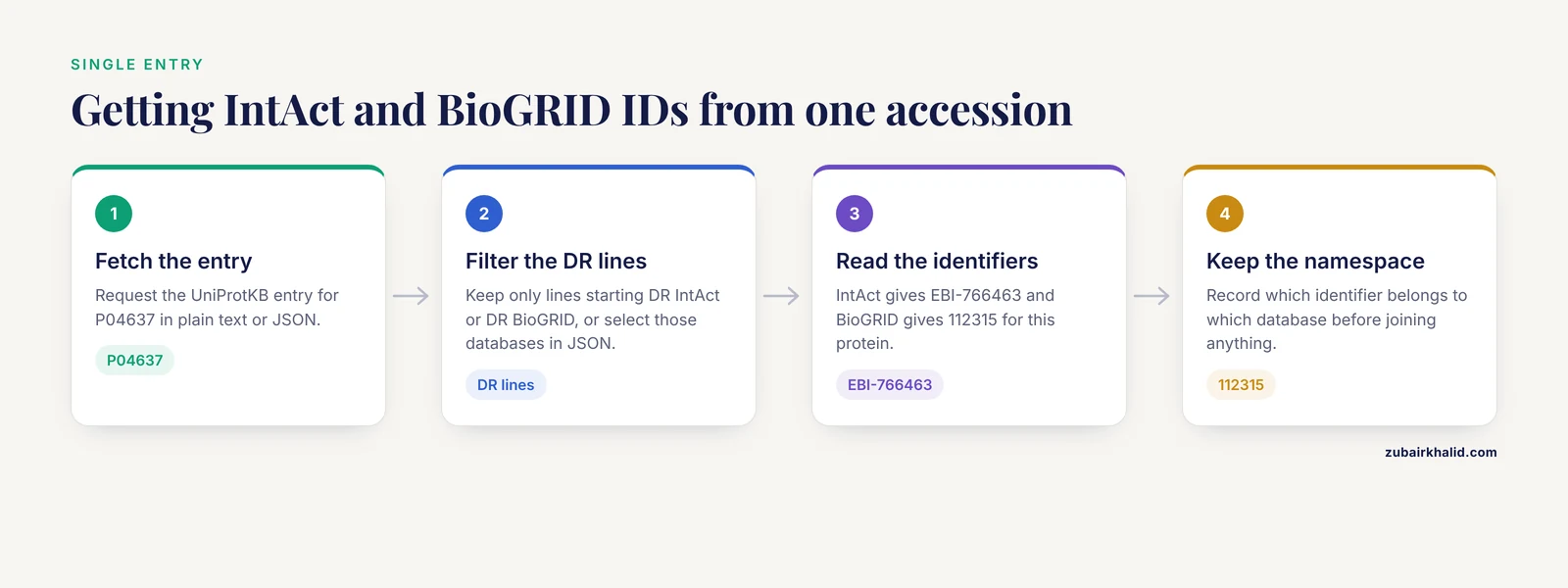
Fetch the plain-text entry and filter the DR lines:
curl -s https://rest.uniprot.org/uniprotkb/P04637.txt | grep -E "^DR (IntAct|BioGRID)"Expected output (identifier values reflect the live databases):
DR   IntAct; EBI-766463; -.
DR   BioGRID; 112315; -.
This single command answers the most common version of the question: given a UniProt accession, what are the IntAct and BioGRID identifiers for this protein. You get both in under a second with no API key.
The same retrieval in JSON, parsed with jq into a clean tab-separated table:
curl -s https://rest.uniprot.org/uniprotkb/P04637.json | jq -r '
  .uniProtKBCrossReferences[]
  | select(.database == "IntAct" or .database == "BioGRID")
  | [.database, .id] | @tsv'
Expected output:
IntAct	EBI-766463
BioGRID	112315
If you prefer Python, this is the scripted version you can drop into a larger pipeline:
import requests

r = requests.get("https://rest.uniprot.org/uniprotkb/P04637.json")
r.raise_for_status()
xrefs = [
    (x["database"], x["id"])
    for x in r.json()["uniProtKBCrossReferences"]
    if x["database"] in ("IntAct", "BioGRID")
]
print(xrefs)
# [('IntAct', 'EBI-766463'), ('BioGRID', '112315')]
The JSON representation is preferable in scripts because each cross-reference can carry additional properties, such as isoform context, that the plain-text DR line flattens away.
Step 2: Resolve an IntAct identifier back to UniProt
The reverse lookup matters when you start from an IntAct MITAB file (for example a downloaded interaction dataset full of EBI- identifiers) and need the corresponding UniProt accessions. UniProt supports searching on cross-reference database and identifier through its REST search endpoint:
curl -s "https://rest.uniprot.org/uniprotkb/search?query=xref_database:IntAct+AND+xref_id:EBI-766463&fields=accession,id,organism_name&format=tsv"Expected output:
Accession	Entry Name	Organism
P04637	P53_HUMAN	Homo sapiens
Two query fields do all the work here. xref_database names the target database exactly as UniProt names it in the DR line, so IntAct and BioGRID are both valid values. xref_id carries the identifier string. The plus signs are URL-encoded spaces, which is why the query must stay inside quotation marks.
To resolve a batch of BioGRID identifiers the same way, build an OR query:
curl -s "https://rest.uniprot.org/uniprotkb/search?query=xref_database:BioGRID+AND+(xref_id:112315+OR+xref_id:113010)&fields=accession,id&format=tsv"Keep OR batches to a few hundred identifiers per request. UniProt enforces a maximum query length, and extremely long URL strings fail with an HTTP 400 response even when every identifier is correct.
Step 3: Find every protein with an IntAct or BioGRID cross-reference
The same two query fields let you enumerate rather than look up. To count all reviewed human entries carrying an IntAct cross-reference:
curl -s "https://rest.uniprot.org/uniprotkb/search?query=xref_database:IntAct+AND+reviewed:true+AND+organism_id:9606&format=tsv&fields=accession,id&size=500" | wc -lreviewed:true restricts the search to Swiss-Prot, organism_id:9606 restricts it to human by NCBI taxonomy ID, and size=500 returns up to 500 rows per page, which is the REST API maximum. For results beyond the first page, read the Link response header, which contains the URL for the next page, and follow it until no further link appears:
curl -sI "https://rest.uniprot.org/uniprotkb/search?query=xref_database:IntAct+AND+reviewed:true+AND+organism_id:9606&format=tsv&size=500" | grep -i "^link"The returned header contains a rel="next" URL. Loop over these pages in a shell or Python script and you have the full set.
For a whole-universe count rather than one organism, drop the organism filter. You can also enumerate entries with BioGRID cross-references by substituting xref_database:BioGRID in any of these queries.
Step 4: Fetch the actual interactions from IntAct
The cross-reference gets you to the door. To walk through it, use the PSICQUIC REST interface provided by IntAct, which returns interactions in the MITAB standard format:
curl -s "https://www.ebi.ac.uk/Tools/webservices/psicquic/intact/webservices/current/search/interactions/?query=identifier:P04637&format=tab25"Expected output, one line per interaction, columns separated by tabs (abbreviated here to the first two columns):
uniprotkb:P04637|intact:EBI-766463 uniprotkb:MDM4|intact:EBI-369614 ...Each MITAB line carries 15 fields in the tab25 format. The fields that matter for most analyses are:
| Column | Content | Example | |
|---|---|---|---|
| 1 | identifier A, pipe-separated database:id pairs | uniprotkb:P04637\ | intact:EBI-766463 |
| 2 | identifier B | uniprotkb:MDM4\ | intact:EBI-369614 |
| 6 | detection method, MI ontology term | MI:0407 (two hybrid) | |
| 7 | publication identifier (PubMed) | PMID:10487843 | |
| 9 | NCBI taxon ID of interactor A | taxid:9606 | |
| 10 | NCBI taxon ID of interactor B | taxid:9606 | |
| 12 | interaction type, MI term | MI:0407 |
Filter on columns 9 and 10 when you want to keep only same-species interactions. Filter on column 7 when you need to link interactions back to their source publications.
IntAct also exposes a native JSON web service under https://www.ebi.ac.uk/intact/ws/, which returns structured interaction records. Use PSICQUIC when you want standard MITAB for downstream tools, and the native service when you are parsing JSON in Python.
Step 5: Fetch the same protein's interactions from BioGRID
BioGRID's REST service requires a free access key. Register on the BioGRID website, then call the interactions endpoint:
curl -s "https://webservice.thebiogrid.org/interactions/?geneList=TP53&taxId=9606&format=tab2&includeHeader=true&accesskey=YOUR_KEY"The output begins with a header row naming the 15 columns:
#BioGRID Interaction ID Entrez Gene Interactor A Entrez Gene Interactor B BioGRID IDs Interactor A BioGRID IDs Interactor B ...Key parameters for the BioGRID REST service:
geneListaccepts one or more gene symbols, comma separated. For many identifiers at once, pass them as a comma-delimited list or use theinteractionsListparameter with BioGRID identifiers.taxIdrestricts to an NCBI taxonomy ID. Omit it and you receive the same gene's interactions across every organism BioGRID covers, which is a frequent source of inflated interaction counts.formatacceptstab2,tab3, or JSON-style output.tab2is the safest choice for awk and R workflows.includeHeader=trueprints the column-name row, which you almost always want.evidenceListandexcludeEvidenceListfilter on BioGRID experimental system codes if you need, for example, only physical interactions.
The summary endpoint gives you a quick sanity check without downloading full interaction tables:
curl -s "https://webservice.thebiogrid.org/summary/?geneList=TP53&taxId=9606&accesskey=YOUR_KEY"It returns a JSON object with interaction and interactor counts for the query, useful for confirming your key, taxId, and geneList are doing what you think before pulling large data.
Step 6: Batch retrieval of cross-references for many UniProt accessions
For hundreds to thousands of accessions, do not loop one request per accession. Use the UniProt stream endpoint with an accession-group query:
curl -s --request POST "https://rest.uniprot.org/uniprotkb/stream?compressed=false&format=json" \
  --data-urlencode "query=(accession:P04637 OR accession:Q13501 OR accession:Q9Y6K9)" > results.json
Then extract all IntAct and BioGRID cross-references in one pass:
jq -r '.results[] | .primaryAccession as $ac | .uniProtKBCrossReferences[]? | select(.database=="IntAct" or .database=="BioGRID") | [$ac, .database, .id] | @tsv' results.jsonExpected output:
P04637	IntAct	EBI-766463
P04637	BioGRID	112315
Q13501	IntAct	EBI-746569
Q9Y6K9	IntAct	EBI-1050214
...
The ? after uniProtKBCrossReferences[] in the jq filter is deliberate. Some entries carry no cross-references at all, and without the ? jq aborts the whole stream on the first such entry.
For very large batches, split your accession list into groups of a few hundred and concatenate the JSON results, or move to the bulk download approach in the next step.
Step 7: Genome-scale extraction from the flat-file release
When you need every cross-reference in Swiss-Prot, downloading the release and parsing locally beats any number of API calls:
curl -O https://ftp.uniprot.org/pub/databases/uniprot/current_release/knowledgebase/complete/uniprot_sprot.dat.gz

zcat uniprot_sprot.dat.gz | awk '
  /^AC/ {gsub(/;/,""); ac=$2}
  /^DR   IntAct/ {sub(/;$/,"",$3); print ac "\t" $3}
  /^DR   BioGRID/ {sub(/;$/,"",$3); print ac "\t" $3}
' > intact_biogrid_xrefs.tsv
The resulting file has one row per cross-reference: accession, database, identifier. The pattern generalizes to any database in the DR block by changing the match string. Note that the TrEMBL equivalent, uniprot_trembl.dat.gz, is far larger and several orders of magnitude slower to decompress and parse. For most interaction analyses, starting from reviewed Swiss-Prot entries is the right default, and you extend to TrEMBL only if your protein list genuinely contains unreviewed accessions.
Step 8: Mapping from sequence when you have no usable identifier
Sometimes your starting point is a raw sequence or an identifier from a database UniProt does not cross-reference, such as an assembly-specific annotation from a genome project. This is the classic identifier-reconciliation problem: datasets annotated from multiple sources carry incompatible, and sometimes unstable, identifiers that refer to the same proteins [1].
The reference solution in the literature is the Protein Identifier Cross-Reference (PICR) service, which resolves protein identifiers across more than 70 source databases by using the UniProt Archive (UniParc) as a data warehouse and offering cross-references based on 100 percent sequence identity [1]. Its design choices are the ones worth copying in any mapping you do yourself: mappings are restricted to exact sequence identity, users can limit results by source database, by taxonomic ID, and by whether the source entry is still active, and the service exposes interactive, REST, and SOAP access for identifiers pasted as text or uploaded in FASTA format [1].
The principle transfers directly to what you can run today:
- If your identifiers are already protein accessions from supported databases, the UniProt ID-mapping service at the UniProt website maps between dozens of identifier types with the same one-to-one discipline.
- If you have a sequence, the UniProt website sequence search (BLAST against UniProtKB) returns candidate entries ranked by identity, and near-identity hits should be filtered by organism and reviewed status before you trust them.
- If you need strict identity mapping, UniParc is the underlying resource. UniParc entries store every version of every protein sequence and all cross-references to source databases, which is exactly the warehouse strategy PICR used [1].
The 100 percent identity rule in PICR is not conservatism for its own sake. Relaxing it to, say, 95 percent identity starts merging paralogs and species orthologs, and interaction data assigned to a paralog is worse than no data at all.
Reference table: parameters that matter across the three services
| Parameter | Service | Purpose | Example value |
|---|---|---|---|
query | UniProt REST | search expression | xref_database:IntAct AND xref_id:EBI-766463 |
fields | UniProt REST | columns returned | accession,id,organism_name |
format | UniProt REST | output format | tsv, json, txt, fasta |
size | UniProt REST | rows per page, maximum 500 | 500 |
Link header | UniProt REST | pagination to next page | follow rel="next" URL |
query | IntAct PSICQUIC | interaction search | identifier:P04637 |
format | IntAct PSICQUIC | MITAB version | tab25 |
geneList | BioGRID | gene symbol input | TP53 or TP53,MDM2 |
taxId | BioGRID | organism restriction | 9606 |
format | BioGRID | output format | tab2, tab3 |
includeHeader | BioGRID | print column names | true |
accesskey | BioGRID | authentication key | your registered key |
Checking Your Results
Validation should be cheap and routine. Four checks catch nearly every failure mode in this workflow.
First, round-trip one identifier. Take an IntAct ID from a UniProt DR line, search UniProt with xref_database:IntAct AND xref_id:<that ID>, and confirm you get the original accession back. If the round trip fails, either the identifier has changed or you have a transcription error.
Second, cross-check between the two interaction databases for one protein of known biology. Human TP53 interacting with MDM2 or MDM4 is documented in both resources. If your BioGRID download shows zero interactions for a gene that IntAct shows dozens of, suspect your taxId parameter or your geneList spelling before you suspect the data.
Third, inspect the evidence columns. A MITAB line with a detection method and a publication in column 7 is a curated interaction. A line missing publication data deserves scrutiny, especially if you plan to count interactions per protein.
Fourth, verify species on every imported interaction. Columns 9 and 10 of MITAB carry taxid: values. Human protein names appear inside mouse and rat interaction records with confusing regularity when cross-species interologs are included, and merging without a taxid filter silently poisons network statistics.
Common Mistakes and Limitations
Quoting and encoding errors in curl. An unquoted URL containing spaces produces curl: (3) URL using bad/illegal format or missing URL or, on some shells, splits the query into a second argument. Always quote the full URL and encode spaces as + or %20. A query pasted from a word processor can also carry invisible non-breaking spaces that produce the same error.
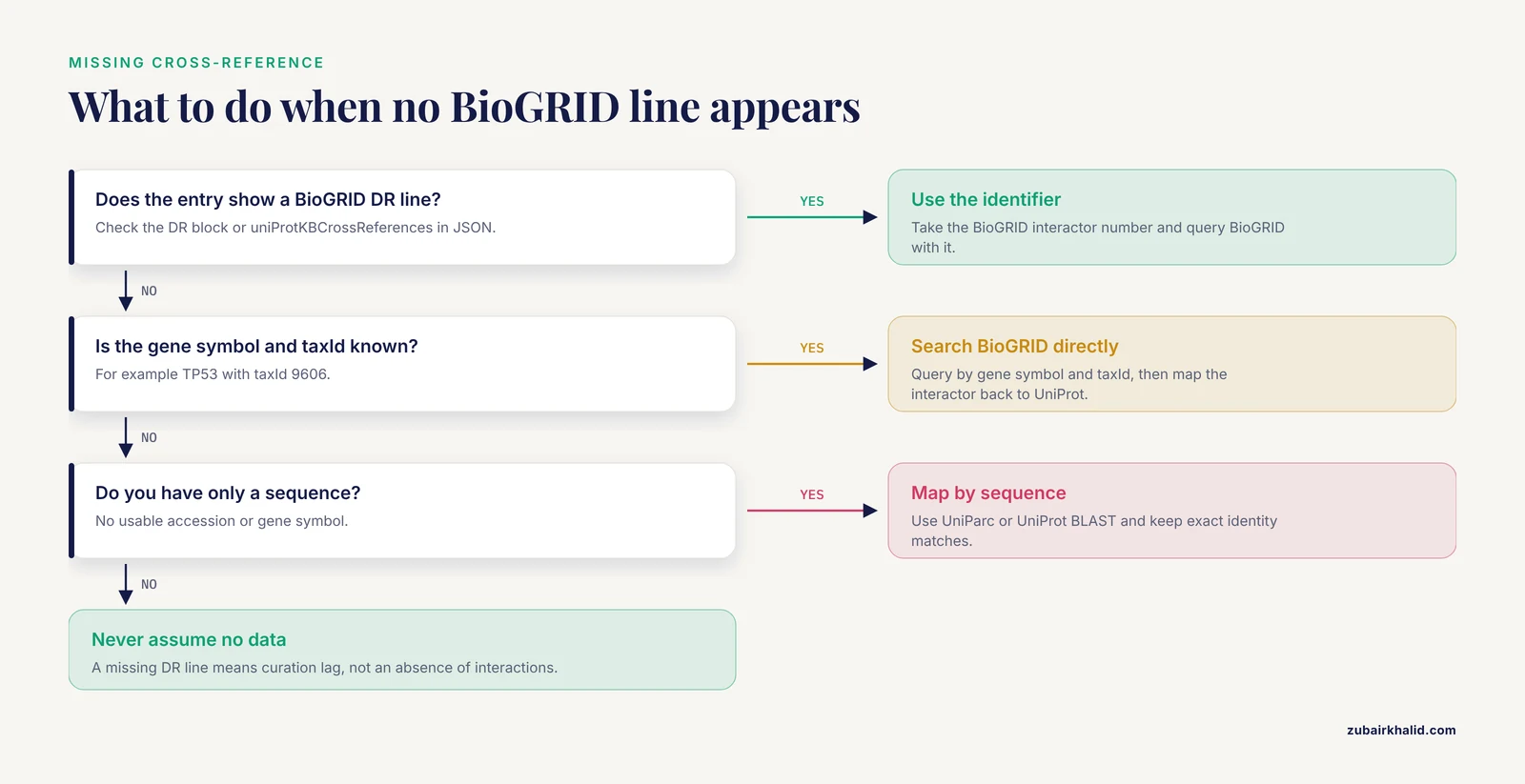
Assuming a missing cross-reference means missing data. UniProt DR lines are added through curation pipelines and lag behind the source databases. A protein with hundreds of BioGRID interactions can show no BioGRID DR line in its current UniProt entry. When a cross-reference is absent, go directly to IntAct or BioGRID and search by gene symbol, then map back to UniProt yourself. Never treat the DR line as an exhaustive statement of what the source database holds.
Confusing the three numeric identifier systems. The BioGRID interactor number in a DR line, the NCBI Gene ID, and the UniProt accession are three different identifiers for related concepts. BioGRID tab2 output includes Entrez Gene columns precisely because its own IDs are internal. Record which namespace every column of your merged table belongs to before you join anything.
Counting DR lines as interactions. One protein has exactly one IntAct DR line and one BioGRID DR line regardless of how many interactions it participates in. Interaction counts come from the interaction databases, not from UniProt.
Ignoring isoforms. The canonical entry's DR line points at the canonical interactor. Where the biology is isoform-specific, IntAct may maintain a separate interactor record, and the interaction you want may live on that record, not on the canonical one. If your analysis is isoform-sensitive, resolve the cross-reference inside IntAct rather than assuming the canonical mapping.
Unbounded BioGRID queries. Calling the BioGRID interactions endpoint with a geneList of thousands of genes and no taxId returns an enormous response and can hit rate limits. Scope every query by organism and batch your gene lists.
Unreviewed TrEMBL entries. TrEMBL accessions are automatically annotated and change as the underlying records are updated. Interaction cross-references and identifier mappings anchored to a specific TrEMBL accession are more fragile than Swiss-Prot anchored ones. Anchor to sequence (UniParc) when long-term stability matters, because UniParc identifiers survive accession retirement, which is precisely why the PICR service was built on UniParc as its warehouse [1].
Trusting identifier stability blindly. The entire motivation for services like PICR was that protein identifiers across databases are potentially unstable, and that datasets annotated from multiple sources need reconciliation before they can be unified [1]. Record the database release versions and the date of retrieval in your methods section. A figure built on cross-references pulled from one release is only reproducible against that release.
Over-merging by sequence similarity. The PICR design deliberately restricted mappings to 100 percent sequence identity and allowed filtering by taxonomic ID and activity status because those two filters are what keep cross-species and dead-entry noise out of mappings [1]. Any similarity-based mapping you do without those two controls will import paralog and ortholog errors.
Next Steps
Once cross-references and interactions flow reliably into your pipeline, three natural extensions follow. Combine the two interaction datasets on UniProt accessions and compare their overlap for a pathway of interest, keeping the detection-method column from MITAB so you can distinguish low-throughput curated interactions from high-throughput screens. Map interaction partners onto functional annotations by fetching UniProt keyword and Gene Ontology cross-references with the same DR-line machinery you already built. And if your project involves proteomics or metaproteomics identifiers from raw instruments, the sequence-first strategy, where you map by exact sequence through UniParc before trusting any accession, mirrors the PICR design and will keep your identifier graph stable across database releases [1].
Frequently Asked Questions
What exactly is a UniProt cross-reference?
A cross-reference is a pointer inside a UniProtKB entry that links to an entry describing the same protein in another database. In the plain-text entry format it appears as a DR line, such as DR IntAct; EBI-766463; -., and in JSON it appears under the uniProtKBCrossReferences key with the database name and identifier.
How do I find the IntAct identifier for a UniProt protein?
Fetch the UniProt entry and read the IntAct DR line. The one-line command is curl -s https://rest.uniprot.org/uniprotkb/P04637.txt | grep "^DR IntAct", which returns the EBI- identifier for that protein's interactor record in IntAct.
Why does my UniProt entry have no BioGRID cross-reference?
The DR line was simply not added yet, because cross-references are propagated through curation pipelines that lag behind the source databases. Search BioGRID directly by gene symbol and taxonomy ID, and map the BioGRID interactor back to UniProt through ID mapping if you need the accession.
Can I search UniProt by an IntAct EBI identifier?
Yes. Query the UniProt REST search endpoint with xref_database:IntAct AND xref_id:EBI-766463 and you get back the UniProtKB entries carrying that cross-reference. The same pattern works for BioGRID identifiers with xref_database:BioGRID.
How do I download all interactions for one protein from IntAct?
Use IntAct's PSICQUIC service with a query such as identifier:P04637 and format tab25, which returns MITAB lines with the two interactors, the detection method, the publication, and the taxonomy IDs. Filter on the taxonomy columns to keep single-species interactions.
Do I need credentials for these services?
IntAct and UniProt require no authentication. BioGRID's REST service requires a free access key that you register for on the BioGRID website, and every call must include it in the accesskey parameter or the request fails with an authorization error.
How can I map protein sequences to database identifiers?
The published solution is the PICR approach, which maps identifiers across more than 70 source databases using UniParc and restricts mappings to 100 percent sequence identity, with filters for source database, taxonomic ID, and active status [1]. In current practice, you can use the UniProt ID-mapping tool for accession-to-accession work and the UniProt BLAST interface for sequence-based searches.
Why do my IntAct and BioGRID interaction counts disagree?
The two databases curate different literature scopes with different curation pipelines, so identical proteins carry different numbers of recorded interactions. Counts also diverge when you filter by species, evidence type, or publication year in one database but not the other. Compare them only after applying matched filters on organism and evidence.