How to Use UniProt BLAST for Protein Engineering
By Dr. Zubair Khalid, DVM, MS, PhD ·

By the end of this guide you will be able to take any protein sequence, run a calibrated BLAST search against UniProt through the web interface or the command line, pull the best homologs together with their curated annotations, and convert that evidence into concrete engineering decisions: which residues to back-mutate in a consensus design, which homologs to use as parents for chimeric libraries, and which hits deserve a structural look before you order oligos.
Here is what you need on hand:
- A query protein sequence in FASTA format, the plain-text format in which each record starts with a
>header line followed by amino acids in single-letter code - A web browser for the UniProt BLAST interface
- For the command-line workflow, the NCBI BLAST+ tools and a few gigabytes of free disk space for the Swiss-Prot sequence file
- Optionally,
awkor Python for filtering hit tables
If you are learning how to use UniProt for the first time, treat this as a UniProt database tutorial aimed at one specific skill: extracting homologs and annotations that support engineering choices, not generic database browsing.
What UniProt Is and Why Protein Engineers Rely On It
UniProt is the reference protein knowledgebase maintained by the UniProt Consortium. Its core product, UniProtKB, has two divisions. Swiss-Prot contains reviewed entries, meaning human curators have checked the sequence, attached experimentally supported annotations such as active sites, binding sites, variants, and mutagenesis records, and linked the entry to publications and structures. TrEMBL contains unreviewed entries, vastly more numerous, generated largely from genome sequencing projects. Beyond UniProtKB, UniProt serves UniRef databases (UniRef100, UniRef90, UniRef50), which cluster sequences at 100, 90, and 50 percent identity to collapse redundancy, and UniParc, an archive that tracks every distinct protein sequence ever observed.
For protein engineering, the annotation layer is the product and BLAST is the retrieval engine. A hit list is only useful if each hit carries trustworthy information about catalytic residues, ligand contacts, known mutations, and structure. That is why the choice between Swiss-Prot, full UniProtKB, and UniRef clusters is a design decision, not a detail.
BLAST itself is a heuristic search method. It belongs to a family of rapid similarity searches that trace back to the seed-and-extend ideas of Wilbur and Lipman [1]. Heuristics trade a small amount of sensitivity for large gains in speed compared with exhaustive Smith-Waterman dynamic programming, and comparisons of hardware-accelerated Smith-Waterman against BLAST and FASTA quantified that tradeoff decades ago [2]. Early side-by-side evaluations of search programs also showed that different tools can rank the same hits differently [3]. None of this diminishes BLAST's status as the standard first-pass tool for homolog discovery, and the practical guidance in the standard methods literature applies directly to the workflow below [4].
Before You Start: Query Hygiene and Database Choice
Clean the query sequence
Most failed searches fail before BLAST runs. Do the following:
- Remove whitespace, digits, and asterisks from the sequence body.
- Confirm the alphabet. Standard residues plus
Xfor unknowns are safe. Rare ambiguity codes such asB,Z,U, andOcan trigger errors or mis-scoring in some tools, so replace them withXif a search misbehaves. - Decide whether you are searching the full-length protein or a domain. Full-length searches are best for finding true homologs. Domain-only searches are best for finding distant relatives of one module, because a long multidomain query can bury a weak but interesting domain match.
- Strip expression artifacts such as N-terminal His-tags and purification linkers. These artificial stretches can generate spurious top hits against vector-derived and recombinant constructs in the database.
Pick the target database
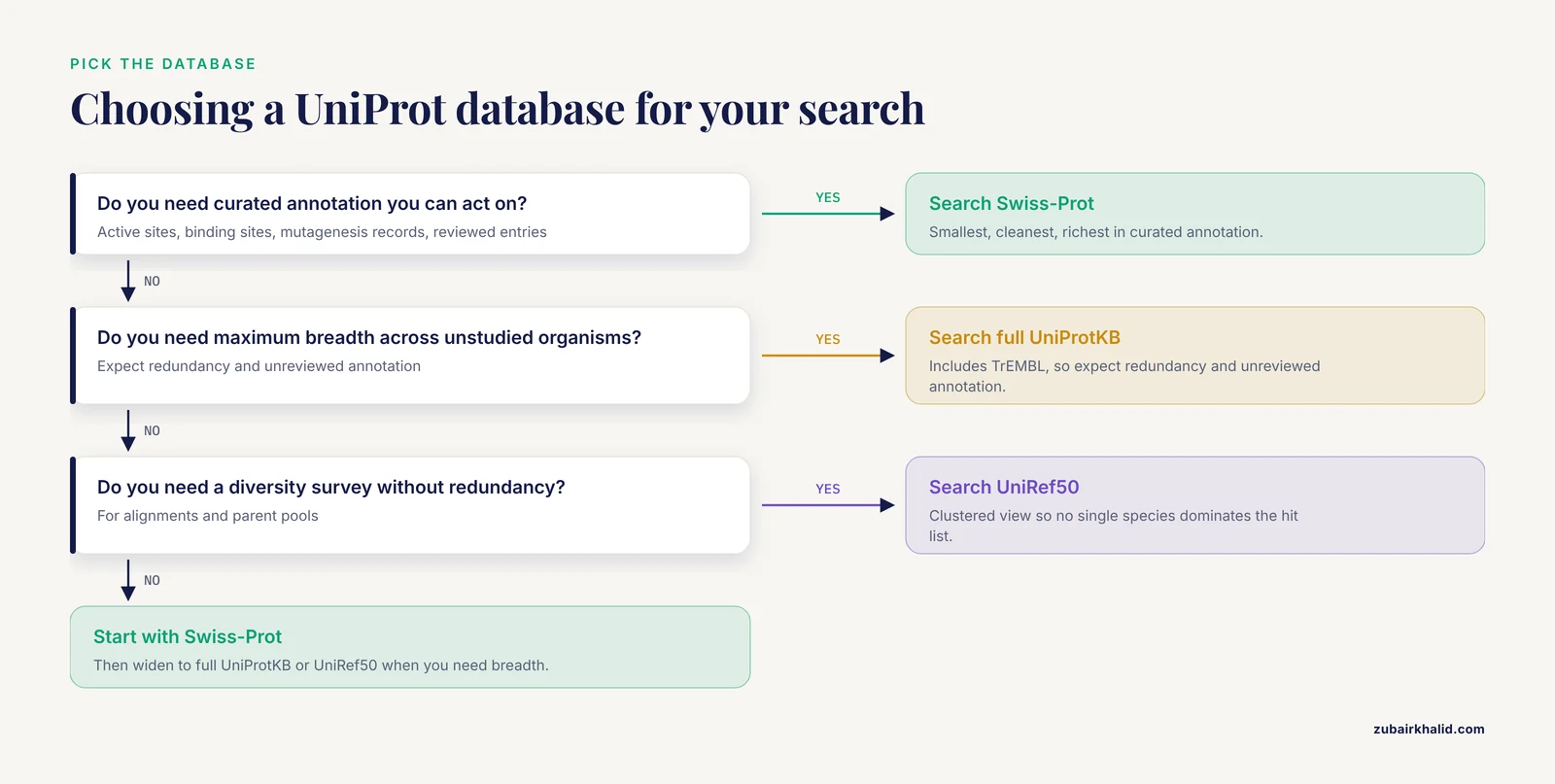
- UniProtKB Swiss-Prot (reviewed only). Smallest, cleanest, fastest, richest in curated annotation. Best for consensus building and for transferring function.
- UniProtKB including TrEMBL. Maximum breadth, including many unstudied organisms. Expect redundancy and unreviewed annotation.
- UniRef90 or UniRef50. Clustered views that reduce redundancy. Good inputs for multiple sequence alignments and diversity surveys, because no single species dominates the hit list.
- UniParc. Sequence archive, useful for tracking whether a sequence existed in a past release, rarely a primary engineering search target.
A workable rule of thumb: build consensus alignments and pick parents from Swiss-Prot or UniRef90 hits, then hunt remote homologs against broader sets with profile methods.
The Core Workflow: UniProt BLAST for Protein Engineering, Step by Step
This browser workflow takes about ten minutes. Any protein works as the query. The demo below uses human ubiquitin because it is short and returns unambiguous hits, but in practice you would paste your own target, for example an enzyme you want to engineer.
Step 1. Fetch or prepare the query. If your target already has a UniProt accession, download it directly from the REST API:
curl -s "https://rest.uniprot.org/uniprotkb/P62593.fasta" -o query.fasta
cat query.fasta
P62593 is the entry for TEM-1 beta-lactamase, a classic protein engineering scaffold. Replace the accession with your own target.
Step 2. Open the BLAST tool. Point your browser at https://www.uniprot.org/blast. The form accepts a pasted sequence or an uploaded FASTA file.
Step 3. Paste the sequence. For the demo:
>ubiquitin_demo_query
MQIFVKTLTGKTITLEVEPSDTIENVKAKIQDKEGIPPDQQRLIFAGKQLEDGRTLSDYNIQKESTLHLVLRLRGG
Step 4. Choose the target database. Select UniProtKB restricted to reviewed entries when you want curated annotation, full UniProtKB when you want maximum breadth, or UniRef50 when you want a diversity survey without redundancy. The form also exposes an E-value threshold, a cap on the number of hits, a scoring matrix, and low-complexity filtering. Leave the defaults on your first run, then adjust using the parameter table later in this guide.
Step 5. Submit and save the job link. After submission, UniProt returns a results page addressed by a job identifier. Bookmark that URL. It lets you reproduce exactly what you saw, which matters when a collaborator asks which database version produced a given hit list.
Step 6. Read the results table. You will see a ranked table whose columns include the target accession, a description, the organism, the alignment score, the E-value, and the percent identity, followed by expandable pairwise alignments. For the ubiquitin demo, expect the top of the list to be dominated by ubiquitin and near-identical ubiquitin sequences from many species with E-values far below 1e-20 and full-length identity, followed by progressively more distant ubiquitin-like domain proteins as identity drops.
Step 7. Open the top hits. Click through to the UniProt entries. Check three things on each entry page: whether the entry is reviewed or unreviewed, which functional features are annotated (active sites, binding sites, mutagenesis records), and which cross-references exist, especially to PDB structures and primary literature.
Step 8. Export. Download the hit sequences and the alignment from the results page. These feed directly into the multiple sequence alignment step described below.
Running the Same Search from the Command Line
The web interface is fine for one-off queries. For reproducible pipelines, batch queries, or custom databases, run BLAST locally against UniProt data.
Step 1. Install BLAST+. On Linux with Bioconda:
mamba install -c conda-forge -c bioconda blast
blastp -version
On Debian or Ubuntu:
sudo apt-get install ncbi-blast+Step 2. Download the Swiss-Prot sequence file from the UniProt FTP site:
curl -s -O https://ftp.uniprot.org/pub/databases/uniprot/current_release/knowledgebase/complete/uniprot_sprot.fasta.gz
gunzip uniprot_sprot.fasta.gz
Step 3. Build a BLAST database:
makeblastdb -in uniprot_sprot.fasta -dbtype prot -parse_seqids \
  -title "UniProtKB Swiss-Prot" -out uniprot_sprot
Expected output (abbreviated, your counts and timings will differ with the release and hardware):
Building a new DB, current time: ...
New DB title: UniProtKB Swiss-Prot
Adding sequences from FASTA, added ~570000 sequences in 41 seconds.
Step 4. Run blastp with a machine-readable output format:
blastp -query query.fasta -db uniprot_sprot \
  -outfmt "6 qseqid sseqid pident length qstart qend sstart send evalue bitscore qlen slen qcovhsp" \
  -evalue 1e-3 -max_target_seqs 500 -num_threads 8 > hits.tsv
head -n 3 hits.tsv
Illustrative output for the ubiquitin demo (your values will differ):
ubiquitin_demo_query  sp|P0CG48|UBC_HUMAN    100.000  76  1  76  1    76   2.0e-31  161  76   685  100
ubiquitin_demo_query  sp|P0CG47|UBB_HUMAN    100.000  76  1  76  1    76   2.0e-31  161  76   229  100
ubiquitin_demo_query  sp|P62988|RS27A_HUMAN  100.000  76  1  76  1    76   2.0e-31  161  76   156  100
...
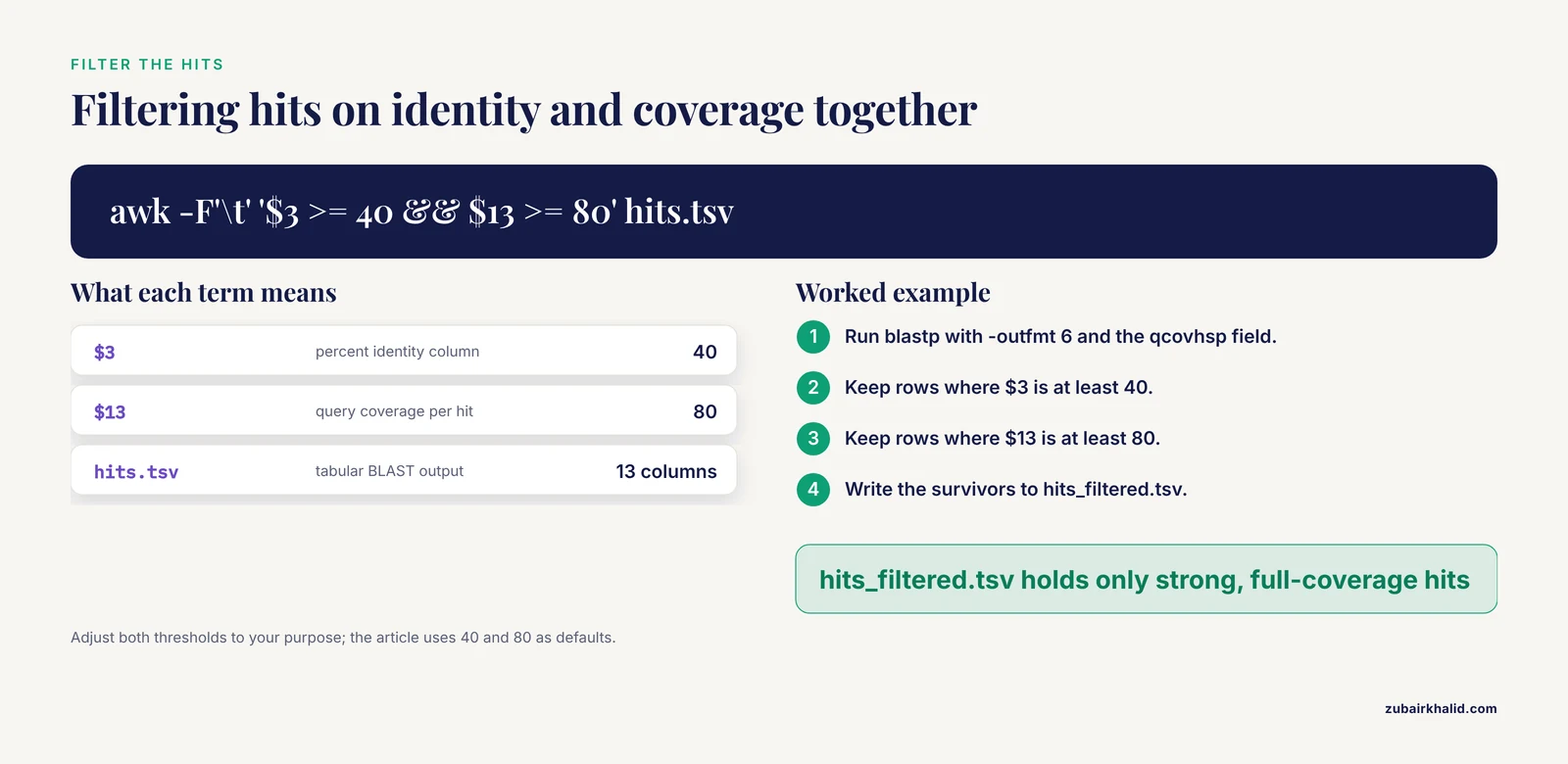
The 13 columns are query id, subject id, percent identity, alignment length, query and subject coordinates, E-value, bit score, query and subject lengths, and query coverage per hit. The -parse_seqids flag from Step 3 is what makes identifiers like sp|P0CG48|UBC_HUMAN appear cleanly.
Step 5. Filter on identity and coverage, not E-value alone:
awk -F'\t' '$3 >= 40 && $13 >= 80' hits.tsv > hits_filtered.tsv
wc -l hits_filtered.tsv
This keeps hits with at least 40 percent identity over at least 80 percent of the query. Adjust both thresholds to your purpose.
Step 6. Pull sequences and annotations for the hits from UniProt REST. Extract unique accessions and download their FASTA records into one file:
cut -f2 hits_filtered.tsv | sort -u > subjects.txt
while read sid
do
  acc=$(echo "$sid" | cut -d'|' -f2)
  curl -s "https://rest.uniprot.org/uniprotkb/${acc}.fasta" >> homologs.fasta
done < subjects.txt
Then fetch the flat file for any hit and extract the functional feature lines that matter for engineering:
curl -s "https://rest.uniprot.org/uniprotkb/P62593.txt" | grep -E "^FT (ACT_SITE|BINDING|MUTAGEN)"Output follows the UniProt feature-table format, for example (illustrative shape, contents depend on the entry):
FT   ACT_SITE        70
FT                   /note="..."
FT   MUTAGEN        104
FT                   /note="..."
Each MUTAGEN line records a position that curators tied to an experimentally measured effect, which is exactly the prior evidence a mutagenesis plan wants.
Step 7. Hunt remote homologs with PSI-BLAST. PSI-BLAST builds a position-specific scoring matrix (PSSM), a per-column residue-scoring table derived from the accumulating alignment, and re-searches with it:
psiblast -query query.fasta -db uniprot_sprot -num_iterations 3 \
  -evalue 1e-3 -out psi_hits.txt -out_ascii_pssm pssm.txt
Option names for saving and reusing PSSMs have shifted slightly between BLAST+ releases, so check psiblast -help for your version. You can then replay the saved profile against a broader database:
psiblast -db uniprot_broad_subset -in_pssm pssm.txt \
  -num_iterations 1 -evalue 1e-5 -out psi_round2.txt
Step 8. Build a custom subset database. For stability engineering you often want homologs from thermophiles. Download a targeted set through the REST API and index it:
curl -s "https://rest.uniprot.org/uniprotkb/stream?query=(reviewed:true)%20AND%20(organism_name:Thermus)&format=fasta" \
  -o thermus_reviewed.fasta
makeblastdb -in thermus_reviewed.fasta -dbtype prot -parse_seqids -out thermus_sp
blastp -query query.fasta -db thermus_sp \
  -outfmt "6 sseqid pident length evalue bitscore qcovhsp" \
  -evalue 1e-3 > thermus_hits.tsv
Field names in the REST query follow UniProt's documented search syntax, so you can swap in protein names, gene names, taxonomy identifiers, or annotation types as needed.
Interpreting the Results Like an Engineer
E-value. The expectation value is the number of alignments with a score at least this good that you would expect by chance in a database of the size searched. Smaller is stronger. E-values scale with database size, so the same alignment scores a larger E-value against TrEMBL than against Swiss-Prot.
Bit score. A log-odds measure of alignment quality that is normalized so it stays comparable across searches and database sizes. When comparing hits across two different databases, compare bit scores, not E-values.
Identity, positives, and coverage. Percent identity counts identical residues, positives counts conservative substitutions, and coverage tells you what fraction of the query participates. A hit with 70 percent identity over 30 residues of a 500-residue query is a domain match, not a full-length homolog. Always read qstart, qend, and query coverage together.
Interpretation tiers. Near-full-length hits at high identity usually support direct annotation transfer. Mid-range identity usually indicates a shared domain or fold rather than a shared function. Low identity calls for profile methods or structural evidence before you act on it. Database breadth matters here in a measurable way: evaluations of cross-species protein identification showed that success tracks the full-length sequence identity between the query and its closest homolog in the database, so a deeper database directly buys sensitivity [5].
Composition bias. Proteins with skewed amino acid composition, such as membrane segments and low-complexity linkers, generate inflated scores against unrelated composition-skewed targets. Composition-based statistics were introduced into PSI-BLAST specifically to fix false positives from this effect and measurably improved search accuracy [6], and later work showed that combining alignment similarity with an independent measure of compositional similarity improves both retrieval and statistical accuracy on a SCOP-based benchmark [7]. Keep composition correction enabled unless you have a specific reason to disable it.
Seeding and speed. BLAST finds candidate alignments by seeding on short matching words. The default protein word size is 3. Implementations that seed on longer words, 6 or 7, cut running time by 20 to 30 percent while matching the retrieval accuracy of the shorter-word defaults in receiver-operator-characteristic comparisons [8]. For routine screening against large databases, longer words are a free win.
Iterative profiles. PSI-BLAST improves domain identification and pushes sensitivity into the twilight zone where pairwise identity fails [9]. Profiles extracted from PSI-BLAST also serve as input features for downstream classifiers, for example support vector machines predicting structural class for low-similarity sequences [10], and profile- and HMM-style searches have resolved remote repeat architectures such as beta-propeller domains in DNA-damage repair proteins [11]. Profile-to-profile methods exist as well, and one implementation matched PSI-BLAST on the COG benchmark, outperformed it on Pfam and BALIBASE, and did so with 10 to 20 times less memory and compute [12].
Structural context. Sequence hits against PDB-derived sequences give you templates for homology modeling, and dedicated servers layer residue-level structural annotations onto PDB BLAST hits, including predicted secondary structure, solvent accessibility, tight turns, and nucleic-acid or ligand-interacting residues [13]. For fold-level questions that defeat sequence comparison, structural similarity search servers handle co-linear homologs and circular permutants at scale [14]. Choose the similarity metric that matches the question: comparisons across protein superfamilies showed that sequence-based, structure-based, and active-site-based networks cluster proteins differently, and active-site similarity tracked curated functional hierarchies more often than the other two metrics [15].
Sanity checks before you trust the output
- Self-hit check. Your query, or an identical sequence, should be the top hit with an extremely small E-value. If it is not, suspect the wrong alphabet, a corrupted file, or aggressive filtering.
- Coverage check. Scan the alignment coordinates for every hit you intend to use.
- Reviewed-status check. Before transferring any annotation, confirm the source entry is reviewed.
- Reciprocal check. For orthology claims, search your top hit back against your query's organism and confirm it returns the original query.
- Provenance check. Record the database release, the parameters, and the job identifier for every search you act on.
Turning Hits into Engineering Decisions
Consensus and back-to-ancestor mutations
Align your filtered hits with a multiple sequence alignment tool such as MAFFT or Clustal Omega, compute the majority residue at each column, and list positions where your target deviates from the consensus. Prioritize deviations that sit near annotated active sites or binding sites, because consensus residues in structured cores and functional regions tend to be tolerated, while random deviations elsewhere may be neutral or functional. This is the cheapest rational-design strategy that falls directly out of a UniProt BLAST workflow.
Choosing parents for chimeras and libraries
For chimera construction or combinatorial libraries, pick homologs that are diverse enough to contribute useful variation yet similar enough to recombine without breaking the fold. Inspect the alignment around intended crossover points and avoid placing junctions inside insertions, gaps, or loops that differ in length between parents. UniRef90 hit lists are convenient here because clustering prevents one organism's near-duplicate paralogs from dominating the parent pool.
Mapping annotations onto your alignment
Transfer the ACT_SITE, BINDING, MUTAGEN, and variant feature lines from each UniProt entry onto your alignment columns. Positions flagged by curators become constraints: avoid mutating them blindly, or target them deliberately when the goal is altering specificity. Cross-references to PDB structures on the same entry pages tell you whether a template exists for modeling the region you plan to modify.
Sanity-checking the final design
After you build an engineered sequence, search it back against UniProtKB. The top hits should be your intended parents and close relatives. Unexpected high-scoring hits to unrelated proteins flag assembly errors, accidental domain swaps, or contamination. For application-specific safety screens, such as allergen or toxin similarity, run dedicated specialized resources rather than relying on a general-purpose database alone.
Re-run as the databases grow
Sequence databases grow continuously, and a search that returned nothing useful six months ago can return the perfect parent today. Tools such as ReHAB were built precisely to diff repeated searches between database versions and surface newly appeared hits automatically [16]. Schedule periodic re-searches for every active project.
Key Parameters at a Glance
| Option (BLAST+ flag) | Typical setting | What it controls | When an engineer should touch it |
|---|---|---|---|
| , - | , - | , - | , - |
-task | blastp, or blastp-short for very short queries | Search mode | Peptides and epitope-sized queries need the short-task tuning |
-evalue | 1e-3 for discovery, 1e-5 or tighter for annotation transfer | Significance cutoff | Tighten whenever you will act on a hit |
-matrix | BLOSUM62 (default) | Substitution scoring | BLOSUM45 for distant relatives, BLOSUM80 for close pairs |
-gapopen, -gapextend | 11, 1 (defaults paired with BLOSUM62) | Gap penalties | Rarely, and only with a stated reason |
-word_size | 3 (default) | Seed length | Words of 6 or 7 cut runtime 20 to 30 percent with little accuracy loss [8] |
-max_target_seqs | 500 | Hits retained | Raise for library-scale surveys, then filter locally |
-comp_based_stats | 2 (default for blastp) | Composition correction | Keep on for compositionally biased proteins [7] [6] |
-num_iterations (psiblast) | 2 to 3 | Profile-building rounds | Stop when the hit list stabilizes and curate every round [17] |
-inclusion_ethresh (psiblast) | 0.002 (default) | E-value bar for joining the profile | Lower it to grow the profile conservatively |
-seg, -soft_masking | Version dependent | Low-complexity masking | Mask linkers, tags, and repetitive regions when they dominate hits |
-outfmt | Tabular with qcovhsp and slen | Output fields | Always carry coverage columns into your filters |
Practical Tips That Separate Good Searches from Bad Ones
- Match the database to the decision. Consensus work wants curated, nonredundant hits. Breadth scouting wants TrEMBL or UniRef50. Running one search and using it for both purposes is how bad parent panels happen.
- Filter on coverage and identity together. A single-column awk filter on
pidentandqcovhspremoves most misleading hits before a human ever sees them. - Anchor searches with a motif when you can. PHI-BLAST restricts hits to sequences containing a pattern you specify, an approach built on protein searches seeded by patterns rather than single words [18]. Supplying your catalytic motif guarantees every hit shares the chemistry you care about.
- Mask what you do not mean. Signal peptides, low-complexity linkers, and affinity tags attract hits that reflect composition, not homology. Mask them or trim them from the query.
- Iterate deliberately. PSI-BLAST is powerful and self-corrupting in unskilled hands. Two or three curated iterations beat ten unattended ones.
- Expect imperfection in the query when it comes from proteomics. De novo peptide sequences are redundant, degenerate, and partly wrong, yet similarity searches still anchor them to real proteins, and validation protocols exist specifically for identifications whose statistical confidence is borderline [19]. Treat borderline hits as leads, not facts.
- Automate retrieval through the REST API. Every step shown above is scriptable, which converts a one-off search into a repeatable pipeline you can rerun against next year's database release.
Common Mistakes and Limitations
Errors you will actually see
BLAST Database error: No alias or index file found for protein database [uniprot_sprot] in search path [...]. The database was never built or-dbpoints to the wrong directory. Fix: runmakeblastdbfirst, use the exact-outname in-db, and set theBLASTDBenvironment variable or pass full paths.Error: [blastdbcmd] Entry or entries not found in BLAST database: P0CG48. The identifier you passed does not match how the database stored its IDs, usually because you skipped-parse_seqidsor mixed releases. Fix: extract thesseqidvalues directly from your tabular output and feed those toblastdbcmd -entry_batch.Error: [blastp] Query contains no sequence data. Your FASTA has a header line but no residues beneath it, or you pointed at the wrong file. Fix:catthe query file and check.- Web form rejections. Pasting a nucleotide sequence, or a sequence with invalid characters, into a protein search either fails outright or produces meaningless output. Fix: clean the query as described at the top of this guide.
- Resource exhaustion on full TrEMBL. Building and searching the complete unreviewed database demands large memory and disk resources on a typical workstation. Fix: download a taxonomy-restricted or annotation-restricted subset through the REST API and index that instead.
- Silent truncation from
max_target_seqs. This setting interacts with BLAST's heuristics and can shape the hit list in ways that surprise people who treat it as a simple post-search limit. Fix: search generously, save everything, and do your truncation locally with awk or Python.
Mistakes that corrupt engineering conclusions
- Trusting E-value alone. E-values reward long alignments and punish small databases. A modest-identity, full-coverage hit can matter more than a short, near-perfect one.
- Letting PSI-BLAST profiles drift. Homologous over-extension, where an alignment that starts in a genuine domain slides into unrelated neighboring sequence, is the dominant PSI-BLAST error mode. In benchmarks with embedded Pfam domain queries, 5 to 9 percent of alignments at the fifth iteration were non-homologous, removing partial domains from the search space cut over-extension from 16 percent to 3 percent of weighted coverage on hard queries, and refusing to extend previously found sequences improved specificity 4- to 8-fold with little sensitivity loss [17]. Limit iterations, eyeball every new alignment, and exclude fragments that dangle into unrelated regions.
- Letting redundancy skew consensus. Searching full TrEMBL lets one organism's many near-identical entries outvote the rest of the tree. Use UniRef90 or UniRef50, or deduplicate by identity before aligning.
- Transferring annotation from unreviewed entries. TrEMBL annotations are largely propagated by automated methods. Confirm anything load-bearing against the reviewed entry or the primary literature.
- Coverage blindness. Accepting a hit without reading alignment coordinates is how a single shared domain gets mistaken for a full-length homolog, which then poisons parent selection.
- Assuming sequence similarity implies structural or functional equivalence. Sequence, structure, and active-site similarity each cluster proteins differently, and the metric that matches your functional question is the one to trust [15]. Use structure-aware tools when the design question is about geometry [13] [14].
- One-shot searching. Databases change under your feet. A parent panel built from a stale search misses newly deposited sequences, including engineered variants published since your last run [16].
- Skipping provenance. A hit list without a recorded database release, parameter set, and job identifier cannot be reproduced, defended, or extended.
- Ignoring query artifacts. Tags, signal peptides, and low-complexity tails produce confident, meaningless top hits that waste design cycles.
- Treating BLAST as a safety screen. A UniProt search estimates similarity to one database at one moment. Novelty claims, allergen assessments, and regulatory screens each need their own dedicated resources and current releases.
One limitation deserves plain language: a BLAST result is computational evidence about similarity, never proof that a mutation, chimera, or new substrate profile will behave as intended in the lab. Individual designs need experimental validation by people with the relevant domain expertise.
Frequently Asked Questions
Is UniProt BLAST the same thing as NCBI BLAST?
No. They share the BLAST algorithm family, but UniProt BLAST runs against UniProt's own databases (UniProtKB, UniRef, UniParc) through the UniProt website, while NCBI BLAST runs against NCBI-curated databases such as nr. Choose by the identifiers and annotations you need downstream.
Which UniProt database should I search first?
Start with reviewed Swiss-Prot when you want curated annotations you can act on, then widen to full UniProtKB or UniRef50 when you need breadth or diversity. Most engineering projects use both in sequence.
What E-value should I use for protein engineering searches?
Start around 1e-3 for discovery searches and tighten to 1e-5 or stricter when you plan to transfer functional annotations. Always pair the E-value with coverage and identity checks rather than using it alone.
How do I download my hits and their annotations automatically?
Use the UniProt REST API with the accessions from your hit table, as shown in the command-line section, pulling .fasta for sequences and .txt or .json for feature annotations such as active sites and mutagenesis records.
Can UniProt BLAST confirm that my engineered sequence is novel?
It shows the closest current relatives, which is strong evidence, but novelty depends on the database version searched. Record the release date, and re-run the search before publication or any filing.
When should I switch from blastp to PSI-BLAST?
Switch when ordinary searches stop finding new homologs and you suspect remote relatives. Run a few iterations, inspect every alignment that enters the profile, and stop as soon as the hit list stabilizes.
How do I find thermostable or extremophile homologs?
Combine a protein or gene keyword with an organism restriction in a UniProt REST query, download the subset, and index it as a custom BLAST database, or filter your web BLAST results by organism directly in the interface.
Does UniProt BLAST work for short peptides?
Plain blastp loses sensitivity on very short queries, so use short-query task settings or dedicated short-sequence approaches, keep the E-value threshold loose, and interpret every hit conservatively.
Sources
- Rapid similarity searches of nucleic acid and protein data banks.
- Sensitivity and selectivity in protein similarity searches: a comparison of Smith-Waterman in hardware to BLAST and FASTA.
- Automat and BLAST: comparison of two protein sequence similarity search programs
- Similarity searching using BLAST.
- The Power and the Limitations of Cross-Species Protein Identification by Mass Spectrometry-driven Sequence Similarity Searches*S
- Improving the accuracy of PSI-BLAST protein database searches with composition-based statistics and other refinements.
- Retrieval accuracy, statistical significance and compositional similarity in protein sequence database searches
- Improved BLAST searches using longer words for protein seeding
- Protein domain identification and improved sequence similarity searching using PSI-BLAST
- Prediction of protein structural class for low-similarity sequences using support vector machine and PSI-BLAST profile.
- PSI-BLAST searches using hidden markov models of structural repeats: prediction of an unusual sliding DNA clamp and of beta-propellers in UV-damaged DNA-binding protein.
- PHOG-BLAST - a new generation tool for fast similarity search of protein families
- BLAST-based structural annotation of protein residues using Protein Data Bank
- iSARST: an integrated SARST web server for rapid protein structural similarity searches
- Comparison of topological clustering within protein networks using edge metrics that evaluate full sequence, full structure, and active site microenvironment similarity
- Recent Hits Acquired by BLAST (ReHAB): A tool to identify new hits in sequence similarity searches
- Homologous over-extension: a challenge for iterative similarity searches
- Protein sequence similarity searches using patterns as seeds.
- Rapid validation of protein identifications with the borderline statistical confidence via de novo sequencing and MS BLAST searches.