UniProt BLAST Parameters Explained
By Dr. Zubair Khalid, DVM, MS, PhD ·

UniProt BLAST parameters are the dials that trade sensitivity against speed and specificity: the target database decides how much redundant sequence you wade through, the E-threshold decides how much statistical noise you tolerate, and the word size and scoring matrix decide how distant a relative your query can still find. The rule of thumb is simple. For a first look at a protein you know little about, search against a clustered database such as UniRef100 with the default scoring matrix, a permissive E-threshold, and a generous hit limit. For a precise annotation claim you will publish or act on, repeat the search against the curated Swiss-Prot subset, tighten the E-threshold, and read the alignments yourself rather than trusting the top hit.
This article explains each UniProt BLAST parameter on its own terms, compares them side by side on the criteria that actually decide choices, walks through worked scenarios, and lists the mistakes that waste the most compute and credibility. Everything here applies to the web form at uniprot.org and, with minor wording changes, to command-line BLAST runs against UniProt FASTA files.
What the UniProt BLAST Tool Is
UniProt is the reference resource for protein sequence and annotation data, and its website offers four main tools: BLAST for sequence similarity searching, Align for multiple sequence alignment, Peptide Search for finding proteins that contain an exact short peptide, and Retrieve/ID Mapping for converting identifier lists between databases [1]. The BLAST tool is the one most people reach for first when they have an unknown protein sequence and want to know what it might be.
The same three tools existed in earlier UniProt documentation, which shows how stable this workflow has been over time: BLAST, Align, and Retrieve/ID Mapping were already the core offering years before the 2023 update [2]. What has changed is scale. UniProt keeps growing, and searching the full non-redundant protein space with classical BLAST gets slower every year, which is why the UniProt ecosystem now leans on clustered databases and faster search engines as complements [3].
A BLAST search itself is standard bioinformatics: the Basic Local Alignment Search Tool finds locally aligned regions between your query sequence and database sequences, scores them with a substitution matrix plus gap penalties, and reports each hit with an E-value, the number of alignments with a score at least that good that you would expect by chance in a database of the size searched. Lower E-values mean stronger evidence of shared ancestry. These mechanics come from the BLAST algorithm itself and apply identically whether you run the search at UniProt, at EMBL-EBI, or on your own machine [4].
How to Use UniProt BLAST, Step by Step
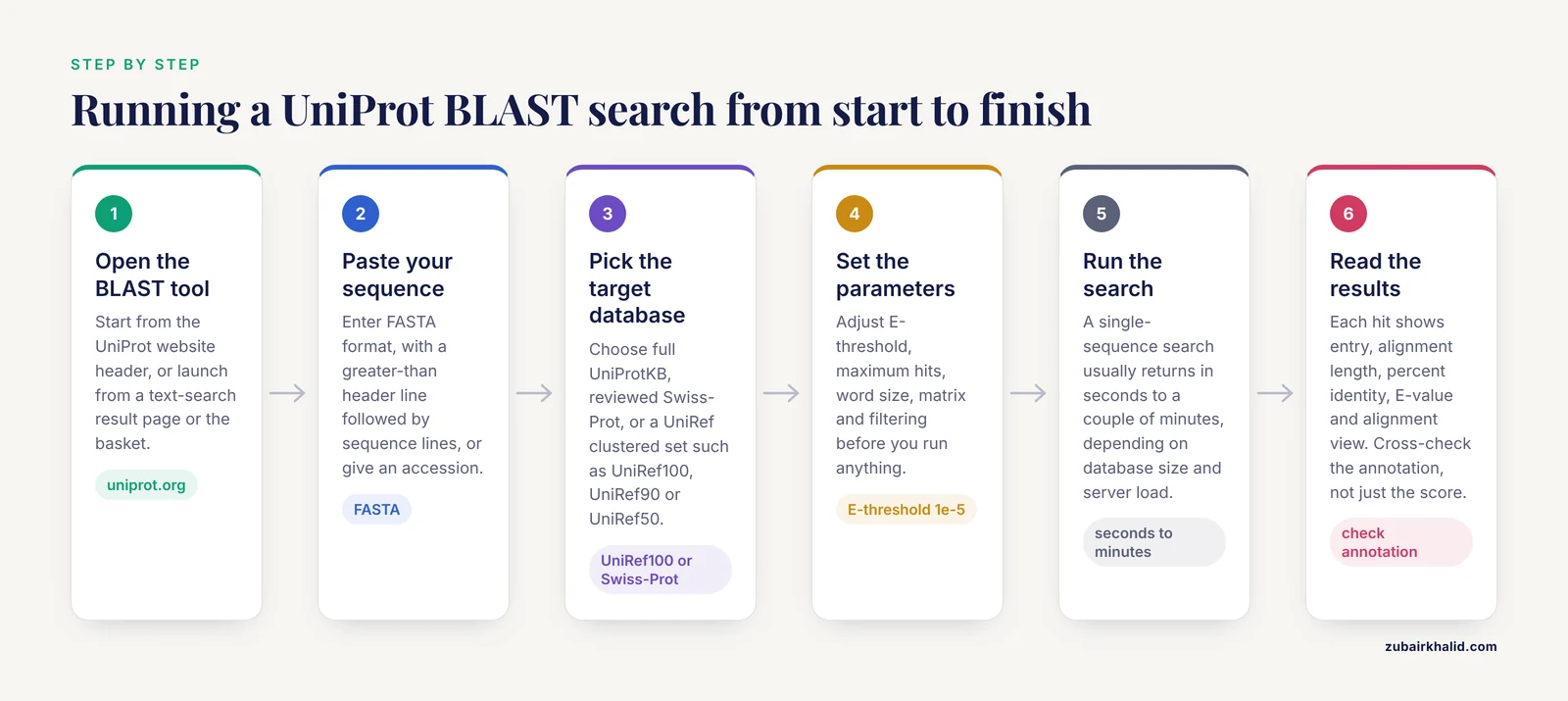
If you are learning how to use UniProt for the first time, the BLAST workflow is short.
- Go to the BLAST tool from the UniProt website header.
- Paste your sequence in FASTA format, or enter a UniProt accession directly. A FASTA header line starts with a greater-than sign followed by a name, and the sequence lines follow.
- Pick the target database. The main choices are the complete UniProtKB, the manually reviewed Swiss-Prot subset, and the UniRef clustered sets (UniRef100, UniRef90, UniRef50).
- Set the parameters covered in this article: E-threshold, maximum number of hits, word size, matrix, and filtering.
- Run the search. Typical single-sequence searches return in seconds to a couple of minutes depending on database size and server load.
- Read the results. Each hit gives the matched UniProt entry, alignment length, percent identity, E-value, and alignment view. Cross-check the hit's annotation, not just its score.
The UniProt protocols also describe alternate entry points that matter in real work: you can BLAST directly from UniProt text-search result pages, or from sequences stored in the UniProt basket, which is convenient when you have already collected candidate proteins interactively [1]. For programmatic access, the same searches are available through web services, and EMBL-EBI exposes parallel sequence similarity services against UniProt and other databases through a consistent REST interface for pipelines [4].
One practical note on scale. UniProt's website serves on the order of hundreds of thousands of unique visitors per month, and interactive web searches are sized for single queries or short lists. If you need to search hundreds or thousands of query sequences against UniProt-scale data, download the FASTA files and run BLAST, DIAMOND, or MMseqs locally [1][3].
UniProt BLAST Parameters Side by Side
The table below is the core reference for this article. "Safe default" means a value that works for most protein queries without tuning. "Change it when" describes the realistic trigger. "Main risk" is what goes wrong if you get it wrong.
| Parameter | What it controls | Safe default | Change it when | Main risk |
|---|---|---|---|---|
| Target database | Which sequences are searched | UniRef100 or UniProtKB for discovery, Swiss-Prot for confident annotation | You need less redundancy (UniRef50, Swiss-Prot) or exhaustive coverage (UniProtKB) | Redundant hits bury the one entry that matters, or a curated entry is missed because you searched the wrong subset |
| Program | Query type versus target type | blastp for protein queries | Your query is nucleotide sequence (blastn, tblastn-style translated searches) | Searching nucleotide against protein without translation produces nothing useful |
| E-threshold | Statistical noise tolerance | 1e-5 for annotation-grade hits, 10 for exploratory searches | You are hunting distant homologs (raise it) or want only near-certain matches (lower it) | Too permissive floods you with chance hits, too strict hides real distant relatives |
| Maximum hits | Result list length | 250 to 500 for interactive work | Large families, or building a set for downstream clustering | Cutting too low truncates a genuinely large family |
| Word size | Seed length for the initial hit | 3 for standard protein searches | Short queries (peptides, domains under about 30 residues) need a smaller word | A large word size misses short or divergent matches entirely |
| Scoring matrix | How substitutions are scored | BLOSUM62 | Very distant relationships (BLOSUM45) or short close queries (BLOSUM80) | A mismatched matrix biases E-values and ranking in the wrong direction |
| Filtering | Masking of low-complexity and biased regions | Enabled for whole proteins | Coiled-coil, collagen, or repetitive proteins where masking destroys signal | False hits driven by composition, or real alignments lost to over-masking |
| Gap costs | Penalties for insertions and deletions | Default pair (roughly 11 for opening, 1 for extension in standard blastp) | Rarely, when aligning proteins with unusual indel patterns | Nonstandard values distort E-values unless you know what you are doing |
| Iterations (PSI-BLAST) | Whether hits build a position-specific profile | Single iteration for routine work | Building a family profile for distant-homer hunting | Profile corruption from early false positives [5] |
The next sections explain each row in depth, because the "when to change" column only makes sense once you understand what the parameter is doing.
Target Database: The Most consequential UniProt BLAST Parameter
The database choice is the single UniProt BLAST parameter with the largest effect on your results, your wait time, and your ability to interpret what you get. UniProt offers a tiered set of targets, and each tier answers a different question.
UniProtKB is the full knowledgebase, combining Swiss-Prot (manually reviewed entries with curator-validated annotation) and TrEMBL (computationally annotated entries awaiting review). Searching UniProtKB gives you maximum breadth, including unreviewed entries that may be the only representative of a recently sequenced organism's protein. The cost is redundancy: the same protein family can appear as hundreds of near-identical entries from different strains and isolates, and many of those carry automated annotation of uneven quality.
Swiss-Prot is the reviewed subset. Searching it means every hit comes with curated function, domain annotations, and literature links. For annotation-grade conclusions, this is the target of choice, and it is also the subset that resources built for reliable annotation draw on. The sORFdb project, for example, used Swiss-Prot and UniProt content to ensure reliable characterization of small bacterial proteins and to build families through bidirectional best BLAST hits [6].
UniRef100, UniRef90, and UniRef50 are clustered databases that merge sequences at 100%, 90%, and 50% pairwise identity respectively, keeping a representative sequence and a record of all merged members. Clustering large databases this way improves the speed and sensitivity of iterative searches and makes results readable, because you see one hit per family-level cluster instead of hundreds of near-duplicates [3]. Building such clusters is a serious computational task in its own right: kClust was designed to cluster databases of UniProt's size down to 20% to 30% maximum pairwise identity in days rather than the impractical runtimes of BLAST-based clustering, and achieved comparable sensitivity with a lower false discovery rate on multidomain sequences [7]. MMseqs extended this approach with a cascaded clustering workflow that clusters large databases down to roughly 30% identity at hundreds of times the speed of BLASTclust [3].
The practical consequences are concrete. Function prediction pipelines routinely search against a clustered version of UniProt rather than the full database, because clustering reduces redundancy and improves the weighting of evidence for functional inference [8]. Search speed improves correspondingly: a search against UniRef50 touches far fewer residues than the same search against UniProtKB, which matters when the search is part of a pipeline processing thousands of queries. Metagenomics annotation studies comparing BLAST, DIAMOND, and Taxonomer against NCBI nr and UniRef concluded that DIAMOND with UniRef was the sensible choice when computing resources and transfer speed are limited [9].
The downside of UniRef clustering is loss of granularity. If your question is "which exact entries, from which organisms, contain this protein," UniRef50 cannot answer it, because member sequences are hidden behind the representative. That is why the two-stage pattern works so well: screen against a UniRef set for speed, then take the cluster representatives that interest you and either expand them through UniProt's ID mapping or rerun a targeted search against UniProtKB or Swiss-Prot [1].
Program Selection
Because UniProt contains protein sequences, the default and overwhelmingly common program is blastp, which compares a protein query against a protein database. A few other situations arise:
- blastp is the right choice for essentially every UniProt search where your input is amino acid sequence.
- Translated searches matter when your input is nucleotide sequence. If you have a coding sequence, translate it first and run blastp. If you have an unspliced genomic fragment and want to find protein homologs, use a translated query-to-protein search, which you would typically run locally with tblastn or tblastx against appropriately prepared targets, since the UniProt web tool is oriented toward protein queries.
- PSI-BLAST is blastp plus iteration, covered in its own section below.
If your input is a short exact peptide rather than a divergent protein, Peptide Search is the better UniProt tool, since it retrieves every protein containing that peptide exactly rather than scoring approximate alignments [1]. Choosing BLAST for a job that Peptide Search does better is a common beginner mix-up, and it usually shows up as confusion about why a 10-residue peptide produces noisy low-scoring hits.
E-threshold: How Much Noise You Accept
The E-value (expectation value) is the number of database hits with a score at least as good as the reported hit that you would expect to see purely by chance. An E-value of 1e-5 means roughly one chance hit per hundred thousand searches of this size, which is why 1e-5 became the conventional cutoff for annotation-grade similarity. An E-value of 10 means you expect on the order of ten chance alignments of that quality per search, which is acceptable only when you are deliberately hunting for very distant relatives and are prepared to inspect every alignment by eye.
Three properties of E-values matter for choosing your threshold:
- E-values depend on database size. The same alignment scores higher E-value in a bigger database. Moving a search from Swiss-Prot to full UniProtKB inflates E-values without any change in the alignment itself. This is a pure statistical bookkeeping effect, not a change in biological relatedness.
- E-values are not probabilities of homology. A hit with E-value 1e-50 is almost certainly homologous, but an E-value of 0.5 is not "50 percent likely to be homologous." It simply means chance produces alignments that good routinely.
- Short queries inflate E-values. A 30-residue query has less statistical room to accumulate score, so significant short alignments carry worse E-values than long ones of equal identity. For short queries, lower the threshold rather than raising it, and lean on alignment inspection.
For exploratory work, a permissive threshold such as 10 or 1 maximizes what you see. For a claim you intend to defend, 1e-5 or stricter, combined with alignment inspection and cross-checking the annotation source, is the practical standard. Distant-homology searches that rely on threshold alone frequently mislead, which is why the scenarios section below treats threshold as one input among several.
Maximum Number of Hits
This parameter caps the result list. Its role is mostly practical: UniRef and UniProtKB searches against a common protein can return tens of thousands of qualifying hits, and no human reads that list. A cap of 250 to 500 keeps interactive results readable while preserving the top of the distribution.
Two failure modes exist. Setting the cap too low truncates genuinely large families, which matters if you plan downstream steps such as building a multiple sequence alignment from the hits or counting family members across taxa. Setting it too high on the full UniProtKB drowns you in redundant TrEMBL entries, which is a database-choice problem masquerading as a hit-limit problem. If you need exhaustive family enumeration, that is a job for clustering the database yourself or using a precomputed cluster resource, not for turning the hit cap up [3][7].
Word Size
BLAST does not compare your whole query against every database sequence. It first finds short exact or near-exact "words" shared between query and target, then extends those seeds into full alignments. Word size is the length of those seeds. In standard protein BLAST the default word size is 3, meaning any exact match of 3 consecutive residues can seed an alignment.
The effect is intuitive: a larger word size demands longer exact matches before an alignment can even begin, so the search is faster but less sensitive. A smaller word size finds more seeds, so the search is slower but more sensitive. You change word size mainly in one situation: short queries. A peptide of 15 to 30 residues, or a single small domain, can fail to produce any seed at default settings, and the search returns nothing even though real relatives exist in the database. Dropping the word size to 2 is the standard remedy and costs you runtime that is negligible for a single short query.
The inverse mistake is lowering word size on a long query "for more sensitivity." The gain is marginal for long queries and the runtime penalty is real, because the number of chance seed matches scales steeply. Keep the default word size except for short inputs.
Scoring Matrix
The substitution matrix scores each aligned residue pair, encoding which amino acid substitutions are evolutionarily tolerated more than others. BLOSUM matrices are built from observed substitution frequencies in conserved protein blocks, and the number in the name is the minimum percent identity of the blocks used: BLOSUM62 comes from blocks at 62% identity or less, BLOSUM45 from blocks at 45% or less.
- BLOSUM62 is the general-purpose default for protein BLAST and the right choice for the vast majority of searches. It is tuned for relationships in the roughly 30% to 70% identity range, which is where most real queries live.
- BLOSUM45 favors distant comparisons. Its relative scoring tolerates more conservative substitutions and penalizes mismatches less harshly in ways suited to alignments around 20% to 30% identity. Use it when you are deliberately hunting remote homologs and have already relaxed your E-threshold.
- BLOSUM80 favors close, short comparisons, weighting recent substitutions more heavily. It suits short queries against likely close relatives.
- PAM30 applies to very short queries, roughly peptides, where BLOSUM matrices tuned on longer blocks over-penalize divergence.
The matrix interacts with E-values directly, because the E-value is computed from the scoring system. Switching matrices changes the ranking and statistical interpretation of every hit, so matrix changes belong in a deliberate strategy, not casual experimentation. A defensible pattern for a difficult query is to run BLOSUM62 first, and only if the top hits look like composition artifacts or the search is suspiciously empty, retry with BLOSUM45 and compare.
Filtering and Composition
Low-complexity filtering masks regions of biased composition, such as poly-alanine tracts, serine-rich windows, and simple repeats, so they cannot seed spurious alignments. Composition-based statistics adjust scores to account for unusual amino acid composition in either the query or the hit. Both exist because composition, not shared ancestry, drives a large share of false BLAST hits.
The standard advice is to leave filtering on for whole-protein queries. The exceptions are principled: proteins whose biology lives in low-complexity or repetitive regions, such as some coiled-coil and collagen-like proteins, can have their real signal masked along with the noise. If your query is such a protein, run the search both with and without filtering and compare, treating unfiltered hits with extra skepticism. The zebrafish TCOF1 annotation saga illustrates a related hazard at the level of whole proteins rather than composition windows: large proteins with unstructured and repetitive regions complicate alignments and comparisons enough that an orthology assignment was later reversed, with the chromosome 13 gene reclassified as nolc1 and the chromosome 14 candidate identified as a low-complexity LisH domain-containing protein homologous to NOLC1 but lacking TCOF1's essential features [10]. When repetitive sequence dominates the query, top hits can be paralogs or repeats rather than the true ortholog.
PSI-BLAST and Iterative Searching
PSI-BLAST (Position-Specific Iterated BLAST) runs blastp, builds a position-specific scoring matrix (PSSM, a profile recording which residues are tolerated at each position of the aligned family) from the hits found, and searches again with the profile. Each iteration can find relatives the single-sequence search missed, because the profile encodes family-specific conservation patterns that a generic matrix cannot.
The tool's power comes with a documented failure mode. Gonzalez and Pearson characterized homologous over-extension (HOE), an error type in which an alignment begins in a genuinely homologous region but extends beyond the homology into neighboring sequence, often into an unrelated domain. When the profile absorbs that unrelated sequence, subsequent iterations retrieve non-homologous proteins with significant expectation values. In searches against complete protein sequences, 5% to 9% of alignments at the fifth iteration were non-homologous, and HOE accounted for the largest fraction of false positives both initially and at iteration 5. Removing partial domains from the library cut HOE errors from 16% to 3% of weighted coverage on hard queries, and simply not extending previously found sequences improved specificity 4-fold to 8-fold with little loss in sensitivity [5].
The practical rules that follow from this are straightforward:
- Inspect the alignments fed into the profile after each iteration, and unselect hits whose alignment looks domain-chimeric or truncated.
- Keep iteration counts modest. Most useful profile building happens in the first two or three iterations.
- Be especially wary when your query is a multidomain protein or contains a partial domain, because partial domains are where HOE begins [5].
PSI-BLAST remains a standard component of in silico workflows. Studies of hepatitis B virus protein-x used psi-blast for similarity search alongside pairwise alignment tools and threading servers to build a structural and interaction model [11]. Molecular mimicry studies in autoimmune cardiovascular disease used PSI-BLAST to quantify identity between human autoantigens and pathogen antigens, finding identities spanning 30% to 88.24% across ten cardiovascular proteins, with actins and heat shock proteins showing the highest matches to Trypanosoma cruzi, Cryptococcus neoformans, and Chlamydia trachomatis [12]. In both cases the iterative profile was the point: single-sequence blastp would not have assembled the same evidence.
Speed and Scale: When the Defaults Stop Being Enough
The parameters above tune a single BLAST search. At pipeline scale, the bigger decision is whether to run BLAST at all. Three complementary options exist.
Faster search engines. MMseqs (Many-against-Many sequence searching) is a software suite for fast clustering and searching of large protein sets such as UniProt. In homology detection benchmarks it was more sensitive and 4 to 30 times faster than UBLAST and RAPsearch respectively, though it did not reach full BLAST sensitivity [3]. SANSparallel offers interactive homology searches against UniProt, UniRef90/50, Swiss-Prot, and PDB with immediate response, using a suffix array neighborhood search method that is as sensitive as BLAST above 50% sequence identity and competitive with UBLAST, DIAMOND, LAST, LAMBDA, RAPSEARCH2, and BLAT in benchmarks [13]. DIAMOND earned a recommendation over BLAST for metagenome read annotation against UniRef specifically because of computing resource and transfer speed constraints [9]. The pros and cons are consistent across these tools: you gain one to two orders of magnitude in speed and lose a thin slice of sensitivity at the distant-homology margin. For annotation pipelines that is usually an excellent trade. For a borderline homology claim in a publication, run the definitive search with BLAST itself.
Precomputed searches. PairsDB took the opposite approach to scale: instead of running BLAST per request, it stored precomputed BLAST and PSI-BLAST alignments covering all UniProt sequences and served instant filtered queries, such as all human proteins with solved structure and no transmembrane segments [14]. The design principle, that all-against-all similarity graphs can be computed once and reused, is worth knowing because it explains why many family-level resources answer orthology questions without running a live search at all.
Local runs against downloaded FASTA. For anything repetitive, download the UniProt or UniRef FASTA, install BLAST+ or DIAMOND, and run locally. A command shaped like the following is the local equivalent of a tuned UniProt web search:
blastp -query my_protein.fasta -db uniprot_sprot \
  -evalue 1e-5 -max_target_seqs 500 -word_size 3 \
  -matrix BLOSUM62 -seg yes -outfmt "6 qseqid sseqid pident length evalue bitscore stitle"
Running locally lets you fix every parameter in a script, which is the foundation of reproducibility. The UniProt web form records your parameter choices in the result URL and job output, which is adequate for a single query but awkward for a pipeline.
Worked Scenarios
Scenario 1: Annotating a novel protein from a non-model organism. You have a 420-residue protein from a newly sequenced beetle species and want to know what it does. Start with blastp against UniRef100 with default word size, BLOSUM62, E-threshold 1e-5, maximum hits 500, filtering on. If the top hits are all one enzyme family with E-values below 1e-30, rerun against Swiss-Prot to attach curated annotations to your claim. If the UniRef search returns weak hits in the 1e-5 to 1e-3 range, inspect the alignments for domain coverage, then consider a couple of PSI-BLAST iterations while watching for over-extension as described above [5]. Finally, place the protein in context using a resource that maps protein groups across classification schemes, because annotation conflicts between databases are common for poorly characterized proteins and ProGMap was built precisely to expose those conflicts [15].
Scenario 2: Assessing cross-reactivity or mimicry. You want to know whether a candidate antigen is similar to human proteins, or whether allergen epitopes cross-react across species. BLAST-based similarity is the standard starting point: allergen cross-reactivity studies compared epitope and protein sequences from inhalant allergens against food proteins with algorithms handling exact matching, gaps, and similar amino acids, finding high similarity within mites, grasses, and trees [16]. OpenAntigens embeds sequence-similarity hits alongside ortholog and paralog context for 5,328 human secreted and cell-surface proteins, providing 148,722 sequence-similarity hits specifically to help assess cross-reactivity risk before construct design [17]. For these searches, keep filtering on to suppress composition-driven matches, and treat moderate-identity hits (the 30% to 50% range seen in molecular mimicry studies [12]) as hypotheses requiring structural confirmation rather than conclusions.
Scenario 3: Predicting interaction templates. You want to model whether two of your proteins interact. Homology-based servers such as HOMCOS run BLAST searches against a representative dataset of heterodimer structures to find templates, then evaluate the model by combining sequence similarity with a knowledge-based contact potential, and report candidate interacting partners as UniProt entries homologous to the template's partner [18]. Your contribution at the parameter level is the input quality: give the server the full-length protein, not a fragment, because template detection depends on covering the interacting region.
Scenario 4: Building a family set for downstream analysis. You need all members of a protein family for a phylogeny or profile. A single BLAST query is the wrong instrument, because it finds sequences similar to one seed member and misses divergent family members. The established pattern is bidirectional best BLAST hits plus Markov clustering, the approach used to build families of small bacterial proteins in sORFdb [6], or explicit clustering of the database with tools designed for UniProt-scale data [3][7]. Set the E-threshold permissively in the seed search, cluster rigorously, and validate family boundaries against curated sources such as Pfam and the reviewed annotation in Swiss-Prot.
Common Mistakes and Limitations
Trusting the top hit's annotation without reading the alignment. Percent identity in the aligned region is not percent identity of the whole protein, and a hit can share one domain with your query while the rest of the proteins are unrelated. Always check how much of each sequence the alignment covers.
Confusing E-value with identity. A 90% identity hit over 30 residues can carry a worse E-value than a 35% identity hit over 400 residues. E-value reflects score and database size, not percent identity, and both numbers belong in your interpretation.
Searching the wrong database for the question. Discovery searches against Swiss-Prot miss real relatives that exist only as unreviewed TrEMBL entries. Annotation claims supported only by TrEMBL hits inherit automated annotation of uneven quality. Match the target to the question.
Ignoring database version. UniProt updates continuously. A search run today will not reproduce a search run last year against the same nominal database. Record the database version and release date with your parameters, because parameter reproducibility without database reproducibility is not reproducibility.
Pushing PSI-BLAST too far. The over-extension error mechanism means unattended iterations corrupt the profile, and 5% to 9% of fifth-iteration alignments against complete sequences were non-homologous in the benchmark that characterized the problem [5]. Supervise every iteration.
Treating moderate similarity as functional equivalence. Cross-reactivity and mimicry analyses report identities in the 30% to 88% range between proteins with very different biological roles [12][16]. Sequence similarity informs hypotheses about shared function, but transferred annotation needs domain-level and experimental support.
Using the web form for pipeline-scale work. The UniProt web BLAST tool is designed for interactive single-query use, with alternate entry points from result pages and the basket for interactive collection of candidates [1]. Hundreds of queries belong in a local or API-driven workflow, with faster engines such as MMseqs, DIAMOND, or SANSparallel where the sensitivity margin permits [3][13].
Forgetting that parameters interact. Lowering the E-threshold while also shrinking the word size and switching to BLOSUM45 can multiply runtimes and noise simultaneously. Change one parameter at a time and compare results, so you know which change produced which effect.
A final boundary on all of this: parameter choices shape the evidence, but the evidence still needs biological judgment. Individual annotation decisions, especially for clinically or experimentally consequential proteins, deserve expert review of the full alignment and annotation provenance rather than acceptance of a parameter-tuned top hit.
Frequently Asked Questions
What E-value should I use for UniProt BLAST?
Use 1e-5 for annotation-grade hits and something permissive such as 10 for exploratory distant-homology hunts where you will inspect every alignment yourself. Remember that E-values scale with database size, so a hit from Swiss-Prot and the identical alignment from full UniProtKB carry different E-values.
Should I search UniProtKB, Swiss-Prot, or UniRef50?
Search UniRef100 or UniProtKB when discovering what a protein is, and Swiss-Prot when making a curated, defensible annotation claim. Use UniRef50 when you want one readable hit per protein family and can tolerate losing individual member entries behind the cluster representative.
Why did my short peptide query return no hits?
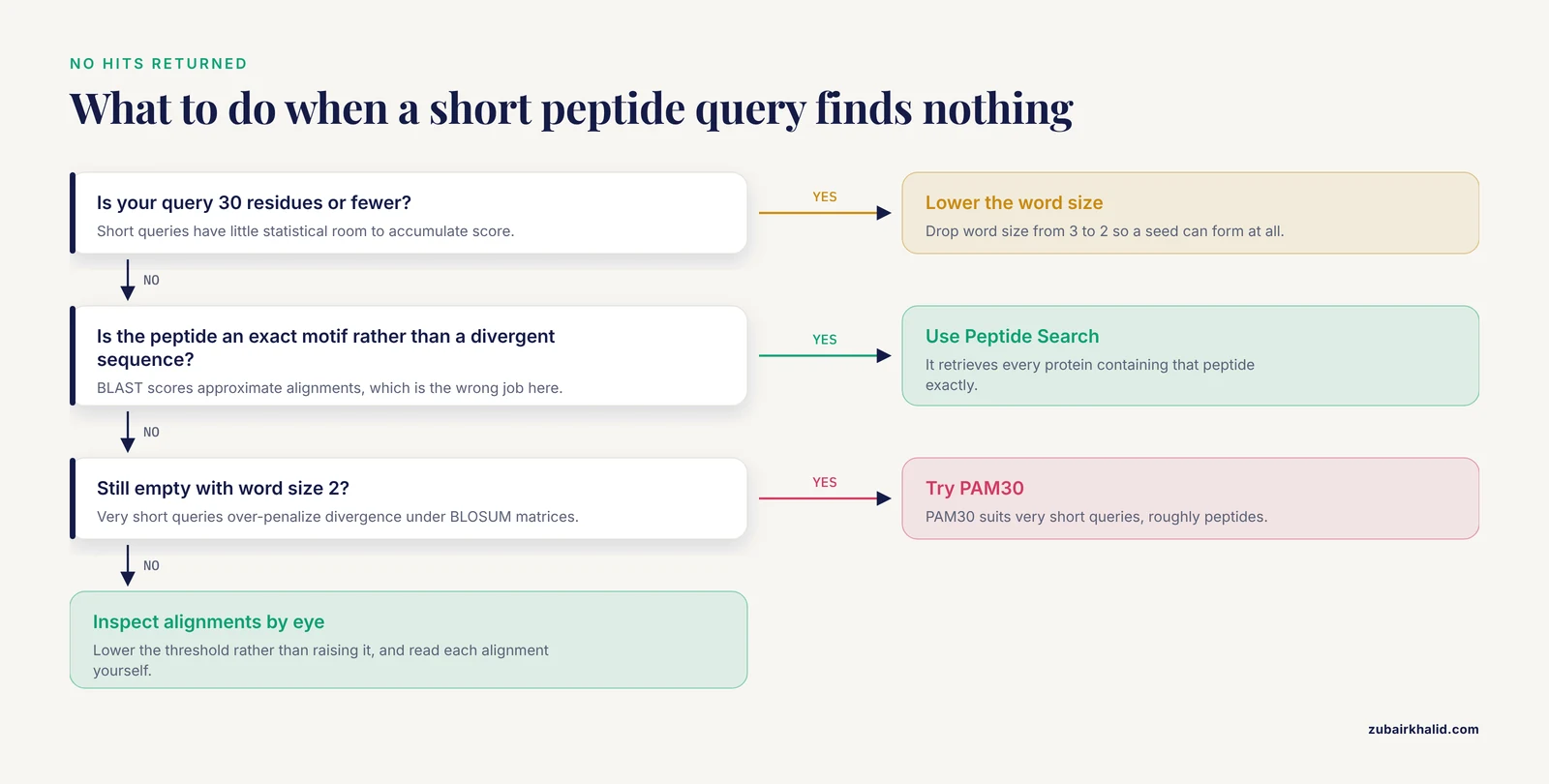
The default word size of 3 may never find a seed in a query of 30 residues or fewer. Lower the word size to 2, consider the PAM30 matrix for very short queries, and if the peptide is an exact motif rather than a divergent sequence, use UniProt Peptide Search instead of BLAST [1].
Is PSI-BLAST available in UniProt and when should I use it?
PSI-BLAST-style iterative searching is the right tool when single-sequence blastp finds only weak hits and you want to build a family profile. Use it in supervised, short runs, because unattended iterations absorb non-homologous sequence into the profile through homologous over-extension, which accounted for the largest share of false positives by iteration 5 in the benchmark that characterized the error [5].
My BLAST search is slow. What are my options?
Switch to a clustered target such as UniRef50, which reduces the searched space drastically [3]. For pipelines, run DIAMOND or MMseqs locally against downloaded FASTA, accepting a small sensitivity loss at the distant-homology margin in exchange for large speed gains [3][9]. For interactive single queries, SANSparallel returns UniProt-scale results with immediate response [13].
How many hits should I request from a UniProt BLAST search?
Request 250 to 500 for interactive work. Go higher only when you genuinely need a full family enumeration for downstream analysis, and in that case prefer clustering approaches over a giant raw hit list, because clustering improves both speed and the readability of homology searches [3][7].
Sources
- UniProt Tools: BLAST, Align, Peptide Search, and ID Mapping.
- UniProt Tools.
- MMseqs software suite for fast and deep clustering and searching of large protein sequence sets.
- A new bioinformatics analysis tools framework at EMBL-EBI.
- Homologous over-extension: a challenge for iterative similarity searches.
- sORFdb - a database for sORFs, small proteins, and small protein families in bacteria.
- kClust: fast and sensitive clustering of large protein sequence databases.
- Enhancing protein function prediction with taxonomic constraints--The Argot2.5 web server.
- Comparison of methods for library construction and short read annotation of shellfish viral metagenomes.
- Untangling Zebrafish Genetic Annotation: Addressing Complexities and Nomenclature Issues in Orthologous Evaluation of TCOF1 and NOLC1.
- Protein-x of hepatitis B virus in interaction with CCAAT/enhancer-binding protein α (C/EBPα)--an in silico analysis approach.
- [[Molecular mimic between cardiovascular diseases and microorganism antigens].](https://pubmed.ncbi.nlm.nih.gov/38683079/)
- SANSparallel: interactive homology search against Uniprot.
- PairsDB atlas of protein sequence space.
- ProGMap: an integrated annotation resource for protein orthology.
- Allergen cross-reactivity in allergic rhinitis and oral-allergy syndrome: a bioinformatic protein sequence analysis.
- OpenAntigens: a structure-aware database for antigen construct design across the human cell-surface and secreted proteome.
- HOMCOS: a server to predict interacting protein pairs and interacting sites by homology modeling of complex structures.