How to Use UniProt's Align Tool for Multiple Sequence Alignment
By Dr. Zubair Khalid, DVM, MS, PhD ·

By the end of this UniProt align tool tutorial you will be able to take a set of protein sequences, assemble them in the right format, run a multiple sequence alignment (MSA) directly on the UniProt website, read the colored output correctly, export the alignment for publication or downstream analysis, and recognize the mistakes that quietly ruin alignments built from database sequences. You need nothing installed except a web browser for the core workflow. A terminal with curl or wget is useful for fetching sequences in bulk, and the Jalview desktop app (free, from the University of Dundee) is worth installing if you plan to edit or publish the alignment.
The Align tool is one of the four main tools UniProt provides on its website, alongside BLAST, Peptide Search, and Retrieve/ID Mapping [1]. UniProt's own protocols describe the Align tool as the resource's mechanism for multiple sequence alignment, with entry points from the dedicated Align page, from search results pages, from individual entry pages, and from the UniProt basket [1]. This article walks through each of those routes, then covers the judgment calls that separate a defensible alignment from a misleading one.
What the Align Tool Is, and When You Should Use It
A multiple sequence alignment arranges three or more protein (or nucleotide) sequences in rows, inserting gaps so that residues thought to occupy the same evolutionary position line up in columns. Conserved columns often correspond to structurally or functionally important positions. Alignments feed directly into phylogenetic trees, domain boundary inspection, mutation interpretation, and primer or probe design.
The UniProt Align tool handles this job for you inside the same site that hosts the sequences themselves, which is its main practical advantage. Because UniProt entries carry stable accessions, curated names, and feature annotations, aligning UniProt sequences keeps identifiers, descriptions, and annotations attached to every row of the alignment without any manual bookkeeping. The tool grew out of the site's earlier toolset, which offered BLAST, Align, and Retrieve/ID Mapping as the three core utilities [2], and it remains the recommended first stop for a quick MSA of proteins you are already browsing in UniProt [1].
Use the Align tool when:
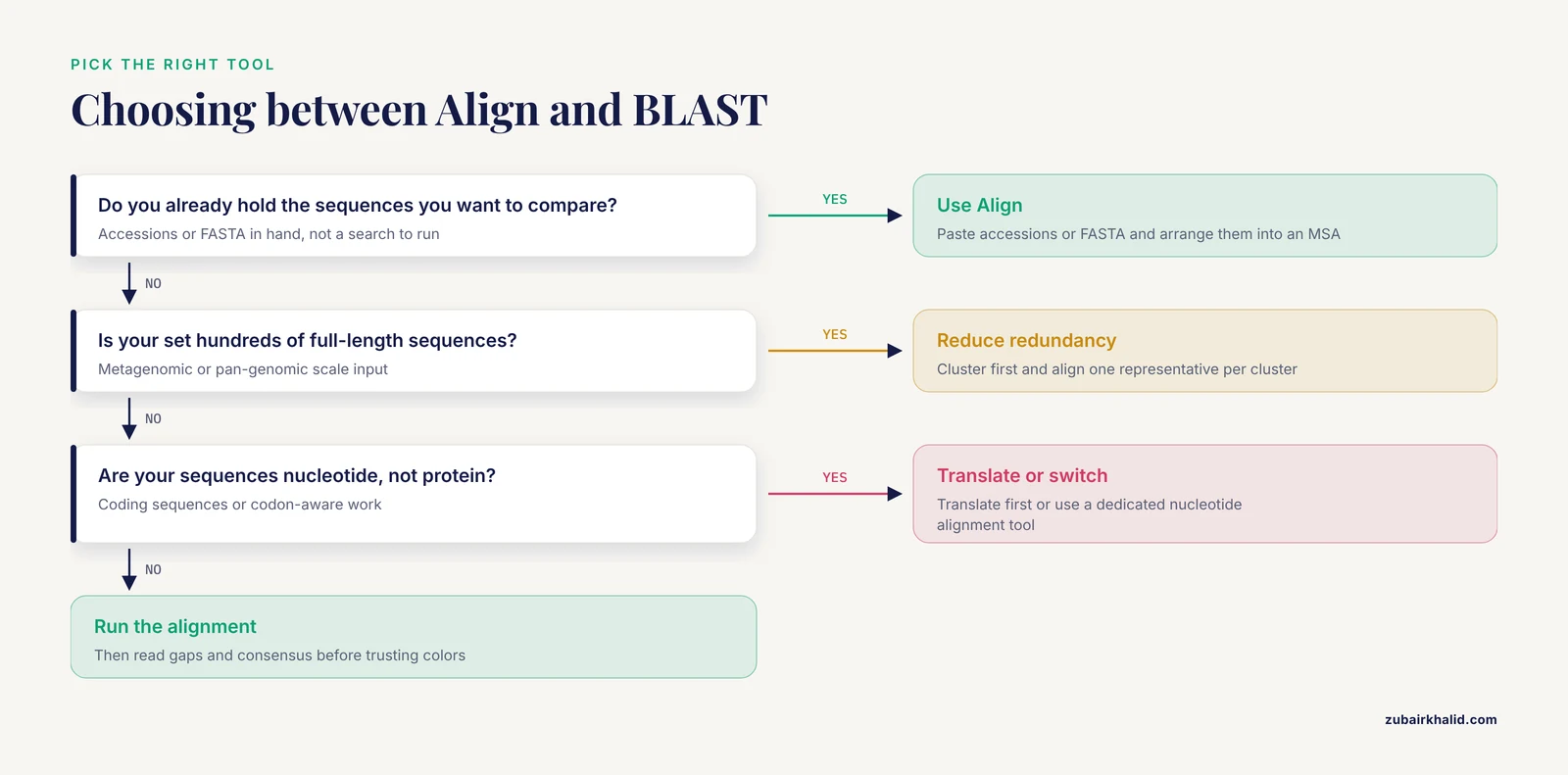
- You are comparing a handful to a few dozen related proteins you found through UniProt searches.
- You want the alignment rendered immediately in the browser with conservation coloring, without installing software.
- You want to hand a live alignment to Jalview for editing, tree building, or figure preparation.
- You are teaching or documenting an analysis and want a reproducible, citation-friendly web workflow.
Use something else when:
- Your input exceeds what a web form handles comfortably, such as hundreds of full-length sequences from a metagenomic study. At that scale, redundancy reduction and command-line tools are the right approach, because sequence databases grow rapidly and searching or aligning everything against everything becomes expensive [3], [4].
- You need a specific scoring matrix, gap model, or iterative refinement strategy that a general web form does not expose.
- You are aligning nucleotide sequences or codon-aware alignments for dN/dS work. The UniProt Align tool is built around protein sequences from the UniProt knowledgebase context.
Understanding UniProt Before You Align
If you are new to how to use UniProt, a sixty-second orientation will save you hours. UniProtKB, the UniProt Knowledgebase, contains two sections. Swiss-Prot is the manually curated, expert-reviewed section with reliable function annotation and clean sequences. TrEMBL is the larger, automatically annotated section, which is comprehensive but noisy. Aligning a protein family drawn only from Swiss-Prot usually gives you a cleaner, easier-to-interpret alignment than aligning every matching TrEMBL entry, many of which are near-duplicate fragments of the same proteins.
Redundancy is the central practical issue. Large protein databases contain enormous numbers of near-identical sequences, and clustering them by similarity is a standard way to reduce redundancy and improve both speed and biological clarity of downstream analyses [3], [4]. UniProt addresses this with UniRef clusters (UniRef100, UniRef90, UniRef50), which group similar sequences under representative entries. A common and effective strategy is to BLAST your query first, then align one representative per UniRef cluster rather than hundreds of duplicates. External homology search services follow the same logic by offering results against UniProt, UniRef90, UniRef50, or Swiss-Prot as separate searchable databases [5], and dedicated tools can cluster the entire UniProt database down to roughly 30 percent maximum pairwise identity at scale [3] or to 20 to 30 percent identity with profile-based refinement [4].
A second issue is annotation noise. Different databases classify the same protein differently, and automated annotations can conflict, particularly for poorly characterized proteins [6]. When your alignment is meant to support a functional claim, favor Swiss-Prot entries and treat the labels attached to TrEMBL rows with skepticism.
Preparing Your Sequences
The Align tool accepts sequences in two forms:
- UniProt identifiers, most commonly UniProtKB accessions such as
P04637or entry names such asP53_HUMAN. - Raw sequences in FASTA format, which lets you align your own newly sequenced or translated proteins against UniProt entries.
FASTA format has a header line beginning with > followed by the sequence in single-letter amino acid code. A minimal, correct record looks like this:
>sp|P04637|P53_HUMAN Cellular tumor antigen p53 OS=Homo sapiens OX=9606
MEEPQSDPSVEPPLSQETFSDLWKLLPENNVLSPLPSQAMDDLMLSPDDIEQWFTEDPGP
Practical preparation rules:
- One protein per FASTA record, header line first, sequence wrapped on the following lines.
- Strip stop codons (
) and trailing translation artifacts. A strayin the middle of a sequence will either be rejected or distort the alignment. - Keep unique, meaningful headers. If you align five records all named
>seq, you will not be able to tell which row is which once the tool relabels output. - Decide whether fragments belong in your alignment. Aligning partial fragments against full-length proteins produces misleading gap patterns at the termini and, worse, can corrupt iterative analyses downstream [7]. If a sequence is clearly a fragment, note it or exclude it.
- Avoid duplicate sequences unless you specifically need them. Two identical rows add nothing to an MSA and inflate apparent conservation.
UniProt Align Tool Tutorial Step by Step
This walkthrough uses a real, reproducible example: aligning the tumor protein p53 across five species. Every accession below is a genuine UniProtKB entry, and you can fetch them yourself with the commands shown.
Step 1. Collect Your Accessions
Search the UniProt website (uniprot.org) for your protein of interest, filter to reviewed Swiss-Prot entries if available, and note the accession of each protein you want in the alignment. For the p53 example the accessions are:
- Human:
P04637 - Mouse:
P02340 - Rat:
P10361 - Dog:
Q29565(note that this entry may be labeled as a p53 homolog, check the entry name on the site) - Chicken:
P02341
If you prefer to build the list from a search results page rather than by hand, that route is covered in Step 4.
Step 2. Fetch the Sequences (Optional but Recommended)
You do not need this step if you will paste accessions directly. It matters when you want a local copy of the inputs for reproducibility, or when your sequences come from outside UniProt and you want to inspect them before aligning. UniProt provides programmatic access to each entry as FASTA through its REST interface.
for acc in P04637 P02340 P10361 Q29565 P02341; do
  curl -s "https://rest.uniprot.org/uniprotkb/${acc}.fasta" >> p53_set.fasta
done
Expected contents of p53_set.fasta (truncated):
>sp|P04637|P53_HUMAN Cellular tumor antigen p53 OS=Homo sapiens OX=9606 GN=TP53 PE=1 SV=1
MEEPQSDPSVEPPLSQETFSDLWKLLPENNVLSPLPSQAMDDLMLSPDDIEQWFTEDPGP
DEAPRMPEAAPPVAPAPAAPTPAAPAPAPSWPLSSSVPSQKTYQGSYGFRLGFLHSGTAK
...
>sp|P02340|P53_MOUSE Cellular tumor antigen p53 OS=Mus musculus OX=10090 GN=Trp53 PE=1 SV=2
MEPQSDPSIELPLSQETFSGLWKLLPPEDILPSPHCMDDHLPDHDNWGSFDVNLQWPEIP
...
Sanity check the file: five header lines, no asterisks, no duplicated records.
grep -c "^>" p53_set.fastaExpected output:
5Step 3. Run the Alignment From the Dedicated Align Page
- Open
https://www.uniprot.org/alignin your browser. - Paste either your accession list or the full contents of
p53_set.fastainto the sequence input box. The tool accepts plain accessions on separate lines or multi-record FASTA. - Give the job a name if the form offers one. Naming jobs is a small habit that pays off when you rerun an analysis months later.
- Submit and wait. Alignment of five proteins of roughly 400 amino acids finishes within seconds to a minute depending on load.
- The results page displays the aligned sequences with residues colored by conservation or chemical property, a consensus line, and controls for changing the color scheme and for launching the alignment in Jalview.
Step 4. Run the Alignment From Search Results or the Basket
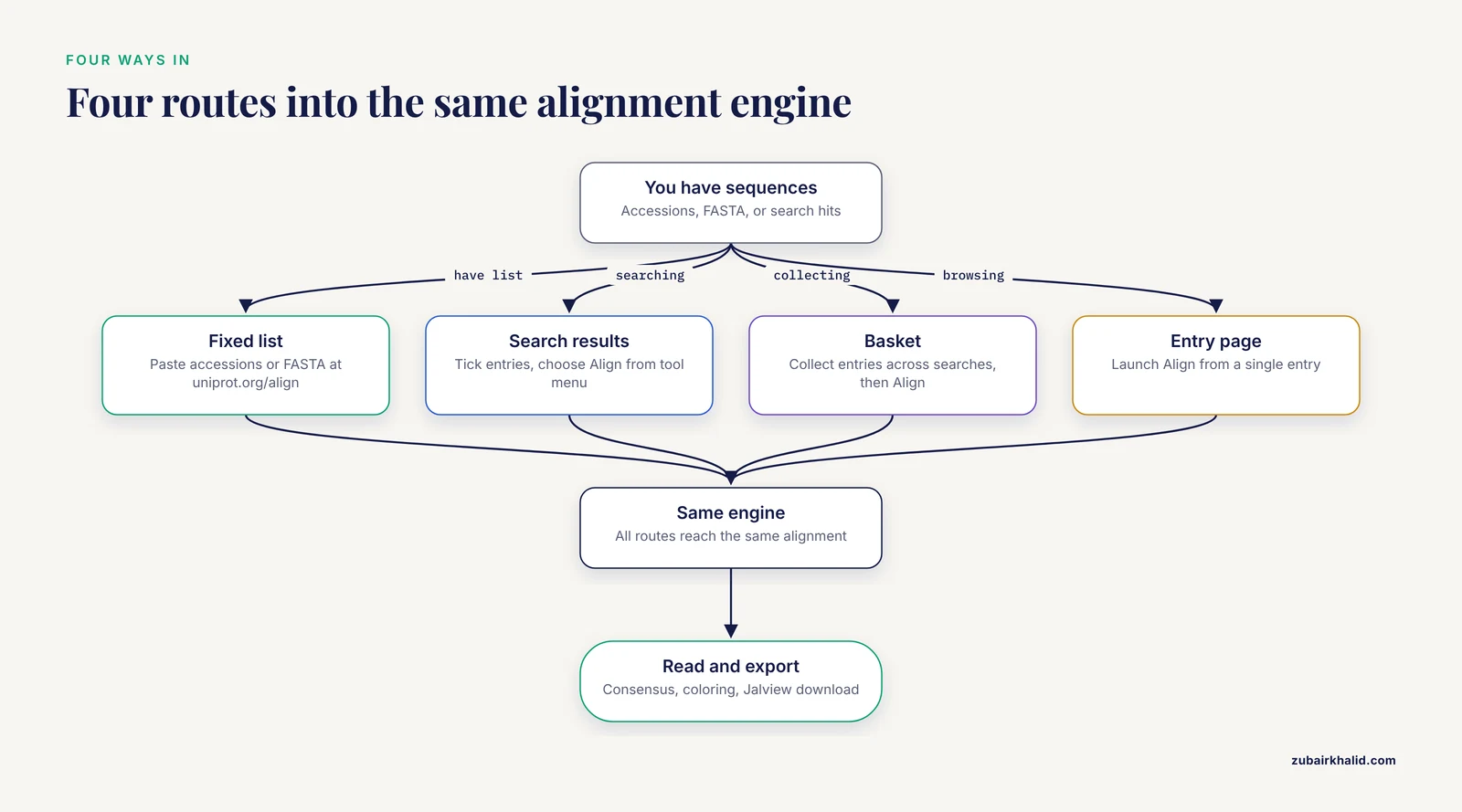
UniProt's protocols describe alternate entry points that are frequently more convenient when your sequences came from a UniProt search [1].
From a results page:
- Perform a search, for example
gene:TP53 AND reviewed:true. - On the results page, tick the checkboxes next to the entries you want.
- Choose the Align action from the tool menu above the results table. UniProt passes the selected entries straight into the Align tool [1].
From the basket:
- Add entries to your basket as you browse, possibly across several separate searches.
- Open the basket and trigger the Align action on the collected entries [1].
The basket route is the better choice when your sequence set accumulates over a working session. The dedicated-page route is better when you already hold a fixed accession list or a FASTA file. All routes converge on the same alignment engine and the same output.
Step 5. Read the Alignment
A well-formed output has these elements:
- Rows, one per input sequence, labeled with identifiers derived from your headers or accessions.
- Columns, aligned positions, with dashes marking gaps.
- Conservation coloring, typically shading identical or chemically similar residues so that fully conserved columns stand out.
- A consensus or conservation summary along the alignment.
What to look at first:
- Are all sequences full length relative to one another, or do some rows start and end with long gap stretches? Terminal gaps usually mean fragments or isoform differences, not missing data.
- Do the sequences share a recognizable block structure, with conserved blocks separated by gappy variable regions? Most real protein families look like this.
- Are there positions where every single sequence agrees? Fully conserved columns are the strongest signal in the alignment and the natural candidates for mutagenesis or functional commentary.
- Does anything align over only a small fraction of its length? A row that matches in one block then diverges may be a fragment, an isoform, or a wrong pick from the search stage.
Step 6. Export and Take It Further
From the alignment view you can typically download the alignment in a standard format and open it in Jalview for editing, feature annotation, and tree building. Jalview is the visualization partner UniProt's own documentation highlights for alignment display, and third-party homology services likewise push stacked alignments into Jalview or sequence logo views for serious inspection [5]. A reasonable export loop looks like:
- Download the alignment in FASTA or Clustal format from the results page.
- Open it in Jalview.
- In Jalview, calculate a tree from the alignment (neighbor joining on percent identity is the default many users start with) if you want a quick phylogeny.
- Recolor, hide columns with excessive gaps, and export a publication-quality figure.
The phylogenetic step is a legitimate use of alignment output. Sequence similarity networks and trees built from alignments underlie everything from allergen cross-reactivity analysis, where researchers aligned epitope-bearing proteins across allergen classes and built a phylogenetic tree to explore evolutionary relationships [8], to homology-based interaction prediction servers that rely on aligning user sequences against template databases [9].
Parameters and Options That Matter
The web form is deliberately simple, which is a strength, but a few decisions still shape the result. The table below summarizes the choices that matter in practice.
| Decision | What it controls | Practical guidance |
|---|---|---|
| Input mode (accessions vs FASTA) | Whether identifiers come from UniProt entries or your own headers | Use accessions when the proteins live in UniProt, so annotations stay attached. Use FASTA for your own sequences. |
| Sequence source (Swiss-Prot vs TrEMBL vs UniRef representative) | Redundancy and annotation quality of the rows | Prefer reviewed Swiss-Prot entries for interpretation. Pick one representative per cluster when duplicates dominate. |
| Number of sequences | Runtime, readability, and statistical weight of conserved columns | Keep web alignments to a manageable set you can actually inspect. For genome-scale sets, cluster or reduce redundancy first [3], [4]. |
| Inclusion of fragments | Gap patterns and risk of misleading extension | Exclude clear fragments unless you are specifically studying truncation. Partial regions drive false extension errors in related iterative methods [7]. |
| Output format on export | Compatibility with downstream tools | FASTA alignment for pipelines, Clustal-style output for readability, Jalview for figures and trees. |
| Coloring scheme | What visual patterns jump out at you | Conservation coloring for function hunting, chemistry-based coloring for structure-oriented reading. |
There is no gap penalty or scoring matrix dropdown to agonize over in the typical UniProt Align workflow, unlike command-line aligners. That simplicity is fine for exploration. When a reviewer asks which algorithm and parameters produced your alignment, the honest answers are either "the UniProt web Align tool with default settings" or the name of a local tool you ran yourself. If you anticipate needing to defend parameters, run the final alignment locally with a documented tool and keep the command line in your methods section.
Worked Example, Continue From the Alignment
Suppose the p53 alignment shows a fully conserved stretch across all five species in the DNA-binding core. Two follow-up moves are standard:
Move 1. Map conservation onto function. Note the conserved column ranges, then open the human entry P04637 in UniProt and check which annotated domains and variants fall in those ranges. Alignments plus entry annotations are how most bench biologists connect a conserved residue to a proposed role.
Move 2. Test whether the conservation holds in more distant relatives. Add an invertebrate p53 family member or expand the set, rerun, and see which columns survive. If a column is conserved only among mammals, it is weaker evidence of ancient functional constraint than a column conserved from human to insect.
If your question extends to similarity searching rather than alignment, that is BLAST's job, and UniProt's protocols treat BLAST and Align as complementary tools with separate protocols [1]. Iterative profile searches (PSI-BLAST style) are the more sensitive option for remote homologs, but they carry a specific failure mode worth knowing before you build a family alignment from their results, described in the mistakes section below [7]. Some published pipelines illustrate the combination concretely, extracting a sequence from UniProt, running PSI-BLAST similarity searches, and building structural models from the hits [10]. Machine-learning classifiers that go beyond sequence similarity, recoding proteins into reduced-alphabet k-mer representations, exist for families so diverged that straightforward alignment struggles [11], and databases of underexplored protein classes, such as small bacterial proteins, assemble families through bidirectional best hits and clustering when direct alignment is thin [12].
Common Mistakes and Limitations
These are the errors that most often invalidate a UniProt Align session, drawn from recurring patterns in real analyses.
1. Aligning fragments against full-length proteins without saying so. A fragment row produces a giant sea of terminal gaps and can pull the alignment locally. The deeper danger shows up in iterative similarity searches, where alignments that start in a genuine homologous region but extend beyond homology into unrelated neighboring sequence contaminate the search. This failure mode, called homologous over-extension, accounted for the largest fraction of false positives in PSI-BLAST tests, with 5 to 9 percent of alignments at the fifth iteration being non-homologous, and removing partial domains from the search library cut over-extension errors from 16 percent to 3 percent of weighted coverage in the hardest queries [7]. The lesson transfers directly to alignment curation. Curate fragments out, or at minimum label them, before you interpret the MSA.
2. Confusing sequence similarity with homology. An alignment column can line up two residues without any common ancestry. Short alignments, low-complexity regions, and coiled coils all generate statistically weak but visually plausible matches. Alignment is evidence, not proof. When you are tempted to call two proteins orthologs from an alignment alone, corroborate with reciprocal search results and taxonomic logic. Automated function-transfer pipelines that rely on sequence similarity mitigate exactly this problem by clustering the database first and applying taxonomic constraints to filter annotations that cannot apply to the organism under study [13].
3. Feeding in unreviewed, redundant TrEMBL entries. Aligning forty near-identical TrEMBL records of the same enzyme from different strains adds rows without adding information, and their automated annotations may conflict with each other. Database classification schemes frequently disagree about protein group membership, which is precisely why resources exist to cross-check the coherence of protein groups across UniProt, RefSeq, Ensembl, and other sources [6]. Reduce to representatives, or restrict to reviewed entries.
4. Trusting the alignment in gap-rich regions. Multiple alignment algorithms place gaps in variable regions with less confidence than in conserved cores. Columns inside long insert loops or around domain boundaries are the least reliable positions in any MSA. If a functional claim rests on one or two columns, check whether those columns sit in a conserved block or in a gappy swamp.
5. Ignoring isoforms. Many UniProt entries have multiple isoforms produced by alternative splicing. If one row is isoform 2 and the rest are isoform 1, the alignment will show large internal gaps that have nothing to do with evolution. Pick one canonical isoform per gene unless isoform variation is your actual question.
6. Overloading the web form. The Align tool is built for interactive, moderate-sized jobs, not for the thousands of sequences a metagenomic or pan-genomic project produces. Large-scale work belongs in command-line pipelines, where clustering reduces redundancy before analysis and multi-module search suites handle the scale of modern databases [3], [4]. Trying to force genome-scale input through a web form wastes your time and degrades the output's readability to the point of uselessness.
7. Not recording inputs. A screenshot of a colored alignment is not reproducible. Record the accession list, the date, and the URL. If you fetched sequences programmatically, keep the commands. UniProt entries update, so an alignment rebuilt two years later may differ, and your methods section should make that traceable.
8. Reading colors without reading the consensus. Color schemes make nearly everything look conserved at a glance. Train yourself to check the consensus or conservation row first, then the colors. Fully conserved, strongly similar, and weakly similar columns are different grades of evidence.
9. Assuming the web alignment is the final word. A web MSA is a first-pass tool. For anything bound for publication, rebuilding the alignment locally with a documented method, curating it in Jalview or a comparable editor, and archiving the input file gives you a defensible artifact. Interactive web results are ideal for the exploratory phase, and faster interactive homology services exist precisely to accelerate that exploratory phase before careful work begins [5].
Validating Your Alignment
A quick validation checklist before you build anything on top of the MSA:
- Identity sanity check. Every pair of sequences in the alignment should show a pairwise identity roughly consistent with their known relationship. If your human and mouse orthologs align at 25 percent identity while two of your "paralogs" align at 95 percent, you picked a wrong entry somewhere.
- Domain architecture check. Open each UniProt entry and confirm the domain layout matches what the alignment shows. Conserved blocks should correspond to shared domains.
- Length check. Confirm each row's length against the entry. Unexpectedly short rows are fragments or isoforms.
- Outlier check. If one sequence sits far from every column of conservation, either it is a wrong entry, a fragment, or the honest signal that your family is more divergent than you assumed. Do not delete outliers reflexively. First verify the accession, then decide.
- Cross-tool check. Run a BLAST search of your most divergent sequence against UniProt to confirm it belongs in the family at all. Precomputed-alignment databases built over full protein sequence space exist to make exactly these similarity relationship checks fast [14], and orthology-focused resources group sequences to help assess whether two entries truly belong to the same protein group [6].
Where to Go Next
Once you are comfortable with the Align tool, three natural extensions round out a UniProt-centered skill set. First, learn the BLAST tool on the same site, including PSI-BLAST for iterative profile searches, and pair it with the over-extension awareness described above [7], [1]. Second, learn Retrieve/ID Mapping, which converts a list of external identifiers into UniProt accessions and back, an unavoidable step whenever your input comes from RNA-seq differential expression tables or proteomics spreadsheets [1], [2]. Third, when your analyses outgrow the web interface, move to command-line clustering and searching, where modern suites can cluster databases at the scale of UniProt to moderate identity thresholds far faster than older methods [3], [4]. The progression from web tool to command line is the standard maturation path for protein sequence analysis, and the Align tool is the right place to start because it teaches you to read alignments, which is the skill every downstream method depends on.
Frequently Asked Questions
Is the UniProt Align tool free to use?
Yes. UniProt is a free, publicly funded resource, and all four of its main web tools, including Align, are available without registration through the UniProt website [1].
How many sequences can I align at once?
The tool is designed for interactive, moderate-sized jobs of the kind described in UniProt's own protocols, not for genome-scale batches [1]. Keep the set small enough that you can visually inspect every row. For large collections, reduce redundancy by clustering first [3], [4].
Can I align my own sequences that are not in UniProt?
Yes. Paste them in FASTA format alongside or instead of UniProt accessions. The alignment engine works on the sequences you supply, and UniProt annotations attach only to the rows that correspond to UniProt entries.
What is the difference between BLAST and Align in UniProt?
BLAST searches one or more query sequences against a database to find similar sequences. Align takes sequences you already selected and arranges them into a multiple sequence alignment. UniProt's protocols document them as separate tools with separate protocols [1].
Does the Align tool work for nucleotide sequences?
The tool is oriented toward protein sequences from the UniProt knowledgebase context. For nucleotide work, translate your coding sequences first, or use a dedicated nucleotide alignment tool. Aligning translated protein sequences is also usually more sensitive for coding genes across distant species.
How do I build a phylogenetic tree from my UniProt alignment?
Export the alignment, open it in Jalview, and use the tree calculation on the alignment. Jalview is the visualization application that UniProt's alignment workflow connects to, and it computes simple trees such as neighbor joining directly from the alignment [1], [5].
Why do some sequences in my alignment have long stretches of gaps?
Terminal and large internal gaps usually mean the sequence is a fragment, a different isoform, or a protein with an extra domain the others lack. Check each gappy row against its UniProt entry before interpreting the pattern. Fragments in particular should be curated out because they distort both alignments and any iterative searches built on them [7].
Which alignment algorithm does the UniProt Align tool use?
UniProt documents its tools and their underlying methods in its help pages and in the Current Protocols articles describing the toolset [1], [2]. For work where the specific algorithm and parameters must be reported, run the alignment locally with a tool whose settings you control and cite that instead of the web defaults.
Sources
- UniProt Tools: BLAST, Align, Peptide Search, and ID Mapping.
- UniProt Tools.
- MMseqs software suite for fast and deep clustering and searching of large protein sequence sets.
- kClust: fast and sensitive clustering of large protein sequence databases.
- SANSparallel: interactive homology search against Uniprot.
- ProGMap: an integrated annotation resource for protein orthology.
- Homologous over-extension: a challenge for iterative similarity searches.
- Allergen cross-reactivity in allergic rhinitis and oral-allergy syndrome: a bioinformatic protein sequence analysis.
- HOMCOS: a server to predict interacting protein pairs and interacting sites by homology modeling of complex structures.
- Protein-x of hepatitis B virus in interaction with CCAAT/enhancer-binding protein α (C/EBPα)--an in silico analysis approach.
- Snekmer: a scalable pipeline for protein sequence fingerprinting based on amino acid recoding
- sORFdb - a database for sORFs, small proteins, and small protein families in bacteria.
- Enhancing protein function prediction with taxonomic constraints--The Argot2.5 web server.
- PairsDB atlas of protein sequence space.