How to Transfer Large FASTQ Files to an HPC Cluster
By Dr. Zubair Khalid, DVM, MS, PhD ·

By the end of this guide you will be able to move a sequencing run, often tens to hundreds of gigabytes of FASTQ data, from a local workstation or sequencing provider to a high performance computing (HPC) cluster, verify that every byte arrived intact, and resume cleanly if the connection drops. You will also know which transfer tool fits your situation and which mistakes corrupt or waste sequencing data most often.
To follow along you need a terminal on a Linux, macOS, or Windows machine (Windows Subsystem for Linux or PowerShell with OpenSSH both work), an account on the target cluster, the cluster's login hostname, and enough free disk space at both ends. Everything in this guide uses standard Linux commands that come with OpenSSH, GNU coreutils, and rsync. No root access is required.
FASTQ is the standard flat text format for raw sequencing reads, storing a read identifier, the nucleotide sequence, a plus line, and per base quality scores in a repeating four line block. Because a single Illumina flow cell can produce hundreds of gigabytes of text, moving FASTQ files is one of the first real bottlenecks every new bioinformatician hits. Getting it right the first time saves days.
Know Your Data Before You Move It
The first rule of any large transfer is to measure what you are actually moving. Sequencing runs typically arrive as pairs of files per sample, such as sampleA_R1.fastq.gz and sampleA_R2.fastq.gz for the forward and reverse reads.
Check total size and file count from the parent directory:
du -sh .
ls -lh *.fastq.gz | head
find . -name "*.fastq.gz" | wc -l
Expected output:
412G    .
-rw-r--r-- 1 jdoe jdoe  28G Nov  3 14:22 sampleA_R1.fastq.gz
-rw-r--r-- 1 jdoe jdoe  27G Nov  3 14:37 sampleA_R2.fastq.gz
9
Three practical points fall out of this quick check.
First, confirm you already have compressed files. FASTQ data compresses extremely well because the sequence alphabet is tiny and quality strings are repetitive. A raw FASTQ file typically shrinks to roughly a quarter to a third of its original size under gzip compression. If your provider delivered .fastq.gz files, do not decompress them before transfer. If you somehow have plain .fastq files, compress them first, because transferring the uncompressed version can take three to four times longer for no benefit.
Second, confirm the read structure. Each FASTQ entry has four lines, so the total line count of any well formed FASTQ is divisible by four. You will use this fact later to verify integrity.
Third, look at the file count. Nine large files transfer very differently from nine hundred thousand small ones. Every file has per file overhead for opening, transferring, and closing, so many small files can make a transfer dramatically slower than the raw byte count suggests. If you face thousands of small files, bundle them first:
tar -cvf run1_smallfiles.tar smallfiles_dir/The tar flags here are -c to create an archive, -v for verbose output, and -f to name the archive file. You can then transfer a single tarball and unpack it on the cluster with tar -xvf run1_smallfiles.tar.
Step 1: Set Up SSH Key Authentication
Every method in this guide rides over SSH (Secure Shell), the encrypted protocol used to log into remote systems. Password authentication works, but for multi hour transfers a key pair is more reliable, because some cluster configurations drop long lived password sessions while keys authenticate once at connection time.
Generate a modern Ed25519 key on your local machine:
ssh-keygen -t ed25519 -C "jdoe-hpc-transfer"Press Enter to accept the default location (~/.ssh/id_ed25519) and choose a passphrase. Then copy the public key to the cluster:
ssh-copy-id [email protected]Test it:
ssh [email protected] 'hostname'Expected output:
gpu-node01.hpc.example.eduTo avoid typing the full hostname every time, create an SSH config entry in ~/.ssh/config:
Host hpc
    HostName login.hpc.example.edu
    User jdoe
From now on, ssh hpc, scp, and rsync all recognize the alias hpc. This is one of the highest value habits in Linux for bioinformatics. Small conveniences compound when you run dozens of commands per day.
One caution: many clusters route you through a login node. Confirm with your system administrators whether a dedicated data transfer node (DTN) exists. DTNs are built for heavy file movement, and pushing hundreds of gigabytes through a login node can get your account temporarily throttled or earn you an email from the admin.
Step 2: Generate Checksums Before You Transfer
A checksum is a fixed length fingerprint computed from a file's contents. If even one byte changes, the fingerprint changes completely. Generating checksums before the transfer and comparing them after is the only rigorous way to prove your FASTQ files arrived bit for bit identical.
SHA-256 is the current standard:
sha256sum *.fastq.gz > sha256sums.txt
cat sha256sums.txt
Expected output:
3f8a1c9e...  sampleA_R1.fastq.gz
b71d02f4...  sampleA_R2.fastq.gz
On a multi terabyte directory this step itself takes time, so run it once and keep the file. Copy sha256sums.txt along with the data. Some sequencing providers ship an MD5.txt or per file .md5 sidecar with each delivery. Use theirs if present, since it lets you confirm the data was intact before it ever reached you.
Step 3: Choose Your Transfer Method
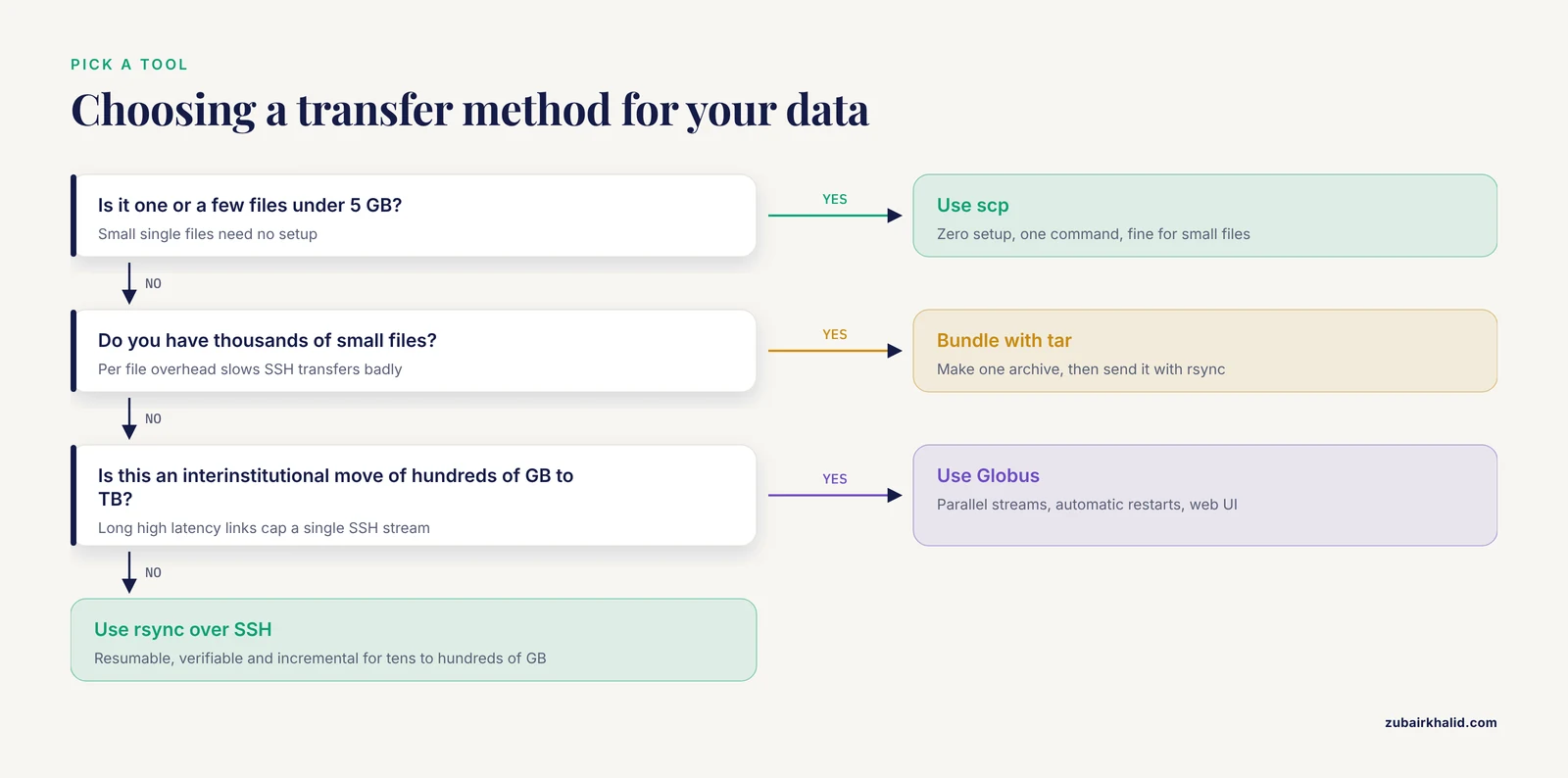
Three tools cover nearly every situation.
scp (secure copy) is the simplest. It copies files over SSH and requires nothing beyond OpenSSH. Its weakness is that an interrupted transfer starts over from zero.
rsync is the workhorse. It synchronizes directories, can resume partial transfers, skips files that already exist and match, and prints progress. For anything over a few gigabytes, or any directory with many files, rsync is the default answer.
Managed transfer services such as Globus handle long distance, high volume moves between institutions. They sit on top of GridFTP, run optimized parallel streams on dedicated endpoints, and handle authentication, restarts, and notifications for you. Many US universities and national computing centers, including XSEDE/TACC style resource providers, run Globus endpoints as the officially recommended path for large dataset movement.
The table below summarizes the decision.
| Situation | Recommended tool | Why |
|---|---|---|
| One or a few files under 5 GB | scp | Zero setup, one command |
| Tens to hundreds of GB, local to cluster | rsync over SSH | Resumable, verifiable, incremental |
| Thousands of small files | tar, then rsync | Avoids per file overhead |
| Interinstitutional move, hundreds of GB to TB | Globus | Parallel streams, automatic restarts, web UI |
| Sequencer or provider pushing to you | Aspera or Globus, provider dependent | Optimized for long high latency links |
| Provider data already in cloud storage | aws s3 cp or s5cmd from the cluster | Skips your workstation entirely |
Step 4: Transfer with rsync, Step by Step
This is the core walkthrough for the most common case, moving a run directory from your workstation to your cluster scratch space.
First, do a dry run to see exactly what would happen without moving anything:
rsync -avP -n ./run1_2024/ hpc:/scratch/jdoe/run1/The -n flag makes rsync print its plan and exit. Expected output:
sending incremental file list
sampleA_R1.fastq.gz
sampleA_R2.fastq.gz
sha256sums.txt

sent 45 bytes  received 19 bytes  25.33 bytes/sec
total size is 412.4G  speedup is 5,498,666.67
Nothing has transferred yet. The trailing slashes matter: a source path ending in / means "the contents of this directory," while a source path without the slash means "the directory itself." Mixing this up is the classic way people end up with /scratch/jdoe/run1/run1_2024/.
When the plan looks right, run the real transfer:
rsync -avP --stats ./run1_2024/ hpc:/scratch/jdoe/run1/Here is what every parameter does.
-a(archive) preserves permissions, timestamps, and recursive structure. It is shorthand for several other flags and is almost always what you want for data directories.-v(verbose) lists each file as it goes.-Pcombines-partialand-progress. Partial keeps incompletely transferred files in place so an interrupted transfer can resume from where it stopped rather than starting over. Progress shows a live per file meter.-statsprints a summary of bytes transferred and throughput at the end, which is handy for records.
Expected progress output during the transfer:
sampleA_R1.fastq.gz
    1,234,567,890  3%  45.21MB/s  0:08:12
Expected final summary:
Number of files: 3
Total bytes sent: 412,412,341,760
sent  412.41G bytes  received  132 bytes   88.45M bytes/sec
If your connection is shared or capped, limit bandwidth so you do not starve everyone else in the lab:
rsync -avP --bwlimit=20000 ./run1_2024/ hpc:/scratch/jdoe/run1/-bwlimit=20000 throttles rsync to 20,000 KiB/s, about 20 MB/s. The value is in KiB/s unless you append a suffix such as M.
If the transfer dies at hour three, rerun the exact same rsync command. Existing complete files are skipped after a quick check, and the partial file resumes from its last complete block. This single property is why rsync beats scp for anything large.
A few extra flags earn their keep on big runs:
rsync -avPL --partial-dir=.rsync-partial --exclude='*.bam' ./run1_2024/ hpc:/scratch/jdoe/run1/-Lcopies the target of symbolic links rather than the links themselves, which matters when your sequencing pipeline left symlinks pointing at original data.-partial-dir=.rsync-partialhides partial files from your analysis directory so a half written FASTQ can never be mistaken for a real one.-exclude='*.bam'skips anything you do not intend to move yet.
Never use the -delete flag until you fully understand it. With -delete, rsync removes files on the destination that are absent from the source. Combined with a typo in the source path, this is how people have deleted the only copy of a sequencing run. Treat it as a configuration management flag, not a data transfer flag.
Step 5: Verify the Transfer
Verification has three layers, and each catches a different failure.
Layer 1, checksums. Copy your checksum file to the cluster and verify from there:
scp sha256sums.txt hpc:/scratch/jdoe/run1/
ssh hpc
cd /scratch/jdoe/run1
sha256sum -c sha256sums.txt
Expected output:
sampleA_R1.fastq.gz: OK
sampleA_R2.fastq.gz: OK
Any line reading FAILED means that file differs from the original. Delete the bad copy on the cluster and rerun rsync for that file specifically. Do not proceed to analysis on a failed checksum.
Layer 2, compression integrity. If checksums are unavailable for some reason, at minimum confirm each gzip archive is internally consistent:
gzip -t sampleA_R1.fastq.gz && echo OKgzip -t tests the archive without extracting. A truncated or corrupted gzip file fails here, which catches the most common transfer failure, an interrupted copy.
Layer 3, FASTQ sanity. Confirm the files still parse as FASTQ and the read counts match expectations from the run sheet. Count reads in the forward file:
zcat sampleA_R1.fastq.gz | awk 'NR%4==2 {count++} END {print count}'Expected output:
41235234Because every FASTQ record spans exactly four lines, dividing total line count by four gives read count. Run the same command on the reverse file and confirm the two counts match for paired end data. Mismatched R1 and R2 read counts, or a count that disagrees with the sequencing provider's report, means something went wrong upstream of your analysis and is worth resolving before you burn cluster hours on a broken dataset.
Tools such as FastQC provide a richer structural check (per base quality, adapter content, overrepresented sequences) and are a sensible next step once the files land, but the three checks above are the minimum gate before you commit compute.
Moving Many Small Files Without Suffering
Illumina's BCL to FASTQ conversion and some demultiplexing pipelines can leave you with one file pair per sample per lane, which is manageable, but other workflows produce hundreds of thousands of small files. SSH based transfers pay a round trip cost per file, so a directory of small files can crawl at a few files per second even on a fast link.
Two clean solutions exist. The first is the tarball approach shown earlier. The second is rsync running over an SSH connection multiplex, which still pays per file overhead but reuses one authenticated connection:
rsync -avP -e "ssh -o ControlMaster=auto -o ControlPath=/tmp/ssh-%r@%h -o ControlPersist=600" manyfiles/ hpc:/scratch/jdoe/manyfiles/This keeps a single SSH session alive for ten minutes (ControlPersist=600) and channels every file through it, eliminating repeated handshakes. In practice, for very large numbers of files, the tarball is still simpler and faster. Compress the tarball too if the contents are text:
tar -cvf - manyfiles/ | gzip > manyfiles.tar.gzThen transfer the single archive and unpack on the far end with tar -xzf manyfiles.tar.gz. This pattern, bundling then streaming, shows up constantly in bioinformatics workflows precisely because file count so often matters more than byte count.
When the Link Is the Bottleneck
If you are moving hundreds of gigabytes across the country, plain rsync over SSH may cap out well below your actual line speed. TCP, the transport protocol underneath SSH, performs poorly over high latency paths because of how it paces unacknowledged data. You can observe this yourself: a 10 Gbps research link will not deliver 10 Gbps through a single SSH stream from your laptop.
Practical responses, in order of effort:
- Use Globus if both ends have endpoints. Your institution's cluster very likely runs one. Globus opens parallel data streams, tolerates interruptions, verifies transfers, and lets you start a move from a web browser and close your laptop. Once you have used it for a terabyte scale project you rarely go back to command line transfers for institutional data.
- Ask about Aspera or similar UDP based tools. Commercial sequencer vendors commonly ship data via Aspera, which uses a UDP based protocol that tolerates latency far better than TCP. The
ascpcommand line client follows the same source destination pattern as scp. - Stage through cloud storage. If your provider deposits data in Amazon S3, Google Cloud Storage, or Azure Blob Storage, and your cluster has outbound internet and credentials, pull directly on the cluster and skip your workstation as a middleman:
aws s3 cp s3://sequencing-provider-bucket/run1/ /scratch/jdoe/run1/ --recursiveFor very large buckets, s5cmd or aws s3 cp with parallel requests saturates links far better than any laptop to cluster path. Verify with checksums exactly as before, since a cloud copy still deserves the same proof of integrity as an SSH copy.
- Split across time, not tools. If nothing else helps, run the transfer overnight with
-Pand let rsync resume as needed. A boring, resumable, overnight copy beats a clever fragile one.
Where Files Belong Once They Arrive
Cluster storage usually comes in tiers, and putting FASTQ in the wrong tier causes problems even when the transfer itself was perfect.
- Home directories are typically small, sometimes tens of gigabytes with strict quotas. Do not put a sequencing run here. Exceeding a home quota can block logins entirely.
- Scratch is large, fast, and often automatically purged after a set period. This is where active FASTQ files belong.
- Project or persistent storage is for data you must keep beyond the scratch purge window. Move final, verified datasets here.
- Archive or tape tiers exist at many centers for long term raw data retention. Raw FASTQ is exactly the kind of data these tiers are for.
Check your quota and the local conventions right after your first login:
quota -s
lfs quota -uh $HOME /scratch 2>/dev/null
The second command applies to Lustre filesystems, which are common on US academic clusters, and fails silently on systems that use something else. Your cluster's documentation, or a quick message to its support list, settles the question faster than any general guide can.
Finally, set group readable permissions so collaborators and pipeline accounts can read the data:
chmod -R g+rX /scratch/jdoe/run1/g+rX adds group read permission on files and group execute (traverse) permission on directories, without granting write access.
Common Mistakes and Limitations
These are the errors that actually cost people days, gathered from real cluster support queues.
Transferring uncompressed FASTQ. Decompressing before transfer multiplies transfer time and disk usage several fold for zero benefit. Compress once, transfer, verify, then decompress only inside your analysis pipeline, most of which read gzipped FASTQ directly anyway.
Using scp for large transfers. scp cannot resume. On a flaky connection at hour four of a six hour copy, scp starts over. Use rsync with -P for anything you would be upset to lose.
Ignoring the destination quota. A transfer that fills scratch mid run can fail in confusing ways or, worse, interfere with other users. Check free space with df -h /scratch on the cluster before starting.
Writing to the wrong directory level because of a missing or extra trailing slash in the rsync source path. Always dry run with -n first.
Treating a completed transfer as verified. rsync's own per file checksum comparison is fast but not cryptographic proof, and scp offers nothing at all. Run sha256sum -c on the far end. Bit rot, truncated writes, and silent network errors are rare but real, and raw sequencing data is expensive to replace.
Mistaking a re compressed file for the original. If you recompress with a different tool or level before transfer, your checksums will never match the provider's. Generate checksums on the exact files you transfer.
Running heavy transfers on login nodes. Saturating a login node's bandwidth degrades SSH for every user and irritates administrators. Use the DTN or Globus endpoint your center provides.
Deleting local files before verification passes. Keep the source until every checksum reads OK. Storage is cheap relative to a lost sequencing run.
Forgetting that some clusters purge scratch. Files that pass verification on Monday can be gone in thirty days. Move what you need to persistent storage on a schedule.
On limitations. This guide covers the common case of Unix to Unix transfer over SSH and widely deployed transfer services. Clusters differ in filesystem layout, quota policy, transfer node availability, and security requirements such as VPN or one time tokens, so your center's own user documentation always overrides the general patterns here. Individual environments need local support staff for specifics.
Frequently Asked Questions
Should I use rsync or scp to transfer FASTQ files to an HPC cluster?
Use rsync for anything larger than a few gigabytes. It resumes interrupted transfers, skips files already copied, and shows progress, while scp restarts from zero after any interruption. scp remains fine for small files such as a checksum list or a configuration file.
How do I resume an interrupted FASTQ transfer?
Rerun the exact same rsync command with the -P flag. Rsync checks the destination, keeps the partial file, and continues from the last complete block instead of starting over. This is the single biggest practical advantage of rsync over scp.
Should I compress FASTQ files before transferring them?
Yes, unless they are already compressed, which they usually are when delivered as .fastq.gz. Gzip typically shrinks FASTQ to a fraction of its original size, so compression cuts transfer time and disk use substantially. Never decompress provider delivered gzip files just to move them.
How do I check that my FASTQ files arrived intact?
Run sha256sum on the source to create a checksum file, transfer it with the data, then run sha256sum -c on the cluster. Every file should report OK. As a secondary check, confirm gzip -t passes and that R1 and R2 read counts match.
Why is my transfer so slow even though I have fast internet?
A single SSH stream over a long distance is limited by TCP behavior on high latency paths, so you rarely see the advertised line speed. Use Globus or another parallel stream transfer service for interinstitutional moves, or stage through cloud storage if your provider already put the data there.
How long should a 200 GB transfer take?
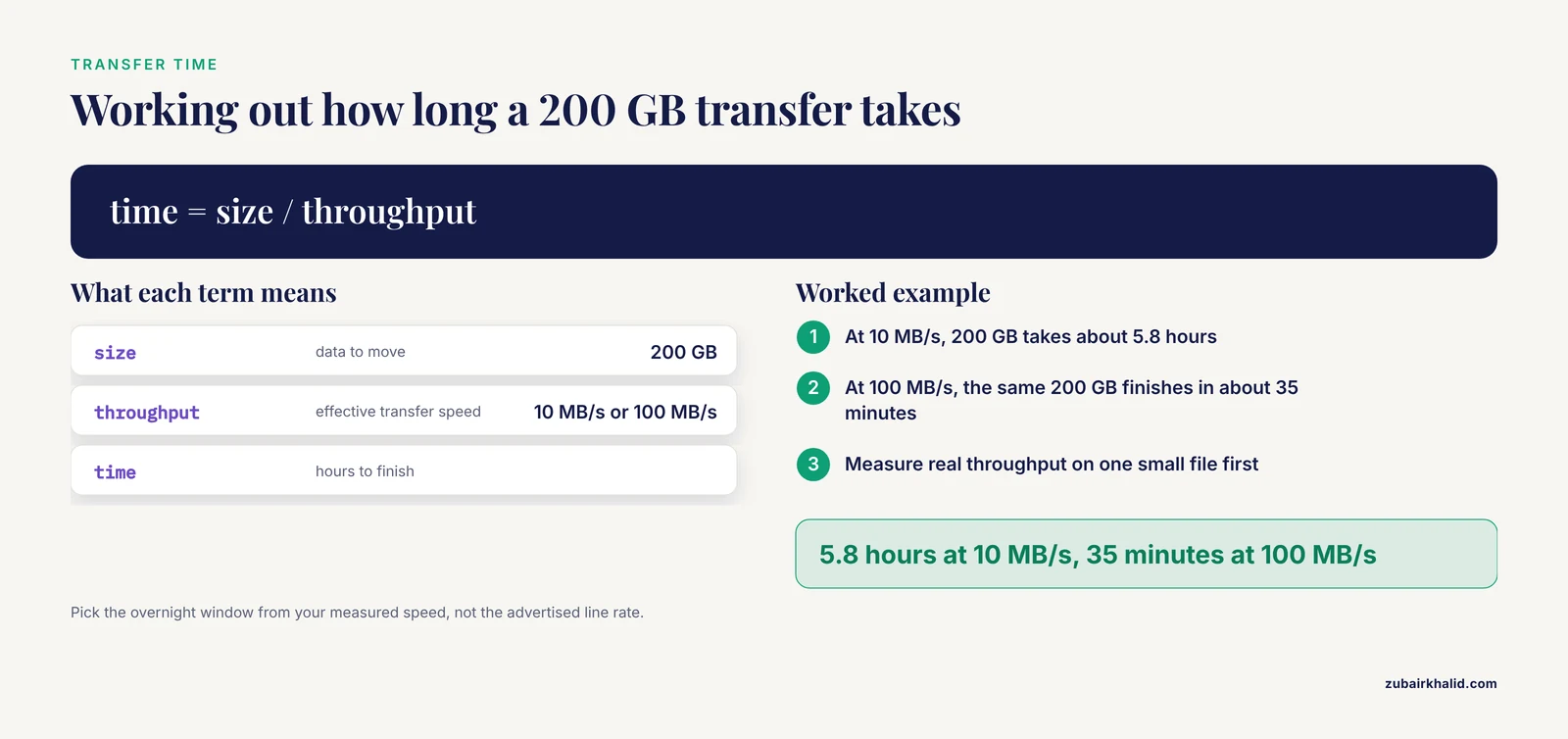
Time equals size divided by effective throughput. At a realistic 10 MB/s home upload speed, 200 GB takes about 5.8 hours, while a 100 MB/s institutional link finishes in about 35 minutes. Measure your actual throughput with one small file before committing to an overnight window.
Where should I put FASTQ files on the cluster once they arrive?
Put active files in your scratch directory, not your home directory, because home quotas are usually too small for sequencing runs. After verification, move datasets you need long term to project or archive storage, since most centers automatically purge scratch after a set period.
Can I transfer FASTQ files directly from the sequencing provider or cloud storage to the cluster?
Yes, when the data lives in cloud storage such as Amazon S3 and the cluster has credentials and outbound access. Pull directly on the cluster with aws s3 cp or a faster alternative such as s5cmd, which skips your workstation as a bottleneck entirely. Provider push services such as Aspera also deliver directly to institutional endpoints.