How to Track Pipeline Parameters with Git
By Dr. Zubair Khalid, DVM, MS, PhD ·

Track pipeline parameters with Git and you will never again guess which mapping quality cutoff produced a figure. This guide walks through the complete workflow. By the end you will be able to put a pipeline under version control, move every tunable setting into one tracked file, stamp every result with the exact commit that produced it, tag the parameter sets behind published analyses, and recover any past parameter set with a single command.
You need Git 2.23 or newer installed, a terminal, and about an hour. A free GitHub account is required for the backup and sharing steps. The worked examples use a small alignment pipeline managed by Snakemake, with notes for Nextflow users, but the approach works for any pipeline written in Python, R, Bash, WDL, or a workflow manager.
Pipeline parameters are the values that change what a pipeline does without changing its code: a minimum mapping quality of 20, a minimum read length of 50 bases, the hg38 reference build, the path to an adapter file, the number of threads. Code changes rarely. Parameters change constantly, and an unrecorded parameter change is the most common reason two runs of the same pipeline produce different results.
Why Pipeline Parameters Drift and Why Git Fixes It
A collaborator reruns your pipeline on the cluster and gets a different number of detected features. The code is identical. What changed is a parameter someone edited in place: a threshold bumped during a late-night session, an adapter file swapped for a corrected version, a reference genome quietly updated. Without a record, the difference is unexplainable, and the analysis loses credibility.
Version control solves this. Version control is a system that records snapshots of your files, where each snapshot is called a commit and carries an author, a timestamp, a message, and a unique identifier. A repository is the folder being tracked together with its full history. Git is the standard version control tool, and GitHub is the most widely used service for hosting Git repositories.
The reproducibility problem is bigger than parameters alone. The FairFlow authors observe that identical code can produce different results depending on which versions of dependencies are installed, and that incomplete documentation of dependencies and versions undermines reproducibility [1]. Parameters multiply the problem because they change far more often than code. A pipeline can be perfectly versioned at the code level and still be unreproducible because the parameter file was edited without a commit.
Clinical bioinformatics shows what disciplined practice looks like. Consensus recommendations developed by 13 clinical bioinformatics units in the Nordic Alliance for Clinical Genomics call for strict version control, standardized file formats, and production standards similar to ISO 15189, the international standard for medical laboratory quality [2]. You do not need a clinical setting to borrow the habit. Git gives you three properties that spreadsheets and lab notebooks do not: attribution, because every change records who made it, reversibility, because any past state can be restored exactly, and portability, because the whole history travels with the repository when you push it to GitHub.
What Counts as a Pipeline Parameter
Anything that alters results when you edit it, without requiring an edit to the code itself, is a parameter. In practice these fall into five groups.
Thresholds and filters. Minimum mapping quality, minimum read length, duplicate handling switches, allele fraction cutoffs, false discovery rate thresholds. Mapping quality is a phred-scaled score, so a cutoff of 20 means alignments with less than a 1 percent estimated chance of being misplaced are dropped.
Input definitions. The sample sheet listing sample identifiers and file paths, the adapter sequences, the target regions. The sample sheet is a parameter file too, because changing it changes what the pipeline processes.
Reference data identities. The genome build, the annotation release, the database versions. The Nordic clinical recommendations name hg38 as the reference build of choice for clinical genomics [2]. The reference FASTA itself is far too large for Git, so track its identity instead of its contents. Compute a checksum and commit it:
md5sum references/hg38/genome.fa > references/hg38/genome.fa.md5
git add references/hg38/genome.fa.md5
Anyone can later confirm they used the identical file by rerunning md5sum and comparing the output.
Tool and environment versions. These behave like parameters because changing them changes results. The MAYA pipeline isolates every rule in its own Conda environment to maintain strict version control across all eighteen tools it runs [3]. Keep your environment file in Git next to the parameter file:
# environment.yaml
name: rnaseq-pipeline
channels:
  - conda-forge
  - bioconda
dependencies:
  - snakemake=7.32.4
  - bwa=0.7.17
  - samtools=1.19.2
Run metadata. Output directories, thread counts, memory limits, container image digests.
The table below sorts common items into what belongs in Git and what does not.
| Item | Track in Git? | How |
|---|---|---|
| Parameter file (config.yaml, params.json) | Yes, every change | Single file at the repository root |
| Sample sheet with IDs and paths | Yes | Small TSV or CSV file |
| Environment and tool versions | Yes, pinned | environment.yaml or a lockfile |
| Reference build identity | Yes, identity only | Checksum and source in a tracked text file |
| Raw FASTQ, BAM, VCF | No | Lab storage, record paths and checksums |
| Credentials and tokens | Never | Secret manager, listed in .gitignore |
The guiding rule is that Git should hold anything a person can read and diff line by line, and nothing that is measured in gigabytes.
Set Up Git Before You Touch a Pipeline
Most git for scientists tutorials start with notebooks and manuscripts. The mechanics are identical for pipeline work, so confirm the installation and set your identity once:
git --version
# git version 2.43.0

git config --global user.name "Alice Lee"
git config --global user.email "[email protected]"
git config --global init.defaultBranch main
The name and email are written into every commit you make, which is what makes attribution possible. The last command names the default branch main instead of the older master. Version 2.23 or newer is needed for the git switch command used later.
If you skip the identity commands, the first commit fails with this message:
Author identity unknown

*** Please tell me who you are.

Run

  git config --global user.email "[email protected]"
  git config --global user.name "Your Name"

to set your account's default identity.
Run the two config commands and commit again. For GitHub, create a free account and add an SSH key, or use the HTTPS login prompt the first time you push.
How to Track Pipeline Parameters with Git, Step by Step
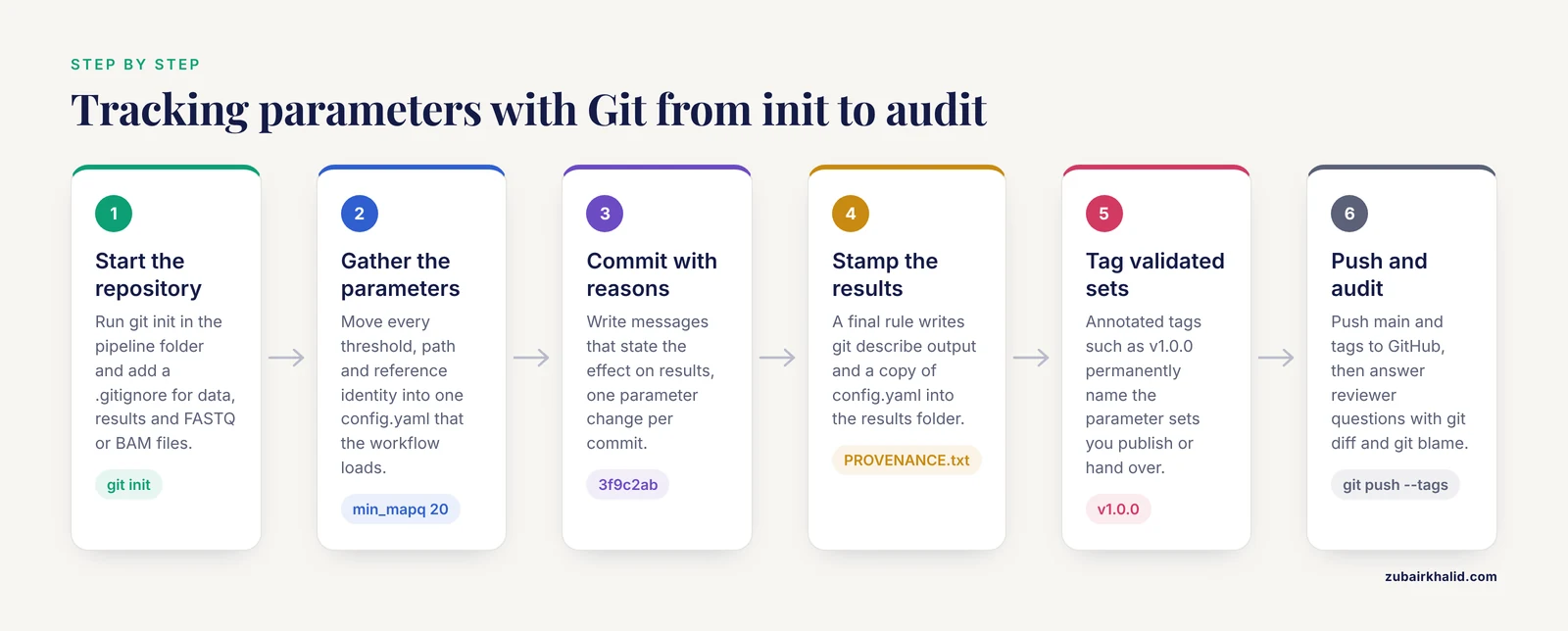
The steps below use a small Snakemake pipeline in a folder called rnaseq-pipeline. Substitute your own pipeline, the commands are identical.
Step 1: Put the Pipeline Folder Under Version Control
cd ~/projects/rnaseq-pipeline
git init
Expected output:
Initialized empty Git repository in /home/alee/projects/rnaseq-pipeline/.git/Git now tracks this folder. If a Git command prints fatal: not a git repository (or any of the parent directories): .git, you are outside the folder you initialized, so change back into it.
Before anything else, tell Git what to ignore, because sequencing data has no place in the history. Create a file named .gitignore:
data/
results/
work/
.snakemake/
.nextflow/
*.fastq.gz
*.bam
*.bai
*.cram
*.vcf.gz
Each line excludes a path or pattern. Run git status to see what Git sees:
git statusOn branch main
No commits yet
Untracked files:
(use "git add <file>..." to include in what will be committed)
config.yaml
config/
scripts/
nothing added to commit but untracked files presentIf FASTQ or BAM files appear in this list, your .gitignore needs another line before you proceed.
Step 2: Consolidate Parameters Into One Tracked File
Scattered parameters are untrackable parameters. Values buried inside scripts change invisibly, and no history can help you. Move them into a single file that Git can watch.
For Snakemake, that file is usually config.yaml, loaded at the top of the Snakefile:
# config.yaml
samples: "config/samples.tsv"
reference_build: "hg38"
reference_fasta: "references/hg38/genome.fa"
gtf: "references/hg38/genes.gtf.gz"
adapters: "assets/adapters.fa"
min_mapq: 20
min_length: 50
dedup: true
threads: 8
# Snakefile
configfile: "config.yaml"Rules then read values from the config dictionary, so each threshold lives in exactly one place:
rule filter_alignments:
    input:
        bam="results/aligned/{sample}.bam"
    output:
        "results/filtered/{sample}.bam"
    params:
        min_mapq=config["min_mapq"]
    shell:
        "samtools view -bq {params.min_mapq} {input.bam} > {output}"
The sample sheet referenced by the config stays small and readable:
sample	fastq_1	fastq_2
S1	data/S1_R1.fastq.gz	data/S1_R2.fastq.gz
S2	data/S2_R1.fastq.gz	data/S2_R2.fastq.gz
For Nextflow, parameters live in nextflow.config or a JSON file passed at launch:
// nextflow.config
params {
    reference_build = 'hg38'
    min_mapq        = 20
    min_length      = 50
    outdir          = 'results'
}
nextflow run main.nf -params-file params.jsonThis is the pattern used across the nf-core collection, where pipelines such as scnanoseq ship a default configuration and expect run-specific values through a parameter file [4]. Documenting parameters this way is standard practice, down to protocol-level guides like the MINI-EX walkthrough, which takes users from input preparation through configuring parameters to interpreting output [5].
Step 3: Commit the Parameter File With Messages That Explain Why
git add .gitignore config.yaml
git commit -m "Add parameter file: hg38 reference, MAPQ 20, 50 bp minimum length"
Expected output:
[main (root-commit) 3f9c2ab] Add parameter file: hg38 reference, MAPQ 20, 50 bp minimum length
 2 files changed, 16 insertions(+)
 create mode 100644 .gitignore
 create mode 100644 config.yaml
Each commit is a permanent snapshot. The identifier 3f9c2ab is the short form of a 40-character SHA-1 hash, a fingerprint Git computes from the snapshot contents, which means identical content always produces the identical identifier.
Write messages that state the effect on results, not just the file touched. Compare "update config" with "Raise min_mapq from 20 to 30 to reduce multimapping in low-input libraries". Six months later the second message answers the reviewer question by itself. A workable habit, and the single most useful of these tips, is one parameter change per commit, so every snapshot differs from its parent in exactly one interpretable way.
Step 4: Stamp Every Result With the Commit That Produced It
A result file without a record of what generated it is only half a result. Provenance is the record of the data, code, parameters, and environment behind an output, and the commit name is the cheapest complete provenance marker you can attach.
Two commands give you that name:
git rev-parse HEAD9f8e7d6c1b2a4e5f6a7b8c9d0e1f2a3b4c5d6e7fgit describe --tags --always --dirtyv1.0.0-1-g9f8e7d6The second form reads as "one commit after the tag v1.0.0, at commit 9f8e7d6". The suffix dirty appears when the working tree has uncommitted changes, a warning you should never ignore before a run.
Automate the stamp with a final rule that writes the commit name and a copy of the parameter file into the results folder:
# provenance.smk
rule provenance:
    output:
        "results/PROVENANCE.txt"
    shell:
        """
        git describe --tags --always --dirty > {output}
        echo "" >> {output}
        git show HEAD:config.yaml >> {output}
        """
Every results folder now carries the exact commit and the exact parameters used. The nf-core framework applies the same principle at larger scale, recording pipeline and software versions alongside outputs so results stay reproducible across runs [4].
Verify the stamp before trusting it. Run git status and confirm nothing is listed as modified. A provenance file ending in dirty means the parameters on disk were not the parameters in history, and the run should be repeated after a commit.
Step 5: Tag the Parameter Sets You Validate or Publish
A tag is a permanent, human-readable name attached to one commit. Unlike a branch, a tag never moves. An annotated tag also stores a message, a date, and the tagger, which makes it the right choice here. Tag every parameter set that passes validation, produces a published figure, or goes to a collaborator:
git tag -a v1.0.0 -m "Pilot cohort parameters, min_mapq 20"
git tagv1.0.0Use a simple version scheme: bump the major number when a change alters results, the minor number when you add parameters, the patch number for comments and formatting. The value of tags shows up in regression testing. A community audit of twelve crosslinking mass spectrometry pipelines used ground-truth designs to measure error control and tracked how pipelines improved between software versions, an approach the authors connect directly to regression testing [6]. You can run the same loop at small scale: keep a tiny test dataset, rerun it whenever parameters change, and tag the parameter set that passes.
Recovering a past parameter set is then one command:
git show v1.0.0:config.yamlsamples: "config/samples.tsv"
reference_build: "hg38"
reference_fasta: "references/hg38/genome.fa"
gtf: "references/hg38/genes.gtf.gz"
adapters: "assets/adapters.fa"
min_mapq: 20
min_length: 50
dedup: true
threads: 8That output is byte for byte what ran the pilot.
Step 6: Use Branches for Parameter Sweeps and Trial Settings
A branch is a movable label for a line of commits. Branches let you test new settings without touching the validated ones:
git switch -c params-stringentOn Git versions older than 2.23, use git checkout -b params-stringent instead. Edit config.yaml, raise min_mapq to 30, and commit:
git commit -am "Raise min_mapq to 30 for stringent comparison"Compare the two settings line by line:
git diff main params-stringentdiff --git a/config.yaml b/config.yaml
index 8a2b1c9..4d5e6f7 100644
--- a/config.yaml
+++ b/config.yaml
@@ -6,7 +6,7 @@
-min_mapq: 20
+min_mapq: 30If the stringent setting wins, merge it back:
git switch main
git merge params-stringent
If it loses, delete the branch with git branch -D params-stringent. Two cautions. First, tags, not branches, are how you preserve parameter sets you trust, because branches keep moving. Second, for a systematic parameter sweep, prefer generating config files from a template in a short script and committing each generated config in its own directory, so every sweep point remains individually reproducible.
Step 7: Push to GitHub and Publish Releases
A repository that exists only on your workstation is one disk failure away from losing its history. GitHub for researchers serves the same role as for software teams: an offsite copy, access control, and a clean interface for collaborators.
git remote add origin [email protected]:your-lab/rnaseq-pipeline.git
git push -u origin main
git push --tags
The remote named origin now points at GitHub, and the history plus tags are copied there. Note that a plain git push does not copy tags, which is why the third command exists.
From this point, parameter changes gain a review layer. Open a pull request, which is a proposal to merge one set of commits into another, and the diff of config.yaml becomes a reviewable, discussable record of exactly what changed. Collaborators comment on the threshold change itself rather than on a rumor of one. A GitHub release bundles a tag with release notes, which is the right place to state what the parameter set was used for, which dataset validated it, and where the results live. Keep unpublished work in a private repository, available at no cost on the basic plan, and control access through the collaborator settings.
Step 8: Audit Parameter History With diff and blame
When a reviewer asks why a threshold is 30, two commands answer with evidence. git diff compares any two states:
git diff v1.0.0 v1.1.0 -- config.yamlThe output shows every line that changed between the two parameter sets, with old values prefixed by a minus sign and new values by a plus sign. git blame shows the last commit that touched each line:
git blame config.yaml3f9c2ab (Alice Lee 2026-01-12 10:41:03 -0500 4) reference_build: "hg38"
9f8e7d6 (Ravi Patel 2026-02-03 15:22:47 -0500 7) min_mapq: 30Combined with the commit message, this establishes who changed the value, when, and why, without a meeting. For deeper questions, git log -p config.yaml prints the full patch history of the parameter file one commit at a time.
Verifying the Whole Setup
Run through this checklist once, then after any major change:
git statusreports a clean working tree before every production run.- Each results folder contains PROVENANCE.txt, and no stamp ends in dirty.
git show v1.0.0:config.yamlmatches the parameter snapshot inside the pilot results folder.- A fresh clone reproduces the tag:
git clone [email protected]:your-lab/rnaseq-pipeline.git /tmp/check, thencd /tmp/check, thengit checkout v1.0.0, thencat config.yaml. - Rerunning the tiny test dataset at the tag produces outputs with matching checksums.
If all five hold, any figure in the project can be traced to a named, restorable state of the parameters.
Git Commands for Parameter Tracking at a Glance
| Command | What it does | When to use it |
|---|---|---|
| git init | Start tracking a folder | Once, when the pipeline is created |
| git status | Show modified and staged files | Before every commit and run |
| git add <file> | Stage a change for the next commit | After each parameter edit |
| git commit -m "message" | Record a snapshot in history | Every parameter change |
| git log, oneline | Print a compact history | Reviewing recent changes |
| git diff v1.0.0 v1.1.0, config.yaml | Compare two parameter sets | Audits and reviewer questions |
| git tag -a v1.0.0 -m "note" | Permanently name a commit | Validated or published parameter sets |
| git describe, tags, always, dirty | Human-readable name for the current commit | Stamping results with provenance |
| git show v1.0.0:config.yaml | Print a past parameter file | Reproducing an old result |
| git switch -c name | Create and enter a branch | Testing trial settings |
| git blame config.yaml | Show the last change per line | Tracing who changed a value |
| git push, tags | Copy tags to GitHub | After tagging |
Next Steps Once the Basics Are in Place
Three upgrades build on this foundation.
First, automate the regression loop. A GitHub Actions workflow can rerun your tiny test dataset on every pull request that touches config.yaml, so a parameter change that breaks the test is caught before merge. The crosslinking mass spectrometry audit showed that version-aware regression testing catches real errors and documents improvement over time [6].
Second, adopt a framework that standardizes the file layout. The nf-core collection, which includes scnanoseq for long-read single-cell RNA-seq, enforces a configuration structure, version reporting, and continuous integration out of the box, delivering portability across computational environments [4]. Moving an in-house pipeline onto that pattern converts the habits in this guide into defaults.
Third, add a management layer as the lab grows. clonevdjseq pairs a Nextflow workflow with a Django-based management system to handle sequencing, archiving, and analysis across thousands of clonal libraries [7]. The principle underneath is the one in this article at larger scale: every analysis must remain traceable to what produced it.
Common Mistakes and Limitations
1. Running analyses with uncommitted parameter changes. The symptom is a git describe output ending in dirty, or a PROVENANCE.txt that disagrees with the history. Results then match no commit and no one can reproduce them. Fix: commit before every run, or park experimental edits with git stash and restore them with git stash pop afterward.
2. Committing data files. A single BAM can outweigh the entire code history by orders of magnitude, and GitHub blocks files larger than 100 MB. Repositories stuffed with FASTQ files become slow, and clones take hours. Fix: keep data paths and checksums in Git, keep data in lab storage, and extend .gitignore the first time git status shows a large file.
3. Committing credentials. API tokens for cloud services and sequencing providers end up in config files. Once pushed, they are exposed to everyone with repository access, and deleting a file in a later commit does not remove it from history. Fix: keep secrets in environment variables or a secret manager, list any file that must hold them in .gitignore, and rotate any token that was ever committed.
4. Confusing the code version with the parameter version. When parameters and code share one repository, a single commit name covers both, which is a strong argument for the same-repo layout. If your lab keeps parameters in a separate repository, one hash is not enough. Fix: record both repository hashes in the provenance file.
5. Changing parameters and tool versions in the same update. If min_mapq changes and samtools is upgraded in the same commit, a result difference cannot be attributed to either. Fix: separate commits and separate tags, changing one thing at a time. This attribution problem is why the MAYA pipeline pins each tool in its own Conda environment, keeping strict version control across all constituent tools [3].
6. Rewriting shared history. git push, force replaces the remote history, and collaborators who built on it end up with conflicts that look like corruption. Fix: treat pushed history as immutable, and if an overwrite is unavoidable, use git push, force-with-lease, which refuses when someone else has pushed in the meantime.
7. Vague commit messages. "Update config" and "fix" carry no information six months later. Fix: state what changed and what effect it should have on results, in one line.
8. Expecting Git to reproduce results on its own. Git records text. It does not record the contents of your conda environment, the container image digest, or the bytes of the reference FASTA. FairFlow addresses the same gap by locking every dependency into a version-locked container, precisely because identical code with different installed versions can produce different results [1]. Fix: pair the commit hash with pinned environment files or container digests, and checksum large reference files as shown above.
Git also has inherent limits. It tracks line changes, so binary formats such as Excel metadata sheets diff poorly, keep metadata in CSV or TSV instead. It records what changed, not the biological reasoning, so the reasoning belongs in the commit message or a linked notebook entry. And the history is only as honest as the discipline behind it: a committed parameter file describes what someone wrote, not necessarily what the cluster executed, which is why the provenance stamp in Step 4 belongs inside the workflow itself rather than in a manual note.
Frequently Asked Questions
Should parameters live in the same Git repository as my pipeline code?
Yes, for most labs. One commit then describes both the code and the settings behind a result, and one hash is all your provenance file needs. Split parameters into their own repository only when several pipelines share one parameter set, and in that case record both repository hashes in every result.
How do I automatically record which commit produced a result?
Add a final workflow step that runs git describe and writes the output, plus a copy of the parameter file, into the results folder. The Snakemake rule in Step 4 does this in a few lines, and nf-core pipelines apply the same idea by recording version information alongside outputs [4].
What is the difference between a tag and a branch for parameter sets?
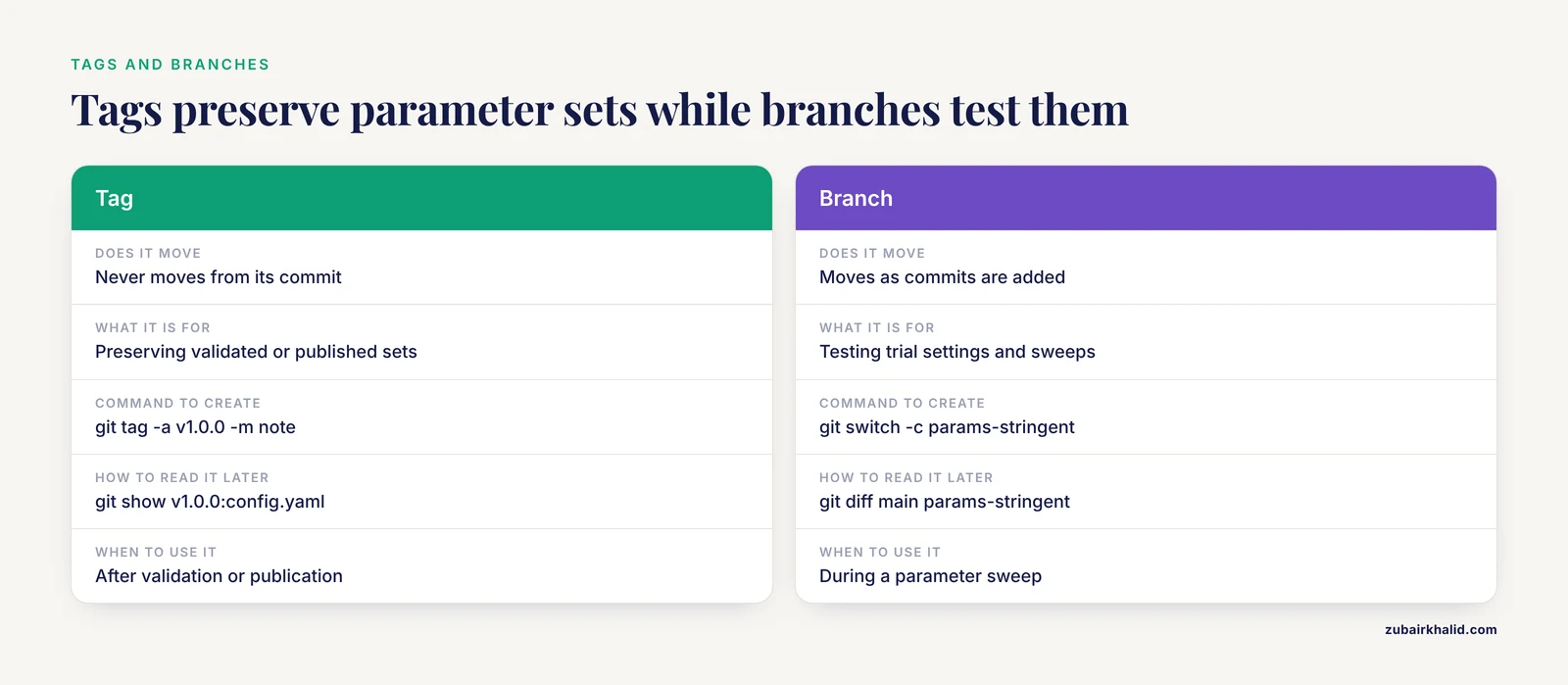
A tag is a permanent name fixed to one commit, while a branch is a movable label for a line of development. Use branches to test trial settings, and tags to preserve the parameter sets you validated, published, or handed to a collaborator.
Can Git track my sample sheet and metadata files too?
Yes. Small TSV and CSV files diff cleanly line by line, so commit the sample sheet together with any parameter change that depends on it. Keep the columns stable and add new columns rather than renaming old ones, so history stays comparable.
How do I recover the exact parameters behind a figure I published last year?
Find the tag or commit recorded in that figure's PROVENANCE.txt, then run git show with the tag and the file path to print the parameter file exactly as it was. If nothing was stamped, the commit history and git blame on the parameter file are the fallback.
If my pipeline runs in containers, do I still need to track parameters with Git?
Yes. Containers fix tool versions, Git fixes settings, and the two solve different halves of reproducibility. A container image with the wrong parameters reproduces the wrong analysis perfectly, so record the container digest in Git and the commit hash in the results.
How do I keep large FASTQ and BAM files out of the repository?
List the patterns in .gitignore before the first commit, store the data in lab storage or an archive, and commit a small text file with paths and checksums instead. For files that must travel with the repository, Git LFS replaces them with pointers while keeping them accessible.
Is GitHub safe for unpublished research pipelines?
Yes, with private repositories, which are available at no cost on the basic plan and let you control exactly who can see or clone the code. Review the repository for secrets and sensitive metadata before any push, and check your institution's policies for anything involving human genomic identifiers.
Sources
- FairFlow: A transparency-first framework for verifiable and reproducible bioinformatics.
- Recommendations for bioinformatics in clinical practice.
- Deep Genomic Characterization of Bacillus subtilis SNUY1 & 168 Using MAYA (Multistage Analysis of Prokaryotic Annotations): An Integrated Snakemake-Based Bioinformatics Pipeline.
- scnanoseq: an nf-core pipeline for Oxford Nanopore single-cell RNA-sequencing.
- MINI-EX Version 2: Cell-Type-Specific Gene Regulatory Network Inference Using an Integrative Single-Cell Transcriptomics Approach.
- A community audit of error control in crosslinking mass spectrometry.
- clonevdjseq: A workflow and bioinformatics management system for sequencing, archiving, and analysis of VDJ sequences from clonal libraries.