Automated Testing for Bioinformatics Pipelines
By Dr. Zubair Khalid, DVM, MS, PhD ·

By the end of this guide you will be able to build a layered automated test suite for a bioinformatics pipeline, run it locally with pytest and nf-test, wire it into a CI platform such as GitHub Actions, and execute those same tests on an HPC cluster without administrator help. You will also know how the choice of bioinformatics workflow manager, Nextflow versus Snakemake, changes how you write and run those tests.
You need the following installed or on hand before you start:
- Git, with your pipeline in a repository on GitHub or GitLab
- Nextflow (requires Java 17 or later) or Snakemake (requires Python 3.9 or later)
- A container runtime such as Docker or Singularity/Apptainer
- Python 3 with pytest installed
- nf-test, the test framework for Nextflow pipelines
- A small test dataset, ideally a few megabytes of FASTQ or FASTA files that you own
- For the HPC section, an account on a Slurm or PBS cluster
Everything in this guide uses free, open-source tools. The worked example is a two-process pipeline that computes GC content from a FASTQ file, because it is small enough to test in seconds yet exercises the same failure modes as a full WGS workflow: bad inputs, wrong outputs, version drift, and silent numeric errors.
Why Automated Testing Matters in Bioinformatics
A bioinformatics pipeline is software that happens to move biology data. Like any software, it breaks in quiet ways: a dependency updates and changes an alignment coordinate system, a renamed column breaks a downstream parser, a flag is deprecated and the tool silently changes behavior. Manual testing, where you rerun the pipeline by hand before each release, catches almost none of this reliably because humans test the happy path and forget edge cases.
Continuous Integration, usually shortened to CI, is the software engineering practice of running an automated test suite every time someone changes the code. The reproducibility crisis in bioinformatics and computational biology can be mitigated by using CI to automate the testing of analysis pipelines and models, yet adoption has been limited because existing solutions were often tied to a specific CI platform, a specific HPC job scheduler, or required actions from cluster administrators [1]. Tools that remove those barriers make automated testing practical for ordinary research groups, not just large centers.
There is also a domain-specific reason. Clinical and diagnostic pipelines must demonstrate that they produce correct, reproducible results. Recent clinical pipelines illustrate the pattern. paRDal, a containerized and modular framework that integrates matched germline DNA and RNA sequencing for hereditary cancer diagnostics, depends on modular components and containerization precisely so that each part can be validated and updated independently [2]. NanoPATH, an automated Oxford Nanopore 16S analysis pipeline built for non-specialist staff, was evaluated against standard-of-care testing with explicit agreement metrics before clinical deployment [3]. Both designs rest on the same foundation: you can only trust a pipeline you can test, and you can only test a pipeline whose components and environment are pinned.
What You Need to Understand First
Automated testing for bioinformatics pipelines rests on three ideas.
Determinism. Given the same inputs, same tool versions, same parameters, and same reference data, the pipeline must produce the same outputs. Anything that breaks this assumption, such as an unpinned conda environment or a floating latest container tag, makes every other test unreliable.
Pinned environment. Every tool version, every database version, and every container image must be recorded and frozen. A test that passes today with tool version 1.2.0 must still pass next year with the same 1.2.0, not with whatever the mirror serves that morning.
Test data you understand. A test only works if you know the correct answer. Ten reads where you have hand-computed the expected GC content are worth more than a gigabyte of data where you merely hope the output looks reasonable.
The Four Levels of Pipeline Testing
Testing bioinformatics pipelines works best as a pyramid. Cheap tests run constantly, expensive tests run rarely. Each level answers a different question.
| Level | Question it answers | Typical tool | Typical runtime | Example check |
|---|---|---|---|---|
| Unit | Is this one function correct? | pytest, testthat | Milliseconds | GC content of ATGC is 0.5 |
| Process (smoke) | Does each process run on tiny input? | nf-test, Snakemake test data | Seconds to minutes | FASTQC produces an HTML report |
| Integration | Do the processes chain correctly? | Nextflow/Snakemake with -profile test | Minutes | BAM is sorted, counts file has 8 columns |
| Regression/validation | Do results match a known gold standard? | md5sum, MultiQC, bespoke scripts | Minutes to hours | Known variant detected in a control sample |
A fourth, domain-specific level matters for clinical or diagnostic pipelines. Validation against a reference standard, quantified with metrics such as positive percent agreement, is how the NanoPATH 16S workflow was assessed against outsourced standard-of-care testing before deployment [3]. Research pipelines rarely need that formality, but the habit of comparing output against a curated truth set applies everywhere.
Nextflow vs Snakemake: How the Workflow Manager Shapes Your Tests
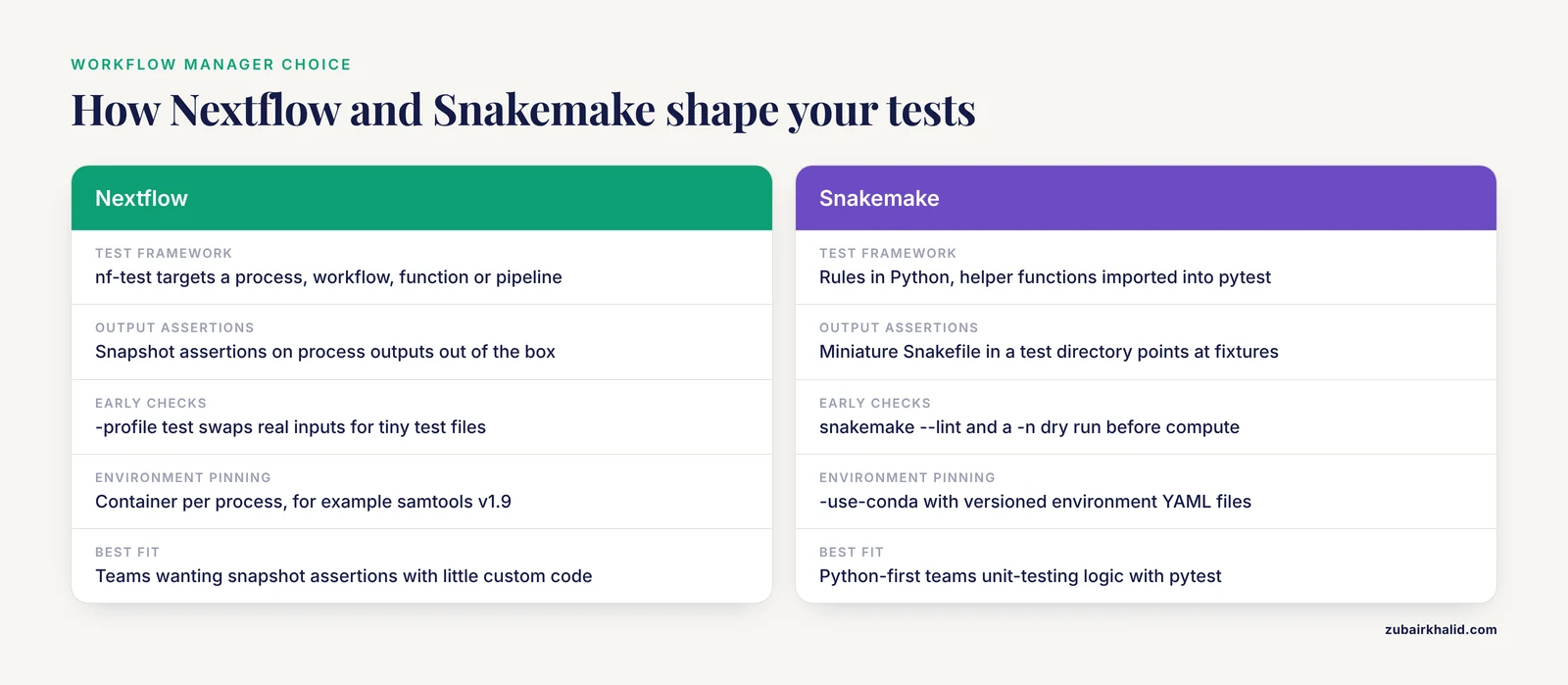
Nextflow and Snakemake are the two most widely used workflow managers in bioinformatics, and the choice affects testing more than most people expect. Neither is universally better. The honest comparison for a test-focused reader:
Nextflow executes each process in its own task directory with a hash-based work directory, which makes output assertions straightforward: a test can check that a specific output file exists, has the expected content, or matches a stored snapshot. The nf-test framework is built for exactly this and can target a single process, a workflow, a function, or a whole pipeline. Nextflow also ships with configuration profiles, so a -profile test block can switch real inputs for tiny test files and Docker for conda without touching the pipeline code.
Snakemake expresses the workflow as a directed acyclic graph of rules in Python. Testing benefits from that Python foundation: you can import helper functions directly into pytest, and snakemake, lint catches structural problems before execution. Snakemake supports -use-conda for environment pinning and runs a dependency solve before executing, which itself acts as an early integration test. Testing individual rules is usually done by building a miniature Snakefile in a test directory that points the real rules at tiny fixture files.
The practical differences for testing. If your team wants snapshot-based assertions on process outputs with minimal custom code, Nextflow plus nf-test gives you that out of the box. If your team is Python-first and wants to unit-test transformation logic with ordinary pytest, Snakemake integrates more naturally with a Python test stack. Both run on Slurm, PBS, LSF, cloud, and laptops, so the scheduler is rarely the deciding factor. The deciding factor is usually which language your team already speaks, because the pipeline language you avoid writing tests in is the one that goes untested.
This guide shows commands for both. The core concepts, pinning, fixtures, assertions, CI, transfer directly.
Testing Bioinformatics Pipelines Step by Step
This walkthrough builds a test suite from the inside out. Follow the steps in order for a new pipeline, or apply them one at a time to an existing one.
Step 1: Put the pipeline under version control with a tiny test dataset
Create a project structure like this:
gc-pipeline/
├── main.nf              (or Snakefile)
├── nextflow.config      (or config.yaml)
├── bin/
│   └── gc_content.py
├── test_data/
│   └── sample.fq
├── tests/
│   ├── test_gc_content.py
│   └── main.nf.test
└── .github/
    └── workflows/
        └── pipeline-tests.yml
Commit test_data/sample.fq to the repository. A good test FASTQ is 20 to 100 synthetic reads you generated on purpose. Do not commit patient data, and do not download a 20 GB test dataset in CI. One worked fixture file for this guide:
@read1
ATGCATGCATGC
+
IIIIIIIIIIII
@read2
GGGGCCCCGGGG
+
IIIIIIIIIIII
Read 1 has GC content 0.5, read 2 has GC content 1.0. Those hand-computed values become your expected outputs in every later test.
Step 2: Write unit tests for your scripts with pytest
Unit tests check a single function in isolation, without running the pipeline. Put a GC-content helper in bin/gc_content.py:
def gc_content(seq: str) -> float:
    seq = seq.upper().strip()
    if not seq:
        raise ValueError("empty sequence")
    gc = sum(1 for base in seq if base in ("G", "C"))
    return gc / len(seq)
Then write tests/test_gc_content.py:
import pytest
from gc_content import gc_content

def test_half_gc():
    assert abs(gc_content("ATGC") - 0.5) < 1e-9

def test_all_gc():
    assert abs(gc_content("GGCC") - 1.0) < 1e-9

def test_zero_gc():
    assert abs(gc_content("AAAA") - 0.0) < 1e-9

def test_lowercase_input():
    assert abs(gc_content("atgc") - 0.5) < 1e-9

def test_empty_sequence_raises():
    with pytest.raises(ValueError):
        gc_content("")
Run the suite:
cd gc-pipeline
pip install pytest
pytest tests/ -v
Expected output:
tests/test_gc_content.py::test_half_gc PASSED
tests/test_gc_content.py::test_all_gc PASSED
tests/test_gc_content.py::test_zero_gc PASSED
tests/test_gc_content.py::test_lowercase_input PASSED
tests/test_gc_content.py::test_empty_sequence_raises PASSED
5 passed in 0.03s
Each assert is a precise, hand-computed expectation, not a guess. The empty-sequence case is what unit testing is for: it will never appear in your demo data, and it will absolutely appear in production when a file is truncated.
Common error at this step:
ModuleNotFoundError: No module named 'gc_content'Fix by adding the scripts directory to the path in the test file, or by installing your package in editable mode:
import sys, os
sys.path.insert(0, os.path.join(os.path.dirname(__file__), "..", "bin"))
Step 3: Smoke-test the whole pipeline with a profile
A smoke test answers one question: does the pipeline start, run end to end, and produce its declared outputs on a trivial input? Nextflow handles this with configuration profiles. Add to nextflow.config:
profiles {
    test {
        params.read_input = "${projectDir}/test_data/sample.fq"
        process.errorStrategy = 'terminate'
    }
}
Run it:
nextflow run main.nf -profile test,dockerExpected final output:
Executor >  local (2)
[45/8c1f2a] GC_COUNT   | 1/1
[2b/9d3e7f] GC_REPORT   | 1/1
Completed at: ...
Duration    : 12s
Snakemake does the same with a test config file and a dry run first:
snakemake --lint
snakemake -n --use-conda --configfile config/test.yaml
snakemake --use-conda --cores 1 --configfile config/test.yaml
The -lint subcommand is your first automated test for free. It reports undefined input files, ambiguous wildcards, and shell quoting problems without running anything. The -n dry run resolves the full directed acyclic graph and prints the jobs it would run, which catches missing-input errors before any compute is spent.
The most common Snakemake failure and its exact message:
MissingInputException in line 12 of /path/Snakefile.
Missing input files for rule gc_count:
sample.fq
This means the resolved path did not exist. Fix the path or the config, then rerun -n before the full run.
The most common Nextflow failure:
Process `GC_COUNT` terminated with an error exit status (1)Diagnose with nextflow log and the saved task directory it prints, then read the .command.err file inside. Nine times out of ten this is a pinned container that lacks a tool, or a file path that does not exist inside the container.
Step 4: Add nf-test assertions to individual processes
Smoke tests tell you the pipeline finished. They do not tell you the output is right. nf-test adds assertions. Install it, initialize, and generate a test template:
curl -fsSL https://code.askimed.com/install/nf-test | bash
nf-test init
nf-test generate process main.nf
Edit the generated tests/main.nf.test:
nextflow_process {

    name "Test process GC_COUNT"
    script "main.nf"
    process "GC_COUNT"

    test {
        when {
            params {
                read_input = "${projectDir}/test_data/sample.fq"
            }
        }
        then {
            assert workflow.success
            assert path(process.out.report, checkIfExists: true)
        }
    }
}
Run it:
nf-test test tests/main.nf.testExpected output:
🚀 nf-test is running...
[FC_COUNT] Process Test process GC_COUNT | PASSED
Test Process Test process GC_COUNT: PASSED (7.2s)
The when block sets the test parameters, the then block holds assertions. workflow.success fails the test if the process exits nonzero. For content-level checks, compare against a committed snapshot:
then {
    assert workflow.success
    assert snapshot(process.out.report).match()
}
On the first run nf-test writes the snapshot. Review it by hand, confirm it is correct, commit it. From then on any change in output content fails the test. That is regression testing in one line.
Step 5: Pin the environment so tests mean anything
An unpinned environment makes test results meaningless, because the thing being tested changes under you. Pin three layers:
- Containers per process. In Nextflow, set
container 'biocontainers/samtools:v1.9-4-deb_cv1'inside each process. In Snakemake, declarecontainer:per rule or use-use-condawith versioned environment YAML files such asenvs/samtools.yamlcontainingsamtools=1.19.2. - Reference data versions. Record the genome build, transcriptome release, and database dates in your config and echo them into a
versions.ymloutput. - Conda and pip freezes for scripts. Commit an
environment.ymlorrequirements.txtwith exact versions, and have CI install from it rather than from the internet's current defaults.
A quick verification command you can put in any test:
samtools --version | head -n 1Expected output, when pinned correctly:
samtools 1.19.2If that line ever changes between runs of your test suite, the test fails, and it has just caught real version drift rather than a code bug. Many production pipelines write exactly this check into a versions file that ships with results.
Step 6: Run the suite automatically on every change with GitHub Actions
Create .github/workflows/pipeline-tests.yml:
name: pipeline-tests
on: [push, pull_request]

jobs:
  test:
    runs-on: ubuntu-latest
    steps:
      - uses: actions/checkout@v4

      - name: Install Java for Nextflow
        uses: actions/setup-java@v4
        with:
          distribution: temurin
          java-version: "17"

      - name: [Install Nextflow](/knowledge/bioinformatics/install-nextflow)
        run: curl -fsSL https://get.nextflow.io | bash

      - name: Pipeline smoke test
        run: ./nextflow run main.nf -profile test,docker

      - name: Process assertions
        run: |
          curl -L https://github.com/askimed/nf-test/releases/latest/download/nf-test.tar.gz | tar xz
          ./nf-test test tests/

      - name: Python unit tests
        run: |
          pip install pytest
          pytest tests/ -v
Now every push runs the full unit suite, a containerized smoke test, and the nf-test assertions. If any step exits nonzero, the job stops, later steps do not run, and the commit is marked red. This is the CI guarantee in action: a broken pipeline never silently merges.
The most common CI error and fix:
docker: permission denied while trying to connect to the Docker daemon socketOn GitHub-hosted runners Docker is preinstalled, so this error usually means you ran a custom runner or wrote a step before checkout. On self-hosted runners, add the user to the docker group or switch the profile from docker to singularity, where available.
A second common failure:
No tests found for main.nfnf-test prints this when the script and process names in the .nf.test file do not match the real file and process names. Check spelling and case exactly.
Step 7: Run the same tests on an HPC cluster from CI
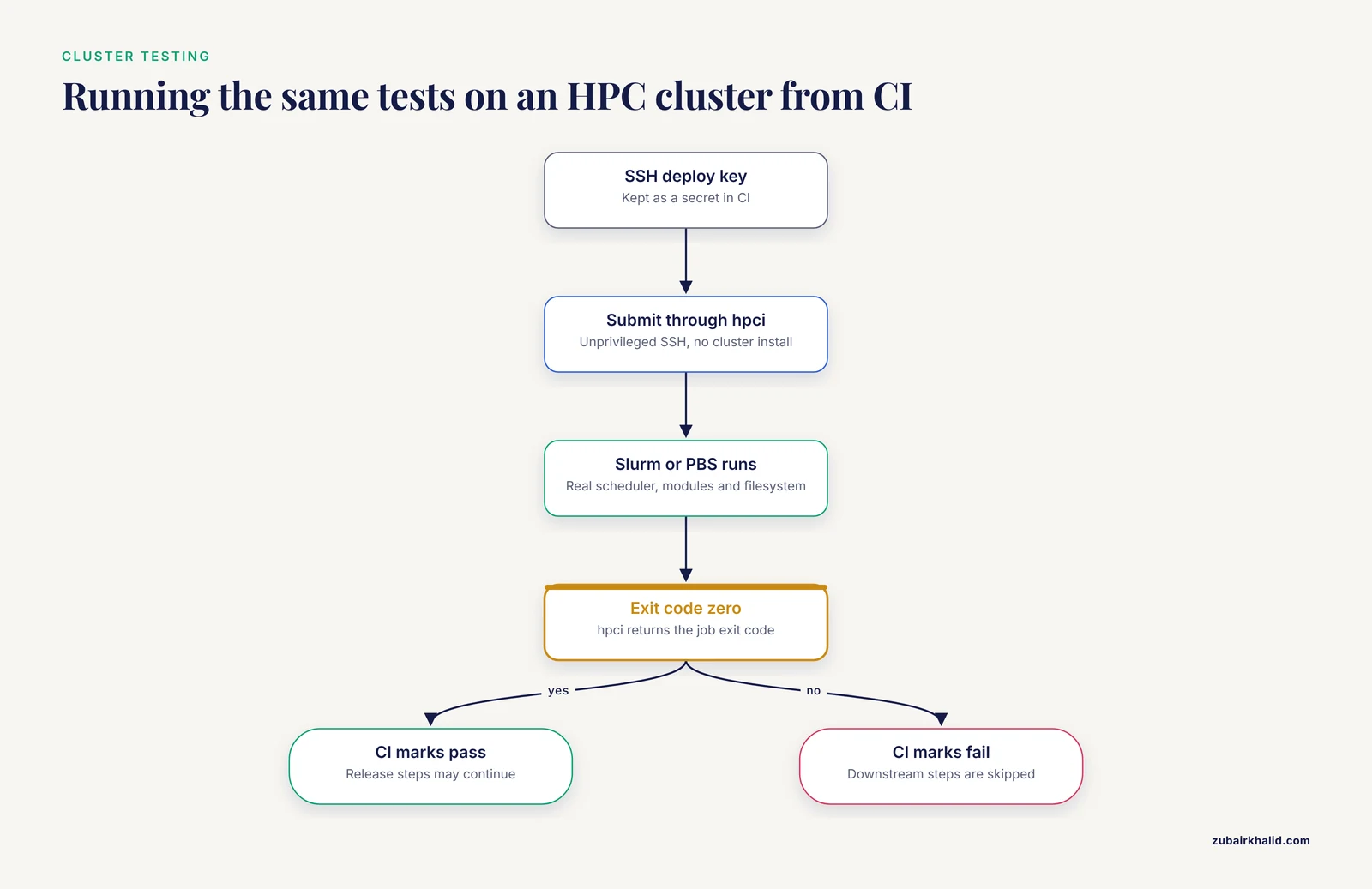
CI runners are small virtual machines. Your real production environment is a cluster with Slurm or PBS, different container runtime, and a shared filesystem. A test suite that only ever runs on the CI runner proves your logic, not your production environment.
hpci closes that gap. It is a platform-agnostic, open-source utility that connects CI platforms such as GitHub Actions and GitLab CI with common HPC job schedulers including Slurm and PBS. It operates as a standard unprivileged user over SSH, requires no cluster-side installation or administrator involvement, and terminates on the CI runner with the exact exit code the HPC job produced, so downstream CI steps are skipped if the cluster test fails [1]. Its authors demonstrated it across five diverse computational biology workflows on HPC, showing that automated testing and continuous analysis can verify reproducibility in real production environments [1]. The tool is written in Haskell, is licensed GPL-3.0, and is available from the Garvan Data Science Platform repository at https://github.com/Garvan-Data-Science-Platform/hpci, with source archived on Zenodo [1].
The pattern, regardless of the exact flags you configure:
- Store an SSH deploy key as a secret in your CI platform so it can log into the cluster as you.
- In the CI workflow, submit the test pipeline to the cluster scheduler through hpci.
- hpci waits for the Slurm or PBS job, streams the outcome back, and exits with the job's own exit code.
- If the exit code is nonzero, CI marks the run failed and no release step executes.
This gives you a test that exercises your actual scheduler, your actual module versions, and your actual filesystem, on every commit, with no help from a systems administrator [1].
Step 8: Regression-test against a gold-standard result
The final layer compares current output against output you have verified by hand. The mechanism is simple:
nextflow run main.nf -profile test,docker -resume --outdir results_v2
md5sum results_v2/gc_report.txt results_gold/gc_report.txt
Expected output for an identical pipeline run:
d41d8cd98f00b204e9800998ecf8427e  results_v2/gc_report.txt
d41d8cd98f00b204e9800998ecf8427e  results_gold/gc_report.txt
Matching checksums pass. A mismatch fails the test and forces a human decision: the change was either intended, in which case you regenerate and re-review the gold standard, or unintended, in which case you have caught a real regression before any user saw it. For outputs where checksums are unstable, such as reports with timestamps, compare the data columns with a small pytest script instead:
def test_report_columns_match_gold():
    new = read_tsv("results_v2/gc_report.txt")
    gold = read_tsv("results_gold/gc_report.txt")
    assert new["read_id"].tolist() == gold["read_id"].tolist()
    for n, g in zip(new["gc"], gold["gc"]):
        assert abs(float(n) - float(g)) < 1e-6
For clinical-grade pipelines, the same idea scales up to formal agreement studies. The NanoPATH 16S workflow quantified performance with positive percent agreement against outsourced standard-of-care testing, expanded diagnostic yield in culture-negative samples, and tracked turnaround time and workflow integration as operational endpoints [3]. You do not need those sample sizes for a research pipeline, but you should be able to state, in one sentence, what your gold standard is and how closely the current output matches it.
How paRDal connects to this step is architectural rather than numeric. Its containerized, modular design, with independent components for alignment, splicing and expression outlier detection, allele-specific expression, and annotation, is what makes component-level testing and independent validation feasible at all, and it demonstrated standardized RNA-based evidence integration across 204 individuals tested for hereditary cancer predisposition [2]. Modularity is a testing strategy, not just an engineering preference.
Testing Bioinformatics Pipelines Tips
These are the habits that separate a test suite people trust from one people ignore.
- Start with the cheapest test you can run in under a minute. A single-process nf-test on a 20-read FASTQ catches more bugs per minute of effort than any full-cohort rerun.
- Hand-compute at least one expected value per test. An assertion that merely checks a file exists will pass on a file full of garbage. Know the answer, then assert it.
- Make test failures readable. A test that fails with
expected 0.5, got 0.483gets fixed. A test that fails withassert Falsegets deleted. Include actual values in assertion messages. - Test failure behavior on purpose. Feed an empty FASTQ and a malformed file into the pipeline and assert that it stops with a clear message instead of producing a plausible-looking wrong result. Silent wrong output is the worst outcome a pipeline can have.
- Keep the test dataset in the repository and tiny. Under about 10 MB keeps clones fast and CI cheap. Generate synthetic reads with a fixed random seed so fixtures never change unexpectedly.
- Run version checks as tests. Assert on the output of tool
-versioncalls. Version drift is the most common source of irreproducibility and the easiest to catch mechanically. - Let CI run the suite on every pull request, and a full regression suite nightly. Fast tests on every commit, deep tests on a schedule.
- Treat a red build as a stop sign. A CI suite that people routinely ignore when it fails is worse than no suite, because it manufactures false confidence.
Common Mistakes and Limitations
These are the errors that most often undermine automated testing in real bioinformatics groups.
Testing only the happy path. Teams write tests for clean input and never for truncated files, empty fastq entries, wrong genome builds, or a FASTA with Windows line endings. Most production failures come from messy input, not clean input. Add deliberately broken fixtures.
Using production or patient data in tests. Beyond the privacy problem, large real datasets make tests slow, and slow tests stop being run. Synthetic fixtures with known answers are both safer and better tests. Any clinical data handling also carries governance obligations that synthetic data avoids entirely.
Unpinned dependencies. If CI installs the newest samtools each run, a passing test tells you nothing about tomorrow. Pin container tags, conda versions, and database releases. A latest tag in a pipeline intended for reproducible results is a bug.
Snapshot everything mentality. Snapshotting a MultiQC report full of timestamps makes every run fail for cosmetic reasons. Snapshot or assert only the fields that carry meaning, and exclude volatile metadata.
Confusing a completed run with a validated result. Exit code 0 means the software ran. It says nothing about biological correctness. That distinction is exactly why diagnostic pipelines are evaluated with explicit agreement metrics against a reference standard rather than declared working after a successful execution [3].
Ignoring nondeterminism. Some tools are stochastic by design. If output varies run to run, compare distributions or tolerant numeric ranges rather than exact bytes, and seed every random number generator you control.
Writing tests after the pipeline is finished. Tests written last tend to encode whatever the pipeline currently does, including its bugs. Write the first test as soon as the first process exists, and add a test with every bug fix so the bug can never return unnoticed.
Assuming the CI runner equals the production environment. Runner architectures, container runtimes, schedulers, and filesystems differ. Running the suite on the actual cluster through a tool like hpci is what verifies the production path, and it requires no cluster-side installation or administrator action [1].
One honest limitation of the practice itself. Automated tests verify what you thought to check. They cannot detect a systematically wrong assumption shared by the pipeline and the test, such as using the wrong transcript reference for splice interpretation. Independent review, gold standards, and for diagnostic contexts formal validation against reference methods remain necessary alongside any test suite [2], [3].
Frequently Asked Questions
Do I need automated tests if my pipeline already produces correct results?
Yes, because correctness today does not protect you from a dependency update, a collaborator's change, or your own edit next month. Tests freeze known-correct behavior so any deviation is detected within minutes of the change that caused it.
What is the difference between a smoke test and a regression test?
A smoke test checks that the pipeline runs end to end on a tiny input and produces its declared outputs. A regression test compares current output against a previously verified gold standard to detect any change in results. Smoke tests catch crashes, regression tests catch silent wrong answers.
Nextflow vs Snakemake, which one is easier to test?
Nextflow has nf-test, which provides built-in process-level assertions and snapshots, and profile-based test configurations. Snakemake's Python foundation lets you unit-test logic with pytest directly and lint the workflow with snakemake, lint. Both are fully testable, so choose based on your team's language preference and existing stack.
How much test data do I need?
A few synthetic files, usually well under 10 MB, that exercise every process and every branch of your pipeline. The data must be small enough that the full suite runs in minutes, and it must come with hand-computed expected values.
Can I run CI tests on an HPC cluster without bothering my administrators?
Yes. Tools like hpci connect GitHub Actions or GitLab CI to Slurm or PBS over SSH as a regular unprivileged user, need no cluster-side installation, and propagate the HPC job's exit code back to the CI run so failures block downstream steps [1].
How do I test a pipeline whose output is not deterministic?
Seed every random number generator the pipeline controls, and for tools that remain stochastic, assert on tolerant numeric ranges or distribution-level summaries instead of exact file checksums. Also assert on structural invariants such as row counts and column names, which should be stable regardless of randomness.
How often should automated tests run?
Unit and smoke tests should run on every push and pull request through CI. Regression and gold-standard comparisons can run nightly or on every release, and any suite touching the production cluster can run on a schedule or before each deployment.
What is the minimum viable test suite for a small lab pipeline?
Three pieces: a pytest file for your core scripts, one smoke test that runs the whole pipeline on a tiny pinned dataset with pinned containers, and one checksum or column-level comparison against a gold-standard output. Wire those into CI on every push and you have caught the majority of realistic regressions.
Sources
- hpci improves reproducibility of computational biology research by integrating Continuous Integration with High Performance Computing clusters.
- paRDal: bioinformatics framework for a parallel RNA and DNA NGS analysis in hereditary cancer diagnostics.
- Clinical accuracy and operational evaluation of a novel nanopore-based 16S sequencing workflow for diagnostic pathogen detection.