SSH for Biologists: How to Securely Connect to a Remote Server
By Dr. Zubair Khalid, DVM, MS, PhD ·

SSH (Secure Shell) is a network protocol that lets you open an encrypted, text-based session on a remote computer and run commands on it as if you were sitting at its keyboard. For biologists, SSH is the standard way to log into the Linux servers and computing clusters where sequencing data, genomes, and analysis pipelines actually live.
Nearly all serious computational biology happens away from your laptop. A single-cell RNA-seq experiment can generate matrices with hundreds of thousands of cells, and published analyses of this kind of data rely on dedicated computational infrastructure to process it [1]. Proteomic and structural work is no lighter, as studies screening hundreds of candidate molecules by molecular docking require substantial CPU time that a laptop cannot supply [2]. Even platform-based drug resistance analyses and large proteomic detection experiments depend on serious compute behind the scenes [3] [4]. SSH is the doorway to all of that computing power. This article explains what SSH is, how it works, and how to use it safely, with commands you can type today.
What Is SSH for Bioinformatics?
SSH for bioinformatics is the practice of using the Secure Shell protocol to reach a remote Linux machine, transfer data to and from it, and run analyses on it. When someone says "ssh for bioinformatics explained simply," the shortest honest answer is this: SSH gives you a terminal window on someone else's powerful computer, over an encrypted connection.
The protocol has three jobs:
- Authentication. It proves to the server that you are who you claim to be, using a password or a cryptographic key pair.
- Encryption. It scrambles everything you type and everything the server sends back, so passwords, data, and commands cannot be read by anyone listening on the network.
- Integrity. It guarantees that the commands and files you send arrive unaltered.
You use SSH through a client program. On macOS and Linux the client is called ssh and is already installed. On Windows 10 and 11, OpenSSH is built in and available in PowerShell and Windows Terminal. Graphical clients such as PuTTY also work, but the built-in terminal client is what most bioinformaticians use.
One acronym, two very different meanings
Biologists meet the letters SSH in two unrelated contexts, and the collision confuses students every year. In plant genomics literature, SSH can stand for suppression subtractive hybridization, a PCR-based technique used to enrich for transcripts present in one sample but absent from another, and it appears alongside QTL mapping, GWAS, and RAPD in reviews of genomic approaches to plant stress research [5]. In this article, SSH always means Secure Shell, the remote-login protocol. If a paper about arsenic tolerance in plants mentions SSH among genomic techniques, that is the hybridization method [5]. If a systems administrator asks whether you have SSH access, that is Secure Shell.
| Term | What it is | What it does | Where you meet it |
|---|---|---|---|
| SSH (Secure Shell) | Encrypted remote-login protocol | Gives you a terminal on a remote server | Everyday bioinformatics work on clusters |
| Suppression subtractive hybridization | A PCR-based transcript comparison technique | Enriches for differentially expressed transcripts | Genomics literature, especially older plant studies [5] |
| SFTP | SSH File Transfer Protocol | Moves files over the same encrypted SSH connection | Uploading FASTQ files |
| SCP | Secure Copy Protocol | Simple file copying over SSH | Quick one-file transfers |
| FTP | File Transfer Protocol | Older, unencrypted file transfer | Avoid it for sensitive data |
| VNC | Virtual Network Computing | Shows you a remote graphical desktop, not a terminal | RStudio Server alternatives, GUI tools |
| VPN | Virtual Private Network | Places your computer inside a private network | Required by some universities before SSH works |
The row that trips people up most is the second one. When you search for "what is ssh for bioinformatics," search engines sometimes return hybridization protocols. Skim the abstract before you download the PDF.
Why Biologists Cannot Avoid Remote Servers
Consider the kinds of analyses that fill modern journals. A study of salt-sensitive hypertension combined single-cell RNA sequencing of mouse and human aorta with pathway analysis to pinpoint a transcriptional regulator in endothelial cells [1]. A Rickettsia study performed pan-proteomic comparisons across four bacterial strains, then docked 607 candidate metabolites against a selected drug target and validated hits with additional scoring tools [2]. An endoxifen resistance study generated gene signatures, ran pathway enrichment, and performed correlation analysis across resistant and sensitive breast cancer cell lines [3]. A proteomics methods paper detected protein polysulfidation across a cellular proteome with a novel biotinylated tag [4]. A plant science review summarized how genomics, transcriptomics, proteomics, and metabolomics combine to characterize arsenic stress responses [5].
What do these have in common? Each required running software on data too large for a laptop: aligners, quantifiers, docking engines, statistical packages, and visualization tools, usually on a Linux system. The outputs you read in a paper are produced on servers, and servers are reached through SSH. Learning SSH is therefore not an optional bonus skill. It is the entry point to nearly every bioinformatics workflow more demanding than a web tool.
How SSH Works, Step by Step
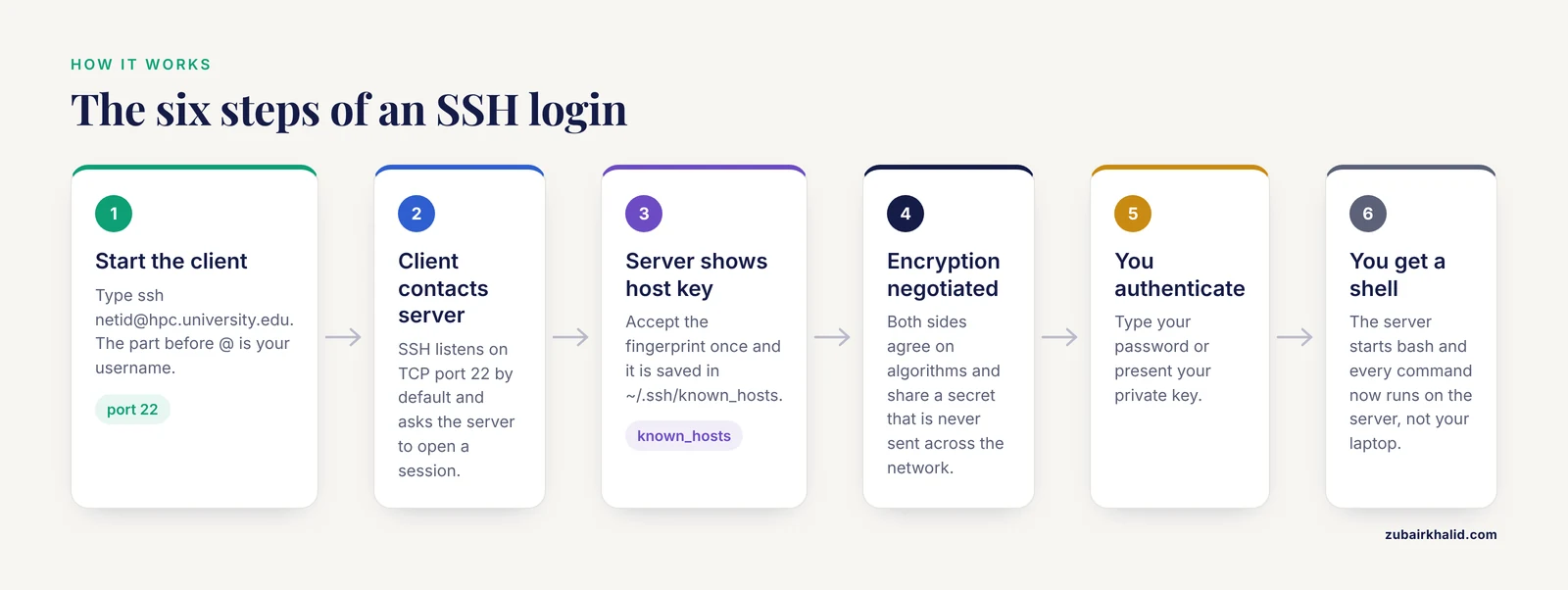
Understanding the mechanism helps you interpret the warnings you will see. The process follows the same outline every time.
- You start a client. You type a command such as
ssh [email protected]. The word before@is your username on the server. The rest is the server address, which can be a hostname or an IP address such as10.20.30.40. - The client contacts the server. SSH listens on TCP port 22 by default. Your client asks the server to open a session.
- The server identifies itself. The server presents a host key, a cryptographic fingerprint unique to that machine. The first time you connect, your client shows you the fingerprint and asks whether you trust it. If you accept, the fingerprint is recorded in a file on your computer called
known_hosts, stored in the hidden folder~/.ssh. - Encryption is negotiated. Your computer and the server agree on encryption algorithms and establish a shared secret without ever transmitting that secret across the network. Everything after this point is encrypted.
- You authenticate. You either type your password or present a private key, described in detail below.
- You get a shell. The server starts a shell process, usually bash, and you see its prompt. Every command you type now runs on the server, not on your laptop.
Two details deserve attention. First, the host key check in step 3 is your defense against a man-in-the-middle attack, where an impostor server intercepts your connection and steals your password. This is why your first connection is the moment to pause. If you are on your home network and expect the fingerprint prompt, accepting it is fine. If you later see a stark warning that the host key has changed, stop and ask your system administrator before doing anything, because it can mean either a server reinstall or an active attack.
Second, SSH encrypts the session but does not hide the fact that you are connecting. Network administrators can see that traffic flows to port 22. They cannot read its contents.
Your First Connection: A Worked Example
Here is a realistic first login, annotated line by line.
ssh [email protected]The first time, you will see something like this:
The authenticity of host 'hpc.bigstate.edu (141.198.7.24)' can't be established.
ED25519 key fingerprint is SHA256:9Kx2bQ0mTzYvPpL4nW8rCdE1fGhJkLmNoPqRsTuVwXy.
Are you sure you want to continue connecting (yes/no/[fingerprint])?
Type yes and press Enter. This writes the fingerprint into ~/.ssh/known_hosts. You will not see this prompt again unless the server's key changes.
Next comes the password prompt. Note that nothing appears on screen as you type, not even asterisks. This is normal. Type your password and press Enter.
[jdoe@hpc01 ~]$That prompt means you are now typing on the server. Try two safe commands:
whoami
hostname
The first prints your username. The second prints the machine's name, confirming you are no longer on your own computer. To leave, type exit or press Ctrl+D.
A note on naming conventions. Unix systems, including macOS and Linux, distinguish uppercase from lowercase and treat spaces in filenames as trouble. Use underscores instead of spaces in filenames, and remember that Data, data, and DATA are three different directories.
SSH Keys: Stronger, More Convenient Authentication
Passwords work, but keys are better for daily bioinformatics work. A key pair consists of two files: a private key that stays on your laptop and a public key that you place on the server. The two are mathematically linked, but knowing the public key does not let anyone derive the private key.
Setting up keys takes about five minutes and removes the need to type your password on every connection.
- Generate a key pair on your own computer:
ssh-keygen -t ed25519 -C "jdoe laptop"The -t ed25519 selects a modern, secure key type. When asked where to save the key, accept the default, which is ~/.ssh/id_ed25519. The private key is id_ed25519 and the public key is id_ed25519.pub. Choose a passphrase when prompted. A passphrase protects the private key if your laptop is stolen, and you can configure your system to remember it for the session.
- Copy the public key to the server:
ssh-copy-id [email protected]This one command appends your public key to the file ~/.ssh/authorized_keys on the server. If ssh-copy-id is unavailable on Windows, open the .pub file, copy its single line of text, log in to the server, and paste that line into ~/.ssh/authorized_keys.
- Test it:
ssh [email protected]You should now log in without a password prompt, or with only your key passphrase.
Permission problems cause most key failures. Your private key must be readable only by you. If ssh complains about permissions or refuses your key, run:
chmod 600 ~/.ssh/id_ed25519The chmod command changes file permissions. The number 600 means you can read and write the file and nobody else can access it at all.
Linux Commands Bioinformatics Users Need First
SSH hands you a Linux terminal, so SSH and Linux skills arrive together. A small core of linux commands covers most daily bioinformatics work. Practice these on the server with harmless files before you touch real data.
| Command | What it does | Example |
|---|---|---|
pwd | Prints the directory you are in | pwd |
ls | Lists files | ls -lh shows sizes in human-readable units |
cd | Changes directory | cd ~/projects/rnaseq |
mkdir | Creates a directory | mkdir results |
cp, mv | Copy, move or rename | mv raw.fastq.gz raw_rep1.fastq.gz |
rm | Deletes, permanently, no trash can | rm old.log |
less | Views a file page by page | less reads.fastq (press q to quit) |
head, tail | Shows the first or last lines | head -n 4 reads.fastq shows one FASTQ record |
grep | Searches text for a pattern | grep -c "@SQ" alignment.sam counts lines |
wc | Counts lines, words, characters | wc -l genes.txt |
du, df | Disk usage and free space | du -sh raw_data/ and df -h |
top | Shows running processes and memory | Press q to quit |
chmod | Changes permissions | chmod 755 script.sh |
man | Opens the manual for any command | man rsync |
history | Lists your previous commands | Combine with grep to find that command you half-remember |
FASTQ files reward a concrete example. A FASTQ record has four lines: a header starting with @, the sequence, a + line, and quality scores. Looking at the first four lines with head -n 4 is the standard sanity check that a file downloaded correctly before you commit hours of compute to it.
Two behaviors separate beginners from comfortable users. The first is Tab completion. Type the first few letters of a filename and press Tab, and the shell fills in the rest. This eliminates almost all typos in long filenames like SRR12345678_trimmed_paired_R1.fastq.gz. The second is the Up arrow, which cycles through your command history. Bioinformaticians rerun commands constantly, and retyping them is wasted effort.
Moving Data Between Your Laptop and the Server
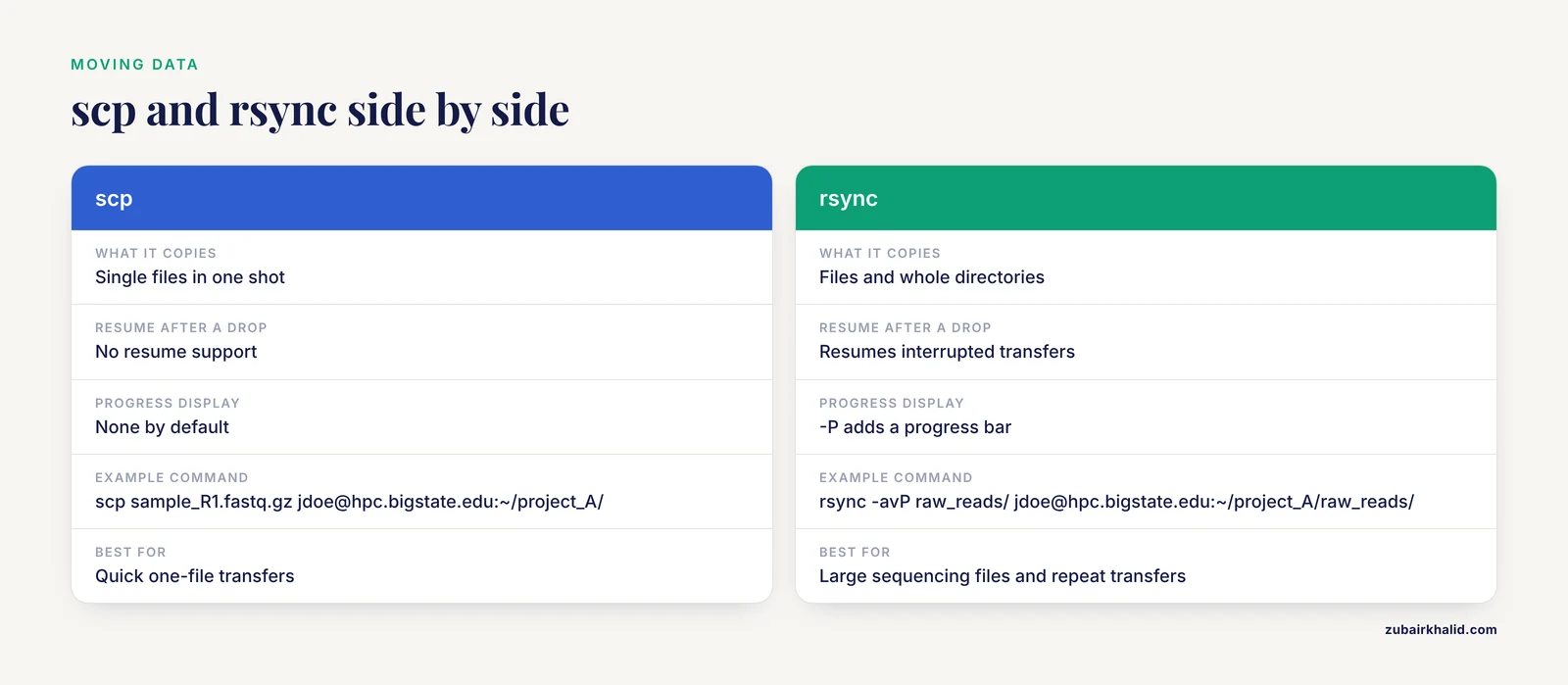
scp and rsync are the two workhorses, and both run over SSH, so they inherit its encryption and its key-based login.
scp copies files in one shot:
scp sample_R1.fastq.gz [email protected]:~/project_A/
scp [email protected]:~/project_A/results.csv ~/Desktop/
The first line uploads a sequencing file. The second downloads results. The colon after the server address is what marks the remote path.
rsync copies files and directories, and it only transfers the differences between what exists on each side. That makes it faster for repeat transfers and lets it resume after an interruption, which matters when a 40 GB FASTQ file dies at 90 percent:
rsync -avP raw_reads/ [email protected]:~/project_A/raw_reads/The -a flag preserves timestamps and permissions, -v prints progress, and -P enables resume capability and a progress bar. Note the trailing slash on raw_reads/: with it, rsync copies the contents of the folder. Without it, rsync copies the folder itself into the destination, which is a classic source of nested duplicate directories.
If you prefer graphics, FileZilla and Cyberduck support SFTP, which is file transfer over SSH. Use SFTP mode, not plain FTP, because plain FTP sends your password unencrypted.
Keeping Long Analyses Running After You Log Out
This is the single most expensive beginner mistake in bioinformatics. When you close your terminal or your Wi-Fi drops, the SSH session ends, and everything started inside that session dies with it. A genome alignment killed at hour 11 of a 12 hour run is eleven hours of compute wasted.
The fix is to detach your work from the login session. Two tools do this.
tmux creates a persistent terminal session on the server:
tmux new -s rnaseq
salmon quant -i transcriptome_index -l A -1 sample_R1.fastq.gz -2 sample_R2.fastq.gz -o sample_quant
Inside the tmux session, start your analysis. Then press Ctrl+B, release, and press D to detach. You can log out, shut your laptop, and go home. The job continues. Tomorrow, log back in and type:
tmux attach -t rnaseqYou are back in the same session, with the same output scrolling. Type tmux ls to list sessions.
nohup is the simpler alternative for a single command:
nohup blastp -query proteins.fa -db nr -out hits.txt &The trailing & runs the job in the background. Output that would have gone to the screen is written to a file instead. Check progress with tail -f nohup.out.
One caution applies on shared clusters. Many high-performance computing centers require long jobs to run through a scheduler such as SLURM rather than directly on login nodes. If your center has a scheduler, learn its submission commands before launching anything heavy, because running a big job on a login node is the fastest way to earn an email from your administrator.
The SSH Config File: Stop Typing Long Commands
Typing ssh [email protected] -p 2222 every morning wears you down. The file ~/.ssh/config on your own computer stores connection settings under a short name.
Create or edit ~/.ssh/config and add:
Host hpc
    HostName hpc.cluster2.bigstate.edu
    User jdoe
    Port 2222
    IdentityFile ~/.ssh/id_ed25519
Now ssh hpc connects with all of those settings applied, and scp and rsync accept the same alias. The config file also helps when a server uses a nonstandard port, which some administrators set to reduce automated break-in attempts.
Port Forwarding: Web Tools on a Remote Server
SSH can do more than give you a shell. It can tunnel network traffic, which lets you use a web application running on the server through your local browser. This is how many biologists run Jupyter notebooks that live on the server.
From your laptop, run:
ssh -L 8888:localhost:8888 [email protected]Log in as usual. Then, on the server, start Jupyter:
jupyter notebook --no-browser --port=8888Back on your laptop, open a browser and go to http://localhost:8888. The port forwarding flag -L 8888:localhost:8888 means: take traffic sent to port 8888 on my laptop and deliver it, through the encrypted SSH connection, to port 8888 on the server. The notebook is computing on the server, but you are clicking in a local browser. The same trick works for RStudio Server and for visualization tools that expect a web browser.
SSH for Bioinformatics Examples: Three Complete Scenarios
These worked scenarios tie the pieces together into realistic days at the keyboard.
Scenario 1: First analysis of new sequencing data. Your core facility emails you a download link. Download the FASTQ files to your laptop, then transfer them:
rsync -avP ~/Downloads/SRR*fastq.gz [email protected]:~/project_A/raw/Log in with ssh hpc. Run a quality check inside tmux, view the report with less, and decide on trimming parameters. Nothing here touched your laptop's CPU.
Scenario 2: Screening many compounds on a cluster. Suppose you are reproducing a docking screen comparable in scale to published work that evaluated hundreds of metabolite candidates against a bacterial target [2]. You would split the candidate list into chunks, launch each chunk as a background job in its own tmux window, and check on all of them the next morning with a single tail on each log file. SSH plus tmux turns one connection into many parallel workspaces.
Scenario 3: Interactive exploration with a notebook. You want to explore a single-cell expression matrix, the kind of dataset produced by studies profiling tens of thousands of cells from tissue samples [1]. Start a port-forwarded SSH session, launch Jupyter on the server, and work interactively on data your laptop could never hold in memory.
Each scenario uses the same four skills: connect, transfer, run persistently, and check results. Master those and you can participate in almost any computational project.
SSH Compared With Other Ways to Reach a Server
Choosing the right tool matters, so here is how SSH stacks up.
- SSH versus FTP. FTP transmits passwords and data in plain text. SFTP, which runs over SSH, encrypts everything. There is no good reason to use plain FTP for research data.
- SSH versus VNC. VNC mirrors a graphical desktop. It is convenient for GUI-only applications but heavier on bandwidth, and over a slow connection the lag is frustrating. A terminal over SSH stays responsive even on weak hotel Wi-Fi.
- SSH versus a VPN. Some institutions require you to connect through a VPN first, and then use SSH inside it. The two solve different problems. The VPN places you inside the private network, and SSH then authenticates you to a specific machine.
- SSH versus web portals. Servers such as Galaxy provide point-and-click pipelines through a browser, and they are excellent teaching tools. But reproducible, large-scale work eventually requires the command line, and that means SSH.
- SSH versus Mosh. Mosh, the mobile shell, tolerates roaming and sleep in ways SSH does not, which helps on unstable connections. It is a nice extra but rarely installed by default, so SSH remains the universal option.
Common Mistakes and Limitations
Every experienced bioinformatician has made at least three of these. Learn them here instead.
- Confusing the two SSH meanings. Searching literature for "SSH" returns suppression subtractive hybridization protocols alongside network security pages. Read the context before you apply a result.
- Deleting or overwriting
~/.ssh. This hidden folder holds your keys andknown_hosts. Students occasionally delete it while cleaning up their home directory. Back it up before major cleanups. - Panicking at the host key warning. A warning that the host key changed can mean a server was rebuilt, but it can also mean an impostor. Do not bypass the warning to reconnect. Ask your administrator.
- Wrong permissions on keys. If your private key is readable by others, SSH refuses to use it. Run
chmod 600on the private key andchmod 700on the~/.sshdirectory. - Losing work to a closed laptop. Any analysis launched in a plain SSH session dies when the session ends. Use tmux, screen, or
nohupfor anything longer than a coffee break. - Deleting data with no safety net.
rmon a server is permanent. Most clusters have no trash folder, and backups may not include your scratch space. Copy irreplaceable files to two locations before cleaning up. - Blaming SSH for scheduler rules. If your job is killed, the cause is usually a scheduler policy, a memory limit, or a disk quota, not SSH itself. Read the center's documentation.
- Assuming SSH works everywhere. Firewalls block port 22 on some networks, and some servers only accept connections from university IP addresses. If a connection times out rather than refusing, a firewall is often the cause.
- Leaving passwords in scripts. Never write a password into a shell script or notebook. Keys with an SSH agent handle this safely.
- Treating a server as backup storage. SSH gives access, not archival. Follow your institution's data retention policy for sequencing data, which is often a grant and publication requirement.
Quick Review
- SSH is the encrypted protocol that gives you a terminal on a remote Linux server, and it is how nearly all real bioinformatics compute is accessed.
- The first connection asks you to verify a host key fingerprint. Verify it once, and treat any later change warning as a stop sign.
- Key-based authentication with
ssh-keygenandssh-copy-idis stronger and faster than passwords. scpmoves single files, andrsync -avPmoves directories with resume support.- Run long jobs inside tmux or with
nohup, or they die when your connection drops. ~/.ssh/configturns long connection commands into two-letter aliases.- In biology literature, SSH can also mean suppression subtractive hybridization, a PCR technique unrelated to remote login [5].
Frequently Asked Questions
What is SSH for bioinformatics in simple terms?
It is a secure, encrypted way to open a command-line session on a remote server so you can run analyses on data that never has to leave that machine. Think of it as sitting down at the server's keyboard from anywhere.
Is SSH in biology papers the same thing as the login protocol?
No. In genomics literature, SSH often stands for suppression subtractive hybridization, a PCR-based method for comparing transcript populations that appears among genomic techniques in plant stress research [5]. The remote-login protocol appears in methods sections only as a tool, never as a technique.
Do I need to know Linux before learning SSH?
You need far less than you fear. SSH and basic Linux commands such as cd, ls, less, and rsync are learned together in an afternoon, and the commands in this article cover most daily work in computational biology.
How do I keep a job running after I log out of SSH?
Start it inside a tmux or screen session, or launch it with nohup and an ampersand. The job then continues on the server independently of your connection, and you reattach later to check results.
Is password login safe enough, or do I need SSH keys?
Passwords work, but keys are the professional standard because they resist guessing attacks and remove typed passwords from the network entirely. Generate a key with ssh-keygen -t ed25519 and install it with ssh-copy-id.
How do I copy large sequencing files to the server?
Use rsync -avP for anything large, because it shows progress, resumes interrupted transfers, and only sends data that has changed. It runs over SSH, so your transfer is encrypted without extra setup.
Sources
- IRF5 Mediates Artery Inflammation in Salt-Sensitive Hypertension by Regulating STAT1 and STAT2 Phosphorylation to Increase ESM1 Transcription: Insights from Bioinformatics and Mechanistic Analysis.
- Bioinformatics analysis of Rickettsia typhi autoimmune associations and screening of Streptomyces-derived inhibitors.
- Uncovering the transcriptomic basis of endoxifen resistance in ER+ breast cancer cells: Insights from bioinformatics analysis.
- Detection of Protein Polysulfidation Using a β-(4-Hydroxyphenyl)ethyl Iodoacetamide-Derived Biotin Tag HPB.
- Omics advancements towards exploring arsenic toxicity and tolerance in plants: a review.