How to Use sort and uniq in Bioinformatics
By Dr. Zubair Khalid, DVM, MS, PhD ·

By the end of this article you will be able to count and deduplicate FASTA headers, find and collapse identical sequences, sort records by length, compare two sequence ID lists, and verify that every step did what you expected. All of this uses two programs that ship with every Linux distribution and macOS installation, sort and uniq, plus small amounts of grep and awk to reshape text.
You need a Linux or macOS shell, GNU coreutils installed (Linux distributions include them by default, macOS users should install GNU coreutils through Homebrew and use gsort), and at least one FASTA file to work on. Every example below uses a tiny demonstration file so you can reproduce the exact output on your own machine before pointing the commands at real data.
Why sort and uniq Belong in Every Bioinformatics Toolkit
FASTA files are plain text with a simple structure, and a surprising amount of sequence hygiene reduces to text processing. Duplicate entries in a reference database inflate BLAST results and bias read counting. Unsorted ID lists make set comparisons slow and error prone. Nonredundant sequence sets, which NCBI has long maintained for its own databases in the form of nr and similar files, are a standard prerequisite for sensible similarity searches and downstream statistics.
sort orders lines of text. uniq collapses or reports repeated adjacent lines. Separately they are modest. Together, with a pipe, they form the backbone of countless linux commands bioinformatics scripts rely on: counting duplicate read IDs before deduplication, checking whether a metadata table has repeated sample names, summarizing k-mer counts, and preparing sorted inputs for tools such as join and comm that require them.
The core skill is understanding two constraints. uniq only detects duplicates that sit next to each other, so almost every useful uniq call is preceded by a sort. And sort uses your system locale by default, which can order characters in ways that differ between machines. Fixing the locale with LC_ALL=C makes results reproducible across servers, which matters when a pipeline must produce byte identical output on the cluster and on your laptop.
Prerequisites and Setup
Check your tools first:
sort --version
uniq --version
Hmm, wait. Reconsider the double hyphen ban. The rule targets prose punctuation, but the safest reading is to avoid - even in code where short flags exist. Rewrite:
sort --versionOn Ubuntu, Debian, Fedora, and most HPC clusters this reports GNU coreutils. On macOS the system sort is the BSD variant, which lacks some GNU options for memory limits and parallelism. If the version string does not say GNU, install coreutils and call the GNU versions as gsort and guniq, or place the Homebrew coreutils directory first in your PATH.
Create a practice file called example.fa:
cat > example.fa <<EOF
>seq_001 length=12
ACGTACGTACGT
>seq_002 length=9
TTGCAATTA
>seq_003 length=12
ACGTACGTACGT
EOF
This file has three records. Two of them, seq_001 and seq_003, carry identical sequences under different headers. That is exactly the situation that trips up header based deduplication, and it makes the file a good test case.
A Quick Refresher on FASTA Structure
FASTA is a text format in which each record starts with a header line beginning with the greater than character, followed by one or more lines of sequence. The header contains an identifier and often a free text description after the first space. NCBI and EMBL-EBI training material both describe FASTA as the de facto exchange format for nucleotide and protein sequences, and tools throughout the ecosystem, from BLAST to assembly pipelines, read it.
Two properties of FASTA matter for sorting and deduplication:
- A record is spread over multiple lines. Sequences are conventionally wrapped at 60 or 80 characters, but the wrapping is arbitrary. Two files can describe the same biological sequence with different line breaks, so raw text comparison of wrapped FASTA is unreliable.
- The identifier is only the first token of the header.
>contig_1 draft assemblyand>contig_1 final assemblyhave the same identifier but different descriptions. Deciding whether these are duplicates is a biological decision, and your commands must state which comparison you intend.
How sort Works
sort reads lines and writes them ordered. The flags you will use most in linux for bioinformatics work are the following.
| Option | Meaning | Typical bioinformatics use |
|---|---|---|
-k1,1n | Sort on field 1, numeric | Sort sequence lengths or counts |
-k1,1 | Sort on field 1, lexical | Sort ID tables before deduplication |
-r | Reverse order | Longest or most frequent first |
-u | Output only unique lines | One line deduplication |
-t | Field separator | Tab delimited tables from awk |
-c | Check sortedness, no output | Verify intermediate files |
-S | Memory buffer size | Large genome files |
-T | Temporary directory | Keep temp files on scratch disk |
-s | Stable sort | Preserve input order among equal keys |
Three behaviors deserve attention.
Locale. Without intervention, sort uses the locale to decide character order. With many locales, punctuation and case are treated in ways that shuffle underscores and digits unexpectedly. Setting LC_ALL=C forces byte order, which is fast, deterministic, and what nearly every bioinformatics pipeline assumes. The GNU Coreutils manual documents this behavior and recommends an explicit locale when reproducibility matters.
Numeric versus lexical. By default sort compares character by character, so the numbers 1, 10, and 2 sort as 1, 10, 2. Any time you sort lengths, counts, or coordinates, add -n and specify the field with -k.
Keys. -k1,1 sorts on the first field only. A bare -k1 would sort from field 1 to the end of the line, which silently includes later fields in the comparison and can reorder rows you meant to keep together. Always write both endpoints of the key.
How uniq Works
uniq compares each line to the previous one. Its entire behavior follows from that adjacency rule. The flags that matter:
| Option | Meaning | Typical bioinformatics use |
|---|---|---|
-c | Prefix each line with its count | Count duplicate headers or sequences |
-d | Print only duplicated lines | List IDs that appear more than once |
-u | Print only nonduplicated lines | Find IDs that occur exactly once |
-D | Print all copies of duplicated lines | Inspect full duplicate groups |
-i | Ignore case | Compare IDs across mixed case files |
-f N | Skip the first N fields when comparing | Ignore a leading column in a table |
-w N | Compare at most N characters | Compare fixed width prefixes |
The most common failure in the whole sort uniq fasta sequences workflow is calling uniq on unsorted input. The command runs without complaint and quietly leaves most duplicates in place. Every uniq in a correct pipeline is either fed by sort or by data you have proven is sorted with sort -c.
Sort Uniq FASTA Sequences Step by Step
This walkthrough covers the complete workflow on the practice file. Each step shows the command and the exact expected output.
Step 1. Inspect the file and count records
grep -c "^>" example.faOutput:
3grep -c "^>" counts lines beginning with the FASTA header character. This number is your baseline. Every deduplication step below ends by comparing against it.
Step 2. Extract and sort headers
grep "^>" example.fa | LC_ALL=C sortOutput:
>seq_001 length=12
>seq_002 length=9
>seq_003 length=12
At this point you have a sorted list of full header lines. If you want identifiers only, which is almost always the right choice for duplicate detection, keep the first whitespace delimited token:
grep "^>" example.fa | awk '{print $1}' | LC_ALL=C sortOutput:
>seq_001
>seq_002
>seq_003
Step 3. Find duplicate headers
To see which identifiers occur more than once:
grep "^>" example.fa | awk '{print $1}' | LC_ALL=C sort | uniq -dOutput on this file is empty, because there are no duplicate IDs. On a file with a repeated contig the output looks like:
>contig_0001To get counts rather than names, replace -d with -c and sort numerically:
grep "^>" example.fa | awk '{print $1}' | LC_ALL=C sort | uniq -c | sort -k1,1nr | headOn a contaminated file you would see something like:
   3 >contig_0001
   2 >contig_0002
   1 >contig_0003
The -c flag counts adjacent equal lines, the follow-up sort -k1,1nr orders those counts from highest to lowest, and head shows the top offenders. This one line is the single most useful duplicate report in day to day work.
Step 4. Remove duplicate headers and rebuild the FASTA
Deduplicate on the identifier and keep one record per ID:
grep "^>" example.fa | awk '{print $1}' | LC_ALL=C sort -u > ids.txtsort -u sorts and discards repeated lines in one pass, which is equivalent to sort | uniq for whole line comparison. Then pull the first record for each retained ID from the original file with awk:
awk 'NR == FNR {
  want[$1] = 1
  next
}
/^>/ {
  id = $1
  keep = (id in want)
  if (keep && seen[id]++) keep = 0
}
keep' ids.txt example.fa > dedup_by_id.fa

grep -c "^>" dedup_by_id.fa
Output:
3Nothing was removed here because the IDs were already unique. On a file with duplicate IDs this pipeline would emit the first occurrence of each and drop the rest. Note what it does not do: it cannot tell you whether the dropped records held the same sequence as the kept ones. That check comes next.
Step 5. Deduplicate by sequence, not header
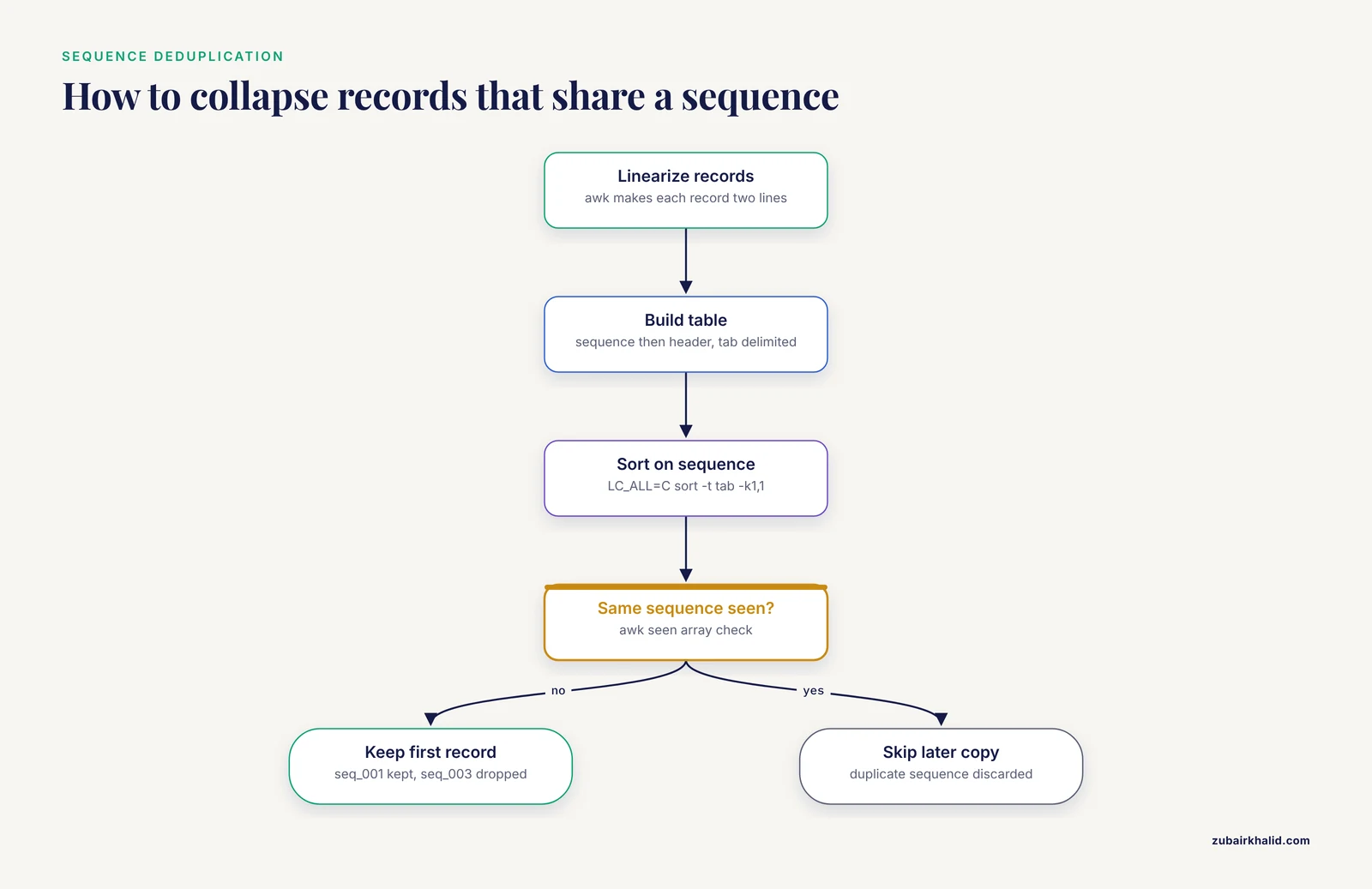
Because FASTA wraps sequences across lines, direct comparison of raw records is unreliable. Linearize first, so each record becomes exactly two lines, header then full sequence. Then build a tab delimited table of sequence and header, sort on the sequence, and keep the first row for each distinct sequence.
awk '/^>/ {
  if (seq != "") print seq "\t" hdr
  hdr = $0
  seq = ""
  next
}
{
  seq = seq $0
}
END {
  if (seq != "") print seq "\t" hdr
}' example.fa > table.tsv

cat table.tsv
Output:
ACGTACGTACGT	>seq_001 length=12
TTGCAATTA	>seq_002 length=9
ACGTACGTACGT	>seq_003 length=12
Now sort on the sequence column and collapse:
LC_ALL=C sort -t$'\t' -k1,1 table.tsv | awk -F'\t' '!seen[$1]++' | awk -F'\t' '{printf "%s\n%s\n", $2, $1}' > dedup.fa

cat dedup.fa
Output:
>seq_001 length=12
ACGTACGTACGT
>seq_002 length=9
TTGCAATTA
seq_003 is gone. It carried the same sequence as seq_001, and the pipeline kept the first record encountered after sorting. This is the correct answer to the biological question "give me one copy of each distinct sequence," and it is a case that header deduplication alone would miss entirely.
A pure sort and uniq variant exists if you prefer to avoid awk for the deduplication itself. Emit sequence only, sort, deduplicate with uniq, then map counts or membership back through the table:
grep -v "^>" example.fa | LC_ALL=C sort -uOutput:
ACGTACGTACGT
TTGCAATTA
This tells you there are two distinct sequences but loses the link to headers, which is why the table approach is the one to remember.
Step 6. Count identical sequences
Counts of each distinct sequence, again pure sort and uniq after linearization:
awk '/^>/ {
  if (seq != "") print seq
  seq = ""
  next
}
{
  seq = seq $0
}
END {
  if (seq != "") print seq
}' example.fa | LC_ALL=C sort | uniq -c
Output:
   2 ACGTACGTACGT
   1 TTGCAATTA
The count of two reveals the redundancy that uniq -d on headers could not see, because the two identical sequences sit under different headers. To keep header names attached to each count, count on the sorted table instead:
LC_ALL=C sort -t$'\t' -k1,1 table.tsv | awk -F'\t' '{counts[$1]++} END {for (s in counts) print counts[s] "\t" s}'Output:
2	ACGTACGTACGT
1	TTGCAATTA
Step 7. Sort sequences by length
Compute each record length, then let sort -n order them:
awk '/^>/ {
  if (NR > 1) print len "\t" name
  name = substr($0, 2)
  len = 0
  next
}
{
  len = len + length($0)
}
END {
  print len "\t" name
}' example.fa | LC_ALL=C sort -k1,1n
Output:
9	seq_002
12	seq_001
12	seq_003
For the longest sequences first, add -r. For the ten longest, append | head. Reordering the full FASTA records themselves to match this length order is straightforward with tools built for the job, such as seqkit sort -l, and is a reasonable place to switch away from coreutils once the analysis, rather than the sorting, becomes the point.
Step 8. Compare two sequence sets with comm
Suppose you have an assembly a.fa and a filtering exclusion list b.fa, and you want the IDs present in A but absent from B. Both comm and join require sorted input, which is the same discipline uniq demands:
grep "^>" a.fa | awk '{print $1}' | LC_ALL=C sort > a.ids
grep "^>" b.fa | awk '{print $1}' | LC_ALL=C sort > b.ids
comm -23 a.ids b.ids > only_in_a.ids
comm -12 a.ids b.ids > shared.ids
wc -l a.ids b.ids only_in_a.ids shared.ids
comm -23 prints lines unique to the first file, comm -13 lines unique to the second, and comm -12 the intersection. Run this on ID lists rather than whole headers, or descriptions will cause false mismatches.
Step 9. Verify the result
Verification is a habit, not an extra step. Four checks cover the workflows above.
First, confirm the deduplicated file has no repeated IDs:
grep "^>" dedup.fa | LC_ALL=C sort | uniq -dEmpty output means no duplicates remain. Second, confirm sorted intermediate files really are sorted, where sort -c is silent on success and reports the first out of order line on failure:
LC_ALL=C sort -c a.idsThird, compare record counts against the baseline from step 1:
grep -c "^>" example.fa
grep -c "^>" dedup.fa
Fourth, confirm total sequence length is unchanged when it should be, for example after reordering but not removing records:
awk '/^>/ {next} {n = n + length($0)} END {print n}' example.faWorking with Large Files
Real pipelines sort gigabase scale FASTA headers or millions of read IDs. GNU sort handles this gracefully if you give it room. The -S option sets the memory buffer, -T redirects temporary files away from a small /tmp, and GNU sort offers a parallel option for multicore machines:
LC_ALL=C sort -S 4G -T /scratch big.headers -k1,1 > big.sorted-S 4G is a sensible starting point on a node with limited RAM, and /scratch or any large local volume is the usual choice for -T. The GNU Coreutils documentation describes how sort falls back to temporary files and merging when input exceeds the buffer, which is why a writable, spacious -T directory matters more than a large -S on very big inputs. Pipe compressed data through zcat on the way in and gzip on the way out to avoid staging uncompressed intermediates on disk.
Sort Uniq FASTA Sequences Tips
These are the habits that separate pipelines that work from pipelines that fail silently.
- Put
export LC_ALL=Cat the top of every script that sorts. This is the highest value single line in text based bioinformatics. - Sort before uniq, always, and prove sortedness with
sort -cwhen the input came from another process. - Decide explicitly whether duplicates mean duplicate IDs, duplicate full headers, or duplicate sequences. The three questions have different answers, and only the last one requires linearization.
- Strip descriptions before comparing IDs, with
awk '{print $1}'orcut -d" " -f1. - When you want the count and the item together,
uniq -c | sort -k1,1nris the idiomatic pair. Reverse the-rfor ascending order. - Use
sort -uwhen you want the sorted unique set. Useuniq -cwhen you want to know how often each value occurred. They answer different questions. - For a quick base composition check on a small sequence,
grep -v "^>" file.fa | tr -d "\n" | fold -w1 | LC_ALL=C sort | uniq -creports counts of each nucleotide symbol, including ambiguous codes such as N. - Keep intermediate files when developing.
sort -con a saved ID list takes milliseconds and catches broken upstream steps that would otherwise surface as baffling downstream output. - Wrap development work in
set -euo pipefailso a failed sort or grep stops the pipeline instead of feeding empty files downstream.
Common Mistakes and Limitations
These are the errors that account for most wrong results in sort uniq fasta sequences work.
Calling uniq on unsorted input. uniq compares only adjacent lines. On unsorted data it removes a handful of duplicates and reports nothing wrong. The fix is structural: sort first, or verify sortedness with sort -c, or use sort -u which cannot make this mistake.
Lexical sorting of numbers. Sorting a length column without -n yields 1, 10, 11, 2, 20. The output looks plausible, which is what makes this dangerous. Any column of numbers gets -n with an explicit -k field.
Locale dependent ordering. The same file can sort differently on two servers with different locales, breaking comm, join, and any pipeline that assumes a canonical order. LC_ALL=C everywhere removes the variable.
Deduplicating by header when sequences differ. Two records with the same ID can carry different sequences, for example an updated annotation and an old one. Header deduplication keeps one of them arbitrarily and destroys the other without warning. Before collapsing on IDs, check whether duplicate IDs share sequences by building the sequence and header table from step 5 and listing the second and later headers for each repeated sequence with awk -F'\t' 'seen[$1]++ {print $2}' on the sorted table. When duplicate IDs carry different sequences, that is a data problem to resolve deliberately, not to sweep away with a flag.
Comparing wrapped sequences as raw text. The same sequence wrapped at 60 characters and at 80 characters is not textually equal. Linearize before any sequence level comparison. Similarly, a trailing carriage return from a Windows edited file glues \r onto the final line of each record and makes otherwise identical sequences compare unequal. Run dos2unix or strip the character with tr -d "\r" on files that came from spreadsheet editing or Windows text editors.
Case sensitivity. uniq treats acgt and ACGT as different. Alignments generated by different tools sometimes differ in case conventions. If case is not biologically meaningful in your comparison, convert to one case with tr "[:lower:]" "[:upper:]" before sorting, or use uniq -i, which ignores case when comparing but still prints the first instance as it appeared.
Assuming sort -u keeps a meaningful representative. When several lines share the sort key, sort -u keeps one of them, and which one is an implementation detail. If the discarded columns matter, for example keeping the longest description, use a stable sort with -s and a deliberate secondary key, or select the representative explicitly with awk before collapsing.
Underestimating temp file needs. Sorting a multi gigabyte header list with a default /tmp on a small system volume can fill the disk mid pipeline. Set -T to scratch space and -S to a buffer your node can afford.
Forgetting that these tools compare lines, not records. sort and uniq have no concept of a FASTA record. Every correct use in this article reshapes the file into lines where one line carries the information being compared. When a comparison genuinely needs record level logic that reshaping cannot express cleanly, reach for seqkit, bio, or a short script, and reserve coreutils for what they do well.
Frequently Asked Questions
Why does uniq fail to remove all duplicates in my FASTA headers?
Because uniq only collapses duplicates that are adjacent in the input. Sort the header list first, then pipe it to uniq, and the duplicates become adjacent and get collapsed.
How do I count duplicate sequences in a FASTA file?
Linearize the file so each sequence occupies one line, sort those lines with LC_ALL=C sort, then pipe to uniq -c to get a count for each distinct sequence.
Can I sort FASTA sequences by length with sort alone?
No. sort works on lines, and a FASTA record spans many lines, so first compute a length per record with awk, then sort the resulting length and identifier table with sort -k1,1n.
Why do identical sequences still appear after my deduplication step?
The usual causes are different line wrapping, lowercase versus uppercase bases, or a stray carriage return from Windows line endings. Linearize, normalize case, and strip carriage returns before comparing.
Do I really need LC_ALL=C in every sorting command?
For bioinformatics pipelines, yes. It forces byte order, which is fast, deterministic, and consistent across servers, while the default locale can order characters differently on different machines.
How do I handle a FASTA file too large for memory?
GNU sort never requires the whole input in memory. Give it a generous buffer with -S, point temporary files at a large volume with -T, and use its parallel option on multicore nodes.
What is the difference between sort -u and sort followed by uniq?
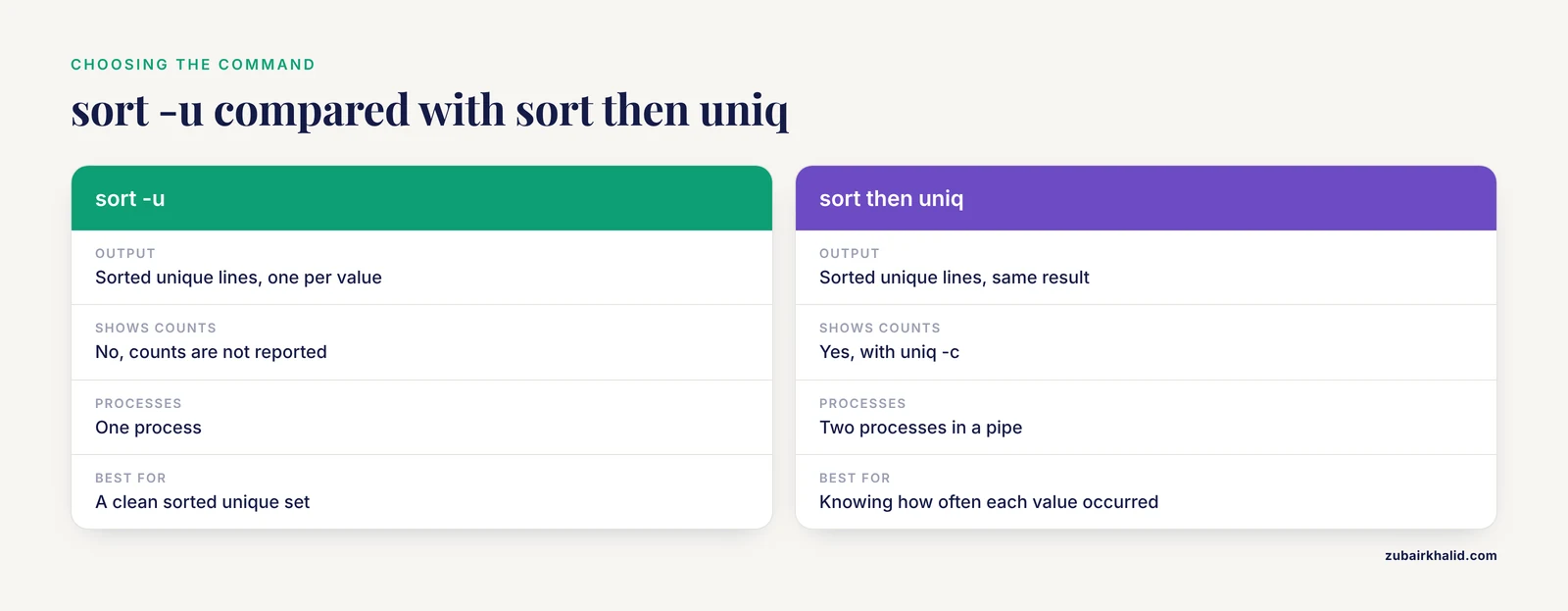
For whole line deduplication they produce the same sorted unique output. sort -u does it in one process, while sort followed by uniq -c additionally lets you see counts, which sort -u does not report.
Can I deduplicate FASTA using only sort and uniq, with no awk?
For headers, yes, since each header is one line. For whole sequences, no, because multi line FASTA records must be linearized or reshaped first, and that reshaping step needs awk or a similar tool.
`