How to Use Singularity Containers in Snakemake on an HPC Cluster
By Dr. Zubair Khalid, DVM, MS, PhD ·

By the end of this guide you will be able to attach a pinned container image to every rule in a Snakemake workflow, pre-pull those images on a cluster that restricts internet access, submit the whole workflow to SLURM through a profile file, monitor running jobs, verify that outputs are correct, and right-size each job from measured resource usage instead of guesses. You need an account on a SLURM-scheduled HPC (high-performance computing) cluster, the Snakemake and Singularity or Apptainer modules available through the cluster module system, a few gigabytes of scratch space, and about thirty minutes.
This combination of Snakemake, Singularity, and HPC scheduling is the standard way to get reproducible bioinformatics on shared clusters. Container virtualization spread through bioinformatics because it improves the portability and reproducibility of software deployment across computing environments [1]. A workflow manager adds orchestration on top, so the same workflow that runs on your laptop runs, unmodified, across hundreds of scheduled jobs.
Why Singularity Instead of Docker on an HPC Cluster
A container is an isolated process that runs against its own filesystem, provided by an image, which is an immutable snapshot of an operating system plus installed software. Singularity stores images as a single file in SIF format (Singularity Image Format), which makes them easy to move and to keep on shared filesystems.
Docker is the most widely known container engine, but it requires a privileged background daemon running as root. Multi-user HPC clusters do not allow that, because anyone with access to the daemon could escape into other users' data. Singularity, and its successor Apptainer, were built for exactly this environment. They run containers under your own user account with no daemon, either through kernel user namespaces (a kernel feature that lets unprivileged users create isolated environments) or through a setuid starter binary that administrators install. The Singularity project became the Apptainer project under the Linux Foundation in 2021, and Sylabs continues a separate SingularityCE fork. On most clusters the commands singularity and apptainer behave interchangeably for everyday use, and Snakemake's -use-singularity flag drives either engine.
A workflow manager reads a set of rules, builds a DAG (directed acyclic graph) of jobs from them, runs only what is missing or outdated, parallelizes independent jobs, and restarts cleanly after failures. Snakemake is a Python-based bioinformatics workflow manager whose rules use wildcards, named placeholders such as {sample} that expand into one job per value. That model pairs well with containers: each rule can pin its own tool and version, the same workflow runs on a laptop and on a cluster, and the scheduler receives per-rule memory and time requests.
Containers also pair naturally with workflow descriptors. The Common Workflow Language (CWL) ecosystem, for example, combines containerized tools with standardized workflow descriptions so that the same analysis runs across different computing environments [1]. Snakemake achieves the same pairing through its singularity: directive, which you will use below.
What You Need Before You Start
Confirm these four things before writing any code:
- A cluster account with access to a SLURM partition. SLURM is the workload manager that queues your jobs on compute nodes.
- A Snakemake module, version 8 or newer. Snakemake 7 works too, and this guide flags where the syntax differs.
- A Singularity or Apptainer module, version 3.x or 1.x respectively.
- Scratch space (a high-performance parallel filesystem for job input and output, often purged periodically) that you can write to from compute nodes.
Check what your cluster provides:
module avail snakemake singularity apptainer 2>&1 | tail -20Example output on an EasyBuild-style cluster (yours will differ):
--------------------- /opt/software/modules ---------------------
snakemake/8.14.0    apptainer/1.3.4    singularity/3.11.5
Also confirm which partitions exist and whether the login node has outbound internet, because that determines where you pull images:
sinfo -sPARTITION AVAIL TIMELIMIT NODES STATE NODELIST
general up infinite 8 idle c[01-08]
bigmem up infinite 2 idle m[01-02]Step-by-Step: Snakemake with Singularity on an HPC Cluster
The following walkthrough builds a minimal two-rule workflow, containerizes it, and runs it through SLURM. Exact log wording varies slightly between Snakemake versions, so treat the outputs below as representative.
Step 1: Load the modules and check versions
module load snakemake/8.14.0
module load apptainer/1.3.4
snakemake --version8.14.0apptainer version1.3.4If your cluster names the module singularity instead, load that. The rest of the walkthrough is identical. Add both module load lines to your ~/.bashrc so scheduled jobs see the same software.
Step 2: Create a small test workflow
mkdir -p ~/demo-workflow/{scripts,results,logs,profiles/slurm}
cd ~/demo-workflow
Create scripts/make_reference.py, which generates a small synthetic FASTA file:
import random

random.seed(1)
seq = "".join(random.choices("ACGT", k=5000))
with open(snakemake.output, "w") as fh:
    fh.write(">chr1\n")
    for i in range(0, len(seq), 60):
        fh.write(seq[i:i+60] + "\n")
The snakemake.output object is injected by Snakemake when it runs the script, including inside containers. This lets a rule use the script: directive, which is cleaner than long one-liner shell commands.
Step 3: Add container directives to the Snakefile
Create a file named Snakefile:
rule all:
    input:
        "results/reference.fasta.fai"

rule make_reference:
    output:
        "results/reference.fasta"
    log:
        "logs/make_reference.log"
    resources:
        mem_mb=500,
        runtime=5
    singularity:
        "docker://python:3.11-slim"
    script:
        "scripts/make_reference.py"

rule faidx:
    input:
        "results/reference.fasta"
    output:
        "results/reference.fasta.fai"
    log:
        "logs/faidx.log"
    threads: 1
    resources:
        mem_mb=500,
        runtime=5
    singularity:
        "docker://biocontainers/samtools:v1.9.1_cv1"
    shell:
        "samtools faidx {input} 2> {log}"
Each parameter matters:
singularity:names the image for that rule. Thecontainer:directive is an accepted alias in recent Snakemake versions. Supported URI schemes includedocker://(Docker Hub and other OCI registries),library://(Sylabs Cloud),oras://(OCI artifacts), and the legacyshub://. Thebiocontainers/samtools:v1.9.1_cv1tag used here is a long-standing tutorial example. For real work, pick current per-version images from the Bioconda-backedquay.io/biocontainerscollection, whose tags follow the patterntool:version-build, and copy the exact tag from the registry so the build string matches the Bioconda package you intend to use.resources:carries scheduler hints.mem_mbrequests memory in megabytes andruntimerequests minutes. These feed SLURM through the profile in Step 5.threads:requests CPU cores. The scheduler turns it intocpusorcpus_per_task.log:sends stderr to a per-rule file, which is where container and tool errors land.
You can also set a global default container at the top of the Snakefile, outside any rule:
singularity: "docker://python:3.11-slim"Every rule without its own directive then inherits that image, and per-rule directives override it. This is the cleanest way to guarantee full coverage.
Step 4: Test the pull and the dry run
First confirm that the engine can pull and run an image from your current node:
singularity exec docker://python:3.11-slim python --versionPython 3.11.9Progress lines about pulling layers appear above that on first use. If this works, containerization works on this node.
Next, control where images and layers are cached. Put both on scratch, not on your often-quota-limited home directory:
export APPTAINER_CACHEDIR=/scratch/$USER/apptainer_cache
export SINGULARITY_CACHEDIR=/scratch/$USER/singularity_cache
APPTAINER_CACHEDIR (or SINGULARITY_CACHEDIR for SingularityCE) holds downloaded layers, so repeated pulls are fast even if the final image file is rebuilt. Add those exports to ~/.bashrc.
Now do a dry run, which builds the DAG and reports the plan without executing anything:
snakemake -n --use-singularity --cores 1Building DAG of jobs...
Job stats:
job count
---------------------
all 1
faidx 1
make_reference 1
total 3
Reasons:
(check individual jobs above for details)
missing output files: results/reference.fasta.fai
This was a dry-run (flag -n). For production runs, use snakemake --cores 1 --use-singularity.The -use-singularity flag enables containerization for every rule that resolves to an image. If any rule lacks a directive and no global default exists, Snakemake aborts with a WorkflowError naming the rule and mentioning a missing container directive. The fix is a per-rule directive or the global default shown in Step 3.
Step 5: Configure a SLURM profile
A profile is a directory holding a config.yaml that maps to command-line flags, so your submission command stays short and reproducible. Create profiles/slurm/config.yaml for Snakemake 8:
executor: slurm
cores: 4
jobs: 50
use-singularity: true
printshellcmds: true
retries: 1
latency-wait: 120
default-resources:
  slurm_account: "myaccount"
  slurm_partition: "general"
  mem_mb: 2000
  runtime: 20
set-resources:
  faidx:
    mem_mb: 1000
singularity-args: "--bind /scratch:/scratch"
Key by key:
executor: slurmuses the SLURM executor plugin. If Snakemake reports that the executor is unavailable, install it withpip install snakemake-executor-plugin-slurmor use a module that bundles it.jobs: 50caps how many jobs may run on the cluster at once. Keep this within your group's allocation limits.use-singularity: trueis the profile form of-use-singularity. Snakemake 8 also accepts-use-apptainerand the combined form-software-deployment-method conda singularity.default-resourcesapplies to every rule, andset-resourcesoverrides specific rules. Replacemyaccountwith your SLURM account andgeneralwith a real partition name fromsinfo.latency-wait: 120gives slow shared filesystems two minutes to make outputs visible after a job reports success. Without it, busy filesystems cause phantom failures.retries: 1resubmits a failed job once, which absorbs transient node and filesystem errors.singularity-argspasses extra arguments to the container runtime. Singularity binds$HOME,/tmp, and your working directory by default, but other trees such as/scratchor/projectoften need explicit-bindentries. Multiple binds are separated by commas inside one-bindargument.
On Snakemake 7, the equivalent launch uses a -cluster template instead of the executor plugin:
snakemake --use-singularity --cores 1 --jobs 50 \
  --latency-wait 120 --retries 1 \
  --cluster "sbatch --parsable -A myaccount -p general -c {threads} --mem={resources.mem_mb} -t {resources.runtime}" \
  --cluster-cancel scancel
The braces are filled in per job, so {resources.mem_mb} becomes the rule's memory request in the sbatch call.
Step 6: Launch, monitor, and verify
For the first containerized run, request an interactive compute node so that image pulls happen with real network access and real compute behavior:
srun --pty -p general -A myaccount --mem=8G -t 02:00:00 bash
cd ~/demo-workflow
snakemake --profile profiles/slurm
Representative output (abridged):
Building DAG of jobs...
Job stats:
job              count
---------------------
all                  1
faidx                1
make_reference       1
total                3

Pulling singularity image docker://python:3.11-slim.
Finished job 100 (make_reference)
1 of 3 steps (33%) done
Pulling singularity image docker://biocontainers/samtools:v1.9.1_cv1.
Finished job 101 (faidx)
2 of 3 steps (67%) done
Finished job 102 (all)
3 of 3 steps (100%) done
After the first run, every image is cached, so you can submit from the login node and let SLURM handle everything:
snakemake --profile profiles/slurmMonitor from another terminal:
squeue -u $USER -o "%.10i %.16j %.8T %.10M %R"If a run was interrupted, resume with snakemake, profile profiles/slurm, rerun-incomplete. To recompute everything from scratch, add -forceall, and use it sparingly because it discards all completed work.
Verify the result two ways. First, inspect the actual output:
cat results/reference.fasta.faichr1 5000 6 60 61These five tab-separated columns are the FASTA index: sequence name, sequence length in bases, byte offset of the first base, bases per line, and bytes per line. The values match the 60-base lines written by the script, which confirms the containerized samtools call did real work on the right file. Second, ask Snakemake for its bookkeeping view:
snakemake --summaryoutput-date-time rule log-file(s) status plan
results/reference.fasta make_reference logs/make_reference.log updated no update
results/reference.fasta.fai faidx logs/faidx.log updated no updateRunning the workflow again should now print Nothing to be done (all requested files are present and up to date), which is the strongest confirmation that the DAG, timestamps, and containerized jobs all behaved correctly.
Step 7: Right-size jobs with measured usage
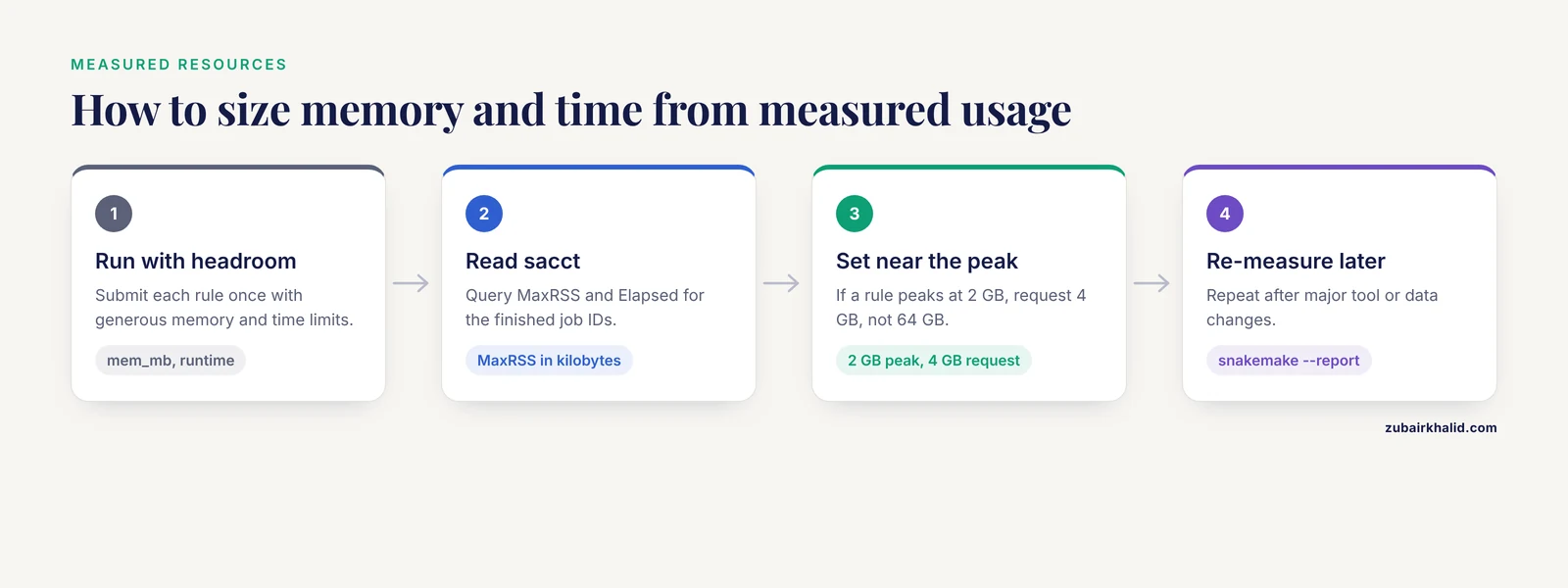
The memory and time values in Step 3 were placeholders. Replace them with measurements. SLURM records peak memory per job through its accounting interface:
sacct -j 123456 --format=JobID,JobName%20,Elapsed,MaxRSS,State JobID JobName Elapsed MaxRSS State
------------ -------------------- ---------- ---------- ----------
123456 faidx 00:00:02 COMPLETED
123456.batch batch 00:00:02 14208K COMPLETEDMaxRSS is peak resident memory in kilobytes and appears on the .batch line. If a rule peaks at 2 GB, request 4 GB, not 64 GB. Oversized requests queue longer behind big-memory jobs and waste allocation that your group pays for.
This measure-then-size loop is exactly what resource-profiling tools formalize. CWL-metrics collects runtime metrics from Docker containers together with workflow metadata while a workflow executes [1]. In its demonstration, the authors profiled 7 transcriptome quantification workflows across 6 cloud instance types and found that choosing compute sized to the measured requirements delivered lower cost and faster execution than less targeted choices [1]. CWL-metrics targets cwltool, the CWL reference implementation, rather than Snakemake, but the measurement principle transfers directly: sacct gives you per-job MaxRSS and Elapsed, and snakemake, report report.html produces a self-contained HTML summary of per-rule runtimes and recorded resources. Those summaries are what let you pick appropriate resources instead of arguing about defaults [1].
Sensible next steps from here are to put the profile and Snakefile under version control, add -report to your standard launch, and grow the workflow one rule at a time, measuring as you go.
Error messages you will meet and how to fix them
| Message you see | Cause | Fix |
|---|---|---|
MissingInputException in rule faidx: Missing input files for rule faidx: results/reference.fasta | Wrong working directory or a path typo | Run from the workflow root and check the path |
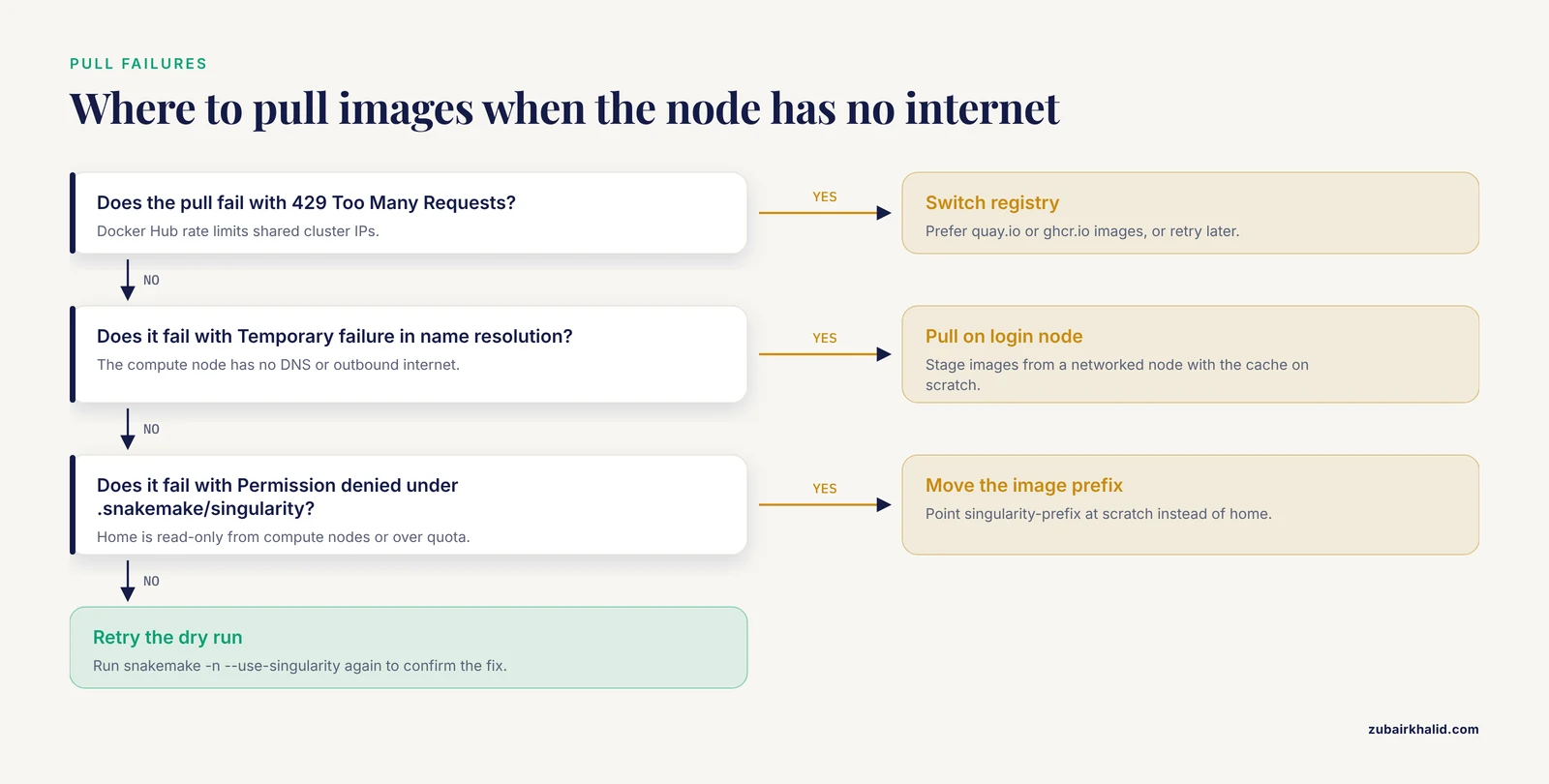
429 Too Many Requests during a pull | Docker Hub rate limits shared cluster IPs | Prefer quay.io or ghcr.io images, pre-pull on the login node, or retry later |
Temporary failure in name resolution during a pull | The compute node has no DNS or outbound internet | Pull on the login node or an interactive node first, with the cache on shared scratch |
operation not permitted while mounting the image | User namespaces are disabled and no setuid binary is available | Use the cluster's Singularity or Apptainer module and ask administrators about namespace support |
WorkflowError naming a rule with missing container directive | -use-singularity is on but that rule has no image | Add a per-rule directive or a global default container |
Permission denied writing under .snakemake/singularity | Home directory is read-only from compute nodes or over quota | Point -singularity-prefix at scratch |
MissingOutputException right after a job succeeded | Shared filesystem lag hid the output | Raise -latency-wait (120 seconds or more) |
CondaError or download timeouts with -use-conda, use-singularity | Conda-in-container image build needs network on the node | Build once from an interactive node with egress, or use prebuilt tool images instead |
Key Options at a Glance
| Option or directive | What it controls | Typical setting |
|---|---|---|
-use-singularity | Turns on containerization for rules with images | Always on for containerized runs |
singularity: directive | Which image a rule runs in, per rule or global | docker://quay.io/biocontainers/... |
-singularity-prefix DIR | Where Snakemake stores pulled images (default .snakemake/singularity) | A scratch path such as /scratch/$USER/smk-images |
-singularity-args | Extra runtime arguments, mainly bind mounts | "-bind /scratch:/scratch" |
-cores N | Cores for local rules and slot accounting | 4 to 8 |
-jobs N | Maximum simultaneous cluster jobs | 50 to 100, per group limits |
-latency-wait SECONDS | Grace period for slow shared filesystems | 120 |
-retries N | Automatic resubmission of failed jobs | 1 |
resources: mem_mb, runtime | Per-rule SLURM memory and time | Measured from sacct, with headroom |
-printshellcmds | Prints each executed command in the log | On while debugging |
Practical Tips for Shared Clusters
- Keep both the image prefix and the layer cache on scratch. Home directories usually have small quotas, and a handful of multi-gigabyte images fills them fast.
- Do the first run from an interactive node (
srun, pty ... bash) so every image lands in the cache while you watch. Later submissions then start instantly and never need egress. - Pin exact tags, including the build string, and record them in your repository. A workflow that pulls a moving tag today can break silently next quarter.
- Add
-cleanenvthroughsingularity-argswhen cluster environment variables leak into containers and change tool behavior. - Prefer slim base images. Smaller images pull faster over shared filesystems and reduce load on registry mirrors that everyone shares.
- Use the
group:directive to bundle many tiny rules into one SLURM job. A thousand two-second jobs each paying scheduler overhead is the most common source of "the workflow is slow" complaints. - Run with
-printshellcmdswhile debugging, then turn it off for production logs you actually want to read.
Common Mistakes and Limitations
- Running the whole workflow on the login node. Login nodes are shared, and administrators kill heavy processes there. Use them for editing, dry runs, and pulls, and send real work through SLURM.
- Treating
-use-singularityas automatic reproducibility. The flag containerizes whatever tags you wrote. Unpinned:latest-style tags drift, so reproducibility comes from pinned digests or exact version tags plus a versioned Snakefile. - Forgetting bind mounts for paths outside the defaults. A file that exists on the cluster can vanish inside the container with a plain
No such file or directoryif it lives under/scratchor/projectand you did not bind it. Test one rule withsingularity execbefore blaming the tool. - Letting caches fill your home directory. Both the Snakemake image prefix and the runtime layer cache grow without limit. Redirect both to scratch as shown in Step 4.
- Assuming compute nodes have internet. Many clusters allow egress only on login nodes. Conda-in-container builds and first-time pulls fail there with DNS errors, so stage images from a networked node.
- Requesting memory by superstition. Asking for 64 GB because a failure once looked memory-related wastes allocation and queue time. Measure
MaxRSS, add reasonable headroom, and move on. The profiling literature shows that matching resources to measured requirements beats default over-provisioning on both cost and runtime [1]. - Writing outputs only to
$TMPDIR. Node-local temp directories are wiped when the job ends. Copy anything you need out of$TMPDIRbefore the command exits. - Ignoring filesystem latency. On busy parallel filesystems, outputs can appear seconds after the job reports success. Without
-latency-wait, Snakemake raisesMissingOutputExceptionand may trigger needless reruns. - Mixing engines unknowingly. Some clusters provide
singularity, othersapptainer, and a few both with different versions. Check which module you loaded before debugging strange behavior.
A note on limits: clusters differ in module names, partitions, namespace support, and network policy, so confirm the details above with your system administrators before standardizing on them. Containers also pin software but not everything. Full reproducibility needs the Snakefile, the profile, the config, and the exact image tags under version control together.
Nextflow vs Snakemake
Both are leading open-source bioinformatics workflow managers with mature SLURM and Singularity support, and both scale from a laptop to thousands of scheduled jobs. Nextflow uses a Groovy-based DSL with first-class process and container semantics, built-in caching and resume, and the large nf-core pipeline catalog. Snakemake uses Python syntax with a wildcard-driven DAG model, deep conda integration, and a single engine that behaves the same locally and on a scheduler. Practical selection comes down to three questions. Which language does your team already know, Python or Groovy? Which ecosystem has the pipeline you would rather adapt than write, nf-core for Nextflow or the Snakemake workflow catalog? And do you need per-sample wildcard fan-out (Snakemake's strength) or process-level channel routing (Nextflow's strength)? For teams already invested in Python and conda, the Snakemake plus Singularity setup in this article is usually the shorter path. Either way, the container and profiling practices in this guide apply to both managers.
Frequently Asked Questions
Do I need root or admin rights to run Singularity on an HPC cluster?
No. Singularity and Apptainer run containers under your own user account, either through kernel user namespaces or through a setuid starter that administrators install. That design is the reason they, and not Docker, are the container engines provided on HPC systems.
Can I combine conda environments with Singularity containers in Snakemake?
Yes. Run with both -use-conda and -use-singularity and Snakemake builds one container image per conda environment, then runs each job inside it. The first build needs network access to the conda channels, so do it from an interactive node with egress or rely on prebuilt tool images instead.
Where does Snakemake store pulled container images, and can I change that location?
By default, pulled images go into .snakemake/singularity inside the workflow directory as hash-named files. Change it with -singularity-prefix, and set APPTAINER_CACHEDIR or SINGULARITY_CACHEDIR to control the layer cache. Put both on scratch rather than on a quota-limited home directory.
Why does my workflow work on the login node but fail when submitted to SLURM?
The usual causes are no outbound internet on compute nodes, filesystems that are mounted differently, or a module environment that differs between shells. Pull images on a networked node first, bind extra paths with -singularity-args, and load the same modules in your profile or job setup.
How do I find the right memory and time settings for each rule?
Run each rule once with generous limits, read MaxRSS and Elapsed from sacct for those job IDs, then set mem_mb and runtime near the measured peak plus headroom. Re-measure after major tool or data changes.
Does, use-singularity work with Apptainer?
Yes. Apptainer is the renamed Singularity, and -use-singularity drives both binaries. Recent Snakemake releases also accept -use-apptainer for the same behavior.
Can I containerize only some rules in a Snakemake workflow?
Not selectively with the flag alone. With -use-singularity active, Snakemake expects every rule to resolve to a container and raises a WorkflowError for any rule without a directive, so assign a directive to every rule. A global default container plus per-rule overrides is the usual pattern.
Is Snakemake or Nextflow the better bioinformatics workflow manager for an HPC cluster?
Neither is universally better. Both run well on SLURM with Singularity, so choose by team language skills (Python for Snakemake, Groovy for Nextflow) and by the pipeline ecosystem you want to reuse, such as nf-core for Nextflow.