Snakemake Rules Tutorial: Step-by-Step Guide
By Dr. Zubair Khalid, DVM, MS, PhD ·

By the end of this Snakemake rules tutorial you will be able to write a Snakefile with multiple linked rules, generalize one rule across dozens of samples with wildcards, run the pipeline on several cores at once, rerun only the steps affected by a change, and diagnose the most common error messages. You will need a Unix-style shell (Linux, macOS, or WSL on Windows), Python 3.11 or newer, the conda or mamba package manager, and a small directory of paired FASTQ files to practice on. If you do not have real data, two tiny synthetic FASTQ files are enough to complete every step in this guide.
Snakemake is a bioinformatics workflow manager, which means it turns a pile of manual shell commands into a reproducible, restartable, parallelizable pipeline defined in a single text file called a Snakefile. Published pipelines show how far this scales in practice. SnakeMAGs, for example, takes Illumina metagenomic reads through quality control with illumina-utils and Trimmomatic, optional host read removal with Bowtie2, assembly with MEGAHIT, binning with MetaBAT2, bin quality filtering with CheckM and GUNC, classification with GTDB-Tk, and abundance estimation with CoverM, all orchestrated by Snakemake in one workflow [1].
What a Snakemake Rule Actually Is
A rule is a named recipe that describes how to produce one or more output files from one or more input files. A Snakefile is just a Python file containing rules. The key idea that separates Snakemake from a plain shell script is that you rarely tell Snakemake what to run first. Instead, you name the final files you want, and Snakemake works backward through your rules, matching each file you want against the output patterns your rules can produce. The resulting graph of jobs is called the DAG (directed acyclic graph), and Snakemake executes it in dependency order, running independent jobs in parallel when cores are available.
Three properties follow from this design, and every step in this tutorial relies on them:
- Rules are declarative. You state what files a rule produces and consumes, not when it runs.
- Rules generalize over filename patterns. One rule with a
{sample}wildcard handles every sample in your project. - Execution is incremental. If an input file changes, Snakemake reruns exactly the downstream jobs that depend on it, and nothing else.
Why this matters for real pipelines
A metagenome-to-genome workflow like SnakeMAGs chains at least seven tool families, and each tool has its own flags, file formats, and failure modes [1]. Writing that as a shell script means manually tracking which sample finished, which failed, and what to rerun. Snakemake tracks all of that for you through file timestamps, and the rule structure makes the logic of the pipeline readable months later.
Step 0: Install Snakemake and Set Up a Project Directory
The cleanest installation route is a dedicated conda environment built from the bioconda and conda-forge channels, which is also where most bioinformatics tools live.
mamba create -n snakemake -c conda-forge -c bioconda snakemake
conda activate snakemake
snakemake --version
Expected output is a single version line, for example:
9.1.1If you see command not found, the activate step failed or the environment was not created. Re-run the mamba create command and read its output for solver errors.
Next, create a minimal project layout. You can name directories anything, but this structure appears throughout the tutorial:
myproject/
├── Snakefile
├── config.yaml
├── envs/
├── resources/
├── data/
│   └── reads/
├── results/
├── logs/
└── benchmarks/
Create it with:
mkdir -p myproject/{envs,resources,data/reads,results,logs,benchmarks}
cd myproject
For practice data, make two tiny FASTQ pairs (the content does not matter for learning the workflow mechanics):
for s in sampleA sampleB
do
    for r in R1 R2
    do
        printf "@read1\nACGTACGTAC\n+\nIIIIIIIIII\n@read2\nTTGGCCAAGG\n+\nIIIIIIIIII\n" > data/reads/${s}_${r}.fastq
    done
done
Step 1: Learn the Anatomy of a Rule
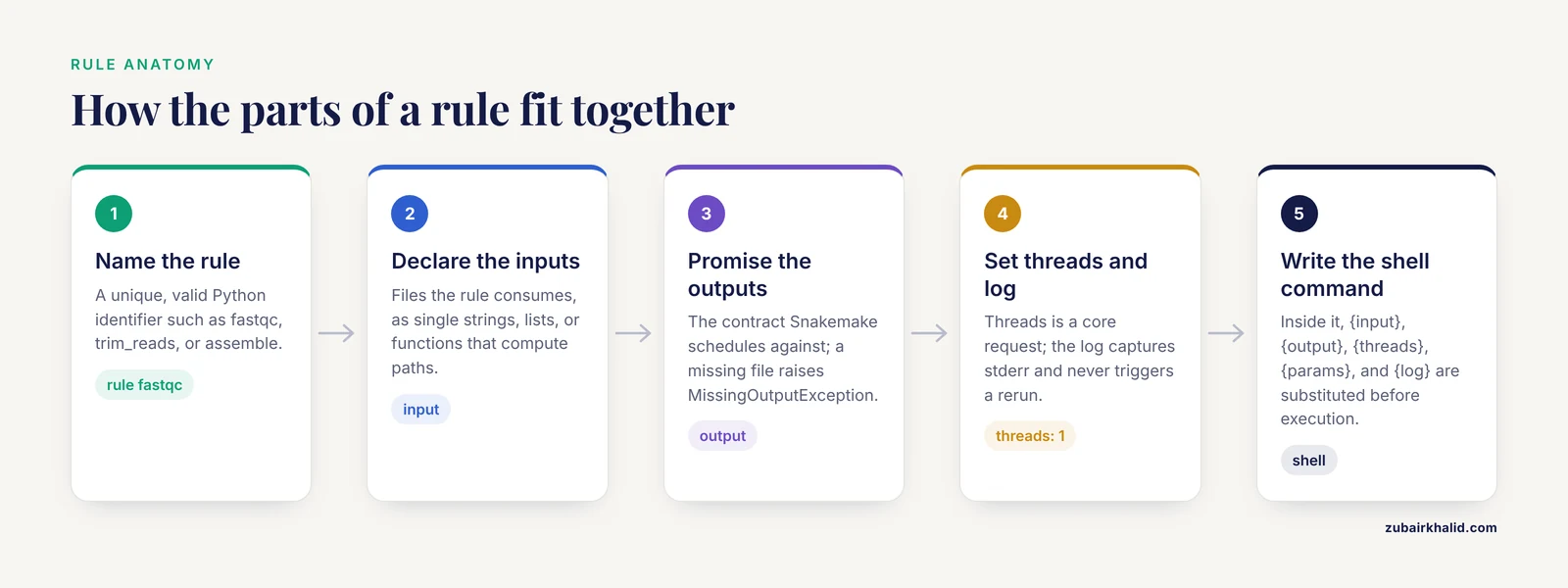
Every rule has the same skeleton. Here is a complete, runnable rule, followed by a line-by-line explanation:
rule fastqc:
    input:
        "data/reads/sampleA_R1.fastq"
    output:
        "results/fastqc/sampleA_R1_fastqc.html"
    threads: 1
    log:
        "logs/fastqc/sampleA_R1.log"
    shell:
        "fastqc {input} -o results/fastqc 2> {log}"
Each directive does one job:
- rule name must be a unique, valid Python identifier.
fastqc,trim_reads, andassembleare fine.rule allis a convention, covered in Step 2. - input lists files the rule consumes. Inputs can be single strings, lists of strings, or functions that compute strings from wildcards.
- output lists files the rule promises to create. This is the contract Snakemake schedules against. If the command exits zero but the file is missing, you get
MissingOutputException. - threads declares how many cores this job wants. Snakemake schedules against a global core budget you set at the command line, not against this number directly.
- log names a file where the rule records its stderr. Logs never trigger reruns, which makes them safe to write to.
- shell holds the actual command. Inside it,
{input},{output},{threads},{params},{log}, and{wildcards.sample}are substituted before execution.
Two formatting details save beginners hours. First, every file path in a rule is relative to the directory where you invoke snakemake, which should be the directory containing the Snakefile. Second, when a rule has multiple inputs, name them so you can reference them individually:
rule trim_reads:
    input:
        r1="data/reads/{sample}_R1.fastq",
        r2="data/reads/{sample}_R2.fastq"
    output:
        r1="results/trimmed/{sample}_R1.trim.fastq",
        r2="results/trimmed/{sample}_R2.trim.fastq"
    shell:
        "some_trimmer -in1 {input.r1} -in2 {input.r2} "
        "-out1 {output.r1} -out2 {output.r2}"
The named form (r1=, r2=) is what lets a paired-end trimmer receive its files in the right slots, and it documents intent at the same time.
Step 2: Write rule all First
Snakemake runs the first rule in the Snakefile by default. The universal convention is a pseudo-rule named all that requests only final outputs and has no shell command. Snakemake reads this rule as the target list and builds the DAG backward from it.
rule all:
    input:
        "results/fastqc/sampleA_R1_fastqc.html"
Running this now does real work:
snakemake -c 1Expected output:
Building DAG of jobs...
Using shell: /usr/bin/bash
Job stats:
job      count
-----    -----
all          1
fastqc       1
total        2

Reasons:
    (check individual rules above for details)
    output files from rule fastqc:
        - results/fastqc/sampleA_R1_fastqc.html

Rule fastqc:
    input: data/reads/sampleA_R1.fastq
    output: results/fastqc/sampleA_R1_fastqc.html
    jobid: 1
    reason: missing output files: results/fastqc/sampleA_R1_fastqc.html
    resources: tmpdir=/tmp

[Sun Nov 09 10:12:01 2026]
Finished job 1.
1 of 2 steps (50%) done
Finished job 0.
2 of 2 steps (100%) done
The exact wording varies slightly between Snakemake versions, but the structure (job stats table, per-rule reason lines, percentage progress) is stable. If the file already exists and nothing changed, Snakemake prints Nothing to be done (all requested files are present and up to date) and exits.
Step 3: Do a Dry Run Before Every Real Run
Before executing anything, always preview the plan:
snakemake -nThe -n flag (long form -dry-run) builds and prints the DAG without running a single job. Expected output shows each job that would run, in dependency order, with a reason: line for each. Read the dry run output like a checklist:
- Does the job list match the steps you intended?
- Are input paths spelled correctly (a wrong path appears as a missing input)?
- Is every sample represented exactly once per rule?
A dry run that surprises you is a five-second fix. The same surprise after a 20-hour assembly is a lost night.
Step 4: Generalize One Rule Across All Samples with Wildcards
The rules so far hardcode sampleA. Replace the sample name with a wildcard in braces, and the single rule now covers any sample:
configfile: "config.yaml"

SAMPLES = config["samples"]

rule all:
    input:
        expand("results/fastqc/{sample}_R1_fastqc.html", sample=SAMPLES)

rule fastqc:
    input:
        "data/reads/{sample}_R1.fastq"
    output:
        "results/fastqc/{sample}_R1_fastqc.html"
    log:
        "logs/fastqc/{sample}_R1.log"
    threads: 1
    shell:
        "fastqc {input} -o results/fastqc 2> {log}"
Create config.yaml in the project root:
samples:
  - sampleA
  - sampleB
Three things happen here, and understanding each is the core skill of writing Snakemake:
configfile: "config.yaml"loads external settings into a global dictionary calledconfig.expand()turns a pattern with wildcards into a concrete list of filenames, one per sample. Theallrule now requests a fastqc report for every sample in the config file. Adding sampleC to the YAML automatically extends the pipeline. Nothing in the rules changes.- When Snakemake needs
results/fastqc/sampleB_R1_fastqc.html, it searches rule outputs for a pattern that can produce that exact string, findsresults/fastqc/{sample}_R1_fastqc.html, bindssampletosampleB, and instantiates a job. This matching step is the DAG construction.
This pattern, one config-driven wildcard rule per analytical step plus an all rule calling expand(), is the backbone of nearly every Snakemake project, including published metagenomics workflows [1].
Wildcard rules you will hit eventually
Sometimes an input name cannot be derived from the output name with a plain pattern, for example when a mapping index lives outside your sample-based naming scheme. The standard fix is a function input:
rule align:
    input:
        reads="results/trimmed/{sample}_R1.trim.fastq",
        index=config["bowtie2_index"]
    output:
        "results/aligned/{sample}.bam"
    shell:
        "bowtie2 -x {input.index} -U {input.reads} | samtools view -b - > {output}"
The index entry has no wildcards, so Snakemake treats it as a fixed resource that the wildcard-matching step does not need to resolve.
Step 5: Chain Rules into a Real Pipeline
Now build a small three-step pipeline that mirrors the front end of published metagenome workflows: read quality assessment, adapter and quality trimming, and assembly. These are the same tool categories SnakeMAGs chains together, quality control with tools like Trimmomatic followed by assembly with MEGAHIT, when going from raw Illumina reads toward reconstructed genomes [1]. Your toy version uses the same tool families on tiny files.
Add these rules below all in the Snakefile:
rule trim_reads:
    input:
        r1="data/reads/{sample}_R1.fastq",
        r2="data/reads/{sample}_R2.fastq"
    output:
        r1="results/trimmed/{sample}_R1.trim.fastq",
        r2="results/trimmed/{sample}_R2.trim.fastq",
        unp1="results/trimmed/{sample}_R1.unpair.fastq",
        unp2="results/trimmed/{sample}_R2.unpair.fastq"
    threads: 2
    log:
        "logs/trim/{sample}.log"
    shell:
        "trimmomatic PE -threads {threads} {input.r1} {input.r2} "
        "{output.r1} {output.unp1} {output.r2} {output.unp2} "
        "ILLUMINACLIP:resources/adapters.fa:2:30:10 "
        "LEADING:3 TRAILING:3 MINLEN:36 2> {log}"

rule assemble:
    input:
        r1="results/trimmed/{sample}_R1.trim.fastq",
        r2="results/trimmed/{sample}_R2.trim.fastq"
    output:
        "results/assembly/{sample}/final.contigs.fa"
    threads: 4
    log:
        "logs/assembly/{sample}.log"
    shell:
        "megahit -1 {input.r1} -2 {input.r2} -t {threads} "
        "-o results/assembly/{wildcards.sample} 2> {log}"
Update all to request the final contig files:
rule all:
    input:
        expand("results/assembly/{sample}/final.contigs.fa", sample=SAMPLES)
Also create a placeholder adapter file so Trimmomatic has something to clip:
printf ">IlluminaUniversalAdapter1\nAGATCGGAAGAGC\n" > resources/adapters.faThen run the full sequence:
snakemake -n
snakemake -c 8
Expected dry-run job stats:
Job stats:
job         count
----------  -----
all             1
assemble        2
trim_reads      2
total           5
Expected real-run tail:
[Sun Nov 09 10:20:44 2026]
Finished job 0.
4 of 5 steps (80%) done
[Sun Nov 09 10:21:02 2026]
Finished job 3.
5 of 5 steps (100%) done
Notice what Snakemake did for you. The two trim_reads jobs (one per sample) ran in parallel because you gave it 8 cores and each job asked for 2. The two assemble jobs waited for their sample's trim jobs, then each grabbed 4 cores. The dependency order came from the file paths matching between rules, with zero explicit scheduling code from you.
Also notice the deliberate chaining detail: the assembly rule reads {sample}_R1.trim.fastq, exactly the string produced by the trim rule's output pattern r1. If those two strings differ by a single character, Snakemake treats them as unrelated files and reports a missing input. Chaining rules is a string-matching exercise, and most beginner pipeline breakage lives here.
Step 6: Make Settings Configurable with params
Flags like trimming stringency or assembly minimum count belong in config.yaml, not buried in the Snakefile. Use the params directive:
rule trim_reads:
    input:
        r1="data/reads/{sample}_R1.fastq",
        r2="data/reads/{sample}_R2.fastq"
    output:
        r1="results/trimmed/{sample}_R1.trim.fastq",
        r2="results/trimmed/{sample}_R2.trim.fastq"
    params:
        minlen=config["trim_minlen"]
    shell:
        "trimmomatic PE -threads {threads} {input.r1} {input.r2} "
        "{output.r1} {output.r2} "
        "ILLUMINACLIP:resources/adapters.fa:2:30:10 "
        "LEADING:3 TRAILING:3 MINLEN:{params.minlen} 2> {log}"
With trim_minlen: 36 in config.yaml, {params.minlen} becomes 36 at execution time. Anything that varies between runs, hosts, or sequencing kits is a candidate for params. Anything that is a fixed property of the analysis logic stays in the Snakefile.
Step 7: Pin Software Versions with conda Environments
A pipeline is only reproducible if the tool versions are pinned. Snakemake attaches a conda environment to any rule with the conda directive. Create one YAML per tool under envs/:
# envs/trim.yaml
channels:
  - conda-forge
  - bioconda
dependencies:
  - trimmomatic=0.39
# envs/assembly.yaml
channels:
- conda-forge
- bioconda
dependencies:
- megahit=1.2.11Reference them in the rules:
rule trim_reads:
    ...
    conda:
        "envs/trim.yaml"
    shell:
        ...
Then activate environment support at the command line:
snakemake -c 8 --use-condaSnakemake creates and caches one environment per YAML file, then runs each job inside its matching environment. This means fastqc does not need to be installed in your interactive shell at all, and a collaborator running your Snakefile gets the same versions automatically. This is one of the strongest reproducibility arguments for using a bioinformatics workflow manager instead of raw scripts.
If an environment fails to solve, the error names the conflicting packages. The usual cause is a typo in a package name or an impossible pin. Fix the YAML, delete the cached environment directory Snakemake points to in the error message, and rerun.
Step 8: Control Parallelism with threads and resources
The threads directive is a request, not a command. Scheduling is a budget calculation you control with -c (long form -cores). Work through one example:
- Two samples.
trim_readswants 2 threads each, so 4 total if run sequentially, 4 if run in pairs.assemblewants 4 threads each, so 8 total sequentially.
Budget of 8 cores: both trims run together (2+2=4), then both assemblies run together (4+4=8). Wall time is roughly one trim plus one assembly.
Budget of 6 cores: both trims still run together (4 of 6 cores in use, 2 idle). Assemblies cannot run together because 4+4 exceeds 6, so they run one at a time using 4 cores each. Wall time is one trim plus two assemblies.
This calculation is why you should set threads to the number the tool genuinely benefits from and let Snakemake pack jobs into whatever cores the cluster or workstation gives it. The same logic extends from a laptop to large systems. SnakeMAGs, like other Snakemake workflows, deploys unchanged from a single multicore workstation to clusters and grids, because the core budget is a runtime parameter rather than something written into the rules [1].
For memory, use the resources directive, which cluster executors read to fill scheduler submission fields:
rule assemble:
    ...
    resources:
        mem_mb=16000
Step 9: Visualize the DAG and Verify the Result
Two checks belong in your routine after any rule change.
First, render the DAG to a graph file using Graphviz:
snakemake --dag | dot -Tsvg > dag.svgExpected result is one node per job instance (so two nodes for a two-sample wildcard rule), with arrows from every upstream job to its consumers. Look for nodes you did not expect, which usually reveal a filename mismatch that silently split the graph.
Second, verify outputs with -summary:
snakemake --summaryExpected output is a table with one row per file in the DAG:
output_file                                       date    rule        version    status    pending
results/assembly/sampleA/final.contigs.fa         ...     assemble    ...        updated   -
results/trimmed/sampleA_R1.trim.fastq             ...     trim_reads  ...        updated   -
data/reads/sampleA_R1.fastq                       -       -           -          updated   -
The status column is where staleness shows up: a file whose inputs were updated after it was created is reported as updated for the input and the stale output appears as needing update on the next run. For a manual check of content, an assembly output from MEGAHIT is a multi-fasta file, so a quick sanity check is that the file begins with > and is non-empty:
head -c 80 results/assembly/sampleA/final.contigs.faStep 10: Rerun, Force, and Debug
Rerun after a code or parameter change
Snakemake compares timestamps and code. Editing the Snakefile, a params value, or an input file marks affected jobs for rerun automatically on the next invocation. To force a rerun of one rule regardless:
snakemake -R assembleTo rebuild everything from scratch:
snakemake -F-F (long form -forceall) reruns every job in the DAG. Use it sparingly, because it discards hours of compute.
Read the exact error, not the summary
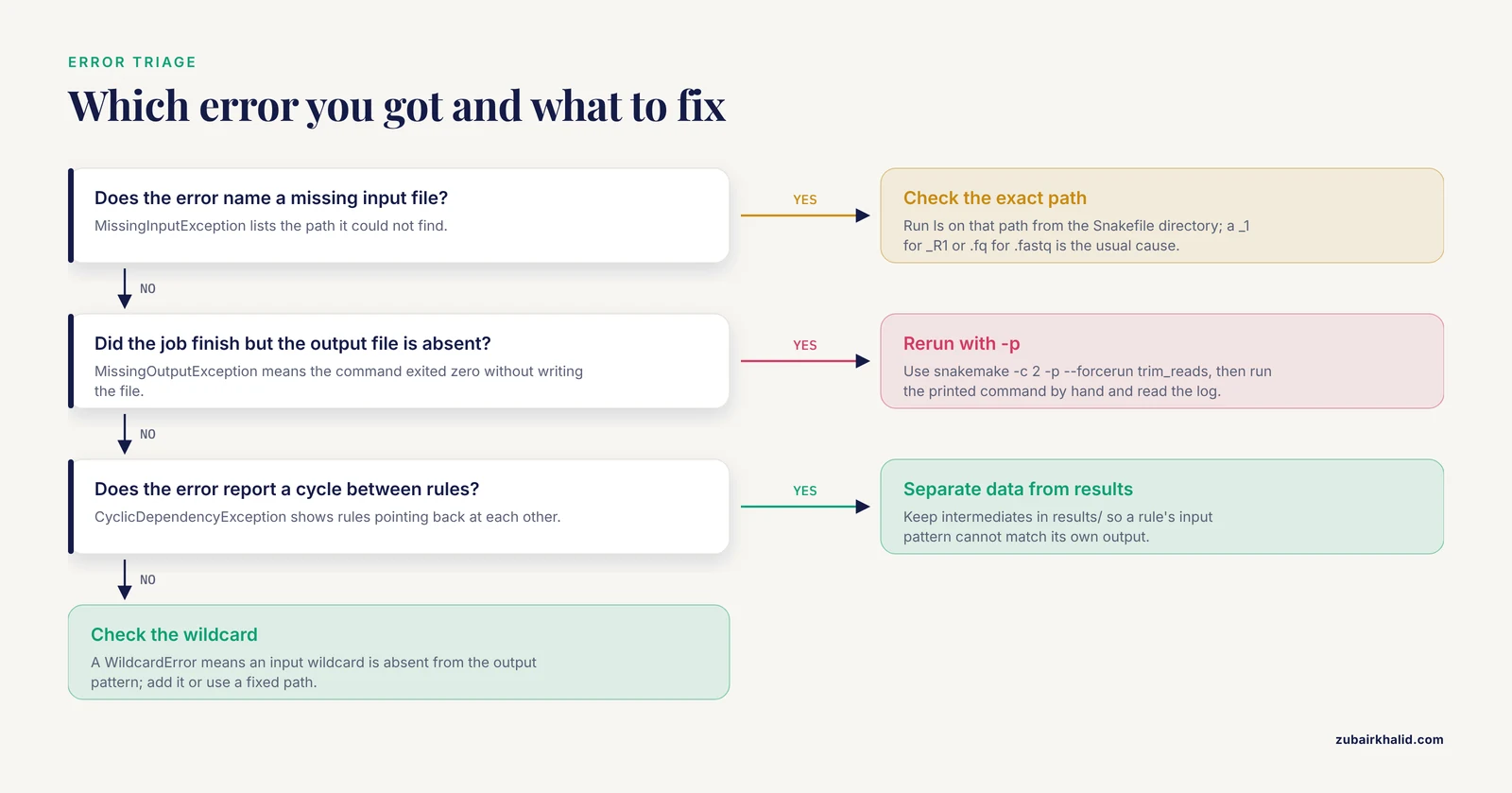
The three error messages you will see most often, with their standard shapes and fixes:
MissingInputException in rule trim_reads in file Snakefile, line 32:
Missing input files for rule trim_reads:
    input: data/reads/sampleA_R1.fastq
Fix: the file does not exist at that path. Run ls on the exact path from inside the Snakefile's directory. Nine times out of ten the filename pattern in input does not match reality (a _1 instead of _R1, a .fq instead of .fastq).
MissingOutputException in rule trim_reads in file Snakefile, line 32:
Job completed successfully, but some output files are missing:
    results/trimmed/sampleA_R1.trim.fastq
Fix: the command ran but wrote its output somewhere else, usually because of a relative path or because the tool failed silently while still exiting zero. Re-run that single command by hand with -p (print the full shell command) to see exactly what Snakemake executed:
snakemake -c 2 -p --forcerun trim_readsThen check the rule's log file under logs/.
CyclicDependencyException / cycle detected:
    trim_reads -> assemble -> trim_reads
Fix: a rule's input pattern matches its own output pattern. Here, if trim wrote to data/reads/{sample}_R1.trim.fastq, the input glob of trim itself would match its own output. Keep intermediate files in a separate results/ tree from raw data/ and the cycle disappears.
A fourth frequent case is the wildcard resolution error, which looks like this:
WildcardError in line 40 of Snakefile:
Wildcards in input files of rule assemble cannot be determined from output files:
    wildcard: sample
    output pattern: results/assembly/final.contigs.fa
Fix: an input pattern uses a wildcard that the rule's output does not contain. Either add the wildcard to the output path or replace the input with a fixed path or a function that computes it.
Log and benchmark every rule
The log and benchmark directives turn failures into readable evidence:
rule assemble:
    ...
    log:
        "logs/assembly/{sample}.log"
    benchmark:
        "benchmarks/assembly/{sample}.tsv"
The benchmark file records wall time and memory consumption per job in a tab-separated format, which is what you need when a reviewer asks how much compute the workflow used, or when you need to size a cluster allocation.
Rule Directives and Command-Line Options Reference
| Directive or option | What it does | Typical use |
|---|---|---|
input, output | Define file dependencies and contracts | Every rule |
shell | Run a shell command with {input}, {output}, {threads} substitution | Wrapping CLI tools |
script | Run an external Python or R script with a snakemake object exposed | Analysis code you want to test separately |
run | Inline Python executed by Snakemake itself | Small glue logic, file moves, summaries |
params | Pass configurable values into the command | Trimming thresholds, database paths |
threads | Core request for scheduling | Per-tool parallelism |
resources | Machine resources such as mem_mb | Cluster submission limits |
log, benchmark | Capture stderr and runtime/memory metrics | Debugging and reporting |
conda, container | Pin the software environment per rule | Reproducibility |
temp(), protected() | Auto-delete intermediates, write-protect finals | Disk management, guarding outputs |
wildcard_constraints | Restrict what a wildcard can match | Preventing ambiguous matches |
snakemake -n | Dry run, build DAG without executing | Pre-run check every time |
snakemake -c N | Set the total core budget | All real runs |
snakemake -R rule | Force rerun of one rule and its dependents | After changing a tool or its flags |
snakemake -F | Force rerun of the entire DAG | Clean rebuilds |
snakemake, dag | Print the DAG in Graphviz format | Sanity checks and documentation |
-use-conda | Materialize per-rule conda environments | All real runs with pinned versions |
-executor slurm | Submit jobs to a SLURM cluster (Snakemake 8 and later) | HPC deployment |
Common Mistakes and Limitations
These are the errors that account for most broken Snakefiles, along with the specific fix for each.
- Chaining rules with almost-matching paths. The trim rule writes
sampleA_R1.trim.fastqand the assembly rule readssampleA_R1_trim.fastq. Snakemake reports a missing input because pattern matching is exact string matching, not fuzzy. Copy output patterns from the producing rule, or centralize path templates at the top of the Snakefile and reuse them.
- Forgetting rule all, or putting it in the middle of the file. Snakemake executes the first rule in the Snakefile when you give no target. If
rule allsits below another rule, you will run the wrong pipeline. Keep it at the top of every Snakefile.
- Hardcoding sample lists in two places. If the sample names appear both in
config.yamland as literals in rules, they will drift apart. Derive everything fromconfigthroughexpand().
- Setting threads higher than the tool can use. A single-threaded tool with
threads: 8wastes your core budget and blocks other jobs. Setthreadsto what the tool actually exploits, and confirm with the tool's own runtime output.
- Overwriting inputs and outputs in the same directory. A rule whose output can match its own input creates a cycle or, worse, silent data loss. Separate
data/(read-only) fromresults/(rule-produced) from the start.
- Ignoring
-dry-run. The single cheapest habit in this whole tutorial is runningsnakemake -nbefore any real run. It catches path typos, wildcard problems, and DAG surprises for free.
- Not pinning versions. A workflow that depends on whatever
trimmomatichappens to be on the login node will produce different results after the next cluster update. Attach aconda(orcontainer) environment to every rule that runs real software.
- Using
runblocks for tools that must run on a cluster node. Arundirective executes inside the Snakemake process itself. That is fine on a workstation, but on a cluster it means the code runs on the head node rather than in a submitted job. Useshellorscriptfor anything compute-heavy.
- Treating timestamps as proof of correctness. Snakemake reruns when files change, but it cannot detect a tool that produced wrong results while writing plausible files. Sanity-check biological outputs (contig counts, read counts, quality metrics) the way you would check any analysis, with a quick script or a dedicated QC rule at the end of the DAG.
- Adding samples without validating the config. A typo in a sample name in
config.yamlproduces a missing-input error only when that sample's jobs are scheduled. Run a dry run after every config edit.
One honest limitation of Snakemake itself: the DAG is built from filenames, so workflows whose later steps depend on the content of earlier outputs (for example, binning only assemblies that pass a quality threshold discovered at runtime) need the checkpoint mechanism, which is more complex than plain rules. Plan for it before you need it, and keep its use localized.
Nextflow vs Snakemake
Both Snakemake and Nextflow are mature bioinformatics workflow managers, and both solve the same three problems: dependency tracking, parallel execution, and reproducibility through conda or containers. Choosing between them is mostly about syntax model and ecosystem, not capability.
- Language and mental model. Snakemake files are Python, and the mental model is filename matching: rules declare what files they produce, and the DAG is built by matching requested files against output patterns. Nextflow uses a Groovy-based DSL built around channels, asynchronous streams of values that flow between processes. Developers who think in file paths tend to feel at home in Snakemake faster, and the Python foundation means you can drop arbitrary Python logic (parsing, aggregation, list manipulation) directly into the Snakefile.
- Resuming and caching. Nextflow's
resumeflag is famously convenient, caching successful task results across pipeline modifications. Snakemake achieves the same end through its timestamp and code-change tracking plus rerun triggers, which requires slightly more care in how outputs are organized but does not need a special cache directory. - Syntax stability. Nextflow's DSL2 conventions have been largely stable across the ecosystem, while Snakemake has gone through larger syntax transitions between major versions, which means older tutorials sometimes show deprecated forms. When learning from a Snakemake rules tutorial, check that the examples match your installed version.
- Ecosystems. Nextflow has the large curated collection of nf-core pipelines. Snakemake has a broad catalog of community workflows, including domain-specific ones like SnakeMAGs for metagenome-assembled genome reconstruction [1]. If a maintained pipeline exists for your exact application in one ecosystem, starting from it beats writing your own.
The practical answer for most people: learn Snakemake if your daily work is Python and you want to understand and modify every rule yourself, learn Nextflow if your institution already runs nf-core pipelines. The DAG-thinking skills transfer between them.
Frequently Asked Questions
What is a rule in Snakemake?
A rule is a named recipe in a Snakefile that declares input files, output files, and the command or code that turns one into the other. Snakemake builds a dependency graph from your rules' file patterns and executes the jobs in the correct order, in parallel where possible.
How do I run Snakemake on a cluster?
Use a cluster executor or a profile. In Snakemake 8 and later, snakemake, executor slurm, cores 100 submits each job through SLURM, and a profile directory stores executor, partition, memory, and time settings so you can run with a short command like snakemake, profile slurm. The same Snakefile runs unchanged on a laptop or a cluster, which is a core design goal of the system.
Which should I learn first, Snakemake or Nextflow?
Learn Snakemake first if you already write Python, because Snakefiles are Python and the file-matching model is easy to reason about. Learn Nextflow first if your target pipelines live in the nf-core collection or your team already uses Nextflow. Both cover the same workflow management fundamentals, so the second one comes much faster.
Why does Snakemake report MissingOutputException?
The rule's command exited with status zero but did not create the file promised in output. Re-run the failing job with snakemake -p, forcerun rulename, read the command it prints, run it by hand, and inspect the rule's log file. The usual causes are a wrong relative path in the output, a tool that skips work silently, or output written to the wrong directory.
How do I rerun only the steps affected by a change?
Do nothing special. Snakemake compares file timestamps, input checksums, code, and params between runs and automatically reruns only jobs whose inputs or definitions changed. To override this and force a specific rule, use snakemake -R rulename, and to rebuild everything use snakemake -F.
Can I use conda environments with Snakemake?
Yes. Add a conda: directive pointing at a YAML file that lists channels and pinned dependencies, then run with -use-conda. Snakemake builds and caches one environment per YAML file and runs each rule's job inside the matching environment, so tool versions are pinned per rule and the workflow is reproducible for collaborators.
How many threads should I give a rule?
Give a rule the number of threads the underlying tool genuinely benefits from, and set the global budget with -c when you run. Snakemake packs jobs into the available cores without exceeding the budget. Declaring 8 threads for a single-threaded tool blocks cores that other jobs could use.
Do I need a rule all in every Snakefile?
You need some first rule that lists your desired final outputs, because Snakemake runs the first rule by default. Naming it all and giving it only an input block with expand() is the strong convention, and keeping it at the top of the Snakefile makes every run start from your true targets.