Snakemake's, until and, target: How to Resume from a Specific Rule
By Dr. Zubair Khalid, DVM, MS, PhD ·

Resuming a Snakemake workflow from a specific rule is a command-line skill, not a workflow rewrite. Snakemake is a bioinformatics workflow manager, a program that reads a description of your analysis steps, works out their dependencies, runs them in parallel where possible, and records what it did. That design gives you built-in tools for partial runs: -until stops after a rule, -omit-from skips a rule and everything before it, and positional targets request single files or rules directly.
By the end of this article you will be able to do all of the following:
- Stop a workflow after any rule with
-until. - Start a workflow at a later rule with
-omit-from. - Run a single rule on demand, or rerun one rule and update everything downstream, with
-forcerun. - Preview every partial run with
-dry-runbefore spending compute. - Diagnose and fix
MissingInputException,IncompleteFilesException, and surprise reruns.
What to have on hand:
- Snakemake 8.x, installed with
pip install snakemakeor from the bioconda channel. Snakemake 8 needs Python 3.11 or newer. Every command in this article also works on Snakemake 7 with minor differences in console wording. - A terminal and the small example workflow provided below. The example creates its own placeholder files, so no biological data and no extra tools are required.
- Graphviz, the graph drawing tool, only if you want the DAG images in the verification step.
Two version facts prevent early confusion. First, Snakemake 8 requires the -cores flag on every execution. Omit it and the run stops immediately:
Error: you need to specify the maximum number of CPU cores with the --cores flag.Snakemake 7 defaulted to a single core instead. Second, there is no -target flag in Snakemake, a detail that trips up many people looking for this exact feature. Targets are positional arguments, and the next section explains how they work.
What Resuming Means in Snakemake
Snakemake does not execute a Snakefile from top to bottom. It parses the rules, takes the target files you requested, and builds a DAG (a directed acyclic graph, the map of which jobs depend on which). A rule is a named step that declares inputs, outputs, and a command. A job is one concrete execution of a rule, for example the align rule applied to sample A. A target is what you ask Snakemake to produce, given as a file path or a rule name on the command line. With no targets, Snakemake uses the first rule in the Snakefile as the default target, which is why most workflows begin with an aggregate rule named all. The order of the remaining rules in the file does not matter.
Resuming is built into this model in two ways.
First, every invocation is already a resume. For each output file a job would produce, Snakemake consults the metadata it wrote during earlier runs, stored under .snakemake/metadata as one record per file. The record captures the code, params, inputs, software environment, and modification time (mtime, the filesystem timestamp) behind the file. If all of those still match, the job is skipped as up to date. If every job in the DAG is current, Snakemake prints:
Nothing to be done (all requested files are present and up to date).Second, you can bound the DAG from either end. The official Snakemake documentation describes the two flags this article centers on as follows:
-until RULEruns everything the rule depends on, runs the rule, and stops there. Downstream rules never run in that invocation.-omit-from RULEremoves the rule and everything upstream of it from the DAG, so execution starts at the rules that consume its outputs. Those outputs must already exist.
Positional targets narrow the run further, and -forcerun forces individual rules. The rest of the article walks through each pattern on a runnable example.
A Small Example Workflow You Can Run
The walkthrough uses a four-rule RNA-seq-style skeleton. In a real pipeline the shell lines would call tools such as cutadapt for trimming, bwa for alignment, and featureCounts for counting. Here they call touch, which creates an empty file, so the example runs on any laptop. Save this as Snakefile:
SAMPLES = ["A", "B"]

rule all:
    input:
        expand("results/counts/{sample}.tsv", sample=SAMPLES)

rule trim:
    input:
        "data/{sample}.fastq.gz"
    output:
        "results/trimmed/{sample}.fastq.gz"
    shell:
        "touch {output}"

rule align:
    input:
        "results/trimmed/{sample}.fastq.gz"
    output:
        "results/aligned/{sample}.bam"
    shell:
        "touch {output}"

rule counts:
    input:
        "results/aligned/{sample}.bam"
    output:
        "results/counts/{sample}.tsv"
    shell:
        "touch {output}"
The {sample} part is a wildcard, a placeholder that lets one rule handle every sample. Create the raw input files and check your version:
mkdir -p data
touch data/A.fastq.gz data/B.fastq.gz
snakemake --version
The last command prints a version string such as 8.24.0. Any 8.x release works for every command here. The dependency chain is trim, then align, then counts, then all, with two jobs per analysis rule.
How to Resume From a Rule in Snakemake, Step by Step
Run the following steps in order in a fresh directory. Each one shows the command and the output you should expect.
Step 1: List the rules you can resume from
snakemake --list-rulesExpected output:
all
trim
align
counts
Rule names are what you will pass to -until and -omit-from, and they are case sensitive. The companion command prints the rules that can serve as targets:
snakemake --list-target-rulesUse it when you inherit a large workflow and need to know what can be requested on the command line.
Step 2: Preview the partial run with a dry run
A dry run builds the DAG and lists every job it would run without executing anything. Always do this before a partial run:
snakemake --cores 8 --dry-run --until alignExpected output (one block per job, four in total):
Building DAG of jobs...
Job stats:
job      count
-----    -----
align        2
trim         2
total        4

[Tue Nov 11 09:30:10 2026]
rule trim:
    input: data/A.fastq.gz
    output: results/trimmed/A.fastq.gz
    jobid: 3
    reason: missing output file
    resources: tmpdir=/tmp

...

This was a dry-run (flag -n). The order of jobs does not reflect the order of execution.
Read the job stats table first. -until align kept the two trim jobs and the two align jobs, and dropped counts and all. The reason line under each job tells you why it is scheduled. A missing output file is the most common reason on a first run.
Step 3: Run up to a rule with, until
snakemake --cores 8 --until alignExpected output:
Building DAG of jobs...
Job stats:
job      count
-----    -----
align        2
trim         2
total        4

[Tue Nov 11 09:30:12 2026]
rule trim:
    input: data/A.fastq.gz
    output: results/trimmed/A.fastq.gz
    jobid: 3
    reason: missing output file
    resources: tmpdir=/tmp

[Tue Nov 11 09:30:13 2026]
Finished job 3.
1 of 4 steps (25%) done

...

[Tue Nov 11 09:30:15 2026]
Finished job 1.
4 of 4 steps (100%) done
Complete log: .snakemake/log/2026-11-11T093012.481620.snakemake.log
-until ran the whole upstream chain and then stopped. counts and all never ran. Run the same command again:
snakemake --cores 8 --until alignBuilding DAG of jobs...
Nothing to be done (all requested files are present and up to date).
Complete log: .snakemake/log/2026-11-11T093355.221040.snakemake.logThe selection is not saved anywhere. A plain snakemake, cores 8 at this point would continue downstream and produce the counts files and the all target. -until only bounds the invocation you pass it to.
Step 4: Start from a rule with, omit-from
-omit-from is the other end of the run. It removes the named rule and everything upstream of it from the DAG, so execution starts with the rules that consume its outputs:
snakemake --cores 8 --omit-from trimExpected output, given that Step 3 already produced the trimmed and aligned files:
Building DAG of jobs...
Job stats:
job      count
-----    -----
all          1
counts       2
total        3

[Tue Nov 11 09:41:02 2026]
rule counts:
    input: results/aligned/A.bam
    output: results/counts/A.tsv
    jobid: 0
    reason: missing output file
    resources: tmpdir=/tmp

...

3 of 3 steps (100%) done
Complete log: .snakemake/log/2026-11-11T094102.901210.snakemake.log
Two things happened at once. trim is gone because -omit-from removed it and its upstream. align is absent from the job list because its outputs were already current from Step 3, which is the automatic resume behavior doing its job.
On a fresh directory, where the trimmed files do not exist, the same command fails before anything runs:
Building DAG of jobs...
MissingInputException in rule align in file /home/user/rnaseq/Snakefile, line 15:
Missing input files for rule align:
input: results/trimmed/A.fastq.gz
input: results/trimmed/B.fastq.gz
The fix is to confirm that the omitted rules' outputs really exist before you omit them. List the directory, or produce them first with a bounded -until run. The exact wording of this error varies a little between Snakemake versions, but the exception name and the rule name are stable.
Step 5: Run a slice between two rules
Combine both flags to run a middle section. First create work for it by deleting the downstream files:
rm results/aligned/*.bam results/counts/*.tsv
snakemake --cores 8 --omit-from trim --until align
Expected output:
Building DAG of jobs...
Job stats:
job      count
-----    -----
align        2
total        2
Only the two align jobs run. This pattern is handy for debugging one stage: keep the inputs from the previous stage fixed, rerun the stage in isolation, and inspect its outputs.
Step 6: Rerun one rule and everything downstream
After you edit a rule, for example to fix the align command, you usually want that rule and its downstream rules rerun, and nothing upstream touched:
snakemake --cores 8 --forcerun alignExpected output:
Building DAG of jobs...
Job stats:
job      count
-----    -----
all          1
align        2
counts       2
total        5

[Tue Nov 11 09:52:20 2026]
rule counts:
    input: results/aligned/A.bam
    output: results/counts/A.tsv
    jobid: 0
    reason: missing output file
    resources: tmpdir=/tmp

...

5 of 5 steps (100%) done
Complete log: .snakemake/log/2026-11-11T095220.334501.snakemake.log
trim does not appear because it is up to date and was not forced. align runs again because -forcerun named it, and counts and all follow because their inputs changed or were missing. -forcerun accepts rule names or file paths.
Step 7: Verify the result
Three checks cover most cases. First, a dry run of the full workflow should report no work:
snakemake --cores 8 --dry-runBuilding DAG of jobs...
Nothing to be done (all requested files are present and up to date).Second, confirm the files themselves exist:
ls results/trimmed results/aligned results/countsresults/aligned:
A.bam B.bam
results/counts:
A.tsv B.tsv
results/trimmed:
A.fastq.gz B.fastq.gzThird, ask Snakemake for the status of every output file:
snakemake --summaryThe table lists each output file with the rule that produced it, a timestamp, and a status, and the column layout varies slightly between versions:
output_file                          date                 rule      version    log-file    status
results/trimmed/A.fastq.gz           2026-11-11 09:30:14  trim      8.24.0     ...         ok
results/trimmed/B.fastq.gz           2026-11-11 09:30:14  trim      8.24.0     ...         ok
results/aligned/A.bam                2026-11-11 09:52:21  align     8.24.0     ...         ok
results/aligned/B.bam                2026-11-11 09:52:21  align     8.24.0     ...         ok
results/counts/A.tsv                 2026-11-11 09:52:22  counts    8.24.0     ...         ok
results/counts/B.tsv                 2026-11-11 09:52:22  counts    8.24.0     ...         ok
A status of ok means the file is current. After you edit a rule, the files it produces flip to needs update, and a file whose input is gone shows missing input file. For a visual check, export the DAG that a partial run would use:
snakemake --dag --until align | dot -Tsvg > dag_until_align.svg-dag implies a dry run and prints the graph in Graphviz DOT format, so Graphviz must be installed. The exported picture should show trim and align for both samples and nothing else.
Key Options for Partial Runs
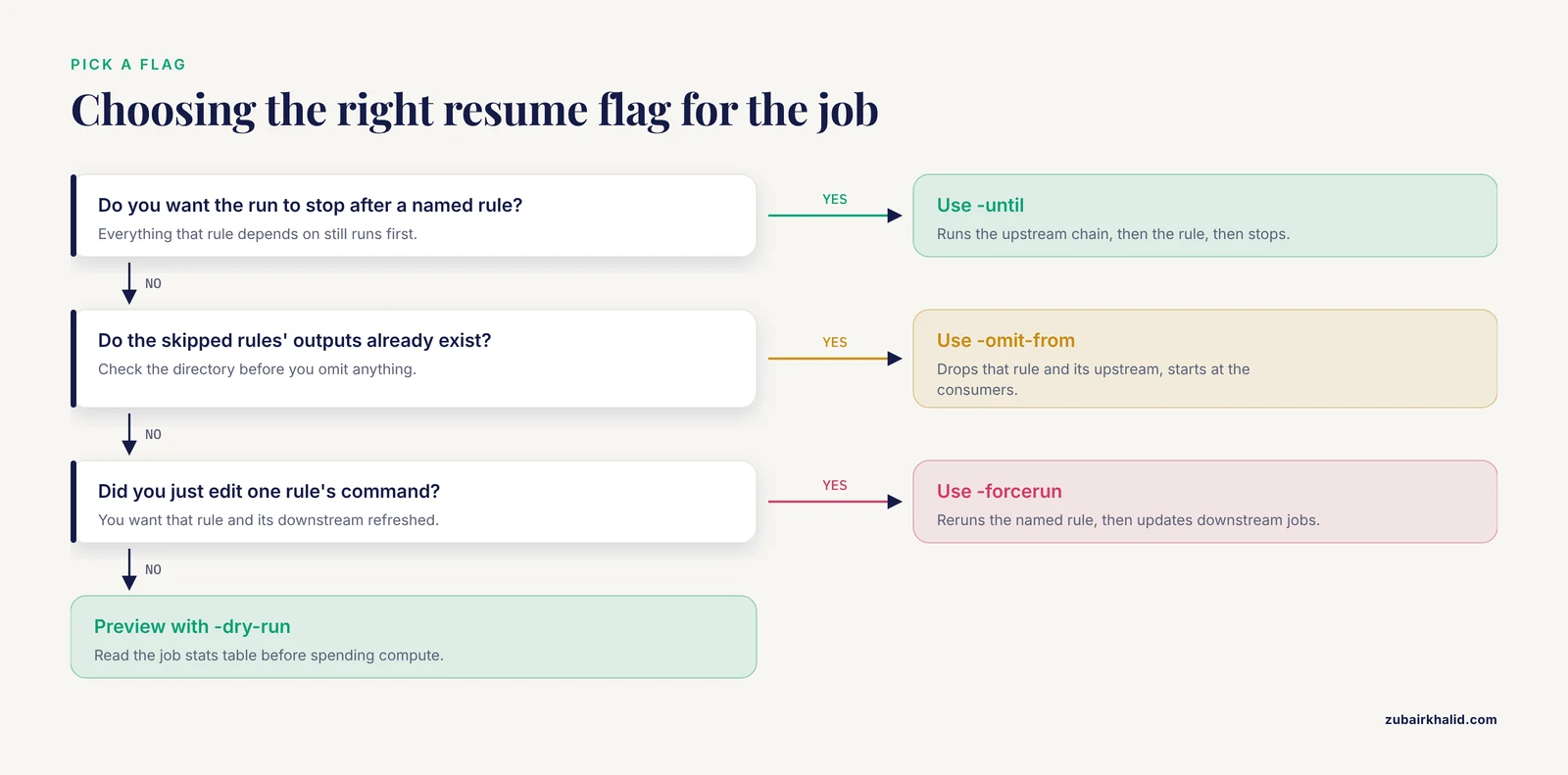
The table collects the options that matter when you resume from a rule.
| Option | What it does | Use it when |
|---|---|---|
| , - | , - | , - |
-until RULE | Runs everything RULE depends on, then RULE, then stops | You want the workflow up to a known point |
-omit-from RULE | Drops RULE and its upstream from the DAG | You want to start at a later rule whose inputs already exist |
| positional targets | File paths or rule names placed after the options | You want one sample, one file, or one aggregate output |
-dry-run (-n) | Builds the DAG and lists jobs without executing | Before any partial run |
-force | Reruns the jobs for the requested targets even when up to date | Your targets are current but wrong |
-forceall | Reruns every job in the DAG | A global change, such as a new reference, touches everything |
-forcerun RULE | Forces the named rule, then lets downstream jobs update | You fixed one rule's command |
-rerun-triggers | Selects which changes mark a file out of date: code, input, mtime, params, software-env | Cosmetic edits keep triggering reruns |
-touch | Marks outputs current by updating timestamps, without running commands | Files were produced or restored outside Snakemake |
-rerun-incomplete | Reruns jobs that a previous crash left unfinished | A run was killed mid-job |
-summary | Prints one row per output file with its status | You want to know what would rerun |
-reason | Prints why each job runs | A dry run schedules more than you expected |
-cores N | Sets the number of parallel jobs, required in Snakemake 8 | Always |
Rerun triggers deserve a closer look. Since Snakemake 7.8, the default up-to-date check covers five triggers: code (the rule's shell or Python code), input (the input files and their timestamps), mtime (output older than input), params (the values in the params section), and software-env (the conda environment or container image). The official Snakemake documentation lists exactly these. -rerun-triggers mtime narrows the check to timestamps alone, which is the main lever you have when you want a resume to ignore small edits.
-touch adopts outside files. If a colleague handed you finished intermediate files, snakemake, cores 1, touch walks the DAG and updates the timestamp of every output instead of running commands. For files copied from another location, clear the stale record first with snakemake, cleanup-metadata results/trimmed/A.fastq.gz, then touch.
-rerun-incomplete repairs crashed runs. A killed run leaves half-written outputs, and Snakemake refuses them on the next pass until you pass this flag.
Practical Tips for Resuming From a Rule
- Dry-run first, every time.
-dry-runcosts seconds and shows the exact job set. Read the job stats table and confirm the boundary rules are where you intended. - Read the reason lines. Snakemake prints why each job runs, for example
reason: missing output fileorreason: code has changed since last execution. If a reason does not match your intention, stop and adjust the flags before compute is spent. - Slice with both flags.
-omit-fromsets the near boundary and-untilsets the far one. Together they isolate any stage of a linear workflow. - Adopt files made outside Snakemake.
-touchregisters them as current, and-cleanup-metadataclears records that point to old locations. - Scope the rerun triggers after cosmetic edits.
-rerun-triggers mtimerestricts the up-to-date check to timestamps. Real code changes then stop triggering reruns, so use it deliberately and do a full run before final results. - Preview what an edit invalidates.
snakemake, list-code-changes,-list-params-changes, and-list-input-changesprint the files a given trigger would affect, without running anything. - Keep long partial runs moving.
-keep-going(-k) continues with independent jobs after a failure, and-printshellcmds(-p) prints each command, which makes logs readable. - Use the logs. Each run writes a timestamped file under
.snakemake/log, and the Complete log line at the end of a run names it. Diffing two logs shows exactly what a flag change did. - The same flags work on a cluster. Snakemake 8 dispatches through executor plugins, for example
-executor slurmafter installingsnakemake-executor-plugin-slurm. SLURM is the scheduler on most university clusters.-untiland-omit-frombehave identically there. - Use
-untilas a smoke test in continuous integration. Running a workflow up to a cheap rule on a tiny test dataset catches broken rules in seconds.
Once the partial-run commands your project needs are settled, write them into the workflow README or a small helper script so the whole team reuses the same entry points. The official Snakemake command-line reference is the authoritative list of every flag used here, including the complete set of rerun triggers.
Common Mistakes and Limitations
- Typing
-target. Snakemake has no such option. The parser answers with a usage block followed by: ``snakemake: error: unrecognized arguments: --target foo`Pass targets positionally instead, for examplesnakemake results/aligned/A.bamorsnakemake all. The similarly named-list-target-rules` option lists rules, it does not set a target. - Expecting
-untilto run a single rule.-untilruns the rule's entire upstream chain first. If the upstream outputs are current they are skipped in seconds, but on a fresh directory the run builds them, because the rule cannot execute without its inputs. To run one rule against existing inputs,-untilis enough. To rerun it regardless of status, use-forcerun. - Omitting a rule whose outputs do not exist.
-omit-fromdoes not create the files the skipped rule would have made. Downstream rules then fail at DAG build time with theMissingInputExceptionshown in Step 4. Check that the intermediate files exist, or produce them with a bounded-untilrun first. - Treating a partial run as saved state.
-untiland-omit-fromapply to one invocation. Nothing is stored, and the next plainsnakemakerun continues downstream. Do not look for a config entry or lock file that preserves the boundary, because none exists. - Surprise reruns after harmless edits. Reformatting a shell command, reordering params, or updating a conda environment file counts as a change under the default rerun triggers. The next run regenerates the affected files and everything downstream. Diagnose with
snakemake, summarybefore running, and scope the check with-rerun-triggerswhen the edit was truly cosmetic. - Resuming after a crash without
-rerun-incomplete. A killed run leaves half-written outputs recorded under.snakemake/incomplete. The next run refuses them: ``IncompleteFilesException: The files below seem to be incomplete. If you are sure you want to run them, use the --rerun-incomplete flag. results/aligned/A.bam`Rerun with-rerun-incomplete` and Snakemake regenerates exactly those files. - Requesting a wildcard rule by name. A rule with wildcards in its outputs, such as align with
{sample}, is best requested through concrete file paths likeresults/aligned/A.bam. Rules without wildcards, including aggregate rules such asall, can be typed directly. If a name-only request does not resolve the way you expect, switch to the file path. - Partial runs around checkpoints. A checkpoint is a rule declared with the
checkpointkeyword whose outputs are discovered while the workflow runs, which lets the DAG grow dynamically.-untiland-omit-fromare evaluated against the DAG as it exists when the run starts. Around checkpoints, a partial run can therefore cover a different set of jobs than the same flags suggest from the finished workflow. Dry-run carefully and prefer full runs for checkpoint-heavy sections. - Trusting exact error wording. Messages differ between Snakemake 7 and 8 and between minor releases. Read the exception class, the rule name, and the file list, which are stable, rather than the sentence around them.
- Limitations. A partial run is only as trustworthy as the DAG you think you are running. Validate any new partial-run command against a full run on a small test dataset before using it on real data. For pipelines that feed clinical or diagnostic decisions, a qualified professional must review the results before release.
Nextflow vs Snakemake for Partial Reruns
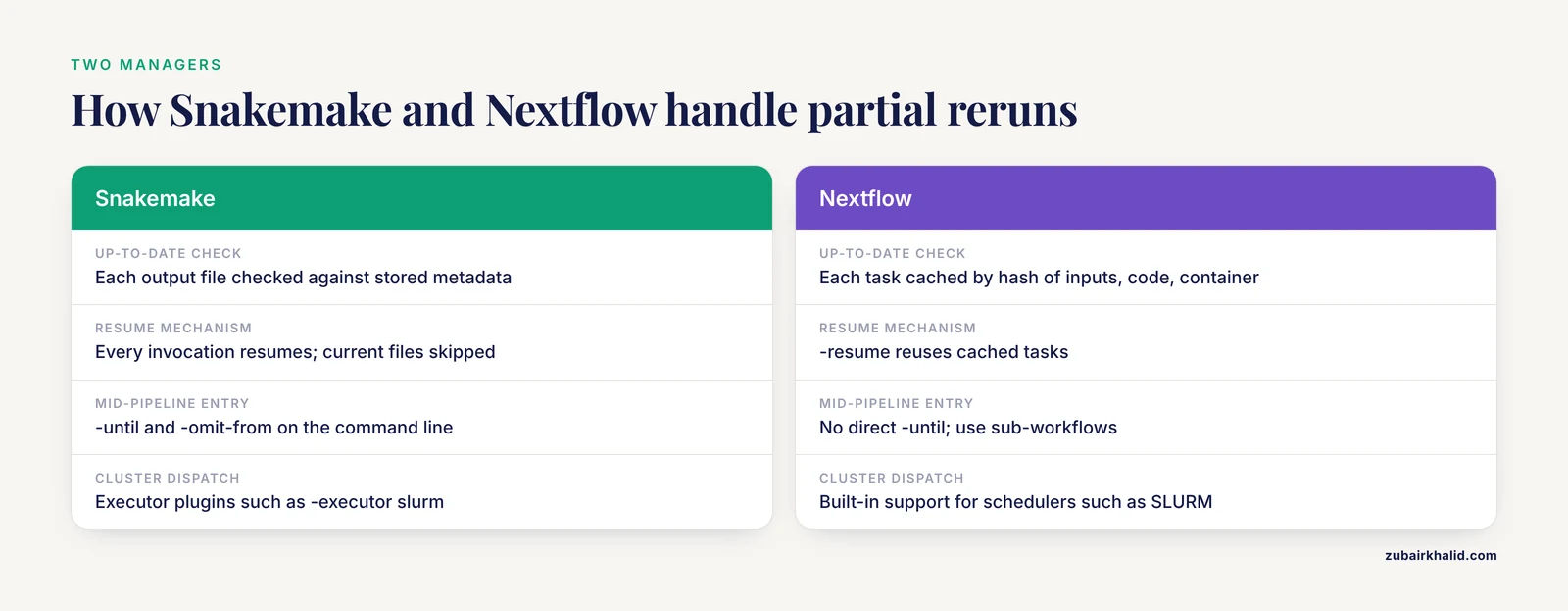
Nextflow vs Snakemake is a common comparison for this exact task, because both are established bioinformatics workflow managers and both avoid repeating finished work.
Snakemake rechecks every output file against its stored metadata on every invocation. Up-to-dateness is a property of files, so any process that leaves the expected files in place, run once by hand or by another tool, is enough to make later runs skip upstream. -until and -omit-from add explicit, named-rule control over where a run starts and stops.
Nextflow takes a different approach. Each process execution is cached in the pipeline's work directory, keyed by a hash of its inputs, code, and container. The -resume flag reuses those cached tasks whenever their hash is unchanged, which makes reruns cheap and mostly automatic. There is no direct equivalent of -until. Partial execution in Nextflow is usually achieved through -resume caching, or by structuring the pipeline so the section you want is its own sub-workflow.
In practice, Snakemake makes mid-pipeline entry points a command-line concern, while Nextflow pushes them into pipeline design. Teams invested in the nf-core collection, which is Nextflow-based, usually stay there. Labs that want Python-native syntax and file-level control often choose Snakemake. Both run well on HPC schedulers, Snakemake 8 through executor plugins and Nextflow through built-in support for common schedulers such as SLURM.
Frequently Asked Questions
Does Snakemake have a, target flag?
No. Snakemake takes targets as positional arguments, either file paths or rule names, and its parser rejects -target as an unrecognized argument. Request a file with snakemake results/aligned/A.bam or an aggregate rule with snakemake all.
How do I start a Snakemake pipeline from a specific rule?
Use -omit-from with the last rule you want to skip, for example snakemake, cores 8, omit-from trim. Snakemake drops that rule and everything upstream of it and runs the rest, which only works when the skipped rules' outputs already exist.
What is the difference between, until and, omit-from?
-until sets the far end of a run and stops after the named rule completes. -omit-from sets the near end and removes the named rule and its upstream from the DAG. Used together, they run a slice between two rules.
Why does Snakemake rerun steps that already finished?
A rerun trigger changed since the last execution: the rule code, params, inputs, software environment, or file timestamps. Run snakemake, summary or snakemake, list-code-changes to see which files are affected before you rerun.
Can I run exactly one rule and nothing else?
Yes. snakemake, cores 8, until myrule runs only that rule when its inputs are already up to date, and snakemake, cores 8, forcerun myrule runs it even when it is current.
How do I force a rerun of one rule after changing its code?
Run snakemake, cores 8, forcerun myrule. Snakemake reruns that rule and then updates every downstream job that consumes its outputs. Use -force or -forceall for broader reruns.
What does "Nothing to be done (all requested files are present and up to date)" mean?
Every requested file exists and still matches the metadata from the run that produced it, so there is no work left for that invocation. If you expected work, check your targets or force a rerun.
How does Snakemake's resume behavior compare with Nextflow -resume?
Snakemake rechecks each output file against stored metadata on every run and skips current files. Nextflow caches finished tasks in its work directory and reuses them when you pass -resume. Snakemake additionally offers -until and -omit-from, which have no direct Nextflow equivalent.