Resource Management in Snakemake
By Dr. Zubair Khalid, DVM, MS, PhD ·

Resource management in Snakemake is the difference between a workflow that fills a cluster politely and one that idles half a node or gets its jobs killed. By the end of this guide you will be able to declare per-rule CPU, memory, wall-time, and GPU requests, cap what an entire run may consume, launch the workflow on SLURM with the modern executor plugin, measure what each job really used, and right-size requests from a profile instead of editing the Snakefile every time.
You need a Linux environment, Snakemake 8 or newer (the flag names here follow the 8.x command line), access to a cluster that runs SLURM, and a project directory with a Snakefile. The example pipeline uses fastp, bwa, samtools, and featureCounts, but the resource logic is identical for any workflow.
The stakes are practical. Workflow executions on large-scale machines routinely run for hours or days, and the workflow management system has to control parallel execution while managing the data those jobs produce [1]. Every core you fail to request is a core someone else uses, and every job killed at 95 percent completion is a rerun you pay for twice.
Resource Management in Snakemake on HPC: The Core Ideas
A bioinformatics workflow manager takes a pipeline description and executes it for you, handling dependencies, parallelism, restarts, and logging. Snakemake describes pipelines as a directed acyclic graph (DAG), a graph of jobs whose arrows never loop back. Each node comes from a rule, a template that maps inputs to outputs through a shell command or Python code. Expanding a rule over your samples produces jobs, and the scheduler decides which jobs run at any moment and where they run.
On a single machine, the scheduler is a resource allocator. It fills the cores you grant with -cores and never exceeds the named resources you grant with -resources. On a cluster, the same allocator runs on a login node and hands each job to SLURM, the workload manager used on most university and national-lab clusters, translating your declarations into sbatch options.
Two declarations do most of the work:
threadsstates how many CPU cores one job of the rule needs.resourcesis a dictionary of named quantities, such as memory and wall time, that one job needs.
The scheduler is greedy. It repeatedly picks runnable jobs that fit the remaining budget, preferring jobs whose outputs unblock the rest of the DAG. That is the same execution-control problem every parallel workflow management system faces, and research on those systems identifies the combination of execution control and workflow data management as the central design challenge for efficient large-scale runs [1]. Snakemake's answer is declarative and local: each rule states its needs, each run states its budget, and the scheduler does the arithmetic.
One distinction prevents most confusion. On a local run, a job's threads must fit inside -cores, because the jobs share one machine. On a cluster run with a remote executor, -cores (or its alias -jobs) counts concurrent jobs, not cores. Each cluster job gets its own allocation sized by the rule that produced it, so a 16-thread job is perfectly happy even when you launched with -cores 8.
The Knobs: What a Rule Declares and What You Cap
What a rule declares
Rules carry their resource requests next to the code that uses them:
rule align:
    input:
        reads="results/trim/{sample}.trim.fastq.gz",
        ref="resources/genome.fa"
    output:
        "results/align/{sample}.bam"
    threads: 8
    resources:
        mem_mb=65536,
        runtime=1440,
        gpus=0
    benchmark:
        "benchmarks/align/{sample}.tsv"
    shell:
        "bwa mem -t {threads} -M {input.ref} {input.reads} "
        "| samtools sort -@ {threads} -m 6G -o {output} -"
Each line has a job:
threads: 8means one job of this rule consumes 8 cores. Use the{threads}placeholder inside the command so the tool matches the allocation.mem_mbis the memory request for one job. The SLURM executor passes it tosbatchas-mem, and SLURM reads-memvalues as MiB, so treatmem_mbnumbers as MiB in practice. Recent Snakemake releases addmem_mibanddisk_mib, which make the unit explicit.runtimeis the wall-clock limit of one job in minutes. 1440 minutes is 24 hours, and the SLURM executor passes it tosbatchas-time.gpusrequests GPUs for one job, which the SLURM executor translates into a GPU request such as-gres=gpu:1.benchmarkwrites a small table of measured usage for each finished job, which you will use for right-sizing later.disk_mbstates how much scratch disk a job needs, which executors consult when staging data.
You can invent extra keys for anything the cluster treats as scarce, for example licenses=1 for a licensed tool or tmpdir="/scratch/$USER" to relocate job scratch space. A resource nobody caps is not limited, but the SLURM executor still passes mem_mb and runtime to sbatch even when you never cap them. Capping controls how many jobs run at once, not what each job asks the cluster for.
threads may also be a callable that receives the wildcards, which helps when the right core count depends on the sample, for example threads: lambda wc: 8 if wc.sample in DEEP else 4.
What you cap
Caps live on the command line or in a profile:
snakemake --cores 64 --resources mem_mb=262144 gpus=2-cores(or-jobs) is the total core pool of the run on a single machine. With a remote executor such as slurm, the same number sets how many cluster jobs may run at the same time, and-local-coresseparately limits the jobs that stay on the master node.-resourcesdefines pools of named resources shared by every job in the run. The scheduler refuses to submit a job that would exceed a pool.-max-threadscaps the thread count of any single job, which is how you reuse a cluster-tuned Snakefile on a laptop.-max-resourcessets a hard upper bound on what any single job may request, so an over-ambitious rule fails fast instead of landing in the queue.- Recent versions also accept
-memand-mem-per-cpu, which cap memory the way-corescaps cores for local runs. -cores alluses every core of the current machine, which is convenient for interactive work on a compute node.
Snakemake 8 refuses to run without an explicit budget. Omit -cores and you get:
Error: you need to specify the maximum number of CPU cores with --cores.A job whose threads exceed the budget fails with a message like "Job align requires 16 threads but only 8 cores are available." Lower the rule's threads, raise the cap, or clamp with -max-threads.
The table below collects the options you will use most.
| Declaration or flag | Where it lives | What it controls | Example |
|---|---|---|---|
threads | rule | CPU cores per job | threads: 8 |
resources: mem_mb | rule | memory per job, read as MiB by SLURM | mem_mb=65536 |
resources: runtime | rule | wall-clock limit per job, in minutes | runtime=1440 |
resources: gpus | rule | GPUs per job | gpus=1 |
resources: disk_mb | rule | scratch disk per job | disk_mb=102400 |
benchmark | rule | measured usage per finished job | benchmark: "bench/{sample}.tsv" |
-cores, -jobs | CLI or profile | total core pool, or max concurrent cluster jobs | -cores 64 |
-resources | CLI or profile | shared pools of named resources | -resources mem_mb=262144 |
-local-cores | CLI | cores for jobs that stay on the master node | -local-cores 8 |
-max-threads | CLI | cap on any single job's threads | -max-threads 16 |
-set-threads | CLI or profile | override a rule's threads | -set-threads align=4 |
-set-resources | CLI or profile | override a rule's resource | -set-resources align:mem_mb=32768 |
-default-resources | CLI or profile | defaults for rules that declare none | -default-resources mem_mb=2000 |
Step-by-Step: Running a Resource-Aware Workflow on a SLURM Cluster
Step 1. Install Snakemake with the SLURM executor plugin
mamba create -n smk -c conda-forge snakemake snakemake-executor-plugin-slurm
conda activate smk
snakemake --version
Expected output is a version string such as 8.25.5. If the cluster provides a module, module load snakemake works too, but confirm the version is 8 or newer before you rely on the executor plugin.
Step 2. Write rules that carry their own requests
Organize the project as follows:
Snakefilewith the rulesworkflow/profiles/hpc/config.yaml, the cluster profiledata/with input readsresources/genome.fa, the referenceresults/,benchmarks/, andlogs/, created by the rules
SAMPLES = ["S1", "S2", "S3"]

rule all:
    input:
        "results/counts/all.tsv"

rule trim:
    input:
        "data/{sample}.fastq.gz"
    output:
        "results/trim/{sample}.trim.fastq.gz"
    threads: 1
    resources:
        mem_mb=2000,
        runtime=30
    shell:
        "fastp -i {input} -o {output} -w {threads}"

rule align:
    input:
        reads="results/trim/{sample}.trim.fastq.gz",
        ref="resources/genome.fa"
    output:
        "results/align/{sample}.bam"
    threads: 8
    resources:
        mem_mb=65536,
        runtime=1440
    benchmark:
        "benchmarks/align/{sample}.tsv"
    shell:
        "bwa mem -t {threads} -M {input.ref} {input.reads} "
        "| samtools sort -@ {threads} -m 6G -o {output} -"

rule counts:
    input:
        bams=expand("results/align/{sample}.bam", sample=SAMPLES),
        ref="resources/genome.fa"
    output:
        "results/counts/all.tsv"
    threads: 1
    resources:
        mem_mb=4096,
        runtime=60
    shell:
        "featureCounts -T {threads} -a {input.ref} -o {output} {input.bams}"
The arithmetic is consistent inside each rule. The align job asks for 8 cores and 65536 MiB, and its command gives samtools sort 6 GiB per thread, 48 GiB total, which fits with headroom. Requests that ignore what the command actually does are how jobs die.
Step 3. Dry run the plan
snakemake -n --cores 64 --resources mem_mb=262144Expected output:
Building DAG of jobs...
Job stats:
job      count
align       3
counts      1
trim        3
total       7

This was a dry-run (flag -n).
The dry run builds the DAG and schedules it without executing anything. It fails here if a rule asks for more threads than the budget allows, and it reports jobs that can never fit the caps you passed. Add -p to print the shell commands as they would run.
Step 4. Create the cluster profile
Create workflow/profiles/hpc/config.yaml:
executor: slurm
jobs: 50
default-resources:
  slurm_partition: "main"
  mem_mb: 2000
  runtime: 60
set-threads:
  align: 8
set-resources:
  align:
    mem_mb: 65536
    runtime: 1440
retries: 1
latency-wait: 60
printshellcmds: true
Each key mirrors a command-line flag. default-resources fills in values for rules that declare none, so every job lands in the main partition without any Snakefile edits. set-threads and set-resources override individual rules, which keeps cluster-specific numbers out of the workflow itself. retries resubmits a failed job once, which absorbs the transient failures every shared cluster produces. latency-wait gives the busy shared filesystem 60 seconds to make outputs visible before Snakemake declares them missing. printshellcmds echoes commands into the log. If your cluster charges usage to an account, add slurm_account to default-resources, and use slurm_extra to pass raw sbatch options such as -qos=batch.
Step 5. Launch
snakemake --workflow-profile hpcExpected log lines:
Building DAG of jobs...
Job stats:
job      count
align       3
counts      1
trim        3
total       7

Selecting jobs to run...
Job 1 has been submitted with external jobid '4123456'.
Job 2 has been submitted with external jobid '4123457'.
Job 3 has been submitted with external jobid '4123458'.
The master process stays on the login node and submits each job with sbatch, sized by that rule's threads, mem_mb, and runtime. Keep the master alive in tmux or screen, or submit the master itself as a cluster job with sbatch, wrap "snakemake, workflow-profile hpc" on systems that kill long login-node processes. The jobs value in the profile, 50 here, is the maximum number of allocations in flight at once.
Step 6. Monitor the run
squeue -u $USER
sacct -j 4123456 --units=G --format=JobID,State,Elapsed,MaxRSS
Expected squeue output while jobs run:
JOBID    PARTITION  NAME       USER  ST  TIME   NODES
4123456  main       snakemake  jdoe  R   4:12   1
Expected sacct output after a job finishes:
JobID     State      Elapsed    MaxRSS
4123456   COMPLETED  02:14:09   40.25G
MaxRSS is the peak resident set size, the memory the job actually held at its busiest. Watching these states while jobs run is the practical version of what workflow researchers call user steering, the ability to inspect a running workflow and adapt it based on intermediate results, a capability that parallel workflow management systems can support with low overhead even on large clusters [1]. In Snakemake the equivalent levers are the profile overrides from Step 4, applied between runs.
Step 7. Right-size from measurements
The benchmark file benchmarks/align/S1.tsv looks like this:
s       h:m:s     max_rss  max_disk  max_uss  max_pss  io_in  io_out  mean_load
8213.4  02:16:53  41877.3  0.0       41880.1  41902.7  12.4   9.8     7.94
max_rss is the peak memory in MB, s is the runtime in seconds, and mean_load is average CPU utilization. Right-sizing is mechanical:
- Read
max_rssand the elapsed time from the benchmark or fromsacct. - Set
mem_mbto roughly 1.2 to 1.5 times the observed peak, rounded up to a step your scheduler likes. - Set
runtimeto the observed elapsed time plus comfortable headroom, since a job killed at its time limit loses all progress. - Put the new numbers in
set-resourcesin the profile when they are cluster specific.
An align job that peaked at 41877 MB keeps its 65536 MiB request. A trim job that peaks at 512 MB can drop from 2000 to 1024, and the scheduler then fits twice as many trim jobs into the same memory pool.
Step 8. Verify and close out
snakemake --report report.html
snakemake --detailed-summary
The report bundles per-job runtimes and metadata into a single HTML file you can attach to a paper or a ticket. The detailed summary lists every output file with its creation date and the rule that produced it, the fastest way to confirm that all targets came from the rules you expect. If the master was interrupted, run snakemake, unlock to clear the lock, then rerun. Snakemake detects half-written files from the killed jobs and prints a message like "Incomplete files detected after restart, these will be rerun" before redoing exactly those jobs.
A Worked Sizing Example
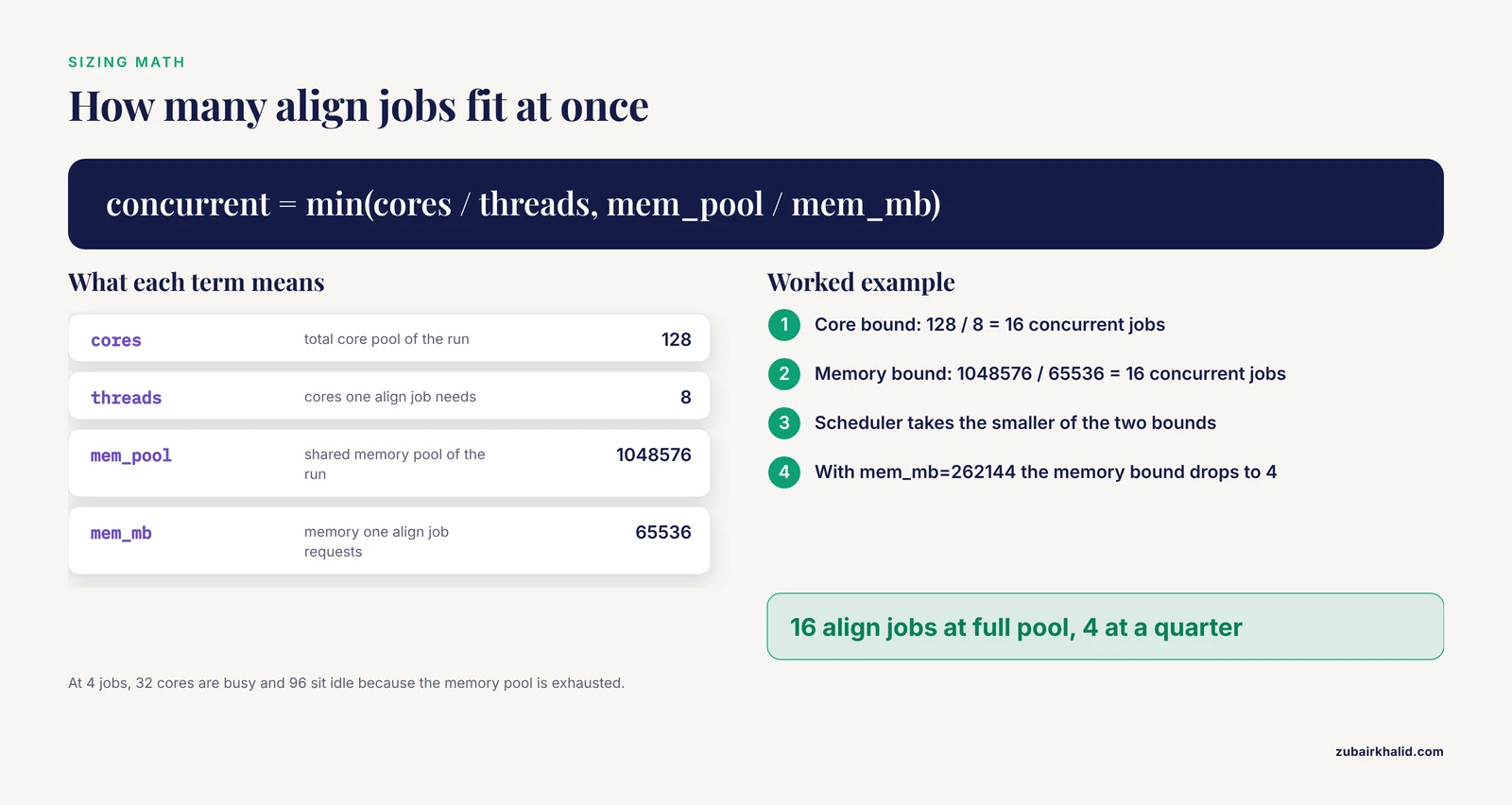
Numbers make the scheduler concrete. Take one high-memory node with 128 cores and 1,048,576 MiB of RAM. The align rule requests 8 threads and 65536 MiB per job. You launch:
snakemake --cores 128 --resources mem_mb=1048576The concurrency math for align jobs:
cores bound:   128 / 8         = 16 concurrent jobs
memory bound:  1048576 / 65536 = 16 concurrent jobs
scheduler:     min(16, 16)     = 16 align jobs at once
Now cap memory to a quarter of the node:
snakemake --cores 128 --resources mem_mb=262144cores bound: 128 / 8 = 16 concurrent jobs
memory bound: 262144 / 65536 = 4 concurrent jobs
scheduler: min(16, 4) = 4 align jobs at onceFour align jobs occupy 32 cores and all 262144 MiB of the pool. The other 96 cores sit idle, because every remaining runnable job also needs memory from the exhausted pool. That idle time is the visible cost of a conservative memory cap, and the same logic in reverse explains why under-requested memory gets jobs killed. On SLURM the arithmetic happens per node: a 65536 MiB request on a 1048576 MiB node allows 16 such jobs per node, which is why per-job requests and node sizes should be planned together.
Profiles, Overrides, and HPC Tips for Daily Work
Snakemake reads profiles at two levels. -workflow-profile NAME reads workflow/profiles/NAME/config.yaml inside the project, which is where cluster-specific values belong, and it travels with the repository so collaborators get the same behavior. -profile NAME reads a user-level profile such as ~/.config/snakemake/NAME/config.yaml, which is where personal preferences belong. A project can ship several workflow profiles, one per cluster or one per scale, and you pick one at launch time.
One-off overrides work on the command line:
snakemake --workflow-profile hpc --set-threads align=4 --set-resources "align:mem_mb=32768"That command runs the same workflow with half the align footprint, useful when the queue for 64 GiB jobs is long and the small-job queue is empty.
Two more scheduling features matter on shared clusters:
- Many tiny jobs waste more time in the queue than they spend running. Mark cheap rules with
group: "trim"in the Snakefile and bundle them with-group-components trim=10, which submits 10 trim jobs inside onesbatchallocation. Keeping the number of schedulable units reasonable is part of keeping task scheduling scalable, a recognized concern for parallel workflow management systems as job counts grow [1]. - Submission storms can annoy the scheduler.
-max-jobs-per-secondthrottles how fast Snakemake submits, and-scheduler ilpswitches the greedy scheduler to an integer-programming scheduler that packs jobs tighter, at some planning cost per scheduling round.
Keep a default profile for local development with small -cores and -max-threads values, and a cluster profile with the real numbers. The Snakefile stays identical in both worlds, which is the whole point of the split.
Legacy Clusters: The -cluster Syntax of Snakemake 5 to 7
Many clusters still run Snakemake 7 or older, where cluster execution goes through a submit string instead of an executor plugin:
snakemake --cores 8 --jobs 100 \
  --cluster "sbatch --parsable -p main -c {threads} --mem={resources.mem_mb} -t {resources.runtime}" \
  --cluster-cancel scancel \
  --jobname "smk-{rulename}-{jobid}"
The placeholders resolve per job: {threads} becomes the rule's thread count, {resources.mem_mb} its memory request, and {resources.runtime} its time limit in minutes, which sbatch accepts as minutes. -parsable makes sbatch print the bare job id, which lets -cluster-cancel scancel remove queued jobs when you interrupt the master. -jobname keeps squeue readable. For robust status handling on clusters where SLURM reports states oddly, Snakemake 7 supports -cluster-status with a small status script, and most cluster documentation pages provide one.
The resource model is identical across versions. Rules declare threads and resources, the run declares budgets, and only the submission syntax differs. When you upgrade to Snakemake 8, the same declarations carry over unchanged, and the submit string is replaced by the executor plugin.
Checking That the Run Is Right
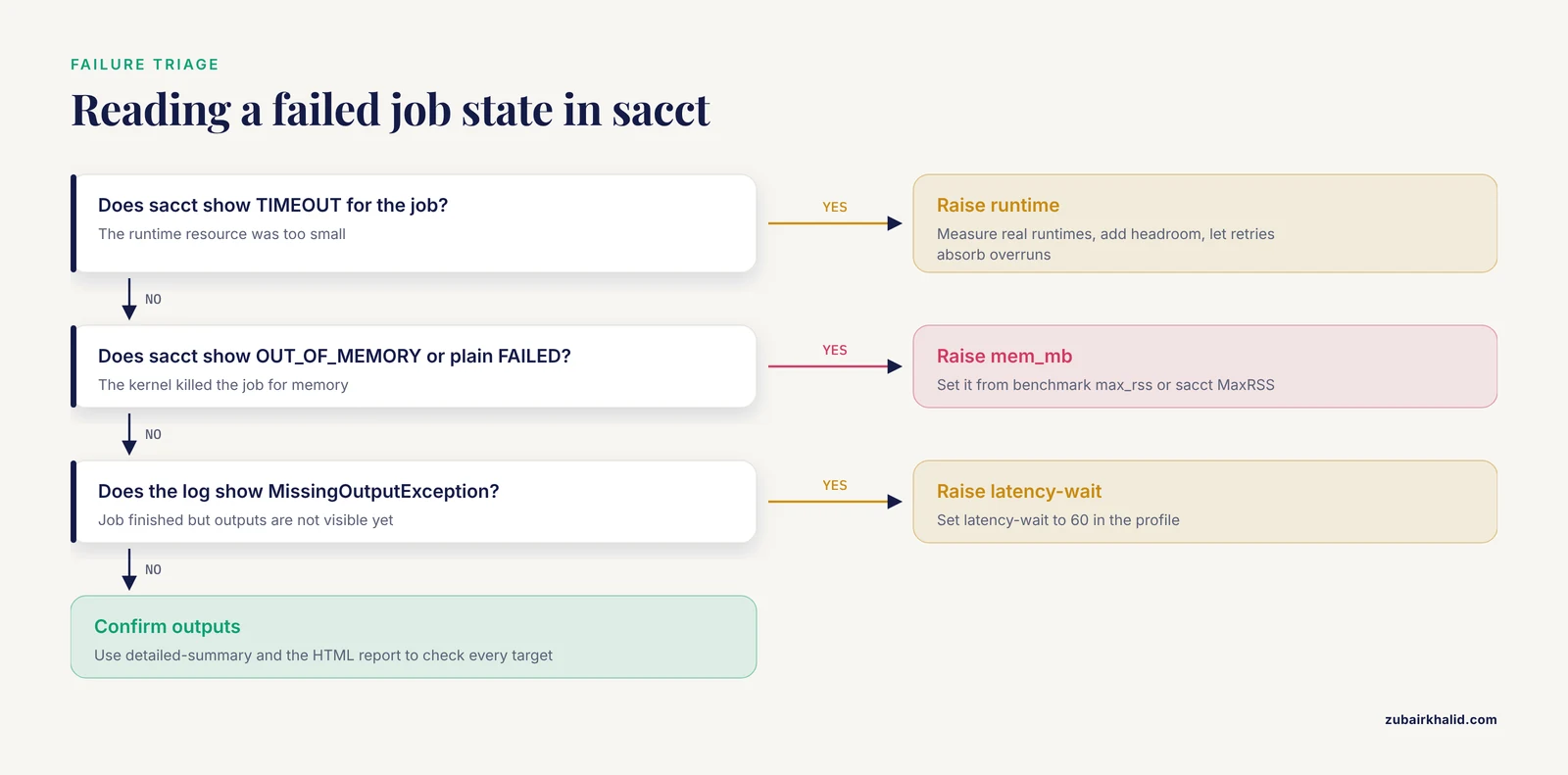
A green run is not automatically a correct run. Work through this checklist:
- Dry run first.
snakemake -n, cores Nwith-pshows the job stats and the exact commands before anything executes. - Decode SLURM states.
sacctshould end inCOMPLETED.TIMEOUTmeans theruntimeresource was too small and the job lost all progress.OUT_OF_MEMORYappears on clusters that enforce memory cgroups, and plainFAILEDappears elsewhere when the kernel killed the job for memory.CANCELLED by uidmeans the master or a human canceled it. - Compare requests to reality. Benchmark files and
sacctMaxRSStell you what jobs actually used. Requests far above usage waste queue priority, and requests below usage cause the kills in point 2. - Expect filesystem lag. On busy shared filesystems, outputs can appear several seconds after a job exits. Snakemake waits 5 seconds by default, then fails with a
MissingOutputExceptionsaying the job completed successfully but some output files are missing. Raise-latency-waitto 60 in the profile and the problem disappears. - Confirm the outputs, not just the exit codes.
-detailed-summarylists every target with its rule of origin and date, and the HTML report from-reportgives per-job timings you can paste into a ticket or a methods section.
Sensible next steps after a verified run are versioning the profile with the repository, adding conda or container integration so each job runs in a pinned environment, and running snakemake, lint to catch structural problems before the next cluster campaign.
Common Mistakes and Limitations
- Hardcoding thread counts in the command.
bwa mem -t 8inside a rule that declaresthreads: 4gets 4 cores from SLURM and spawns 8 threads. The job runs, thrashes, and times out. Always write{threads}. - Omitting
-coreson Snakemake 8. The run refuses to start with "Error: you need to specify the maximum number of CPU cores with, cores." Putjobsin the profile so it never happens again. - Skipping
mem_mb. Without a memory request, SLURM assigns its default, which is often small. The job dies with no Python traceback, andsacctshowsOUT_OF_MEMORYorFAILED. Setdefault-resourceswithmem_mband override per rule. - Underestimating
runtime. A job killed at its time limit loses everything it did, and the rerun starts from zero. Measure with benchmarks, add headroom, and letretriesabsorb rare overruns. - Declaring threads larger than the budget. A rule with
threads: 16under-cores 8fails with a message like "Job align requires 16 threads but only 8 cores are available." Fix the rule, the budget, or clamp with-max-threads. - Treating
mem_mbas decimal megabytes. SLURM reads-memas MiB, so 100000 is about 104.9 GB, and 1000000 cannot fit on most nodes. Compute in MiB, or usemem_mibon versions that offer it. - Writing scratch to home or the system
/tmp. Home quotas fill,/tmpis small and shared, and jobs collide. Pointtmpdirat scratch space, or write intermediates to an explicit scratch path. - Launching the master in a plain login shell. Logging out kills the master, in-flight jobs keep running unwatched, and the DAG stalls. Use tmux or screen, or submit the master as a job.
- Declaring custom resources without capping them. Ten jobs each requesting
licenses=1mean nothing until you also pass-resources licenses=4, which turns the declaration into a real limit. - Assuming the scheduler is optimal. The default greedy scheduler is fast and predictable, not globally optimal, and requests are static once a job is submitted. The ILP scheduler option improves packing, and the resource numbers still come from your measurements, so measure first.
- Mixing versions. Flag names moved between Snakemake 5, 7, and 8. Check
snakemake, versionbefore copying commands from older tutorials, and pin the version in your environment so the profile and the binary agree.
The deeper limitation is that declarations describe jobs, not data. A rule's memory need often scales with input size, and a single static request must cover the worst sample in the cohort. Right-sizing therefore works best as a loop: run, measure, adjust the profile, rerun. Research systems continue to push further, exploring runtime adaptation of running workflows [1], but in day-to-day Snakemake that loop runs between campaigns, not inside them.
Nextflow vs Snakemake for HPC Resource Management
Both Snakemake and Nextflow are mature bioinformatics workflow managers, and both run well on SLURM clusters. The resource models differ in shape. Nextflow attaches cpus, memory, and time directives to processes and scales them through configuration selectors such as withName and withLabel, so pipeline logic and cluster sizing live in separate files. Snakemake puts threads and resources next to each rule and moves cluster-specific values into profile overrides with set-threads and set-resources. Functionally you reach the same place: per-job CPU, memory, and time requests translated into scheduler submissions.
The practical decision is usually about ecosystem. If your goal is to run established community pipelines, Nextflow's nf-core collection is the largest curated catalog, and its pipelines arrive with tested resource profiles. If your goal is to write and maintain your own pipeline with Python-native logic, conda integration, and fine control inside one tool, Snakemake is the stronger fit. Teams that need both keep both installed, since the skills transfer.
The design space is also wider than the two popular tools. Research systems such as d-Chiron manage workflow metadata in a distributed in-memory database specifically to keep scheduling scalable, and they have been evaluated on clusters with up to 960 computing cores with negligible overhead for their extra machinery [1]. Popular tools make different tradeoffs, but the underlying questions, how jobs declare needs and how runs declare budgets, are the same ones this guide answers in Snakemake terms.
Frequently Asked Questions
What is the difference between, cores and, jobs in Snakemake?
Since Snakemake 8 they are aliases for the same budget. On a single machine that budget is the total core pool the scheduler fills. With a remote executor such as slurm, the same number caps how many cluster jobs may run at once, while -local-cores separately limits jobs that stay on the master node.
How do I give each Snakemake rule a memory limit on SLURM?
Declare resources: mem_mb in the rule, or set default-resources in a profile and override specific rules with set-resources. The SLURM executor translates mem_mb into the -mem option of sbatch, and SLURM reads the value as MiB.
Why did my Snakemake job die with no error message?
The Linux out-of-memory killer most likely terminated it because the job used more memory than it requested from SLURM. Run sacct on the job id and look for the OUT_OF_MEMORY state, then raise mem_mb based on the benchmark or MaxRSS measurement.
What does the runtime resource do in Snakemake?
It sets the wall-clock limit of one job in minutes, and the SLURM executor passes it to sbatch as -time. A job that hits the limit is killed and loses all progress, so measure real runtimes and add headroom.
Can I change threads and resources without editing the Snakefile?
Yes. Use -set-threads and -set-resources for one-off overrides on the command line, or put the same values under set-threads and set-resources in a workflow profile, which is the better home for cluster-specific numbers.
How do I cap the total memory of a whole Snakemake run?
Pass -resources mem_mb=N. The scheduler treats that value as a shared pool and stops submitting jobs once the pool is exhausted. Recent versions also offer -mem for local runs.
Nextflow vs Snakemake: which should I use on our cluster?
Both manage HPC resources well, so the decision usually comes down to ecosystem and style. Pick Snakemake for Python-native rules, per-rule overrides, and conda integration in your own pipelines. Pick Nextflow to run community pipelines such as nf-core with their tested process directives.
Do I still need, cores when running with the SLURM executor?
Yes. Snakemake 8 requires an explicit budget, and with the SLURM executor the value of -cores or -jobs sets the maximum number of cluster jobs in flight at the same time.