Snakemake, rerun-incomplete vs., force: When to Use Each
By Dr. Zubair Khalid, DVM, MS, PhD ·

In one sentence: -rerun-incomplete reruns exactly the jobs that Snakemake itself flagged as interrupted mid-write, while -force reruns the jobs you name no matter what Snakemake believes about their state. The rule of thumb follows directly from that split. After a crashed or interrupted run, use -rerun-incomplete. When Snakemake reports everything up to date and you know that is wrong, use -force, or one of its wider siblings -forceall and -forcerun.
The choice matters because both flags spend real compute, and one of them can overwrite outputs that were perfectly healthy. If you are weighing snakemake rerun incomplete or force for a live problem, the state of the previous run usually decides it. This article explains what each flag reads, how far its effects spread through the workflow graph, where each one fails, and how the same problems are handled in Nextflow, the other leading bioinformatics workflow manager.
How Snakemake decides what to rerun
Snakemake is a Python-based workflow engine and one of the most widely used bioinformatics workflow managers in current practice. A workflow is written in a Snakefile as a set of rules. Each rule declares inputs, outputs, and the command, script, or function that turns the former into the latter. A minimal example:
rule all:
    input:
        "results/report.html",

rule align:
    input:
        reads="data/{sample}.fastq.gz",
        ref="refs/genome.fa",
    output:
        "results/aligned/{sample}.bam",
    shell:
        "bwa mem {input.ref} {input.reads} | samtools view -b -o {output}"
rule all collects the final outputs and acts as the default target, the endpoint you ask Snakemake to produce. Given a target, Snakemake builds a directed acyclic graph, or DAG, the dependency graph in which every file to produce is a node, every dependency is an edge, and no chain of dependencies loops back on itself. It then schedules a job, one concrete execution of a rule for one set of concrete files, for every node that needs creating or refreshing.
Two sources of information drive that decision.
First, file modification times, or mtimes, the timestamps a filesystem updates whenever a file's contents change. If an output is older than any of its declared inputs, its job runs again.
Second, a provenance database stored under the .snakemake directory in the working directory. Provenance is the recorded history of how each file was made. For every output Snakemake has generated, the database stores the rule that created it, the mtimes of its inputs at generation time, the exact code that ran, the parameters used, and the software environment definition, such as a conda environment file.
The provenance database is what separates Snakemake from a plain Make clone. Because the code, parameters, and environment of every past job are recorded, Snakemake has detected code changes automatically since version 5. Edit a rule's shell command, change a parameter, or swap a conda environment file, and the affected jobs are scheduled again on the next run without any special flag.
Two failure modes break this tidy system, and they map one to one onto the two flags in the title.
A job that dies partway through writing its output leaves a partial file behind, and Snakemake records that file as incomplete in the database. The next invocation refuses to continue until you deal with the flagged files, and -rerun-incomplete is the designed remedy.
The world can also drift away from the database. An input you never declared changes on disk, a file is corrupted by something outside the workflow, or the .snakemake directory is deleted. Snakemake then believes outputs are current when they are not, and only an explicit override moves it. That override is -force and its relatives.
What, rerun-incomplete does
-rerun-incomplete instructs Snakemake to rerun all jobs whose outputs are flagged as incomplete. The official Snakemake documentation describes the flag in almost exactly those words, and it exists for one situation, recovering a workflow after a run was interrupted.
The mechanics explain the narrow scope. When a job starts, Snakemake marks its outputs as pending. If the job finishes, the outputs are recorded as complete together with their provenance. If the job is killed after it has begun writing output, by Ctrl-C, a scheduler time limit, an out-of-memory kill, or a node reboot, the partial file stays on disk and its metadata entry is marked incomplete. A job killed before it wrote anything leaves nothing to flag, it simply runs again on the next invocation.
On the next run, Snakemake finds the incomplete entries, prints an error naming the files, and stops. It refuses to guess whether a partial file is usable, which is the correct default, because a truncated BAM (the binary alignment format produced by aligners) or a truncated FASTQ (raw sequencing reads) can look plausible while being unusable downstream.
Adding -rerun-incomplete resolves the standoff. The flagged jobs re-enter the DAG and execute again, every other job is evaluated by the normal rules, and downstream jobs whose inputs get rewritten run again as well because their inputs now carry fresh mtimes. Three properties make this the safe default after a crash:
- Minimal blast radius. Only jobs Snakemake itself flagged are touched. Healthy outputs are never overwritten, because they were never flagged.
- Metadata-driven. If the database flags nothing, the flag does nothing. You cannot use it to force an arbitrary rerun, that is
-forceterritory. - Self-clearing. Once the rerun succeeds, the incomplete marks are gone and later runs need no special flags.
If a flagged file is actually intact, for instance because the job died during cleanup rather than during writing, you have an alternative. Inspect it, and if you trust it, delete it anyway and run normally. A missing output triggers its job automatically, so deletion plus a plain run is equivalent to -rerun-incomplete for that file and leaves no incomplete state behind. Partial files also waste disk, which is one more reason to resolve them promptly rather than letting them linger.
Crash recovery usually involves more than one flag. A hard kill can also leave the working directory locked, because Snakemake locks the directory against concurrent runs and a crash bypasses the clean shutdown that releases the lock. The next invocation then reports that the directory cannot be locked. Run snakemake, unlock once, then proceed. On clusters, pair recovery with -retries 3, named -restart-times in older releases, so failed jobs are retried automatically on preemptible or flaky nodes, and with -latency-wait when outputs live on a busy shared network filesystem that sometimes reports a finished file late.
What, force does
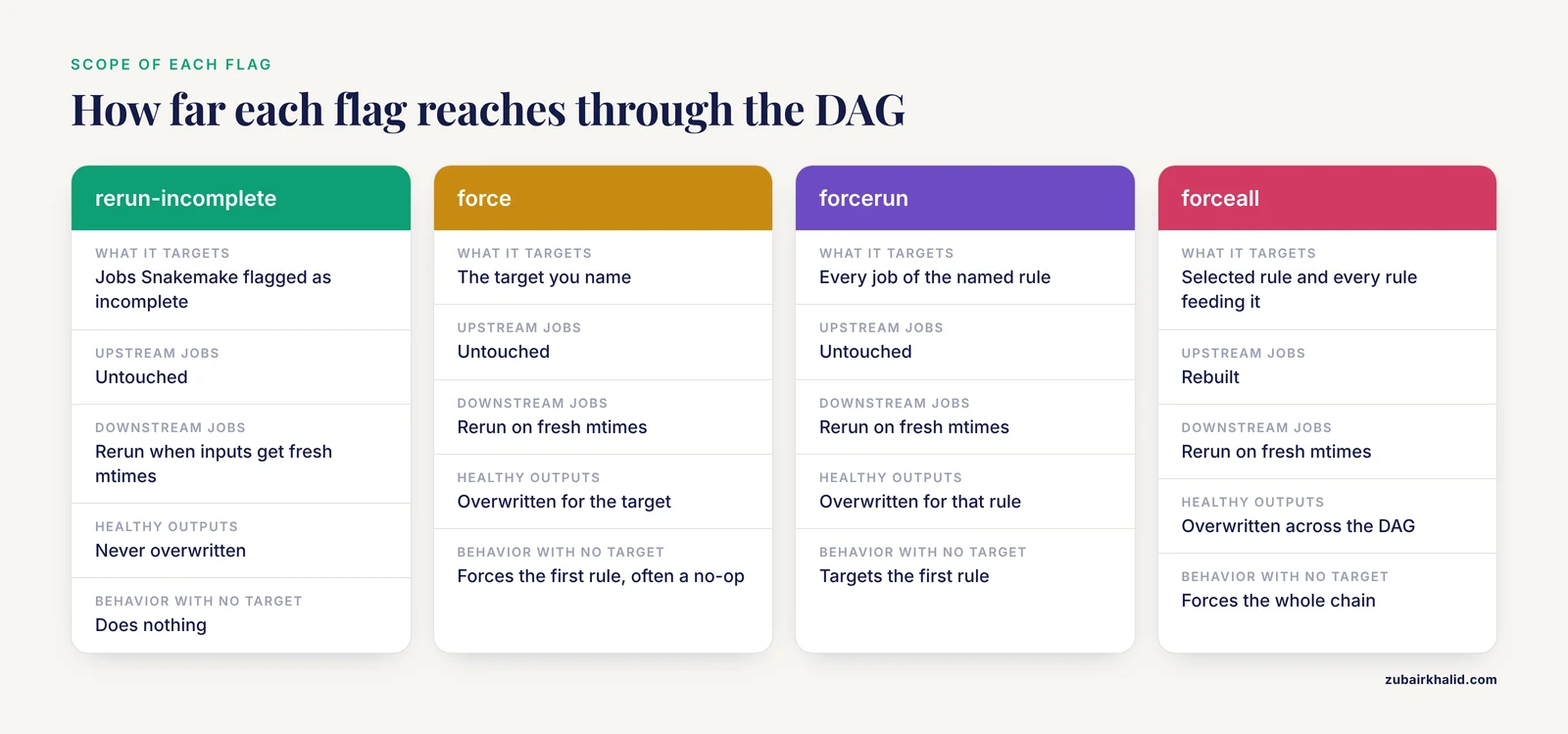
-force, short form -f, forces execution of the selected target regardless of its recorded state, or of the first rule in the Snakefile if you name no target. Where -rerun-incomplete defers to Snakemake's bookkeeping, -force overrules it for the jobs you select.
Three behaviors define the flag:
- It is selective.
snakemake, force results/aligned/sampleA.bamreruns that single job even though the file exists and looks current. Several named targets are each forced. - It does not cascade upstream. Forcing a target does not force its inputs. Upstream jobs are still checked normally and skipped when current. To rebuild the entire upstream chain, use
-forceall, short form-F, which forces the selected rule and every rule feeding into it. - It does cascade downstream. Force a rule in the middle of the DAG and its rewritten outputs carry fresh mtimes, so every downstream consumer becomes out of date and reruns in the same invocation.
A third sibling, -forcerun RULE, short form -R, forces every job of the named rule wherever it appears in the DAG, again with downstream propagation. With no rule names it targets the first rule. This is the tool for statements like "the align step changed, rerun it for every sample."
The bare-flag pitfall deserves its own paragraph. Most workflows begin with rule all, a target-only rule with no command. snakemake, force with no target forces that first rule, and because there is nothing to execute and its inputs are still evaluated normally, the command typically accomplishes nothing visible. People who expect bare -force to rebuild a pipeline get a no-op that finishes in seconds. Name an explicit target, use -forcerun, or use -forceall.
Legitimate reasons to reach for -force all involve distrust of the up-to-date verdict:
- An input Snakemake cannot see has changed. Reference indices, annotation databases, lookup tables, or environment variables that a command reads but the rule never declares are invisible to the DAG. Declare them properly for the long term, and use
-forceor-forcerunfor the immediate rerun. - An output is wrong despite being complete. A tool wrote truncated but valid-looking results, or a known bug produced bad files that are newer than their inputs. Forcing the producing rule regenerates them, and downstream jobs follow.
- The provenance database is gone or untrustworthy. Without it, Snakemake falls back to mtimes alone and can no longer detect code or parameter changes. A
-forceallrun rebuilds both the files and the database from real executions. - You are testing an edit and want to watch the job run even though Snakemake considers it current.
-force spends real compute and overwrites outputs in place. Preview the damage first with snakemake -n, force <target> or snakemake -n, forceall, which print the exact set of jobs that would run without executing anything.
Snakemake rerun-incomplete vs force at a glance
The table below is the core of the snakemake rerun incomplete vs force decision. Keep it open the first few times you reach for either flag.
| Aspect | -rerun-incomplete | -force |
|---|---|---|
| What it targets | Jobs whose outputs Snakemake flagged as incomplete | The target(s) you name, or the first rule if none |
| Question it answers | "A run was interrupted, finish the recovery" | "I know better than the up-to-date check" |
| Requires provenance metadata | Yes, the incomplete flag lives in the database | No, it overrides the check entirely |
| Scope | Only flagged jobs, plus downstream jobs whose inputs change | Selected jobs, plus all downstream dependents |
| Upstream jobs | Untouched | Untouched (use -forceall to include them) |
| Healthy outputs | Never overwritten | Overwritten for the selected targets |
| Behavior when nothing matches | Does nothing | With no target, forces the first rule, often a no-op |
| Typical companion flags | -unlock, -retries, -latency-wait | -forcerun, -forceall, -n for a preview |
| Risk when misused | Low | Wasted compute, overwritten good outputs |
| Typical command | snakemake, rerun-incomplete, cores 8 | snakemake, force results/aligned/sampleA.bam, cores 8 |
The table compresses into a short decision path:
- Did the previous run die mid-flight, from a crash, timeout, Ctrl-C, or node loss? Plan on
-rerun-incomplete, after-unlockif the directory is locked. - Did the next run stop with a list of incomplete files? That exact refusal is what
-rerun-incompleteresolves. - Does the run report nothing to do while you know an invisible input changed or an output is bad? That is
-forceterritory, scoped with an explicit target or widened with-forcerun. - Do you need the whole DAG rebuilt, for example after losing the
.snakemakedirectory? Use-forceall, or-delete-all-outputfollowed by a normal run when you want every generated file removed first. - Unsure? Run
snakemake -n, reasonwith the same flags you intend to use and read the plan before spending compute.
Previewing and auditing reruns
Every command in this article can be previewed by adding -n. A dry run prints the job list and stops. Add -reason to see why each scheduled job runs, -summary for a file-by-file rundown of what would be recreated, and the -list-code-changes, -list-input-changes, and -list-params-changes variants to split pending work by cause. Since version 7.8, -rerun-triggers limits which causes are checked at all, which helps on shared filesystems that report mtimes inconsistently and manufacture spurious reruns.
When to use, rerun-incomplete
Use it whenever the previous run ended abnormally and you want the cheapest correct recovery:
- You pressed Ctrl-C during development after jobs had started writing outputs.
- A scheduler killed jobs at the walltime limit, through the out-of-memory killer, or by reclaiming a preemptible node, one the scheduler may take back at any time.
- A node rebooted or a network interruption severed the run mid-write.
- A container runtime or a storage staging step was interrupted partway through.
In each case the sequence is the same. Run normally first and read the error. If the directory is locked, run snakemake, unlock. Then run again with -rerun-incomplete and your usual settings. The flag is a one-time remedy, not a standing option. It does no harm when nothing is flagged, but the habit that scales is running plain, reading the error, and adding the flag when the error names it.
Equally useful is knowing what it will not do. It will not rerun jobs you merely suspect, because suspicion is not an incomplete flag. It will not fix a job that reported success but never produced its output, which is a missing-output failure with different causes. It will not clear a stale lock. And it does not validate file contents, it only re-executes the commands that produce them.
When to use, force
Reach for the force family when Snakemake's verdict is wrong and you can say why:
- Invisible inputs changed, such as a rebuilt reference index at a path the rule never declared.
- Untracked code changed, such as a helper script called by path inside a
shellstring. - Outputs are known bad, such as files written by a buggy tool version that are newer than their inputs.
- Provenance is lost, such as a deleted
.snakemakedirectory, where-forceallrebuilds both files and metadata. - You deliberately want to watch a job run, such as a one-sample test of an edited command.
Pick the narrowest tool that covers the problem. -force with an explicit target handles one file. -forcerun RULE handles one rule across all samples. -forceall handles everything. Jumping straight to -forceall on a large pipeline can turn a two-minute fix into a week of cluster time.
Two habits keep force rare. First, treat every forced rerun as a symptom of a declaration gap. If an invisible input caused it, declare that input in the rule. If an untracked script caused it, move the logic under script:, which Snakemake tracks by content. After the declaration is fixed, automatic detection handles future changes and the flag returns to being a rare tool. Second, do not force after routine configuration edits. Modern Snakemake records parameters with each job, so editing config.yaml and rerunning normally already triggers the affected jobs. Forcing there only wastes compute.
Worked scenarios
Scenario 1, an overnight SLURM run killed at walltime
SLURM is the job scheduler on most university clusters, and it enforces per-job time and memory limits. You run 40 samples through fastqc and multiqc overnight. The run dies at the walltime limit while 12 samples are mid-fastqc.
The next morning:
snakemake --profile slurm --jobs 20A profile is a small configuration directory that stores cluster settings so commands stay short. Snakemake stops with an error listing incomplete files such as results/qc/fastqc/sample07_fastqc.html and points at -rerun-incomplete. If the main process itself was killed, the directory may also be locked, in which case:
snakemake --unlockThen recover:
snakemake --rerun-incomplete --profile slurm --jobs 20Only the 12 interrupted jobs run. multiqc reruns afterward because its inputs, the per-sample reports, now carry fresh mtimes. The other 28 samples skip entirely. Preview the same plan before committing with:
snakemake -n --reason --profile slurm --jobs 20To stop this from recurring on preemptible partitions, add -retries 3 so killed jobs retry automatically.
Scenario 2, a rebuilt reference index that Snakemake cannot see
You obtained a new genome assembly and rebuilt the bwa index under refs/, but the align rule declares only refs/genome.fa as input, and the FASTA itself did not change. The index files derived from it did. Every run reports nothing to do while all alignments are stale.
Immediate fix:
snakemake --forcerun align --cores 16That reruns the align job for every sample and cascades downstream through sorting and duplicate marking. For one sample only:
snakemake --force results/aligned/sampleA.bam --cores 4Durable fix: declare the bwa index files (refs/genome.fa.bwt, refs/genome.fa.pac, and their companions) as rule inputs. After that, replacing the index triggers reruns automatically and the force becomes unnecessary.
Scenario 3, an edited helper script that Snakemake does not track
A quantify rule calls python scripts/score.py inside its shell string. You improved the scoring. The next run reports nothing to do, because Snakemake tracks files referenced with script: by content, but a path typed inside a shell string is invisible to it.
snakemake --forcerun quantify --cores 8Downstream steps rerun automatically. The durable fix is to move the logic under script: "scripts/score.py", which Snakemake hashes, so future edits rerun the right jobs with no flag at all.
Scenario 4, the .snakemake directory vanished
A cleanup script deleted .snakemake. Snakemake still works, but only on mtimes, so code, parameter, and environment changes go unnoticed until each affected job happens to rerun. Decide based on how much you trust the existing outputs.
If the outputs were just restored from a backup and carry old mtimes, re-stamp without running anything:
snakemake --touchThis marks out-of-date outputs as current and re-records their metadata without executing the rules. If you cannot vouch for the outputs, rebuild with full provenance:
snakemake --forceall --cores 16Every job reruns and the database is repopulated from real executions.
Scenario 5, a crash and a code change in the same morning
You edited the align rule's shell command yesterday, the overnight run crashed, and this morning Snakemake lists incomplete files. One command handles both:
snakemake --rerun-incomplete --cores 16The flag clears the incomplete state, and the edited command reruns for all samples because Snakemake tracks code changes on its own. If you had instead changed an untracked helper script, combine the flags:
snakemake --rerun-incomplete --forcerun align --cores 16Flags compose, and snakemake -n with the same flags previews the union before you commit.
Nextflow vs Snakemake: recovery and rerun semantics
Nextflow and Snakemake are the two workflow managers most bioinformatics teams shortlist, and they solve the interrupted-run problem differently. Knowing the difference prevents bad habits when moving between them.
Nextflow executes each task in an isolated work directory under work/ and records a cache entry keyed by a hash of the task's script, its inputs, its container or conda environment, and its key parameters. nextflow run -resume skips every task whose cache entry matches the current definition. A task killed mid-write has no valid cache entry, so a resumed run reruns it automatically, and its outputs are published to the results directory only after the task succeeds. Partial files therefore never reach the final results tree, which is why Nextflow needs no equivalent of -rerun-incomplete.
Snakemake writes outputs at their final paths by default. That design makes partial files a real possibility in the results tree, and the incomplete-file machinery plus -rerun-incomplete exist to cope with it. The tradeoff runs the other way too: Snakemake's outputs sit exactly where the workflow declares them, which simplifies downstream tooling that expects fixed paths.
Forcing differs as well. Nextflow has no -force flag. To make a cached task run again, you change something in its hash, the script, an input, a parameter, or the container, or you delete the task's work directory. Snakemake exposes graduated overrides, one target with -force, one rule everywhere with -forcerun, the whole DAG with -forceall.
Both systems detect code changes, Nextflow through the task hash and Snakemake through its provenance database, so in both engines an edited script reruns the affected tasks without special flags. The recovery ergonomics are the real difference. Nextflow funnels most situations through one flag, -resume. Snakemake splits recovery from override across several flags, which is finer grained and slightly more to learn. Teams standardizing on one engine should learn its full recovery path rather than importing habits from the other.
Common Mistakes and Limitations
- Expecting bare
-forceto rebuild the pipeline. With no target,-forceacts on the first rule, which is usuallyrule alland has no command. The run finishes in seconds having done nothing. Use-forceall,-forcerun, or explicit targets. - Expecting
-forceto cascade upstream. Forcing a target leaves its inputs alone. If the problem is an old input file, force the upstream rule or use-forceall. - Using
-rerun-incompleteas a general rerun hammer. It acts only on flagged files. Jobs that failed without producing output need no flag at all, a plain invocation reruns them. - Confusing incomplete files with missing outputs. When a job reports success but its output never appears, common on shared network filesystems, that is a missing-output failure.
-rerun-incompletedoes not apply. Raise-latency-wait, check the job log, and rerun. - Confusing a stale lock with incompleteness. The message that the directory cannot be locked after a crash is a lock problem, fixed by
snakemake, unlock. A crashed run can produce both conditions, so unlock first, then rerun incomplete. - Forcing without a dry run.
snakemake -n, forceallcosts seconds and prints the exact job count. On a 500-sample pipeline, the difference between forcing one rule and the whole DAG can be days of cluster time. - Treating
-forceas a cleanup tool. It overwrites the named outputs but leaves any side files a rule produced earlier. For a guaranteed clean slate, use-delete-all-outputfollowed by a normal run, or start from a fresh directory. - Forcing after routine config edits. Parameter values are recorded per job, so edited configuration already triggers the affected jobs on a normal run. Forcing there wastes compute.
- Deleting the
.snakemakedirectory as if it were cache. It is the workflow's memory. Losing it disables code, parameter, and environment change detection until affected jobs rerun, and it cannot be regenerated without running jobs. - Expecting either flag to validate content. Both flags schedule work, neither checks results. Pair the workflow with QC aggregation, for example a MultiQC rule, so silent corruption surfaces in a report.
Two limitations frame all of the above. Behavior has evolved across releases, code-change tracking arrived in version 5, -rerun-triggers in version 7.8, and -retries replaced the older -restart-times naming, so confirm what your installed version does with snakemake, version and the documentation for that release. And on shared systems, forcing rewrites files that colleagues may be reading, so coordinate before a wide -forcerun or -forceall.
Frequently Asked Questions
Can I combine, rerun-incomplete and, force in one command?
Yes, the flags compose in a single invocation. For example, snakemake, rerun-incomplete, forcerun align, cores 16 recovers interrupted jobs and forces the align rule at the same time. Preview the combined plan with snakemake -n plus the same flags.
Does, force rerun the whole pipeline?
No. -force reruns only the target you name, or the first rule in the Snakefile when you name none, which is usually the command-less rule all and therefore a no-op. Use -forceall for the full DAG or -forcerun RULE for one rule everywhere.
Is, rerun-incomplete safe to run after any crash?
Yes. It reruns only jobs Snakemake itself flagged as incomplete, so healthy outputs are never overwritten. If the crash also left the directory locked, run snakemake, unlock first.
Why does Snakemake call my files incomplete?
Because a previous run was killed after a job had begun writing its output, and Snakemake recorded the partial file in its metadata. The next run refuses to continue until you rerun those jobs with -rerun-incomplete or delete the flagged files.
What is the Nextflow equivalent of these flags?
nextflow run -resume fills the recovery role, because killed tasks have no cache entry and rerun automatically. There is no direct -force equivalent, you force a rerun by changing the task's inputs, script, or parameters, or by deleting its work directory.
Do I need, force after editing the Snakefile?
Usually not. Since version 5, Snakemake records the code, parameters, and software environment of every job and reruns affected jobs automatically when they change. Reach for -force only when the change is invisible to the workflow, such as an undeclared input or an external script called from a shell string.