Debugging Snakemake Workflows: 10 Common Errors and How to Fix Them
By Dr. Zubair Khalid, DVM, MS, PhD ·

Most Snakemake failures trace back to one of two causes. Either a file path in the workflow does not match a file that actually exists on disk, or a job ran but wrote something other than what the rule declared. The first thing to check is always the same: read the final exception block at the bottom of the console output, note the rule name and the exact file path it names, then run a dry run with snakemake, cores 4, dry-run, reason to see how far the workflow plan gets before anything executes.
Snakemake is a Python-based bioinformatics workflow manager, a program that runs multi-step analyses in the correct order. You describe each step as a rule in a file called a Snakefile, listing inputs, outputs, and the shell command or script that connects them. Before running anything, Snakemake matches your requested outputs against rule outputs, resolves wildcards (named placeholders such as {sample} in file patterns), and builds a directed acyclic graph, or DAG, which is the dependency map of jobs it must run in order. A target is any file you ask Snakemake to produce.
This guide covers the ten errors you are most likely to meet when debugging Snakemake workflows, ordered from most common to rarest. Each section explains the mechanism behind the failure, gives a short diagnostic sequence, and shows a fix. A summary table sits at the center of the article. The guide closes with prevention practices, a comparison with Nextflow, and answers to frequent questions. Examples assume Snakemake 7 or 8 on Linux with bash. Exact error wording differs slightly between versions, so match on the exception name rather than the full sentence.
How Snakemake Fails: Know the Phase First
Snakemake errors cluster into four phases, and the phase tells you where to look.
- Parsing. The Snakefile is Python code with rule declarations added.
SyntaxError,IndentationError,NameError, andKeyErrorfailures happen here, before any job runs and before any file changes. - DAG construction. Snakemake matches targets to rules and resolves wildcards.
MissingInputException,MissingRuleException,AmbiguousRuleException,CyclicGraphException, and mostWildcardErrorfailures happen here. Nothing has executed yet, so the filesystem is untouched. - Execution. Jobs run, possibly inside conda environments or containers, possibly on a cluster. Tool crashes, conda failures, scheduler kills, and
MissingOutputExceptionafter a job completes happen here. Partial outputs may exist. - Bookkeeping. Locks, incomplete-file markers, and stale metadata from interrupted runs live in the hidden
.snakemakedirectory and can block or distort later runs.
One version note before the errors: Snakemake 8 requires an explicit -cores argument on every invocation, while older versions defaulted to one core. If you upgraded and now see a complaint about missing cores, that is the cause, not a bug in your workflow.
The 60-Second Diagnostic Sequence
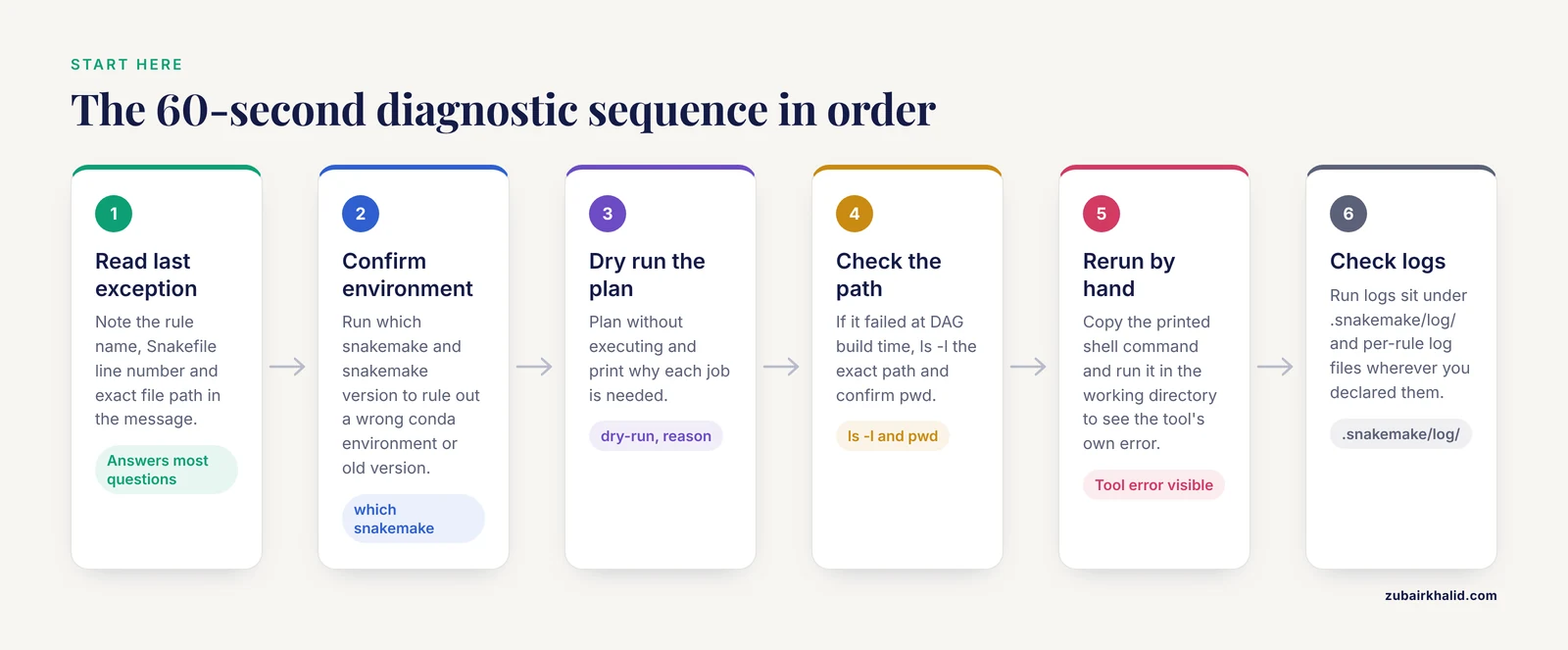
Run these in order the next time a workflow fails.
- Read the last exception block. The rule name, the Snakefile line number, and the file path in the message answer most questions on their own.
- Confirm your environment. Run
which snakemakeandsnakemake, version. A wrong conda environment or an old version explains a surprising number of failures. - Dry run the plan:
snakemake, cores 4, dry-run, reason, printshellcmds. A dry run plans the workflow without executing anything, and-reasonprints why each job is needed. - If the failure happens at DAG build time, check the exact path from the error with
ls -land confirm you are in the directory you think you are in withpwd. - If a job failed at runtime, copy its exact command from the printed shell command and run it by hand in the working directory. You now get the tool's own error message instead of Snakemake's wrapper around it.
- Check logs. Snakemake writes run logs under
.snakemake/log/, and any rule with alog:directive writes per-sample files wherever you told it to.
Troubleshooting Table: 10 Errors at a Glance
| Exception or symptom | Most likely cause | How to confirm | Fix |
|---|---|---|---|
MissingInputException | Path typo, wrong working directory, or no rule produces the file | ls -l the exact path, pwd | Correct the path or add an upstream rule, wrap directories in directory() |
MissingRuleException or "Nothing to be done" | Target name matches no rule output, or outputs look up to date | Dry run with -reason, ls -l timestamps | Align target with the output pattern, keep a rule all, use -force for tests |
SyntaxError, IndentationError, NameError, KeyError | Tabs mixed with spaces, missing colon, undefined name, missing config key | snakemake, lint, editor whitespace view | Four-space indentation, add colons, validate config early |
WildcardError | Input wildcard not derivable from the output, or a pattern matches too much | Dry run one concrete target | Constrain wildcards, align input and output patterns |
MissingOutputException after job success | Command writes a different path than the rule declares | Rerun the command by hand, compare file names | Fix the declared output or redirect stdout |
AmbiguousRuleException, DuplicateRuleException | Two rules produce the same target or share a name | Dry run names both rules | Distinct output paths, rule_order, rename or namespace |
CyclicGraphException | A rule output feeds back into its own input chain | Dry run prints the cycle | Separate stage directories |
CondaEnvException, tool not found in env | Missing channel, unsatisfiable version pin, wrong env file | Create the env by hand with conda env create | Fix channels and pins, reuse envs with -conda-prefix |
| Exit code 137, 139, or 143 | Scheduler out-of-memory kill, segfault, or time-limit kill | sacct MaxRSS versus requested memory | Raise mem_mb and threads, test on an interactive node |
Lock error, IncompleteFilesException | Interrupted run left locks or markers | Check for running jobs, ls .snakemake/incomplete | -unlock, -rerun-incomplete, targeted -cleanup-metadata |
The 10 Errors, From Most to Least Common
1. MissingInputException: The File a Rule Needs Is Not There
This is the most common Snakemake error by a wide margin. The message looks like this, abbreviated:
MissingInputException in rule fastqc in file Snakefile, line 12:
Missing input files for rule fastqc:
    affected files:
        data/raw/sampleA.fastq.gz
Snakemake resolved the {sample} wildcard to sampleA, looked for data/raw/sampleA.fastq.gz, found nothing, and no other rule produces that path. The usual snakemake debugging causes are a typo in the path, running from the wrong directory, a mismatch between the sample sheet and the real file names, or an extension difference such as .fastq versus .fastq.gz.
Diagnose it directly:
pwd
ls -l data/raw/
find . -name "*sampleA*"
Three fixes cover almost every case. First, correct the path or the sample sheet entry. Watch for trailing whitespace in tab-separated sample sheets, which silently changes the file name. Second, if the input is a directory rather than a file, wrap it in directory(), because Snakemake otherwise treats an existing directory as a missing file:
rule index:
    input: directory("resources/genome_index")
Third, if the file genuinely needs to be created upstream, add or fix the rule that produces it. Deriving the sample list from the filesystem prevents this class of error entirely:
SAMPLES, = glob_wildcards("data/raw/{sample}_R1.fastq.gz")2. MissingRuleException or "Nothing to Be Done": The Target Matches Nothing, or Everything Looks Fresh
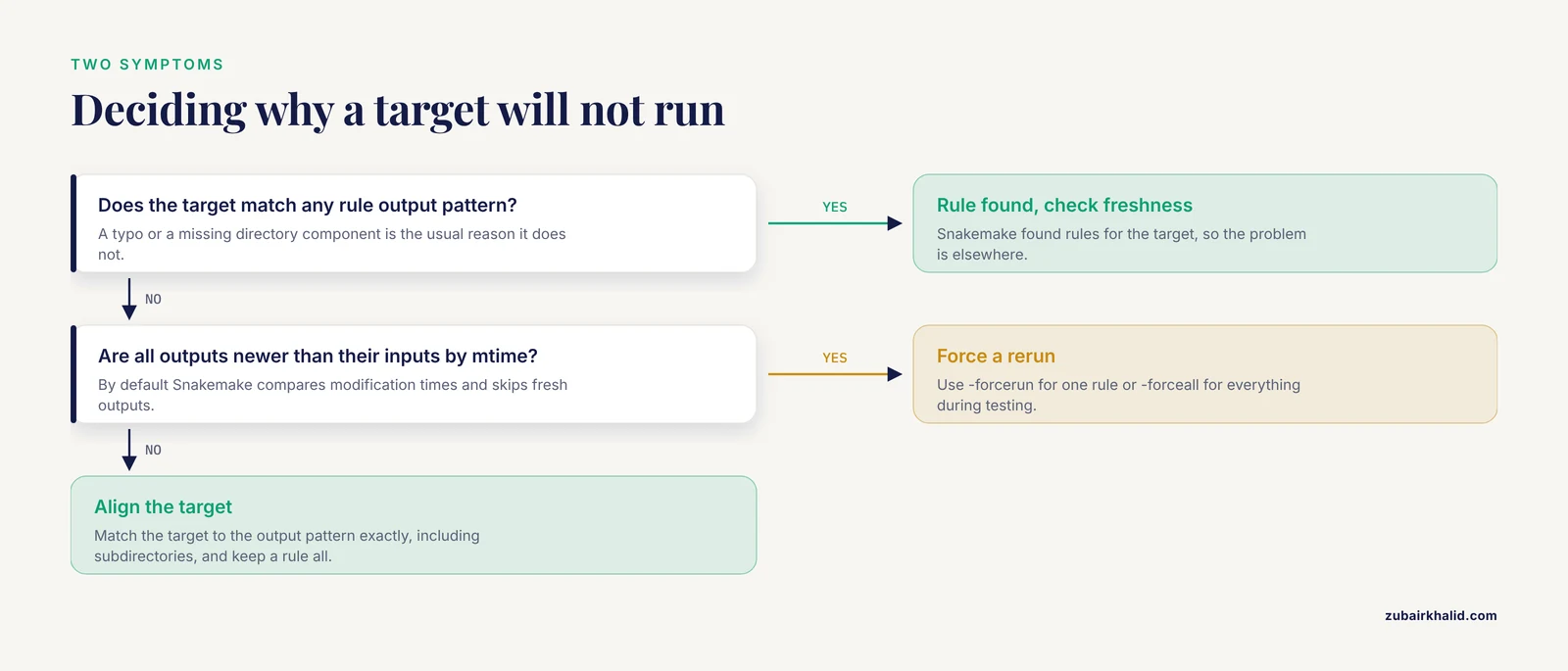
Two different problems produce this symptom. MissingRuleException means the target you named matches no rule output pattern, usually because of a typo or a missing directory component:
MissingRuleException: No rule to produce results/counts/sampleA.tsv"Nothing to be done" means the opposite: Snakemake found rules for the target but considers every output up to date. By default Snakemake compares modification times, the filesystem timestamps usually called mtimes. If an output file is newer than its inputs, Snakemake skips it.
Confirm which case you are in with a dry run:
snakemake --cores 4 --dry-run --reason
ls -l results/counts/
For the missing-rule case, align the target with the output pattern exactly, including subdirectories. Most workflows keep a rule all whose input lists the final targets, which gives you a single stable entry point:
rule all:
    input: expand("results/counts/{sample}.tsv", sample=SAMPLES)
In Snakemake 8 you can instead mark one rule with default_target: True. In older versions the first rule in the Snakefile acts as the default target. For the up-to-date case during testing, force a rerun of one rule with -forcerun (short form -R) or everything with -forceall (short form -F). To test whether a fresh input would trigger downstream work, touch the input file, which updates its mtime without changing content.
3. SyntaxError, IndentationError, NameError, KeyError: The Snakefile Itself Is Broken
These failures happen before the DAG builds. The Snakefile is Python with rule declarations, so ordinary Python mistakes apply. The two most frequent are mixed tabs and spaces, which raise IndentationError or TabError, and a missing colon after a rule or directive:
rule fastqc
    input: "data/raw/{sample}.fastq.gz"
The next tier is NameError for an undefined variable and KeyError for a config key that does not exist, for example SAMPLES = config["samples"] when config.yaml has no samples entry.
Diagnose with the built-in linter, which parses the file and reports structural problems without running anything:
snakemake --cores 1 --lintIn your editor, turn on the display of whitespace characters and set indentation to four spaces with no tabs. Fail fast on configuration by reading and checking the config at the top of the Snakefile, so a missing key produces one clear message instead of a failure deep inside a wildcard resolution. Snakemake also supports validating the config file against a JSON schema, which catches wrong types and missing keys before any job starts.
4. WildcardError and Unconstrained Wildcards: The Pattern Matches Too Much or Too Little
Wildcards are named placeholders in file patterns. When Snakemake builds the DAG, it works backward from your target, matching the target against rule outputs and then needing to fill the same wildcard values in the inputs. Two failure modes dominate.
The first is an input wildcard that cannot be derived from the output, which produces a WildcardError along the lines of "Wildcards in input files must be a subset of wildcards in output files":
rule report:
    input:  "results/qc/{sample}.html", "results/counts/{batch}.tsv"
    output: "results/report/{sample}.html"
Here {batch} appears in an input but not in the output, so Snakemake cannot know its value. The fix is to derive every input wildcard from the output, either by carrying the value through or by looking it up in the sample sheet with an input function.
The second is an unconstrained wildcard that matches too much. This rule is asking for trouble:
rule align:
    input:  "data/raw/{sample}.fastq.gz"
    output: "{sample}.bam"
A bare {sample} can absorb almost any text, including dots and slashes, so it can match files it should never match and select the wrong rule. Constrain the wildcard and put outputs in a dedicated directory:
wildcard_constraints:
    sample="[A-Za-z0-9_-]+"

rule align:
    input:  "data/raw/{sample}.fastq.gz"
    output: "results/aligned/{sample}.bam"
To debug a wildcard problem, dry run a single concrete target such as snakemake, cores 4, dry-run results/aligned/sampleA.bam and read which rule Snakemake selects. The -debug-dag flag prints candidate and selected jobs while the DAG builds, which makes wrong rule selection obvious.
5. MissingOutputException After a Job Succeeds: The Command Wrote Somewhere Else
The message says the job finished with exit code 0 but the declared output is absent:
MissingOutputException in rule fastqc:
Job completed successfully, but some output files are missing:
    results/qc/sampleA.html
The mechanism is almost always a mismatch between the path in the output: field and the path the tool actually wrote. Classic variants include forgetting to redirect stdout, a tool that derives its own output names, and a typo inside the shell command. FastQC, for example, writes files named {sample}_fastqc.html into the directory you pass with -o, so a rule declaring results/qc/{sample}.html will always fail this way. A related error, ChildIOException, appears when a tool writes into a directory that is also an input, such as running FastQC with -o data/raw.
Confirm by hand:
snakemake --cores 4 --dry-run --printshellcmds
# copy the fastqc command, run it in a scratch copy of the workdir
ls results/qc/
Then fix the declared output to match reality, or redirect the tool yourself:
rule bwa_mem:
    input:  reads="data/trimmed/{sample}_R1.fq.gz", ref="resources/ref.fa"
    output: "results/aligned/{sample}.bam"
    log:    "logs/bwa_mem/{sample}.log"
    shell:
        "bwa mem {input.ref} {input.reads} 2> {log} | samtools view -b - > {output}"
Adding a log: directive to every rule pays for itself the first time a job fails, because the tool's stderr lands in a per-sample file instead of vanishing into the cluster. Avoid the temptation to run -touch, which marks outputs as up to date without running anything, until you have verified the files are correct, because it hides the bug rather than fixing it.
6. AmbiguousRuleException and DuplicateRuleException: Two Rules Want the Same File or Name
AmbiguousRuleException names two rules whose output patterns both match the same concrete target, with no way for Snakemake to prefer one:
AmbiguousRuleException: Rules align_bwa and align_star are ambiguous
for the target results/aligned/sampleA.bam
DuplicateRuleException means two rules share a name, which typically happens after an include: of a shared rules file that was already included, or after copy-pasting a rule between files.
Confirm with a dry run, which names the conflicting file and both rules. Fix ambiguity by giving each rule a distinct output path, most simply by using a separate subdirectory per aligner:
rule align_bwa:
    output: "results/bwa/{sample}.bam"

rule align_star:
    output: "results/star/{sample}.bam"
If both rules are legitimate alternatives and you want one preferred, declare rule_order: align_bwa. Fix duplicates by renaming the rule, or, in larger projects, by using Snakemake modules with the use rule statement and a namespace, which prefixes imported rule names so collisions cannot happen.
7. CyclicGraphException: The Workflow Depends on Itself
A cycle means Snakemake found a chain of rules where a file feeds back into its own production:
CyclicGraphException: Cyclic dependency; cycle found in DAG:
    rule b -> results/{sample}.tsv -> rule a -> results/{sample}.final.tsv -> rule b
The mechanism is usually an output pattern that overlaps an input pattern. This pair is a genuine cycle, because each rule's output is the other's input:
rule a:
    input:  "results/{sample}.tsv"
    output: "results/{sample}.final.tsv"

rule b:
    input:  "results/{sample}.final.tsv"
    output: "results/{sample}.tsv"
The same overlap can arise accidentally inside one rule when input and output live in the same directory with patterns that a shifted wildcard can match. The dry run prints the exact cycle, so read it and find the file that appears on both sides. The durable fix is stage directories, one per processing step, such as data/raw/, results/trimmed/, and results/aligned/, with output patterns that cannot collide. Constrained wildcards, as shown in error 4, close the remaining gap.
8. Conda Environment Failures: The Environment Will Not Build or the Tool Is Missing From It
Conda is a package and environment manager that installs tools with their exact dependencies into isolated directories. With -use-conda, Snakemake builds one environment per rule from a YAML file and runs that rule's command inside it. Failures look like CondaEnvException or WorkflowError with conda solver output, and the two dominant snakemake debugging causes are channel problems and unsatisfiable version pins.
Bioconda, the community channel for bioinformatics software, specifies in its setup instructions the channel order conda-forge, then bioconda, then defaults, with strict channel priority. A missing or misordered channel is the single most common reason an environment fails to solve:
channels:
  - conda-forge
  - bioconda
dependencies:
  - samtools=1.19.2
  - fastqc=0.12.1
Diagnose by creating the environment yourself, which gives you conda's full error output instead of a wrapped message. Snakemake stores each resolved environment YAML under .snakemake/conda/ with a hash-based name:
snakemake --cores 4 --use-conda --conda-create-envs-only
ls .snakemake/conda/
conda env create --file .snakemake/conda/<hash>.yaml --name snaketest
conda run -n snaketest samtools --version
If the environment builds but the shell block reports "command not found", the rule's conda: directive points at a YAML that does not contain that tool, or the tool name differs from the package binary. Two habits prevent most of this class of failure. Pin exact versions in every env file, because unpinned dependencies change under you. Reuse environments across runs with -conda-prefix /shared/path, which also helps on clusters where building in a home directory is slow. On systems where conda is impractical, use -use-apptainer instead, which runs each rule inside a container, a packaged image holding the tool and its dependencies.
Caution: conda packages can ship post-link scripts that execute with your user permissions during installation. Install from well-known channels such as conda-forge and Bioconda, pin versions, and review env files you did not write yourself.
9. Jobs Killed on the Cluster: Exit Codes 137, 139, and 143
On a scheduler such as SLURM, a rule can start, run for a while, and die with an exit code Snakemake reports in a WorkflowError. Unix programs exit with 128 plus the signal number, so the common codes decode as follows. Exit code 137 is 128 plus 9, SIGKILL, which on clusters usually means the scheduler or the kernel's out-of-memory (OOM) killer terminated the job. Exit code 139 is 128 plus 11, SIGSEGV, a segfault inside the tool itself. Exit code 143 is 128 plus 15, SIGTERM, typically the scheduler enforcing a time limit.
The most common cause is a resource request below what the tool needs:
rule bwa_mem:
    input:  reads="data/trimmed/{sample}_R1.fq.gz", ref="resources/ref.fa"
    output: "results/aligned/{sample}.bam"
    threads: 8
    resources:
        mem_mb=16000,
        time_min=120
Confirm with the scheduler's own accounting. For SLURM, sacct prints maximum resident set size (MaxRSS), the peak memory the job actually used:
sacct -j 123456 --format=JobID,State,ExitCode,MaxRSS,ElapsedIf MaxRSS is close to or above the requested memory, raise the request. For exit 139, suspect the tool version rather than the resources, and try a different build in the rule's conda environment. For exit 143, raise time_min.
The fastest path to a fix is reproducing the job on an interactive compute node, where you can rerun the exact command with the tool's own error output visible:
srun --pty --mem=16G --cpus-per-task=8 bashTo adjust resources without editing the Snakefile, use -set-resources:
snakemake --cores 4 --set-resources bwa_mem:mem_mb=32000Two cluster-specific traps deserve mention. A tool that works on the login node can fail on compute nodes because modules or paths differ, which is a strong argument for conda environments or containers that travel with the job. And profiles copied between clusters often break because scheduler options differ, so read the profile's job script and its stderr files, which many profiles write as slurm-%j.out.
10. Locks, Incomplete Files, and Stale Reruns: Leftover State From Interrupted Runs
Interrupted runs, whether from Ctrl-C, a lost node, or a full disk, leave state behind in .snakemake. Three symptoms follow.
The lock error appears when a later invocation finds .snakemake_locks:
Directory cannot be locked. ...
In case of a crash, you can use snakemake --unlock in the working
directory to remove the lock.
Confirm no Snakemake process is still running (for example with ps aux | grep snakemake), then remove the lock:
snakemake --cores 4 --unlockIncompleteFilesException lists files that a killed job left half-written. Rebuild them with -rerun-incomplete (short form -T):
snakemake --cores 4 --rerun-incompleteOnly if you are certain a listed file is actually complete should you accept it with -cleanup-metadata results/x.bam, which removes the incomplete marker for that file.
The third symptom is silent: outputs that should have rerun after you changed code, but did not. Snakemake's classic trigger is mtime, so an output newer than its inputs is considered current even if the generating script changed. Check for this case explicitly, then opt into content-aware triggers:
snakemake --cores 4 --list-code-changes
snakemake --cores 4 --rerun-triggers mtime params input software code
The -rerun-triggers flag accepts the values mtime, params, input, software, and code in recent releases, and newer Snakemake versions enable more of them by default, so check snakemake, help for your installed version. The reverse surprise also happens: checking out a different git branch rewrites timestamps and can trigger a mass rerun. Passing a trigger list without mtime suppresses that churn.
Caution: snakemake, delete-all-output removes every file any rule can produce, and rm -rf .snakemake deletes run metadata and built environments along with locks. Prefer targeted cleanup, and never run either against a directory holding irreplaceable data without a backup.
Runtime Debugging Tools Worth Knowing
Beyond the per-error fixes, these flags cover most snakemake debugging sessions.
-dry-runwith-printshellcmdsand-reasonshows the full plan, every command, and the justification for each job without executing anything.-until RULENAMEruns the DAG only up to a named rule, ideal for validating the first stages of a long pipeline.-omit-from RULENAMEskips everything from a rule onward.-keep-incompletepreserves partial outputs from failed jobs so you can inspect how far the command got.-summarylists every output file with its status, which is the quickest way to spot missing or stale files across a large workflow.-list-code-changes,-list-input-changes, and-list-params-changesprint the outputs that would rerun because code, inputs, or parameters changed.-debug-dagprints candidate and selected jobs while the DAG builds, which turns rule-selection problems into visible text.-touchmarks outputs as up to date without running them. Use it only after verifying the files, never as a routine fix.
A habit that makes runtime failures self-explanatory: give every rule a log: directive and a benchmark: directive, then include 2> {log} in the shell command. When a job dies, the tool's stderr is already sitting in a per-sample file.
Prevention: Workflows That Fail Loudly and Early
Most of the ten errors above become rare when a workflow is built defensively.
- Lint on every change. Run
snakemake, cores 1, lintin continuous integration so syntax and structural problems never reach a cluster. - Dry run in CI, real run on test data. A dry run catches DAG errors, and a full run on a two-sample test dataset catches wildcard surprises that only appear with a second sample.
- Use stage directories. Keep
data/raw/,results/trimmed/,results/aligned/and similar directories separate so output patterns cannot collide and cycles cannot form. - Make raw data read-only.
chmod -R a-w data/rawprevents tools from writing into inputs, which eliminatesChildIOExceptionand protects irreplaceable files. Restore write access withchmod -R u+wwhen needed. - Pin software. Exact versions in conda env files and immutable tags for containers make failures reproducible instead of mysterious.
- Validate the config. JSON schema validation of the config file and a strict read of the sample sheet at the top of the Snakefile turn bad inputs into one clear early error.
- Derive samples from the filesystem.
glob_wildcardskeeps the sample list and the actual files in sync, which removes the largest source ofMissingInputException. - Log and benchmark every rule. Per-sample logs and timing files make the failing job obvious on the first look.
- Ship a profile. A workflow profile directory with shared defaults, including rerun triggers and conda settings, means every collaborator runs with the same flags.
- Record versions. Note
snakemake, versionand environment versions in the run log, so a failure report from a collaborator is interpretable months later.
Common Mistakes and Limitations
- Touching outputs to silence errors.
-touchmakesMissingOutputExceptiondisappear without fixing the path mismatch underneath, and the workflow then runs on files that do not exist where you think they do. - Deleting the whole
.snakemakedirectory. That wipes provenance metadata and built environments along with the lock. Use-unlock,-rerun-incomplete, and targeted-cleanup-metadatainstead. - Editing the Snakefile mid-run. Snakemake reads the workflow at start, and edits during a run corrupt state. Stop the run, edit, then restart.
- Spaces in file names. Spaces break wildcard matching and many tools. Use underscores in sample names and paths.
- Testing with one tidy sample. Wildcard constraints that work for
sampleAoften fail forsample-2.oldor a name with a dot. Always test with at least two samples, including one with an awkward name. - Copying cluster profiles between systems. Scheduler options, partition names, and module layouts differ per site. Treat a borrowed profile as a starting point, not a configuration.
On limitations: error message wording varies across Snakemake versions, and this guide matches Snakemake 7 and 8 on Linux. Resource numbers here are starting points that depend on your data sizes and your cluster, so calibrate with sacct on your own jobs. The official Snakemake documentation is the final authority for the flags and defaults of your installed version.
Nextflow vs Snakemake for Debugging
Nextflow and Snakemake are both mature open-source bioinformatics workflow managers, and both are widely used in genomics. The debugging experience differs in ways worth knowing before you choose.
Snakemake rules are written in a Python-flavored syntax, so parse-time and DAG-time failures surface as Python exceptions before anything runs, which makes them cheap to catch with dry runs. Nextflow processes are written in Groovy, and most failures surface at runtime, with each task getting its own directory under work/ containing .command.err and .command.log alongside a global .nextflow.log.
Caching is the sharpest contrast. Nextflow keys each task to a hash of its inputs, so nextflow run -resume automatically skips tasks whose inputs, code, or container did not change. Snakemake historically relied on modification times, with content-aware -rerun-triggers available in recent versions as an opt-in or default depending on release. Ecosystems differ too: nf-core hosts the largest collection of shared Nextflow pipelines, while Snakemake offers its wrappers repository and a workflow catalog, and both managers support conda environments and containers through Docker or Apptainer.
For snakemake debugging specifically, the practical advice is to learn one set of log locations and stick with them: .snakemake/log/ for run logs, per-rule log: files for tool output, and scheduler accounting for cluster kills. Choose between the two managers based on your team's language background and local infrastructure, since both debug well once their conventions are familiar.
Frequently Asked Questions
What does MissingInputException mean in Snakemake?
It means a file listed as input does not exist and no rule produces it. Check the exact path with ls -l, confirm your working directory with pwd, then fix the typo or sample sheet entry, or add an upstream rule that creates the file.
How do I force Snakemake to rerun a rule?
Use snakemake, cores 4, forcerun RULENAME to rerun named rules, or -forceall to rerun everything. For reruns driven by changes rather than timestamps, add -rerun-triggers code input params software.
Why does Snakemake say "Nothing to be done"?
Either the target name matches no rule output, or Snakemake considers every output up to date because outputs are newer than inputs by modification time. Run a dry run with -reason to see which case you are in.
How do I test a single rule in Snakemake?
Dry run one concrete target, then run the DAG up to that rule with -until RULENAME, or copy the printed command and run it by hand. Add -keep-incomplete so failed outputs remain for inspection.
What does exit code 137 mean in Snakemake?
The job was killed by signal 9, SIGKILL, which on clusters usually means the scheduler or the OOM killer ended it for exceeding memory. Compare requested memory with MaxRSS in sacct output and raise the mem_mb resource.
How do I debug a conda environment in Snakemake?
Read the creation log under .snakemake/log/, then create the environment by hand with conda env create from the YAML that Snakemake stores under .snakemake/conda/. Fix channel order and version pins until the manual create succeeds.
Where are Snakemake logs stored?
Run logs live in .snakemake/log/ as timestamped files. Per-job logs exist only if you define a log: directive in the rule, and cluster logs go wherever your execution profile sends them.
Should I use Nextflow or Snakemake?
Both are mature bioinformatics workflow managers, so choose by team language and infrastructure. Snakemake suits Python-centric teams, while Nextflow suits Groovy or JVM-centric teams and nf-core pipelines, and both handle conda and containers well.