Snakemake Cheat Sheet: Essential Commands and Syntax
By Dr. Zubair Khalid, DVM, MS, PhD ·

By the end of this snakemake cheat sheet you will be able to install Snakemake, write a Snakefile from scratch, run a small quality-control pipeline from raw FASTQ files to a MultiQC report, read a job graph, fix the errors new users hit most often, and scale the same workflow from a laptop to a SLURM cluster.
Have the following on hand before you start:
- A terminal running bash or zsh
- Python 3.11 or newer (required by Snakemake 8 and 9)
- pip, or a conda installer such as mamba
- About 1 GB of disk space for conda environments
- Graphviz, if you want to render workflow graphs (optional)
Commands were checked against Snakemake 8 and 9. Notes call out the places where Snakemake 7 behaves differently.
What Snakemake Is
A bioinformatics workflow manager runs the steps of a data analysis in the correct order, skips steps whose results already exist, and records what ran so the analysis can be reproduced. In practice it does four things:
- Reads your description of every step (inputs, outputs, command).
- Works out which steps are needed and in what order.
- Runs independent steps in parallel, respecting CPU and memory limits.
- Remembers what finished, so a rerun touches only what changed.
Snakemake is a free, open-source workflow manager written in Python and documented in the official Snakemake documentation. It borrows the declarative style of GNU Make, a build tool that has been standard on Unix systems for decades, and adapts it to data analysis.
You describe your analysis as rules. A rule maps input files to output files with a command. Snakemake reads all rules, builds a directed acyclic graph (DAG, a graph of jobs where arrows point from inputs to outputs and cycles are forbidden), and executes the jobs. It stores metadata about every finished job in a hidden .snakemake directory, which is how it knows what to rerun when something changes.
The same workflow text runs on a laptop, on a high-performance computing (HPC) cluster through a scheduler such as SLURM, or in the cloud. That portability is the main reason Snakemake became a standard bioinformatics workflow manager in academic labs.
Install and Verify
- Create an isolated environment, or install with pip:
mamba create --name snakemake --channel conda-forge --channel bioconda snakemake
conda activate snakemake
Snakemake 8 and later are also distributed on PyPI, so this works equally well:
python3 -m pip install snakemakeThe conda route keeps Snakemake isolated from your system Python. The pip route is simplest on machines where you control your own Python.
- Verify the install:
snakemake --versionExpected output is a single line with a version number, for example 9.6.2. Any 8.x or 9.x number means the install worked.
- Optionally install Graphviz so you can draw the job graph:
mamba install --name snakemake --channel conda-forge graphvizsnakemake, help prints every option with a one-line description. It is the complete reference, and this cheat sheet distills the options you will actually use.
Set Up a Demo Project
- Create the project layout:
mkdir -p snakemake-demo/data/samples snakemake-demo/envs
cd snakemake-demo- Create three tiny FASTQ files (a FASTQ file stores sequencing reads with their quality scores). Each demo file holds one 10-base read, which is enough for every command in this guide to run end to end:
cd data/samples
for sample in control_1 control_2 treated_1
do
  printf "@read1\nACGTACGTAC\n+\nIIIIIIIIII\n" > ${sample}.fastq
  gzip ${sample}.fastq
done
cd ../..
Real analyses use millions of reads per file. These one-read files exist only so the demo runs anywhere.
- Note what the demo needs at runtime: FastQC, cutadapt, and MultiQC. The dry run in the worked example needs none of them installed, so you can follow along before installing any bioinformatics software.
Snakefile Format: Rules and Directives
Snakemake reads a file named Snakefile in the current directory (override with -snakefile). A Snakefile is a Python file with special rule blocks. The format has four conventions worth internalizing:
- Rule names are lowercase with underscores, for example
rule trim_reads. - The first rule in the file is the default target, the thing that runs when you type
snakemakewith no arguments. Most workflows start with arule allthat requests the final outputs. - Every rule declares inputs, outputs, and one of three ways to execute:
shell(a shell command),script(an external Python or R script), orrun(inline Python code). - Curly braces inside shell commands are wildcards and variables, for example
{sample}and{input}.
The table below covers the directives you will use daily.
| Directive | What it does | Example |
|---|---|---|
input | Files that must exist before the job runs | input: "data/samples/{sample}.fastq.gz" |
output | Files the rule promises to create | output: "results/trimmed/{sample}.trim.fastq.gz" |
params | Values passed into the command | params: adapter=config["adapter"] |
log | A log file path, referenced as {log} | log: "logs/cutadapt/{sample}.log" |
benchmark | Writes runtime and memory use to a TSV file | benchmark: "benchmarks/{sample}.tsv" |
threads | CPU cores the job wants | threads: 4 |
resources | Custom limits, most often memory | resources: mem_mb=8000 |
shell | The shell command to execute | shell: "cutadapt -a {params.adapter} {input}" |
script | An external Python or R script | script: "scripts/plot.py" |
run | Inline Python executed by Snakemake | run: df.to_csv(output) |
conda | Per-rule conda environment file | conda: "envs/fastqc.yaml" |
container | Per-rule container image | container: "docker://quay.io/biocontainers/fastqc:0.12.1-hdfd78af_0" |
wildcard_constraints | Regex limits on wildcard values | wildcard_constraints: sample="[A-Za-z0-9_]+" |
Split large workflows into modules with include: "rules/qc.smk". Files with the .smk extension are the convention for rule modules. Format Snakefiles with snakefmt (pip install snakefmt), the same way black formats Python code.
The One-Table Snakemake Cheat Sheet
Run everything from the directory that holds the Snakefile. The format is simple: one command per row, effect in plain English. This table is the core of the cheat sheet and doubles as a quick reference for daily work.
| Command | Effect |
|---|---|
snakemake, cores 8 | Run the default target with 8 parallel cores |
snakemake, cores all | Use every core on the machine |
snakemake -n | Dry run, print the plan without executing anything |
snakemake -n -p | Dry run that also prints every shell command |
snakemake -F | Force rerun of every job in the DAG |
snakemake -R fastqc | Force rerun of a rule and everything downstream |
snakemake, rerun-triggers mtime | Rerun only when file timestamps change (pre-7.8 behavior) |
snakemake, touch | Mark outputs as current without rerunning jobs |
snakemake, unlock | Clear a stale lock left by a killed run |
snakemake, rerun-incomplete | Finish or redo jobs that were interrupted mid-write |
snakemake, use-conda | Create and use the per-rule conda environments |
snakemake, use-apptainer | Run each job inside its declared container image |
snakemake, profile profiles/slurm | Load all settings from a profile directory |
snakemake, jobs 100 | Allow up to 100 concurrent jobs (cluster or cloud) |
snakemake, latency-wait 120 | Wait up to 120 seconds for outputs to appear on shared filesystems |
snakemake, restart-times 3 | Retry a failed job up to 3 times |
snakemake -k | Keep going with independent jobs after a failure |
snakemake, until multiqc | Run only the part of the DAG that produces the multiqc outputs |
snakemake, omit-from cutadapt | Skip cutadapt and everything downstream of it |
snakemake, summary | List every output file and whether it is up to date |
snakemake, detailed-summary | Same list plus rule, timestamps, and input details |
snakemake, list | List all rules defined in the Snakefile |
snakemake, lint | Report style and consistency problems in the Snakefile |
snakemake, dag | Print the job graph in Graphviz dot format (render with dot -Tsvg) |
snakemake, rulegraph | Print a simplified graph of rules only, not files |
snakemake, report report.html | Build a self-contained HTML report of the run |
snakemake, config adapter=AAAA | Override a config value from the command line |
snakemake, set-threads cutadapt=8 | Override a rule's thread count without editing the file |
snakemake, set-resources cutadapt=mem_mb=12000 | Override a rule's resources from the command line |
snakemake -s workflows/rnaseq.smk | Use a Snakefile at a custom path |
snakemake -d /scratch/project | Run in a different working directory |
One version note belongs next to this table: Snakemake 8 and later refuse to start without -cores. Snakemake 7 defaulted to a single core, which is why older tutorials sometimes omit the flag.
A Worked Example: From FASTQ to MultiQC
This section is a complete snakemake cheat sheet example. The pipeline runs FastQC (per-file quality reports), cutadapt (adapter trimming), and MultiQC (aggregates tool reports into one HTML page) over three samples.
Step 1: Write config.yaml
samples:
  - control_1
  - control_2
  - treated_1
adapter: "CTGTCTCTTATACACATCT"
The adapter sequence is the standard Nextera transposase adapter used in the cutadapt documentation. Keeping sample names in config.yaml separates what runs from how it runs, so adding a sample means editing one line of YAML, not the workflow.
Step 2: Write the Snakefile
configfile: "config.yaml"

SAMPLES = config["samples"]

rule all:
    input:
        expand("results/qc/{sample}_fastqc.html", sample=SAMPLES),
        expand("results/trimmed/{sample}.trim.fastq.gz", sample=SAMPLES),
        "results/multiqc_report.html"

rule fastqc:
    input:
        "data/samples/{sample}.fastq.gz"
    output:
        multiext("results/qc/{sample}_fastqc", ".html", ".zip")
    log:
        "logs/fastqc/{sample}.log"
    conda:
        "envs/fastqc.yaml"
    shell:
        "fastqc --outdir results/qc {input} > {log} 2>&1"

rule cutadapt:
    input:
        "data/samples/{sample}.fastq.gz"
    output:
        "results/trimmed/{sample}.trim.fastq.gz"
    params:
        adapter=config["adapter"]
    log:
        "logs/cutadapt/{sample}.log"
    threads: 4
    conda:
        "envs/cutadapt.yaml"
    shell:
        "cutadapt -a {params.adapter} -j {threads} -o {output} {input} > {log} 2>&1"

rule multiqc:
    input:
        expand("results/qc/{sample}_fastqc.zip", sample=SAMPLES)
    output:
        "results/multiqc_report.html"
    log:
        "logs/multiqc.log"
    conda:
        "envs/multiqc.yaml"
    shell:
        "multiqc {input} --outdir results > {log} 2>&1"
Three environment files under envs/ declare the software. envs/fastqc.yaml looks like this, and the other two follow the same pattern:
channels:
  - conda-forge
  - bioconda
dependencies:
  - fastqc =0.12.1
Pin exact versions with an equals sign (cutadapt =4.9, multiqc =1.21). Unpinned environments drift as packages release updates, which quietly breaks reproducibility.
Step 3: Preview with a dry run
snakemake --cores 4 -nExpected output:
Building DAG of jobs...
Job stats:
job        count
--------  -----
all           1
cutadapt      3
fastqc        3
multiqc       1
total         8

This was a dry-run (flag -n). The order of jobs does not reflect the order of execution.
Eight jobs for three samples: one per sample for fastqc and cutadapt, one multiqc aggregation, and the rule all bookkeeping job. The dry run needs no bioinformatics software installed, which makes it the fastest way to check that filenames and wildcards line up.
Step 4: Run it
snakemake --cores 4 --use-conda -p-use-conda builds each declared environment on first use (several minutes the first time, then cached, and it needs internet access once). -p prints each shell command as it runs. Trimmed output looks like this:
Building DAG of jobs...
Using shell: /usr/bin/bash
Provided cores: 4 (use --cores to define parallelism)
Rules claiming more threads will be scaled down.
Job stats:
job        count
--------  -----
all           1
cutadapt      3
fastqc        3
multiqc       1
total         8

Select jobs to execute...
Execute 1 jobs...

[Wed Nov 11 10:14:01 2026]
rule fastqc:
    input: data/samples/control_1.fastq.gz
    output: results/qc/control_1_fastqc.html, results/qc/control_1_fastqc.zip
    log: logs/fastqc/control_1.log
    jobid: 5
    reason: Missing output files: results/qc/control_1_fastqc.html, results/qc/control_1_fastqc.zip
    resources: tmpdir=/tmp

...
8 of 8 steps (100%) done
Complete log: .snakemake/log/2026-11-11T101401.123456.snakemake.log
The cutadapt rule claims 4 threads and gets them, because 4 cores were provided. If you had passed -cores 2, Snakemake would scale the claim down and print a note saying so.
Step 5: Check the results
Run the dry run again. A healthy pipeline answers with:
Nothing to be done (all requested files are present and up to date).Then audit every file with -summary:
snakemake --summaryoutput_file date rule version input-file update-input
results/qc/control_1_fastqc.html Wed Nov 11 10:14:06 2026 fastqc data/samples/control_1.fastq.gz ok
results/trimmed/control_1.trim.fastq.gz Wed Nov 11 10:14:07 2026 cutadapt data/samples/control_1.fastq.gz ok
results/multiqc_report.html Wed Nov 11 10:14:12 2026 multiqc results/qc/control_1_fastqc.zip okThe last column reads ok when the output is newer than its inputs and updated when a rerun would happen. -detailed-summary adds timestamps and file sizes. Also open the per-job files under logs/ and results/multiqc_report.html in a browser. For a formal document with provenance, run snakemake, report report.html and open the file.
Wildcards, expand(), and File Helpers
A wildcard is a named placeholder in a filename, written in braces. The rule below matches any sample because {sample} can take any value:
rule cutadapt:
    input:  "data/samples/{sample}.fastq.gz"
    output: "results/trimmed/{sample}.trim.fastq.gz"
When you request results/trimmed/control_1.trim.fastq.gz, Snakemake sets sample to control_1 and derives the input path. Two constructs cover most needs:
expand()builds a list of filenames from all wildcard values.expand("results/trimmed/{sample}.trim.fastq.gz", sample=SAMPLES)returns["results/trimmed/control_1.trim.fastq.gz", "results/trimmed/control_2.trim.fastq.gz", "results/trimmed/treated_1.trim.fastq.gz"]. Use it inrule alland in aggregation rules such as multiqc.wildcard_constraintsrestricts what a wildcard can match with a regular expression. Put this near the top of the Snakefile:
wildcard_constraints:
    sample="[A-Za-z0-9_]+"
Without constraints, a wildcard matches anything, including slashes, which produces surprising paths and ambiguous rules.
Five helper functions wrap filenames with extra behavior:
| Helper | Effect |
|---|---|
temp() | Deletes the file once every job that needs it has finished, for example output: temp("results/trimmed/{sample}.trim.fastq.gz") |
protected() | Marks the output read-only after the job finishes |
ancient() | Ignores timestamp updates for that file, useful for stable references such as genome indexes |
directory() | Declares an output that is a directory rather than a file |
multiext() | Declares several extensions sharing one output prefix |
Some pipelines cannot know their outputs in advance, for example a caller that discovers chromosomes at runtime. The checkpoint directive marks a rule whose outputs get re-scanned when the DAG is built:
checkpoint split:
    input: "results/trimmed/{sample}.trim.fastq.gz"
    output: directory("results/split/{sample}")
    shell: "mkdir -p {output} && split_reads {input} --outdir {output}"
An input function then queries the finished checkpoint with checkpoints.split(**wildcards) and returns the discovered files, using glob_wildcards() to list them. The official Snakemake documentation has a full worked example under "Checkpoints".
Conda, Containers, and Reproducible Software
Two directives attach software to rules. conda: points at an environment file, and Snakemake builds that environment automatically when you run with -use-conda. container: points at an OCI image (a Docker-style image reference), and Snakemake runs the job inside it when you run with -use-apptainer. Older releases used -use-singularity, Apptainer being the renamed Singularity project.
rule fastqc:
    input:
        "data/samples/{sample}.fastq.gz"
    output:
        multiext("results/qc/{sample}_fastqc", ".html", ".zip")
    log:
        "logs/fastqc/{sample}.log"
    conda:
        "envs/fastqc.yaml"
    container:
        "docker://quay.io/biocontainers/fastqc:0.12.1--hdfd78af_0"
    shell:
        "fastqc --outdir results/qc {input} > {log} 2>&1"
Useful flags:
-use-condabuilds environments into.snakemake/conda. Add-conda-prefix /shared/conda/envsto store them once on a shared drive and reuse them across projects.-use-apptainerpulls images into.snakemake/singularityand runs jobs inside them. Apptainer needs no root privileges, which suits HPC clusters.-software-deployment-method conda apptainer(Snakemake 8 and later) sets both at once.- The two approaches combine well: conda pins package versions, the container pins operating-system libraries.
A container: directive at the top of the Snakefile, outside any rule, applies to every rule that does not declare its own image.
Threads, Resources, Profiles, and Clusters
threads: declares how many cores a job wants. resources: declares everything else, most commonly memory:
rule cutadapt:
    threads: 4
    resources:
        mem_mb=8000
Snakemake adds up the resources of all jobs it runs at once and refuses to exceed the budget you give it, for example snakemake, cores 16, resources mem_mb=64000. Override either value from the command line without editing the file:
snakemake --set-threads cutadapt=8 --set-resources cutadapt=mem_mb=16000Profiles bundle settings so you type less. A profile is a directory with a config.yaml, for example profiles/slurm/config.yaml:
executor: slurm
jobs: 100
use-conda: true
default-resources:
  slurm_partition: "main"
  mem_mb: 4000
set-threads:
  cutadapt: 8
Run everything with one flag:
snakemake --profile profiles/slurmOn Snakemake 8 and later, cluster support comes from executor plugins. Install the SLURM plugin and run:
python3 -m pip install snakemake-executor-plugin-slurm
snakemake --executor slurm --jobs 100 --default-resources slurm_partition=main
SLURM is the job scheduler on most HPC clusters. The plugin translates each Snakemake job into an sbatch submission and tracks it until it finishes. On Snakemake 7 the equivalent was -cluster "sbatch, partition=main, mem={resources.mem_mb}".
Two cluster flags save hours. -latency-wait 120 gives shared filesystems time to make finished outputs visible, because the classic failure mode is a job that finished but whose output Snakemake cannot yet see from another node. -restart-times 3 resubmits jobs that died on flaky nodes.
Reports, Metadata, and Rerun Triggers
Every finished job writes metadata (a small record with the command, versions, and file state) under .snakemake/metadata. This is what lets Snakemake rerun intelligently. Since Snakemake 7.8, a rerun triggers on any of five changes: file timestamps (mtime), input files, params, the code in the rule, and the software environment (software-env). The default is all five.
Practical commands:
snakemake, list-code-changesandsnakemake, list-params-changesshow which rules would rerun for each reason, before you commit to a run.snakemake, summaryand-detailed-summaryaudit output files.snakemake, report report.htmlproduces a self-contained HTML report with results and provenance.snakemake, cleanup-metadata results/trimmed/control_1.trim.fastq.gzforgets one file's history, useful when a file changed outside Snakemake and the stored metadata conflicts.- Add
benchmark: "benchmarks/{sample}.tsv"to a rule and Snakemake writes wall-clock seconds, CPU time, and peak memory (max_rss, in MiB) per job.
To make reruns depend only on timestamps, the behavior Snakemake had before 7.8, pass -rerun-triggers mtime.
A Reusable Snakemake Cheat Sheet Template
Copy this skeleton for new projects. It follows the layout the official documentation recommends and the conventions used across the Snakemake ecosystem.
| Path | Purpose |
|---|---|
Snakefile | The main workflow definition |
config/config.yaml | Sample names and parameters |
envs/*.yaml | One conda environment file per tool |
rules/*.smk | Rule modules included from the Snakefile |
data/ | Raw input files, never edited |
results/ | Everything the workflow generates |
logs/ | One log file per job |
.snakemake/ | Snakemake metadata and caches, never edit or commit |
configfile: "config/config.yaml"

SAMPLES = config["samples"]

wildcard_constraints:
    sample="[A-Za-z0-9_-]+"

shell.executable("bash")
shell.prefix("set -euo pipefail && ")

rule all:
    input:
        expand("results/final/{sample}.counts.txt", sample=SAMPLES)

rule process:
    input:
        "data/{sample}.txt"
    output:
        "results/final/{sample}.counts.txt"
    log:
        "logs/process/{sample}.log"
    threads: 1
    resources:
        mem_mb=2000
    conda:
        "envs/process.yaml"
    shell:
        "process_tool --threads {threads} {input} > {output} 2> {log}"
The shell.prefix line runs every command in bash strict mode, so a failure inside a pipe stops the job instead of being swallowed. Keep rule all first, keep one tool per rule, and route every command's stderr into {log}. The matching config template is two lines:
samples:
  - sampleA
  - sampleB
Sensible next steps after copying the template: run snakemake, lint on it, add a benchmark: directive to the slowest rule, split rules into rules/*.smk modules as the file grows, and check the community snakemake-wrappers library before writing a shell command by hand, because wrappers for common tools already exist with tested parameters and pinned environments.
Nextflow vs Snakemake
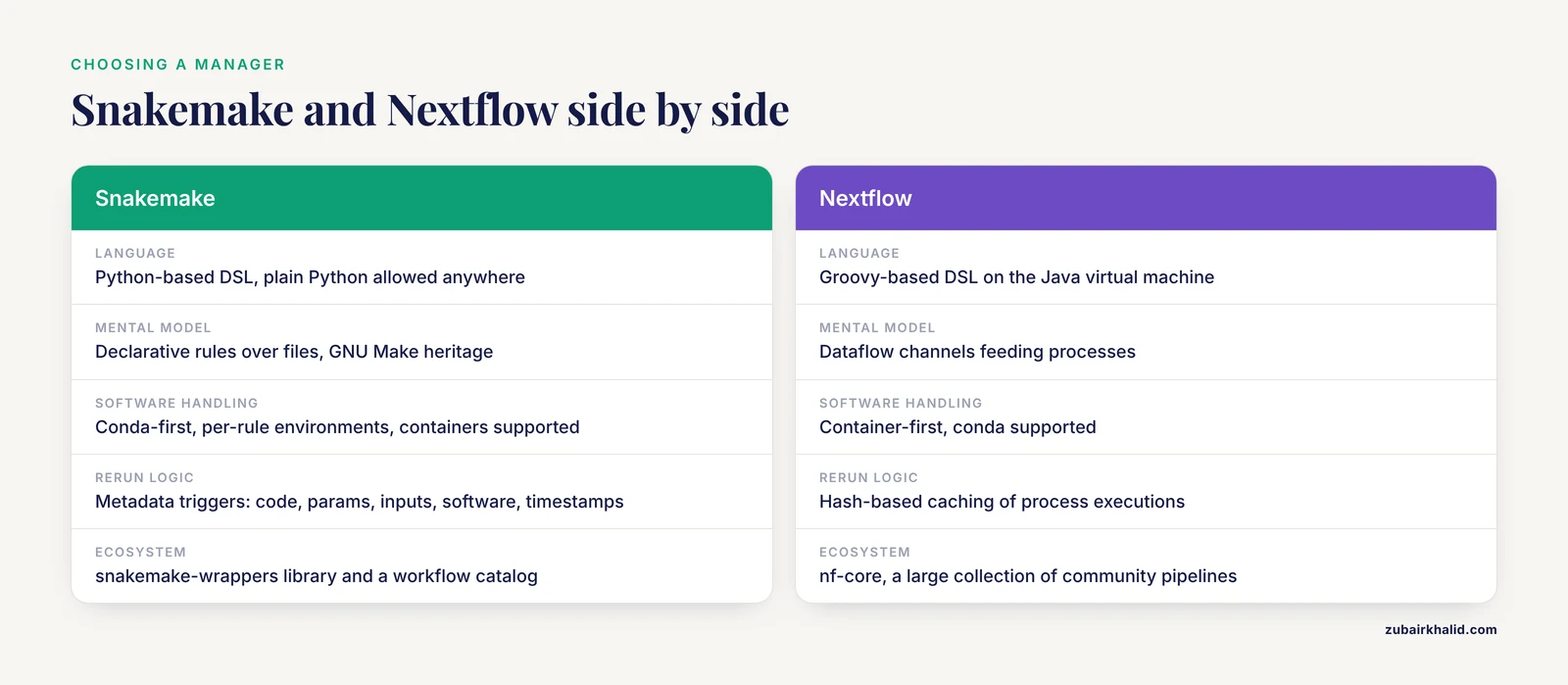
Nextflow and Snakemake are the two workflow managers most commonly seen in bioinformatics, and both are free and open source. The nextflow vs snakemake question usually resolves on team background and on whether a community pipeline already covers your analysis.
| Aspect | Snakemake | Nextflow |
|---|---|---|
| Language | Python-based DSL, plain Python allowed anywhere | Groovy-based DSL on the Java virtual machine |
| Mental model | Declarative rules over files, GNU Make heritage | Dataflow channels feeding processes |
| Software handling | Conda-first, per-rule environments, containers supported | Container-first, conda supported |
| Rerun logic | Metadata triggers: code, params, inputs, software, timestamps | Hash-based caching of process executions |
| Cluster and cloud | Executor plugins for SLURM, Kubernetes, and cloud services | Many executors built in |
| Ecosystem | snakemake-wrappers library and a workflow catalog | nf-core, a large collection of community pipelines with continuous integration |
| Sweet spot | Python-heavy teams, laptop-to-cluster portability, per-rule control | Teams adopting ready-made nf-core pipelines |
Three honest observations for anyone choosing between them:
- If nf-core already ships your analysis (RNA-seq, variant calling, and many other domains), running that pipeline beats writing your own in either system.
- Python teams tend to feel productive in Snakemake within a day, because a Snakefile is a Python file. Groovy is less familiar to most bioinformaticians, so Nextflow usually has a steeper first day.
- Both systems solve the same core problem well. Institutions standardize on one for support and training reasons, not because one fails where the other succeeds.
Common Errors and Exact Fixes
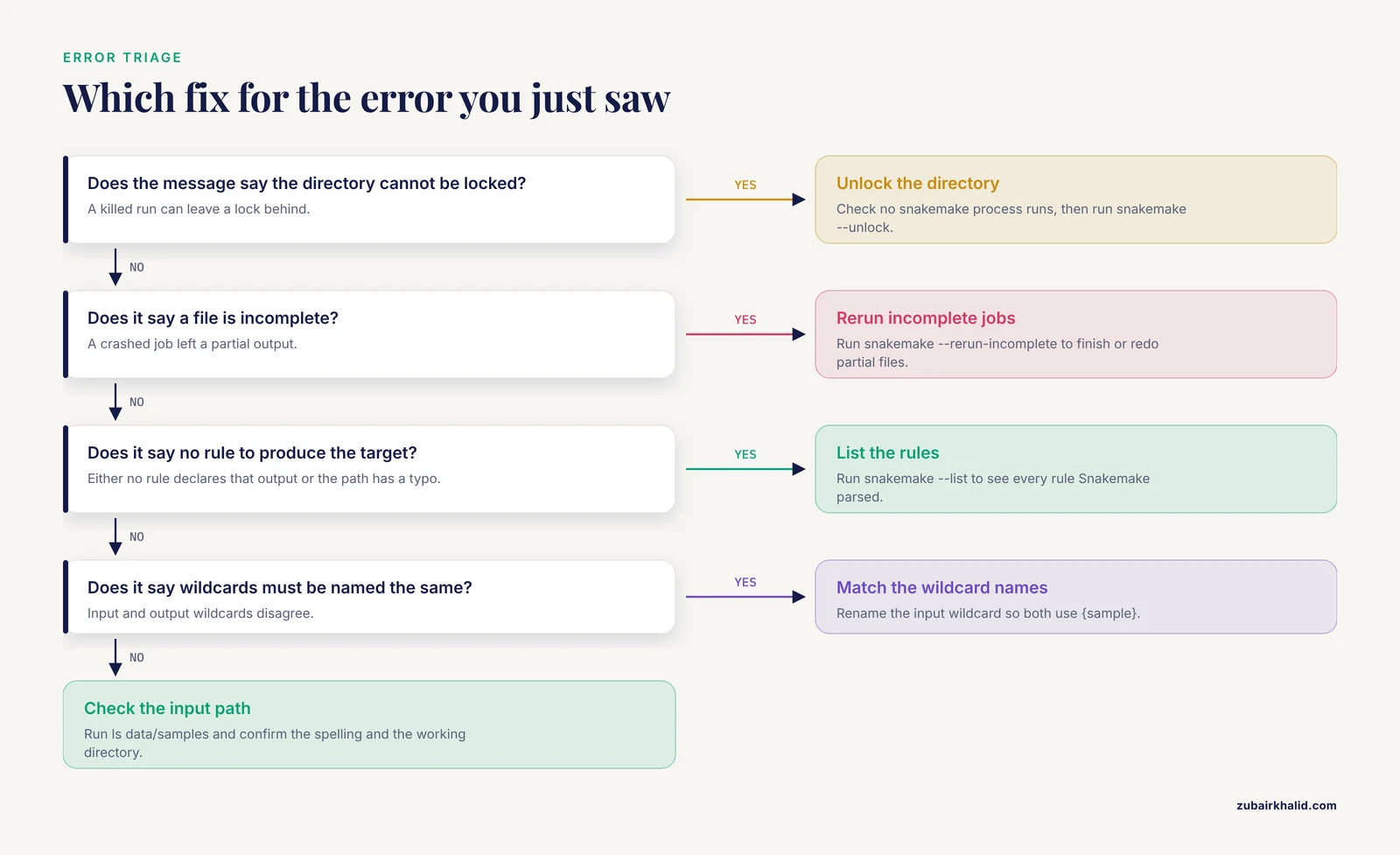
- Missing input file.
MissingInputException in rule fastqc in file Snakefile, line 20:
Missing input files for rule fastqc:
  data/samples/control_1.fastq.gz
Fix: run ls data/samples to check the actual name, confirm you are in the directory that holds the Snakefile, and check the spelling in the rule. A one-character typo causes most of these.
- No rule for a target.
MissingRuleException:
No rule to produce target results/multiqc_report.html
Fix: either no rule declares that output, or the path has a typo. Run snakemake, list to see every rule Snakemake parsed.
- Wildcards in a target you typed.
TargetRules may not contain wildcards.Fix: snakemake results/qc/{sample}_fastqc.html is not runnable because {sample} has no value. Request concrete files (snakemake results/qc/control_1_fastqc.html) or define a rule all with the full list.
- Wildcard name mismatch.
Wildcards in input files must be named the same as wildcards in output files.Fix: rename the wildcard in the input so it matches the output, for example {sample} in both.
- Two rules produce the same file.
AmbiguousRuleException:
Rules fastqc and fastqc_old are ambiguous for the target file results/qc/control_1_fastqc.html
Fix: delete or rename one rule, or add wildcard_constraints so only one rule can match a given path.
- A killed run left a lock.
Directory cannot be locked. Please make sure that Snakemake is not already running on this directory.
...
Please run 'snakemake --unlock' in this case to remove the lock.
Fix: confirm no snakemake process is running (ps aux | grep snakemake), then run snakemake, unlock. Only unlock when you are certain nothing is running, because two concurrent runs on one directory can corrupt outputs.
- Incomplete output from a crashed job.
IncompleteFilesException:
The file results/trimmed/control_1.trim.fastq.gz is incomplete. Please delete it or rerun snakemake with --rerun-incomplete.
Fix: run snakemake, rerun-incomplete, which finishes or redoes partial files.
- Command not found inside a job.
CalledProcessError in line 21 of Snakefile:
Command 'fastqc --outdir results/qc data/samples/control_1.fastq.gz > logs/fastqc/control_1.log 2>&1' returned non-zero exit status 127.
Fix: exit status 127 means the program is not installed in the job's environment. Open the job's log file and look for the words "command not found", then run with -use-conda so the rule's environment file provides the tool.
- Missing
-coreson Snakemake 8 and later. Snakemake exits immediately with an error asking you to specify the number of cores. Add-cores 8(or-cores all). Snakemake 7 defaulted to one core, which is why older tutorials sometimes omit the flag.
Common Mistakes and Limitations
- Editing outputs by hand. The stored metadata will notice and either trigger a rerun or conflict. Regenerate files by running the workflow, and use
-cleanup-metadatafor a file you truly replaced outside Snakemake. - Deleting the
.snakemakedirectory to reset a project. That discards all rerun intelligence and forces a full replan. Prefer targeted flags:-rerun-incomplete,-cleanup-metadata,-unlock. - Unconstrained wildcards. Without
wildcard_constraints,{sample}can match paths containing slashes and scatter files into surprising places. - Using
run:withconda:. Inline Python runs in Snakemake's own environment, not the rule's conda environment. Usescript:orshell:when a rule needs its environment. - Assuming Snakemake replaces the scheduler. On a cluster, SLURM still decides when and where jobs run. Snakemake submits and monitors.
- Unpinned conda versions.
fastqcwithout a version pin means a different environment next month. Pin exact versions in everyenvs/*.yaml. - Shared-filesystem blindness. On NFS or Lustre, a finished job's output can take seconds to appear on other nodes. Raise
-latency-waitbefore assuming a bug. - Windows. Snakemake does not run natively on Windows. Use WSL2 (the Windows Subsystem for Linux), which the official documentation recommends.
- Enormous per-file DAGs. One job per chromosome or per read group scales fine. One job per single read does not, because the DAG lives in memory.
- Treating the dry run as a correctness test. A dry run proves the graph is buildable, not that the commands work. Run a tiny subset of real data before scaling up.
Frequently Asked Questions
What is Snakemake used for?
Snakemake orchestrates multi-step data analyses. You describe each step as a rule with inputs, outputs, and a command, and Snakemake builds the dependency graph, runs jobs in parallel, and reruns only what changed.
How do I run a Snakemake workflow?
Put a Snakefile in your working directory and run snakemake, cores 8. Snakemake 8 and later require the -cores flag, and snakemake -n previews the plan without running anything.
Is Snakemake better than Nextflow?
Neither is universally better. Snakemake suits Python-heavy teams and fine per-rule control, Nextflow suits teams adopting nf-core community pipelines, and both run well on laptops, clusters, and cloud.
How do I preview what Snakemake will do before running it?
Run snakemake -n for a dry run. Add -p to print every shell command, and -dag to render the job graph with Graphviz.
How do I force a rule to run again?
Use snakemake -R rulename to force that rule and everything downstream, or -F to force the entire DAG. Since Snakemake 7.8, changed code, params, inputs, or software also trigger reruns automatically.
How do I give each rule its own software environment?
Add conda: "envs/tool.yaml" to the rule with a pinned environment file, then run with -use-conda. Snakemake builds and caches each environment automatically.
Can Snakemake run on a SLURM cluster?
Yes. On Snakemake 8 and later, install the SLURM executor plugin and run with -executor slurm, jobs 100. On Snakemake 7, use the -cluster flag with an sbatch command.
Where can I find ready-made Snakemake workflows and templates?
Start with the official Snakemake documentation, the snakemake-wrappers library for common tools, and the Snakemake workflow catalog. The template section of this guide gives a minimal starting skeleton.