How to Add New Samples in Snakemake
By Dr. Zubair Khalid, DVM, MS, PhD ·

By the end of this guide you will be able to add one new sample, or an entire batch, to an existing Snakemake workflow, preview exactly which jobs will run before you spend any compute, execute only the new work, and verify that the finished results are complete and consistent with your earlier samples. The same procedure applies whether your workflow reads a TSV sample sheet, a YAML config file, or discovers sample names directly from filenames.
Snakemake is a bioinformatics workflow manager built on Python. You describe each step of an analysis as a rule, and Snakemake assembles the rules into a directed acyclic graph (DAG), a dependency map in which nodes are files and edges are jobs. On every invocation it compares the files you asked for against the files on disk and schedules only the jobs that are missing or outdated. That behavior is what makes adding new samples in Snakemake cheap and safe.
What you need on hand:
- Snakemake 8 or later (current releases are in the 9.x series), installed through Conda or Mamba
- A small workflow to extend. The walkthrough uses a three-rule quality control and trimming example you can recreate in minutes
- The raw FASTQ files for the new sample. FASTQ is the standard text format that stores sequencing reads together with per-base quality scores
- Graphviz, which provides the dot tool used to draw the DAG
- Git, so the sample sheet change is recorded and reviewable
What Happens When You Add a Sample
Most production workflows are sample-driven. A sample sheet, usually a TSV or CSV table with one row per sample, supplies the sample identifiers and metadata. The Snakefile reads that sheet at startup, and every rule is written with a {sample} wildcard so the same code processes any number of samples. A wildcard is a placeholder such as {sample} that Snakemake fills with concrete values while it builds the DAG.
When you add a row to the sheet and rerun, three things happen:
- Snakemake rebuilds the DAG from the current sheet, code, and config
- It checks every target file. Outputs that exist and are up to date are kept, and their jobs are skipped
- Jobs for the new sample run, followed by any aggregate rule whose inputs changed, for example a MultiQC report that must now include the new sample
A dry run (the -n flag) performs steps 1 and 2 without executing anything, which is why it is the standard first move whenever the sample set changes.
Prerequisites and the Example Workflow
Install Snakemake and Graphviz in a dedicated environment:
conda create -n snakemake -c conda-forge -c bioconda snakemake graphviz
conda activate snakemake
snakemake --version
Expected output is a version string such as:
9.1.0Snakemake 8 and later need Python 3.11 or newer, which the command above resolves automatically. Snakemake itself depends on pandas, so the walkthrough can read TSV sample sheets without extra installs.
The walkthrough uses this project layout:
- Snakefile at the project root
- config/config.yaml, which points at the sample sheet
- config/samples.tsv, one row per sample
- data/raw/, holding paired reads named {sample}_R1.fastq.gz and {sample}_R2.fastq.gz
- envs/, results/, and logs/, filled by the workflow
config/config.yaml:
samples: config/samples.tsvconfig/samples.tsv (tab separated):
sample	condition	fastq_1	fastq_2
S1	control	data/raw/S1_R1.fastq.gz	data/raw/S1_R2.fastq.gz
S2	treated	data/raw/S2_R1.fastq.gz	data/raw/S2_R2.fastq.gz
Snakefile:
import pandas as pd

configfile: "config/config.yaml"

samples = pd.read_csv(config["samples"], sep="\t", dtype=str).set_index("sample", drop=False)
SAMPLES = samples.index.tolist()

rule all:
    input:
        expand("results/trimmed/{sample}_R1.fastq.gz", sample=SAMPLES),
        expand("results/trimmed/{sample}_R2.fastq.gz", sample=SAMPLES),
        "results/multiqc_report.html",

rule fastqc:
    input:
        r1="data/raw/{sample}_R1.fastq.gz",
        r2="data/raw/{sample}_R2.fastq.gz",
    output:
        html1="results/fastqc/{sample}_R1_fastqc.html",
        html2="results/fastqc/{sample}_R2_fastqc.html",
        zip1="results/fastqc/{sample}_R1_fastqc.zip",
        zip2="results/fastqc/{sample}_R2_fastqc.zip",
    log:
        "logs/fastqc/{sample}.log",
    conda:
        "envs/fastqc.yaml"
    shell:
        "mkdir -p results/fastqc logs/fastqc && "
        "fastqc --outdir results/fastqc {input.r1} {input.r2} > {log} 2>&1"

rule trim_reads:
    input:
        r1="data/raw/{sample}_R1.fastq.gz",
        r2="data/raw/{sample}_R2.fastq.gz",
    output:
        r1="results/trimmed/{sample}_R1.fastq.gz",
        r2="results/trimmed/{sample}_R2.fastq.gz",
    log:
        "logs/cutadapt/{sample}.log",
    conda:
        "envs/cutadapt.yaml"
    shell:
        "mkdir -p results/trimmed logs/cutadapt && "
        "cutadapt -q 20 -m 25 -o {output.r1} -p {output.r2} {input.r1} {input.r2} > {log} 2>&1"

rule multiqc:
    input:
        expand("results/fastqc/{sample}_R1_fastqc.zip", sample=SAMPLES),
        expand("results/fastqc/{sample}_R2_fastqc.zip", sample=SAMPLES),
    output:
        "results/multiqc_report.html",
    log:
        "logs/multiqc.log",
    conda:
        "envs/multiqc.yaml"
    shell:
        "multiqc {input} --outdir results > {log} 2>&1"
envs/fastqc.yaml:
channels:
  - conda-forge
  - bioconda
dependencies:
  - fastqc=0.12.1
Write envs/cutadapt.yaml and envs/multiqc.yaml the same way, with cutadapt and multiqc pinned. Pinning versions matters for a reason that reappears later: samples added months apart should be processed with identical software.
Adding New Samples in Snakemake Step by Step
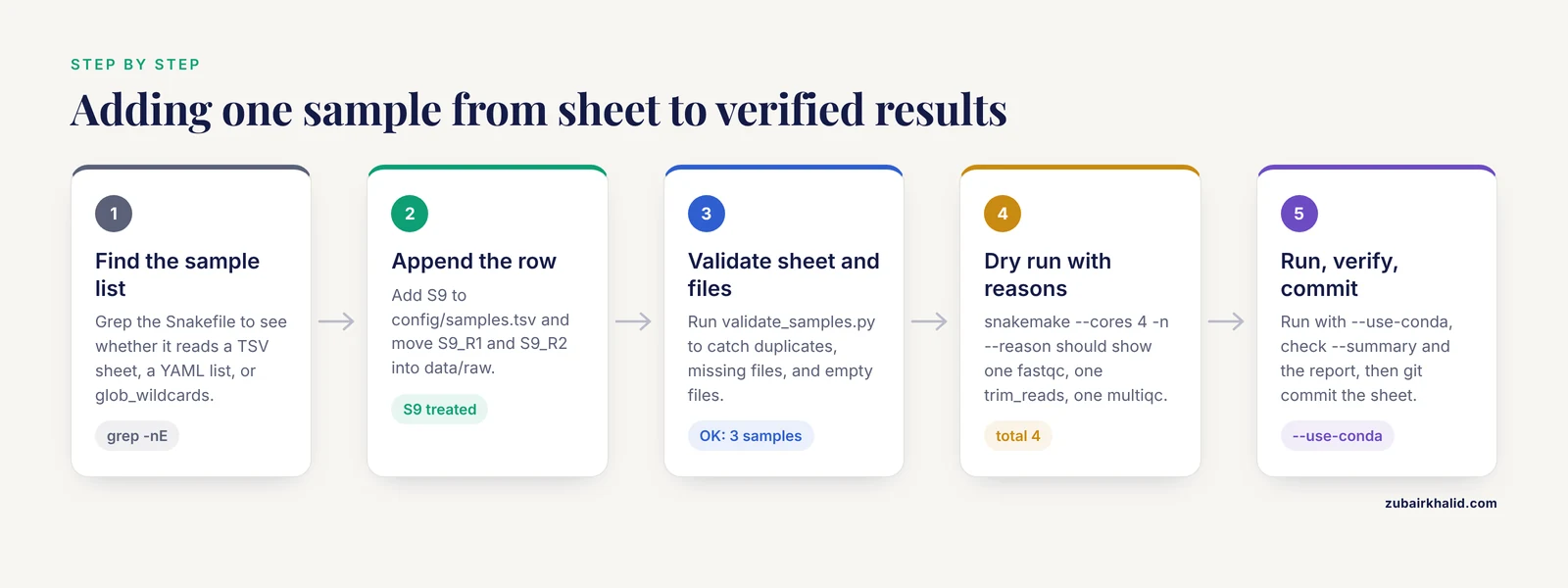
Assume the two-sample project above has already run once, so results for S1 and S2 exist. A third sample, S9 (treated), arrives with two FASTQ files. The six steps below take it from raw files to verified results.
Step 1: Find Where the Workflow Gets Its Sample List
grep -nE "SAMPLES|samples|glob_wildcards|config\[" SnakefileExpected output:
3:configfile: "config/config.yaml"
5:samples = pd.read_csv(config["samples"], sep="\t", dtype=str).set_index("sample", drop=False)
6:SAMPLES = samples.index.tolist()
This workflow reads the path stored in config.yaml, which points to config/samples.tsv. Three ingestion patterns cover almost every workflow you will encounter.
Pattern A, a TSV or CSV sheet read with pandas (used here). The sheet carries sample IDs plus metadata such as condition, and can also carry explicit file paths.
Pattern B, a YAML list:
samples:
  - S1
  - S2
SAMPLES = config["samples"]Pattern C, filename discovery with glob_wildcards, no sheet at all:
SAMPLES, = glob_wildcards("data/raw/{sample}_R1.fastq.gz")The trailing comma unpacks the single-element tuple that glob_wildcards returns. With this pattern, dropping a correctly named file into data/raw is enough to add the sample.
Step 2: Add the Sample to the Sample Sheet
Open config/samples.tsv and append one row for S9. The file is tab separated, so keep the columns aligned:
sample	condition	fastq_1	fastq_2
S1	control	data/raw/S1_R1.fastq.gz	data/raw/S1_R2.fastq.gz
S2	treated	data/raw/S2_R1.fastq.gz	data/raw/S2_R2.fastq.gz
S9	treated	data/raw/S9_R1.fastq.gz	data/raw/S9_R2.fastq.gz
Sample ID rules that prevent most downstream failures:
- Unique within the project
- Letters, digits, hyphens, and underscores only. No spaces
- Consistent case, because S9 and s9 are different strings to Snakemake and to your filesystem
- Exactly matching the FASTQ filenames, since the rules construct paths from the ID
Place the files where the rules expect them and record checksums, short digital fingerprints used to confirm that files were not corrupted during transfer:
mv S9_R1.fastq.gz S9_R2.fastq.gz data/raw/
md5sum data/raw/S9_R1.fastq.gz data/raw/S9_R2.fastq.gz
Expected output:
3f5a8c1e9d2b47a6c0e1f8d9a2b3c4d5  data/raw/S9_R1.fastq.gz
7b9c2d4e6f8a1b3c5d7e9f1a2b4c6d8e0  data/raw/S9_R2.fastq.gz
Compare these values against the checksum file that accompanied the delivery. A mismatch means the transfer corrupted the file, and no workflow setting will fix that.
Step 3: Validate the Sheet and the Raw Files
A 30-second check now prevents a failed run later. Save this as validate_samples.py:
from pathlib import Path
import pandas as pd

sheet = pd.read_csv("config/samples.tsv", sep="\t", dtype=str)
assert sheet["sample"].is_unique, "duplicate sample IDs in sheet"
for _, row in sheet.iterrows():
    for column in ("fastq_1", "fastq_2"):
        path = Path(row[column])
        assert path.exists(), f"missing file: {path}"
        assert path.stat().st_size > 0, f"empty file: {path}"
print(f"OK: {len(sheet)} samples, all FASTQ files present")
Run it:
python validate_samples.pyExpected output:
OK: 3 samples, all FASTQ files presentAdjust the column names to match your sheet, and extend the script with project-specific checks, for example that every treated sample has a matched control.
Step 4: Preview the Plan with a Dry Run
snakemake --cores 4 -n --reasonExpected output (wording varies slightly between versions):
Building DAG of jobs...
Job stats:
job          count
---------  -------
all              1
fastqc           1
multiqc          1
trim_reads       1
total            4

Reasons:
    (check individual jobs above for details)
    missing output files:
        results/fastqc/S9_R1_fastqc.html
        results/fastqc/S9_R2_fastqc.html
        results/trimmed/S9_R1.fastq.gz
        results/trimmed/S9_R2.fastq.gz
    input files updated by another job:
        results/fastqc/S9_R1_fastqc.zip
        results/fastqc/S9_R2_fastqc.zip

This was a dry-run (flag -n).
Read this block before trusting it. Three details confirm the addition is correct:
- The job counts include exactly one fastqc and one trim_reads job, for S9 only
- multiqc appears once, because its inputs (the FASTQC archives) change when S9 joins. Aggregate rules rerun by design so the new sample lands in the report
- No S1 or S2 jobs appear anywhere
To see the structure, render the DAG with dot from Graphviz:
snakemake --dag | dot -Tsvg > dag_after_S9.svgThe SVG shows the new sample's branch joining the shared MultiQC node.
Step 5: Run Only the New Work
snakemake --cores 8 --use-conda-cores sets local parallelism., use-conda tells Snakemake to create the pinned Conda environments declared with the conda directive and run each rule inside them. Expected output, abridged:
Building DAG of jobs...
Job stats:
job          count
---------  -------
all              1
fastqc           1
multiqc          1
trim_reads       1
total            4

Select jobs to execute...

[Wed Nov 11 09:41:02 2026]
rule trim_reads:
    input: data/raw/S9_R1.fastq.gz, data/raw/S9_R2.fastq.gz
    output: results/trimmed/S9_R1.fastq.gz, results/trimmed/S9_R2.fastq.gz
    log: logs/cutadapt/S9.log
    jobid: 2
    reason: Missing output files: results/trimmed/S9_R1.fastq.gz, results/trimmed/S9_R2.fastq.gz
    conda-env: /home/you/.conda/envs/8f1c2d3e4f5a6b7c

...

[Wed Nov 11 09:44:37 2026]
Finished job 0.
4 of 4 steps (100%) done
All jobs completed.
Old samples produced no output because their files were already current. The only repeated work is MultiQC, which regenerates the report so that S9 is included.
Step 6: Verify the Results and Record the Change
Three checks, in increasing depth.
File level. snakemake, summary prints one row per output with its status and plan:
snakemake --summaryAbridged output:
output_file                     rule         status    plan
------------------------------  -----------  --------  ---------
results/trimmed/S1_R1.fastq.gz  trim_reads   ok        no update
results/trimmed/S9_R1.fastq.gz  trim_reads   ok        no update
results/multiqc_report.html     multiqc      ok        no update
On a partially finished project you will also see statuses such as missing output file, updated input files, and incomplete. Any row with plan set to update tells you what the next run will do.
Content level. Confirm the new files are valid gzip archives and open the MultiQC report:
gzip -t results/trimmed/S9_R1.fastq.gz && echo "gzip OK"
ls -lh results/multiqc_report.html
Expected output:
gzip OK
-rw-r--r-- 1 you you 1.2M Nov 11 09:44 results/multiqc_report.html
Compare S9 quality metrics against S1 and S2 in the report. A new sample that looks wildly different from its batch often points to a swapped file or a wrong condition label, not to a pipeline error.
Provenance level. Generate the self-contained HTML report Snakemake can emit, which records the DAG, code, parameters, and software environments for the run:
snakemake --report results/report.htmlThen commit the change:
git add config/samples.tsv
git commit -m "Add sample S9 (treated) to sample sheet"
git push
The git diff is the audit trail showing exactly when each sample entered the analysis.
Handling Multiple FASTQ Files per Sample
Sequencing providers often split one biological sample across several lanes, producing multiple FASTQ pairs per sample. Adding such a sample means more than one row, and the workflow needs a rule that merges the pieces before trimming. The common pattern is a second sheet, often called units.tsv, with one row per file pair:
sample	unit	fastq_1	fastq_2
S9	L001	data/raw/S9_L001_R1.fastq.gz	data/raw/S9_L001_R2.fastq.gz
S9	L002	data/raw/S9_L002_R1.fastq.gz	data/raw/S9_L002_R2.fastq.gz
A merge rule selects all units for the requested sample:
units = pd.read_csv("config/units.tsv", sep="\t", dtype=str)

rule merge_lanes:
    input:
        r1=lambda wc: units.loc[units["sample"] == wc.sample, "fastq_1"].tolist(),
        r2=lambda wc: units.loc[units["sample"] == wc.sample, "fastq_2"].tolist(),
    output:
        r1="data/merged/{sample}_R1.fastq.gz",
        r2="data/merged/{sample}_R2.fastq.gz",
    shell:
        "mkdir -p data/merged && "
        "cat {input.r1} > {output.r1} && "
        "cat {input.r2} > {output.r2}"
Concatenating gzip files with cat produces a valid gzip stream, so no decompression step is needed. Downstream rules then read from data/merged/ instead of data/raw/. When this sample arrives, you add two rows to units.tsv, and the dry run shows one merge_lanes job for S9 followed by the usual fastqc and trim_reads jobs. Several nf-core pipelines use the same repeated-row idea in their samplesheet.csv, which is one reason their sample handling stays predictable as pipelines grow.
Adding Many Samples at Once
For a batch of ten or a hundred samples, edit the sheet with a script rather than by hand. List the sample IDs encoded in the filenames:
for f in data/raw/*_R1.fastq.gz
do
  basename "$f" _R1.fastq.gz
done
Expected output:
S1
S2
S9
S10
Append the missing rows, run the validation script from Step 3, then dry run. With many new jobs, add parallelism or move to a cluster. On a single machine,, cores 8 uses eight cores. On a SLURM cluster, Snakemake 8 and later delegate scheduling to executor plugins such as snakemake-executor-plugin-slurm, configured through a profile directory passed with, profile.
One structural caveat: the plain sheet pattern assumes the sample set is known before the run starts. If the number of downstream files depends on results produced during the run, for example per-assembly reports that only exist for samples passing QC, use checkpoints, which let the DAG grow after a job finishes. For sample additions driven purely by the sheet, checkpoints are unnecessary.
Key Command-Line Options
These options cover nearly every sample-addition scenario.
| Option | What it does | Typical use when adding samples |
|---|---|---|
| , - | , - | , - |
| -n,, dry-run | Shows the job plan without executing anything | First command after every sheet edit |
| , reason | Prints why each job will run | Confirming only new jobs are scheduled |
| , dag | Prints the DAG in Graphviz dot format | Visual check of the new branch |
| , cores N | Sets local parallelism | , cores 8 on a workstation |
| , use-conda | Runs rules inside pinned Conda environments | Keeping old and new batches on identical software |
| , configfile PATH | Uses a specific config file | Testing a candidate sheet before it becomes the default |
| -s,, snakefile PATH | Uses a specific Snakefile | Testing a modified workflow in isolation |
| -R,, forcerun RULE | Forces a named rule to rerun | Refreshing multiqc after manual edits |
| -F,, forceall | Reruns every job in the DAG | After a deliberate pipeline change |
| , touch | Marks existing targets as up to date without running | Recovering from an interrupted run with verified outputs |
| , summary | Prints per-file status and plan | Verifying the finished state |
| , rerun-triggers mtime | Restricts reruns to timestamp changes | Avoiding reruns caused by code edits |
| , report FILE | Writes a self-contained HTML provenance report | Documenting the run for collaborators |
| , lint | Checks the Snakefile for structural problems | Cleaning up before others inherit the workflow |
Tips for Painless Sample Additions
- Dry run first, every time. -n, reason takes seconds and catches sheet typos before they burn an hour of compute.
- Keep exactly one authoritative sample sheet per project and track it in git. The git log then answers when a given sample entered the analysis, without archaeology.
- Pin software versions in every env YAML. Samples added in different months should not be processed by different tool versions unless you decide so explicitly.
- Prefer maintained wrappers for standard tools such as FastQC and MultiQC instead of hand-written shell blocks. Wrappers handle flags and output naming, which shrinks the surface for copy-paste errors.
- Run snakemake, lint after structural edits so problems surface before your collaborators find them.
- When IDs follow a pattern, generate sheet rows with a script and review the diff, rather than typing rows by hand.
Common Mistakes and Limitations
- Editing the wrong file. The workflow reads config/samples.tsv but you edited an old copy or a CSV export. Symptom: a dry run that prints "Nothing to be done (all needed files are up to date)." Fix: run grep -nE "read_csv|samples|config\[" Snakefile, confirm the path, edit that file.
- Sample ID does not match the filenames. Case matters. You add S9 to the sheet while the file on disk is s9_R1.fastq.gz, and the run stops with:
MissingInputException in line 16 of /home/you/project/Snakefile.
Missing input files for rule fastqc:
    input: data/raw/s9_R1.fastq.gz
Fix: run ls data/raw | grep -i s9 to see the real names, then make the sheet and the filenames agree. Snakemake resolves paths exactly, with no fuzzy matching.
- Spaces or stray characters in IDs. A space inside a TSV cell shifts every later column, and pandas fails with a parser error such as:
pandas.errors.ParserError: Error tokenizing data. C error: Expected 4 fields in line 3, saw 5Fix: rename IDs and files to letters, digits, hyphens, and underscores before ingestion.
- Half a pair. You add the R1 file but R2 is missing or misnamed, and the job fails with a MissingInputException naming the R2 path. Fix: the validation script from Step 3 catches this before the run.
- Editing the sheet mid-run. Snakemake reads the sheet once at startup, so new rows have no effect until the next invocation. Fix: wait for the run to finish, then rerun.
- Surprise reruns of old samples. Since version 7, code changes, parameter changes, and software environment changes are rerun triggers by default. If you edited a rule script before adding the sample, old jobs rerun too. Fix: commit code changes first, or run with, rerun-triggers mtime when you specifically want timestamp-only behavior, and use, summary to see the reason per file.
- Outputs for the new sample already exist. This happens when results are copied from a collaborator. Snakemake skips the jobs and never verifies the files. Fix: delete the copied outputs for that sample, or use, touch only when you are certain the files are complete and correct.
- Treating the sheet as metadata validation. Snakemake checks file existence and freshness, not biology. A swapped condition label flows into every downstream table without any error. Fix: keep the sheet in git, review diffs, and validate metadata with a script.
- Software drift between batches. If the env YAMLs changed since the first batch, the new sample is processed with different tool versions than the old ones. Fix: pin versions, and when versions must change, rerun earlier samples so all rows in the results table come from one pipeline version.
- Sheet path typo. A wrong path in config.yaml fails at startup with:
FileNotFoundError: [Errno 2] No such file or directory: 'config/sample.tsv'Fix: correct the path in config.yaml.
- A wildcard rule placed first. If the first rule in the Snakefile contains wildcards, every invocation fails with "Target rules may not contain wildcards." Fix: keep rule all as the first rule, built with expand() over SAMPLES.
- Very large batches. Thousands of new samples make the dry run slower and a laptop run impractical. Fix: move to a cluster profile early rather than mid-project.
Limitations. Snakemake tracks files, timestamps, code, and parameters. It does not track sample identity or experimental meaning, so a sheet row that points at the wrong FASTQ pair will be processed flawlessly and wrong. The workflow also cannot decide design questions for you, such as which samples belong in a batch or whether a new sample needs matched controls. Those decisions need domain judgment, and the versioned sample sheet is where they should be recorded and reviewed.
Nextflow vs Snakemake
Both Snakemake and Nextflow are established bioinformatics workflow managers, and both turn adding samples into a routine operation. The differences are in language and execution model.
Snakemake uses a Python-based domain-specific language. Rules with wildcards describe steps, the DAG is rebuilt on every run, and execution is incremental based on file state and rerun triggers. Adding a sample means editing the sheet and rerunning, as this guide shows.
Nextflow uses Groovy DSL2. Processes communicate through channels, asynchronous data streams that feed files into parallel tasks. A typical pipeline reads samplesheet.csv with splitCsv and map, so the sheet is the single point of entry for new samples. Rerunning with -resume reuses cached process outputs, keyed by inputs and code, so only new work executes.
The ecosystems differ as much as the engines. The nf-core collection standardizes samplesheet.csv schemas with automatic validation across a large set of community pipelines, which makes adding samples nearly identical from one pipeline to the next. Snakemake answers with a large wrapper library and a catalog of reusable workflows.
Practical guidance. If your team writes custom workflows in Python, Snakemake feels native and the wildcard model maps directly onto per-sample file naming. If your team leans on nf-core pipelines, Nextflow gives you uniform sample handling and validated sheets out of the box. Both run on laptops, HPC schedulers, and cloud. For the specific task of adding samples, both reduce to the same loop: edit the sheet, preview, rerun, verify.
Next Steps
- Move the workflow to a cluster profile once sample counts grow, using, profile and the executor plugin for your scheduler
- Replace hand-written shell blocks with wrappers from the Snakemake wrapper library where they exist
- Browse the Snakemake workflow catalog for tested starting points instead of writing from scratch
- Wire snakemake, report into your hand-off routine so every sample batch ships with provenance
- Add the validation script to a pre-commit hook or a CI check so bad sheets never reach the cluster
Frequently Asked Questions
Do I have to rerun the whole workflow after adding a sample?
No. Snakemake rebuilds the job graph, keeps every output that is already up to date, and runs only the jobs for the new sample plus aggregate rules such as MultiQC that now include it.
Where exactly do I add the new sample?
In the file your Snakefile reads for sample names, which is usually a TSV sheet loaded with pandas, a list in config.yaml, or nowhere at all if the workflow discovers samples with glob_wildcards. Run grep on the Snakefile to find out which pattern yours uses.
Why does Snakemake say "Nothing to be done" after I edit the sample sheet?
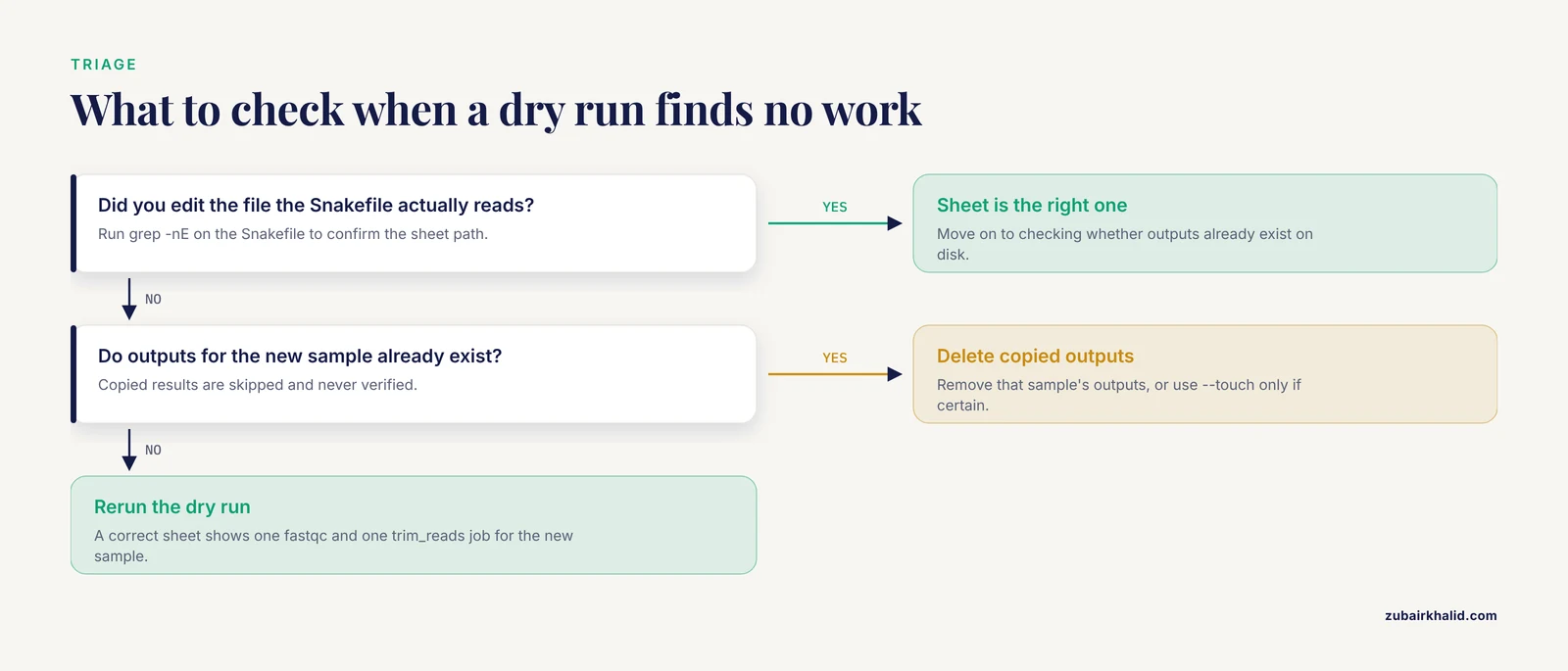
Either the workflow does not read the file you edited, or outputs for that sample already exist on disk. Run a dry run with -n, reason and check which sample file the Snakefile actually loads.
Can I add a sample while a run is in progress?
No. Snakemake reads the sample sheet once at startup. Wait for the run to finish, add the row, then start a new run.
How do I rerun only one rule for one sample?
Delete that sample's outputs for the rule and rerun, or name the target file and force the rule, for example snakemake results/fastqc/S9_R1_fastqc.html, forcerun fastqc.
What naming rules should sample IDs follow?
Use unique IDs made of letters, digits, hyphens, and underscores. Avoid spaces and special characters, keep the case consistent, and make sure each ID matches the FASTQ filenames exactly.
Nextflow vs Snakemake: which handles new samples better?
Both handle it well. In both you edit a sample sheet and rerun, and both compute only the new work. Choose based on your team's language preference, Python versus Groovy, and whether you depend on nf-core pipelines, which standardize the sheet format.
How do I add samples whose FASTQ files still need to be downloaded?
Download them into data/raw with the standard naming first, for example with fasterq-dump from the SRA Toolkit, then add the row to the sheet. Alternatively, add a download rule so Snakemake fetches the files as part of the DAG.