How to Set Up a Shared Genomics Workspace in the Cloud
By Dr. Zubair Khalid, DVM, MS, PhD ·
By the end of this guide you will have a working shared workspace genomics cloud setup that your whole lab or collaborative team can use: a private, versioned object store for sequencing data, managed identities with least-privilege access for every team member, a memory-optimized analysis instance with fast shared storage, a workflow engine that runs reproducible pipelines in containers, a controlled way for collaborators to upload and download results, and cost guardrails that stop a runaway job from draining the grant.
You will need the following on hand before you start:
- A cloud account with billing enabled (this walkthrough uses AWS, the dominant provider for aws genomics workloads, though the same architecture maps onto GCP or Azure)
- The AWS CLI version 2 installed and configured (
aws configurewith an access key and secret key) - Basic command-line fluency. If your team has none, read the section on managed platforms first, because that route requires no shell work
- A list of team members and their roles, because access control is easier to design up front than to retrofit
- Rough estimates of your data volume and monthly compute hours, even if approximate
Everything here uses services and commands that are standard, documented practice. Where a claim comes from the research literature on cloud bioinformatics rather than vendor documentation, I cite it inline.
What a Shared Genomics Workspace Actually Is
A shared genomics workspace is a cloud environment where a team stores sequencing data, runs analyses against it, and shares results, with permissions that differ by role. It differs from a personal laptop analysis or a one-off EC2 instance in three ways: the data lives in shared, durable storage rather than on one person's disk, the compute is disposable and reproducible, and access is governed by policy rather than by who happens to have the SSH key.
Cloud platforms deliver this through three service models. Infrastructure as a Service (IaaS) gives you raw virtual machines and storage you configure yourself. Platform as a Service (PaaS) gives you managed runtime and tooling on top of that infrastructure. Software as a Service (SaaS) gives you a finished application you simply log into. A comprehensive review of collaborative cloud environments describes how these models let organizations deploy flexible, collaborative systems without substantial upfront infrastructure cost, with on-demand access to compute, storage, and analytics [1]. Most genomics teams end up mixing models: IaaS for heavy pipelines, SaaS-style managed science platforms for collaborators who should never see a terminal.
The collaboration layer itself has a research history. Work on real-time synchronization of shared workspaces in cloud storage has formalized how concurrent edits from multiple users get merged consistently, using techniques such as operational transformation [2]. The same pattern shows up in modern collaborative workspace products that combine channels, video conferencing, file sharing, and task management in one interface, built with an emphasis on security and scalability for distributed teams [3]. A genomics workspace needs the same concurrency discipline, applied to files that happen to be 10 GB BAM files instead of spreadsheets.
Three service models, one decision
The practical decision is this: how much do you want to build versus subscribe to?
| Layer | IaaS (build it) | PaaS (assemble it) | SaaS (subscribe) |
|---|---|---|---|
| Compute | EC2 instances you patch and schedule | Batch systems, serverless functions | Provided by the platform |
| Storage | S3 buckets, EBS volumes, FSx | Managed buckets with lifecycle rules | Platform-managed |
| Pipelines | You install Nextflow, Cromwell, containers | Managed workflow services | Curated apps and tools |
| Access control | You write IAM policies | Managed identities plus your policies | Platform project permissions |
| Best for | Teams with dedicated bioinformatics staff | Labs that want control without babysitting | Clinicians, students, wet-lab collaborators |
Concrete examples of each exist in the genomics literature. Terra (app.terra.bio) and Dockstore hosted a fully containerized, formally archived pancancer transcriptomics analysis built on Global Alliance for Genomics and Health (GA4GH) workflow standards, shared as a workspace and notebook, without local supercomputing resources [4]. The Cancer Genomics Cloud (CGC), an NCI-funded platform, packages analysis workflows as apps defined in Common Workflow Language (CWL), run in Docker containers on hardware from commercial providers, and organizes data, tools, and settings into projects that can be shared between users [5]. At the IaaS end, Bionimbus provided an open-source cloud built on OpenStack virtual machines with a GlusterFS clustered filesystem, a portal called Tukey for single sign-on, and automation tooling, supporting real production pipelines such as acute myeloid leukemia resequencing [6].
Plan First: Four Decisions That Shape Everything
Decision 1: What kind of data, and who is allowed to see it
If the workspace will hold human genomic data linked to clinical information, stop and treat this as a governance problem before it is a technical one. A legal analysis of cloud computing for genomics research in Europe and internationally lays out the core tension: cloud platforms enable cohort studies at unprecedented scale, but researchers remain responsible for complying with local data protection rules, and different legal systems understand the right to data protection differently [7]. In practice this means you need written answers to these questions before creating a single bucket:
- Which jurisdictions' data will be stored, and are there contractual or legal restrictions on where it can reside (for example, a requirement to keep data in a specific region)?
- Does the data provider (a hospital, a consortium, a dbGaP-style controlled-access repository) permit cloud processing at all, and under what terms?
- Who is the legal data controller, and who are the processors?
Do not skip this because the pilot is small. Consent terms do not scale down retroactively.
Decision 2: How big is the data, really
A single 30x whole-genome sequence produces on the order of 100 GB of raw FASTQ and BAM output. Bionimbus documented BAM files of 5 to 10 GB per sample in an AML resequencing project, with each alignment step needing eight CPUs for roughly 12 hours [6]. Single-cell studies scale differently: one Human Cell Atlas melanoma dataset processed on the CGC contained 13.3k paired-end sequencing files totaling 371.60 GB for an estimated 6.6k cells [8]. Write down your per-sample footprint, your sample count, and your growth rate. These three numbers determine your storage tiering, your instance sizes, and your budget.
Decision 3: Build on IaaS or use a managed science platform
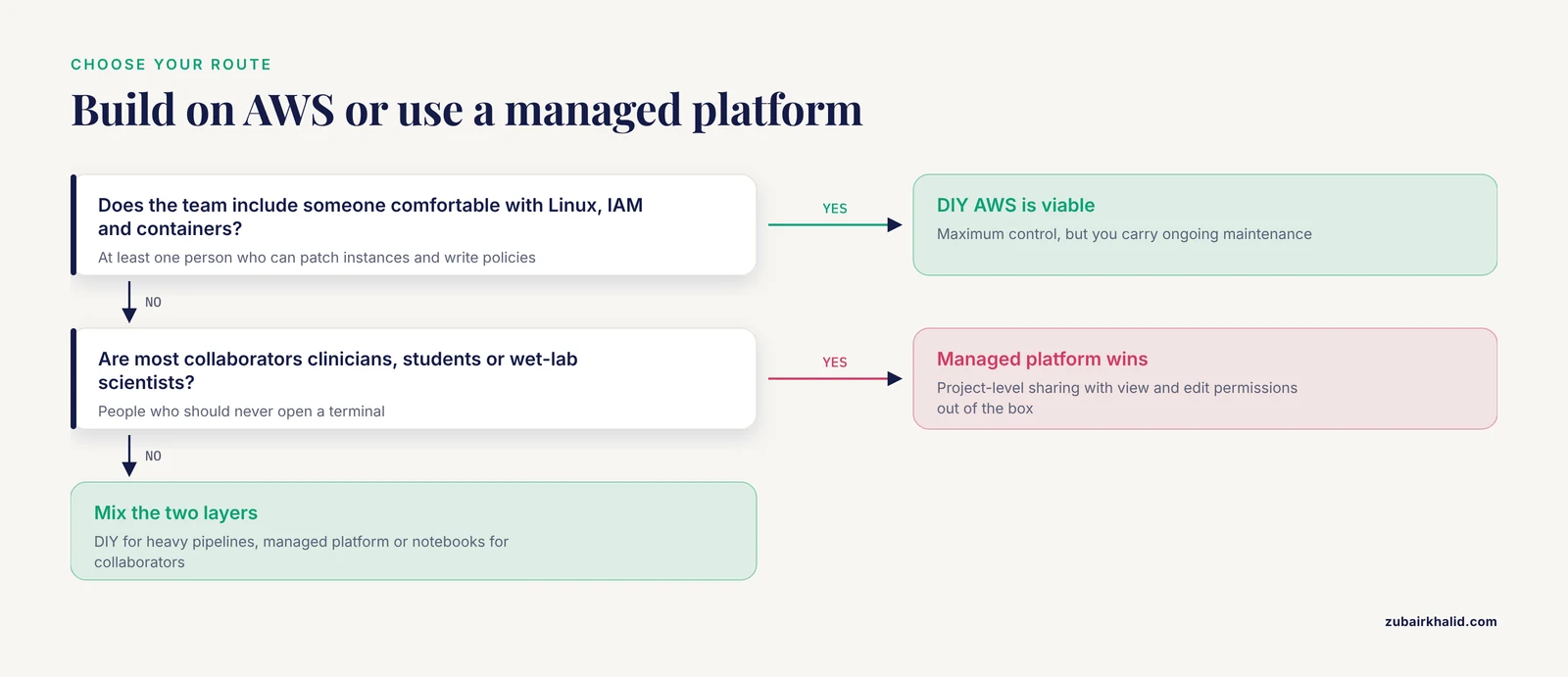
If your team includes at least one person comfortable with Linux, IAM, and containers, the DIY AWS route below gives you maximum control at the cost of ongoing maintenance. If your collaborators are clinicians, students, or wet-lab scientists, a platform with point-and-click project sharing will see far more actual use. The CGC's education work makes the case directly: its project structure contains all data files, tools, and tool settings with fine-grained permissions for viewing or editing, so an instructor can build a complete example analysis and share the entire project with trainees who see identical data on the cloud [9]. The same pattern works for research collaborations, not just teaching.
Decision 4: Who holds which role
Define four roles minimum: an admin who owns the account and billing, a data steward who manages buckets and access, analysts who run jobs, and viewers who read results. Map these to IAM groups now, in Step 3.
Step-by-Step: A Shared Workspace on AWS
The following walkthrough builds a complete, defensible shared workspace genomics cloud environment. Run commands from a machine with AWS CLI v2 configured. I use a placeholder bucket name, lab-genomics-prod-us-east-1, and an example region, us-east-1. Substitute your own.
Step 1: Create the account foundation
Work in a dedicated AWS account for the workspace, not the personal account of whoever set it up. Isolated accounts give you a hard billing boundary and make it trivial to shut everything down if a project ends. Within that account, require multi-factor authentication for the root user, then create an administrative IAM user or role for daily use and stop touching root entirely.
Verify who you are authenticated as before doing anything destructive:
aws sts get-caller-identityExpected output:
{
    "UserId": "AIDAXAMPLE4567EF",
    "Account": "123456789012",
    "Arn": "arn:aws:iam::123456789012:user/zkhalid-admin"
}
The Arn line tells you which identity will own everything you create next. If it says root, stop and set up a named admin identity first. Set your default region so every later command targets the same place:
aws configure set region us-east-1Pin your region deliberately. Celeste, the production architecture behind All of Us genomic analysis, ran within a single AWS Region and processed massive fluctuating workloads there, demonstrating that a single-region design scales to thousands of whole-genome samples per month [10]. Keeping compute and storage in one region also avoids inter-region transfer charges.
Step 2: Create a versioned, private S3 bucket for data
Amazon S3 is Simple Storage Service, an object store with effectively unlimited capacity. All raw reads, references, and results will live here. Bucket names are globally unique across all of AWS, so pick something like labname-genomics-prod-region.
aws s3 mb s3://lab-genomics-prod-us-east-1Expected output:
make_bucket: lab-genomics-prod-us-east-1If you instead see this error, the name is taken by someone else on the planet:
An error occurred (BucketAlreadyExists) when calling the CreateBucket operation: The requested bucket name is not available.Fix: append your institution name or a random suffix.
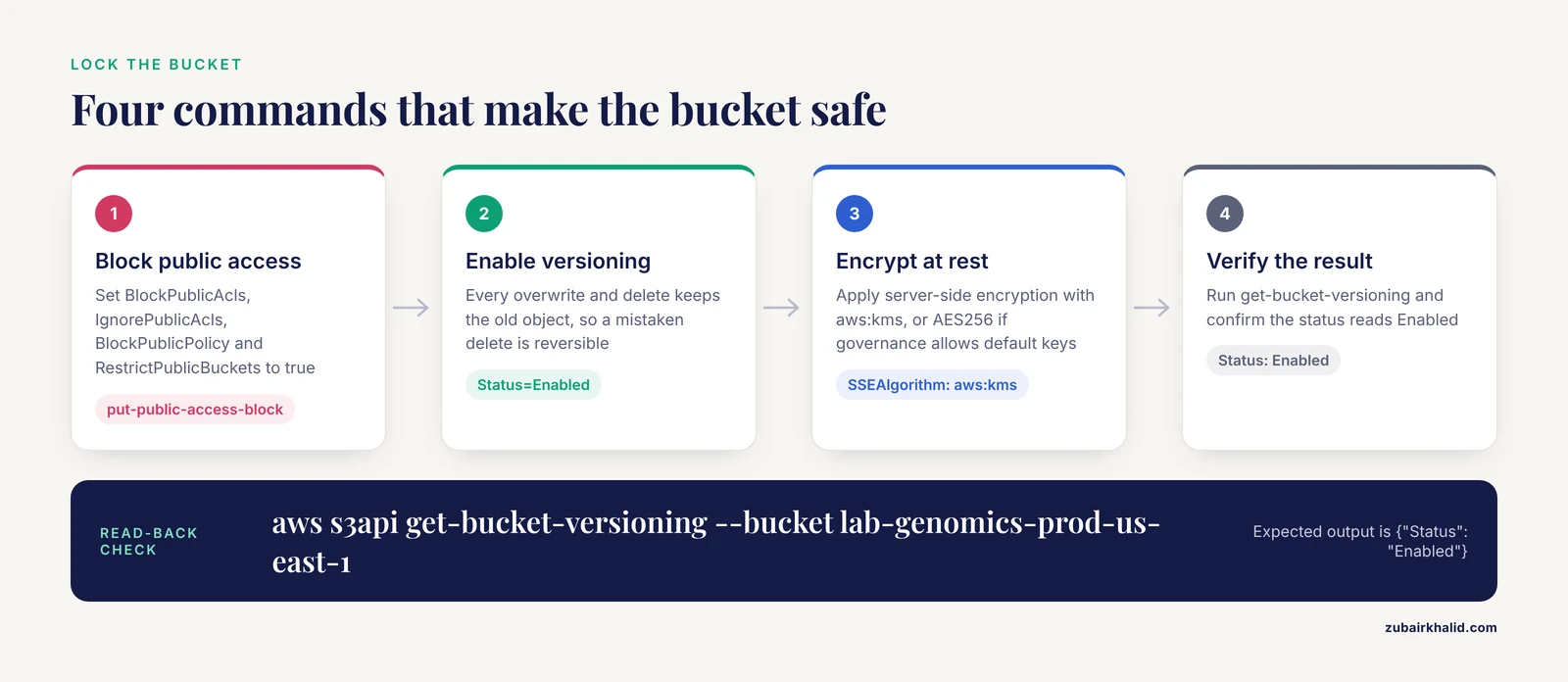
Now lock the bucket down and turn on the features that make it safe for a team. These four commands are the difference between a workspace and a liability:
# Block every form of public access
aws s3api put-public-access-block \
  --bucket lab-genomics-prod-us-east-1 \
  --public-access-block-configuration BlockPublicAcls=true,IgnorePublicAcls=true,BlockPublicPolicy=true,RestrictPublicBuckets=true

# Versioning: every overwrite and delete keeps the old object
aws s3api put-bucket-versioning \
  --bucket lab-genomics-prod-us-east-1 \
  --versioning-configuration Status=Enabled

# Encrypt every object at rest with a managed key
aws s3api put-bucket-encryption \
  --bucket lab-genomics-prod-us-east-1 \
  --server-side-encryption-configuration '{"Rules":[{"ApplyServerSideEncryptionByDefault":{"SSEAlgorithm":"aws:kms"}}]}'
There is no output on success from the three put-* calls. Verify with:
aws s3api get-bucket-versioning --bucket lab-genomics-prod-us-east-1Expected output:
{
    "Status": "Enabled"
}
Parameters that matter here:
Status=Enabledon versioning protects against the single most common disaster in shared workspaces, one analyst overwriting or deleting a file another analyst needed. Suspended versioning is not a substitute.SSEAlgorithm: aws:kmsencrypts objects with AWS KMS keys. You can substituteAES256for free default encryption if your data governance does not require customer-managed keys.- The public access block applies at the account level too if you set it account-wide, which you should.
Now impose a directory convention inside the bucket so the next person can find things:
s3://lab-genomics-prod-us-east-1/
    raw/           # immutable sequencing output, write-once
    ref/           # reference genomes and indices, versioned by build
    results/       # pipeline outputs, organized by project and date
    scratch/       # per-user working directories, lifecycle-managed
Treat raw/ as immutable. If an analyst needs to "fix" a raw FASTQ, the sequencer core reruns the sample and a new file lands under a new run identifier.
Step 3: Give the team identities and least-privilege access
Least privilege means each identity can do exactly its job and nothing more. Create an IAM group per role rather than attaching policies to individuals, so onboarding a new analyst is one add-user-to-group command.
aws iam create-group --group-name genomics-analystsExpected output:
{
    "Group": {
        "Path": "/",
        "GroupName": "genomics-analysts",
        "GroupId": "AGPAXAMPLE123",
        "Arn": "arn:aws:iam::123456789012:group/genomics-analysts"
    }
}
Write the group policy. This policy lets analysts list the bucket, read references and raw data, write to their own scratch space and to results, and never delete anything:
{
  "Version": "2012-10-17",
  "Statement": [
    {
      "Sid": "ListBucket",
      "Effect": "Allow",
      "Action": "s3:ListBucket",
      "Resource": "arn:aws:s3:::lab-genomics-prod-us-east-1"
    },
    {
      "Sid": "ReadShared",
      "Effect": "Allow",
      "Action": ["s3:GetObject", "s3:GetObjectVersion"],
      "Resource": [
        "arn:aws:s3:::lab-genomics-prod-us-east-1/raw/*",
        "arn:aws:s3:::lab-genomics-prod-us-east-1/ref/*",
        "arn:aws:s3:::lab-genomics-prod-us-east-1/results/*"
      ]
    },
    {
      "Sid": "WriteScratchAndResults",
      "Effect": "Allow",
      "Action": ["s3:PutObject"],
      "Resource": [
        "arn:aws:s3:::lab-genomics-prod-us-east-1/scratch/${aws:username}/*",
        "arn:aws:s3:::lab-genomics-prod-us-east-1/results/*"
      ]
    },
    {
      "Sid": "NoDeletes",
      "Effect": "Deny",
      "Action": ["s3:DeleteObject", "s3:DeleteObjectVersion"],
      "Resource": "arn:aws:s3:::lab-genomics-prod-us-east-1/*"
    }
  ]
}
Save it as analyst-policy.json and attach it:
aws iam put-group-policy \
  --group-name genomics-analysts \
  --policy-name analyst-s3-access \
  --policy-document file://analyst-policy.json
The ${aws:username} variable is the parameter that matters most in this policy. It scopes each analyst's write access to their own scratch prefix, which prevents both accidental clobbering and the classic shared-workspace failure where everyone dumps files into one undifferentiated directory. The explicit Deny on deletes overrides any conflicting allow, including a careless s3:* grant added later.
Create users and add them to the group:
aws iam create-user --user-name jdoe
aws iam add-user-to-group --user-name jdoe --group-name genomics-analysts
Step 4: Launch the shared analysis instance
For interactive analysis, one well-specced shared instance beats five underspecced personal ones, because shared storage, shared references, and shared conda environments only pay off when everyone uses the same machine. Start with a memory-optimized type. An r6i.2xlarge gives 8 vCPU and 64 GiB of memory, which comfortably handles read alignment of a single sample, variant filtering, and R or Python sessions for a few simultaneous users. Genomics is memory hungry in ways CPU count does not reveal, so prefer more RAM over more cores at this stage.
aws ec2 run-instances \
  --image-id ami-0abcdef1234567890 \
  --instance-type r6i.2xlarge \
  --key-name team-shared-key \
  --subnet-id subnet-0abc123def456 \
  --tag-specifications 'ResourceType=instance,Tags=[{Key=Name,Value=genomics-workspace}]' \
  --block-device-mappings '[{"DeviceName":"/dev/sda1","Ebs":{"VolumeSize":200,"VolumeType":"gp3"}}]'
Parameters that matter:
-image-idmust be an Amazon Linux 2023 or Ubuntu LTS AMI valid in your region. Region-mismatched AMI IDs produce the errorInvalidAMIID.NotFound: The image id '[ami-...]' does not exist. Look up the current ID in your own console rather than copying one from a blog post.-key-nameis the SSH keypair. One shared key for the team is acceptable at small scale, but individual keys tied to IAM identities audit better.VolumeType: gp3lets you provision throughput independently of size, which matters when you later resize.
SSH in and install the base stack:
ssh -i team-shared-key.pem ec2-user@<instance-public-dns>
sudo dnf update -y
sudo dnf install -y docker git
sudo systemctl enable --now docker
Step 5: Attach fast shared storage
The EBS root volume is fine for software but wrong for data, for two reasons documented painfully across the field. First, large-scale analysis is repeatedly input/output (IO) bound, meaning pipelines stall waiting on disk rather than computing, a bottleneck that bioinformatics software work has flagged as a central engineering challenge for high-throughput genomics [11]. Second, data on an instance volume dies with the instance. Keep durable data in S3 and give the instance a high-throughput mounted filesystem for active work.
For a small team, one additional gp3 EBS volume of 1 to 2 TB mounted at /data is usually enough:
aws ec2 create-volume \
  --availability-zone us-east-1a \
  --size 1024 \
  --volume-type gp3 \
  --throughput 500 \
  --iops 6000
aws ec2 attach-volume --volume-id vol-0abc123 --instance-id i-0abc123 --device /dev/sdf
Then on the instance:
sudo mkfs -t xfs /dev/sdf
sudo mkdir -p /data
sudo mount /dev/sdf /data
echo '/dev/sdf /data xfs defaults,nofail 0 2' | sudo tee -a /etc/fstab
The nofail option matters. Without it, a detached or failed volume prevents the instance from booting at all, which turns a storage problem into an outage.
As the team and workload grow past a single instance, replace this with a managed shared filesystem such as FSx for Lustre, which mounts the same filesystem on many instances concurrently and caches S3 objects locally. The lineage here is long: Bionimbus paired its OpenStack virtual machines with GlusterFS precisely to provide a high-performance clustered filesystem under on-demand compute [6], and every modern managed equivalent solves the same problem.
Step 6: Install a workflow engine and container runtime
Do not let analysts run pipelines by hand over SSH. A workflow engine records every step, retries transient failures, and makes the entire analysis rerunnable. Nextflow is the pragmatic default for a new team. WDL with Cromwell is the other mainstream choice, and both implement the execution concepts standardized through GA4GH workflow services that underpin cross-platform reproducibility [4].
Install Nextflow and a container runtime on the instance:
curl -s https://get.nextflow.io | bash
sudo mv nextflow /usr/local/bin/
# Apptainer (formerly Singularity) for rootless containers, safer on a shared host
sudo dnf install -y apptainer
nextflow -v
Expected output:
nextflow version 24.xx.xx build xxxxContainers are not optional in a shared workspace. Different analysts will otherwise install conflicting library versions into shared environments, and a pipeline that worked in March will break in June for reasons nobody can reconstruct. Containerization is the reproducibility mechanism that both the GA4GH and Bioconductor cloud work [4] and the CGC app framework [5] rely on. Pin every container to a version tag, never latest.
Step 7: Run the first real pipeline
As a smoke test, run a standard published pipeline against a small input. nf-core pipelines are curated, containerized, and produce extensive quality reports out of the box:
cd /data/scratch/zkhalid
nextflow run nf-core/rnaseq \
  -profile docker \
  --input samplesheet.csv \
  --outdir s3://lab-genomics-prod-us-east-1/results/rnaseq-test \
  -with-report pipeline_report.html
Expected output includes lines like these as execution proceeds:
Command error: (optional, only on failure)
executor >  local (8)
process > NFCORE_RNASEQ:RNASEQ:PREPARE_GENOME (1) [100%] 1 of 1 ✔
process > NFCORE_RNASEQ:RNASEQ:CAT_FASTQ (sample1) [100%] 2 of 2 ✔
...
Completed at 12-Jun-2026 14:22 EDT
Duration    : 1h 14m
Success     : true
Check the result landed in the bucket with correct structure:
aws s3 ls s3://lab-genomics-prod-us-east-1/results/rnaseq-test/ --recursive | head -5The output of the smoke test matters more than its speed. You are verifying that the workflow engine, container runtime, S3 permissions, and instance sizing all cooperate before real data and real deadlines arrive. Once it succeeds, run the same pipeline through AWS Batch for burst capacity. Serverless and container-orchestrated execution is how production-scale systems absorb wildly fluctuating workloads, as the Celeste architecture for All of Us demonstrated at a scale of thousands of whole-genome samples per month [10].
Two exact failures you will hit, with fixes:
Error: Process 'NFCORE_RNASEQ:SAMTOOLS_SORT (sample1)' terminated for an unknown reason, Likely running out of memory or not being interrupted by a graceful kill or a plain exit status 137.
Fix: the Linux OOM killer terminated the process because the container exceeded its memory allocation. Do not just add memory blindly. Check dmesg -T | grep -i "killed process" to identify the offender, then raise the process memory directive in the pipeline config or move to a larger instance type.
Error: AccessDenied on upload, formatted as upload failed: ./results.bam -> s3://lab-genomics-prod-us-east-1/results/... An error occurred (AccessDenied) when calling the PutObject operation: Access Denied.
Fix: the executing identity lacks s3:PutObject on that prefix. Check which prefix the target path falls under and confirm the policy in Step 3 covers it. A common variant happens when the pipeline runs under an instance profile rather than your user profile, and the profile has no policy attached.
Step 8: Share results without creating security holes
Never grant collaborator access by handing out AWS console credentials or long-lived access keys. Use these patterns instead:
- Group membership for long-term team members, as built in Step 3.
- Presigned URLs for one-off downloads to external collaborators, with short expiry:
aws s3 presign s3://lab-genomics-prod-us-east-1/results/rnaseq-test/multiqc_report.html --expires-in 604800Expected output is a long URL containing X-Amz-Signature=. Anyone holding it can download that one object until it expires. One week (604800 seconds) is a reasonable default, one day for sensitive outputs.
- A separate landing bucket for inbound collaborator uploads, with write-only permissions for external identities, so nobody can read other submitters' data. This mirrors the project-level sharing model that mature genomics platforms use, where data, tools, and permissions are bundled and shared as a unit with view or edit granularity [9], and where platforms expose APIs for programmatic upload from local hardware [5].
For the human collaboration layer, meetings, discussion, and file annotation, a general-purpose collaborative workspace product with channels, video, and file sharing keeps decisions attached to the data they concern, which is the pattern such platforms were designed for [3].
Step 9: Put cost guardrails in place
Cloud genomics pricing is genuinely complex, and costs from experimentation and mistakes are a recognized challenge alongside the scalability benefits [12]. Install guardrails in this order:
- A billing alarm at a threshold your budget can absorb, plus a second alarm at roughly twice that level, wired to email.
- AWS Budgets with a monthly cap and alerts at 80, 100, and 120 percent of plan.
- Instance scheduling. An interactive workspace does not need to run nights and weekends. Stop it with
aws ec2 stop-instances, instance-ids i-0abc123and start it with a scheduled command or a cron-driven Lambda. An idle r6i.2xlarge burns real money every hour for zero output. - Lifecycle rules on the scratch prefix, transitioning objects to infrequent-access storage after 30 days and deleting after 90:
aws s3api put-bucket-lifecycle-configuration \
  --bucket lab-genomics-prod-us-east-1 \
--lifecycle-configuration '{"Rules":[{"ID":"scratch-expiry","Filter":{"Prefix":"scratch/"},"Status":"Enabled","Transitions":[{"Days":30,"StorageClass":"STANDARD_IA"}],"Expiration":{"Days":90}}]}'- A rule that no pipeline runs unattended on demand instances larger than the team's agreed maximum without a second person approving it. This is a policy, not a technical control, and it prevents the most expensive class of accident in small labs.
Managed Platforms: When to Skip the DIY Route
Everything above is buildable and maintainable by one competent bioinformatician, but there is an honest alternative. Managed science platforms trade control for immediate usability, and for many teams they are the right shared workspace genomics cloud answer.
Terra pairs cloud workspaces with notebooks and workflows executed through GA4GH-conformant services, with tools registered and archived on Dockstore, and demonstrated end-to-end reproducible pancancer analysis without local infrastructure [4]. The Cancer Genomics Cloud organizes everything into projects with fine-grained view and edit permissions, supports CWL-defined apps running in Docker on AWS, GCP, or Azure resources, and connects to public repositories such as TCIA and the Imaging Data Commons through APIs for data import [5]. Its project-sharing model was specifically validated for training: an instructor builds a complete analysis and shares the project so students work against identical cloud-hosted data [9]. St. Jude Cloud demonstrates the clinical end of the spectrum, releasing tumor and germline data from a real-time pediatric cancer sequencing service securely online after clinical reporting completes [13].
The tradeoffs are real. You depend on the platform's roadmap, pricing, and availability, deep customization is harder, and exporting large datasets later takes planning. For teaching and for collaborations with computationally inexperienced partners, however, platforms lower the barrier enormously. Undergraduate courses have run full metagenomics research projects through cloud notebooks where every student got an identical environment, no prior setup was required, notebooks could be shared for synchronous sessions, and heavier jobs scaled into cloud compute when needed [14].
A middle path exists: DIY for the pipeline-heavy core, managed platform or notebooks for the human-facing layer.
Shared Workspace Genomics Cloud Tips From Production Systems
These are the practices that separate workspaces that survive three years from ones that collapse in three months.
Colocate compute with data, always. Every pipeline should run in the same region as its S3 bucket. Analysis across a network boundary is slow, and cross-region transfer is a silent budget killer. This is an instance of the general IO bottleneck problem in high-throughput genomics, where moving data dominates wall-clock time [11].
Compress deliberately, not reflexively. Storage and transfer costs of omics data are large enough that compression strategy is an engineering decision, not an afterthought. Modern tools such as Zstd, GZIP, Snappy, and LZ4 differ substantially in speed and ratio, and research on shared-dictionary compression for omics data in edge-cloud frameworks shows that removing redundancy before transmission measurably improves downstream compression efficiency for real patient datasets [15]. Practically: keep raw data in its original compression, compress derived text outputs (VCFs, logs, tables) with Zstd, and never store uncompressed FASTQ.
Treat concurrent access as a design problem. When two analysts edit shared metadata, sample sheets, or notebooks simultaneously, last-writer-wins silently destroys work. The formal solution, operational transformation, synchronizes concurrent edits against a shared cloud store while preserving each user's intent [2]. Cloud-based notebooks and collaborative editors implement versions of this for you. For plain files, the cheap fix is discipline: one person owns a file at a time, and shared state lives in the pipeline config, which is version controlled.
Keep the communication layer and compute layer separate but linked. A unified collaborative interface for chat, video, and file sharing reduces tool sprawl for the human side of the project [3]. Link out to specific S3 paths and pipeline run IDs from your chat threads rather than attaching data files. The workspace of record for data is the bucket and the workflow logs.
Test containers before scaling out. The GA4GH and Bioconductor cloud work explicitly reported challenges with container design, script archiving, and unit testing even in expert hands [4]. Budget time for it. A pipeline that fails on 900 samples because of a container built on a moving tag is a preventable failure.
Write the runbook as you build. Every command in this article should end up, with your actual names and values, in a repository your successor can read. Systems like Bionimbus invested in automation tooling specifically because manual infrastructure maintenance does not scale with project count [6].
Verify before you trust. After each setup step, run the corresponding read-back check (get-bucket-versioning, aws iam get-group-policy, aws s3 ls). The AWS CLI frequently succeeds silently, and the only way to catch a typo in a policy variable is to exercise the permission as the affected user, for example with sudo -u equivalent testing or an assumed role.
Common Mistakes and Limitations
These are the errors that recur in real cloud bioinformatics teams, with the exact symptoms that identify them.
Public buckets. The most serious mistake in this domain. A bucket holding human genomic data that is publicly readable is a reportable incident in most institutional contexts. The symptom is an S3 bucket showing Block public access: off in the console. The cause is almost always someone fighting a transfer problem by loosening permissions instead of using presigned URLs. Check public access block status on every bucket monthly.
No versioning, then a fat-fingered delete. Without versioning (Step 2), aws s3 rm on a prefix prefix-matches its way through weeks of derived results. With versioning, deletion is reversible. Recovery is aws s3api list-object-versions plus copying the prior version back. The absence of versioning is invisible until the day you need it.
Long-lived access keys shared across the team. A single AWS access key pasted into a Slack channel means every action is attributable to one identity and nobody can revoke access without breaking everyone. Use IAM users with individual keys, or better, IAM roles and short-lived credentials for pipelines.
Instance left running over a holiday weekend. This is the single most common source of budget alarms in small labs. Instance scheduling (Step 9) eliminates it. The related mistake is not understanding pricing complexity at all, which the clinical genomics literature names alongside data security as a primary adoption challenge [12].
Mixing raw and derived data. An analyst "cleaned up" the bucket and deleted raw FASTQ files that cost thousands of dollars to regenerate. The directory convention in Step 2 plus the explicit delete denial in the IAM policy both exist to prevent this. Enforce immutability at the raw/ prefix with a bucket policy if your team is larger than five people.
Unpinned containers and environments. A pipeline referencing biocontainers/samtools:latest will break without warning when the tag moves. Pin exact versions, record them in the workflow config, and archive the config with the results.
Skipping the governance step. Human genomic data processed in the cloud without reviewing what the data provider permits creates institutional risk that no amount of encryption fixes after the fact. The legal analysis of cloud genomics frames this as researchers needing to actively work within the legal frameworks that apply to them, given how differently jurisdictions treat data protection [7]. Loop in your institution's compliance office before uploading controlled-access data, not after.
One shared scratch directory. Without per-user prefixes (Step 3), analysts overwrite each other's intermediates and debugging becomes archaeology. The ${aws:username} policy variable solves this at the permissions layer.
Treating the workspace as a server. Analysts install one-off packages into the system environment, and six months later nobody can rebuild the machine. Everything installed by hand should be captured in a container image or an environment file, and the instance should be treated as replaceable.
A limitation of the approach itself. The DIY architecture here assumes a team with some systems competence and does not, by itself, satisfy every compliance framework. Regulated clinical work needs additional controls beyond what a baseline workspace provides, and clinical genomics delivery in non-specialist settings is still evolving as a practice [12]. If your workspace supports clinical decision-making rather than research, involve your institutional and regulatory advisors from the start.
Frequently Asked Questions
What exactly is a shared genomics workspace in the cloud?
It is a cloud environment where a team stores sequencing data in shared durable storage, runs analyses on shared compute, and accesses results under role-based permissions, replacing per-person laptops or a single shared server. Research prototypes of shared workspaces in cloud storage formalized the collaboration and synchronization model [2], and genomics platforms like Terra and the CGC apply it to sequencing-scale data [4], [5].
Do I need a managed platform like Terra or the CGC, or can I build directly on AWS?
You can build directly on AWS and this article shows how, which gives you full control at the cost of maintenance. Choose a managed platform when most of your users should never open a terminal, when you want curated public datasets pre-staged, or when you need project-level sharing with fine-grained view and edit permissions out of the box [9].
How much does a shared genomics workspace cost?
It depends on storage volume, compute hours, and data transfer, and cloud pricing is complex enough that cost surprises from experimentation are a documented challenge [12]. The controllable drivers are idle instances, unmanaged scratch data, and cross-region transfer, which is why Step 9 exists.
Is it safe to put human genomic data in the cloud?
It can be, but safety is a governance question as much as a technical one, and legal analyses of cloud genomics emphasize that researchers must verify what data providers permit and how their jurisdiction treats data protection before processing patient-linked genomic data in the cloud [7]. Technically, use private buckets, encryption at rest and in transit, region pinning, and least-privilege access.
What instance types should we start with?
Start with a memory-optimized type such as r6i.2xlarge (8 vCPU, 64 GiB) for interactive work, because genomics workloads are frequently memory bound before they are CPU bound, then benchmark your actual pipeline before scaling. Production systems scale further with serverless and container orchestration [10].
How do we let external collaborators upload data securely?
Create a separate landing bucket with write-only permissions for their identities, or issue short-lived presigned URLs for specific uploads. This keeps external access isolated from your main data bucket and mirrors the project-sharing model used by established genomics platforms [5].
What is the difference between IaaS, PaaS, and SaaS for this project?
IaaS gives you raw virtual machines and storage you configure and maintain yourself, PaaS gives you managed runtimes and services you assemble on top, and SaaS gives you a finished platform you log into. Cloud service models are described this way across collaborative cloud deployments [1], and genomics examples exist at each level, from OpenStack-based Bionimbus [6] to the CGC's finished app framework [5].
Can students or collaborators with no command-line experience use the workspace?
Yes, if you give them the right layer. Cloud notebook environments have been used to run complete research projects for undergraduates with no prior computing experience, with identical environments and shareable notebooks for synchronous sessions [14], and platform-based training lets instructors share fully configured analysis projects that students open and run directly [9].
Sources
- Collaborative E-Learning Environments Using Cloud Infrastructure: A Comprehensive Review
- Operational Transformation for Real-time Synchronization of Shared Workspace in Cloud Storage
- Cloud Based Collaborative Workspace: Communication Channel, Video Conferencing, Voice Messaging, File Sharing
- Global Alliance for Genomics and Health Meets Bioconductor: Toward Reproducible and Agile Cancer Genomics at Cloud Scale
- Abstract B026: Artificial Intelligence Apps for Medical Image Analysis using pyCERR and Cancer Genomics Cloud
- Bionimbus: a cloud for managing, analyzing and sharing large genomics datasets
- Computing patient data in the cloud: practical and legal considerations for genetics and genomics research in Europe and internationally
- Abstract 4414: Single-cell analysis on the Cancer Genomics Cloud reveals changes in the transcriptome profiles of endothelial tumor cells over time - novel insights from a public dataset of a mouse model of melanoma
- Abstract 6393: The Cancer Genomics Cloud enables bioinformatics training in a hybrid educational world
- Celeste: A cloud-based genomics infrastructure with variant-calling pipeline suited for population-scale sequencing projects
- High-throughput open source computational methods for genetics and genomics
- Cloud-based genomics pipelines for ophthalmology: reviewed from research to clinical practice
- Real-time sharing of comprehensive clinical genomics sequencing data in St. Jude Cloud.
- Teaching genomics to life science undergraduates using cloud computing platforms with open datasets
- Lossless Compression with Trie-Based Shared Dictionary for Omics Data in Edge-Cloud Frameworks