Versioning and Releasing Bioinformatics Workflows
By Dr. Zubair Khalid, DVM, MS, PhD ·

By the end of this guide you will be able to put a Nextflow or Snakemake pipeline under semantic versioning, cut a tagged release that anyone can rerun months later, make that release citable with a DOI, and ship updates without silently changing anyone's results. You will also learn how the same versioning model applies to the datasets and reference files a pipeline consumes, not just the code.
Have the following on hand before you start:
- A pipeline repository on GitHub or any Git host, even a small one
- Git 2.20 or newer installed locally
- A recent Java runtime if you use Nextflow, or Python 3 if you use Snakemake
- Conda (Miniforge) or Docker or Apptainer for software pinning
- Optional: the GitHub command line tool
ghfor creating releases from the terminal, andconda-lockfor generating lockfiles
Why Version a Bioinformatics Workflow at All
A bioinformatics workflow is rarely one script. It is a bundle of pipeline code, default parameters, container images or conda environments, reference files such as genome FASTAs and annotation tables, and the workflow manager that ties them together. A result is reproducible only when every part of that bundle is fixed. Versioning is the practice of giving a known-good bundle a permanent name, so that months later you can ask a cluster for exactly that bundle again.
Consider what happens without versions. A collaborator reruns your pipeline from the main branch in June and gets different counts than you got in January. Nothing failed. The aligner was updated on conda, someone renamed a parameter, and the reference genome on the shared drive was replaced. Each change is legitimate on its own, and together they destroyed the comparison.
The same problem exists outside code. Falster and colleagues describe the case of evolving datasets, data that keeps growing as records are added and errors are fixed, and note that sharing platforms offered limited support for distributing successive versions of such data. Their answer was to borrow the software toolkit wholesale, applying version control, GitHub, and semantic versioning to a dataset so that any past state can be retrieved and loaded on demand [1]. If that technique is the standard for data that changes under your feet, it is the minimum standard for a pipeline you expect colleagues to rerun.
Semantic Versioning for Bioinformatics Workflows
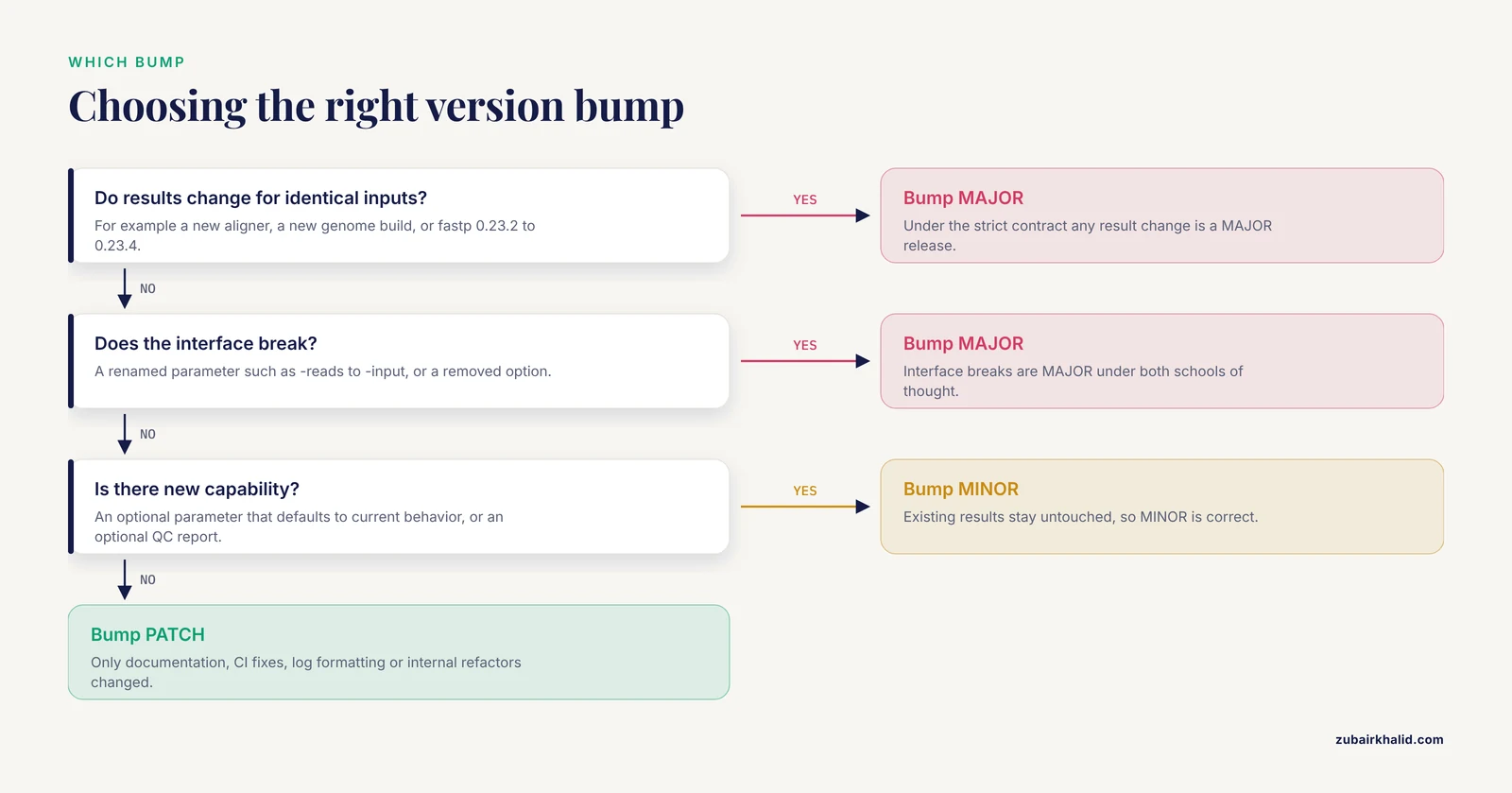
Semantic versioning (SemVer) encodes meaning in a three-part version number, MAJOR.MINOR.PATCH, for example 2.3.1. The specification published at semver.org defines the rules: increment MAJOR when you make incompatible changes, MINOR when you add functionality in a backward-compatible way, and PATCH for backward-compatible bug fixes. Two extensions matter in practice. A pre-release suffix such as 2.0.0-rc.1 sorts before the final 2.0.0, which lets you publish test builds. Build metadata such as 2.0.0+build.7 is ignored when comparing versions. Versions in the 0.x range, such as 0.3.2, signal early development where anything can change, which makes them a comfortable home for a pipeline that is still moving fast.
Precedence trips people up, so work through one example. Sort these tags: v1.9.0, v1.10.0, v1.10.0-rc.1, v1.10.0+build.7, v1.11.0.
v1.9.0sorts lowest because 9 is less than 10 numerically, even though the string "10" sorts before "9" as plain text.v1.10.0-rc.1sorts beforev1.10.0because a pre-release precedes the release it will become.v1.10.0+build.7is equal in precedence tov1.10.0because build metadata is ignored.v1.11.0sorts highest because 11 is greater than 10.
In ordinary software, a PATCH bug fix may change output values and nobody reruns old analyses expecting old numbers. A bioinformatics workflow is different. A colleague who reruns v1.0.0 a year later expects the same count matrix. That expectation justifies a stricter contract than classic software SemVer, summarized in the following table.
| Bump | Trigger under the reproducibility contract | Example | Can the old tag still reproduce its results? |
|---|---|---|---|
| MAJOR | Results for identical inputs change, or the interface breaks | Switch the aligner, rename -reads to -input, adopt a new genome build | Yes, the old tag is frozen |
| MINOR | New capability, existing results untouched | Add an optional -trimmers parameter that defaults to current behavior, add an optional QC report | Yes |
| PATCH | Nothing user-visible changes | Documentation, CI fixes, log formatting, internal refactor | Yes, byte-identical |
Two schools of thought exist. The strict contract above reserves MAJOR for any change in results. The looser style, common across nf-core, the largest community of curated Nextflow pipelines, ships result-affecting changes as MINOR releases with detailed changelog entries and reserves MAJOR for interface breaks. Both are defensible. The one non-negotiable rule is that a tag is immutable, and whatever a tag produces today it must produce forever.
One more consequence matters. The effective version of a workflow includes the software inside its containers. Updating BWA inside an image changes alignments, so a container-only change is never a PATCH under either school.
Choosing a Bioinformatics Workflow Manager
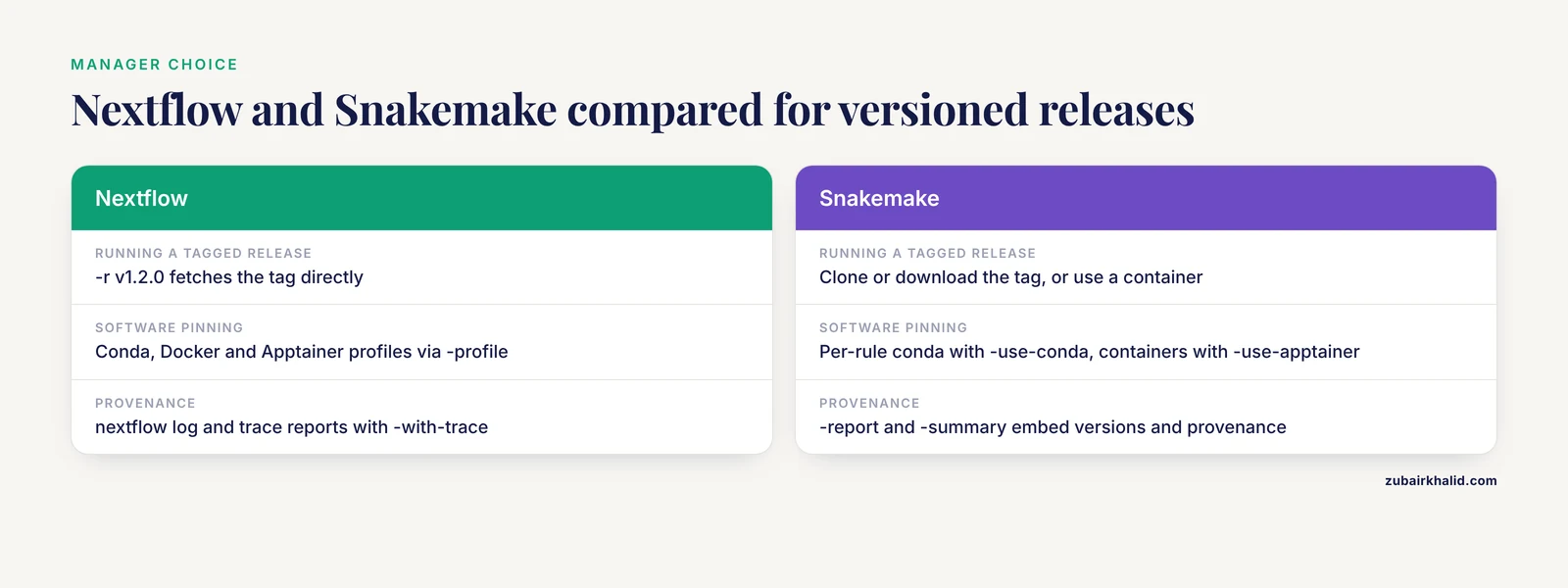
A bioinformatics workflow manager orchestrates multi-step analyses. It resolves dependencies between steps, parallelizes work across cores or a cluster scheduler, caches completed work, and manages software environments, so you describe what to run rather than how to schedule it. Nextflow and Snakemake dominate this space. Nextflow is written in Groovy and runs on the Java virtual machine. Snakemake is pure Python and builds on the Make model of rules, inputs, and outputs.
The nextflow vs snakemake question looks different through a versioning lens than through a syntax lens.
| Versioning concern | Nextflow | Snakemake |
|---|---|---|
| Running a tagged release | Native: nextflow run owner/repo -r v1.2.0 fetches that tag directly | Clone or download the tag, or run a container built from it |
| Software pinning | Conda, Docker, and Apptainer profiles selected with -profile | Per-rule conda environments with -use-conda, containers with -use-apptainer |
| Caching and resume | -resume reuses tasks whose inputs, code, and container are unchanged | Reruns only jobs whose inputs or code changed, tracked in .snakemake metadata |
| Provenance | nextflow log run history, trace reports with -with-trace | -report and -summary embed versions and file provenance |
| Release standards | nf-core template, linting, and semantic-versioned releases | Snakemake Workflow Catalog registration, WorkflowHub deposits |
Neither manager is inherently more reproducible. The mechanics differ and the discipline is identical. If your users should run your pipeline with one command from a URL, Nextflow's -r revision flag is the most direct tag-based delivery mechanism available in any bioinformatics workflow manager. If your pipeline lives inside a container image anyway, Snakemake plus a digest-pinned image gives the same guarantee. Choose by team skills and infrastructure, then apply everything else in this article to either one.
Pinning Software and Containers
The pipeline version is only half the story. A tag named v1.2.0 that resolves samtools at install time is a lie in slow motion, because two installs of the same tag can produce different software.
Start with exact pins in conda environment files:
name: rnapipe-trim
channels:
  - conda-forge
  - bioconda
dependencies:
  - fastp=0.23.4
  - bwa=0.7.17
Then lock the environment. A lockfile records the full resolution, including transitive dependencies, so every machine builds the same environment:
conda-lock --file environment.yml --platform linux-64This produces conda-lock.yml. The -platform flag selects the target system, and you can pass it once per architecture your cluster uses.
For containers, pin by digest rather than by mutable tag. A digest is a content hash of the exact image bytes, so a rebuild cannot drift:
docker pull biocontainers/bwa:v0.7.17_cv1
docker images --digests | grep bwa
Copy the digest column into your Dockerfile:
FROM biocontainers/bwa:v0.7.17_cv1@sha256:9c1b834...The digest shown here is truncated for illustration, so copy the full string from your own docker images, digests output. On a cluster without Docker, Apptainer pulls the same image:
apptainer pull bwa.sif docker://biocontainers/bwa:v0.7.17_cv1A workable rule of thumb: conda pins for logic, digests for distribution, and both recorded in the release notes.
Versioning Evolving Data Alongside the Pipeline
Pipelines that read databases, growing sequence archives, or curated tables face a second versioning problem. The code can be frozen at a tag while the data behind it keeps changing. Falster and colleagues tackled exactly this for evolving datasets and described a workflow that maintains successive versions on GitHub, applies semantic versioning to each one, and lets users retrieve and load a specific version directly into R [1]. Their datastorr package implements the idea, reading whichever version the user requests from the repository [1].
Translate that to your pipeline in three moves. Keep reference data in its own versioned repository and tag snapshots, for example v2024.06. Record the data tag, or at minimum a checksum of each reference file, in the pipeline's output logs and versions file. When the data changes in a way that alters results, bump the pipeline version too and say so in the changelog. A pipeline that records which data version it consumed stays reproducible even while the data grows.
Step-by-Step: Versioning and Releasing a Workflow
The following walkthrough is a step-by-step release procedure for a small Nextflow pipeline called rnapipe. Every command works for a Snakemake repository with the substitutions noted.
1. Put the pipeline under Git and give the version one home
git init rnapipe
cd rnapipe
Add the version to nextflow.config so the tag and the code agree:
manifest {
  name = 'rnapipe'
  description = 'RNA-seq count matrix pipeline'
  version = '0.1.0'
}
For Snakemake, put version = "0.1.0" at the top of the Snakefile instead. One home means one place to bump, which prevents the banner and the tag from drifting apart.
Commit, then confirm the repository has no tags yet:
git describe --tagsfatal: No names found, cannot describe anything.That fatal message is your clean starting state.
2. Write the versioning policy where contributors will read it
Add a Versioning section to CONTRIBUTING.md containing the contract table from earlier, one sentence per bump level, and the immutability rule in bold: released tags are never edited. A policy nobody can find is a policy nobody follows.
3. Pin every tool
Apply the pinning section above. Each process or rule points at a pinned conda environment or a digest-pinned image. Before the first release, search the repository for dependencies declared without an exact version and fix every one of them.
4. Test on every push and every tag
Keep a small test dataset and a profile that runs the pipeline end to end:
nextflow run . -profile test,dockerThe test profile points the pipeline at tiny bundled inputs, and docker selects containerized execution. On GitHub Actions, run the same command on every push and again whenever a v* tag is pushed, so a release is never cut from an untested tree. For Snakemake, snakemake, lint catches Snakefile problems cheaply, and nf-test or pytest-workflow add per-process assertions if an exit code is not enough.
5. Cut the release
Bump the manifest to 1.0.0, commit, and tag:
git commit -am "Release 1.0.0"
git tag -a v1.0.0 -m "rnapipe 1.0.0, first stable release"
git push origin main
git push origin v1.0.0
The -a flag creates an annotated tag, which stores a message, author, and date, and is what release tooling expects. Push the tag explicitly rather than with git push, tags, which ships every stray local tag you forgot about.
Expected output from the tag push:
To github.com:lab/rnapipe.git
 * [new tag]         v1.0.0 -> v1.0.0
Check from another machine that the remote really has it:
git ls-remote --tags origin4a5c1e2... refs/tags/v1.0.0
9f3b1c8... refs/tags/v1.0.0^{}The ^{} line is the commit the annotated tag points to. Both lines present means the tag landed. Then create the GitHub release:
gh release create v1.0.0 --generate-notes --title "rnapipe 1.0.0"https://github.com/lab/rnapipe/releases/tag/v1.0.0-generate-notes drafts notes from commits since the last tag. Edit them into changelog prose before announcing anything.
6. Make the release citable
Link the repository to Zenodo, which mints one DOI per release tag plus a concept DOI that always resolves to the latest version. Add a CITATION.cff file, written in the Citation File Format, so GitHub shows a "Cite this repository" button carrying the correct release DOI. Falster and colleagues demonstrated that this GitHub-centered model gives individual labs a dynamic, versioned delivery system at no cost, and built it for data rather than code [1]. A pipeline release and a dataset release are the same move, a permanent name for an exact state.
7. Run a pinned version
Users, including you in six months, should never run main:
nextflow run lab/rnapipe --input samples.csv -r v1.0.0 -profile dockerN E X T F L O W ~ version 24.04.0
Launching `lab/rnapipe` [soggy_curie] DSL2 - revision: v1.0.0-r selects the revision and accepts tags, branch names, or commit hashes. The banner line revision: v1.0.0 is your confirmation that the right code is running. nextflow pull lab/rnapipe refreshes the local cache, and nextflow list shows what is cached.
The Snakemake equivalent:
git clone --depth 1 --branch v1.0.0 https://github.com/lab/rnapipe-snake
cd rnapipe-snake
snakemake --use-conda --use-apptainer --cores 8
-depth 1, branch v1.0.0 fetches only that tag, -use-conda builds the pinned environments, and -cores 8 caps local parallelism.
8. Verify the rerun
Record checksums from the first run:
md5sum results/*.tsv > run-v1.0.0.md5Run the same tag in a fresh directory, then verify:
md5sum -c run-v1.0.0.md5results/counts.tsv: OKStamp the version into outputs so results trace back to a tag without archaeology. Have a process write a versions.yml containing the pipeline tag and tool versions, and add the tag to log headers. Snakemake users can generate snakemake, report report.html, a self-contained HTML file that embeds software versions and file provenance.
9. Ship the next change
Scenario: you update fastp from 0.23.2 to 0.23.4 and three low-complexity libraries shift slightly. Under the strict contract that is a MAJOR bump, because results changed for identical inputs. Under the looser community style it is MINOR with a loud changelog entry. Either way it is not a PATCH.
Changelog entry, following the Added, Changed, Fixed categories popularized by the Keep a Changelog convention:
## [1.1.0] - 2026-11-11
### Changed
- fastp updated from 0.23.2 to 0.23.4. Counts can shift slightly for
  low-complexity libraries. Rerun to reproduce the new numbers.
Commands:
git commit -am "Update fastp to 0.23.4, bump to 1.1.0"
git tag -a v1.1.0-rc.1 -m "Release candidate for 1.1.0"
# CI runs on the tag, tests pass, then
git tag -a v1.1.0 -m "rnapipe 1.1.0, fastp update"
git push origin v1.1.0-rc.1 v1.1.0
The -rc.1 pre-release lets colleagues exercise the change before it becomes the default, and SemVer guarantees it sorts before v1.1.0.
Versioning Tips That Save Rework
- Start at 0.x while the pipeline churns.
0.3.2tells users nothing is stable yet, and you can bump freely without breaking promises. - Automate the consistency check. This CI step fails the build when a pushed tag does not match the manifest version, and it should run only on tag pushes:
- name: Tag matches manifest version
  run: |
    TAG="${GITHUB_REF_NAME#v}"
grep -q "version = '$TAG'" nextflow.config- Find the latest release with
git tag -l, sort=-v:refname | head -1. Plain string sorting putsv1.10.0beforev1.9.0, which is wrong. - Be consistent about the
vprefix. Tags usually carry it, manifests do not, and your CI check is where the two are reconciled. - Use release candidate tags for anything that touches results, and protect the
v*tag pattern on GitHub so only maintainers can push tags. - Keep the changelog human. "Updated fastp" is useless. "fastp 0.23.2 to 0.23.4, counts may shift for low-complexity libraries" lets a collaborator decide whether to upgrade.
- Version evolving data with the same machinery as code. Falster and colleagues showed that version control, GitHub, and semantic versioning are enough for a small group to deliver successive versions of a growing dataset, retrievable on demand, at no cost [1]. Your reference files deserve the same treatment.
Common Mistakes and Limitations
- Editing a released tag. Someone spots a typo and runs
git tag -f v1.0.0followed by a force push. Git even confirms locally withUpdated tag 'v1.0.0' (was 4a5c1e2). Everyone who recordedv1.0.0now has provenance pointing at two different trees. Never force-push a tag, cut a new one. - Colliding with an existing remote tag. If you retag locally and push normally, Git rejects it:
! [rejected]        v1.0.0 -> v1.0.0 (already exists)
error: failed to push some refs to 'github.com:lab/rnapipe.git'
That rejection is a feature. Treat it as an alarm, not an obstacle to work around.
- Version string disagrees with the tag. The banner says 2.0.0 while the tag is
v1.9.0because someone forgot the manifest bump. The CI check in the tips section catches this. - Shipping result changes as PATCH. Users upgrade from
v1.2.0tov1.2.1expecting only invisible fixes and get different numbers with no warning. Follow the contract table. - Floating software.
samtoolswithout a version in a conda env,FROM ubuntu:latest, or a container reference without a digest means each install can resolve differently. Pin everything. - Unversioned reference data. The pipeline is tagged but the genome FASTA is "whatever is on the cluster share". Record checksums and versions of reference assets in the release notes or a versions file.
- No changelog. Users cannot judge whether upgrading changes their results, so they either never upgrade or upgrade blind.
- Releasing untested code. Tag first, test later, apologize publicly. Release candidate tags and CI that runs on tags fix this.
- Spec violations.
v01.2.0is invalid SemVer, and strict tooling rejects it. Python's version parser, for example, raisesInvalidVersion: Invalid version: '01.2.0'. Usev1.2.0. - Assuming the tag covers everything. A tag pins code, and pins software only if you also pinned containers and reference data. When a release is missing a file that was excluded by
.gitignore, a fresh clone fails with Snakemake'sMissingInputException in rule ...: Missing input files for rule ...naming the absent file. Test every release from a fresh clone.
Two limitations belong here. SemVer communicates intent between releases. It does not guarantee reproducibility by itself, because input data, non-deterministic tools, and cluster scheduling can still make two runs of the same tag differ, and the tag narrows the search space when something drifts rather than eliminating drift. Versioning also supports but does not replace scientific review of the conclusions drawn from a pipeline's output.
Frequently Asked Questions
What is a semantic versioning bioinformatics workflow?
A pipeline whose releases carry MAJOR.MINOR.PATCH tags with agreed meaning: MAJOR for result or interface breaks, MINOR for new capability that leaves existing results untouched, PATCH for invisible fixes. The tag is an immutable name for an exact state of the code and its pinned software.
When should I bump the MAJOR version of my pipeline?
When results for identical inputs change or when the interface breaks, for example a renamed parameter or a new genome build. Under the looser community style, result changes can ship as MINOR with a loud changelog entry, but never as PATCH.
Nextflow vs Snakemake, which handles versioned releases better?
Nextflow, because nextflow run owner/repo -r v1.2.0 fetches and runs a tag directly from the remote, making tag-based delivery native. Snakemake achieves the same by cloning at a tag or running a digest-pinned container. Both are solid choices, and the underlying discipline is identical.
How do I make a pipeline release citable?
Link the repository to Zenodo for a per-release DOI plus a concept DOI covering all versions, and add a CITATION.cff file so GitHub surfaces the citation. Cite the DOI of the exact version in your paper.
Can I version datasets with semantic versioning too?
Yes. Falster and colleagues applied version control, GitHub, and semantic versioning to evolving datasets, letting users retrieve and load any past version directly in R [1]. The same model works for the reference files your pipeline consumes.
Do I need to bump the version when only a container changes?
If the tools inside changed in a way that can alter results, yes, MINOR or MAJOR depending on your contract. A rebuild with byte-identical pins and no code change can be a PATCH.
What is the difference between a Git tag and a release?
A tag is a named pointer to a commit inside Git. A release is a packaged GitHub object built on a tag, with notes, assets, and a shareable URL. You need both, the tag for tooling and the release for humans.
How do users pin a specific version of my pipeline?
Nextflow users pass -r v1.2.0. Snakemake users clone or download that tag, or run a container image built from it. In every case the pinned version should be recorded in the output logs and any versions file.