How to Use the RoseTTAFold Server: A Step-by-Step Tutorial
By Dr. Zubair Khalid, DVM, MS, PhD ·

By the end of this RoseTTAFold server tutorial, you will be able to prepare a protein sequence in FASTA format, submit it to the RoseTTAFold server, track the job through the queue, download the predicted 3D models, and read the two confidence scores (pLDDT and PAE) that tell you which parts of the model to trust. You will also know how to predict multi-chain complexes, how to run the same pipeline on your own hardware, and how to avoid the mistakes that waste the most time.
You need very little to get started: a web browser, a valid email address, and your protein sequence in FASTA format. Nothing has to be installed on your computer. If you have already followed an AlphaFold tutorial or used an AlphaFold server, the RoseTTAFold workflow will feel familiar, because both methods take a sequence, build a multiple sequence alignment, and report per-residue confidence scores.
What RoseTTAFold Is and How It Compares to AlphaFold
RoseTTAFold is a deep learning method for protein structure prediction developed in the Baker laboratory at the University of Washington and released in 2021. It is built as a three-track neural network. A 1D track processes sequence information and sequence profiles, a 2D track predicts distances and orientations between pairs of residues, and a 3D track converts those geometric restraints into an atomic model. The tracks exchange information continuously, so each one refines the predictions of the others. This architecture is closely related to the one used by AlphaFold2, which is why the two methods often produce similar models and similar confidence scores.
The public web implementation runs on the Robetta server (robetta.bakerlab.org), a free prediction service maintained by the Baker laboratory. You paste a sequence, the server builds a multiple sequence alignment (MSA, a set of evolutionarily related sequences that reveals which positions are conserved and which residues co-vary), runs the network, and returns predicted 3D models with confidence scores.
How does RoseTTAFold compare to AlphaFold in practice? At CASP14, the critical assessment benchmark that transformed the field, AlphaFold2 achieved a median Global Distance Test (GDT, a measure of structural similarity to the experimental structure on a 0 to 100 scale) of 92.4 across 87 of 92 domains, a level of accuracy that exceeded all prior expectations [1]. DeepMind's AlphaFold Database now hosts approximately 214 million predicted structures covering nearly entire proteomes [1]. RoseTTAFold reaches comparable accuracy on most well-characterized single chains when a deep MSA is available, and it is lighter to run on your own hardware.
The two methods differ most when no homologous sequences exist. With a single sequence as input, RoseTTAFold produces models with an average TM-score of about 0.34 on CASP14 domains, essentially the same as AlphaFold2 at about 0.35, and both fall well below the roughly 0.5 achieved by newer protein language model methods such as trRosettaX-Single [2]. The TM-score ranges from 0 to 1, and values above roughly 0.5 usually indicate that the model and the experimental structure share the same overall fold. The practical lesson for this tutorial is simple: RoseTTAFold's accuracy depends heavily on the quality of the MSA, so the steps that matter most are the ones that affect MSA depth.
Before You Start: Gather What You Need
Check whether the structure already exists
Before spending time on a prediction, check two resources. First, search the Protein Data Bank (PDB, the public archive of experimentally determined structures) for your protein or a close homolog. Second, search the AlphaFold Database, which contains predicted structures for nearly the entire proteome of many model organisms [1]. If a high-confidence structure of your protein is already available, you can use it directly and reserve RoseTTAFold for cross-checking, for mutants, or for complexes that the database does not cover.
Know your protein
Write down the following before you submit anything:
- The UniProt accession number, if one exists, so you can verify the sequence.
- The exact sequence length in residues.
- Domain boundaries, if the protein is multidomain. Domain architecture matters because linkers between domains give the prediction algorithm spatial freedom, and the relative orientation of domains in a model can be wrong even when each domain folds correctly [3].
- The expected oligomeric state. If your protein works as a homodimer or a heterodimer, a single-chain prediction will not capture the interface.
Prepare the sequence
Copy the amino acid sequence from UniProt or from your own sequencing data. Remove signal peptides, tags, and other non-native residues unless you specifically want to model them. The server expects the standard 20 amino acid letters, and unusual characters will cause problems covered in the common mistakes section.
How to Run RoseTTAFold on the Server: Step-by-Step
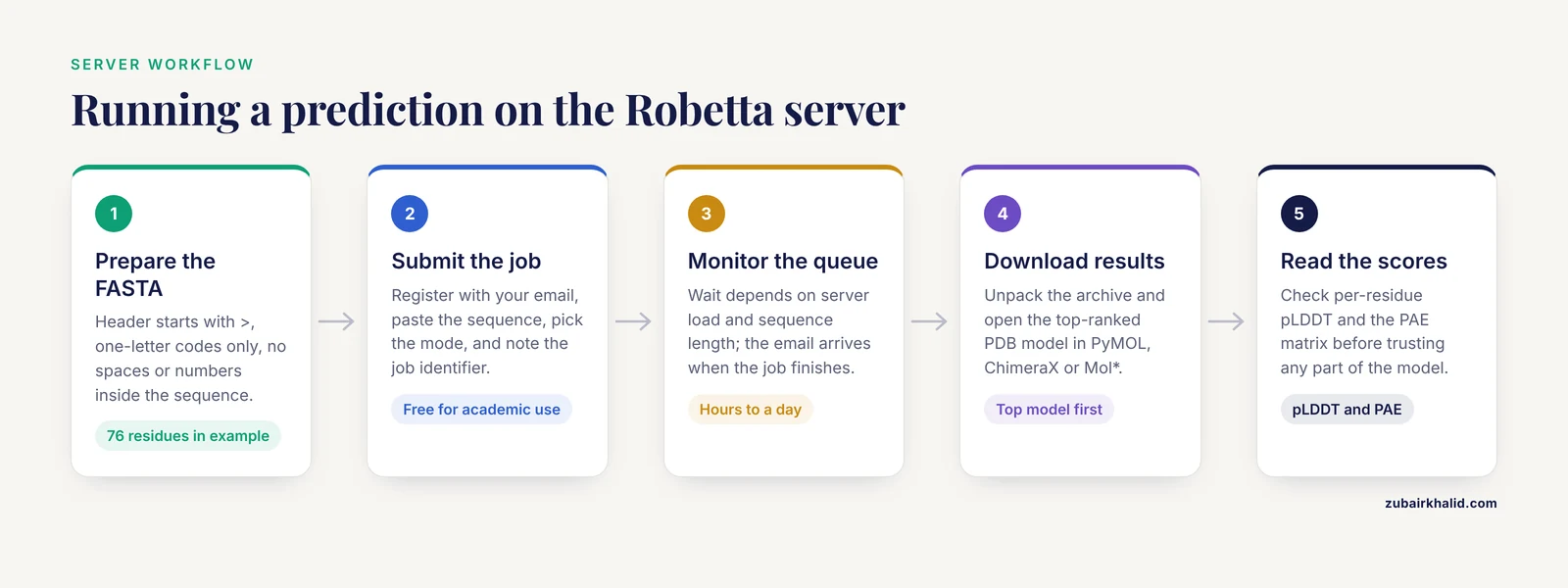
This is the core walkthrough. The exact menu labels on the Robetta server change as the service is updated, so read the submission page each time you use it, but the overall workflow has stayed stable.
Step 1: Prepare Your FASTA File
The server accepts sequences in FASTA format. A FASTA file has a header line beginning with the greater-than character, followed by the sequence itself. Here is a worked example using human ubiquitin, a small and well-studied 76-residue protein:
>human_ubiquitin_76aa
MQIFVKTLTGKTITLEVEPSDTIENVKAKIQDKEGIPPDQQRLIFAGKQLEDGRTLSDYNIQKESTLHLVLRLRGG
Follow these formatting rules:
- The header line must start with
>and should contain a short, descriptive name. Avoid spaces in the header, use underscores instead. - The sequence uses one-letter amino acid codes. Uppercase letters are the safest choice.
- Do not include numbers, spaces, asterisks, or dashes inside the sequence.
- For a multi-chain complex, separate the chains with a colon character. For example, a two-chain input looks like this:
>my_complex_chainA_and_chainB
MKTAYIAKQRQISFVKSHFSRQLEERLIEIEQNKAKGQENWLTLAEKLDLKNYQK : MKTAYIAKQRQISFVKSHFSRQLEERLIEIEQNKAKGQENWLTLAEKLDLKNYQK
In practice you would use two different sequences, one per chain. The colon tells the server where one chain ends and the next begins, and the server will model the interface between them.
- Save the file as plain text with a
.fastaor.txtextension. Word processor formats such as.docxwill corrupt the submission.
A quick sanity check from the command line counts the residues and finds any invalid characters:
grep -v "^>" my_protein.fasta | tr -d '\n' | wc -c
grep -v "^>" my_protein.fasta | grep -o '[^ACDEFGHIKLMNPQRSTVWYacdefghiklmnpqrstvwy]' | sort | uniq -c
The first command prints the sequence length. For the ubiquitin example it prints 76. The second command prints nothing if the sequence contains only valid amino acid letters, and prints any offending character with a count if it does not.
Step 2: Submit the Job
- Open the Robetta server website at robetta.bakerlab.org.
- If this is your first visit, register with your email address and confirm the registration email. The server is free for academic and noncommercial use, and the terms on the site explain the conditions.
- Go to the submission page.
- Enter a short job name. Use something you will recognize in a queue list weeks later, for example
2026-11_human-proteinX_wt. - Paste your FASTA sequence into the input box, or upload the FASTA file.
- Select the prediction mode. The server offers RoseTTAFold for single-chain predictions and a complex mode for multi-chain inputs. The exact labels on the menu change as the service is updated, so read the descriptions on the page before choosing.
- Enter your email address if it is not already filled in from your account. The server sends a notification when the job finishes.
- Submit the job and write down the job identifier shown on the confirmation page. You will use this to find the job in the queue and in your results.
Step 3: Monitor the Queue
After submission, the job enters a public queue. The status page shows your job identifier, its position, and the estimated wait. Two factors dominate the wait time:
- Server load. The Robetta server is free and heavily used, so the queue can be long at busy times.
- Sequence length. Prediction cost grows steeply with length, so a 150-residue protein finishes much faster than a 1,000-residue protein.
Jobs typically complete within hours to a day, but multi-chain complexes and long sequences can take longer. You do not need to keep the browser open. When the job finishes, the server sends an email with a link to the results.
Step 4: Download and Inspect the Results
The results page provides several items, and knowing what each one is will save you time:
- Predicted 3D models in PDB format. PDB (Protein Data Bank) format is a plain-text structural file with one line per atom. The server usually returns several models ranked by confidence, and the top-ranked model is the one to inspect first.
- Per-residue confidence scores. RoseTTAFold stores the pLDDT score for each residue in the B-factor column of the PDB file. The pLDDT (predicted local distance difference test) is a per-residue score from 0 to 100 that estimates how accurately the local structure around that residue is modeled.
- The predicted aligned error (PAE) matrix. PAE is a per-residue-pair score, reported in angstroms, that estimates the expected positional error at residue j when the model is aligned on residue i. Low PAE between two regions means their relative positions are well determined. High PAE means the model is uncertain about how they are arranged relative to each other.
- Supporting files, which may include the MSA used and alignment statistics.
Download the full results archive, unpack it, and open the top model in a molecular viewer such as PyMOL, UCSF ChimeraX, or Mol*.
Step 5: Interpret pLDDT and PAE
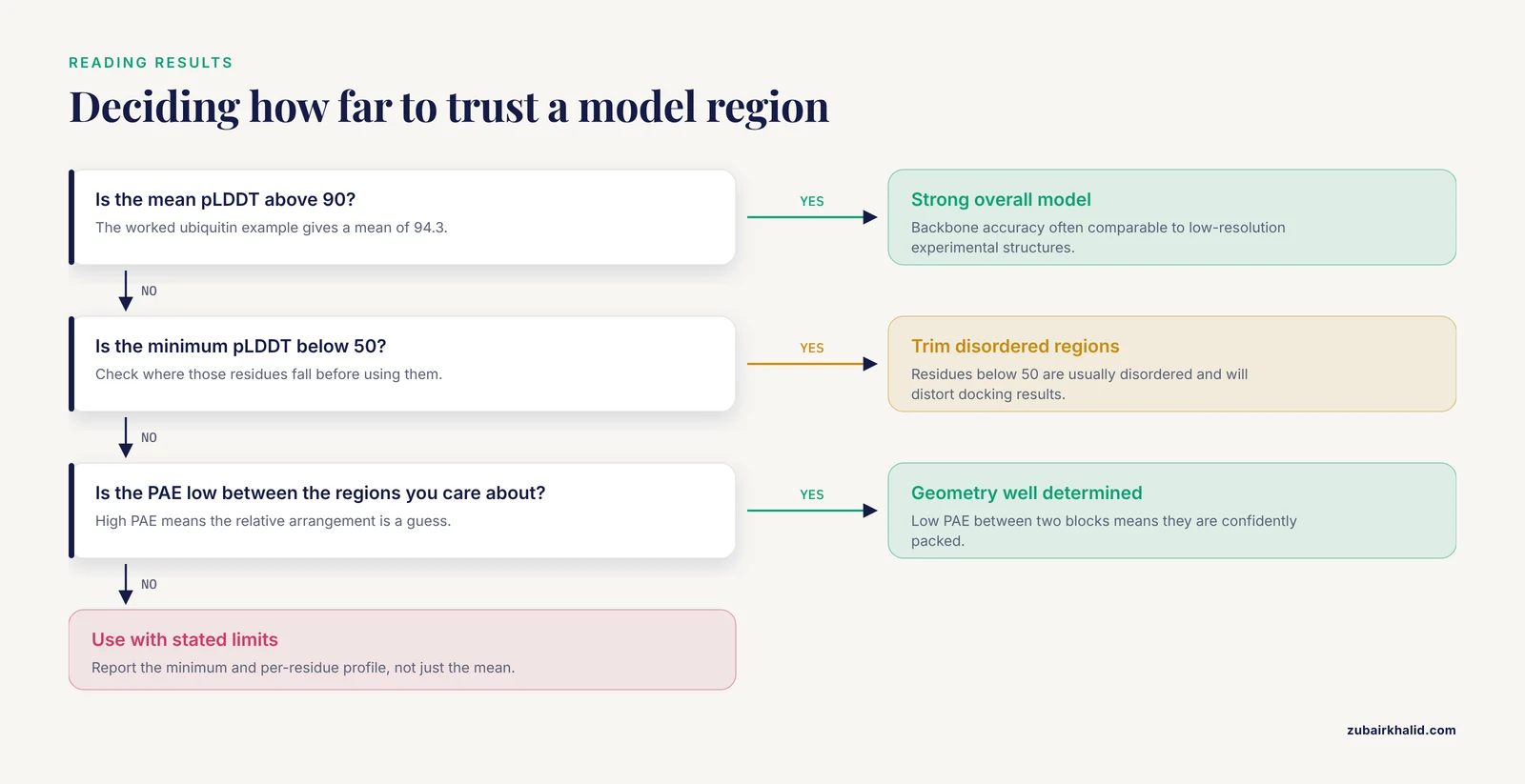
Confidence interpretation is where most new users either overtrust or undertrust their models. Use the following bands, which are the standard interpretation for pLDDT-style scores:
| pLDDT range | Interpretation | Practical use |
|---|---|---|
| 90 to 100 | Very high confidence, backbone accuracy often comparable to low-resolution experimental structures | Reliable for docking, mutagenesis planning, and design |
| 70 to 90 | Good confidence, backbone generally correct, side-chain details may vary | Usable for most purposes, check side chains individually |
| 50 to 70 | Low confidence, treat as a rough sketch | Do not draw mechanistic conclusions from these regions |
| Below 50 | Very low confidence, frequently disordered | These regions are often intrinsically disordered in reality |
You can extract the mean pLDDT from any PDB file with a short Python script:
scores = []
for line in open("model_top.pdb"):
    if line.startswith("ATOM") and line[12:16].strip() == "CA":
        scores.append(float(line[60:66]))
print("residues scored:", len(scores))
print("mean pLDDT:", round(sum(scores) / len(scores), 2))
print("min pLDDT:", min(scores))
print("max pLDDT:", max(scores))
The script reads the B-factor column (characters 61 to 66 of each ATOM line) for every alpha carbon. Expected output for a well-behaved 76-residue single-domain protein looks like this:
residues scored: 76
mean pLDDT: 94.3
min pLDDT: 87.1
max pLDDT: 99.0
A mean pLDDT above 90 with a minimum above 80 is a strong model. If the minimum is below 50, look at where those residues fall. If they cluster at the N-terminus, C-terminus, or in a long loop, that region is probably disordered or flexible, and you should not interpret it.
Then examine the PAE matrix. The practical reading rules are:
- A block of low PAE (dark blue in most visualizations) covering a contiguous stretch of residues means that domain is confidently folded.
- Low PAE between two separate blocks means the two domains are confidently packed against each other.
- High PAE between two blocks means the model has no reliable information about their relative orientation. This is common for multidomain proteins connected by flexible linkers, and it is a known challenge even for AlphaFold2-class methods, where the degree of spatial freedom allowed by a linker makes the mutual orientation of fused domains difficult to predict [3].
Predicting Multi-Chain Complexes
RoseTTAFold can predict complexes, and the server's complex mode is the way to do it. The workflow is identical to the single-chain walkthrough, with one difference in the input: chains are separated by colons in the FASTA file, as shown in Step 1.
Interpreting a complex prediction requires one extra step. Look at the PAE matrix between chains, not just within them. If the inter-chain PAE block is low, the predicted interface is well supported. If it is high, the model may have placed the chains correctly in isolation but guessed their docking arrangement. For homooligomers, also consider whether the biological assembly is a dimer, trimer, or higher order, because the server models the stoichiometry you specify, not the stoichiometry nature uses.
Two cautions apply to complexes and to multidomain single chains alike. First, domain orientation across flexible linkers is the least reliable part of any prediction, and studies of artificial fusion proteins show that even AlphaFold2-class methods must be used with care for these cases [3]. Second, a predicted interface is a hypothesis, not evidence. Interfaces that matter for your conclusions should be checked against experimental data or at minimum against a second prediction method.
Running RoseTTAFold Locally Instead of on the Server
The server is the fastest route, but there are good reasons to run RoseTTAFold on your own hardware: you may need to predict many sequences, you may need full control over the MSA, or you may need to avoid uploading unpublished sequences. The official RoseTTAFold repository is hosted on GitHub under the RosettaCommons organization, and its README is the authoritative guide, because the installation details change as the code is updated.
The general shape of a local installation is as follows:
- Clone the repository:
git clone https://github.com/RosettaCommons/RoseTTAFold.git
cd RoseTTAFold- Create the conda environment from the environment file included in the repository:
conda env create -f RoseTTAFold.yml
conda activate RoseTTAFold- Install PyRosetta if you want the full pipeline with Rosetta-based refinement. PyRosetta requires a free license for academic users, obtained from the PyRosetta website, and the license file must be installed before the refinement step will run.
- Download the sequence databases the network needs for MSA generation. The README specifies the exact databases and versions, which include the UniRef30 database and the BFD (Big Fantastic Database) metagenomic sequence database. These are large, multi-gigabyte downloads, so plan disk space accordingly.
- Run the input preparation script, which builds the MSA and templates:
./input_prep/prepare_inputs.sh -i input.fa -o output_dir -m uniref30 -d bfd- Run the prediction:
python run_pyrosetta.py -fasta input.fa -out output_dir -db uniref30,bfdThe repository also provides an end-to-end script that skips the PyRosetta refinement step, which is useful when you do not have a PyRosetta license or want a faster run. Check the README for the current script names and flags, because they are updated periodically.
The output directory contains PDB model files and a predicted aligned error matrix, in the same formats as the server output. A successful run on a modest GPU takes on the order of minutes for a small protein and grows with length. The most common local failure is a GPU memory error, which PyTorch reports as CUDA out of memory. The fix is to reduce the sequence length, use a GPU with more memory, or use the server for long sequences.
RoseTTAFold Server Tutorial Tips
These tips come from the practical realities of running predictions, and each one addresses a specific failure mode.
- Check the AlphaFold Database first. If your protein is from a well-covered organism, a predicted structure may already exist, and comparing it with your RoseTTAFold model is the cheapest validation available. The database covers approximately 214 million structures [1].
- Judge the MSA, not just the model. RoseTTAFold's accuracy depends on co-evolutionary signal from homologs. If your protein has few homologs, expect lower confidence, and remember that without an MSA the method's average TM-score on CASP14 domains is only about 0.34 [2].
- Read the PAE matrix before the model. A beautiful-looking model with high inter-domain PAE is a guess about domain arrangement. The PAE matrix tells you which parts of the geometry are determined and which are not.
- Trim disordered termini for downstream use. If you plan to dock or design based on the model, remove residues with pLDDT below 50 first, because they are usually disordered and will distort docking results.
- Run a second method for important decisions. Cross-checking against AlphaFold2, or against a language-model method for orphan sequences, protects you from method-specific errors. For single-sequence cases, newer supervised transformer methods outperform both RoseTTAFold and AlphaFold2 [2].
- Use independent scoring for model selection. The confidence scores a method reports about its own models are useful but not independent. Tools such as iQDeep, a web server that applies multiscale deep residual networks to residue-level error estimation and combines them into protein-level scores, provide an independent assessment of model quality [4].
- Sanity-check the secondary structure. A quick secondary structure prediction with a dedicated server such as JPred4, which predicts alpha helices, beta strands, and coil with a reported three-state accuracy of about 82 percent, gives you an independent expectation to compare against the model's helices and strands [5].
- Name your jobs descriptively. Queue lists and email notifications become hard to manage when every job is called
test1. - Keep a record of the input. Save the exact FASTA file you submitted, including the header. Six months later, you will want to know which sequence produced which model.
- For long or multi-chain jobs, submit early in the day. Queue position matters, and long jobs benefit from entering the queue before the peak load.
Common Mistakes and Limitations
This section collects the errors that cost the most time, with the exact symptoms and fixes.
Mistake 1: Malformed FASTA input
Symptom: The server rejects the submission with an error about invalid characters, or the job runs but produces a model for the wrong sequence.
Cause: The most common causes are a copied sequence that includes line numbers, spaces, asterisks, or a BZ (ambiguous) code, or a header line that was accidentally included in the sequence body. Word processor smart quotes and hidden characters from a PDF copy-paste also break submissions.
Fix: Run the validation commands from Step 1. Rewrite the sequence by hand if needed, and always paste from a plain-text editor.
Mistake 2: Missing colon between chains in complex mode
Symptom: The server models your two chains as one continuous protein, or the submission fails with a length error.
Cause: In complex mode, the server uses the colon to split chains. Without it, the input is treated as a single long chain, which changes the MSA and the prediction entirely.
Fix: Insert a colon between the last residue of each chain and the first residue of the next. Verify the chain count in the confirmation output.
Mistake 3: Treating pLDDT as a whole-protein score
Symptom: A user reports "my model has pLDDT 92" and concludes the entire protein is solved, including a 40-residue tail with pLDDT in the 30s.
Cause: pLDDT is per residue. The mean hides the distribution.
Fix: Always report the minimum and the per-residue profile, not just the mean. Use the script in Step 5.
Mistake 4: Trusting high confidence on short sequences
Symptom: A 40-residue peptide gets a high pLDDT, and the model is treated as a real structure.
Cause: Short sequences can receive high confidence scores even when they are not real folded proteins. An analysis of spurious protein sequences, which arise from gene prediction errors and should not yield folded structures, found that AlphaFold2, ESMFold, and AlphaFold3 all predict short spurious sequences with unexpectedly high pLDDT scores, and that discrimination between spurious and real proteins improves beyond 100 amino acids [6].
Fix: Treat high-confidence models of short sequences with skepticism, and look for independent evidence of folding, such as homologs with solved structures or experimental data.
Mistake 5: Overinterpreting inter-domain geometry
Symptom: A two-domain model is used to argue that the domains contact each other in a specific way.
Cause: Flexible linkers give the network spatial freedom, and the relative orientation of domains is the least reliable part of a prediction. This is a documented limitation even for AlphaFold2-class methods applied to fusion proteins [3].
Fix: Check the PAE between the domains. If it is high, present the domain structures as reliable and the relative orientation as a hypothesis.
Mistake 6: Ignoring the MSA when the prediction is poor
Symptom: A model with mean pLDDT in the 50s, and repeated resubmissions that do not help.
Cause: The protein may have few homologs, or the MSA may be dominated by unrelated sequences. Resubmitting the same input does not fix a shallow MSA.
Fix: For orphan sequences, consider methods designed for single-sequence input, which reach an average TM-score of about 0.5 on CASP14 domains where RoseTTAFold and AlphaFold2 reach about 0.34 and 0.35 respectively [2]. Alternatively, expand the MSA with more divergent database searches.
Mistake 7: Using the model as experimental evidence
Symptom: A paper states that a predicted structure "shows" a binding site or a mechanism.
Cause: A prediction is a computational hypothesis. Its confidence scores describe the model's internal consistency, not agreement with experiment.
Fix: Validate important features experimentally, or at minimum with independent computational methods. For structure-based drug screening, note that the structural data available for protein-drug complexes remains very limited even after the AlphaFold breakthrough, and fragment-based approaches that transfer binding modes from crystallized fragments to larger compounds are one way to work around this [7].
Mistake 8: Local installation failures
Symptom: CUDA out of memory errors, or a conda environment that will not solve.
Cause: Long sequences exceed GPU memory, and the environment file pins specific package versions that can conflict with an existing conda setup.
Fix: Use a dedicated conda environment, reduce sequence length, or move long jobs to the server. The repository README is the authoritative reference for supported versions.
Limitations you should state in any write-up
- RoseTTAFold predicts the folded state, not conformational ensembles. Flexible regions, alternative states, and membrane environments are not fully represented.
- Confidence scores are estimates, not error bars. A high pLDDT does not guarantee a correct side-chain conformation.
- Predictions of complexes depend on the stoichiometry you specify, and the method does not tell you the correct stoichiometry.
- Where experimental structure is needed, NMR remains an option for smaller proteins, and automated NMR assignment systems such as I-PINE, which analyzes sequence data and peak lists from multiple NMR experiments to assign chemical shifts, can support that workflow [8].
Validating Your Model and Sensible Next Steps
A prediction is only useful once you know how much to trust it. Build the validation in this order:
- Compare with the AlphaFold Database. If a structure of your protein or a close homolog exists there, align the models. Agreement between two independent methods on the same fold is strong evidence, and disagreement flags a region to investigate.
- Apply an independent scoring method. Self-reported confidence scores are not independent assessments. A dedicated scoring server such as iQDeep, which uses multiscale deep residual networks for residue-level error classification and probabilistically combines them into protein-level scores, was benchmarked across multiple CASP rounds and offers an open-access alternative [4].
- Check secondary structure consistency. Run the sequence through JPred4 and compare the predicted helices and strands with the model. Large mismatches suggest a problem with either the model or the annotation.
- Inspect the PAE matrix one more time. Before any docking or design work, confirm that the regions you care about have low PAE between them.
- Plan experimental validation for the claims that matter. For binding sites and interfaces, mutagenesis, crosslinking, or structural experiments are the definitive tests. For small proteins where NMR is feasible, automated assignment pipelines such as PONDEROSA-C/S, which takes a protein sequence, assigned chemical shifts, and NOESY peak data, and returns assigned NOEs and 3D structural models, can accelerate structure determination [9].
Frequently Asked Questions
Is the RoseTTAFold server free to use?
Yes. The RoseTTAFold server runs on the Robetta server maintained by the Baker laboratory, and it is free for academic and noncommercial use. You register with an email address, and the terms of use on the site describe the conditions.
How long does a RoseTTAFold server job take?
Most jobs finish within hours to a day, but the wait depends on the queue length and the sequence length. Long sequences and multi-chain complexes take longer, and at busy times the queue can extend the wait considerably.
What is the difference between RoseTTAFold and AlphaFold?
Both are deep learning methods that predict protein structure from sequence with similar accuracy when a deep MSA is available. RoseTTAFold uses a three-track neural network and is lighter to run on local hardware, while AlphaFold2 is the method that achieved the landmark CASP14 results and powers the AlphaFold Database.
What does pLDDT mean in a RoseTTAFold model?
pLDDT is a per-residue confidence score from 0 to 100 stored in the B-factor column of the output PDB file. Scores above 90 indicate very high confidence, 70 to 90 is good, 50 to 70 is low, and below 50 usually indicates a disordered region.
What does the PAE matrix tell me?
The predicted aligned error (PAE) matrix estimates, in angstroms, the expected positional error at each residue pair when the model is aligned on one residue. Low PAE between two regions means their relative positions are well determined, and high PAE means the model is guessing their arrangement.
Can RoseTTAFold predict protein complexes?
Yes. The server's complex mode accepts multi-chain inputs with chains separated by colons in the FASTA file, and it models the interfaces between them. Check the inter-chain PAE block to judge whether the predicted interface is well supported.
What is the maximum sequence length for the RoseTTAFold server?
The server enforces a sequence length limit, and the current cap is stated on the submission page. Prediction cost grows steeply with length, so very long proteins are better handled by checking the documented limit first and, if needed, splitting the problem into domains.
Can I run RoseTTAFold without an MSA, on a single sequence?
You can, but expect much lower accuracy. With single-sequence input, RoseTTAFold produces models with an average TM-score of about 0.34 on CASP14 domains, and newer language-model-based methods perform substantially better in that setting, so choose the method to match the input.
Sources
- From CASP13 to the Nobel Prize: DeepMind's AlphaFold Journey in Revolutionizing Protein Structure Prediction and Beyond.
- Single-sequence protein structure prediction using supervised transformer protein language models
- Fusion of two unrelated protein domains in a chimera protein and its 3D prediction: Justification of the x-ray reference structures as a prediction benchmark.
- iQDeep: an integrated web server for protein scoring using multiscale deep learning models
- JPred4: a protein secondary structure prediction server
- Folding the unfoldable 2: using AlphaFold and ESMFold to explore spurious proteins.
- Decomposing compounds enables reconstruction of interaction fingerprints for structure-based drug screening.
- I-PINE web server: an integrative probabilistic NMR assignment system for proteins
- PONDEROSA-C/S: client-server based software package for automated protein 3D structure determination