How to Review a Pull Request for Scientific Code: A Checklist
By Dr. Zubair Khalid, DVM, MS, PhD ·

By the end of this guide you will be able to review a pull request for scientific code from start to finish: fetch the proposed branch (a separate line of work in the repository), read the diff (the line-by-line list of changes), run the analysis from a clean copy, confirm that no patient or participant data is exposed, and leave comments the author can act on. You will need a computer with Git installed (version 2.30 or newer is a safe floor), command-line access, the repository URL, and the runtime the project uses, such as R or Python with its package manager.
The need is real. Computational analysis now sits at the center of clinical and laboratory research, and major journals request code availability statements at publication, yet most surgical trainees and faculty receive no formal training in version control [1]. Review is the practical answer. It is the step where a second pair of eyes runs the analysis, questions the statistics, and catches the leaked data file before it becomes permanent.
A pull request (often shortened to PR) is a proposal to merge one branch of a repository into another, presented as a discussion thread with a line-by-line view of the changes. Reviewing one is a skill, and like pipetting or primer design it improves with a fixed routine. This guide gives you that routine, a copy-paste checklist, and a worked example.
Why Reviewing Pull Requests Matters in Research
Git for scientists rests on four mental models [1]. A repository is the complete history of a project together with its current files. A commit is one recorded snapshot of the files, with a message describing why the change was made. A branch is a movable label that points to a line of commits, so experimental work can proceed without disturbing the main line. A remote is another copy of the repository, usually hosted on a server, that lets collaborators exchange commits. The daily cycle is edit, stage (mark changes for inclusion), commit [1]. GitHub for researchers adds the collaboration layer on top: shared hosting, issues, and the pull request itself.
A pull request is where collaboration becomes visible. An author pushes a branch to the remote and opens a pull request proposing a merge (a combining of the two histories) into the main branch. Anyone with access can read the diff, comment on specific lines, and either approve or block the merge [1]. In a multi-institutional study, this is the moment a co-investigator at another site can catch a reversed contrast or a committed patient identifier.
The stakes are reproducibility. Making an analysis reproducible, well documented, and shareable requires deliberate attention to organization and workflow [2]. The workflowr package binds four elements into one workflow: version control with Git, literate programming (interleaving code, results, and prose in a single document such as R Markdown), automatic checks and safeguards that improve reproducibility, and sharing through a browsable website [2]. A pull request review asks one question about each element: does this change keep them intact?
What You Need on Hand
- Git installed and configured (
git config user.nameandgit config user.email). - Read access to the repository, plus the hosting platform page for commenting.
- The runtime the project uses. For R projects, R plus the renv package if the repository ships
renv.lock. For Python projects, conda or pip plus the environment file the repository provides. - The analysis plan, protocol, or issue the pull request claims to implement. Reviewing without a plan drifts into style opinions.
- Optional: the GitHub command-line tool (
gh), which shortens step 2 togh pr checkout 42. - Optional: the linters the repository already configures, such as ruff for Python or lintr for R.
How to Review a Pull Request for Scientific Code, Step by Step
Step 1. Read the description before the code
Open the pull request page and read the description first. A complete description states the question, the data, the expected result, how to run the change, and what might break. It links the issue or protocol it implements. Descriptions that say only "updates" or "fixes" are a finding in themselves, and asking for a better description is a legitimate review outcome.
While you are there, note the tabs. Conversation holds the discussion. Commits lists the individual snapshots. Files changed shows the diff. Checks shows the continuous integration (CI) status, the automated test runs that fire on every push. You will return to each tab, but the description sets what you expect the code to do, and expectations come before reading.
Step 2. Fetch the pull request branch locally
The diff on the web page is a summary. To run the code you need the branch on your machine. GitHub stores the head of every pull request under a reference of the form refs/pull/42/head, so you can fetch it directly and name the local branch after the review:
git fetch origin pull/42/head:review-pr-42
git switch review-pr-42
You should see output like this:
From https://github.com/lab/rna-seq-registry
 * [new ref]         refs/pull/42/head -> review-pr-42
Switched to branch 'review-pr-42'
The review- prefix is a habit, not a requirement. It reminds you that the branch belongs to someone else, so you never push to it. Confirm where you stand:
git statusOn branch review-pr-42
nothing to commit, working tree clean"Working tree" means the files as they currently sit on disk. If you installed the gh tool, gh pr checkout 42 does the fetch and switch in one step.
Step 3. Size the change
Before reading a single line, measure the change:
git diff --stat main...HEAD analysis/de.R | 84 ++++++++++++++---------
figures/volcano.png | Bin 0 -> 24531 bytes
2 files changed, 61 insertions(+), 23 deletions(-)The summary line is the headline: two files touched, 61 lines added, 23 removed. The per-file bars give the shape, and Bin marks a binary file such as an image, which Git cannot show as text.
Size drives strategy. A change of this size, one script and one figure, fits in a single sitting. A pull request spanning dozens of files and thousands of lines cannot be reviewed honestly in one pass, and the right move is to ask the author to split it into stacked pull requests rather than to skim and approve. Also scan the file list for anything that does not belong: data files, lockfiles with hundreds of changed lines, or a figure committed as a binary when it should be regenerated by code.
Step 4. Read the commit history
git log --oneline main..HEADa1b2c3d Fix contrast direction in DESeq2 results call
e4f5a6b Add volcano plot figure
9c8d7e6 Add differential expression analysis scriptTwo dots mean commits reachable from HEAD (your current position) but not from main, which is exactly the set of commits this pull request adds. Read the messages as a story. Each commit should be one logical change with a message that says why. Messages like "wip" or "fix" tell you the author did not curate the history, which earns one polite comment but not a block. What matters more is a commit that mixes unrelated changes, because that makes the final diff hard to attribute.
Step 5. Read the diff line by line
git diff main...HEADThree dots tell Git to compare the merge base (the most recent commit shared by both branches) with HEAD, so you see only what this pull request changes. To focus on one file, name it:
git diff main...HEAD -- analysis/de.RThe output comes in hunks, blocks of changed lines shown with surrounding context. Learn to read the header and you can navigate any diff:
@@ -34,7 +34,8 @@ filter_low_counts(counts)
 counts <- counts[, sample_order]
-counts <- counts[rowSums(counts) > 0, ]
+keep <- rowSums(counts) >= 10
+counts <- counts[keep, ]
 logcounts <- log2(counts + 1)
 pca <- prcomp(t(logcounts))
 plot_pca(pca)
 write.csv(counts, "results/counts.csv")
 save_pca_plot(pca)
The header says the old file shows 7 lines starting at line 34, and the new file shows 8 lines starting at line 34. The text after the second @@ is the enclosing function or context Git matched. Lines beginning with a single minus are removed, lines beginning with a single plus are added, and unprefixed lines are unchanged context. Read deletions as carefully as additions, because a deleted line can remove a filter, a seed, or a sanity check.
Close the pass with a hygiene check that finds leftover conflict markers and whitespace errors:
git diff --checkanalysis/de.R:51: trailing whitespace.
analysis/plot.R:8: new blank line at EOF.Either line is a nit, but a stray <<<<<<< marker left in a file means the author committed unresolved conflict text, and that is blocking.
Step 6. Run the analysis from a clean state
Reading proves the code looks right. Running proves it works. The strongest form is a fresh clone (a brand-new local copy of the repository), because it catches files the author forgot to commit, the most common way an analysis works on the author's laptop and fails for everyone else:
cd ~/tmp
git clone https://github.com/lab/rna-seq-registry.git
cd rna-seq-registry
git fetch origin pull/42/head:review-pr-42
git switch review-pr-42
Rebuild the environment exactly as the README describes. For an R project that ships renv.lock:
renv::restore()For a Python project:
conda env create -f environment.yml
conda activate project
Then run the pipeline the way the description says and time it:
Rscript analysis/de.RCheck three things. First, does it finish without error, and how long does it take. Second, do the outputs match the figures and tables attached to the pull request. Third, is the run deterministic. Stochastic methods need a seed, set with set.seed() in R or numpy.random.seed() in Python, and the seed should be visible in the code. Re-run and confirm you get the same numbers.
Session information matters as much as the seed. Recording sessionInfo() in R, or exporting the resolved environment with conda env export, is what lets a reader a year later rebuild the exact software stack. Tools built for this record it automatically, workflowr among them, which captures session information and runs automatic reproducibility checks on every analysis document [2]. If the pull request produces a published figure and records no session information and no seed, that is a should-fix at minimum.
Step 7. Check for data that must not be in the repository
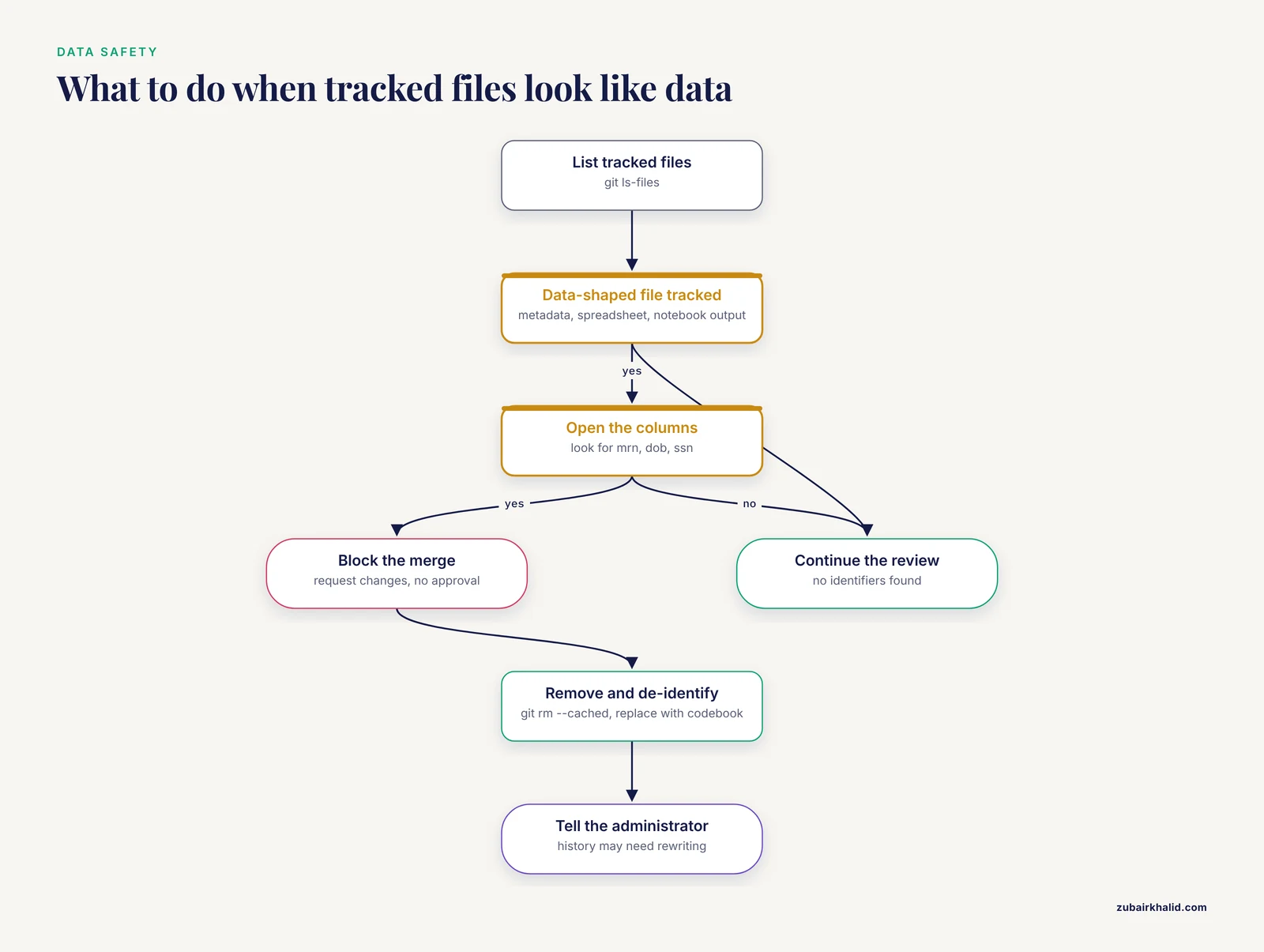
This step outranks everything else in the review. Identifiable patient data must never enter a version-controlled repository, and the standard defense is a .gitignore file that keeps data directories, result directories, and credential files out of Git's reach [1].
List everything Git tracks:
git ls-files.gitignore
README.md
analysis/de.R
analysis/plot.R
data/sample_metadata.csvThen read the ignore rules:
cat .gitignoredata/
results/
*.xlsx
.envNow cross-check. data/sample_metadata.csv is tracked even though data/ is ignored, because .gitignore only affects untracked files. Git ignores the directory for future adds, but a file already committed stays tracked until it is removed. If that CSV carries medical record numbers, the review blocks until the author runs git rm, cached data/sample_metadata.csv, commits, and replaces the file with a de-identified codebook.
Open the tracked data-shaped files and look at columns, not just names. A column named mrn, dob, or ssn is a finding even inside a metadata file. Check for credentials the same way: .env files, tokens in scripts, passwords in notebooks.
Remember that history is permanent. Git keeps every version ever committed, and deleting a file in a later commit removes it from the working tree but not from earlier commits. The same property that lets you recover lost work, which the Git primer demonstrates with worked recovery scenarios [1], also means a leaked file survives deletion. If sensitive data was already pushed, the fix involves rewriting published history and rotating any exposed credentials, and it needs the repository administrator.
Repository size is a quick screen for large files:
git count-objects -vHcount: 0
size: 0
in-pack: 1287
packs: 1
size-pack: 5.42 MiB
prune-packable: 0
garbage: 0
size-garbage: 0A code-only research repository usually sits in the kilobytes to low megabytes. A size-pack in the hundreds of MiB means large files are buried in history, and git log, stat will find them.
Step 8. Check the science, not just the syntax
A pull request can be clean, tested, and wrong. The highest-value review comments in scientific code are about analysis choices, and most of them hide in one or two lines. Work through a fixed list:
- Contrast and direction. In the DESeq2 call
results(dds, contrast = c("condition", "treated", "control")), the first level named is the numerator. Reversed order flips the sign of every log2 fold change while leaving p-values untouched, so a wrong contrast passes every test that only checks for significance. - Design formula. Are the covariates the protocol specifies, such as batch or sex, actually in the model?
- Multiple testing. Which correction is applied, and at what threshold? The method should match the analysis plan.
- Reference system. For genomic coordinates, is the build stated and consistent? GRCh37 versus GRCh38 is the classic silent failure. For transcript quantification, are the units TPM, FPKM, or counts, and are they used consistently?
- Joins and keys. Where sample sheets are merged, which columns are the keys, and what happens to samples that fail to match? A silent drop of three samples changes the sample size.
- Boundaries. Off-by-one errors live at the edges: the first and last row of a window, the inclusive or exclusive end of a range.
When the change claims a numeric result, ask the author to point to the line that produces it, and reproduce that one number by hand where it is cheap to do so.
Step 9. Run the tests and read the CI results
Green checks on the pull request page mean the author's continuous integration passed in the author's configuration. That is necessary and not sufficient, so run the suite yourself:
pytest tests/ -vtests/test_io.py::test_read_sample_sheet PASSED [ 25%]
tests/test_de.py::test_contrast_direction PASSED [ 50%]
tests/test_de.py::test_pvalue_columns PASSED [ 75%]
tests/test_plots.py::test_volcano_file PASSED [100%]
========================= 4 passed in 1.87s =========================For an R project, testthat::test_local() does the same job.
Then judge the tests, not just the result. New behavior needs new tests, and a test that cannot fail is decoration. The strongest pattern is to write the test against the old code, watch it fail, then apply the change and watch it pass. If the pull request fixes a bug and ships no test, the bug is free to return.
Step 10. Lint and style pass
A linter is a program that flags style violations and obvious slips automatically. Let the machine say the petty things:
ruff check .All checks passed!R projects typically run styler::style_pkg() and lintr::lint_package(). If the repository configures a linter, a failing lint run is a legitimate request-changes item, because the automation already exists. If it does not, spend your own review time on science and data safety instead, and suggest adding the linter as a follow-up.
Step 11. Write the review comments
The review comment format that works is always the same shape: severity, location, problem, concrete fix. Four severity levels cover research code:
- Blocking. The merge must not happen until this is fixed. Reserved for data exposure, wrong results, and broken runs.
- Should-fix. The result is probably right but the choice is risky or undocumented. The author should change it or explain why not.
- Question. You need information before you can judge. Ask on the exact line.
- Nit. Preference and polish. Say it once, mark it as a nit, and let the author decide.
Attach comments to lines with GitHub's line comments, and use the suggestion feature when the fix is a small edit the author can accept with one click. Compare the difference tone makes:
This is wrong.
Question. Line 13: the contrast reads
c("condition", "treated", "control"). Can you confirm the factor level order in the sample sheet? If treated is the second level, this is the numerator, and reversing it would flip every log2 fold change.
The first tells the author nothing. The second can be answered in one line. Keep every comment about the code, never about the coder, and remember the author owns the decision on nits.
Step 12. Submit the review and finish
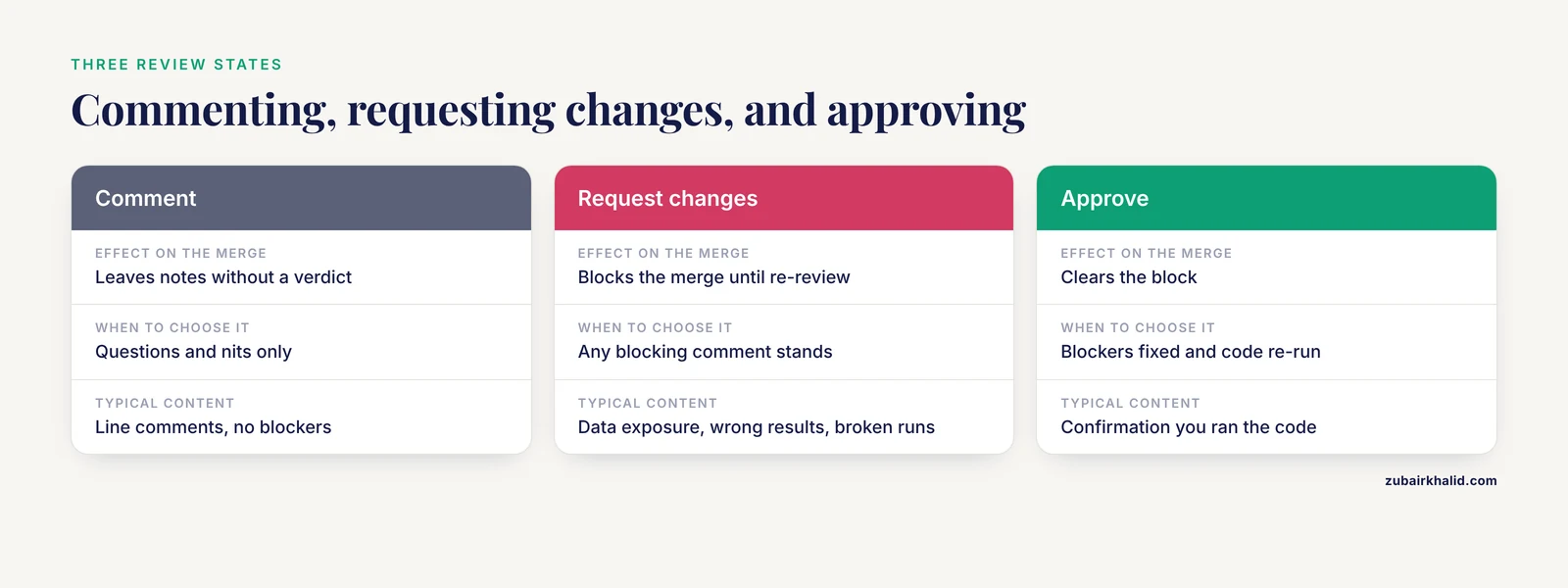
At the top of the Files changed tab, choose one of the three review states. Comment leaves notes without a verdict. Request changes blocks the merge until you re-review. Approve clears it. In multi-institutional or regulated work, request changes is the honest default while any blocking comment stands, because approving with open blockers is how leaked data slips through.
When the author pushes fixes, re-fetch and re-read only what changed, then re-run the pipeline if the fix touched analysis code. After merge, tidy your clone:
git switch main
git pull origin main
git branch -d review-pr-42
Switched to branch 'main'
Updating a1b2c3d..f9e8d7c
Fast-forward
Deleted branch review-pr-42 (was a1b2c3d).Many teams merge with the squash option, which combines every commit in the pull request into a single commit on main. History on main stays readable, and the full commit detail remains on the pull request page. Whether to squash is a team convention, so agree on it once and write it down.
Common errors and their exact fixes
fatal: not a git repository (or any of the parent directories): .git
You ran a Git command outside a repository, usually one directory above the clone. Move into the project directory with cd and confirm with git status, which should report a branch name rather than an error.
CONFLICT (content): Merge conflict in analysis/de.R
You merged main into the review branch to test compatibility, and both branches edited the same lines:
git merge mainAuto-merging analysis/de.R
CONFLICT (content): Merge conflict in analysis/de.RGit reports that the automatic merge failed and asks you to fix the conflicts and commit the result. Open the file and find the markers:
<<<<<<< HEAD
res <- results(dds, contrast = c("condition", "treated", "control"))
=======
res <- results(dds)
>>>>>>> main
Keep the line you intend, delete the three marker lines, then stage and commit:
git add analysis/de.R
git commit
If you would rather not resolve the conflict at all, git merge, abort returns the branch to the state before the merge, and you can review the pull request exactly as submitted.
HEAD detached at a1b2c3d
You checked out a commit hash, perhaps copied from the pull request page, instead of a branch. Git lets you look around but warns that commits you make now belong to no branch. Return with git switch review-pr-42, or keep any notes you made with git switch -c review-notes.
The diff is empty
git diff main...HEAD prints nothing. Either you are on main, or the pull request is already merged. Check your position with git branch, show-current, and check the commit list with git log, oneline main..HEAD. An empty list while on the review branch usually means the work landed while you were reading.
Review commands at a glance
| Command | What it shows or does | When to use it |
|---|---|---|
git fetch origin pull/42/head:review-pr-42 | Downloads the pull request as a local branch | Starting every review |
git switch review-pr-42 | Moves you onto that branch | Right after fetching |
git diff, stat main...HEAD | Files changed with line counts | Sizing the change |
git log, oneline main..HEAD | The commits the pull request adds | Reading the intent |
git diff main...HEAD | The full line-by-line change | The main read |
git diff main...HEAD, <file> | The change to one file | Focusing on hot spots |
git diff, check | Whitespace errors and leftover conflict markers | Quick hygiene pass |
git ls-files | Every file Git tracks | Hunting for data that should not be committed |
git count-objects -vH | Repository size in human-readable units | Screening for large files in history |
git blame <file> | The commit that last touched each line | Tracing a suspicious line |
git merge, abort | Cancels a conflicted merge | When you do not want to resolve |
A Copy and Paste Review Template
Paste this into the first comment of your next review, or save it as a Saved Reply in your GitHub settings so it is one click away. Delete the rows that do not apply to the project and add the ones that do, such as a required Cell Ranger version for a single-cell laboratory.
## Review checklist

### Description and scope
- [ ] The description states the question, the data, and the expected result.
- [ ] It links the issue, protocol, or analysis plan it implements.
- [ ] The change does one thing, with no unrelated fixes bundled in.

### Reproducibility
- [ ] Package versions are pinned (renv.lock, requirements.txt, or environment.yml).
- [ ] Random seeds are set and visible wherever stochastic methods run.
- [ ] Session information is recorded (sessionInfo() or conda env export).
- [ ] A fresh run from a clean checkout reproduces the attached figures and tables.

### Data safety
- [ ] No identifiable patient, animal, or participant data is tracked in Git.
- [ ] .gitignore covers data/, results/, and credential files.
- [ ] No tokens, passwords, or API keys appear in the diff or the history.

### Correctness
- [ ] Contrast direction, covariates, and multiple-testing correction match the plan.
- [ ] Units, genome build, and coordinate conventions are stated and consistent.
- [ ] Sample sheet joins keep every expected sample or document the drops.
- [ ] Boundary cases (first and last rows, inclusive and exclusive ranges) are checked.

### Tests and automation
- [ ] New behavior has a test that fails without the change.
- [ ] Continuous integration passes on this branch.
- [ ] The configured linter passes.

### Documentation
- [ ] README or vignette describes the new behavior.
- [ ] Non-obvious decisions are explained in comments or the description.

### Verdict
- [ ] I ran the code from a clean checkout.
- [ ] Verdict: Comment / Request changes / Approve
The template is the durable version of this whole guide. Teams that adopt it find that authors start checking the boxes before opening the pull request, which is the point. The same review format holds whether the project is a retrospective registry analysis, a multi-institutional collaboration, or a bench protocol pipeline [1].
Worked Example: Reviewing a Small Analysis Pull Request
Here is the whole routine applied to one realistic case. The repository is a small RNA-seq project. Pull request #42, opened by a rotating student, is titled "Add differential expression analysis" and says it closes issue #17, the plan for comparing treated against control samples.
You fetch the branch, size it, and find one script of 84 changed lines plus one binary figure, a single sitting. The commit history reads cleanly, three commits with sensible messages. The heart of the diff is this hunk:
@@ -12,7 +12,9 @@ library(DESeq2)
 dds <- DESeq(dds)
-res <- results(dds)
+res <- results(dds, contrast = c("condition", "treated", "control"))
+res$padj[is.na(res$padj)] <- 1
 summary(res)
 write.csv(res, "results/de_results.csv")
 png("figures/volcano.png")
 plot_volcano(res)
 dev.off()
You clone fresh, restore the environment, and run. The script finishes in under a minute and writes results/de_results.csv. Then you check git ls-files and cat .gitignore, and results/ is not ignored, so every run dirties the repository and invites an accidental commit of a half-written results table. You also notice what the new second line does: every missing adjusted p-value becomes 1.
You leave four comments:
Blocking. Running
analysis/de.Rwritesresults/de_results.csv, andresults/is not in.gitignore, so every run dirties the working tree. Please addresults/to.gitignorebefore merge.
Should-fix. Line 14 sets missing adjusted p-values to 1. That silently hides the genes that independent filtering dropped, and a reader cannot tell them from tested genes that truly failed. Consider leaving them as NA and documenting the choice in the README, or filtering explicitly with the
alphaargument so the rule is visible.
Question. Line 13: the contrast is
c("condition", "treated", "control"). I checked the sample sheet and treated is the second factor level, so this reads treated minus control as intended. Can you add a one-line comment stating the direction so the next reader does not have to re-derive it?
Nit.
df2is a long way from its creation. Renaming itde_resultswould save the next reader a scroll.
Verdict: Request changes. The author adds results/ to .gitignore, replaces the NA substitution with an explicit alpha filter, and pushes two commits. You re-fetch, re-run from the clean clone, confirm the figure matches, and approve. The maintainer merges with squash, and the branch is deleted.
Total effort, one working session. Total value, one prevented accidental commit, one documented statistical choice, and one reviewer who now knows exactly how this pipeline behaves.
Making the Next Review Easier
A review routine compounds when the repository supports it. Add a pull request template at .github/PULL_REQUEST_TEMPLATE.md so every description arrives with the question, data, and run instructions filled in. Add a CODEOWNERS file so the right reviewer is requested automatically. Use branch protection so main accepts merges only with one approval and passing checks. For R laboratories, workflowr goes further and binds version control, literate programming, automatic reproducibility checks, and a browsable results website into one workflow, which means several checklist items are satisfied by construction [2].
Common Mistakes and Limitations
Reviewing the web diff and never running the code. The diff shows what changed, not what happens. Analyses that work on the author's machine and fail everywhere else are caught only by a clean run.
Approving because the checks are green. Continuous integration tests what the author configured it to test. If the new code ships no test, the green check says nothing about it.
Blocking on style while missing data safety. A trailing space is a nit. A committed column of medical record numbers is an incident. Spend your authority on the second one.
Reading additions and skipping deletions. Deleted lines can remove a seed, a filter, or a sanity check. Read the minus lines with the same care as the plus lines.
Swallowing a 3,000-line pull request in one sitting. Attention collapses long before line 3,000. Ask for stacked pull requests, and review the small ones properly.
Treating "it runs" as "it is right". A script can execute end to end and still use the wrong genome build or a reversed contrast. Running the code clears step 6. The science check in step 8 is separate.
Forgetting that history is permanent. Deleting a sensitive file in a commit does not remove it from earlier commits, and the same recovery power that protects work also preserves leaks [1]. If data was already pushed, involve the repository administrator before anything else.
One limitation belongs in plain words. A review verifies internal consistency, reproducibility, and data safety. It cannot certify that the scientific conclusion is true, and no single checklist covers every domain, so analyses that hinge on specialized statistics or domain knowledge need a second reviewer who has it.
Frequently Asked Questions
What does it mean to review a pull request for scientific code?
It means reading a proposed set of changes to a research repository, running the code behind them, and judging whether the change is correct, reproducible, and safe to merge before it lands on the main branch.
Do I have to run the code myself, or can I trust the green checks?
Run it yourself whenever the result will be published or reused, because continuous integration only tests what the author configured it to test, in the author's configuration.
What should I do if a pull request contains patient data?
Block the merge immediately with a review that requests changes, have the author remove the files and de-identify, and involve the repository administrator, because deleting a file in a later commit does not erase it from Git history.
How long should a review take?
Long enough to run the code and read every changed line, and if that does not fit in a single working session, ask the author to split the pull request rather than skimming it.
What is the difference between commenting, requesting changes, and approving?
They are the three review states on GitHub, and they tell the author and the branch protection rules whether the merge is unconstrained, blocked until fixes, or cleared.
How do I review code that uses statistics I do not know?
Verify what you can (the run, the paths, the data safety), ask explicit questions on the lines you cannot judge, and request a second reviewer with the domain expertise as part of the review.
Should we squash commits when merging a pull request?
Squashing combines all of the pull request's commits into one commit on main, which keeps the main history readable, and whether to use it is a team convention to decide once and write down.
What Git skills do I need before my first review?
You need the four mental models of repository, commit, branch, and remote, the fetch and switch commands, and the ability to read a diff with its hunk headers.