Mastering Regular Expressions for Genomic Data
By Dr. Zubair Khalid, DVM, MS, PhD ·

Regular expressions are a compact pattern language for describing text, and in genomics they are the standard way to search, filter, and restructure sequence and annotation files. Applied to formats such as FASTA and BED, a regular expression lets you pull out headers, count records, find sequence motifs, and slice coordinate intervals with a single line of shell code.
This matters because most raw genomic data arrives as plain text. A genome assembly, a set of predicted binding sites, a variant call summary, all of it can be read with the same core Unix tools that have shipped with Linux for decades. A researcher who can write grep '^>' file.fa and understand why it works can audit, sanity check, and rescue almost any text-based genomics file without waiting for a custom script. That skill, built on Linux for bioinformatics, is one of the highest-leverage habits a student or analyst can develop, because it turns every ambiguous file format question into a testable one-liner rather than a day of manual inspection in a spreadsheet.
What Is Regular Expressions Genomics FASTA BED, Explained
The phrase describes a working pattern rather than a single tool. It covers three things that routinely appear together in a bioinformatics workflow:
- Regular expressions, the pattern language itself, implemented by tools such as
grep,sed, andawk. - FASTA, the sequence format in which each record starts with a header line beginning with the
>character, followed by the sequence on one or more subsequent lines. - BED, the interval format used to describe genomic coordinates, most commonly three tab-separated columns giving a chromosome name, a start position, and an end position.
A typical task ties all three together. Suppose you have a set of transcription factor binding motifs predicted across a genome and a BED file of promoter intervals. You use regular expressions to validate the motif strings, to filter the BED rows by strand or length, and to extract the exact sequence records your intervals point into. The regular expression is the glue. The two file formats are the substrate.
Understanding the phrase also means understanding the coordinate conventions behind the formats, because a regular expression that works on one file type can silently mislead you on another. BED uses a half-open, zero-based start and a one-based end, a convention documented in the UCSC Genome Browser file format specifications. FASTA has no coordinate system at all, only sequence characters, so pattern matching there is about sequence content rather than position. Keeping these two mental models separate is the first step toward mastering regular expressions for genomic data.
Why Plain-Text Skills Anchor Linux Commands for Bioinformatics
Almost every file in a sequencing pipeline is text. FASTQ reads, FASTA references, SAM alignment records, GFF and GTF annotations, VCF variant records, BED intervals, and the logs of every tool in between. Some of these formats carry binary companions, such as BAM for SAM and BAI indexes, but the text representations remain the canonical human-readable form, and the SAM format specification published alongside samtools describes the column layout that downstream tools rely on.
The core Linux commands in bioinformatics form a small set that combines with regular expressions into powerful pipelines:
grepsearches lines matching a pattern.sedperforms substitutions and stream edits.awktreats each line as fields and can compute, filter, and reformat.cut,sort,uniq,head,tail, andwchandle columns, ordering, and counting.cat,less, andzcatmove text through the pipeline, including from gzip-compressed files.
The pipe operator | chains these so the output of one command becomes the input of the next. A chain like grep '^>' genome.fa | wc -l counts sequence records without loading the file into memory. This composability is the reason Linux for bioinformatics is taught as a skill in its own right rather than as a collection of memorized commands. Each command is simple. The combinations are where the work happens.
The Grammar of Regular Expressions, Step by Step
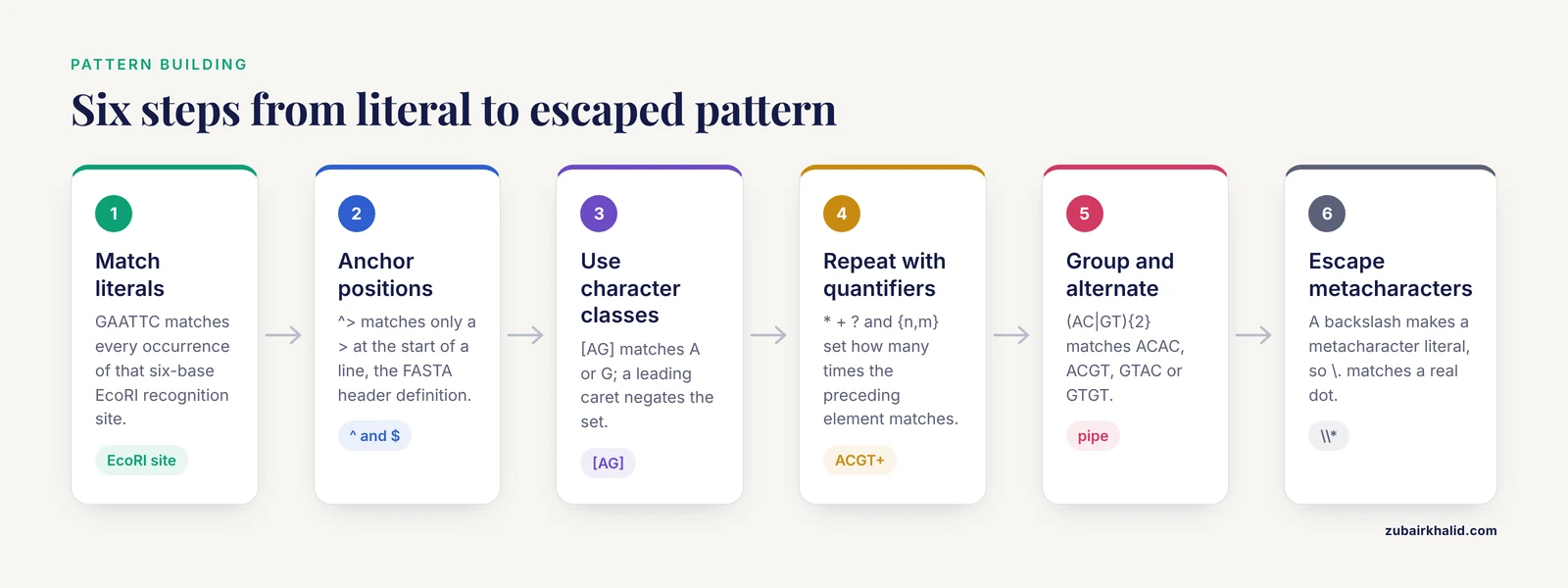
A regular expression is built from two kinds of characters. Literal characters, such as the letters in GAATTC, match themselves. Metacharacters, such as ^, [, *, and |, describe structure. Learning the language means learning what each metacharacter does and how the pieces combine.
Step 1: Match literals
The simplest pattern is a string of literal characters. The motif pattern GAATTC matches every occurrence of that six-base sequence, which happens to be the recognition site of the EcoRI restriction enzyme. In a FASTA file, each line containing the motif will match.
Step 2: Anchor positions
The caret ^ anchors a match to the start of a line and the dollar sign $ anchors to the end. The pattern ^> matches a > only when it begins a line, which is exactly the definition of a FASTA header. Without the anchor, > would also match any > appearing inside sequence data or in a quality line of a FASTQ file, a distinction that matters enormously in practice.
Step 3: Use character classes
Square brackets define a set of allowed characters at one position. [AG] matches either A or G. A leading caret inside the brackets negates the set, so [^>] matches any character that is not a >. Ranges work inside brackets, so [0-9] matches a digit and [a-zA-Z] matches any letter. Classes are how you express biological ambiguity, a point developed in the motif section below.
Step 4: Repeat with quantifiers
Quantifiers control how many times the preceding element matches:
*means zero or more times.+means one or more times.?means zero or one time.{n},{n,}, and{n,m}mean exactly n, at least n, or between n and m times.
The pattern ^>{1} is redundant but explicit. The pattern ACGT+ matches ACG followed by one or more extra T residues. Quantifiers are greedy by default, meaning they match as much as possible, which is the source of many surprises discussed later.
Step 5: Group and alternate
Parentheses group elements, and the pipe | separates alternatives. (AC|GT){2} matches ACAC, ACGT, GTAC, or GTGT. In tools that support capture groups, text inside parentheses can be recalled later, which is the basis of most sed and awk rearrangements.
Step 6: Escape metacharacters
When you need to match a literal metacharacter, precede it with a backslash. To match a literal in a description line, write \. To match a literal dot, write \., because an unescaped dot matches any single character. Forgetting to escape is one of the most common sources of patterns that match far more than the author intended.
Know your flavor: BRE, ERE, and PCRE
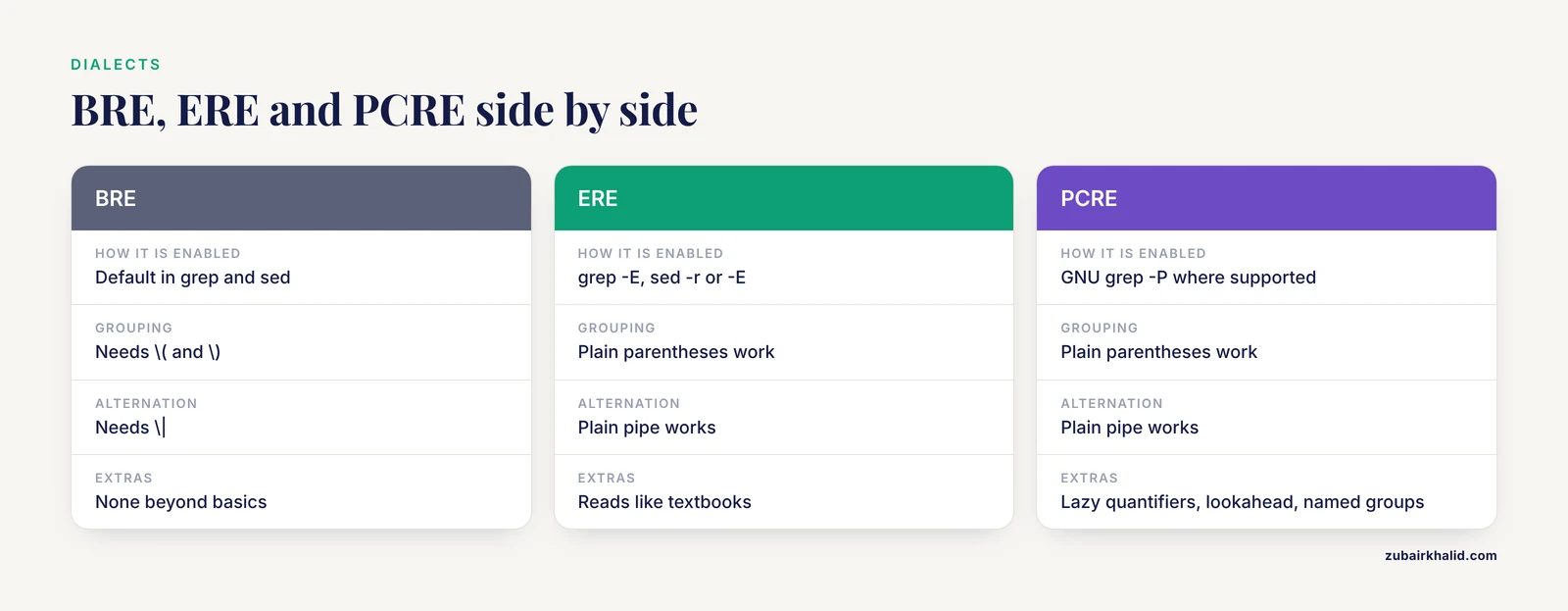
Unix regular expressions come in dialects, and the dialect determines which metacharacters need backslashes:
- BRE, basic regular expressions, the default in
grepandsed. Here+,?,|, and parentheses are literal unless escaped, so grouping requires\(and\)and alternation requires\|. - ERE, extended regular expressions, enabled in
grepwith-Eand insedwith-ror-Eon GNU systems. Here+,?,|, and plain parentheses carry their special meanings. - PCRE, Perl-compatible regular expressions, enabled in GNU grep with
-Pwhen supported. PCRE adds lazy quantifiers, lookahead assertions, and named groups.
The practical advice is to pick ERE for everyday work, since it reads closest to how textbooks describe the language, and reach for PCRE only when you need its extras. Always test a new flavor against a tiny file first, because a pattern written for one dialect can fail or overmatch in another.
Regular Expressions on FASTA Files
FASTA is the friendliest format for regex work because its structure is a single invariant. Every record begins with a line whose first character is >. Everything else in the file is either sequence or, after the first whitespace on the header, a free-text description.
Counting and listing records
To count sequence records in a file:
grep -c '^>' genome.faTo preview the first ten identifiers:
grep '^>' genome.fa | headTo extract just the identifiers, stripping the > and everything after the first space:
grep '^>' genome.fa | sed 's/^>\([^ ]*\).*/\1/'Reading that sed expression from left to right: match a line starting with >, capture the run of non-space characters that follows, ignore the rest, and replace the whole line with the captured group. The parentheses and \1 are a BRE backreference, so this expression works in default sed. With sed -E the same expression simplifies to s/^>([^ ])./\1/.
Searching for sequence motifs
The most frequent biological use of regular expressions on FASTA is motif searching. A restriction site, an enzyme recognition sequence, or a short protein domain signature is just a pattern. A few concrete examples:
- The BamHI site
GGATCCis a plain literal:grep 'GGATCC' genome.fafinds every line containing it. - A degenerate site such as the sau3ai pattern GATC needs no special syntax because it is already unambiguous.
- A pattern containing ambiguity, such as
[AG]GATC, matches a first base of either A or G.
A subtlety arises with wrapped sequence lines. FASTA files traditionally wrap sequences at a fixed width, often 60 or 70 characters, but the width is not guaranteed and modern files sometimes store the entire sequence on one line. A motif that spans a line break will not match a line-based search. The reliable fix is to join the sequence into one line per record before searching, which awk handles cleanly:
awk '
/^>/ { if (seq != "") print header, seq
       header = $0
       seq = ""
       next }
     { seq = seq $0 }
END   { if (seq != "") print header, seq }
' genome.fa
This reads record by record. On a header line it prints the completed previous record, stores the new header, and skips to the next input line. On sequence lines it concatenates. The END block flushes the final record. Once each sequence occupies one line, every motif search you perform operates on the complete biological sequence rather than on an arbitrary 60-character slice of it.
Computing sequence lengths
The same joined representation yields record lengths, a standard quality check on any assembly:
awk '
/^>/ { if (header != "") print header, length(seq)
       header = $0
       seq = ""
       next }
     { seq = seq $0 }
END   { if (header != "") print header, length(seq) }
' genome.fa
Sorting that output numerically and looking at the largest and smallest values reveals contamination fragments or overly short contigs faster than any visualization.
Extracting a record by identifier
To pull one sequence out of a large multi-FASTA, extend the join pattern with a target:
awk -v want="contig_42" '
/^>/ { keep = (substr($0, 2) ~ want) }
keep { print }
' genome.fa
The comparison substr($0, 2) ~ want uses the ~ operator, which applies a regular expression match in awk. Here the pattern happens to be a plain string, but you could equally supply ^contig_42\b or any other pattern to select a family of records. In production pipelines, tools such as samtools faidx perform indexed subsequence extraction far faster than regex scanning, and the samtools documentation describes the required index. The regex approach earns its keep for one-off inspections and for files that lack an index.
Regular Expressions on BED Files
BED describes positions, not sequences, and that changes what pattern matching is for. The format, specified in the UCSC Genome Browser documentation, is tab-separated with three required columns and up to nine optional ones:
- chrom, the chromosome or scaffold name
- chromStart, the zero-based start position
- chromEnd, the one-based, exclusive end position
- name, an optional label
- score, an optional integer, conventionally from 0 to 1000
- strand, either
+,-, or. - through 12. thickStart, thickEnd, itemRgb, blockCount, blockSizes, and blockStarts for structured features such as transcripts
Because the columns are positional, most BED filtering is field logic rather than string matching, and awk is the natural tool.
Filtering by strand
Keep forward-strand features only:
awk -F '\t' '$6 == "+"' intervals.bedHere -F '\t' sets the field separator to a literal tab, and $6 == "+" is an exact string comparison, not a regex. To use a real regex, for example matching chromosome names that begin with chr followed by a number:
awk -F '\t' '$1 ~ /^chr[0-9]+$/ { print }' intervals.bedThe ~ operator applies the pattern /^chr[0-9]+$/ to the first field. The anchors matter. Without them, a scaffold named chrUn_12 would also match, because chr appears at its start and digits appear later in the name.
Filtering by interval length
Because BED is half-open, the length of an interval is simply end minus start:
awk -F '\t' '$3 - $2 >= 200' intervals.bedThis one-liner keeps intervals of 200 bases or longer. The arithmetic is exact because the convention, a start counted from zero and an end counted past the final included base, means no off-by-one adjustment is needed when computing lengths.
Converting BED to one-based coordinates
Many downstream contexts, including reports written for collaborators and formats such as GFF, count bases from one. The conversion is a single addition:
awk -F '\t' -v OFS='\t' '{ print $1, $2 + 1, $3 }' intervals.bedNote that only the start shifts. The end column is already one-based exclusive, so it passes through unchanged. Getting this direction wrong, shifting the end instead of the start or shifting both, produces intervals that are consistently off by one base, which is invisible in a quick visual check and ruinous in base-level validation.
Cleaning and validating BED structure
A quick structural audit catches the most common file corruption before it propagates:
awk -F '\t' '
NF < 3            { print "too few fields at line " NR ; bad++ }
$2 ~ /[^0-9]/     { print "non-numeric start at line " NR ; bad++ }
$3 <= $2          { print "end not greater than start at line " NR ; bad++ }
END               { if (bad == 0) print "structure OK" }
' intervals.bed
This uses NF, the awk variable holding the number of fields on the current line, and NR, the running line number. A file that passes this audit has the right shape even if its biology is wrong, which is a useful separation of concerns. For operations beyond filtering, such as merging overlapping intervals, sorting in chromosome order, or intersecting two interval sets, dedicated tools such as bedtools, documented by the Quinlan laboratory, are the standard choice, and they expect exactly this clean, sorted, tab-separated input.
Regular Expressions Genomics FASTA BED Examples in One Workflow
The following workflow assembles the pieces into a realistic task. The goal is to find all occurrences of a degenerate six-base motif in a genome, report the surrounding sequence context, and produce a BED file of hit coordinates ready for downstream intersection with annotation.
Step 1: Inspect the file
Never pattern against a file you have not looked at. Two commands establish the lay of the land:
grep -c '^>' genome.fa
head -4 genome.fa
The first tells you how many records to expect. The second shows whether sequences are wrapped and whether headers carry descriptions beyond the identifier.
Step 2: Join sequences into one line per record
Use the awk record-joining pattern shown earlier and write the result to a working file:
awk '
/^>/ { if (header != "") print header "\t" seq
       header = $0
       seq = ""
       next }
     { seq = seq $0 }
END   { if (header != "") print header "\t" seq }
' genome.fa > joined.tsv
Each output line now holds a full identifier and a full sequence, separated by a tab. Working from a flat representation makes every subsequent pattern unambiguous.
Step 3: Define the motif with IUPAC ambiguity codes
The IUPAC nucleotide code is the standard alphabet for ambiguous bases, and it maps directly onto character classes. The codes you will use most:
- R matches A or G, purines
- Y matches C or T, pyrimidines
- S matches G or C, strong pairing
- W matches A or T, weak pairing
- K matches G or T, keto
- M matches A or C, amino
- B matches C, G, or T
- D matches A, G, or T
- H matches A, C, or T
- V matches A, C, or G
- N matches any base
To find every occurrence of a motif written in IUPAC, translate each code into its bracket class. A motif such as GCRRGG becomes GC[AG][AG]GG, which matches GCCAGG, GCGAGG, GCCGGG, GCGGGG, and their reversals of the R positions. Count matches per record with grep count and occurrence flags:
grep -oE 'GC[AG][AG]GG' joined.tsv | wc -lThe -o flag prints each match on its own line, so wc -l counts matches rather than matching lines. This distinction matters when a long single-line sequence contains several hits, because default grep reports one matching line regardless of how many times the pattern occurs within it.
Step 4: Locate hits within each record
Line-level grep tells you a record contains a motif but not where. For coordinates, awk can scan the joined sequence and emit BED-style positions:
awk -F '\t' '
{
  seq = $2
  motif = "GC[AG][AG]GG"
  pos = 1
  while ((i = index(substr(seq, pos), "GC")) != 0) {
    # placeholder logic shown for clarity, see note below
    break
  }
}
' joined.tsv
That sketch illustrates a real limitation. Basic regular expression engines available in POSIX awk cannot report match offsets directly, and brute-force sliding windows in awk get verbose fast. The pragmatic solution in practice is to use grep with byte offsets or to move to a tool built for motif scanning, such as the FIMO program in the MEME Suite, which is designed to report motif positions in genomic coordinates. Knowing when a regex is the wrong tool is part of mastering it. For short records and quick checks, a small Python or Perl one-liner using re.finditer or an equivalent loop reports every offset cleanly, and the output can be written straight into BED columns.
Step 5: Produce and validate the BED file
Whatever produced your coordinates, validate before use. The structural audit from the BED section applies directly. Then sort into canonical order so that interval tools behave predictably:
sort -k1,1 -k2,2n hits.bed > hits.sorted.bedThis sorts by chromosome name as text and start position as a number. The two-part key syntax -k1,1 -k2,2n is deliberate, because without the field-end specifiers sort can reorder columns unexpectedly when values contain shared prefixes.
Step 6: Intersect with annotations
With a sorted, valid BED file, the last step typically belongs to interval algebra rather than regex:
bedtools intersect -a hits.sorted.bed -b promoters.bed -u > hits.in.promoters.bedThe -u flag reports each A feature once if it overlaps any B feature. The full flag set is described in the bedtools documentation. The division of labor is worth internalizing: regular expressions find and reshape text, interval tools reason about genomic coordinates, and the pipeline is strongest when each layer does its own job.
Testing and Validating Your Patterns
A pattern you have not tested is a guess. Professional practice treats regex development as a small unit-testing exercise, and the tools support it directly.
Start with the smallest possible inputs. Build a two-record test FASTA and a five-line test BED by hand, containing one obvious hit, one near miss, and one edge case such as a motif at the very start or very end of a sequence. Then:
- Run the pattern with
grep -oto see exactly what matched, character by character. - Run it with
grep -vto inspect what was excluded, because overmatching usually hides in the complement. - Count with
grep -cand compare the count to what the test fixtures predict. - Apply any transformation to the fixtures and
diffthe output against a hand-written expected file.
For BED work, round-trip the coordinates. Pick one interval, compute by hand which bases it should cover under the zero-based start and one-based end convention, and extract those bases from the reference FASTA to confirm. A mismatch means your conversion or your understanding of the format is off, and it is far cheaper to learn that on five test lines than on a genome-wide result.
Finally, version your patterns. Keep working one-liners in a lab notebook file or a script with comments, because a sed expression that took twenty minutes to perfect will be needed again, and reconstructing it from memory rarely reproduces the original.
How Regular Expressions Compare With Adjacent Tools
Confusion between pattern tools is one of the most common stumbling blocks for newcomers, and the distinctions are worth stating precisely.
| Tool or concept | What it matches | Typical genomics use | Key limitation |
|---|---|---|---|
| Regular expression (grep, sed, awk) | Text patterns within lines or fields | FASTA headers, motifs, column values | Line-oriented, so wrapped sequences need joining first |
| Shell glob (file matching) | File names, not file contents | Looping over .fasta, sample_.bed | Cannot search inside files |
| awk field logic | Positional columns with exact or regex conditions | BED filtering, coordinate arithmetic | Requires clean, consistent tab structure |
| bedtools | Genomic interval relationships | Intersect, merge, subtract, coverage | Needs valid, usually sorted BED input |
| samtools faidx | Indexed subsequence extraction | Fetching sequences by region | Requires the reference and its index |
The glob versus regex distinction causes the most student errors. In a shell, grep A* file.txt behaves unexpectedly because the shell expands A* against filenames before grep ever sees it. The fix is to quote the pattern, grep 'A*' file.txt, which passes the regex intact. Understanding that the shell, not grep, performs glob expansion resolves a whole family of confusing behaviors at once.
Clinical and Research Relevance
Regular expression fluency shows up at every stage where genomic data meets a practical question. In diagnostic and research sequencing settings, the same pattern skills support:
- Quality triage. Screening read identifiers, adapter remnants, or unexpected characters in raw files before committing to a full pipeline run.
- Primer and probe work. Enumerating restriction sites and degenerate binding motifs directly from sequence records.
- Annotation hygiene. Detecting inconsistent chromosome naming, such as a mixture of
chr1and1within one project, which is a leading cause of silent intersection failures between files that are individually well formed. - Report preparation. Reshaping tool output into the tables and filtered lists that collaborators and reviewers actually read.
In clinical contexts, the stakes of an off-by-one coordinate error or an overeager pattern are real, because the interval you extract determines the sequence you interrogate. The habit of validating with small fixtures before scaling up is the professional safeguard, and it costs minutes.
Common Mistakes and Limitations
- Confusing glob expansion with regex. Unquoted patterns containing
*,?, or brackets may be altered by the shell before the regex engine sees them. Quote every pattern with single quotes unless you deliberately want shell expansion. - Ignoring wrapped FASTA lines. A motif search on a wrapped file misses every motif that spans a break. Join sequences to one line per record before content-level searching.
- Applying FASTA habits to FASTQ. In FASTQ, sequence lines are followed by quality lines, and quality characters can include symbols that resemble sequence or header content. Line-anchored patterns such as
^@are safer on FASTQ than^>-style logic is, but even they need care because a quality line can begin with any printable character. Validate FASTQ structure with a format checker rather than regex alone. - Mixing coordinate systems. BED starts are zero-based and ends are one-based exclusive. GFF and GTF are one-based inclusive on both ends. SAM and VCF carry their own conventions. Every cross-format operation is a coordinate conversion, and skipping it is the single most consequential silent error in interval work.
- Trusting greedy quantifiers. A pattern like
^>(.)captures greedily and can swallow more of a header than intended. When you need the shortest match, use a lazy quantifier in PCRE,.?, or a negated class such as[^ ]*that cannot overrun its target. - Forgetting case sensitivity. Many assemblies ship repeat-masked sequence in lowercase. A motif pattern in uppercase letters will miss lowercase occurrences. Use
grep -ior normalize case first, and be explicit about which behavior you want. - Assuming column counts. BED files sometimes carry only three columns. An awk condition on
$6silently fails on such files, because an absent field reads as empty rather than as an error. Check NF before filtering on optional columns. - Expecting regex to do everything. Regular expressions excel at text shaping and searching. Statistics, interval algebra, alignment, and motif scoring belong to dedicated tools. Reaching for grep where bedtools or a proper motif scanner belongs produces fragile pipelines.
Quick Review
- A regular expression is a pattern language for text, and
^>is the canonical FASTA header pattern because every FASTA record begins with>at the start of a line. - Character classes express biological ambiguity, with IUPAC codes such as R, Y, and N translating directly into bracket expressions like
[AG]and[ACGT]. - FASTA and BED answer different questions. FASTA matching works on sequence characters, BED filtering works on positional columns, and BED uses a zero-based start with a one-based exclusive end.
- Wrapped sequence lines break line-based motif searches, so join each record onto one line before searching for motifs.
- Quote patterns to protect them from the shell, and know whether you are writing BRE, ERE, or PCRE.
- Validate every pattern and every coordinate conversion against a small hand-built test file before applying it genome-wide.
- Regex finds and reshapes text. Interval tools such as bedtools reason about coordinates. Use each for the job it was built for.
Frequently Asked Questions
What is the fastest way to count records in a large FASTA file?
Use grep -c '^>' genome.fa, which counts header lines without loading the file into memory. Because each record has exactly one header, the count equals the number of records.
Can regular expressions search across multiple lines in a FASTA file?
Standard grep cannot, because it processes one line at a time. The reliable approach is to join each record onto a single line with awk first, then search the joined sequences. Tools with multiline modes, such as grep with PCRE options or a short Python script, can also handle it directly.
Which regex flavor should I use for genomic work, BRE, ERE, or PCRE?
Use ERE for daily work, enabled with grep -E, because its syntax matches the way regex is usually taught and needs the fewest backslashes. Reach for PCRE, via grep -P where supported, only when you need lazy quantifiers, lookarounds, or named groups. Always test a pattern in its intended flavor before scaling up.
How do I search for a motif containing IUPAC ambiguity codes?
Translate each IUPAC code into a character class and search with ERE. For example, the motif GCRGGT becomes GC[AG]GGT. For large-scale motif scanning with position reporting, use a dedicated tool such as FIMO from the MEME Suite rather than hand-rolled patterns.
Why does my BED-based sequence extraction return the wrong bases?
Almost always because of a coordinate conversion error. BED uses a zero-based start and a one-based exclusive end, so the interval chr1, 100, 200 covers bases 101 through 200 in one-based language. Verify with a single hand-checked interval against the reference before trusting any batch result.
Do I still need regular expressions if I use bedtools and samtools?
Yes, for different jobs. Those tools handle coordinates, alignments, and indexed lookups efficiently, but they do not replace pattern matching on headers, identifiers, motif strings, or free-text annotations. The strongest workflows use regex for text shaping and the specialized tools for coordinate and alignment logic.